Angry Birds Seasons arrives on iOS and Android

If you thought yesterday’s advent calendar apps were good, then wait until you try the latest festive-themed game to swoop into the App Store and Android Market.

Angry Birds Seasons is a Christmas-themed version of the classic fowl-flinging mobile game, in which a new level is unlocked every day for the next 23 days. Only being able to play one level a day is a bit annoying, but the challenges (at least the two so far)  are so tough that it might take you 24 hours to complete them!

Now flutter off and read my reviews of the iOS and Android versions of Angry Birds Seasons.

How to: Use Japanese characters on Windows 7

A while ago I wrote a post about how to configure Asian languages on Windows XP. Since that day, my interest has increased to the point that I’m currently taking Japanese lessons – which means I often have to use those tricky characters on the computer.

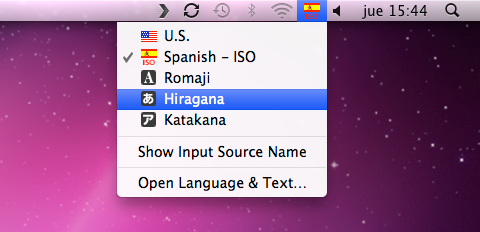
Using hiragana, katakana and kanji on a Mac is no big deal. You only need to add the new language as a new keyboard input source in System Preferences, and switch from one to another from the top toolbar.

Things are a bit more complicated on Windows, but if you follow these steps, you’ll be able to set up Japanese as a new language on Windows 7, and use Japanese characters in Windows application.

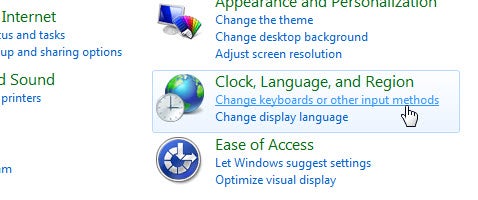
1. Go to Control Panel and click the Change keyboards or other input methods option.

Continue reading “How to: Use Japanese characters on Windows 7”

Original Motorola Droid users get Android system update

It may not be the update to Android 2.3 (Gingerbread) that original Motorola Droid users were hoping for, but it’s an update just the same. In the next 24 hours a group of preselected testers will have access to the FRG83D build update, believed to be Android 2.2.1 (Froyo).  If all goes well, Motorola will likely make the update publicly available to all original Motorola Droid users within the next couple of days.

The update is relatively minor and seems primarily to be a bug fixer. It does include what promises to be a nice (but small) selection of added features. These include an updated Twitter application, as well as updated widgets for Amazon and News & Weather. There have also been improvements made to Exchange ActiveSync, including added support for Exchange 2010 connections. In addition, the Gmail user interface will be enhanced.

Originally, there was confusion whether this would be an update to Froyo or Gingerbread, but it’s looking like the former. This makes sense.  Although there are rumors that Gingerbread will be released on December 6, there has yet to be confirmation from Motorola. A few comments from Droid beta testers also seem to hint that this update is minor at best, despite the hype surrounding it.

Instructions on updating your original Droid can be found on Verizon’s website here.

Make computers easier to use for the elderly

Every time I go back home I try to convince my Mum to buy a laptop and start using Internet, but she always rejects my offer with the same excuse: “It’s too difficult for someone my age”. Though I do know people who are already in their seventies and use computers every day,  many people at that age find those awful machines just too complicated. This is where Eldy comes in handy.

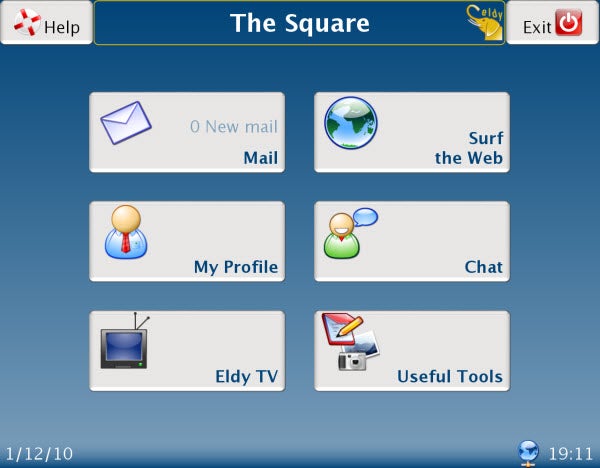
Eldy replaces the standard Windows desktop with a special interface, designed for senior users, with large buttons and text, and a colorful mouse pointer that stands out on the screen. The buttons take you to basic Internet activities, such as checking your email, browsing the web, chatting with other people and watching online videos.

Continue reading “Make computers easier to use for the elderly”

Reckless Racing gets new tracks and vehicles

EA’s Reckless Racing has brought top-down racing back from the dead. Its perfect mix of great control and lovely graphics is the best the genre’s seen, and it really brings back memories of the last great top-downer, Ivan ‘Ironman’ Stewart’s Super Off Road.

The only criticism of Reckless Racing was its small number of tracks, but update now to version 1.2 and you’ll get two more, The Island and Frozen Lake. There are also two new vehicles, with drivers Boss and Granny. The Island is the toughest track in the game, with tricky corners and bottlenecks, while Frozen Lake gives you some great iced corners to drift round. If you’ve never checked it out, have a look at James’ review then buy it for 99 cents on the iTunes Store.

First look at Flock 3.5 for Mac

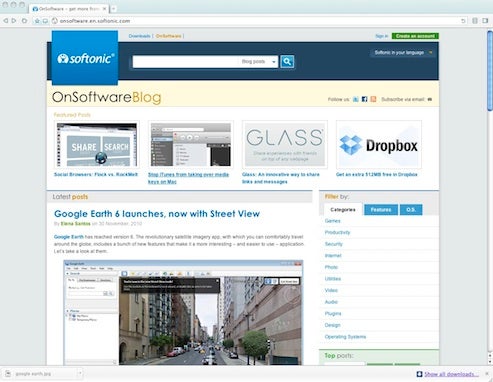
The latest version of social networking browser Flock has just been released for Mac with some interesting changes. I took it for a test-drive to see how Flock 3.5 performs.

Flock is a web browser which was originally based on Firefox but has been best known for broad integration with a wide range of social networking sites. Flock 3.5 however sees it changed considerably under the hood. Gone is the Firefox base in favor of a Chromium one which is interesting considering the recently released RockMelt has also based itself on Chromium and aims to steal the social networking par excellence crown from Flock. However, Flock beats it in the social networking stakes offering integration with LinkedIn, Flickr, and YouTube compared to just RockMelt’s Facebook and Twitter.

Continue reading “First look at Flock 3.5 for Mac”

National Geographic joins the Instagram community

Since I tried Instagram for the first time a couple of months ago, I’ve become quite addicted to this little app. It’s a great way to experiment with creative photos and at the same time share them with friends and followers. And now that I learnt that National Geographic has partnered with Instagram, it’s suddenly become a much more interesting app!

The terms of this partnership though are yet to be defined. According to Instagram co-founder Kevin Systrom, “we’ve been going back and forth — brainstorming ideas for how NG can participate in the community”. Whatever idea they come up with, Systrom states that Instagram users will be a priority in this agreement.

National Geographic has already created an account on Instagram (you can find them under the username “natgeo”) and say they’re “looking forward to sharing photo tips and running IG photo challenges”. No matter what the outcome of this partnership is, I’m sure it’ll be very exciting for the whole Instagram community – and a new resource of popularity and revenue for its developers.

Best advent apps for iPhone

Many of us open Windows every day on our PCs, but in December we can open more fun types of windows. If you haven’t got an advent calendar in your house then perhaps you’d like to try a more futuristic version – by installing an advent app on your iPhone. There’s plenty of fun to be had with these applications, so go grab them now. Remember, you can start using them from today!

A-Story-A-Day Advent Calendar Christmas

A-Story-A-Day Advent CalendarA-Story-A-Day Advent Calendar Christmas will help you get in the festive spirit with a series of 25 Christmas stories.  Stories include A Christmas Carol, The Gift of the Magi, and Christmas in Poganuc. There is a choice of different calendar themes you can apply, and the application even plays Christmas carols in the background as you read. It’s all very elegantly designed, making the stories easy to read. Price: $1.99

Christmas Advent Games

Christmas Advent GamesThere’s plenty of fun to be had with Christmas Advent Games, an app which allows you to play a different holiday puzzle every day. Among the treats hiding behind the windows are a bottle cap-matching memory game, a snowflake catching game, and a picture puzzle. With three difficulty levels, Christmas Advent Games is a delight for the whole family. Price: 99 cents

Christmas Calendar

Christmas CalendarAnother great interactive advent calendar, this app offers 24 different seasonal animations to get you in the mood. Set around a festive village, Christmas Calendar includes interactive animations based all the usual themes, such as a Christmas tree, star, presents, and a fireplace. The app also belts out a selection of classic carols, including Silent Night, Jingle Bells and We wish you a Merry Christmas. Price: 99 cents

Christmas+

If you’re looking for an advent app that represents the true meaning of yuletide, then the traditionally-themed Christmas+ is well worth checking out. It features an illustrated calendar based around the nativity scene, with 24 holy images behind each window. The app doubles up as a Christmas carol player, with a selection of nine hymns, including Good King Wenceslas, Hark! The Herald Angels Sing and O Little Town of Bethlehem. Price: 99 cents

Christmas!!

ChristmasLocked until today, Christmas!! is an app that offers a series of festive delights in the run-up to the big day. Besides an advent calendar packed with surprises, Christmas!! lets you create your gift list, read funny festive jokes, listen to Christmas songs, play games, and grab install wintry wallpapers. There’s even a countdown that tells you exactly how long it is until Christmas Day.