5 free art apps for your PC

I bought a graphics tablet for my PC, and I must say I’m very happy with it. I’ve always liked drawing and computers, and a gadget like this was the perfect link between two of my favorite pastimes. After installation and initial set-up, I spent some time searching for the appropriate software to make the most out of my new toy. Besides Adobe Photoshop (which works great with pressure-sensitive input devices like my tablet) there are also other drawing editors you may not know about. Here are free art apps:

Drawing by Agrianti, an ArtRage user

Graphic & Design apps

Artweaver – Includes a dozen customizable brushes that recreate different drawing tools:  oils, pencils, charcoal, chalk, acrylics, felt pens, and more. It also has support for layers and transparency and a history window that lets you undo any previous action.

TwistedBrush – This free app doesn’t have as many features as its full version, but makes up for it with a bunch of great features: lots of brushes to choose from, support for layers, photo cloning and tracing, pattern, textures, and more. And it does feel like actual painting on canvas!

ArtRage – Delivers an impressively realistic canvas feel when drawing on your tablet. The latest release includes tools like watercolor, glitter sprinkling, and sticker spray. You can also trace a real image and turn it into a beautiful drawing – even if you’re not very artistically-gifted.

Flowpaint – Though it’s not the best drawing apps around here, Flowpaint still lets you grasp the feeling of actual drawing tools when using digital brushes on the computer. It doesn’t require installation and runs under Java.

Greenfish Painter – Not as fully-featured as other drawing apps, but still a reasonably good piece of software to use as virtual canvas. You can freely paint on its interface, mix different colors on your palette like in real life and tweak brushes to meet your needs.
Check out more graphic design apps

Songbird – our new favorite Android music player!

One of the great things about software is that there is always something new to discover. This is especially true when we’re talking about music players for Android. We’ve see plenty so far, and Zimly, TuneWiki and Winamp, for example, are all serious contenders.

Last week, however, we took a peek at SongBird, a music app already available  for Mac and PC, and which has now made it to Android devices.

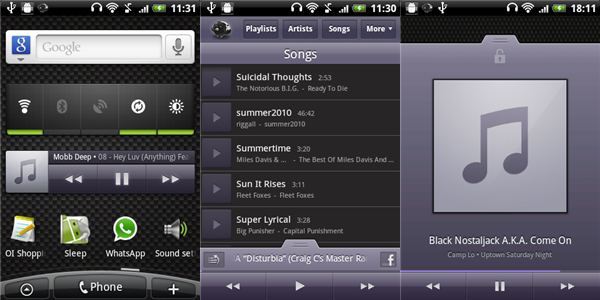
Songbird for Android isn’t going to blow your mind with new, revolutionary features, but what it does do, it does very, very well. For a start, the interface is super-simple to use, with everything divided up clearly and cleanly. Swap between now playing and music options by swiping up and down.  Basic actions, like setting a song as your ringtone or creating playlists, are intuitive and make using the app surprisingly fast and effective.

Songbird’s now playing screen makes navigating between songs easy. In fact, the only thing missing here is being able to go forward or back a song by swiping, but the default buttons are fun as they are.  Even though shuffle and repeat are small, they’re easy to access.

If you like social media, you’ll be able share directly to Facebook from the now playing screen and there’s a nice Flickr photostream feature that allows you to display streamed images of the artist playing from the photo-sharing website in place of the album artwork.

To finish off an already impressive offering, Songbird also offers a homescreen widget and lockscreen functionality. If we’re being really picky, the lockscreen could integrate better – on our test phone, using it appeared to override the phone’s default lock. Even so, if you frequently use your phone to listen to music, you’ll know it’s a feature that’s absolutely essential.

If you’re really into social media, Songbird is probably not your best option. Likewise, if you have a problem with the color purple, you should really look elsewhere. If you’re just looking for a simple, attractive music player that just works, however, Songbird is really worth checking out. Download it now!

slezenger

Discover new music with 8tracks

We all know that the genius feature on iTunes is a great way to discover new music. Just click on songs you like and preview them in the iTunes store before you decide to buy. But what if you want to listen to an entire song before you buy? Or what if you want to discover lots of new music, all at once? Check out 8tracks, a do-it-yourself internet radio tool.

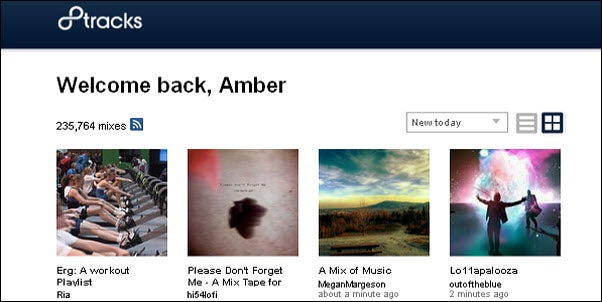
8tracks lets users upload playlists of their favorite songs and share them with others. A playlist consists of at least eight songs, most of which have to be by different artists, but keep to a similar theme.  So, for example, you can listen to “Hip Hop old school beats” or, for the broken-hearted, “A soundtrack for the ones who got away”. If you’re a registered user, you can friend other users, comment on playlists and even upload your own music. Those who prefer not to get so involved can enjoy music on the site without registering.

8tracks is a really nifty concept, made even cooler by the fact that there’s an iPhone app available so you can listen to music on the go. There’s even an 8tracks fullscreen player extension for Google Chrome. Lastly, Mac users get an additional 8tracks perk – the app has a Mac Uploader that lets you click and drag songs directly from iTunes to be uploaded to the 8tracks’ website.

So rock on, fellow music lovers. 8tracks really does seem to have it all.