Now you can control your music in-game with Steam

If you like listening to your own music while gaming, you should update to the latest version of Steam now. Beyond getting a refreshed home page with customized recommendations, the Steam update includes a music player that allows you to control your own tunes from inside any game.

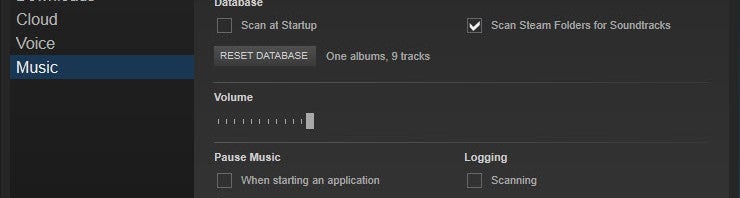
Steam Music Player will automatically find music in your Music folder but you can specify other folders if you keep your music elsewhere. To do this, head over to the settings and Music section on the left navigation column. You can add or remove folders and adjust options like scanning your library on startup and looking for soundtracks purchased using Steam.
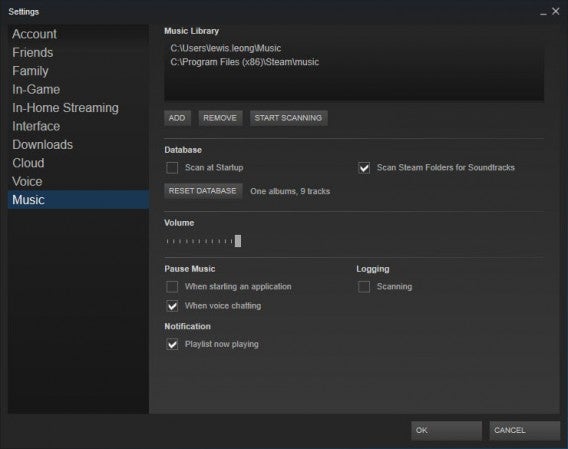
Steam Music Player settings

To pull up the Steam Music Player in game, use the same shortcut (Shift + Tab) as the Steam overlay and you’ll see it. You can queue up tracks or create playlists, all without leaving your game.

Your music will automatically pause when voice chat is activated so you don’t miss out on your conversation.

Download Steam for Windows and Mac

Source: Steam

Related Stories

11 ways to up your FIFA 15 game

EA SPORTS™ FIFA 15 Companion launched for iOS, Android and Windows Phone

Angry Birds Transformers coming to iOS and Android this October

Gameloft ruins Asphalt Overdrive by turning it into a free-to-play endless runner

Follow me on Twitter: @lewisleong
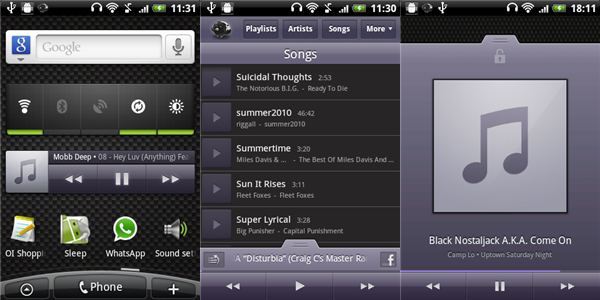
Songbird – our new favorite Android music player!

One of the great things about software is that there is always something new to discover. This is especially true when we’re talking about music players for Android. We’ve see plenty so far, and Zimly, TuneWiki and Winamp, for example, are all serious contenders.

Last week, however, we took a peek at SongBird, a music app already available  for Mac and PC, and which has now made it to Android devices.

Songbird for Android isn’t going to blow your mind with new, revolutionary features, but what it does do, it does very, very well. For a start, the interface is super-simple to use, with everything divided up clearly and cleanly. Swap between now playing and music options by swiping up and down.  Basic actions, like setting a song as your ringtone or creating playlists, are intuitive and make using the app surprisingly fast and effective.

Songbird’s now playing screen makes navigating between songs easy. In fact, the only thing missing here is being able to go forward or back a song by swiping, but the default buttons are fun as they are.  Even though shuffle and repeat are small, they’re easy to access.

If you like social media, you’ll be able share directly to Facebook from the now playing screen and there’s a nice Flickr photostream feature that allows you to display streamed images of the artist playing from the photo-sharing website in place of the album artwork.

To finish off an already impressive offering, Songbird also offers a homescreen widget and lockscreen functionality. If we’re being really picky, the lockscreen could integrate better – on our test phone, using it appeared to override the phone’s default lock. Even so, if you frequently use your phone to listen to music, you’ll know it’s a feature that’s absolutely essential.

If you’re really into social media, Songbird is probably not your best option. Likewise, if you have a problem with the color purple, you should really look elsewhere. If you’re just looking for a simple, attractive music player that just works, however, Songbird is really worth checking out. Download it now!

slezenger

Songbird music player reaches 0.5

SongbirdIs Songbird the Firefox of music players? That’s what we’d like to think so of the open source program. Songbird, which is commonly expected to compete with iTunes once it comes out in full version, reached 0.5 last week. We’ve been keeping an eye on the open source music player for a while now and we’re glad to hear about the update. Slowly but surely, the Songbird team have been building up the player, with developers around the world contributing to make it a better program. This new version comes with a number of significant improvements, which you can read about in more detail on the team’s blog.

They include MPT device support (to connect to a number of portable media players and mobile phones), view customization, a better filter picker and rating UI and added developer resources. This last point may not sound very significant to some of you, but to me may be more important than all the other updates. It shows that the Songbird team is really active in sharing the project with other developers around the world. Like with Firefox this means you get an application which is constantly looked after and with all sorts of new features popping up often. An example of this is add-ons. Songbird has its own Add-ons page where you’ll see plenty of extensions to download, from iPod support to an album art manager or a playlist export tool.

This update of Songbird is a good opportunity to encourage you to try it out. It has a sleek interface, a solid iTunes-like structure, an embedded browser through which you can download tracks and read about music news and loads of add-ons to customize it your way.