Test the latest Chrome for Mac with Canary

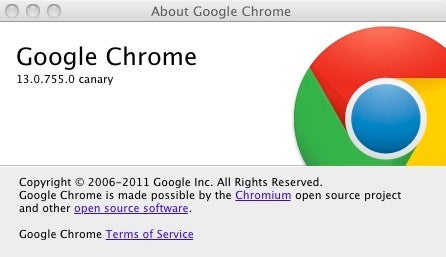
If you’re one of the many converts to the Google Chrome browser on Mac, then you can now stay ahead of the very latest developments with Google Chrome Canary which has just been released for OS X. Google Chrome Canary is effectively the Alpha version of Google’s browser and is the testing ground for most of the features that eventually appear in the Google Chrome Stable, Google Chrome Beta and Google Chrome Developer versions.
If you’re a bit confused by the increasing number of builds of Chrome, here is a brief lowdown…

The stable build is the latest official version of Chrome. The Chrome beta build is is slightly newer than the stable version of Chrome and is intended for testing by everyone. The developer build is intended for users with software testing or programing experience and finally the Canary build is the least tested of them all and automatically created from the parent Chromium project.

The good news is, when you install Google Chrome Canary, it won’t overwrite any other version of Chrome you’ve got installed, so you can test it to your heart’s content while running your regular Chrome browser. However, since it’s completely untested and designed for those that want to help Google develop the next version of Chrome, you’ll find it very unstable and unreliable at times. Oh, and be warned that it will send anonymous usage stats back to Google for development purposes.
How to: Silence your Mac startup sound

No matter how much Macs have changed over the years, one thing has remained constant – the startup sound. It’s not a feature that’s just for fun though – the sound indicates that all initial startup tests on your Mac’s internal components have been successful. That said, it can be inconvenient or even embarrassing if you switch on your Mac in a quiet public area, such as a library or classroom. Fortunately, there are a few simple solutions:

Continue reading “How to: Silence your Mac startup sound”

8 Things You Must Do Before Reformatting Your PC

Your PC is slow. Really slow. You’ve used CCleaner to get rid of the garbage, you’ve lightened the load by uninstalling bloatware with Revo, you’ve checked inside, outside, upside down and backwards for a virus, and you still have time to make a coffee by the time it takes your computer to start up. Is it time to reformat your hard drives?

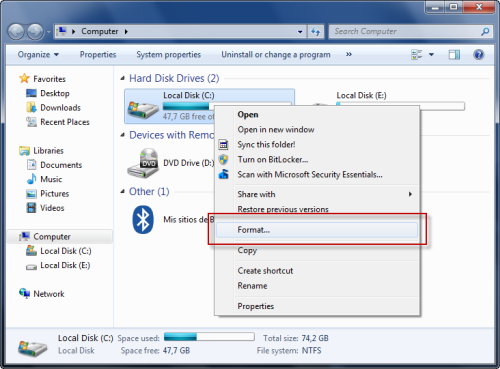
Luckily for you, reformatting your computer is really simple. Go to My Computer, find the offending hard drive (in all likelihood, C:) and right click. You’ll see Format… under the context menu options, and find all the information you need when you click.

What takes a little more effort, however, is preparing for the reformat. As it will erase absolutely everything on the disk, if you don’t make the right preparations, you could find yourself with a faster computer, but absolutely nothing to do on it. Follow the steps laid out in our list first to make reformatting your hard drive as easy and safe as possible!

Continue reading “8 Things You Must Do Before Reformatting Your PC”

How to: Control an Android device from a PC

Last month I explained how to remotely control a Blackberry phone from a PC. As a follow-up, I’ll show you how to do the same on Android device.

There are a few ways you can control your Android from a computer. Perhaps the most simple is via an application called droid VNC Server, which you can get for free from the Android Market. The app uses a virtual network connection to allow you to access your device and control it using a VNC viewer. Note, however, that your Android phone needs to be rooted for this to work!

Continue reading “How to: Control an Android device from a PC”

Storify: collect, compile and share content online

There’s already a lot of content out there on the web. You’ve got Twitter, Facebook and Tumblr, not to mention Google Search, all of which will find you just about anything. But what if you want to compile related content all in one place for others to see though? Storify is here to fill that gap!

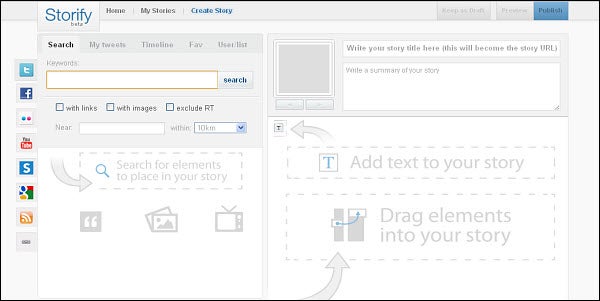
Last week, Storify’s first public beta was launched. The web-based app lets  users share social media like tweets from Twitter, photos from Flickr and videos from YouTube. With a simple search and a click and drag interface, it’s also incredibly easy to learn how to use. Just pick a social media platform where you want to start your searching and type in your search terms. Results will appear on the left of your Storify dashboard.

From there, all you have to do is click and drag the content you want from the search box on the left to your empty storyboard on the right. Arrange pictures, videos, news articles, tweets and more, however you like. You can even give your story a title and a small description. The developers also note that your stories can be embedded into self-hosted WordPress blogs, Tumblr accounts and any other blog interface that allows JavaScript to be enabled.

Storify’s content collection system is unique and simple to use. It’s also a great way for major news organizations to reach even larger audiences, not to mention a way for novice bloggers to share stories of their very own. You can assign multiple editors to each story you’re working on, making collaboration between users even easier.

So, the next time you wonder what the next step in the social media and news sharing revolution is, look no further – Storify is at the top of the game!

Spotify now syncs with iPod

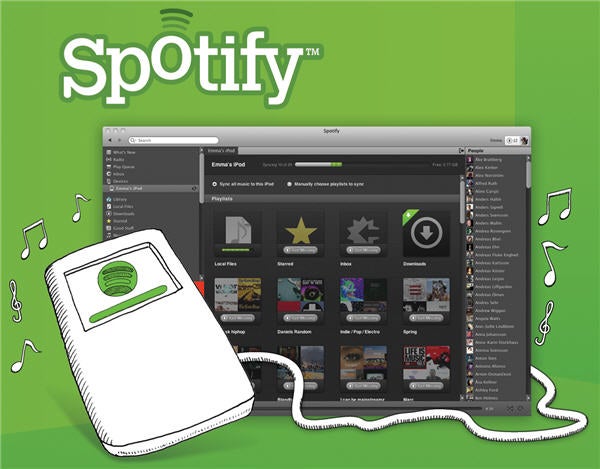
One of the advantages of having a Spotify Premium account is being able to take your music anywhere you go, thanks to the iPhone and Android apps that sync your device with your Spotify music collection. As of today, the popular music service has decided to make this feature available to everyone, meaning any Spotify user – no Premium account needed – can install the Spotify app on their mobile phone and enjoy their favorite playlists on the go.

Everyone, seriously? Yes. The catch is that the playlist syncing feature is not free. You pay for every single MP3 file you sync with your mobile phone, starting at €9.99 for a 10-track playlist (€1 each), up to €60 for a 100-track playlist (€0.60 each track, cheaper than iTunes). Note that these prices are only for Spain – we don’t have reliable prices for other locations yet. In any case, they seem pretty reasonable rates.

But that’s not all. Besides the free-for-all mobile apps and the all-new MP3 download service, Spotify has also announced that from now on you’ll be able to seamlessly manage and sync any iPod right inside Spotify. Simply connect the iPod to the computer and it’ll appear on the Spotify sidebar, under the new ‘Devices’ section.

All these new features will be rolled out to users in an automatic update, coming up in the next few days. With this new version, Spotify has taken an important step towards becoming the only app you’ll need to manage, organize and listen to your favorite music, whether you use a computer, a mobile phone or an iPod. We can’t wait to try the new version… and to see what iTunes is going to do about it!

How to: Create an iPhone 4 wallpaper in Photoshop

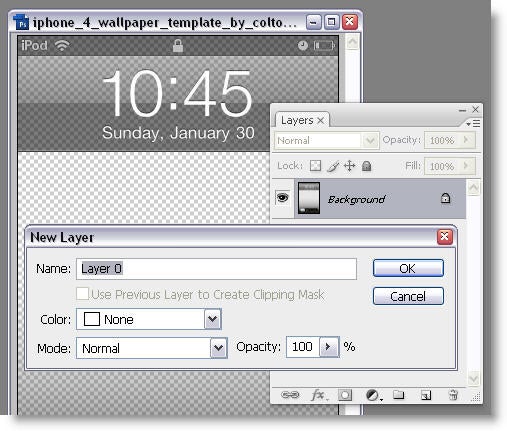
How often have you seen an image that you’d like to use as a wallpaper on your iPhone 4? In my case it happens all the time, but I’m never sure if the image will fit my iPhone – with the clock, the unlock bar and everything in the way. Luckily, I’ve found a simple trick to turn your favorite photos into gorgeous iPhone 4 wallpapers. All you need is this iPhone 4 template from DeviantArt, then follow these steps:

1. Open the iPhone wallpaper template in Photoshop and unlock the background layer by double clicking on it.

Continue reading “How to: Create an iPhone 4 wallpaper in Photoshop”

Test Opera Swordfish with Opera Next

The Opera browser has a new version in the works, codenamed Swordfish. You can test this new version by downloading the development version of Opera, Opera Next.

Opera Next is a standalone build of Opera, that  you can run alongside the official version (currently 11.10). It’s for anyone interested in testing early versions of Opera developments, and by default it auto-updates, so you always have the freshest build to play with. Next features a cool gray logo so you won’t get your Operas mixed up.

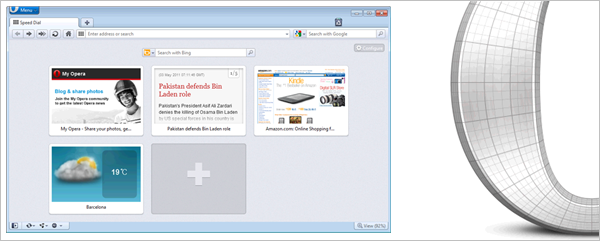
Today sees the release of Opera 11.5, Swordfish, featuring a major new development with Speed Dial Extensions. As you can see above, the Speed Dial page, which can show you your most visited websites, can now also show extensions, such as the Weather extension and Tagged Photos. These make the Speed Dial page even more useful and customizable, although right now there are only three to play with!

Opera Next is available for Windows, Mac and Linux too.

How to: Hide desktop icons in Windows

Are there times when you just wish all your desktop icons would disappear? Of course, using Windows would be tricky without them but once you have more than a dozen or so desktop icons your screen gets cluttered.

Thankfully there is a way to temporarily hide desktop icons to give you a cleaner screen. What’s more, it’s very easy to do!

Hide icons in Windows XP

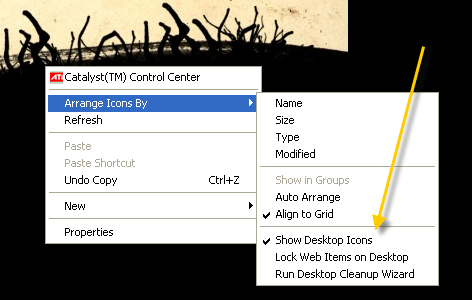
In XP, you need to right-click on any space on your desktop. Select Arrange Icons By, then uncheck the option that says Show Desktop Icons. To display the icons again, just repeat the same procedure.

Hide XP icons

Hide icons in Windows 7

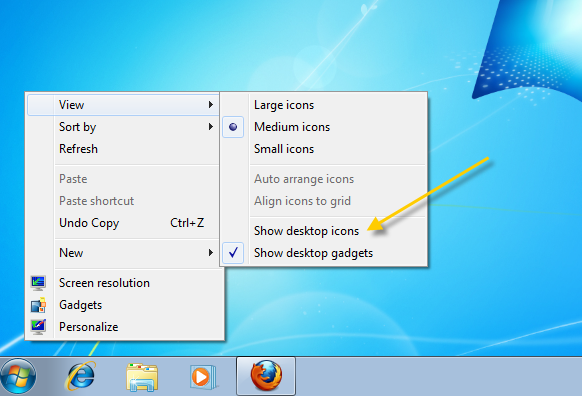
The procedure for hiding icons is very similar in Windows 7. Right-click on the desktop and choose View, then go to Show desktop icons to uncheck it. Again, you repeat the same process to turn the icons back on.

Hide Windows 7 icons

Related programs

DeskSweeper: Allows you to show or hide icons even more easily, placing an icon in the Windows system tray that lets you toggle desktop icons on and off.

DeskDuster: This program actually lets you schedule icons to hide themselves after a given period of PC inactivity. This way, you can ensure that your computer looks clean, even when you’re not there!

Free Browser Game: Tiny Hawk

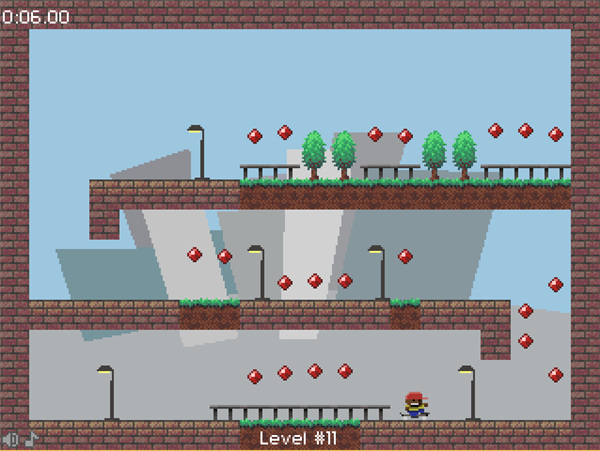
Cross skateboarding with Mario and you’ll get something that looks like Tiny Hawk. Jump and grind around these tiny levels as fast as possible collecting all the gems so you can move to the next room. This is a free browser game that’s simple, but pretty fun.

Tiny Hawk gains speed as he moves, and you have to avoid things that will slow you down like patches of grass. He can perform wall-jumps like Mario too – and you’ll need to be pretty quick to get them right without losing momentum. Check out Tiny Hawk here.