A sneak peek at Google’s Photovine

Right on the heels of Google+, another site supported by the search engine giant is up and running, although it’s also currently in invite-only mode.

Photovine is a new image sharing service created by Slide which, according to the site’s Privacy Notice, is part of Google Inc. The concept seems relatively simple – create an account, download the app (apparently for both iPhone and Android smartphones, if the image on the service’s initial web page is any indicator) and share with friends and family. As people connected with you upload their own photos, the images can be linked based on common user-created captions, until you’ve gone from a single picture “seedling” to a full-grown photo “vine” that’s growth is virtually limitless.

[youtube]http://www.youtube.com/watch?v=-MPIZKPhfDY[/youtube]

If you’re wondering whether Google plans to connect this new service to Google+, it’s unclear so far. With the obvious and enthusiastic interest in garnering a Google+ invite from the general public though, it’ll be interesting to see how the two new web apps might end up being connected. For the time being, Photovine is taking requests from interested web users on its main page and promising to roll out invites later this month on a first-come first-served basis.

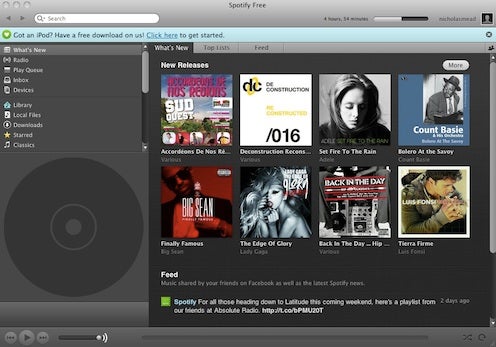
Spotify launched in the US

Almost two and a half years after its launch in Europe, Spotify has been finally launched in the USA. The European music streaming service has reached deals with major record labels in the US that allows American users to try one of iTunes biggest rivals.

The pricing structure will be slightly different to Europe where there’s only Free and Premium. Free accounts in the US will be invitation only but there will be an Ad-Free version for $4.99 a month plus a Premium Account with Mobile Access for $9.99 a month.

Spotify will find the going much harder in the US where established apps such as Pandora, Grooveshark, Rhapsody, Mog and of course, iTunes dominate the music streaming industry. However, according to some market analysts such as Albert Fried & Co., Spotify poses the biggest challenge to all of them. Speaking to PaidContent.org, analyst Rich Tullo said:

Spotify is really the biggest threat, in our view. It’s going to sell into Facebook’s 650 million users, and if you look at the growth of Zynga, it’s clear that an alliance with Facebook is definitely what you want, because it’s the biggest distribution channel out there.

According to my account, I still have the option to “send your family and friends an invitation to join Spotify” so if you’re a US user that would like to try Spotify, leave a comment below with a reason why you want to try Spotify, and I’ll try sending some invites.

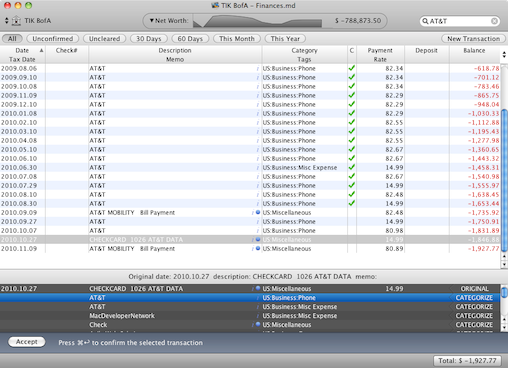
Top Quicken for Mac alternatives on Lion

Quicken 2007 won’t work on Lion due to Apple’s decision to drop Rosetta support. This is possibly the final blow for thousands of Mac users who were bitterly disappointed last year by the latest version of Quicken Quicken Essentials – because of the decision to drop online features such as the ability to pay bills, store investment transaction history and export to TurboTax. If there were ever an example of a developer trying to their best to alienate Mac users and destroy their own product, it’s definitely Quicken creators Intuit.

However, the good news is there’s no reason to let Intuit or Quicken 2007 stop you from upgrading to Lion. Here is the only selection you’ll ever need of the very best alternatives for Lion:

Moneydance

While Moneydance may not feel quite as intuitive as Quicken for Mac at first, it can do pretty much everything the latter can and was actually one of the first ever financial applications on the Mac so it’s certainly not lacking in experience. Most importantly, unlike the majority of financial software for Macs, it supports extensive online banking and bill payment features. You can retrieve credit card statements and bank statements from most major US banks that support OFX standards. Even better, you can use Moneydance to automatically pay your bills for you too and if you’re worried about all your Quicken data, Moneydance will import it all from Quicken Essentials.


Continue reading “Top Quicken for Mac alternatives on Lion”

The best PC cricket games

Cricket is a great sport, with fans around the world. If you’re not able to play yourself, or are in between games, you might want to see some of the action on your desktop. If that sounds like you, then we’ve rounded up the best cricket games on Softonic, so you can take your pick!

Brian Lara International Cricket 2007 is one of the classics of the genre. Although looking at it in 2011 it is a little dated, it’s still the slickest, most popular cricket game out there. It’s got a dedicated World Cup mode, not to mention fully-licensed players, meaning you can play as Ricky Pontin, Andrew Flintoff – or whoever takes your fancy!


Continue reading “The best PC cricket games”

Preview Gmail’s new look now

Google is on fire: in just a few days they’ve launched their own social network Google+, announced the rebranding of Picasa and Blogger to Google Photos and Google Blogs respectively, and slightly redesigned a few of of their online services (such as search and calendar). The new design will presumably be slowly rolled out to all Google services in the near future, but you can have a sneak peek – at least in Gmail:

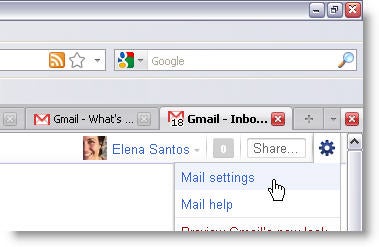
To preview Gmail’s new look you have to click the gear icon on the top right corner and select the Mail settings option.

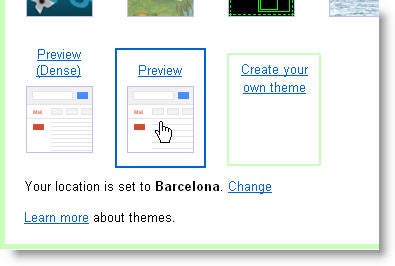
Then click the Themes tab and browse down to the bottom of the page. You’ll see two Preview themes: standard and dense.  The first one uses the same space between text lines that Gmail has been using up to now, while the second one leaves more space between lines and makes it all cleaner.

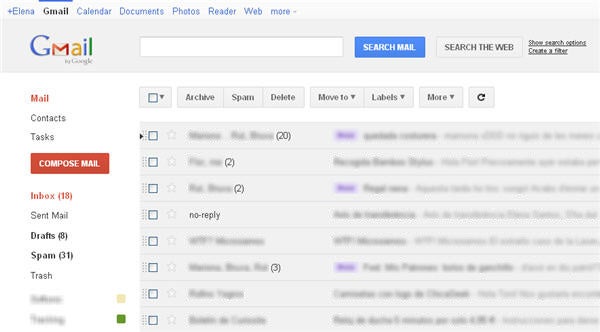
Whatever theme you pick, Gmail will immediately apply the new design. This is how my inbox looked with the standard Preview theme:

Finally – Scrabble for Android!

Word game fans are going to be over the moon at news of an official Scrabble app for Android! Scrabble games have caused much controversy in recent years, with lots of attempts at making games and apps cut short by a swift lawsuit.

Annoying as this must have been for the developers in question, it was even more upsetting for avid Scrabble players, who had to abandon their games mid-play and interrupt their concentration between turns! Well, worry no more, because Android users can now play wherever they go, against pretty much whoever they choose with SCRABBLE free. The app works across systems – iOS, other Android devices and even Facebook. There’s also in-game chat, stat monitoring and full notification features.

To play SCRABBLE free, you’ll need at least 2.1, or 2.2 if you want all of the cool notification features. It’s available free through the Android Market, and if you have a love of words, we really don’t know what you’re waiting for!

Privacy: Google+ vs. Facebook

Google+ may be more than “just” a social network, but it can be used in in a similar way to Facebook, and many people want to join precisely because they want a change. Facebook has suffered a number of privacy scares as it has grown, so how does it compare with new kid Google+? Let’s take a look at the  privacy options of both social apps.

Privacy Settings:

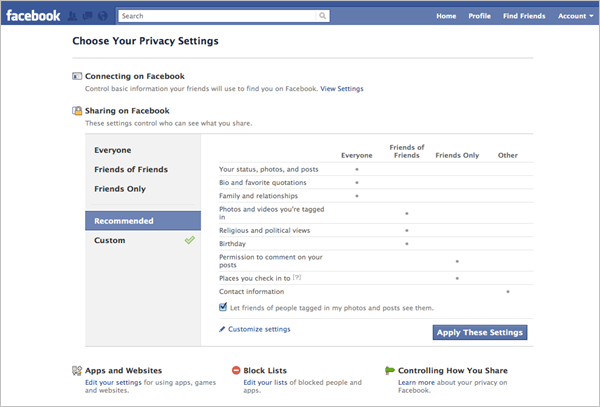
Facebook’s privacy dashboard has a neat table that shows you who can see what. Click Customize and you can edit these settings. You can choose to share things with just you, friends, friends of friends or specific people. You can also opt to hide certain categories from specific people. Here you can also preview your profile as it appears to any of your friends.

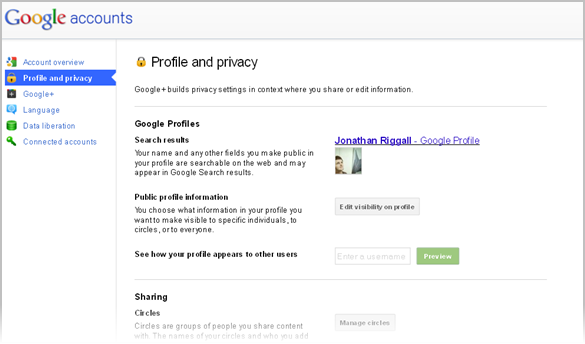
The Google+ privacy settings page is much longer, but every segment is clearly explained. Editing your settings takes you to your profile, letting you see exactly which part of your profile you are altering. Google+’s Circles means you choose who can see your posts and updates as you make them, giving you much greater control.

While their approaches are different, I think both are good attempts at making privacy and sharing settings accessible and user friendly.

Continue reading “Privacy: Google+ vs. Facebook”

Harry Potter and the Deathly Hallows – Part 2 PC Demo

You can now download the PC demo of Harry Potter and the Deathly Hallows – Part 2, featuring two levels from the final game.

The first level plays out with Harry on the rooftops of Hogwarts, battling against the Death Eater Army of Lord Voldermort. The second sees you in Hermione‘s shoes, fighting Fenrir.

Like the movie, EA’s Harry Potter and the Deathly Hallows – Part 2 promises to be a darker experience than earlier titles. I hope this game lets the series end on a high note, as the Harry Potter games in general have been a very mixed bunch.

Download the Harry Potter and the Deathly Hallows – Part 2 PC demo here.

Watch the space shuttle launch online

It’s the end of an era for NASA – this weekend they will finally launch their final space shuttle mission Atlantis before the next generation of space craft come into service. Having made its maiden voyage in 1985, Atlantis will make made its last ever lift-off in the next few hours (weather permitting) after over 25 years of service. If you don’t want to miss history in the making, here are a few ways to follow the lift-off online:

NASA TV

You can watch every second of the action live on NASA TV from 08:00 EDT and also stream it your iPhone or Android Phone.

If you can’t watch it then follow it on twitter either with @NASA:

or @NASAKennedy:

Enjoy the launch and let’s hope the weather doesn’t delay it!


Fun iPhone apps for fans of Angry Birds

So, you’ve schooled those dastardly green pigs in virtually every way possible, making them sorry they ever even considered stealing your eggs. What’s next to conquer after Angry Birds?

You could wait for the latest and greatest version of Angry Birds Seasons to be released. Your other option is to get in on the fun with apps that are reminiscent of your favorite game but have different objectives. One thing remains the same across these apps though – they’re all a total blast to play. As an added bonus, some of them even feature birds!

Penguin Airborne: Here’s the first of your bird-themed alternatives. Just like Angry Birds, the objective of this game is simple – get your penguin to the ground quickest by free-falling against other arctic birds. The faster you get to the ground, the quicker you advance through the penguin military ranks. Just make sure you activate your parachute at the right time, lest your bird have a rather unpleasant landing. As you free-fall, you can earn points by collecting stars that are placed throughout the screen.

Air Penguin: Similar in name to the last game, Air Penguin is a totally different experience. Much more reminiscent of games you’d find on an actual console, Air Penguin has you in the role of a cute little bird who’s trying to jump from iceberg to iceberg and ultimately reach an end flag to complete each level. You do this by tilting your iPhone’s screen back and forth and forward to get your penguin to jump from platform to platform. In addition, there are lots of threats to avoid, like sharks. You can download the free/lite version of this app here.

Rip Off: As the name suggests, Rip Off is very similar in the feel and back-story to Angry Birds. One major difference in this game is that your eggs have yet to be stolen and it’s your job to protect them. Evildoers of all shapes and sizes will come at you in an attempt to snatch away three multicolored eggs under your protection. Simply tap on one of the baddies and your bird will shoot up and destroy it. Rip Off sounds a lot simpler than it actually is though. Once you’ve got 10 bad guys coming at you from all directions, you’ll see what I mean.

Dino Rush: If you enjoyed playing the Mario Brothers games growing up, you’ll probably get a kick out of this app. Dino Rush puts you in a jungle as you play a little orange dinosaur that needs food to survive. You’re given a new objective that gets increasingly difficult on each new level. Much like Mario Brothers, you can collect tokens that give you special powers, such as the ability to attract food to you like a magnet and a temporary invincibility cloak. The tap screen is also quite responsive, meaning the longer you tap the higher your dinosaur soars.

Fruit Ninja: So, there are no birds (or even animals) in this one, but Fruit Ninja’s still plenty of fun. All you have to do is use your touch screen to swipe at flying fruit. You earn points every time you successfully cut one in half. Real ninjas earn combo points by swiping several at once. Just beware of the flying bombs as well. Hitting one of those ends your game with a bang – and not in a good way! There’s also a lite (free) version of Fruit Ninja.

There you have it. These apps should keep you plenty amused if you need a break from Angry Birds. Plus, they’re similar enough in objective to keep any avid app fan thoroughly entertained.

What are some of your favorite alternatives to Angry Birds? Let us know in the comments!