Transit released on Android, provides highly detailed public transportation info

Transit was previously only on iOS devices, but released on Android today.

The app currently provides public transit information for 43 cities. In the United States, Transit offers real-time schedules for the majority of supported cities. Some transit services don’t provide real-time schedules so Transit can’t gather information from them.

The app does cover major cities in the United States like New York, San Francisco, and Chicago, but also covers Austin, Honolulu, and Miami.

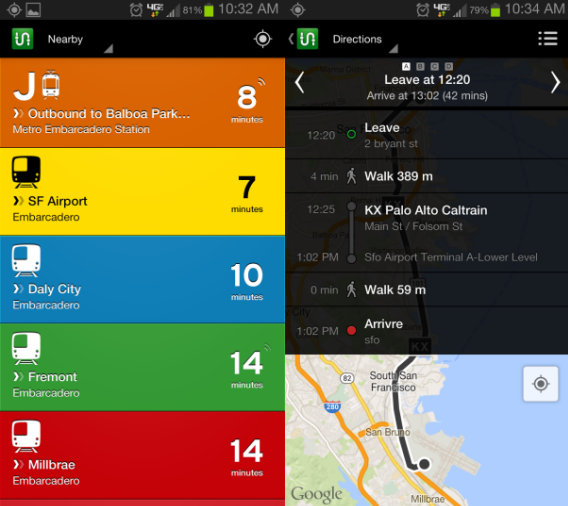
Transit’s real-time lists of public transit in major cities is impressive and almost suffocating. San Francisco has a lot of options when traveling and Transit is able to pull info from all surrounding public transportation services.

If you’re visiting one of the 43 supported cities, Transit is a good app to bring with you.

Interested in the perfect public transportation app? So are we.

Download Transit on Android or iOS

Instagram begins blocking third-party Windows Phone app uploads

Microsoft has promised Windows Phone 8 users that popular apps like Vine, Flipboard, Path, and Hipstamatic are coming to the platform but one of the most popular apps is still missing: Instagram. Currently, there are third-party Windows Phone apps that have the ability to upload to your Instagram account but now there’s news that they’re being blocked by Instagram.

Daniel Gary, developer of the app Instance, reported on Twitter that the app was seeing photos blocked and deleted seconds after being uploaded. Turns out Instagram implemented a new API to “fight spam to help prevent future attacks and increase security,” according to an Instagram spokesperson.

Gary goes on to say, “It’s their servers, their service. What I was doing was not approved by them and was using their private API.” He doesn’t blame Facebook for blocking third-party apps since he was using their API in an unapproved way.

Other third-party Instagram apps like 6tagram are also reporting having issues with uploading to the service. At the time of this writing, photos are still being removed after they’re sent to Instagram. Links for the photos show up briefly, only to be taken down so that those links show a “Not Found” error.

UPDATE (August 1st, 2013 10:00AM PDT):

Instagram is tweaking its spam filtering, which affected third-party Windows Phone Instagram apps. For now, these unofficial apps will work, but there will always be a risk of relying on unofficial apps. Instagram has no plans to bring the app to Windows Phone so users will have to settle with the uncertainty of using third-party apps.

Source: Daniel Gary (Twitter) | The Verge

Bioshock Infinite: Burial at Sea coming later this year

The second and third DLC packs for Bioshock Infinite will be a two part adventure set in the underwater city of Rapture, the location of the first Bioshock game. Burial at Sea is the name of the first episode, and over the two part adventure you will play as both Booker and Elizabeth from Bioshock Infinite.

The first downloadable content for Bioshock Infinite is released today, and is available on Steam. Clash in the Clouds is a wave based arena game – a series of ever more difficult combat challenges. It will be great for fans of Bioshock’s often inventive combat, but doesn’t deliver any more of the fascinating story that drove Booker and Elizabeth’s adventure.

Burial at Sea is set in Rapture on New Year’s Eve, 1958, the night that Rapture is bombed, and its decline begins. Playing as private detective Booker, you will meet Elizabeth, but just like in Infinite, the two don’t know each other to begin with.

Default player


brightcove.createExperiences();

Fans will undoubtedly be happy to play the further adventures of Booker and Elizabeth, and it will be interesting to see if creator Ken Levine can make their relationship as engaging as it was in Bioshock Infinite.

Bioshock Infinite: Burial at Sea will arrive later this year, while the second part is due in 2014.

Doodles arrive on Viber for Android, iOS coming soon

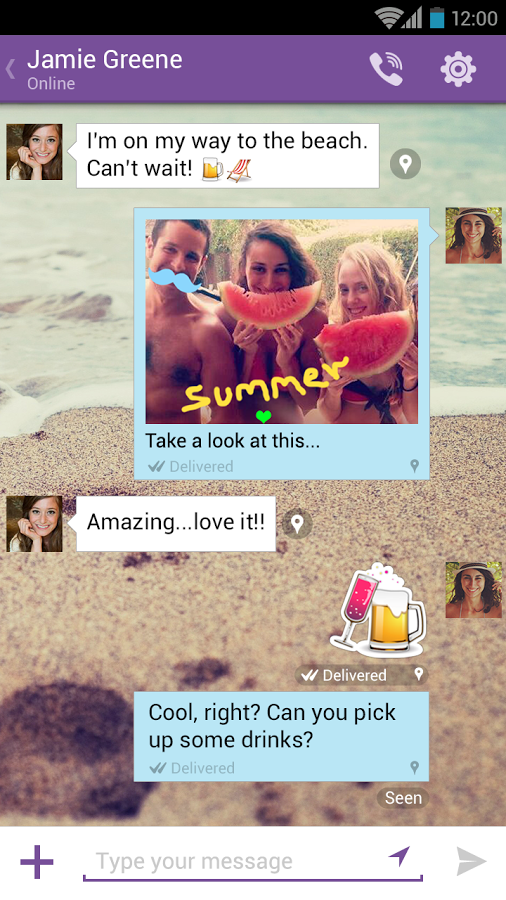
You can now send Doodles on Viber for Android, and the feature is coming soon to iOS. Doodles have been very popular on Snapchat, and sending drawings or ‘improved photos’ to your friends in Viber chat will no doubt go down well.

Like LINE, with Viber you can text, call and send images for free with your phone or from the desktop app. Viber claims to have over 200 million users already (which LINE also claims).

The full list of improvements to Viber is as follows:

  • Send doodles or paint over a photo and share it with your friends!
  • Now you can know when your friends have seen your messages
  • Support for the Viber Desktop application on Windows and Mac
  • Fun new emoticons
  • Massive performance improvements
  • Bug fixes
  • Localized to: Croatian, Norwegian, Romanian, Slovak and Ukrainian
  • Localized to: Croatian, Norwegian, Romanian, Slovak and Ukrainian

  • Download Viber for Android, iOS, Windows and Mac
    .

    Apple seeds iTunes beta to developers with new iTunes Radio service

    A new beta of iTunes is available for developers, alongside the release of iOS beta 4. The most important new feature is the inclusion of iTunes Radio, the currently US only streaming service built to compete with Pandora and Spotify.

    iTunes Radio is more like Pandora than Spotify – it uses what you listen to to create automatic radio stations for you to listen to. This makes sense within iTunes as a way to discover new music using your library. You can rate the songs played, which will give Apple the necessary data to try to improve your radio stations. Whatever you listen to will be synchronized across your Apple devices in iCloud.

    iTunes Radio will be free, supported by advertisements. If you have a subscription to iTunes Match, the system that stores your music collection in the cloud for access anywhere, you will get iTunes Radio ad-free.

    iTunes with iTunes Radio is expected for public release in fall this year, alongside the launch of iOS 7 which will also include the service.

    iOS 7 beta 4 released for developers

    After the delay cause by the attack on the Developer Program website, Apple has finally released iOS 7 Beta 4 for iPhone, iPad and iPod Touch. Intended for developers to test and create apps, iOS 7 beta 4 is free to download.

    This beta is available as an over the air update to all devices running iOS 7 beta 3. Beta 4 brings some graphical improvements, bug fixes and some improvements to the interface.

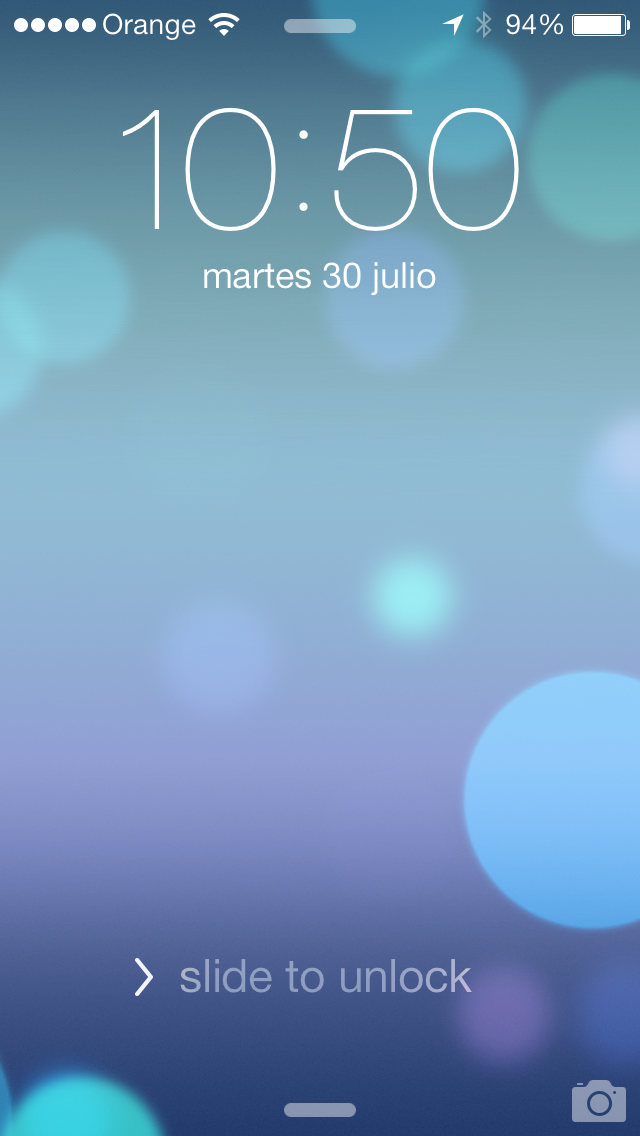
    The unlock button is clearer and bigger – the ‘slide to unlock’ text is now accompanied by an arrow.

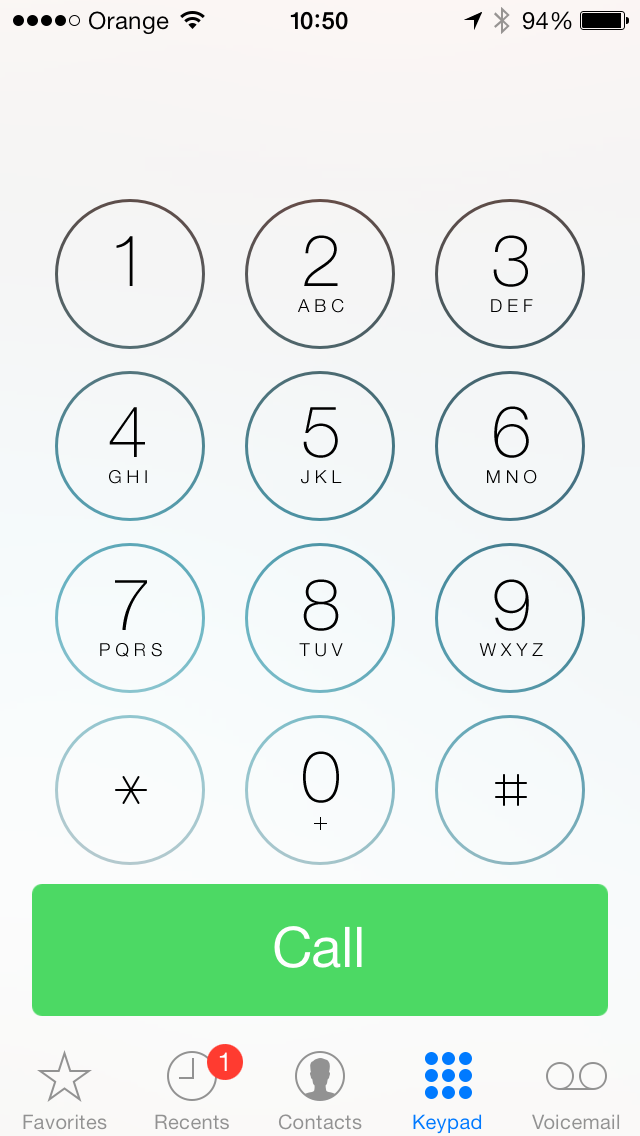
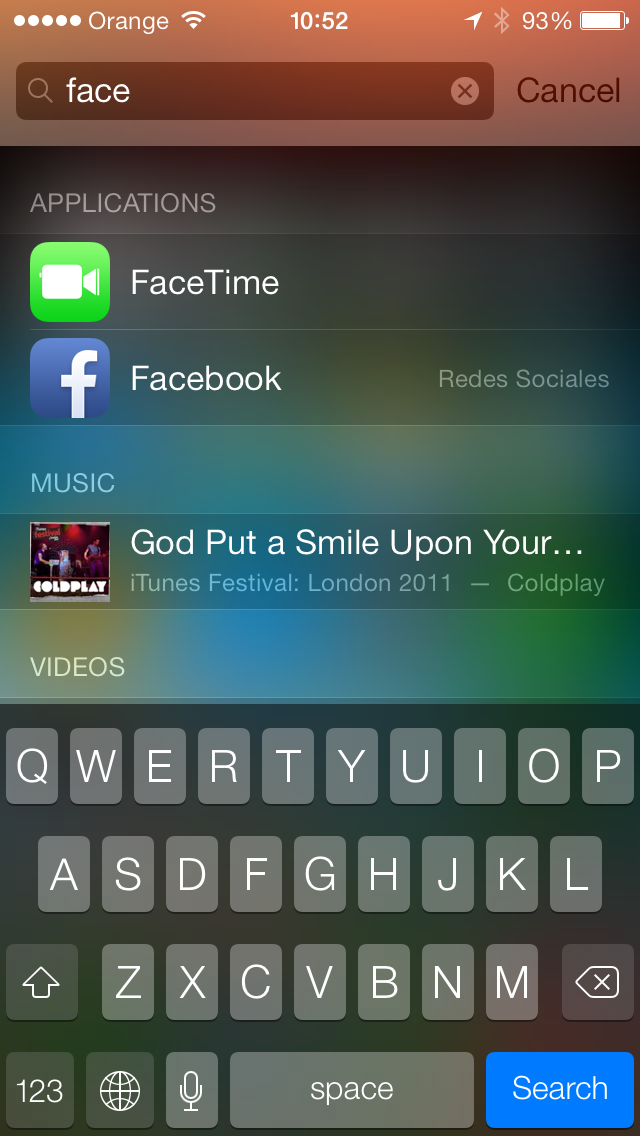
    The dialer has been revised, as has search, below.

    The notifications center allows you to swipe between today, all and missed notifications. Some apps that didn’t work in the last beta now now seem to function.

    iOS 7 beta 4 is compatible with the iPhone 4, 4S, 5, 5th generation iPod touch as well as the iPad 2, retina and mini.

    Line for iOS updated to 3.8.0

    Increasingly popular free call and message app LINE has been updated for iOS. Version 3.8.0 adds a new Brown theme, which fills LINE with the Brown bear icons and soft toned backgrounds.

    This LINE update also adds new Emoji featuring LINE characters (like Brown), and a neat feature that lets you download all the stickers you used on an old device onto a new one at once, instead of having to go and find them separately in the shop again.

    There is also a new notes feature for one to one chats, and the limit for messages has been increased to 10,000 characters, which really should be enough for anyone! Finally, LINE has made posting images and stickers on your home and timeline easier.

    If you’re new to LINE, you can learn about how it works in this cheerful promotional song.

    Default player


    brightcove.createExperiences();

    Download LINE for iOS, Android and Windows Phone.

    Starter apps for a new Android user

    Getting a new device is an exciting feeling. Android devices are relatively empty of apps unless you bought a customized third-party device.

    But lets say that there are no apps on your new device…

    What apps do you install?

    Google Apps

    It’s difficult to not dive into the Google ecosystem on an Android device, unless you’re an advanced user who will install a custom ROM the first chance they get.

    But Google’s first party apps are all useful and worth having.

    It’s a list of apps that are available and, if you have a Google account (likely a Gmail account), then using all these apps is recommended. An advantage to using Google apps is that they sync across devices. An example is searching for locations through Google Maps logged into your account – the results will also show in Google Maps on Android.

    Chrome – The default browser for Android 4.0+. Read more about Chrome.
    Gmail – Google’s email service. Read more about Gmail.
    Google+ – Google’s social network. Read more about Google+.
    Google Maps – Location and navigation service. Read more about Google Maps.
    Google Play Music – Streaming and subscription music service. Read more about Google Play Music.
    Google Translate – Translation service. Read more about Google Translate.

    Social Networks

    Being connected to your social accounts is a big benefit of a smartphone or tablet. There are a lot of alternatives besides Facebook and Twitter, but some of them are region-specific. Most of your friends will probably use one of the two main ones so installing them to remain connected is a good idea.

    Facebook – The most popular social network. Read more about Facebook.
    Path – An alternative social network. Built on existing friends it connects to Facebook on startup.
    Twitter – The second most popular social network. Read more about Twitter.

    Photo and Video

    The included Android camera app works well enough to take quick photos, but if you’re looking for more options like filters you will need to look elsewhere. The most popular app for photo is Instagram, but there are others like Line Camera which is popular in Asia.

    There are a lot of different photo apps, so you’ll need to experiment a little to find the one that suits you best.

    Other than photos, videos are becoming more popular with Vine or Snapchat. Video apps also are plentiful in Google Play and app quality differs a lot. Another great standby is YouTube, to watch all those viral videos.

    Instagram – The photo filter app. Read more about Instagram.
    Line Camera – Photo app for editing and stickers. Read more about Line.
    Snapchat – 10 second photo and video sharing app. Read more about Snapchat.
    Vine – 6 second video sharing app made by Twitter. Read more about Vine.
    YouTube – Billions of hours of video. Read more about YouTube.

    Productivity

    Even though it’s difficult to be equally productive on a mobile device, it’s good to be able to access important files and information from other accounts. There some great productivity apps that are connected through the cloud to keep all your information current.

    Box – Cloud backup/sync service.
    Dropbox – Cloud backup/sync service. Read more about Dropbox.
    Evernote – Note-taking app. Read more about Evernote.
    Feedly – Google Reader replacement. Read more about Feedly.
    Google Calendar – Agenda app for events/appointments. Read more about Google Calendar.
    Google Drive – Google’s Cloud backup/sync app. Read more about Google Drive.

    Communication

    The age of texting is dying and is being taken over by messaging apps. Many apps combine chat and video and others allow for free calling through data or Wi-Fi.

    It’s a great way to keep in contact with friends who are overseas and not readily available to talk.

    Digisocial – Share photos with voice memos. Read more about Digisocial.
    Facebook Messenger – Messenger that can also receive/send texts. Read more about Facebook.
    KakaoTalk – South Korea’s most popular messaging app that allows chat and free calls. Read more about Kakaotalk.
    Line – Japan’s most popular messagine app that allows chat and free calls. Read more about Line.
    Skype – Voice and Video calls. Read more about Skype.
    Tango – Free chat and video calls. Read more about Tango.
    Viber – Voice and Video calls. Read more about Viber.
    WhatsApp – Free texts app that’s popular in Europe. Read more about WhatsApp.

    Utility

    Unless you’re an advanced user, you won’t need superuser apps, but it’s always good to have access to storage on your device. There are also other apps that are helpful to use when setting up security on your mobile device.

    Astro File Manager – File manager and backup app. Read more about Astro File Manager.
    Barcode Scanner – Scanner for barcodes and QR codes. Read more about Barcode Scanner.
    Helium – Backup/sync app for apps and user data. Read more about backups.

    Pick and choose what works for you

    One of the great things about Android are the customization options available in the operating system. This is just a selection of popular apps that a lot of people use and you won’t need all of them. Find out what your friends are using, especially for the communication apps.

    If you’re getting started in the Android ecosystem, it may take some time before you get the perfect apps for your device, but don’t worry about trial-and-error. It’ll be worth it in the end.

    Check out more Android apps here.

    Imagining the perfect public transport app

    Apple recently acquired HopStop, the public transit app for iOS and Android that gives transport data to users in over 300 cities worldwide with transit maps, journey planners, and multiple options to reach a destination. The app isn’t without flaws, but what makes HopStop (on iOS and Android) one of the most popular public transit apps on the market is the integration of a ton of data.

    There are plenty of public transit apps out there that incorporate data collected by public transport authorities from all over the world, data which is usually free and available for developers to play with. This data, along with some other essentials, has the potential to create an app that makes any trip outside your front door as smooth as possible. Below, we outline some of the most essential considerations needed to create the mother of all transit apps!

    The Necessities

    Good maps

    This is a no-brainer. Apple purchased HopStop in part because of its need to improve its much-criticized maps application, and the uproar created when Google maps briefly disappeared from the iPhone is testament to just how important a good map application is. First and foremost, a public transport app that is meant to get you around should show you how it intends to do that.

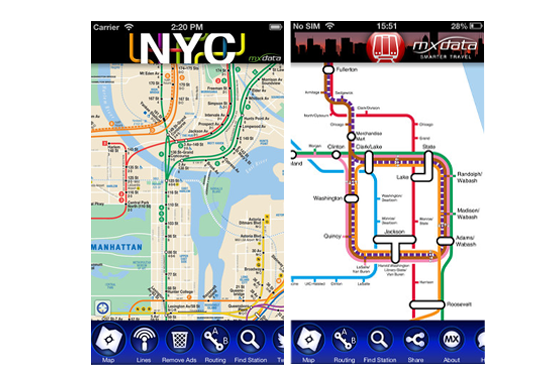
    Of course, it should also include public transit maps. MXData, for example, produces simple but really great subway maps for cities all over the world, letting you search stations and plan the quickest route from one stop to another.
    Options

    If you’re accustomed to taking the subway everywhere, you tend to think in subway stops as opposed to the actual distance between them, and you might forget just how easy it is to get from point A to point B without having to transfer to 3 different subway lines. Taking the bus, cycling, or walking might be the easiest, quickest, or even cheapest mode of transportation. Apps that compare the time it takes you to get somewhere using different modes of transportation, or that let you filter by which type of transportation you want to take, can really save time.

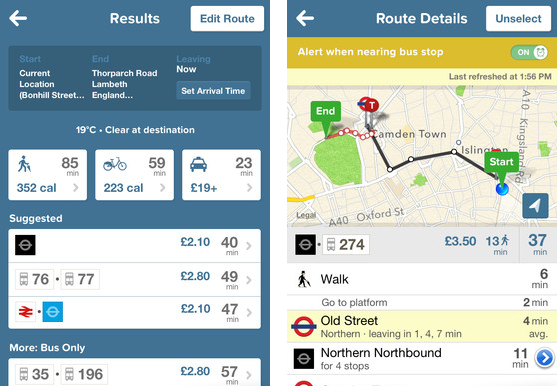
    CityMapper for iOS and Android is probably one of the best apps on the market for this. It not only compares the time it takes to get somewhere by subway, by bus, by bike, by foot and by taxi, it also tell you how much each mode of transportation will cost and how many calories you’ll burn by walking or cycling. CityMapper has a really well-implemented comparison tool but unfortunately, the app is only currently available for the city of London.
    Real-time schedules and updates

    In a perfect world, the quickest way to get somewhere would always be the same. Alas, we don’t live in a perfect world, and things like traffic, disruptions and delays can make our lives a lot harder when we’re trying to get somewhere quickly and conveniently. Incorporating live travel updates, subway and train line closures, delays, construction, and traffic reports into an app is a really good way to help us make the right decision before we step out the door.

    This is where data collected by public transit authorities can really come in handy. A lot of big cities already collect this data (like when you’re waiting for the subway and can see how long it will take for the next train to arrive, for example) and make it available to developers for free: it’s just a matter of being able to use it effectively.

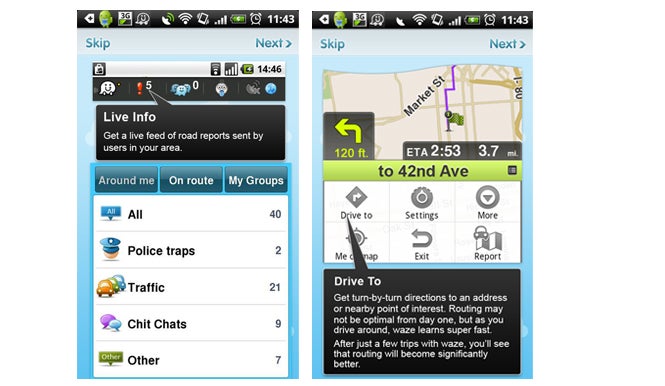
    Another recent trend is using crowd-sourced data to get live traffic reports from other users, a sure way to get spot-on traffic info. A crowd-sourcing app like Waze for iOS and Android is a great way to get accurate and timely traffic data in real time, but this app is only as useful as the number of people using it in your specific area. HopStop has recently added something similar for their iPhone app with live travel updates from users.
    Similarly, with lots of cities now offering bike sharing programs, there’s even room to incorporate data about bike availability at docking stations into an app.

    Wish List

    There are other additions that, although not essential, can help make travel apps even more useful.

    Weather reports

    Walking might be quickest, but not ideal if its going to rain. Incorporating weather reports would be a simple but handy addition to the ultimate transport app.

    Saved locations

    Being able to save locations and most-frequented routes is also key. People generally travel the same routes on a daily basis, and having those locations on hand can save a lot of time and trouble. Again, CityMapper and its ‘Get Me Home‘ function is a great example in this instance. It saves your home location and gives you immediate directions to get you home from anywhere, at anytime, in the city. Useful among Saturday night revelers, I’m sure.

    Ticketing

    Every city has different ticketing systems so it could be hard to integrate them all into one app, but for things like rail service, adding the option to purchase tickets within the app could save a lot of time. Similar is the option to order and pay for a taxi, much like super app Hailo, which gives you detailed info on how many taxis are in your vicinity, letting you order and pay for your journey without having to say more than two words to the taxi driver.

    At the end of the day, all of these functions ARE available, but separately. Some apps have begun to integrate more and more public transport info into one with various levels of success. For now, CityMapper proves to have one of the best formulas, with comparative routes, maps, weather, live bus and tube departure times, and even integrates London’s public bike share program into the app.

    Given that London has one of the most complex public transport systems to navigate, there is hope that this template can be recreated in a way that services more cities!

    World of Warcraft lost 600,000 players last quarter

    There’s no denying that World of Warcraft is still the most popular MMORPG in the world. Currently, Blizzard has 7.7 million active WoW players but that number seems quite low when you recall the game used to have 12 million players at its peak.

    Released in 2004, World of Warcraft has been struggling to stay relevant to everyone except die-hard fans. Blizzard came out with the Mists of Pandaria update which helped boost subscriptions but only temporarily. Even with the update, our editor Jon noted the update lacked any real innovation.

    Still, it may be too early to be ringing the death knell of the MMORPG. 7.7 million subscribers is still a huge number but Blizzard knows it has to do something to stop hemorrhaging players. The company is working on a successor to WoW but that likely won’t come to market until 2016 at the earliest, according to GamesIndustry International.

    Do you still play WoW? Let us know in the comments.

    Source: GamesIndustry International