If this it true, Spotify may never fear rivalry again

Spotify has recently announced that as of this week, the majority of your data will be moved from the company’s old servers to those of Google. So far, the music streaming service was initially using Amazon’s data storage facilities, but has now decided to go with Google for its data analysis requirements.

While Spotify says their decision was for practical purposes, the action has already generated speculation. What if Google were to buy Spotify?

Yes, Google already has GooglePlay Music, but if they did join forces, the service could be a clear winner in the world of music streaming.

Spotify currently has 20 million paying subscribers , and 75 million active users,while Apple barely has 10 million subscribers.

Google already tried to acquire Spotify back in 2014, but to no avail, simply down to the fact they couldn’t decide on a final price. Could 2016 be the year we see them make a decision that will drastically affect the music industry for years to come?

Sick of having so many cables? Here’s the cable that charges everything!

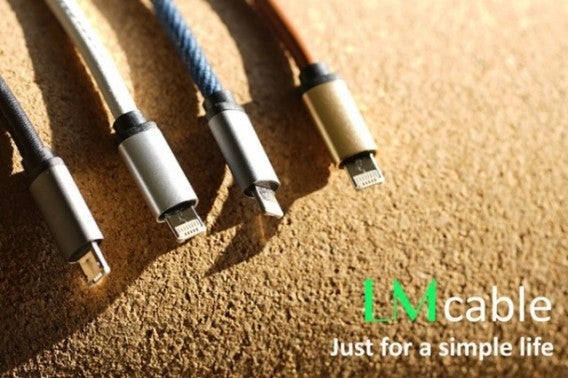
One of the biggest nuisances we face when we’re away from home, is the abundance of cables we have to bring for charging our numerous devices. Every gadget has its own, which are often not compatible with each other, especially for those who have both an Android phone and an iPad. Luckily, this may not need to be an issue any longer, all thanks to the LMCable.

The cable is (as the inventors describe) the first 2 in 1 charger for the two main systems. It has both the Lightening connector (for Apple devices) as well as Micro-USB (used for all Android devices and many other gadgets such as cameras and games consoles).

But where’s the catch? Does it come with adapters?

The answer is no. The secret is that each side of the connector is intended for each system.

Although the cable is not yet available to buy, it is currently a project for Kickstarter. Its creators are currently seeking around $5,000 to fund the project and have already achieved $100,000 with 28 days left to go until the end of the funding. This of course, is great news, and indicates that it’s more than likely we’ll be seeing these beauties on the shevles shortly. In the meantime, you can check on their progress here.

Facebook Live: the app you’ve been waiting for has arrived on Android!

Facebook Live is the latest feature from Facebook the whole world seems to be going crazy for! It allows you to broadcast real-time videos and share them with friends, or, anybody! Having already been available on iOS in more than 30 countries, Facebook has now confirmed that it is available on Android!

The function will be up and running this week in the United States, and is expected to reach other countries shortly.

So, how does it work?

It works as if you were just updating your status, or uploading a photo, only this time it’ll be live and in motion! Facebook Live will be an extra option in your sharing box at the top of your homepage.

You can interact with your viewers in real time, and also allow them to react and comment on your broadcast throughout the transmission. One thing’s for sure – this is going to get addictive.

If you’re reading in the US, you can immediately begin to play with this option and start having some fun. If you’re not in the US, be patient – it’ll no doubt be here soon!

Millions of people are about to be blocked from WhatsApp. Could it be you?

It appears that very shortly, as many as millions of users will need to find a replacement for the popular messenger service, as WhatsApp announces that it will no longer be compatible with a number of devices.

A statement was recently published on the WhatsApp official blog, explaining the reason behind this brutal decision:

This was a tough decision for us to make, but the right one in order to give people better ways to keep in touch with friends, family, and loved ones using WhatsApp. If you use one of these affected mobile devices, we recommend upgrading to a newer Android, iPhone, or Windows Phone before the end of 2016 to continue using WhatsApp.

The devices that will be affected are as follows:

BlackBerry, including BlackBerry 10

Nokia S40

Nokia Symbian S60

Android 2.1 and Android 2.2

Windows Phone 7.1

So, the big question is: Do you love WhatsApp enough to splash out on a new device?

Google Maps finally introduces the feature you’ve been waiting for!

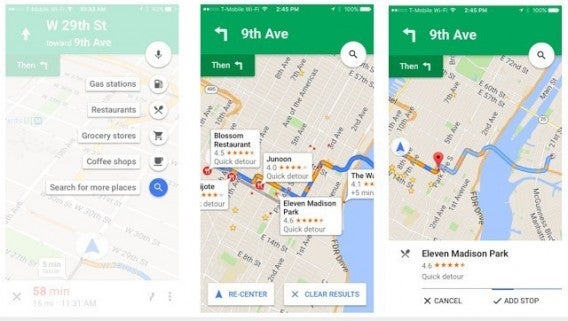
Google Maps has recently introduced the feature that many of us have been waiting for: the ability to make stops.

This useful function has been available of Android for a few weeks, and has proved the perfect aid if you’re planning a long trip and want to make a few stops to either refuel, or simply take a breather. During your planned route, Google can help you make the right stops in the best places, and can even recommend anything worth doing or seeing in the surrounding area.

How it works:

When planning your car route, Google can suggest places such as the cheapest place to buy gasoline, nearby service stations and even popular tourist attractions. You can plan your journey so that it works automatically, allowing Google to alert you when you get close to any of the stops you have planned on route.

This option is great if you have a hefty car journey ahead of you, and will also surprise you with things you may not have even been aware  of before setting off. Anything to make journeys much more bearable eh?


Your mobile could be at risk if you don’t deactivate the new function on WhatsApp

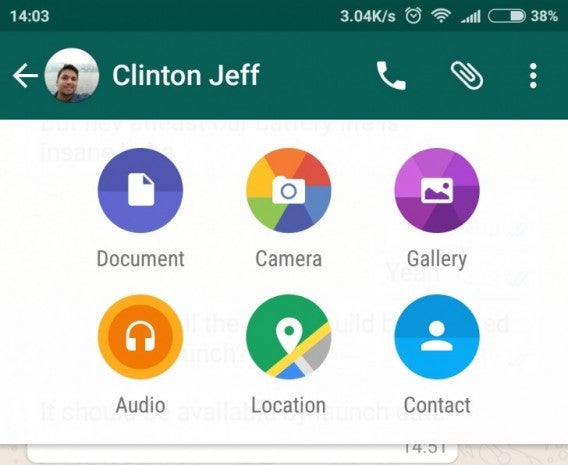
The latest version of WhatApp for Android has recently been updated with an awesome new function that allows you to send documents to your contacts. Doesn’t sound that dangerous does it? Allow us to explain.

The function allows users to share text documents, presentations and spreadsheets, however the files need to be in PDF format, with the plan to introduce compatilibility with DOCX and PPT eventually.

For now, this feature on the app downloaded from the APK on the WhatsApp website, but will no doubt be available soon through an automatic update.

So, it sounds pretty great doesn’t it? But there’s just one little aspect of this feature which could put your cellphone at risk.

This new feature of allowing to send and receive documents could make your mobile vulnerable to various viruses, but only if you don’t deactivate the option to automatically download attachments.

In order to deactivate it, go to Settings, and Chat, and make sure you are not automatically downloading any media (this will require you to now approve the files that are sent to you before downloading them).

Now you can enjoy this new feature without the fear of something nasty getting into your device!

Why have 14 million users already reserved this mobile?

Chinese mobile phone manufacturers Xiaomi has managed to get 14,440,000 users to reserve its latest product: the Xiaomi Mi5 – and it’s not just because they’ve been waiting two years for it.

In a world dominated by iPhone and various expensive gadgets, no one could have predicted the global success of Mi5 – apparently one of the biggest successes for Android in 2016. So just what has this phone got that’s creating such a buzz?

Check out the video below to see!

Don’t see the video? Click here.

Understanding Internet Speed: The Ups & Downs

When the Internet was first conceived and developed, the speed of data transfer was very slow. Today, however, you can not only enjoy super-fast Internet data transfer from all over the country, but also enjoy at your home or office. So, how did the industry make the leap from slow, wired connections to a blazing wireless connection?

What Determines Internet Speed?

Internet speeds are based upon the bandwidth that your service provider has allotted you, often based on how you pay each month. Download and upload speed tests may provide you with a specific number, but the truth is that Internet speed tests will often be biased. This is because they typically take a small data sample and use it to determine where you stand.

The problem with this is that Internet Service Providers, or ISPs, tend to treat traffic differently. A user who is accessing live streaming video may be categorized differently than someone who is accessing a web page. The streamer may receive priority because he or she is gaining access to a greater amount of data, whereas someone who is pulling up a web page may be left to wait because he or she isn’t hogging a lot of data. This is not always the case, but ISPs use advanced technology and software to ensure that data is routed properly.

How Internet Download Manager Fights Against Limits

One of the main benefits of Internet Download Manager is that users can schedule downloads. This option means that you can choose a large number of downloads at once, schedule them to download on a specific timeline, and get them on by one. Using this resource, you won’t have to fight for data bandwidth, and you will also receive your downloads when you want them to be delivered.

Furthermore, if your ISP issues constraining limits to your downloading ability, Internet Download Manager provides the ability to set limits on how many connections are in use at one moment and how much data can be downloaded within a certain amount of time. This can help to stave of ISPs that are serious about data caps, allowing you to download what you need over the course of a period of time.

To learn more about downloading, check out Free Download Manager through Softonic!

Security 101: Using a Proxy for Downloads

When you visit any website, you are sharing an incredible amount of information. Any click can let others know your physical location, the type of device you used to access the Internet, what site you visited just prior, and even what type of browser you used. Proxies are a great way to protect your online identity.

What Are Proxies?

A proxy server acts as a protective shell around any information you send or receive online. Proxies work by providing an inaccurate depiction of your location, essentially masking your identifying features. Proxies have a primary practical purpose: to keep Internet users’ identities safe. For many, a proxy is a way to ensure confidential connections, such as when accessing and transferring sensitive business files.

Proxy servers act as a technology that provides a tunnel from one computer to another. When a user connects to a proxy server, the user’s actual IP address, a unique identifier showing the location of an online device, is hidden. When a user requests information from another server, the proxy server acts as an intermediary, providing access to the sought-after information.

Why Does Using a Proxy Matter?

If you want to keep your web activity private, especially when downloading, proxies are an effective way to protect yourself. On an open connection without proxy protection, you share more information than you might realize.

Software programs let website owners learn the locations of the devices used via your IP address. These programs also reveal the kind of devices you used, what service providers you used, and which sites you came from. If you visited a particular site after clicking on an email link, a page link, a banner ad, or you typed the URL into your address bar, the site owner knows that information too.

Even worse, visiting some sites installs cookies on your device. Granted, cookies can be helpful, but they can also used to capture even more information about you, possibly opening you up to attacks by malware. By using a proxy connection, those issues are virtually wiped out.

Why Do People Use Proxy Servers?

There are all kinds of reasons for using a proxy. Maybe you want to keep your digital footprint small and not give sites information about your browsing and computing habits. Maybe you want to download information, music, or videos without running up against ISP limits on downloaded data. Whatever the reason, using a proxy is an important tool in maintaining your privacy while staying within the guidelines.

How to Use a Proxy for Safer Internet Surfing

There are a number of free proxy sites available, but download speeds can be slow. Be sure to find sites that have a good reputation. Some of those free sites, and many others, offer a paid option that promises faster download times and extra features.

Once on a proxy website, simply enter the name of the website you wish to visit. Your browser window will show the proxy site address with an add-on and an encrypted alphanumeric link to the site you’re visiting. Within the browser window, most proxy browsers include an address bar that lets you surf from site to site without returning to the proxy home page.

If you regularly need to download large files from the Internet, using a proxy server is an effective and easy way to get the files you need while protecting your identity from those who may wish to do you harm.

Check out this video to get faster downloads with Internet Download Manager!

Don’t Push That Button: Understanding Internet Cons

As the Internet has evolved, so have scammers and con artists. These are people who look for any way possible to lead you off the beaten path, onto their sites, and into a trap that typically involves getting you to pay up. The most recent example of a prevalent Internet con is the fake “play” or “download” button. Most people have fallen prey to this scam at one point or another, so how do you guard against it?

Know Your Source

Before you can guard against fakers, you have to know whether you’re dealing with one or not. There’s no need to name specific sites, but if you frequent sites that offer sketchy downloads and “free” video and TV streaming, you’re bound to run into fake play and download buttons. If you’re not sure about a particular site’s legitimacy, do some searching to see if people give it negative reviews.

Look for the Biggest Button

In most cases, a fake button will be the biggest, most brightly-colored button on the page. It may also be animated and blinking. This is done on purpose to draw your attention away from the real play or download buttons. Many times, the real button will either be directly below the video in a play bar or the download link will be a simple text link. Also, beware of fake play buttons that pop up on top of videos when paused. These may look like they’re meant to resume the video, but typically, they’re leading you to another site.

Hover Over the Button

Before pushing any button on the Internet, hover over it. When you do this on a video, you should see a URL pop up in the bottom of your browser. This shows you that the button is actually a link and not a functional part of the site. When you do this for a download, make sure the URL’s root matches the site from which you’re supposed to be downloading.

The Button Opens a New Window

One dead giveaway that a button is fake is if it opens a new window or tab when you click on it. Keep in mind that when you download something, you should receive a notification that the download has started, or if you click to play a video, the actual video should start playing. In other words, you should not be taken to a new site in order to complete the action.

Unfortunately, con artists these days have begun to utilize technology that prevents you from closing windows. Instead, the new site will continue to create pop up dialogs, even when you click on the window’s close button.

Thankfully, you can avoid these problems by immediately closing any new browser windows or tabs that a fake button may generate. If you do find yourself facing a window or tab that keeps popping up, check the box on the dialog that says “Prevent this page from creating additional dialogs” to finally close the offending site. This option is typically available when the dialog pops up for the second time.

Even if you get fooled by a fake button, you can always protect your computer. Take a look at the Best Antiviruses of 2016 for more information on keeping your computer secure!

Next: Security 101: Using a Proxy for Downloads