Windows 10’s most iconic feature is about to change forever

Possibly the most important element of Windows 10 (or any version for that matter) is set to receive a big change this summer, and it may leave some users feeling somewhat uneasy. We are of course referring to the Start menu.

Microsoft is currently preparing an important update for Windows 10 called the “Anniversary Update”, which will commemorate the operating system’s first year of life. One of the novelties that will be addressed during this update will be the Start menu, which will eventually (and hopefully) enable the user to access all applications with fewer movements and clicks. One of these small changes will include the “hamburger menu” interface that should hopefully make app navigation a lot more efficient and user-friendly.
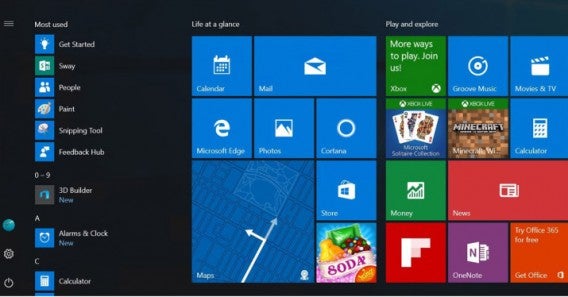
As you can see from the screenshot above of the most-used application menu, you will be able to click a new “hamburger” icon, which will display a full menu containing all shortcuts. For now, you can only access the most-used applications and just a few shortcuts. This new menu is supposedly set to contain everything – and we mean EVERYTHING!

Microsoft believes that its users are going to really enjoy what this new interface has to offer, in terms of comfortability and efficiency. It hasn’t yet confirmed if users will have the option to choose between the old and the new menu. which seems to be upsetting some Windows user who fear the change may be irreversible. Let’s see what the summer has in store!

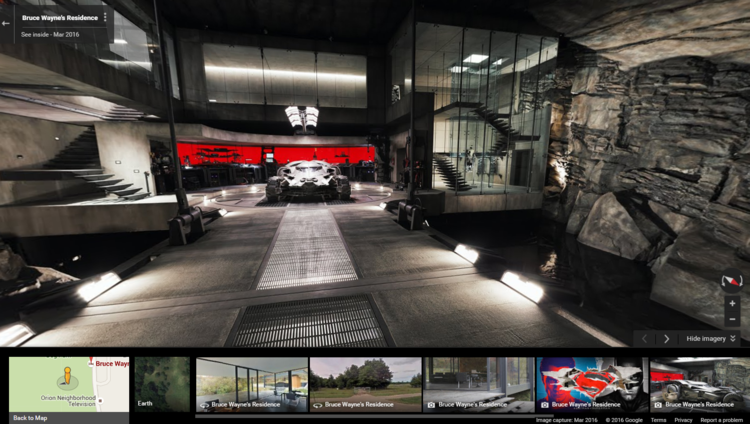
Google Maps has an awesome surprise for Batman fans

Thanks to Google, Batman fans around the world are now able to tour Bruce Wayne’s house through its Street View feature, and even have a snoop around the adjoining “Batcave”, all in 360 degree view!

How to find it:

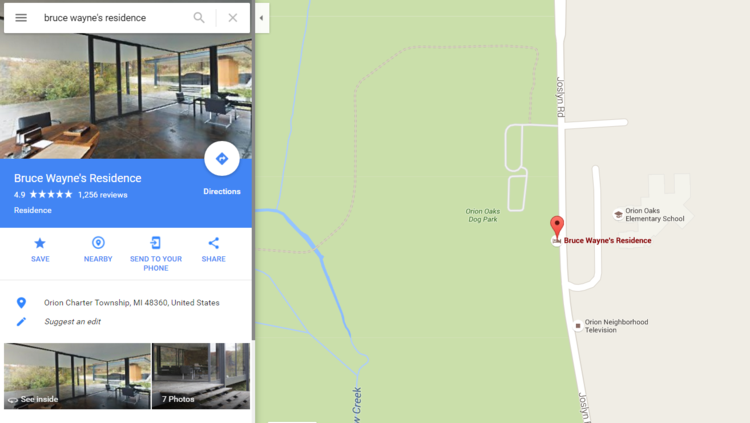
Simply type “Bruce Wayne’s residence” in the search bar (or even easier, click here).

Once you click on the Street View version, you’ll be thrown into a very contemporary lake-side lodge. If you click on the wall toward the right of the fire place, you’ll be transported into Batman’s secret layer, complete with the Batmobile and armor etc!

We won’t spoil the experience with too many photos, so take a look for yourself!

Five apps to create your own digital avatar

The face changing app MSQRD (iOS|Android) has been talked about a lot recently. But, if you are looking for a more complete visual overhaul, then there are lots of other great apps out there that can totally transform you into an animated avatar. Here are five of the best.

Second Life (Windows)

Second Life is the granddad of virtual worlds that offers you a digital multiverse filled with things like exhibitions, concerts, shops, and other things you may find in the real world. But to interact with all this you need an avatar, and Second Life has you covered. It lets you change anything about your digital self, and purchase them almost anything you can imagine, to ensure they look exactly how you desire.

Zoobe (iOS|Android)

One great app for creating a talking avatar is Zoobe. All you have to do is add your voice, then the app animates your chosen avatar to look like they are speaking for you. You can then select an animation to go along with it to add that little extra pazaz. Zoobe also offers social links so you can laugh at your creations with friends.

FaceRig (Windows)

Those of you wanting to chat live with your avatar should get FaceRig. This program uses facial recognition and your webcam to map your facial movements instantly onto your avatar. There are numerous masks to pick between, and – if you have enough creativity and patience – you can even make your own.

VEEMEE Avatar Creator (Android)

VEEMEE Avatar Creator is an avatar tool for people who enjoy RPG games. Just pick a base character and get modify – tweaking every detail until it is exactly how you want it. Once complete you can dress, pose, photo, and share them. If you grab VEEMEE Video Avatar (Android) it’s also possible to animate them to entertain you. Dance avatar, dance!

Miitomo (iOS|Android)

Miitomo is Nintendo’s first mobile title. It has you create your own little avatar in the Nintendo Mii style, selecting a look and personality to match your own. After this your creation can interact on a Mii Social Network. There you can answer questions that work like status updates, and visit your friends Mii’s to interact with them. If that isn’t enough, you can also play mini-games to earn rewards to further improve your avatar.

That’s it for this week, next time I’ll be back with apps to help you sell your old junk and buy other people’s desirables. See you then.

Related Stories

Five free music apps

Five voice changing apps

5G and why we need it

VR is here to stay

Follow me on Twitter: @DoFuss

Amazing! You can use Virtual Reality in Whatsapp NOW!

Whatsapp is riding the VR wave with its latest incredible update. To use it, and start enjoying the messaging app in virtual reality, all you need is a compatible phone and a Google Cardboard style headset to slip it into.

Released today on both Android and iPhone, the messaging app now allows you to enter your own virtual reality chat room. Once inside you are surrounded by messages. Active chats appear in front of you, with older conversations appearing off to the left and group chats to the right. You can swipe messages out of the way with your arms to move through them, while holding up your hand allows you to record and send audio responses (sorry, there is no Minority Report style holographic keyboard yet).

It doesn’t end there though: notifications pop-in above your head, contacts are beneath your feet, and media (such as photos and videos) can be found behind you.

To send one of these files all you have to do is move through them with more swiping motions until you find the one you want. Then by holding out both hands you can “grab” the selected file and turn around to drop it into an active chat.

No, it’s not amazingly practical – you certainly won’t see me using it on the bus – but we had great fun trying it out in the office. Plus, it is a great example of what the future of messaging may hold.

Of course there are some restrictions, the update (numbered 4.01.016) is only compatible with iOS 9.2 and 9.3, while Android users have to be using Lollipop or Marshmallow.

Unfortunately, those of you with Windows 10 Phones will have to wait for the update to hit the Windows Store later in the month.

Related Stories

WhatsApp has changed! Be sure to watch your data usage!

How to try new features on WhatsApp before anybody else

Could this mean the end for WhatsApp?

VR is here to stay

Follow me on Twitter: @DoFuss