
How to choose the right content for small screen experiences

Presented by:

iStock by Getty Images

For many years, we’ve added images to our websites and blogs to splash some color on the walls of text.

But things have changed and we are starting to realize that images and videos have the ability to unlock the richness in content and deliver messages better than plain text ever could. Visuals have now evolved into primary tools that brands and companies use to define their personalities and drive the connection with their users.

And as we all progress into mobile-first entertainment, it is important to start to rethink how we can create compelling experiences for smaller screens. Do we use the same tried and tested images as the big-screen PCs and TVs? And how do we get around the limitations of the smaller screen? iStock by Getty Images, the leading stock content provider, shares the best methods for choosing the right content for the mobile-first generation.

Why are images important?

The numbers are staggering. Done right, images can increase engagement by up to 94%, and because visual material is processed about 60,000x faster than text, much more content can be communicated in much less time.

That’s why apps like SnapChat and Instagram are quickly overtaking text-based Twitter, taking selfies and sharing pictures have become key features in new products, and the excitement around camera drones and action cameras like GoPros is palpable.


First person point of view

When it comes to mobile devices, not only are we dealing with smaller screen sizes, but also screens that are usually held much closer to our eyes than a PC or TV. This opens a new opportunity for brands to free users from the distractions around them, and lets them jump into a visual experience from the first person point of view.

Powerful first person visuals, such as an exhilarating bungee jump, or a journey through a new country, or even re-picturing an everyday experience like riding a bicycle around town, move away from being narrative to being easy to relate to – so that you feel like you’re actually there. This encourages users to participate and engage with your content.

First person POV


So how do we spice things up? By mixing the perspectives. It doesn’t always have to be a person’s point of view. Playing with the unexpected, like running across a field from a dog’s perspective, or climbing up a flight of stairs from a baby’s perspective will offer a relatable setting with a unique and stimulating point of view.

First person POV

Super sensory

Super sensory takes you beyond looking at a picture, into invoking the senses of sight, taste, touch, smell, and hearing to help you live the experience.

The most obvious way to super sensory is to stimulate more than just sight and sound. For instance, the trailer of the TV show, Homeland, combined thrilling video with tactile effects. So when a bomb goes off or when a car crashes, the viewer feels the vibrations as they see the events unfold.

With still images, the senses have to be stimulated by association by using up-close and personal images of familiar subjects. Much like how we salivate at a picture of a chocolate lava cake, or recoil at an image of a metal grinder throwing up sparks.

Smell the images

But to truly create an all-round sensory experience, don’t just paint big broad strokes, dive into the detail. For instance, users don’t just want a panoramic picture of Paris, they want to be visually stimulated with the bright colors at the farmers’ market, want to reach out and feel the iron of the Eiffel Tower, to vividly hear the sound of clinking champagne glasses, and to smell the butter from a freshly-baked tray of croissants.

button-1

Use code NEWSTONIC12 to get 12% off

Tasting rain

Smartphone users want experiences that are less mediated to interact with the world around them. If we focus on one subject and one sense at a time, we amplify the experience and take away the screen that is standing between them and the experience.

What do people want?

Wonder, awe, inspiration, travel are the most searched terms for images for business, and for good reason. Travel narratives are powerful because not only do they make great plots, they are great metaphors for personal journeys. They play on our desire to see more, do more, and be more.

Epic perspective

Images depicting epic perspectives are especially sought after. These images do not necessarily include people in them, but perspectives to show how small we are on this planet.

For instance, Airbnb, who is technically an accommodation platform, displays breathtaking sights and amazing destinations on their website. They don’t look like a typical travel brochure, but they inspire visitors to explore the unknown and try something different. It’s a similar story on their Instagram feed where they showcase personal experiences and stories, and not pictures of their apartments as any other accommodation platform would.

Space imagery has also continued to grow fast, riding on our fascination with new technology and science, and it is also a timeless metaphor for curiosity and wonder.

Space

These images work well for mobile not only for their breathtaking qualities, but because they usually leave plenty of space for copy and action buttons.

What’s the takeaway?

Put simply, images for mobile is a new ballgame. There are many considerations to be made around the limitations of small screens, but also opportunities to unlock new experiences that were never possible on larger screens.

Sourcing content doesn’t need to be difficult. iStock by Getty Images offers over 8 million exclusive images & 4K video and for a limited period are offering new customers 12% off credits for their first purchase with code NEWSTONIC12. Sign up today! (offer expires October 31st 2016)

button-1


CyberGhost 6: A Powerful VPN Service That is Easy to Use

VPNs are a big deal these days as users want to accesstheir content when travelling outside of their country and to generally feel feel secure whilst browsing the internet. CyberGhost 6 provides both of these services very well and offers many more secure VPN services from its simple and easy to use interface. Today we’re going to look into the features that a premium license of CyberGhost 6 would give you access to.

This article is brought to you by CyberGhost VPN – A simple and secure VPN service.

button

How do VPN Services Work?

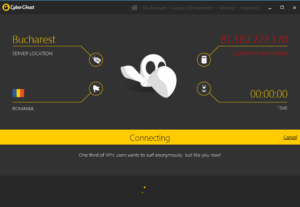
Every computer has an IP address which is assigned by your Internet Service Provider (ISP). This can then be used to discover the geographic location of your Internet Service Provider. VPN services like Cyber Ghost override this IP address and replace it with one from a number of services that they have in various locations.

Simple Layout

CyberGhost have 650 servers in 30 countries available for users of its service. This gives users a huge amount of freedom and control when it comes to accessing the internet. It also complicates matters, quite considerably, with plenty of options to consider when controlling your internet connection. For this reason CyberGhost have put a lot of effort into creating a user-friendly interface that is easy to understand.


screenshot-1-copy

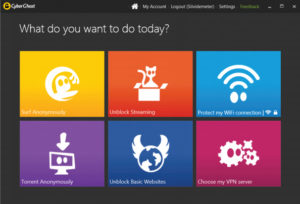
What Do You Want to Do Today?

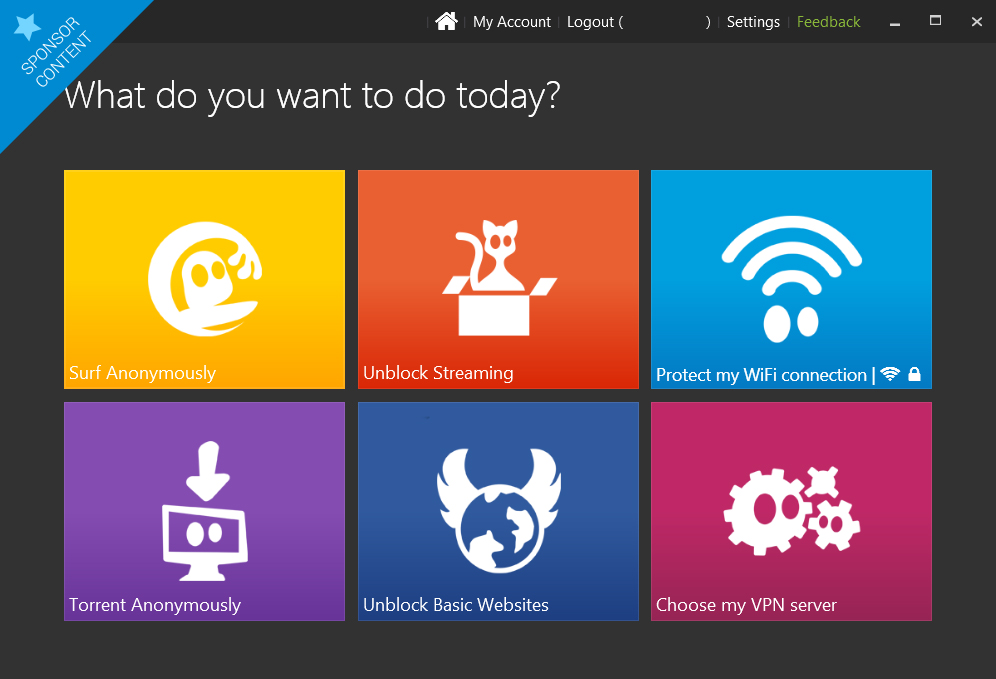
The CyberGhost Home Screen has 6 tiles that each represents a single VPN profile. Each profile has been curated by CyberGhost to perform some of the most common uses for a VPN. If you’re a more advanced user the 6th tile offers you the chance to choose your VPN server yourself. The Home Screen is easily accessible from your system app tray meaning you can easily switch between profiles depending on what you’re doing.

untitled-4-copy

If you’re not too sure about how to use VPN services these curated profiles are really helpful:

  • SURF ANONYMOUSLY will enable all of CyberGhost’s protection components and will start your browser in incognito mode. It also allows users to manually change the pre-set features, according to their own preference.
  • TORRENT ANONYMOUSLY will select the fastest Peer2Peer (P2P) compatible server (at the time of the release) and will activate the appropriate protection measure for P2P sharing.
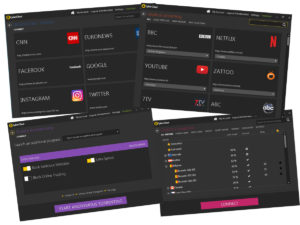
  • UNBLOCK STREAMING gives you a list of streaming sites that CyberGhost can give you access to no matter your geographic location. This is fully automated, meaning you don’t have to search through different servers in the hopes of catching your favorite TV program.
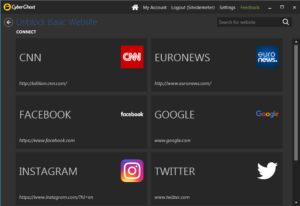
  • UNBLOCK BASIC WEBSITES is available to all CyberGhost users and allows access to basic websites that may be censored in various parts of the world.

unblock

  • PROTECT MY INTERNET CONNECTION will automatically connect you to servers in your own country. As well as that it’ll remember any wireless networks you’ve accessed and provide you with the same amount of protection you selected last time you used it.
  • CHOOSE MY VPN SERVER is for more advanced users and gives you total control over your internet connection. If you’re a little more comfortable playing around with the VPN settings this is for you. It allows you to manually select the server you’re using and gives you the option to narrow down the list to include only the types of servers you’re looking for. If you’re looking for the fastest servers for example or for servers that are P2P compatible you can simply select from them from the upper menu.

connectinh

button

Fully Customizable

Each of profile has a number of features activated within them designed to facilitate optimized browsing in line with your needs. These settings can be customized, however, using the simple switches found on the control panel of each profile. The settings that you select, including the country you’re browsing from, remain selected every time you connect using that profile.

untitled-1

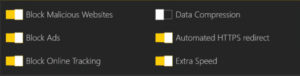
A useful feature is the Ad-Blocking feature which gives you control over which websites you’ll support by allowing their ads to be shown. This can be used in conjunction with Data Compression, Malware Protection and Online Tracking Prevention to save on data costs whilst using a mobile connection.

Mobile Protection

The Premium license, which cost $4.99 a month, gives access to all of CyberGhost’s profiles and features on 1 device. This means that you’re able to use all of the features on your mobile device as well as your home computer as long as you’re not logged in on both devices at the same time. If, however, you’re looking for hassle free experience and would like to protect more than one device the Premium Plus License, which costs $7.99 a month, allows you to run all of CyberGhost’s Features across 5 devices simultaneously.

Free Version Available

There is a free version of CyberGhost 6 available which will give you full access to all that CyberGhost has to offer for 3 days. After the trial period is over you’ll receive lifelong access to the “Unblock Basic Websites” profile. This is due to CyberGhost’s policy of wanting to free up basic information to web users all over the world.

button

Future Proof

The true power of the application, however, lies in the Premium and Premium Plus Licenses. These give you complete control over your internet connections and can even help you save on data costs if you’re using a mobile connection to access the internet. The Premium and Premium Plus Licenses also include free upgrades to any future versions of CyberGhost.

Simple to Use and Powerful VPN

All in all CyberGhost 6 Premium offers you a powerful VPN package that gives you complete control over your internet connection. The level of control is up to you with CyberGhost’s user friendly interface and curated profiles meaning anybody can take advantage of the features it offers. More advanced users are able to exert more control over the program and with 650 servers in 30 countries there is plenty of control to be had. The free version allows you to experience all of CyberGhost’s features and profiles for a short amount of time but if you’re after a long term solution, whether it be for streaming services or anonymity, the Premium and Premium Plus Licenses will give you full access to a simple but powerful VPN service.

CLICK HERE to try CyberGhost 6.

A sensational deal on Adobe Creative Cloud

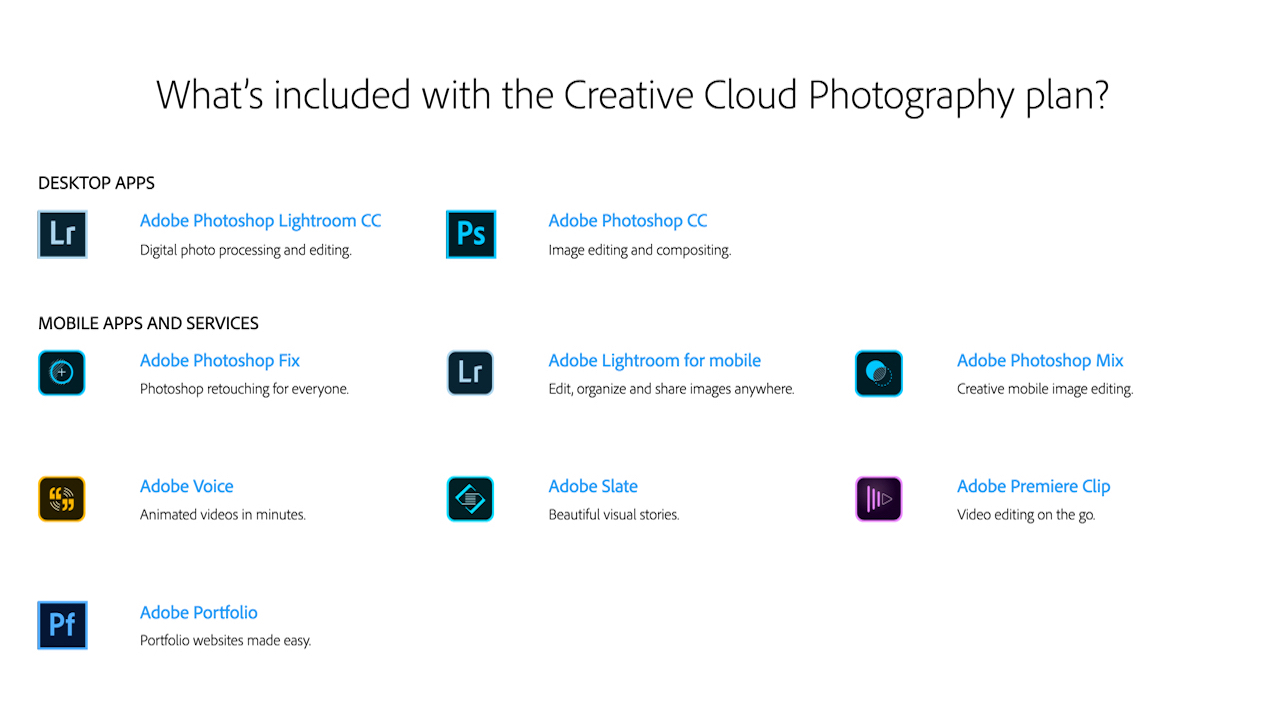
Adobe Creative Cloud Photography plan provides you access to a suite of Adobe’s renowned desktop and mobile apps. The package ensures that you have the tools you need to make a brilliant picture perfect. It is the ideal package for photographers of all levels, allowing you to get the most from every holiday snap and pet picture, without the need to spend hours editing.

Best of all, Adobe is offering 20% OFF this superb software suite to Softonic readers.

button (1)

Softonic Adobe Promo

Photography has always relied as much on technical prowess as it has on an eye for a good picture composition. Be it playing around with the exposure during your shoot, or overdeveloping the colors in the dark room, the art of taking a great photo has always demanded a diverse skill set.

Today it is easier than ever to produce photographic perfection, thanks to the Adobe Creative Cloud Photography plan, a suite stuffed with nine amazing tools to get the most out of every image.

Softonic Adobe Promo

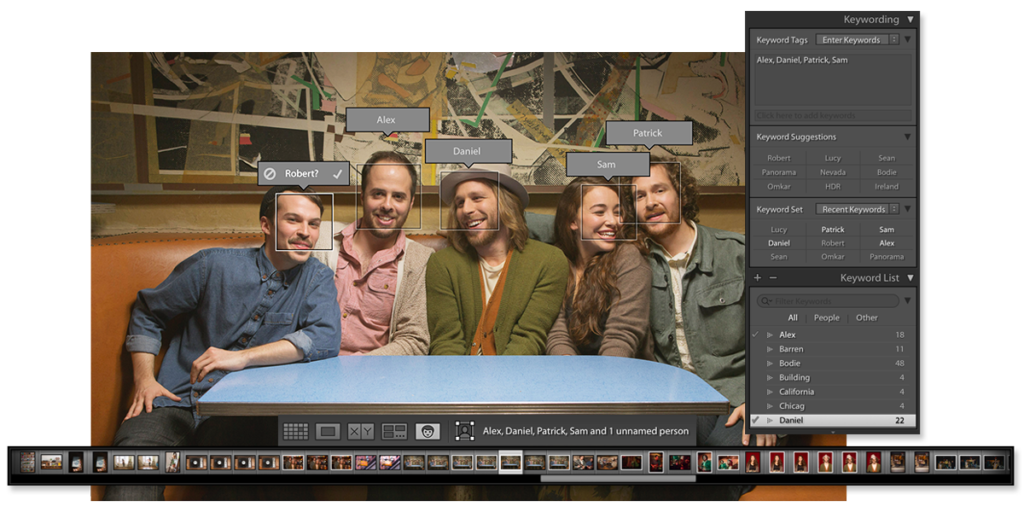
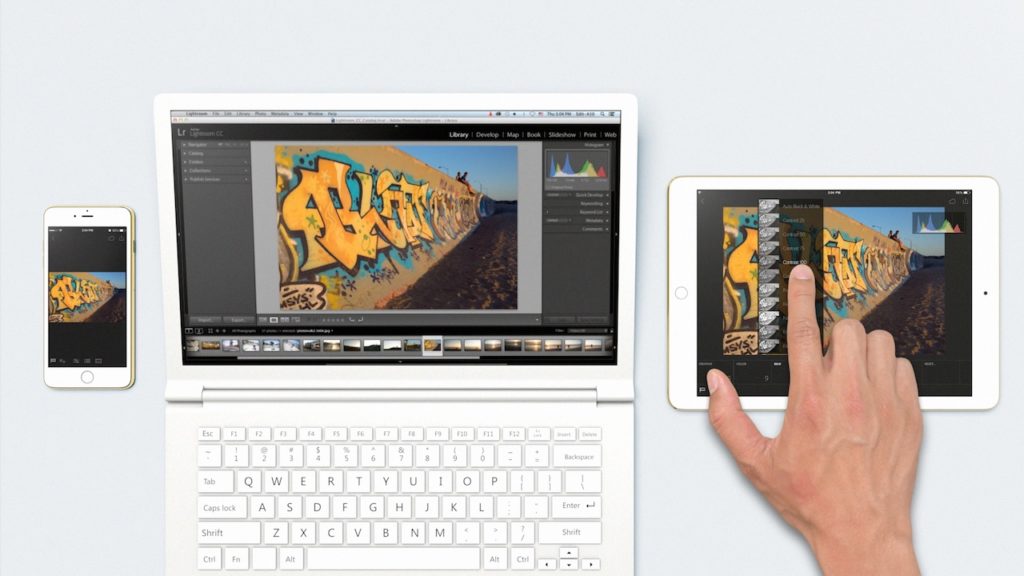
With Lightroom, your photography goes where you go. Organise, edit and share your photos from anywhere – your computer, the web, your iPad and your iPhone or Android devices. All your photography in one place.

Softonic Adobe Promo

The most famous element of the suite is Adobe’s Photoshop CC. This powerful desktop software offers all the tools you could possibly need make your masterpiece. Letting you combine, retouch, resize, layer, and more, Photoshop has long been an industry standard for both professionals and enthusiasts. Best of all, it is included as part of the Adobe Creative Cloud Photography plan, making it an absolute bargain.

button (1)

The double package of Photoshop Mix and Photoshop Fix provides a streamlined mobile version of the desktop app for editing on the go – cut, combine, and retouch from anywhere.

Photoshop Product Image


If you want to extend your photos beyond still images, then the Adobe Voice, Adobe Slate, and Premier Clip apps are perfect for you. With Adobe Voice you can quickly turn your images into an incredible animated video. Slate allows you to easily make compelling visual documents that combine words and images to fantastic effect. Finally, Premier Clip can produce high-quality videos that can be shared with ease.

Softonic Adobe Promo

Furthermore, you can quickly and simply showcase your creativity with Adobe Portfolio, giving you access to Typekit’s library fonts, live editing, plus much more.

If all of that isn’t enough, the updater makes sure you always have the newest version of the software and a training option allows you to get in-app tips and tutorials to get the most from every part of the Adobe Creative Cloud Photography plan.

Softonic Adobe Promo

All you have to do to get this amazing 20% off deal, is to click on the button below and subscribe to Adobe Creative Cloud Photography plan for one year. The package includes 2 desktop apps and 7 mobile apps and services, and provides incredible value to photographers of all levels – from beginners to professionals.

button (1)

Get ready for a new kind of browser

1stBrowser is a new browser from SIEN. Built on the Chromium open source code, it has a familiar and intuitive interface. But, more importantly, it builds in everything you could want from your default web-tool – personalization, security, and flexible, one-click downloads.

In the interest of disclosure, please be aware that this article is sponsored by SIEN for 1stBrowser.

Personalization

SIEN is still working hard to deliver everything you could possibly want in 1stBrowser. But their ambition is already paying off, with a great many fantastic features already in place, and more promised by the end of 2015.

If you have used Chrome, you can use the same login and instantly sync your settings. From here you are ready to make your browser look exactly how you want it to.

Select a theme

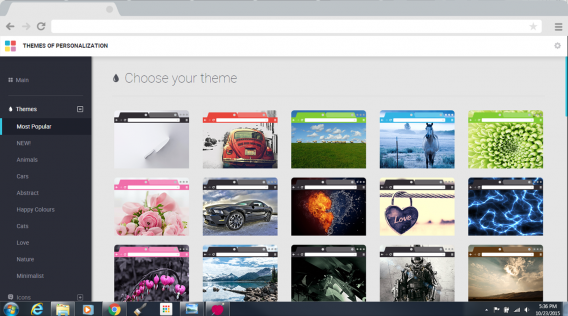
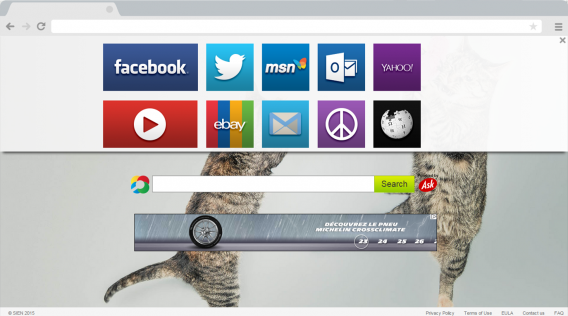
The Personalization Button is in the top-right corner of the screen, next to the browsers settings menu. A quick click of this delivers you to all of 1stBrowser’s theme and personalization options. Here you can alter the color of your title bar, the theme, and wallpaper of empty pages. They have a good selection of default options ready for you, which offer a total overhaul to the bland grey interface of Chrome.

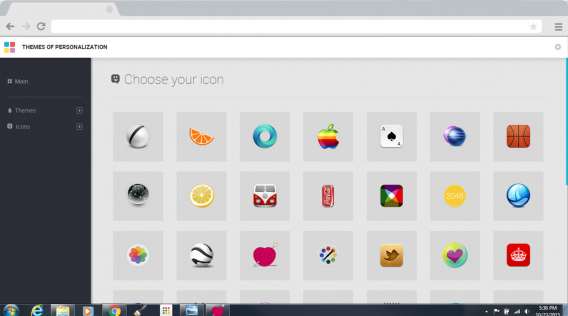
Themes range from puppies to cars, with almost everything in-between. You can also change 1stBrowsers default icon to something that stands out on your desktop and taskbar.

Pick an icon

But SIEN is not finished yet. Soon they will be offering the ability to add wallpapers with parallax scrolling to give the illusion of motion to your pages. Combine this with support for user generated content, and you should see the range of customization options really takeoff.

1stBrowser also makes your browsing experience seamlessly tailored to your needs. Standard navigation options – such as bookmarks and favorites – are soon to be joined by geolocation and time filters, so your favorite pages will be organized depending on whether you are at work, home, or on the move.

Media downloader and gallery

If you want more than just a pretty face, 1stBrowser also comes with lots of built in tools that practically improve your browsing experience. And none is more valuable than its Media Downloader.

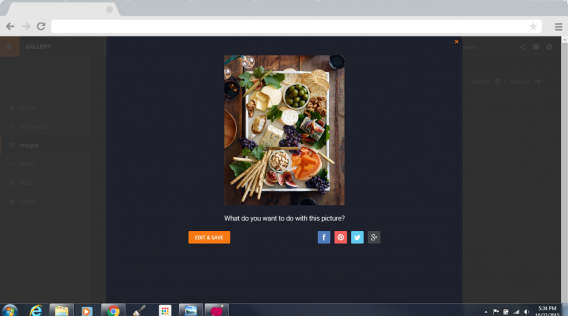
Download any image

Again indicated by a convenient button in the top-right corner of the screen, the Media Downloader is your one-stop-shop to download and save everything you enjoy online. Simply rolling over a video or an image causes a button to appear, giving you the option to download it.

It is wonderfully simple, and only helped by the downloader’s further options. Clicking on a video lets you choose between downloading the video or just the audio. Image downloads are similarly versatile, allowing you to apply filters to the picture before it ever reaches your hard drive.

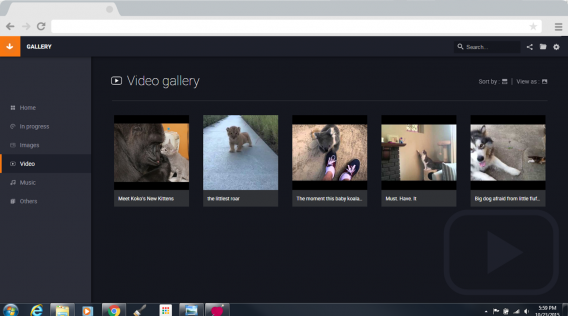
Download video

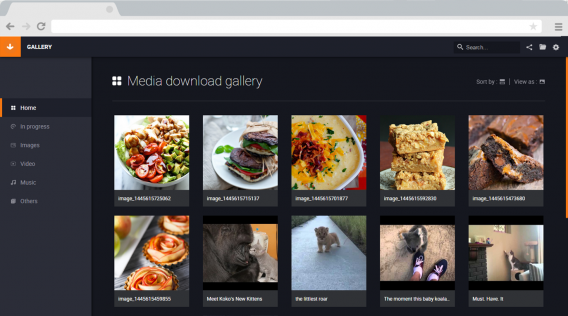
Your downloaded media is then all saved and filed away in 1stBrowser’s attractive Media Manager, so you can always find it quickly.

Still not enough? Well, SIEN agrees it seems, and they have plans to further extend these features by the end of the year. Future updates are set to include playlists, the ability to sync your downloads with other devices, and a download booster so you can download files more efficiently.

Media Manager

Feel secure

But for many people, what they really want while online is privacy and security. And, here again, SIEN it trying to provide everything you need to stay safe.

The prevalence of Malware and Adware is enough scare anyone, and it can be hard to ignore the feeling that you have been compromised by some unnoticed malicious file.

1stBrowser is to implement protection from both of these threats. This means any files you download or links you click will be checked, and the appropriate measures taken to prevent them infecting or damaging your device.The addition of an Adblocker further adds to this protection, hiding advertising and preventing you from unwittingly clicking on links.

Safe browsing, now with kittens

While some of these features are yet to implemented in 1stBrowser, they should all be ready to keep you safe and protected from any cyber-threats by the end of the year.

It may not be the first browser you download, but – with all of its built-in features that SIEN is dedicated to improving and expanding – it could be the last.

Download 1stBrowser

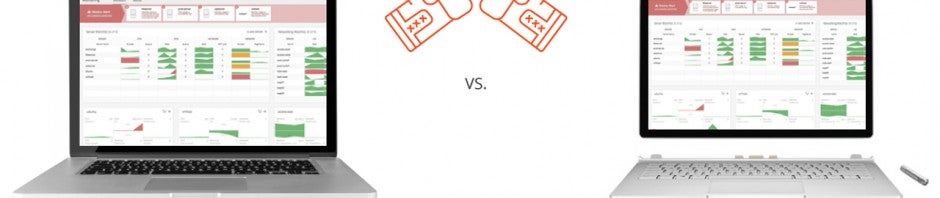
Spiceworks’ Macbook Pro and Surface Pro giveaway

Spiceworks’ Network Monitor is the comprehensive network tool for IT professionals. It places everything you need to manage your network on a single screen, allowing you to see and fix problems in real-time. And best of all, if you try its free service for a week, you can win either a Mac Book Pro or a Surface Book Pro.

Custom built for IT professionals

Offering a massive range of practical and free tools, Spiceworks award winning range of products have been trusted by millions of IT professionals for almost a decade.

Its latest server-based tool, Network Monitor, uses knowledge gathered from their huge network of SysAdmins, Network Administrators, and Systems Administrators to create the perfect dashboard to monitor your whole Windows or Linux network environment.

Port View

Fix problems before they happen

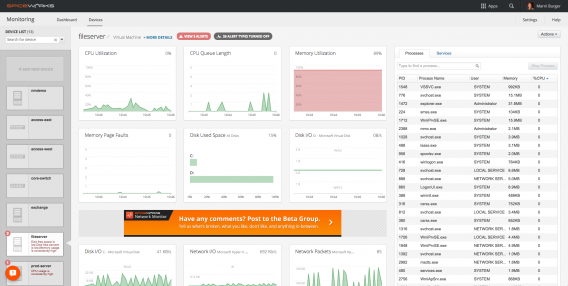
Network Monitor can be set up in minutes and allows you to track everything in real-time. You can see what is happening on critical interfaces, server, and device throughout your network. Network Monitor can track problems both onsite and offsite with ease – as well as allowing you to address potential issues through a remote desktop connection.

Network Monitor has a clean, easy to follow visual interface. Everything is displayed on a single screen, allowing you to track server activity and network utilization. This data includes disk and CPU usage, active processes and services, system memory, and other environmental data.

Help Desk

Spiceworks’ Network Monitor delivers all of this information in real-time. This enables you to pinpoint problems as they happen, see what is effected, who it effects, and fix it quickly. Now you can fix small issues before they become problems, and problems they ever impact your users!

As if this wasn’t enough, Spiceworks also offers Help Desk. This service is build for IT professionals who want to offer a help service to their users, but lack the hardware infrastructure to set it up. The Hosted Edition of Help Desk is filled with all the features millions of Spiceworks’ users have come to depend on, giving access to the tools and community they need to keep their customers happy.

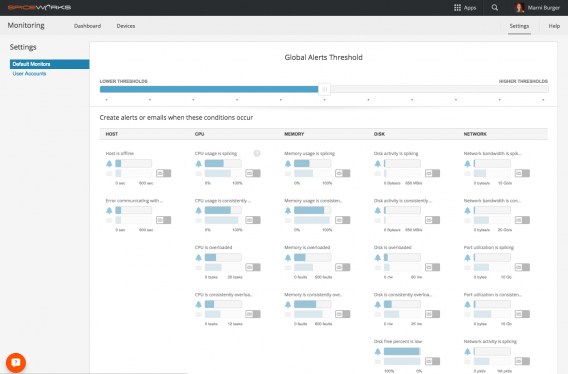
Global Thresholds

Macbook Pro and Surface Pro giveaway

Softonic is partnering with Spiceworks to bring IT professionals a brilliant offer, the chance to win a Macbook Pro or Surface Pro – your choice – for just trying the superb Network Monitor.

If you are a SysAdmins, Network Administrators, or Systems Administrators all you have to do is download Spiceworks’ Network Monitor and try out all of its incredible features.

After using it for one week, just leave a product review on the Spiceworks Community page, and you will be in with a chance to win one of these fantastic devices. Which will you choose?

Hurry. You only have until November 20 to download the Network Monitor and participate in the contest.

Win a Macbook or Surface

With UR 3D Launcher, personalizing your Android device has never been so easy or fun

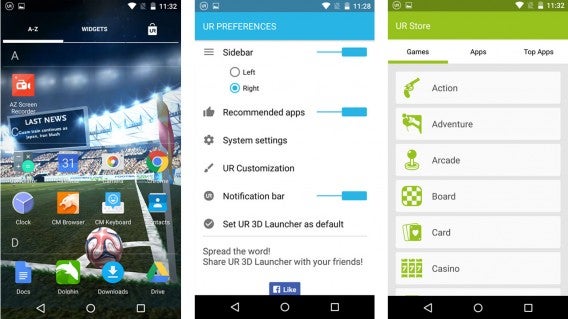
UR 3D Launcher isn’t just another Android Launcher. This application lets you personalize your Andriod OS to a mind-blowing degree, including a huge gallery of animated 3D wallpapers, dozens of icon packs, smart folders that organize your apps more efficiently, and a memory optimizer for your device. And all this is free.

One of the advantages of Android is the ability to personalize the system and set up your device — whether cell phone or tablet — the way you want. In addition to changing how things look — such as new wallpapers and icons — you can also change system settings and even include extra features. Launchers were developed to help you do this, but the downside is they’re not always easy to use. Not with UR 3D Launcher and their new user-friendly interface. Everything is done with just a few clicks, and it’s all intuitive, making your device even more fun to use.

Homescreen

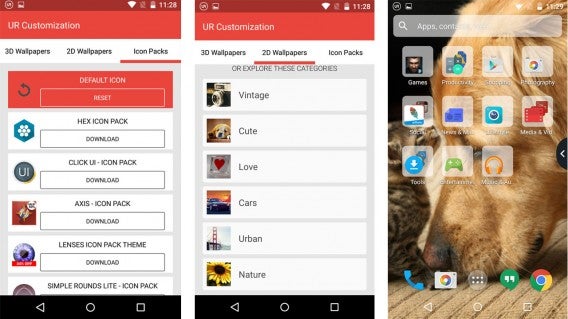
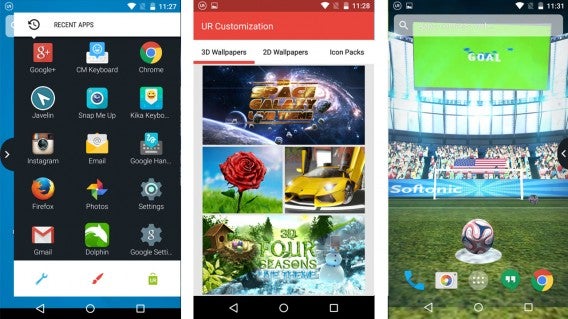
UR 3D Launcher offers customization that starts with your home screen. This is where you can always find the apps you use the most, so that you won’t have to spend unnecessary time trying to find YouTube hidden amongst a huge list of apps, for example. To give your device a look that reflects your own style, the app includes 25 3D animated wallpapers and more than 100 2D images, divided into categories such as “Vintage,” “Love,” and “Nature.” Several icon packs are also available to complete the transformation.

And there’s more: UR 3D Launcher offers extra features to make it even easier to navigate the operating system. Just install and start up Launcher, and it will create a series of smart folders that separate your apps by type, such as “Games,” Social,” “Photography,” and “Productivity.” Each folder offers recommendations for new apps in that category for you to discover and download.

Store and sidebar

Another new feature is the sidebar, which you open by sliding your finger to the right or left, depending on your preference. This space contains your most recently used apps, and also offers quick access to the UR 3D Launcher settings and customization screens, as well as the Launcher’s very own Android app store. UR 3D Launcher also makes the search bar at the top of the screen smarter and more powerful, with the ability to search through apps, contacts, and the web, all in one place.

The developers at UR 3D Launcher know that many of us run out of storage space on our devices from saving photos or installing new apps, so they’ve gone beyond customization to include a memory optimizer. UR Booster Lite frees up space on your device with a simple tap on the screen.

Setup

But what if you get tired of UR 3D Launcher’s “special effects”? Don’t worry! With UR 3D Launcher, it’s also easy to restore the default style of your phone or tablet without having to turn off the application or restore it to the original factory settings and run the risk of losing everything you’ve saved. A few intuitive taps on the screen is all it takes – this application is truly this easy to use!

UR 3D Launcher offers a complete set of personalization packs and features. Although you’ll need to individually download wallpapers and icons — which actually helps save space on your device — the app offers everything you need to set up your device with your own style, free of charge and free of hassles.

Download UR 3D Launcher for Android

Signs Your Website is Crashing – and how to prevent it

Your website is the face of your business, connecting you to your customers and enabling you to complete transactions and provide services. Keeping it running smoothly is absolutely essential, and a crash or slowdown will mean losing customers.

While you’d probably think that your host provider has your back, the fact is, most hosting companies only send alerts in the aftermath of a crash, which is akin to having a fire alarm that only goes off when the building has completely burnt to the ground. You need to be able to recognize the telltale signs that your website is about to crash, and a good Performance Monitoring tool can make it dramatically easier for you to watch out for these symptoms.

In this article, we will be using the SolarWinds Server and Applications Monitor as an example of one such tool.

Here are some signs that your website is crashing and what you can do to avoid it:

Poor Performance

Whether it’s CPU or memory spikes, disk corruption or application failures, poor performance or even global Internet outages, a myriad of issues can cause your website to under-perform. While some of these issues are beyond your control, many others have symptoms that you can monitor for, and spot in time to take action or alert your host before it becomes a major issue.

Performance issues are probably the most difficult to triage. A slow website may be caused by a faulty hard drive on your server, or it could be the result of a software bug. Ruling out performance issues with your server should be the first step you take, and can easily be accomplished with your performance monitoring tool.

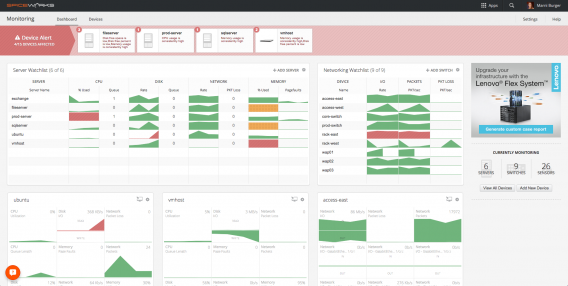
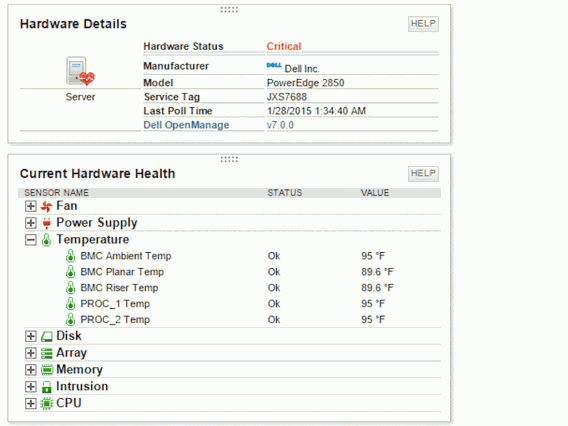
Let’s take a look at a hardware snapshot from the SolarWinds performance monitoring tool.

This is an example of server monitoring done right. Notice that the hardware components that are at risk of failing are flagged with red indicators. If this was your website, you could quickly call your host or your IT administrator and catch the problem before it becomes a disaster.

Difficulties Remote Controlling

Windows uses a service called Remote Desktop (RDP) to give you the ability to control your web server from anywhere in the world. RDP is important when you want to install new software on your server or when you need make new changes to your website.

RDP runs in the Windows background and when you make a “call” to the server, it responds with a login request. When performance wanes, you’ll notice difficulties with either RDP itself or navigating within the RDP window. Problems such as lockouts, application freezes, or dropped connections to the server are signs that something serious is happening and your website might be on a verge of a crash.

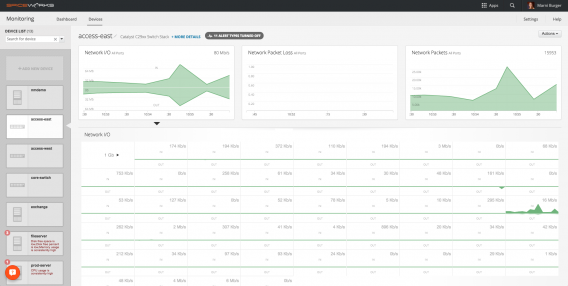
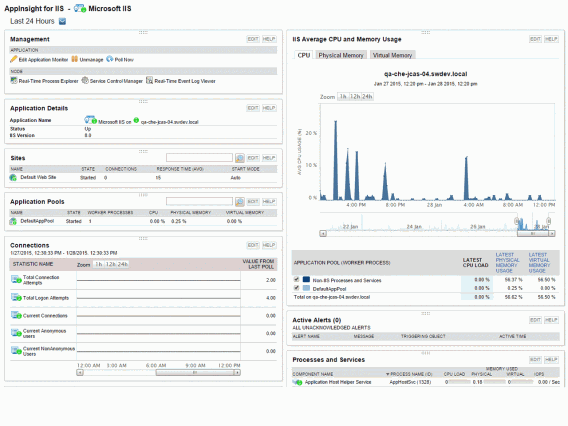
A good performance monitoring tool identifies the processes running on your server and gives you clues to identify which applications are taking too much memory or CPU resources. Take a look at the screenshot from the SolarWinds performance monitoring tool below.

Notice the section that indicates CPU usage. See the spikes? These spikes are normal, but too many spikes, or spikes that last too long, slow down the server and your website will eventually crash. Monitoring for these abnormalities means that you can schedule a server reboot to temporarily stop your website from crashing, and checking your monitoring log will help you perform a root-cause analysis.
Application Timeouts

Just like your personal computer, applications crash when your server’s resources are depleted. While a crash could simply mean that you need more resources, it could also be symptomatic of failing memory or a corrupted hard drive – both of which are difficult to diagnose without a performance monitoring tool.

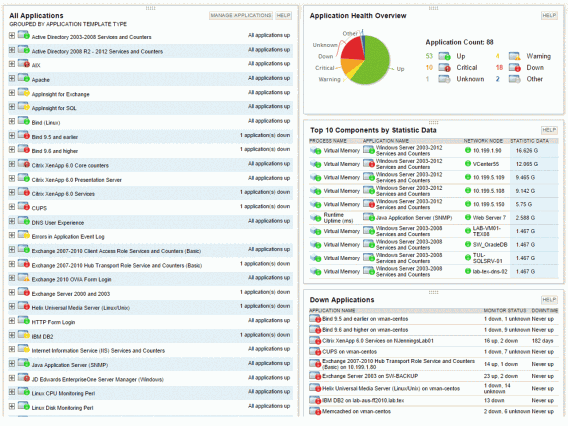
Here is another SolarWinds example.

Notice that this SolarWinds tool displays all the applications that are running on the server, and it flags the applications that have failed to run. “Down applications” aren’t necessarily a bad thing as you can choose to keep some applications from running for various reasons. However, some applications could rely on these “down-ed” applications, which would result in website crashes or errors.

With a good monitoring tool such as SolarWinds, you can review the list of “down” applications that are affecting your system’s workflow and quickly restart these applications before a dramatic event happens.

Random Disconnects

Finally, a server that doesn’t have enough resources will have trouble handling your website’s visitor traffic. Let’s say about 1,000 people want to visit your website every day, and about 1% of these people eventually go on to buy something. Having a website that cannot accommodate all your traffic means it is possible that you might lose all 10 paying customers when trying to accommodate the 990 other people.

Your website server uses memory and CPU resources to respond to each of these users as they navigate throughout your website. Once these resources are used up, the website starts to refuse connections to new visitors. These disconnects would be represented in several ways -The loading icon spins indefinitely, the page loading incorrectly or incompletely, or a “Connection Refused” message appearing in the browser – none of which are part of a recipe for happy customers.

While server resources aren’t the only cause of random disconnects, it is the one thing that you can quickly check and rule out, before combing through countless logs and reports to find a software error.

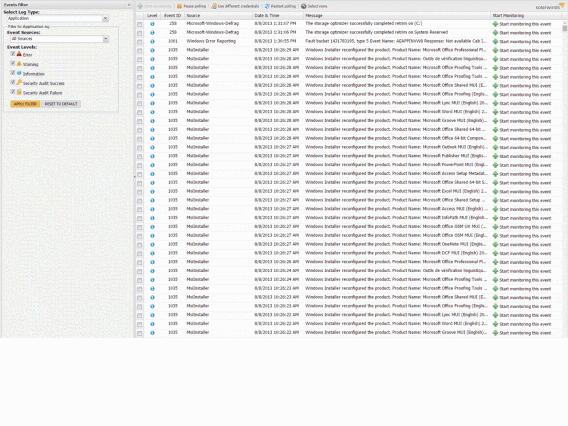
Here’s an example of how SolarWinds uses a graphical representation to help you monitor user activity on your website to spot recurrent disconnection issues.

Looking at this list of running events, you can quickly identify if any user connections are returning an error.

Wrap up

A crashed website is probably one of the most catastrophic events that could happen to your business. Apart from lost customers and revenue, it impinges on your reputation of delivering your product or service reliably and professionally. Investing in a proper Performance Monitoring tool, such as SolarWinds Server and Application Monitor, could save you from buckets of tears and perspiration, and a potential crisis from boiling over.

11 reasons you will be wearing a smartwatch this year

2015 is the year of the smartwatch. Not convinced? Here are 11 reasons you’ll be wearing one before the year ends:

1: Apple made one!

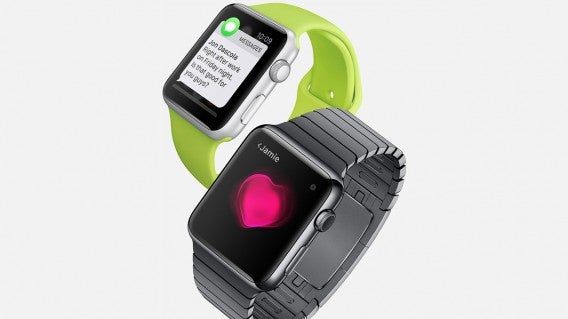
Apple Watch Messages
Love it or hate it, Apple is great at convincing us we need something when perhaps we don’t. With Apple Watch just around the corner, a smartwatch just got that much harder to resist. Not many of us had smartphones or tablets before Apple showed us why we “needed” them, don’t bet against it doing it again.

2: … and Android users can play too!


LG and Huawei are trying to grab the luxury smartwatch market too with the Huawei Watch and LG Urbane. Designed to look like classic luxury watches, it’s like having a Rolex you can talk to.

3: You want to get fit


Smartwatches want to make you healthier. By tracking your movement and heart rate, smartwatches will know how healthy you are and they can remind you to exercise more and get in shape. A smartwatch could be the personal trainer you’ve always needed. Or it could be the personal trainer you take off your wrist and “forget” to charge…

4: You want to live in the future


Let’s face it, making a call from your watch is only a step away from flying cars and hoverboards. If you grew up dreaming of that kind of future, it looks like it’s arrived. How could you resist?

5: You have too much money


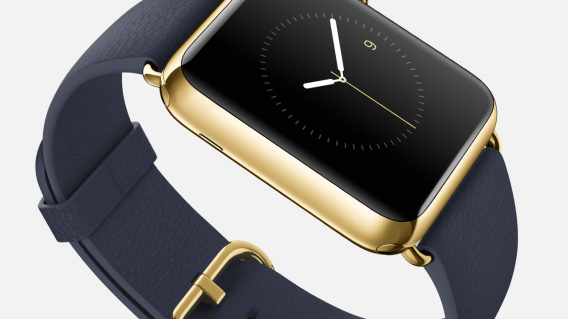
What better way to prove it to everyone in 2015 than with an Apple Watch Limited Edition? Starting at a cool $10,000, it’s the ideal way to say “I can afford to spend this again next year when Apple Watch 2 comes out.”

6: You want to save your phone battery life


That huge screen on your phone eats your battery whenever it’s on. With a smartwatch, you’ll wake your phone less often, which could help it last longer. Or the constant Bluetooth tethering could run it down faster, but let’s not think about that too much.

7: You didn’t read this article

Jon Riggall explained gave you five reasons not to get a smartwatch, but you wouldn’t listen, would you?

8: You’re a social media addict

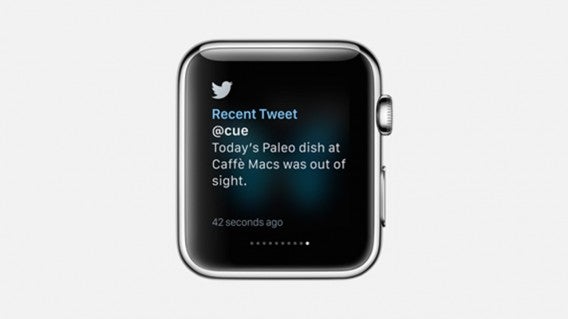
Apple Watch Twitter
A smartwatch is the perfect way to keep track of social media – you can get all your Facebook, Twitter and Tumblr notifications delivered straight to your wrist. With the Apple watch, it will even alert you every time something happens (if you want it to).

9: You can check your smart watch more discretely than your phone

We’ve all been there – you pull out your phone to check Twitter or Facebook, and someone complains that “oh, people never have conversations any more, they are always staring at their phone!”

Instead of explaining patiently that it’s the 21st Century, that’s just how people live nowadays and stop being such a luddite, you just glance at your wrist instead. They will barely notice.

10: You want to be even more connected to the office

Imagine Outlook notifications on your wrist! You’ll be even closer to the office, wherever you are!

11. You want to be part of the crowd

Android Wear

If the industry analysts are correct, we’ll all have smartwatches eventually: you don’t want to be left out! Get one soon, and your friends will think you’re a trendsetter.

Related Stories

Best apps for the Apple Watch (so far)

Best Android Wear smartwatch apps

Best Android Wear watch faces

8 apps you don’t want to explain to your parents

There are just some things that parents don’t understand and all these newfangled apps teenagers are using are downright bizarre to them. Explaining what the internet was and why I had to have AOL to AIM my friends was hard enough back in the ‘90s.

My parents just got used to emailing and texting me, now they’re struggling with all these chat apps. “Why there are so many of them?,” they ask. There are other apps we use everyday but as it turns out, they’re extremely difficult to explain to parents.

Here are 9 apps I don’t want to have to explain to my parents because they just won’t get it.

1. Snapchat (Android | iOS)

I don't like it

“I have to keep holding on to see pictures? Wait, the picture just disappeared? You’re telling me that’s a feature?”

Beyond explaining why people may want photos to disappear, do you really want to explain the indecent ways some people use Snapchat?

2. Twitter (Android | iOS)

Twitter is stupid

My parents barely understand Facebook and now I have to explain what Twitter is? FML.

To parents, Twitter is a silly place where people follow celebrities and broadcast trite things about their own life. Sure they can see what’s trending, but then you’ll also have to explain what those things are. There goes your entire Friday night.

3. Google+ (Android | iOS)

dafuq

Another social network? Why would someone use this over Facebook? Good question, Mom.

On top of that, Google doesn’t even know what Google+ is any more. This is probably why Google’s trying to turn it into a photo service and abandoning the social networking side of it.

4. Yo (Android | iOS)

confused

Hell, I don’t even understand this one. It’s an app that just sends your friends message that says “Yo.” It does nothing else. For more meaningful communication, you’ll have to use another chat app or text them.

“Why don’t you call each other instead,” I can hear my mother asking. Don’t get me started on calling and voicemail, Mom.

5. Tinder/Grinder/Down

let me explain franco

Don’t let your parents catch you furiously swiping left or right. They’ll end up asking to see your “friends” and why they’ve never met them before.

Before long, they’re going to start asking you when you’re going to settle down, get married, and when you’re going to pop out some grandchildren for them. You’re not getting any younger, you know.

6. Watching Cute Girl (iOS)

surprised shocked speechless

This is an app that helps you build “confidence” by staring at cute girls. You’ll spend the rest of the night trying to convince your parents you don’t have Yellow Fever.

7. Whisper (Android | iOS)

stuart i love secrets

Is it a social network? Is it a chat app? Are the things posted true?

Good luck trying to explain why someone would lie on the internet. Also try explaining how grown adults are using Whisper to rant about their lives to complete strangers.

8. Omegle (iOS)

that's a penis

You’re really going to be rolling the dice if your parents ask you to show them Omegle. Cross your fingers as your new chat buddy connects and pray you won’t see penis.

Also don’t tell your parents you’re talking to strangers online. They’re going to tell you they’re all pedophiles. Which is true.

12 creepiest Android apps

There are millions of Android apps but you usually only see the top apps lists. But there are also some really strange and creepy apps that you should know about. While you may think these apps could be useful in some situations, trust us, that’s definitely not the case.

CREEPER

1. Secret Selfie: People take selfies all the time. You may even see people with so-called “selfie sticks.” But now you can be that weirdo who takes a selfie without the camera being visible on your screen. If you have absolutely no self esteem, this is for you.

Watching you2. Spy Camera Phone: Ever wanted to take a picture of someone without them knowing? It’s already hard to do with that shutter noise, but Spy Camera Phone hides the camera behind another app and lets you be a creeper and take pictures of people without them knowing.

We know where you are 3. Mobile Number Spy Location: There’s a lot of information attached to a phone number and Mobile Number Spy Location gives you the tools to track people. It says you can follow a child’s movements, but really you’re going to follow some random person you met at a bar.

Party time
4. Background Check BeenVerified: Met someone special? Want to know if they’ve had run-ins with law enforcement? Background Check BeenVerified gives you one complete background check every month. Don’t go wasting it if they’re not the one.

Hiding in plain sight 5. Stalk App: The official name is s.Talk, but what’s that spell? Stalk lets you chat with friends and family, but really you want to find people that are nearby. Stalk lets you do that. When a screenshot of an app says “I don’t stalk, I investigate,” it’s a winner.

Your location is mine
6. PhoneWatcher: Don’t trust your significant other or your kids? Install PhoneWatcher and get records of all their text messages and phone calls. It’s an excellent way to build trust.

Party Hard
7. PoopLog: If you love statistics, knowing the trends of your poop might be really useful. But if you feel the need to log your poop for the rest of your life, that’s just weird.

Gee Gee Gee Gee Baby Baby
8. Hot Asian Girls Photos: Got yellow fever but haven’t admitted it yet? Keep your fetishes a secret with photo albums of Chinese and Japanese girls. Or go teach English in Asia.

BOOM
9. Pickup Lines & Flirty Jokes: “So we’re friends now, when do the benefits kick in? ;)” Someone please try this in real life.

Working out those muscles
10. Penis Enlargement: From the description: Follow these tips and you will increase your penis size up to 1.5 inches within 3 months. Good luck.

No words to describe
11. Gay-O-Meter Full Version: We can’t even….

So fresh and so clean

12. Butt Analyzer: You take a photo of someone’s butt and it tells you how attractive it is. Rely on technology to make decisions for you.