Loki meets The Simpsons on Disney+

Disney+ just dropped The Simpsons: The Good, the Bart, and the Loki, an original short for subscribers of its streaming platform that will see Springfield’s most famous family invade the Marvel Cinematic Universe (MCU). Following little Maggie in The Force Awakens from Its Nap, this new The Simpsons crossover leaves the world of Star Wars to take us on a hilarious trip that will even shock the God of Mischief himself. And one thing’s for sure, with Bart along for the ride, laughter is guaranteed.

What is The Simpsons: The Good, the Bart, and the Loki about?

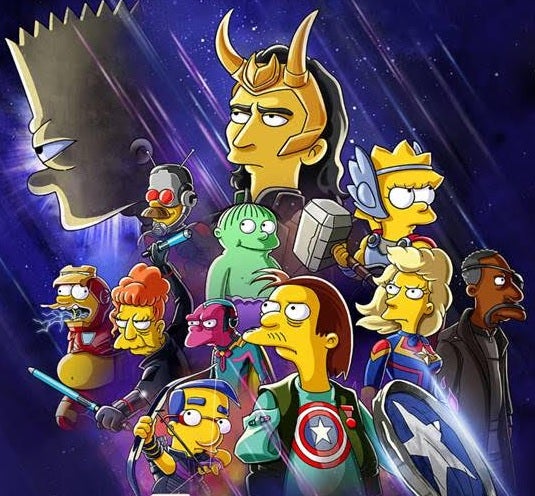
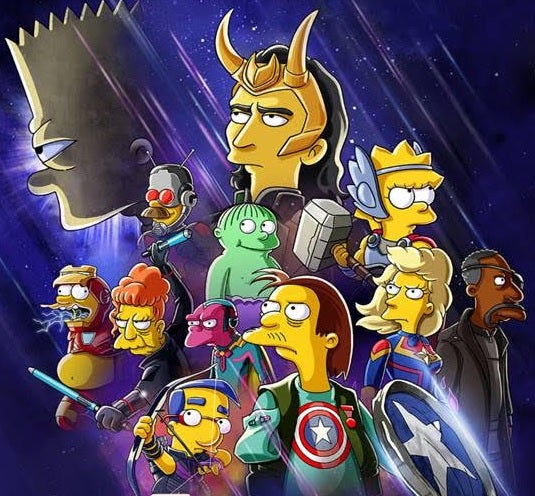
Featuring a promotional poster in which The Simpsons parody the great Avengers: Endgame, the new short begins with Loki being exiled from Asgard once again. Little does this charismatic villain know that in Springfield he’ll meet his match, someone who’s just as much of a trickster as he is: Bart Simpson. Joining forces with him, the God of Mischief will have to take on one of the most powerful (and hilarious) heroes imaginable. You’ll love the fun references to the MCU universe, such as Lisa as Thor, Bart embodying Iron Man, or Skinner’s mom as Black Widow.
Like all good parodies, The Simpsons: The Good, the Bart, and the Loki is a true gift for fans of Matt Groening’s classic animated series and the Marvel universe. It stars Tom Hiddleston voicing Loki, and despite being just about four minutes long (six if you count the credits at the end), it manages to combine the spirit of both franchises. So, Disney+ will put a smile on subscribers’ faces once again with an unprecedented crossover.

Want more? The fun continues on Disney+

If The Good, the Bart, and the Loki leaves you wanting more, don’t worry! As a Disney+ subscriber, you can keep enjoying the adventures of the family from Springfield on Star. The platform has all the episodes, movies, and specials of The Simpsons, such as Maggie Simpson in The Force Awakens from Its NapIn this fun Star Wars crossover, the baby of the family will embark on an epic adventure in a daycare far, far away in search of her pacifier. Tiny Padawans, Sith Lords, and familiar droids come together in this hilarious parody of the George Lucas universe.

Aside from The Simpsons, be sure to check out all the other movies and shows from the Marvel Universe. If you liked this short, don’t miss your chance to watch Loki, the latest MCU series on Disney+ starring the God of Mischief himself. Mysteries, plot twists, and Loki’s caustic wit come together in a story full of time jumps that will have you hooked from the first episode. You don’t believe us? Watch new episodes every Wednesday exclusively on this platform.
How to Download Jenny Mod in Minecraft 1.12.2 in 5 Easy Steps

For those that don’t know, Jenny is a Minecraft character created by developer SlipperyTum. While she has several supernatural abilities in the game, she’s mostly known for being half or completely nude. It’s led to gamers referring to her as the pornstar of Minecraft.

We’re going to show you how to download the Jenny Mod in Minecraft 1.12.2 specifically before we delve into the new features she presents.

  1. Download the Jenny Mod folder

    How to Download Jenny Mod in Minecraft 1.12.2 in 5 Easy Steps

    To get the egg rolling, you’ll need to down folder from a reliable source. After you select the download button, it should appear in your download folder unless you changed the default destination. It’s best that you have an antivirus solution on your device to ensure that it doesn’t contain malware.

  2. Extract the files

    How to Download Jenny Mod in Minecraft 1.12.2 in 5 Easy Steps

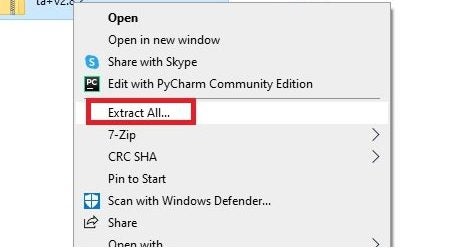
    Once you have a safe download of the Jenny mod, you’ll need to extract the files. Find the zip folder on your PC, right-click, and say extract all. You’ll see a new folder available with all of the game files located inside. You’ll need these to add the new features to Minecraft.

  3. Place them in the Minecraft mod folder

    How to Download Jenny Mod in Minecraft 1.12.2 in 5 Easy Steps

    You’ll need to copy the new folder to the Minecraft mod folder. Alternatively, you can move the downloaded folder to the mod folder and extract the files there. To find the correct location, Search for Minecraft in your program files or PC for %appdata% and look for the “Mod” folder.

  4. Launch Minecraft

    How to Download Jenny Mod in Minecraft 1.12.2 in 5 Easy Steps

    With the files in the correct location, you can now launch the game with the Jenny mod. However, it only works on Minecraft 1.12.2. Therefore, you’ll need to ensure you run the correct version from your Minecraft mod launcher with “Forge (OptiFine)” selected.

  5. Find the Jenny egg

    How to Download Jenny Mod in Minecraft 1.12.2 in 5 Easy Steps

    You may see new skins and items available, but you’ll need to hunt for the Jenny egg to find the character. If you’re playing Creative Mode, you can simply select the egg and spawn it. Survival Mode is more challenging, as you’ll need to search in different locations until you find it.

A Quick Look at Jenny’s Features

Now that you’ve seen how to download the Jenny mod for Minecraft, we’ll investigate what new features you can look forward to. In some ways, she’s a really powerful mob created mostly for fans, so expected an overpowered character for absolutely no reason.

Abilities

If Jenny takes a luck potion, she can use Probability Manipulation and Water Breathing to her advantage. She can also teleport like the Enderman under the right conditions, making her unreliable to keep around for too long. 

Jenny also has excellent regeneration, letting her heal quickly from attacks. Since the developer created her with specific physical attributes in mind, she can use some of her body parts in battles, such as her hips or buttocks.

How to Download Jenny Mod in Minecraft 1.12.2 in 5 Easy Steps

Weaknesses

Even superheroes have weaknesses, and Jenny isn’t without them either. She’s not fond of Squids, that seem to have a hold over her. Also, she tends to get stuck in slime quickly, so make sure you keep her away from the biomes that spawn them. Of course, it’s a great way to keep her in one place.

How to Download Jenny Mod in Minecraft 1.12.2 in 5 Easy Steps

Bring Jenny to your World

Placing Jenny in your world will certainly be an interesting experience. Of course, fans of the character will be thrilled having her around, although activating her skills may be challenging. Of course, you can have a few of them running around if it brings joy to your Minecraft world, but we hope to see more skins and items added in the future.