
Skip to content

Softonic English

Just another Softonic Sites site

How to match product colors across an entire catalog in Adobe Photoshop

Getting a catalog to feel visually consistent is harder than it looks. One image comes out warm, the next one feels cooler and a little washed out, and suddenly the whole set stops looking like it belongs together. Pulling everything into the same color range takes time, plus some technique, but Adobe Photoshop makes it a lot easier to handle.

Adobe Photoshop
Adobe Photoshop Try now

Photoshop gives you a few solid ways to make a full set of images feel cohesive. With the right approach, you can clean things up in a handful of steps and save yourself a lot of time when you’re working through image after image. In this guide, you’ll see how to get the colors in your images closer together in Adobe Photoshop.

Why color gets messy as a catalog grows

With just a few images, it’s usually easy to tell whether the color looks right. Once you’re dealing with hundreds of files, that gets trickier fast. Now you’re juggling lighting conditions, the software used to create the images, whether they were AI-generated or shot with a camera, and plenty of other variables.

Consistent product color matters more than most people expect. When your images stay within the same visual range, a couple of things tend to happen:

  • Fewer returns: if the product doesn’t look the same in real life as it does in the photo, you’re more likely to deal with returns your store shouldn’t have had in the first place.
  • A store that looks more professional: when the product images feel consistent from one listing to the next, people tend to trust the store more.

Before you begin, set a shared color base

A little setup at the start makes the rest of the process smoother.

  • If you’re working with a team, make sure everybody uses the same color profile. You can set that in Edit > Color Settings. For images that are headed to the web or social media, sRGB is usually the safest choice.
  • Pick your reference photos. Keep one or several images nearby that already have the base color you want the rest of the set to follow.
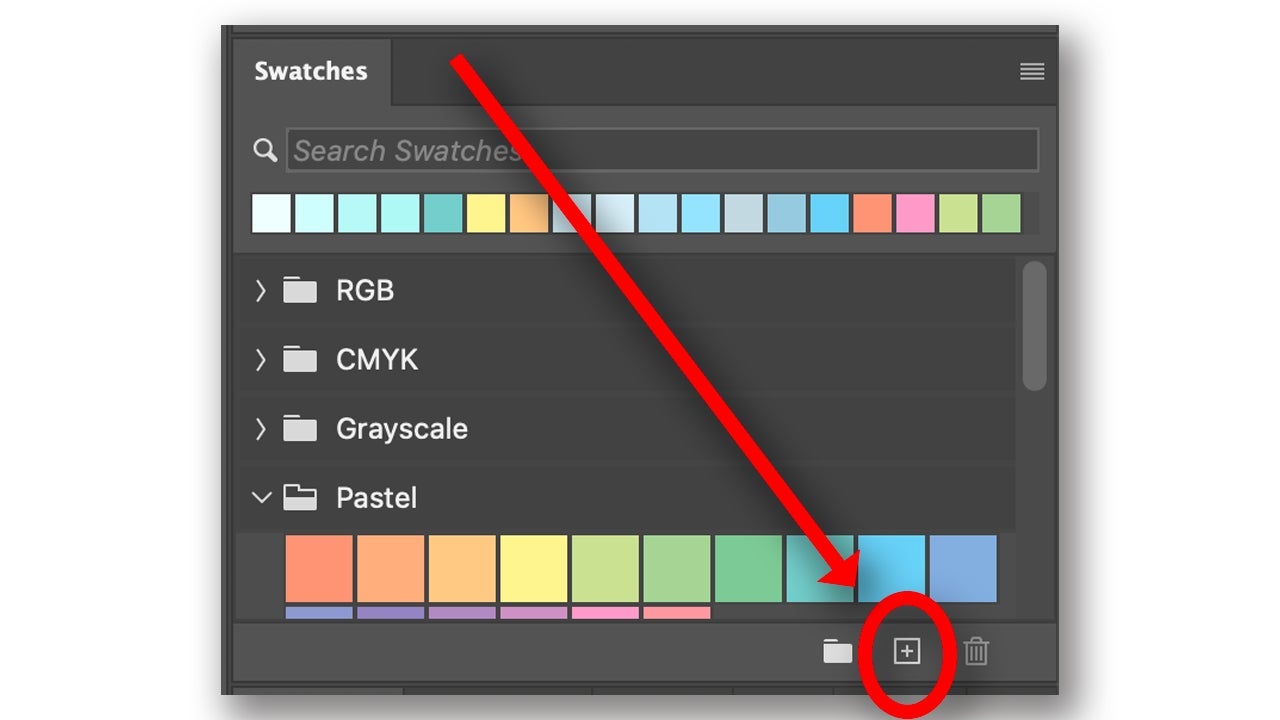
  • Save those colors too. If you already know the tones you’re aiming for, create swatches in the Swatches panel (Window > Swatches). Use the Eyedropper tool to sample the color, then click the + button, like in the image. Give it a name and click OK.
Camera Raw and Match Color: what each one does

Photoshop includes Adobe Camera Raw and Match Color, and both can help when several photos need to line up more closely. They don’t do the same job, though.

Camera Raw

If you edit RAW photos, meaning files whose data hasn’t been processed or compressed, Adobe Camera Raw will probably end up being one of the tools you use most. It opens on its own when you open a RAW file in Adobe Photoshop. If you want to use it on a JPG, a PNG, or even a specific layer, go to Filter > Camera Raw Filter.
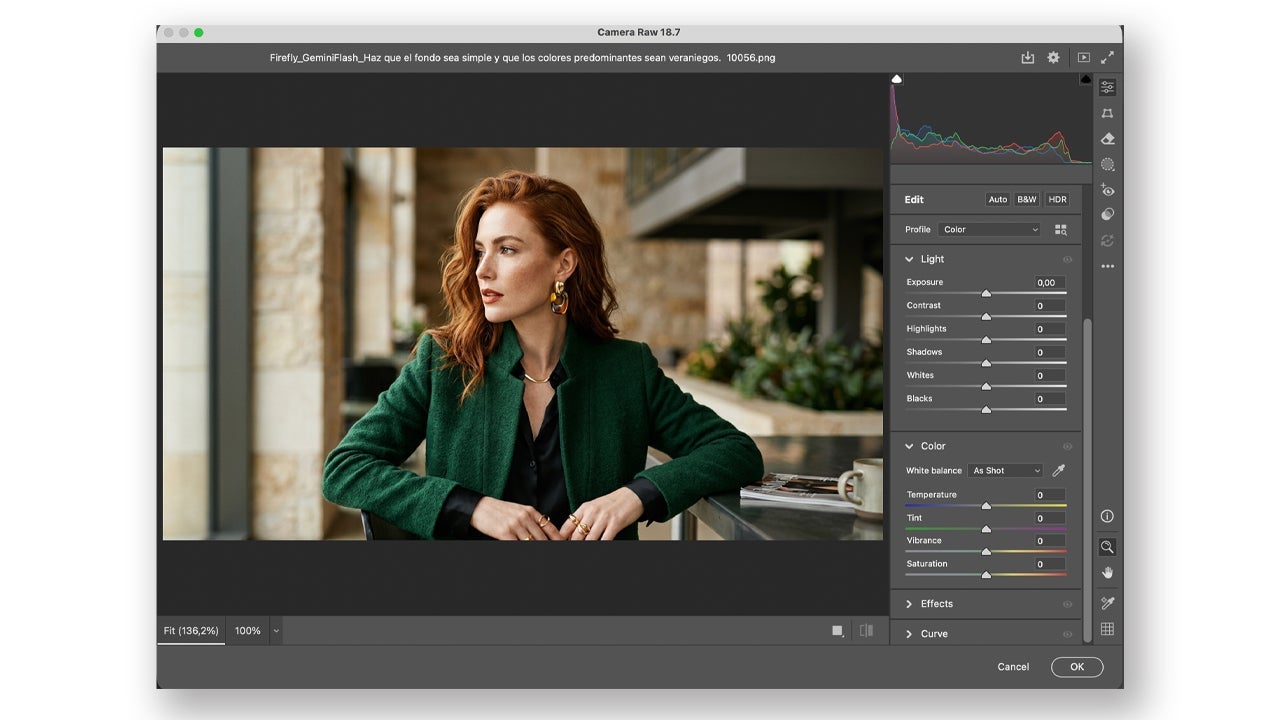
On the right side, you’ll find panels for white balance, contrast, highlights, and a lot more. If you aren’t sure where to start, hit Auto. It gives you a first pass that you can tweak by hand afterward. If you’re new to editing, this is a good place to begin because you can get decent results in seconds.

Match Color

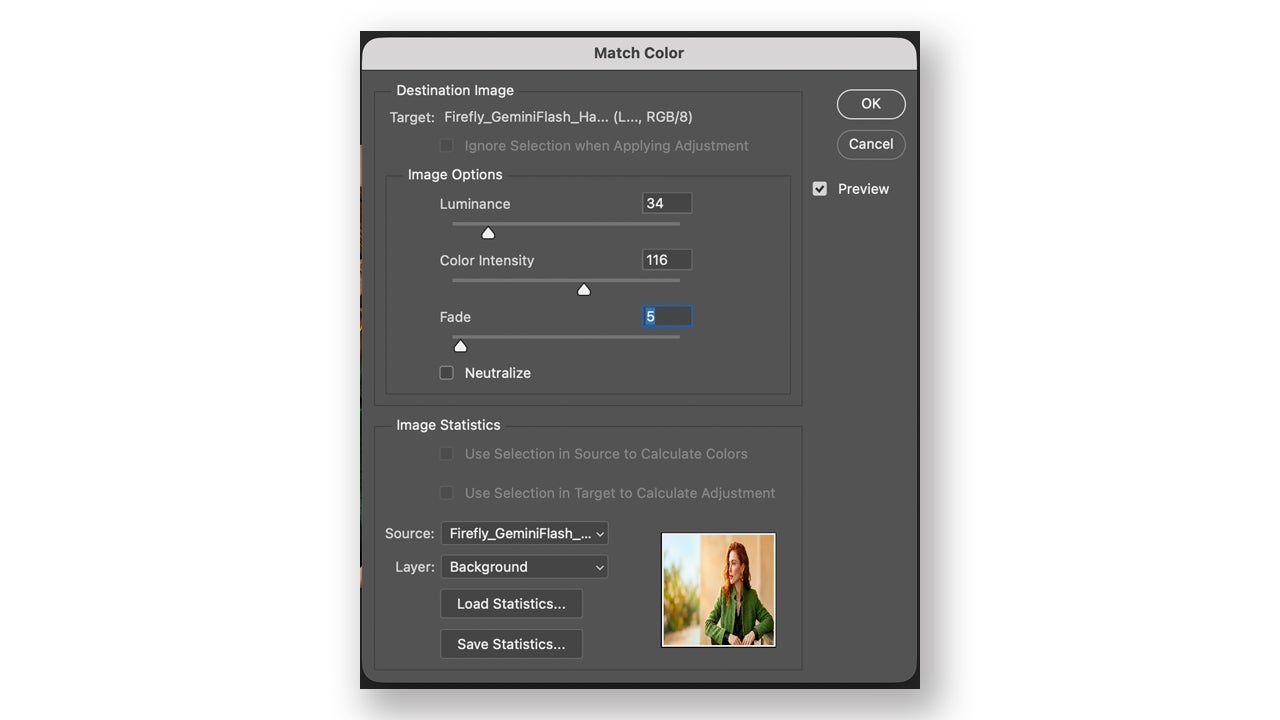
Match Color lets you pull the color from one image and apply it to another. It’s especially useful when you’ve got several shots of the same product but the tones don’t line up. To use it, open two images: the one you want to correct and the one you’ll use as the reference.

Then duplicate the layer of the image you’re fixing. Select that copied layer and go to Image > Adjustments > Match Color. At the bottom, in the Image Statistics section, open the Source dropdown and choose the reference photo. If Preview is checked, you’ll see the change right away.
How to handle color in hundreds of photos

  • Actions: an action records the steps you apply to one image, whether that’s adjustments, cropping, or color retouching, and then repeats those steps on other images. Open the panel from Window > Actions, then click the + button there to create a new action.
  • Smart Objects: if the same element appears across every image, convert it to a Smart Object. Once you correct the color on that layer, the change updates in every document that includes it.

And for the rest of the workflow, Photoshop gives you a couple more tools that are worth keeping close:

  • Creative Cloud Libraries: inside Libraries, you can save colors, logos, and other graphic elements. If you’re working with a team, it’s a simple way to keep everything in one place instead of having to hunt for files.
  • Adobe Firefly: tools like Generative Fill and Generative Expand aren’t built specifically for color matching, but they can still help with related tasks, like extending a background or removing distracting elements.

From a photo catalog to video in Adobe Premiere Pro

If you also work in Adobe Premiere Pro, you can use the Lumetri Color panel to adjust video while using the photos you’ve already edited in Adobe Photoshop as your reference. The colors you’ve saved in Creative Cloud Libraries also show up in Adobe Premiere Pro, so it’s pretty easy to keep the tones aligned there too.

Adobe Photoshop
Adobe Photoshop Try now

Why Photoshop is worth using

Photoshop gives you very fine control over color, lets you work non-destructively, and speeds up batch editing in a real way. If you manage a large catalog and want your photos to stay consistent, it’s got the tools to help you do that with a professional finish. It also saves a lot of time on a job that can get repetitive fast and feel a little overwhelming when you’re just getting started with editing.

Author: María López

{ "de-DE": "Künstler aus Berufung und Technikliebhaber. Seit ich denken kann, habe ich gerne an allen möglichen Gadgets herumgebastelt.", "en-US": "Artist by vocation and technology lover. I have liked to tinker with all kinds of gadgets for as long as I can remember.", "es-ES": "Artista de vocación y amante de la tecnología. Me ha gustado cacharrear con todo tipo de gadgets desde que tengo uso de razón.", "fr-FR": "Artiste de vocation et amateur de technologie. J'aime bricoler avec toutes sortes de gadgets depuis que j'ai l'usage de la raison.", "it-IT": "", "ja-JP": "", "nl-NL": "", "pl-PL": "", "pt-BR": "", "social": { "email": "", "facebook": "", "twitter": "", "linkedin": "" } } View all posts by María López

Author María LópezPosted on November 11, 2026November 12, 2026Categories News

Post navigation

Previous Previous post: Apple smart glasses and camera AirPods are back in focus: supplier points to both projects
Next Next post: The iPhone 18 Pro Max has the best battery: they’ve tested 32 phones and this one beats them all in battery life

Recent Posts

  • Nvidia in CEO turmoil: Trump wants Tim Cook as CEO
  • Star Wars returns in 2027: archival documentary, 1977 rerelease
  • Elon Musk opens door to Jensen Huang: ‘Would be an honor’
  • GTA 6 leaks again: possible Leonida map surfaces via Selfridges
  • Netflix updates its November 2026 anime slate: Bass X Machina is out now

Archives

  • November 2026
  • October 2026
  • September 2026
  • August 2026
  • July 2026
  • June 2026
  • May 2026
  • April 2026
  • March 2026
  • February 2026
  • January 2026
  • December 2025
  • November 2025
  • October 2025
  • September 2025
  • August 2025
  • July 2025
  • June 2025
  • May 2025
  • April 2025
  • March 2025
  • February 2025
  • January 2025
  • December 2024
  • November 2024
  • October 2024
  • September 2024
  • August 2024
  • July 2024
  • June 2024
  • May 2024
  • April 2024
  • March 2024
  • February 2024
  • January 2024
  • December 2023
  • November 2023
  • October 2023
  • September 2023
  • August 2023
  • July 2023
  • June 2023
  • May 2023
  • April 2023
  • March 2023
  • February 2023
  • January 2023
  • December 2022
  • November 2022
  • October 2022
  • September 2022
  • August 2022
  • July 2022
  • June 2022
  • May 2022
  • April 2022
  • March 2022
  • February 2022
  • January 2022
  • December 2021
  • November 2021
  • October 2021
  • September 2021
  • August 2021
  • July 2021
  • June 2021
  • May 2021
  • April 2021
  • March 2021
  • February 2021
  • January 2021
  • December 2020
  • November 2020
  • October 2020
  • September 2020
  • August 2020
  • July 2020
  • June 2020
  • May 2020
  • April 2020
  • March 2020
  • February 2020
  • January 2020
  • December 2019
  • November 2019
  • October 2019
  • September 2019
  • August 2019
  • July 2019
  • June 2019
  • May 2019
  • April 2019
  • March 2019
  • February 2019
  • January 2019
  • December 2018
  • November 2018
  • October 2018
  • September 2018
  • August 2018
  • July 2018
  • June 2018
  • May 2018
  • April 2018
  • March 2018
  • February 2018
  • January 2018
  • December 2017
  • November 2017
  • October 2017
  • September 2017
  • August 2017
  • July 2017
  • June 2017
  • May 2017
  • April 2017
  • March 2017
  • February 2017
  • January 2017
  • December 2016
  • November 2016
  • October 2016
  • September 2016
  • August 2016
  • July 2016
  • June 2016
  • May 2016
  • April 2016
  • March 2016
  • February 2016
  • January 2016
  • December 2015
  • November 2015
  • October 2015
  • September 2015
  • August 2015
  • July 2015
  • June 2015
  • May 2015
  • April 2015
  • March 2015
  • February 2015
  • January 2015
  • December 2014
  • November 2014
  • October 2014
  • September 2014
  • August 2014
  • July 2014
  • June 2014
  • May 2014
  • April 2014
  • March 2014
  • February 2014
  • January 2014
  • December 2013
  • November 2013
  • October 2013
  • September 2013
  • August 2013
  • July 2013
  • June 2013
  • May 2013
  • April 2013
  • March 2013
  • February 2013
  • January 2013
  • December 2012
  • November 2012
  • October 2012
  • September 2012
  • August 2012
  • July 2012
  • June 2012
  • May 2012
  • April 2012
  • March 2012
  • February 2012
  • January 2012
  • December 2011
  • November 2011
  • October 2011
  • September 2011
  • August 2011
  • July 2011
  • June 2011
  • May 2011
  • April 2011
  • March 2011
  • February 2011
  • January 2011
  • December 2010
  • November 2010
  • October 2010
  • September 2010
  • August 2010
  • July 2010
  • June 2010
  • May 2010
  • April 2010
  • March 2010
  • February 2010
  • January 2010
  • December 2009
  • November 2009
  • October 2009
  • September 2009
  • August 2009
  • July 2009
  • June 2009
  • May 2009
  • April 2009
  • March 2009
  • February 2009
  • January 2009
  • December 2008
  • November 2008
  • October 2008
  • September 2008
  • August 2008
  • July 2008
  • June 2008
  • May 2008
  • April 2008
  • March 2008
  • February 2008
  • January 2008
  • December 2007
  • November 2007
  • October 2007
  • September 2007
  • August 2007
  • July 2007
  • June 2007
  • May 2007
  • April 2007
  • March 2007
  • February 2007
  • January 2007
  • December 2006
  • November 2006
  • September 2006
  • August 2006
  • June 2006
  • May 2006
  • July 2001
  • January 2001
  • November 2000
  • September 2000
  • August 2000
  • July 2000
  • April 2000
  • March 2000

Categories

  • Affiliate post
  • Expert Review
  • Gaming
  • Guides
  • How to
  • Legacy how To
  • News
  • Noticias
  • Software>Security
  • Sponsored
  • Trucos y Consejos
  • Uncategorized
  • Windows software

Meta

  • Log in
  • Entries feed
  • Comments feed
  • WordPress.org
Softonic English Proudly powered by WordPress