Marvel’s Eternals now available on Disney Plus

Without leaving us much time to recover from the excellent HawkEye, Marvel returns to Disney Plus with its latest blockbuster: Eternals. From January 12, all of the streaming service’s subscribers will be able to watch Chloé Zhao’s film at no extra cost. Are you ready to meet some of the most powerful characters in the Marvel Universe?

If you still don’t own a Disney Plus membership, don’t worry. January is the best time of the year to join the service and gain access to its amazing catalog. Also, don’t miss out on the chance to save 20% thanks to its annual plan. That’s two whole months of Disney Plus for free!

Disney+ Offer SUBSCRIBE NOW
9
Save 20% on the annual subscription

Giving Marvel a new direction

Based on the 1976 comic strips by Jack Kirby, Eternals follows the adventures of the champions of planet Olympia, a group of immortal heroes sent to Earth by the Celestials to become the guardians of humankind. Their mission is none other than to supervise the evolution of the human race and make sure that they are protected from The Changing People, also known as the Deviants.

Released in theaters after the exciting Shang-Chi and the Legend of the Ten Rings, Eternals is a treat for all MCU fans. The movie isn’t just bold and full of surprises, but it manages to provide a breath of fresh air that breaks from the style of previous Marvel movies to date. This is achieved not only by introducing a new and unfamiliar group of heroes to the story, but also by transforming the classic visuals and storytelling usually found in MCU films.

Promotional image from Eternals

An all-star cast and crew

Eternals isn’t just an amazing action-filled adventure, the movie also boasts an all-star cast and crew lead by the Oscar-winning director and scriptwriter Chloé Zhao. That’s not all, through the film you’ll see some of Hollywood’s most familiar faces, from both the big and small screen, playing the roles of these god-like heroes.

Some of the most notable actors from the films include Richard Madden (Game of Thrones), Gemma Chan (Fantastic Beasts and Where to Find Them), Kumail Nanjiani (Silicon Valley), Lauren Ridloff (The Walking Dead), Brian Tyree Henry (Atlanta) or Salma Hayek (From Dusk Till Dawn)… But that’s not all! There’s also Lia McHugh (Totem), Don Lee (Train to Busan), Barry Keoghan (Dunkerque) and even Angelina Jolie (Changeling).

Salma Hayek in Eternals

Feel part of the movie thanks to IMAX Enhanced

Whether you’ve already watched the film in theaters or this is the first time you are watching Eternals, the movie offers a brand new experience through Disney Plus. Joining the other 13 Marvel films in the streaming service, Eternals can also be enjoyed using the revolutionary IMAX Enhanced playback system.

If you aren’t familiar with this technology, IMAX Enhanced lets you bring the magic of an IMAX screen to the comfort of your living room. With it, you can experience Marvel movies like you never imagined, with fully remastered image, sound and scale.

Using IMAX Enhanced you’ll experience a new world of vibrant colors, a greater contrast and sharper clarity thanks to its 4K HDR compatibility. What’s more, its sound quality mimics that of IMAX theaters and its aspect-ratio has been altered to adapt to its iconic screens. This translates into a wider perspective over what’s going on and literally immerses you in the film like you could never have imagined.

Promotional image of Eternals

How can I watch Eternals for free?

On Wednesday, January 12, Eternals will join the Disney Plus catalog. To be able to enjoy this film for free you only need to have an active membership with the streaming service. There are no additional charges.

Disney Plus offers two different plans to access its catalog. You can choose between a monthly subscription of $7.99 or an annual one for $79.99. Purchasing the latter is highly recommended since it allows you to enjoy Disney+ for a whole year but paying 20% less than what you’d have to with the monthly fee.

Disney Plus logo

A must watch for all MCU fans

Eternals joins Marvel’s Phase 4 breaking boundaries and creating a daring but refreshing adventure that will surely please all MCU fans. Don’t miss out on the chance to watch it for free on Disney Plus!

How to do a 2021 recap on Instagram

More and more social media channels are adding features that allow you to take a glimpse back over the year that’s just passed. This is a great way to relive some of your best memories and achievements of the year. Instagram is one of the newest social media platforms to introduce their 2021 Playback feature. 

In this article, we’ll show you how to do a 2021 recap on Instagram, even if you missed the feature.

What is Instagram’s Playback feature?

This new feature on Instagram lets users create a quick 2021 recap where Instagram automatically selects up to ten Stories you posted throughout the year. These Stories are then compiled into a memory reel. The memory reel also features a special 2021 frame and stickers that make it easily identifiable as a 2021 recap.

As if this wasn’t enough, the video reel also features the iconic trending remix of ‘Locked out of Heaven’ by Bruno Mars and ‘Easy on Me’ by Adele, making this feature easy to recognize in feeds of others.

How to Do a 2021 Recap on Instagram in 4 Simple Steps

The step-by-step approach to create your 2021 recap on Instagram

If you want in on this trend and look over your last year, this is how to do it on Instagram.

  1. Tap on the ‘View Playback’ button

    How to Do a 2021 Recap on Instagram in 4 Simple Steps

    If you’re lucky, you may still have the ‘View 2021 Playback’ banner at the top of your Instagram page. If the banner is still there, you can click on the ‘View Playback’ button in this banner. You may have noticed this banner appearing early in December when this feature became available. However, the banner is no longer available for the most part, which means you’ll have to continue to step two to enable the feature.

  2. Tap on the 2021 sticker in another user’s Playback Reel

    How to Do a 2021 Recap on Instagram in 4 Simple Steps

    If you no longer see the banner, your next option to see your 2021 Playback reel is by tapping on the 2021 sticker in another user’s recap reel. This may require some searching because although the recap is a popular trend, it may be challenging to find someone who still has the recap in their Story.

    Unfortunately, if you can’t find someone with a recap where you can tap on the 2021 sticker, you’ve missed your chance to use Instagram’s built-in recap feature. However, you can still make your own by using video editing software such as KineMaster or InShot and manually adding videos and an audio backtrack.

  3. Edit your 2021 Playback

    How to Do a 2021 Recap on Instagram in 4 Simple Steps

    If you can view your playback, you can also edit it. As mentioned, Instagram automatically selects up to ten videos to include in your recap. You can edit these by adding more videos from your Stories, removing videos, adding stickers and more.

  4. Share your 2021 recap

    How to Do a 2021 Recap on Instagram in 4 Simple Steps

    Once you’re happy with your recap reel, you can share it to your Story and download a copy directly to your phone’s gallery. Once in your device’s gallery, you can also share it via messaging apps such as WhatsApp or on other social platforms such as Facebook.

Tips for using Instagram’s recap feature

Here are a few tips to help make your 2021 recap reel spectacular.

  • Make sure that Story archiving is turned on
  • Choose only positive emotion-evoking stories
  • Keep it short and sweet – don’t use more than ten stories
  • Don’t go crazy with the stickers; only use a few
  • If you don’t like the video Instagram chose, replace it with a better one
  • If you haven’t posted three or more stories before 15 November, you won’t be able to create a recap automatically

Celebrate the past year and share memories in style

Enjoying your memories from the past year is a great way to start the new chapter positively. This Instagram Playback feature, although only available for a few weeks, is a great way to relive some of your best programmable moments and share the year with other friends and family.

10 free games on Prime Gaming

We’ve seen many free games and sales over the holiday season that kept us busy on our gaming platforms. Amazon Prime has stepped up to the plate and is also offering a selection of titles after you subscribe. It’s called Prime Gaming and is joining the likes of Epic Games and Xbox Games Pass with their generosity.

Here’s our selection of the top 10 free games on Prime Gaming.

Star Wars: Jedi Fallen Order

For the Star Wars fans, you can download Jedi Fallen Order for free. It’s an action-adventure game where you take on the role of Cal Kestis, a warrior who’s training to become a Jedi. However, there are hunters looking to take out every member of the order, with you as the prime target.

There are some role-playing aspects to Star Wars: Jedi Fallen Order. The story and character progress at an excellent pace, rewarding you for your hard work. Of course, the best part is mastering the lightsaber to take out more challenging enemies as you continue through the game.

Star Wars: Jedi Fallen Order

Total War: Warhammer

Another free game on Prime Gaming that has us excited is Total War: Warhammer. This strategy war game has outstanding graphics and gameplay elements, giving you action every step of the way. There are also building elements to master if you want to survive.

You’ll see a detailed campaign map that presents all your objectives, diplomatic relations, and missions in one place. You can also level up your units, which will help you progress through the main story. It’s definitely not for casual gamers, as you’ll have to use your wits every step of the way.

Total War: Warhammer

Fahrenheit: Indigo Prophecy Remastered

While the initial game launched in 2005, Fahrenheit: Indigo Prophecy Remastered is a free game on Prime Gaming that upgrades the graphics and gameplay elements for an improved experience. Even the music score sounds more chilling than ever before.

The most outstanding feature is the interactive gameplay. There’s a lengthy story to follow, but you’ll have your part to play along the way. You’ll also be able to replay the game and make different choices to see the consequences of your actions. 

Fahrenheit: Indigo Prophecy Remastered

WRC 7 FIA World Rally Championship

If you’re more into racing than action or mystery, try WRC 7. It follows the 2017 racing year of the sport in real life, with the same calendar and roster of drivers. The visuals and mechanics are realistic, so you may have some heart-stopping moments while drifting sandy corners.

You can also race against other players with the online mode; this allows you to challenge games over the internet. There’s also split-screen mode for local gaming. Whatever mode you choose, you’ll need to learn every corner and track if you want to become victorious.

WRC 7 FIA World Rally Championship

World War Z: Aftermath

We’ve seen several zombie movies and games over the last few years. World War Z: Aftermath follows the first game in the series and is based on the film with the same name. It’s a co-op multiplayer game where you’ll need your shooting skills to take out the undead and survive.

Fortunately, it has all the content from the World War Z Game of the Year (GotY) Edition. The story moves to a new location, where it’s your job to help a group of survivors eliminate zombies in the area. The action is intense and not for the faint of heart.

World War Z: Aftermath

Two Point Hospital

One of the free games on Prime Gaming that we thoroughly enjoyed is Two Point Hospital. Reminiscent of Bullfrog’s Theme Hospital from 1997, you manage a hospital in a small city where people contract strange ailments. As you discover new sicknesses, you need to heal the residents as quickly as possible.

As you complete missions, you unlock facilities in other cities. It becomes more complicated and intense, but the fun never ends. You’ll have a good laugh at some of the conditions while also stressing about how much money you’re making. The funds help you unlock new tech and rooms. 

Two Point Hospital

Roblox

Roblox is a fun platform that’s free-to-play and download whenever, even without Prime Gaming. What you’ll receive as part of your subscription are free items that you usually need to buy with Robux. For instance, this month’s deal includes the Cyberpunk Wolf Hat.

While there’s no official news on what more will become available in 2022, we’re hoping to see some free Robux or items that will make other gamers envious. You’ll need an account with Amazon Prime to unlock the rewards on Prime Gaming.

Two Point Hospital

In Other Waters

Here’s a science-fiction game that has a beautiful story. In Other Waters presents you as Artificial Intelligence, visiting other worlds to study the wildlife and plants. Hidden in this tale is a quest to find your lost partner. 

There are many puzzle elements to solve, which will keep you intrigued every moment in the alien world. Your Xenobiologist adventure will let you collect clues and observe items, while you can study sketches for more details. With every dive underwater, you’ll need to plot what you’ll investigate next.

Free games on Prime Gaming 8

League of Legends

League of Legends is another game that’s already free to download and play. As part of the Prime Gaming experience, you’ll receive Prime Gaming Capsule drops every month. These items provide free skins, RP, and so much more that you’d usually have to buy in the game.

If you’ve never heard of LoL before, it’s a strategy game that lets online players face each other in a tower battle royale. Your mission is to get to the enemy’s side of the map and take out the defenses and main castle. You also need to defend your castle at the same time.

Free games on Prime Gaming

Abandon Ship

Finally, we present an exhilarating tactical game called Abandon Ship. You sail the high seas in your ship, taking on ancient creatures and human enemies as part of the adventure. There are plenty of random events you’ll come across, as each area is procedurally generated.

The visuals are stunning, and you’ll love the booming sound effects of the cannons. The fun part is that the death of your ship is the start of a new adventure. You can build a small boat and survive until you claim a new ship.

Free games on Prime Gaming

Time to get back to gaming!

With this new subscription service available, you can now enjoy all of these free games on Prime Gaming as well as some new items. If you decide to take advantage of these offers, remember to make the most of them so you can receive a proper return on your investment. Now, head on out and start gaming!

How to download and install Gacha Club Edition mod

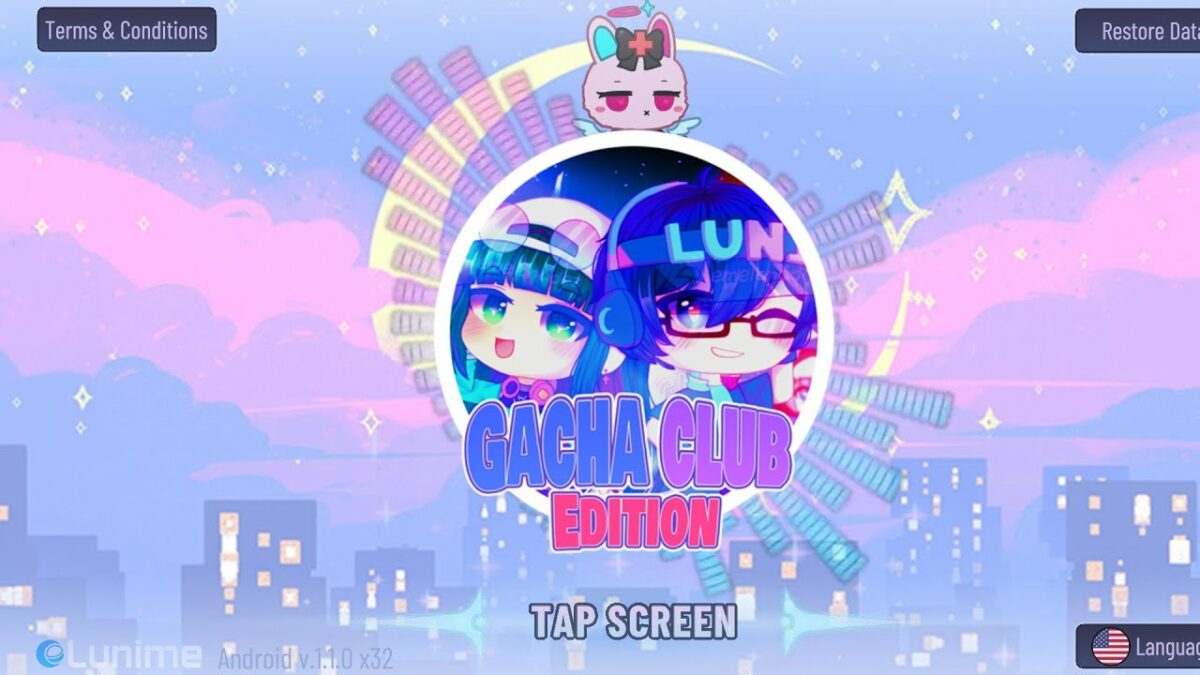
Gacha Club Edition presents several new items and characters as a mod to the original game, loved by children and adults worldwide. However, many people have noticed how challenging it is to obtain and get it to work on their devices. 

If you know how game modifications work, it shouldn’t be difficult to work out how to download and install the Gacha Club Edition mod. If you are new to this, here’s a quick guide to help you along the way.

What is Gacha Club Edition?

The original Gacha Club was and still is a sensation among gamers everywhere. While it is a casual title with a few mini-games, players enjoy spending hours unlocking new characters and dressing them. 

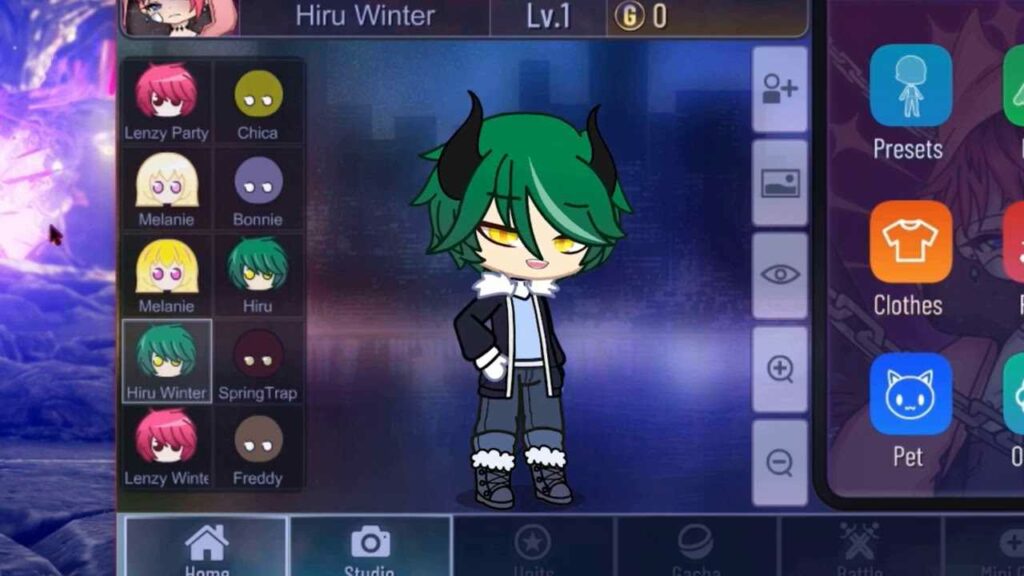
Gacha Club edition does the same thing, but it also provides new characters, outfits, and items not available in the original version. You don’t need to override the files on your original saved game since the mod version has its own storage location.

How to download and install Gacha Club Edition

  1. Download Gacha Club Edition mod folder

    How to download and install Gatcha Club Edition mod

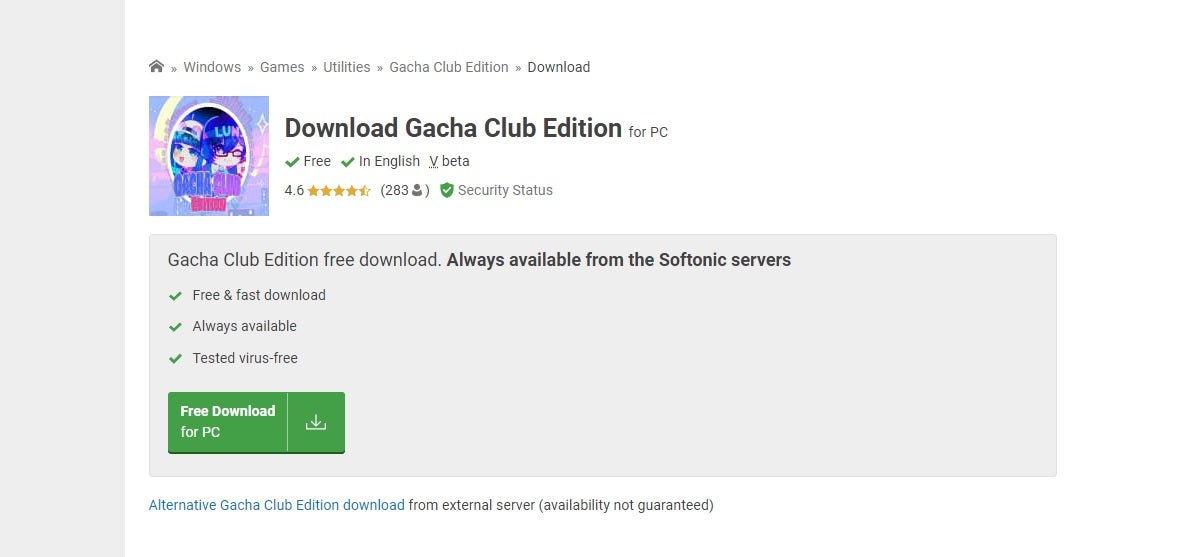
    First, download the compressed zip folder that contains all of the Gacha Club Edition mod files. When you click on the “Download” button, you’ll see a notification appear on the bottom of your browser showing you the progress. Make sure you save it to a location where you can retrieve it later.

  2. Extract files

    How to download and install Gatcha Club Edition mod

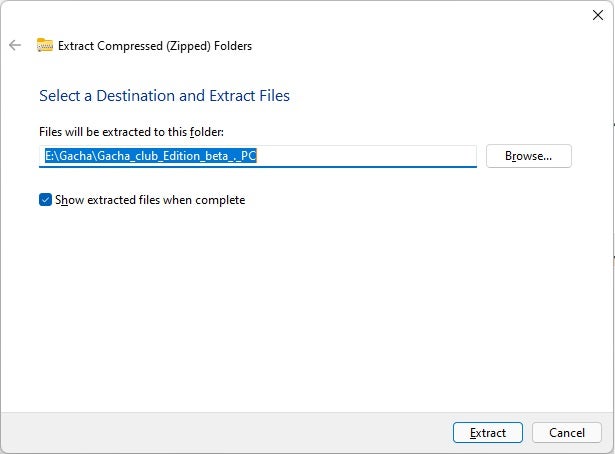
    Next, head to the location you saved the Gacha Club Edition zip folder. You need to extract the files so that you can play the game. To do so, right-click on the folder and select “Extract all.” You can extract them to the current location or indicate a new one.

  3. Open the game’s executable file

    How to download and install Gatcha Club Edition mod

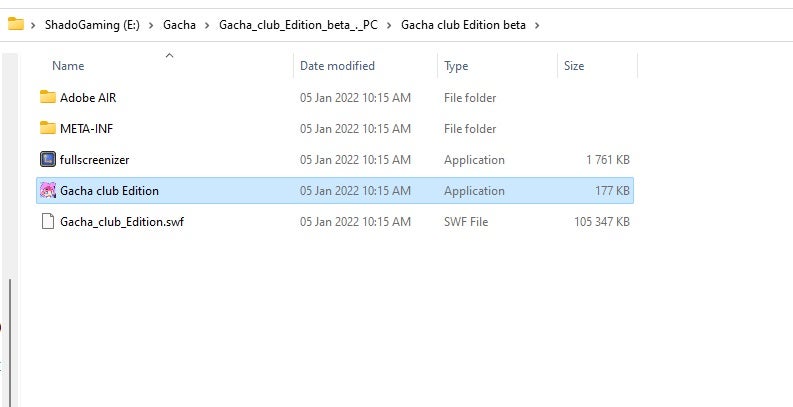
    The Gacha Club Edition mod doesn’t actually install onto your system, and there’s no installation wizard to activate. The game runs from the new folder you extracted by simply double-clicking on the executable file. 

    You can also save a shortcut to your desktop for ease of access by right-clicking on the main file, selecting “Send to…”, and then selecting your desktop. It is important to note that for Windows 11 you’ll have to click on “Show more options” to get to the “Send to…” choice.

Common Issues with Gacha Club Edition

While the steps for how to download and install Gacha Club Edition looks easy, there are a few common problems you may find along the way. For instance, some people complained that the game doesn’t work properly on their devices. 

In this situation, it’s best to remove it completely and try to follow the steps again. It may also be that your PC or mobile phone doesn’t meet the minimum requirements.

Another issue we detected while installing Gacha Club Edition was an error message while extracting. It says that the path name is too long. We skipped the error twice, and the game still ran properly.

However, some of the items may not run as expected. If you’re adventurous, you can go into the compressed zip folder and try to shorten the file names. It will still extract them and place them in your new game folder.

How to download and install Gatcha Club Edition mod

Features of Gacha Club Edition

The Gacha Club Edition mod has the same gameplay elements as the original title. You have various game modes, such as Story, Studio, Training, and Tower. Most of the characters and items make a return, as it’s based on the original game. 

So, what are the new features? Well, there are new effects and objects in the different modes. You also have the latest Mascots, and you can try on new outfits and colors. If you don’t like the original backgrounds, there are a few more you can try in this mod update.

Turn on your fashion sense

Once you work out how to download and install the Gacha Club Edition mod; the fun really begins. Use your creativity to create new avatars and show them to your friends and audience on social media. It’s amazing how many combinations you can come up with within a small game like this.