Skip to content

Softonic English

Just another Softonic Sites site

Using Acrobat And Illustrator To Create Interactive PDFs for Marketing

A PDF can be much more than just a simple static document: with Adobe Acrobat you can add buttons, links, drop-down menus, or even form fields to make it more dynamic and useful. This type of interactive PDF will be very handy for presentations, catalogs, portfolios, and a long etcetera. As you can imagine, there are many ways to prepare an interactive PDF. Among all the paths you can take, today we are going to suggest one for you to start shaping your ideas in a relatively easy way. Prepare the content before you start Before diving into assembling anything in Acrobat, it is advisable […]

A PDF can be much more than just a static document: with Adobe Acrobat you can add buttons, links, drop-down menus, or even form fields to make it more dynamic and useful. This type of interactive PDFs will come in handy for presentations, catalogs, portfolios, and much more.

Adobe Acrobat
Adobe Acrobat DOWNLOAD

As you can imagine, there are many ways to create an interactive PDF. Among all the paths you can take, today we are going to suggest one for you to start shaping your ideas in a relatively easy way.

Prepare the content before starting

Before you start creating anything in Acrobat, it is advisable to create the visual part in another program such as, for example, Adobe Illustrator. From here you can create high-quality vector graphics and illustrations that, when exported to PDF, will look sharp on any screen.

Imagine you are creating a catalog. If you want to make it more attractive, you can start with a cover and then add graphics inside. On the other hand, you can also design buttons to integrate them later into your PDF. And of course, don’t forget to gather all the content you might need later (texts, images, etc.)
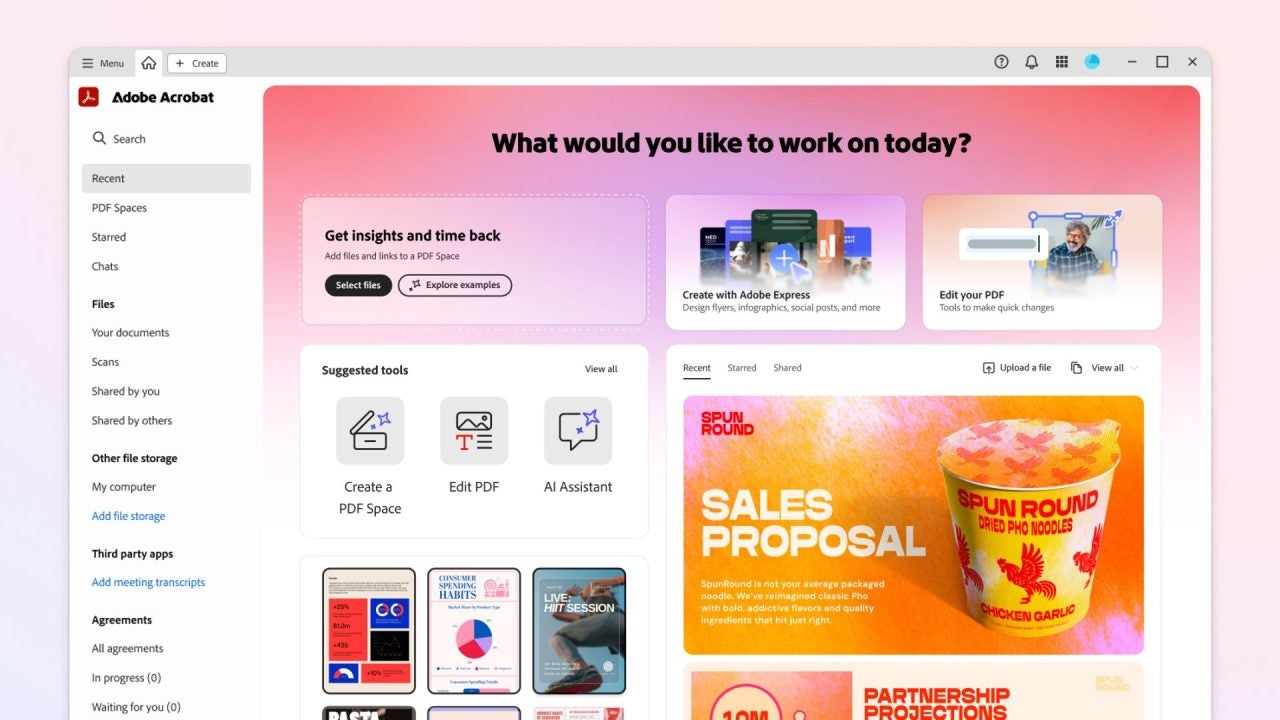
Why we should use Adobe Illustrator for our PDFs

Adobe Illustrator is an ideal program for designing buttons, icons, and visuals because it works with vector graphics. This means you can adapt your creations to any size and without losing quality. As you can see, it is especially useful if we are creating PDFs, whether to be viewed on screen or for printing.

At Softonic, we have several tutorials that will help you make the most of Adobe Illustrator, whether you are a beginner or already know a bit about the program.

Import your Illustrator creations to Acrobat Pro

If you have set up your entire document in Illustrator, now it’s time to prepare the file for export as a PDF. Before you start, organize your document into well-defined layers (illustrations, texts, etc.), as this will make any type of editing easier later on.

  • Don’t forget to check the color mode of the document. If the intention is for it to be displayed on screens, use RGB. If you need to print it, then use CMYK. To change this, you can go to File > Document Color Mode.
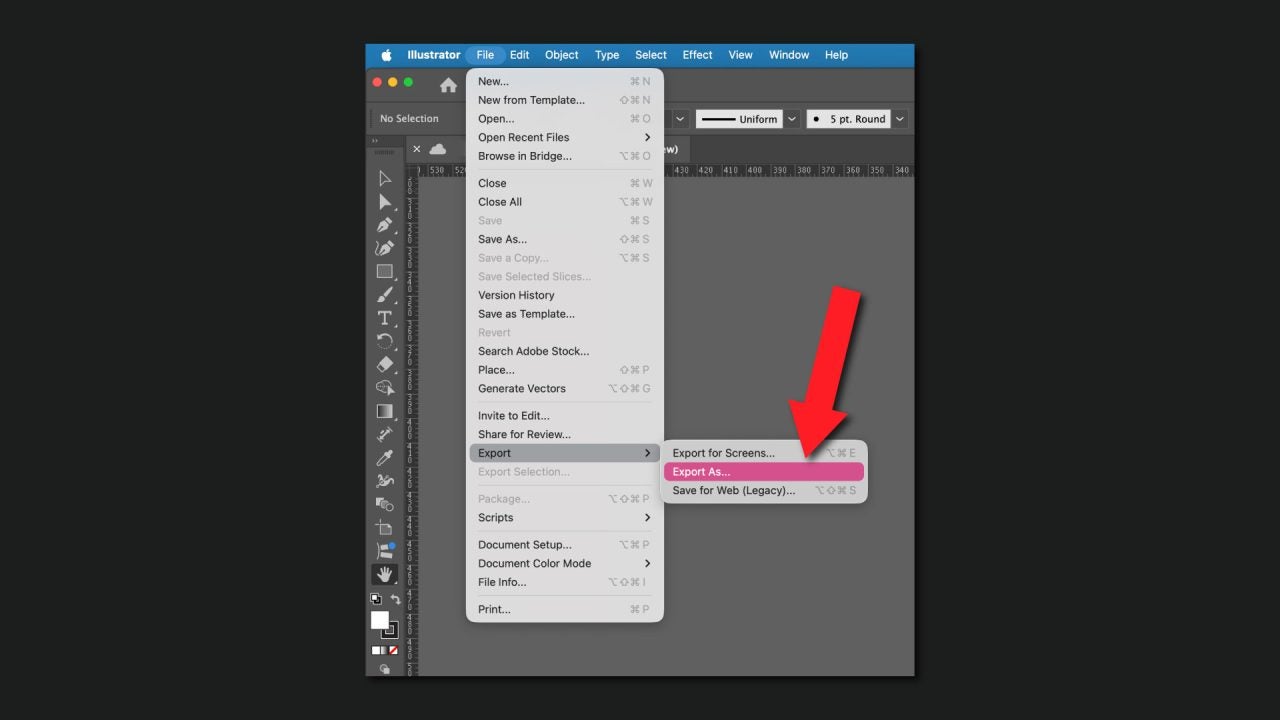
  • After these checks, click on File > Export > Export As.. and select PDF. You can also save the file as a PDF directly from File > Save As…
Everything described above will help you save any project you have laid out or designed entirely from Illustrator as a PDF. If you have the desktop application of Adobe Acrobat, you can also create a PDF from scratch there.

  • Adobe Acrobat is compatible with many types of Adobe files, such as those belonging to Photoshop (.psd), Illustrator (.ai, .eps), or InDesign (.indd, .indb).
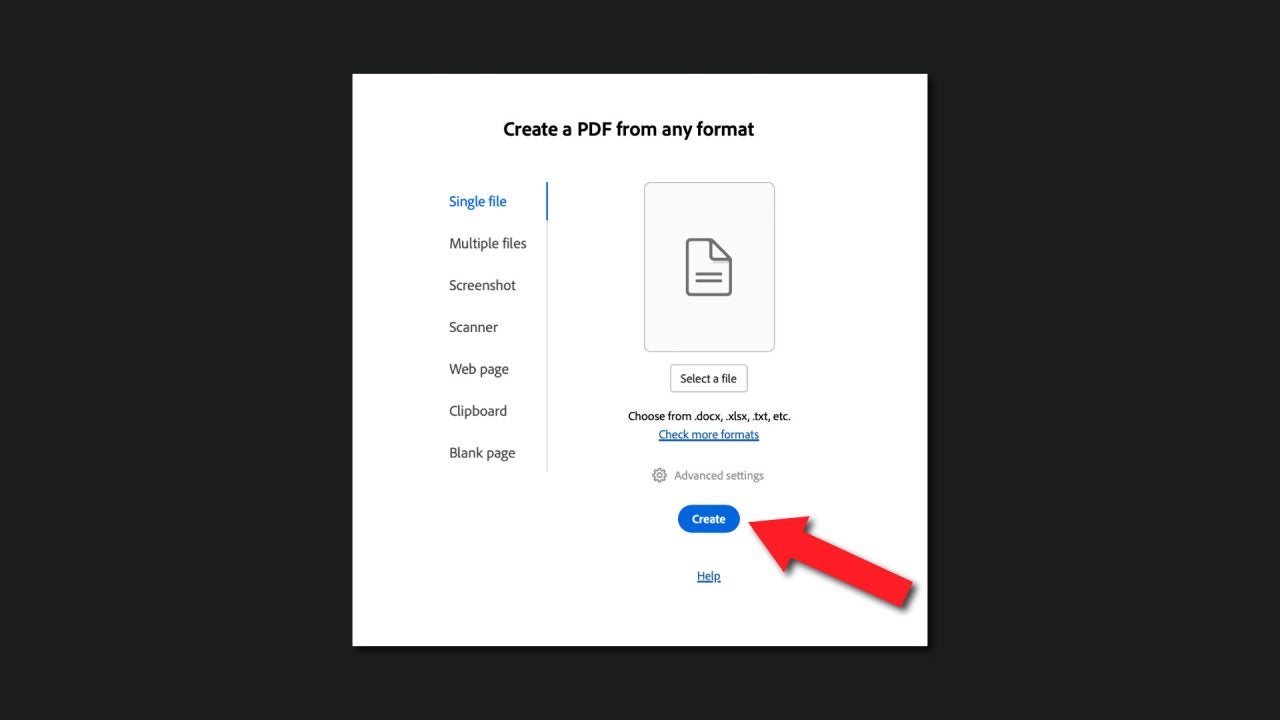
  • Open Adobe Acrobat and click on the Create tab.
  • Drag the file you want to convert to PDF into the program. It will open, and you can save it as a PDF from File > Save As…
  • Select where you want to save the future PDF and make sure that Format is set to Adobe PDF Files. Finally, click on Save.
How to add buttons and links

Although you may think otherwise, creating interactive content in Adobe Acrobat is easier than you think. One type of structure that will help make your PDF more enjoyable to consult is to integrate an interactive table of contents.

This allows any user to quickly navigate between sections of a PDF without getting lost. If you want to create one, do the following:

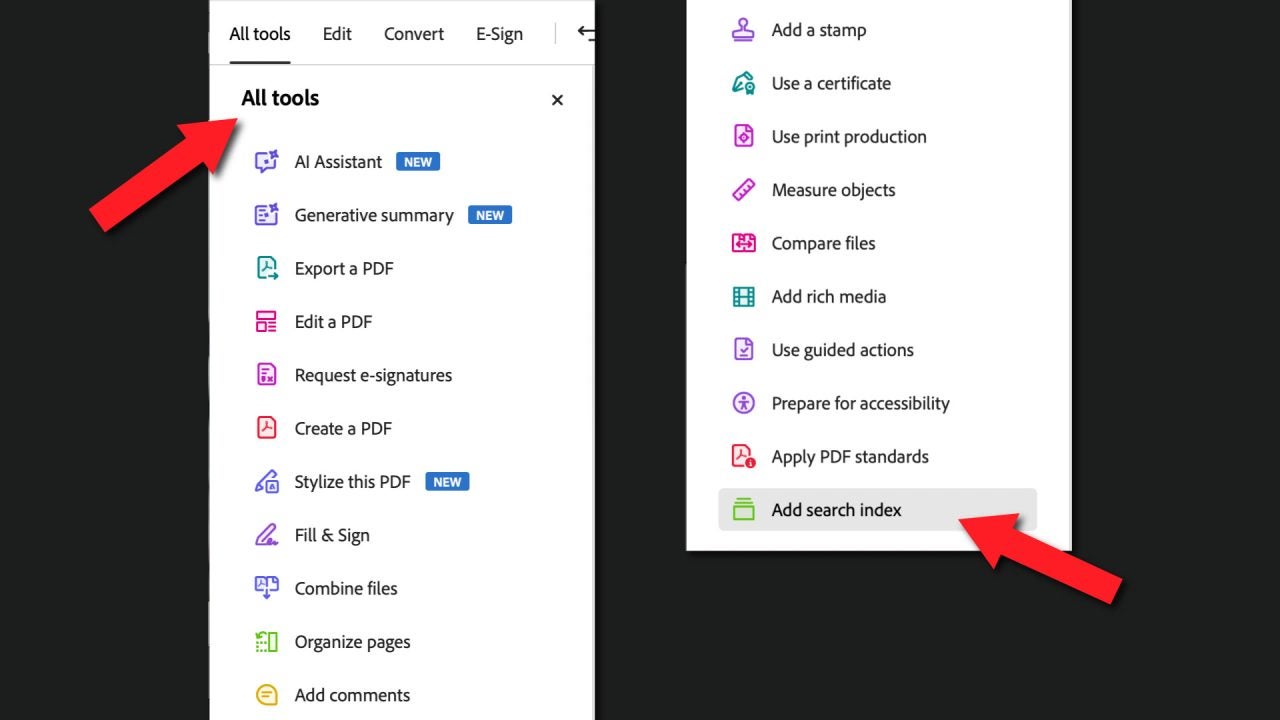
  • With the document already open in Adobe Acrobat, go to All Tools > Add search index.
  • Click on Manage embedded index and then, on Embed Index.
  • To confirm, press OK.

You can include hyperlinks in your documents that lead to other websites, YouTube videos, or any social media. Add them like this:

  • Go back to All Tools and click on Edit a PDF.
  • Select the text or image you want to add a link to.
  • Right-click on the item in question and click on Create Link.
  • Select what you want it to do: go to a specific page in the PDF, open a file… when you’re ready, click on Next and follow the instructions on the screen.

To add buttons to your PDF that further facilitate navigation, follow these simple steps:

  • When you have the document open in Acrobat, click on Edit and go to the Add content section. Below you will see a long list of options that can be expanded further by selecting More. Look for Button and click on it.
  • Select the area of the document where you want to place the button and define its size.
  • Finally, right-click on the newly created button. To customize the design and configure what it can do, select All Properties. You will see sections like Appearance, Position, and more. Feel free to change whatever you want.

The era of boring PDFs is over

The combination of Adobe Acrobat and Illustrator can make a simple PDF much more eye-catching and also easier to consult. With Illustrator, we can add a distinctive visual touch while Acrobat makes it more interactive. Feel free to combine both programs to make your documents more interesting.

Adobe Illustrator
Adobe Illustrator DOWNLOAD

Author: María López

{ "de-DE": "Künstler aus Berufung und Technikliebhaber. Seit ich denken kann, habe ich gerne an allen möglichen Gadgets herumgebastelt.", "en-US": "Artist by vocation and technology lover. I have liked to tinker with all kinds of gadgets for as long as I can remember.", "es-ES": "Artista de vocación y amante de la tecnología. Me ha gustado cacharrear con todo tipo de gadgets desde que tengo uso de razón.", "fr-FR": "Artiste de vocation et amateur de technologie. J'aime bricoler avec toutes sortes de gadgets depuis que j'ai l'usage de la raison.", "it-IT": "", "ja-JP": "", "nl-NL": "", "pl-PL": "", "pt-BR": "", "social": { "email": "", "facebook": "", "twitter": "", "linkedin": "" } } View all posts by María López

Author María LópezPosted on September 23, 2025September 23, 2025Categories Affiliate post, Expert Review, News

Post navigation

Previous Previous post: Eric Barone confirms that we should lower our expectations for the 1.7 update of Stardew Valley
Next Next post: It is the number 1 movie on HBO MAX and its success has been unbeatable

Recent Posts

  • The Legend of Zelda gets its first live-action trailer: Nintendo confirms the movie’s title
  • Blizzard clarifies Diablo 4 at BlizzCon 2026: Twitch Drops, not a free trial
  • Insecure on Max: HBO’s comedy ends with its best season yet
  • Wolverine #30 is coming: Marvel reveals a feral Logan
  • Apple Watch Series 12 and Ultra 4 expected this week: faster chips, health upgrades

Archives

  • September 2026
  • August 2026
  • July 2026
  • June 2026
  • May 2026
  • April 2026
  • March 2026
  • February 2026
  • January 2026
  • December 2025
  • November 2025
  • October 2025
  • September 2025
  • August 2025
  • July 2025
  • June 2025
  • May 2025
  • April 2025
  • March 2025
  • February 2025
  • January 2025
  • December 2024
  • November 2024
  • October 2024
  • September 2024
  • August 2024
  • July 2024
  • June 2024
  • May 2024
  • April 2024
  • March 2024
  • February 2024
  • January 2024
  • December 2023
  • November 2023
  • October 2023
  • September 2023
  • August 2023
  • July 2023
  • June 2023
  • May 2023
  • April 2023
  • March 2023
  • February 2023
  • January 2023
  • December 2022
  • November 2022
  • October 2022
  • September 2022
  • August 2022
  • July 2022
  • June 2022
  • May 2022
  • April 2022
  • March 2022
  • February 2022
  • January 2022
  • December 2021
  • November 2021
  • October 2021
  • September 2021
  • August 2021
  • July 2021
  • June 2021
  • May 2021
  • April 2021
  • March 2021
  • February 2021
  • January 2021
  • December 2020
  • November 2020
  • October 2020
  • September 2020
  • August 2020
  • July 2020
  • June 2020
  • May 2020
  • April 2020
  • March 2020
  • February 2020
  • January 2020
  • December 2019
  • November 2019
  • October 2019
  • September 2019
  • August 2019
  • July 2019
  • June 2019
  • May 2019
  • April 2019
  • March 2019
  • February 2019
  • January 2019
  • December 2018
  • November 2018
  • October 2018
  • September 2018
  • August 2018
  • July 2018
  • June 2018
  • May 2018
  • April 2018
  • March 2018
  • February 2018
  • January 2018
  • December 2017
  • November 2017
  • October 2017
  • September 2017
  • August 2017
  • July 2017
  • June 2017
  • May 2017
  • April 2017
  • March 2017
  • February 2017
  • January 2017
  • December 2016
  • November 2016
  • October 2016
  • September 2016
  • August 2016
  • July 2016
  • June 2016
  • May 2016
  • April 2016
  • March 2016
  • February 2016
  • January 2016
  • December 2015
  • November 2015
  • October 2015
  • September 2015
  • August 2015
  • July 2015
  • June 2015
  • May 2015
  • April 2015
  • March 2015
  • February 2015
  • January 2015
  • December 2014
  • November 2014
  • October 2014
  • September 2014
  • August 2014
  • July 2014
  • June 2014
  • May 2014
  • April 2014
  • March 2014
  • February 2014
  • January 2014
  • December 2013
  • November 2013
  • October 2013
  • September 2013
  • August 2013
  • July 2013
  • June 2013
  • May 2013
  • April 2013
  • March 2013
  • February 2013
  • January 2013
  • December 2012
  • November 2012
  • October 2012
  • September 2012
  • August 2012
  • July 2012
  • June 2012
  • May 2012
  • April 2012
  • March 2012
  • February 2012
  • January 2012
  • December 2011
  • November 2011
  • October 2011
  • September 2011
  • August 2011
  • July 2011
  • June 2011
  • May 2011
  • April 2011
  • March 2011
  • February 2011
  • January 2011
  • December 2010
  • November 2010
  • October 2010
  • September 2010
  • August 2010
  • July 2010
  • June 2010
  • May 2010
  • April 2010
  • March 2010
  • February 2010
  • January 2010
  • December 2009
  • November 2009
  • October 2009
  • September 2009
  • August 2009
  • July 2009
  • June 2009
  • May 2009
  • April 2009
  • March 2009
  • February 2009
  • January 2009
  • December 2008
  • November 2008
  • October 2008
  • September 2008
  • August 2008
  • July 2008
  • June 2008
  • May 2008
  • April 2008
  • March 2008
  • February 2008
  • January 2008
  • December 2007
  • November 2007
  • October 2007
  • September 2007
  • August 2007
  • July 2007
  • June 2007
  • May 2007
  • April 2007
  • March 2007
  • February 2007
  • January 2007
  • December 2006
  • November 2006
  • September 2006
  • August 2006
  • June 2006
  • May 2006
  • July 2001
  • January 2001
  • November 2000
  • September 2000
  • August 2000
  • July 2000
  • April 2000
  • March 2000

Categories

  • Affiliate post
  • Expert Review
  • Gaming
  • Guides
  • How to
  • Legacy how To
  • News
  • Noticias
  • Software>Security
  • Sponsored
  • Trucos y Consejos
  • Uncategorized
  • Windows software

Meta

  • Log in
  • Entries feed
  • Comments feed
  • WordPress.org
Softonic English Proudly powered by WordPress