Skip to content

Softonic English

Just another Softonic Sites site

Cybersecurity Awareness Month: do this Windows security check in just 5 minutes with the free Avast One antivirus

If you’re wondering how to scan your computer for viruses, Cybersecurity Awareness Month, observed every October, is a good reminder to review your PC’s security. This guide explains how to do a quick Windows security check in five clear steps, including running a virus scan with Avast One Free AV, removing unused apps and browser extensions, checking for updates, and maintaining good security habits year-round.

Avast One Free AV
Avast One Free AV Download

Although we often hear about complex cyberthreats or cyberattacks on large companies, the reality is that keeping a personal computer protected doesn’t require advanced technical knowledge or spending hours configuring complex settings.

In fact, spending just five minutes once a year checking your computer’s status can make a big difference to your PC’s privacy, performance, and overall protection.

If you’ve ever wondered how to scan your computer for viruses in a simple way, this is the perfect time to bring your system up to date. In this guide we’ll show you how to do a quick security check in Windows in just five clear, straightforward steps, using Avast One Free AV to simplify the whole process.

Step 1: How to run a malware and virus scan with Avast One Free AV

The first step in any security review is to make sure your computer is secure. For those wondering how to scan a computer for viruses easily, the best approach is to start with a structured scan using an easy-to-use antivirus tool. This is where Avast One Free AV comes in for this routine.

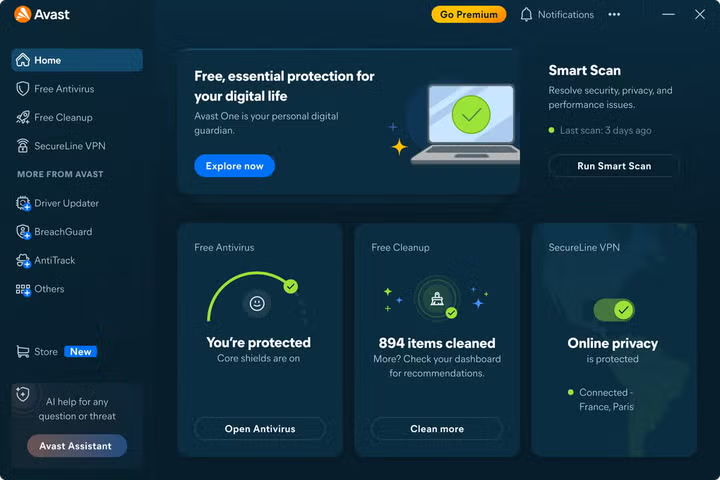
Avast One Free AV is designed to be easy for anyone to use, helping detect viruses, malware, spyware, and other potential threats on your computer.

How to run a scan step by step:

  • Open the application: Double-click the Avast One Free AV icon on your desktop or look for it in the Windows Start menu.
  • Start the scan: On the main screen, select the option for a quick scan or Smart Scan. This process checks the most vulnerable areas of your system for malware and possible security issues.
  • Review the results: Once the scan is finished in a few minutes, the tool will show you a clear summary of the findings.
  • Follow the recommendations: If the program detects a suspicious file or a compromised setting, it will guide you through simple steps to quarantine the files or apply the recommended solution with a single click. Making this a habit gives you a clear starting point for your annual review. If you want to take the first step today, you can try Avast One Free AV to run a quick virus scan and start your Windows 10 or Windows 11 security check for free.

Step 2: How to delete the apps you no longer use

Once you’ve verified that your system is clean of malware, the next step is to review the applications installed on your computer. We often download apps for one-off projects or tools that we end up replacing with others, leaving old programs installed that take up space and may no longer be updated.

Removing what you don’t use helps reduce your PC’s attack surface, since an old unsupported program can expose you to vulnerabilities.

Steps to clean up unnecessary programs in Windows:

  • Open Windows Settings (you can use the keyboard shortcut Windows + I).
  • Go to the Apps section and select Installed apps.
  • Review the list sorted by installation date or by size.
  • If you find a program you don’t recognize or haven’t used in months, click the three-dot menu next to it and select Uninstall.

Step 3: How to remove browser extensions you’ve forgotten about

The web browser is one of the tools we use most every day and one of the main gateways to the internet. Browser extensions can be very useful, but letting too many pile up or keeping add-ons from unreliable developers can compromise your privacy or slow down browsing.

Removing browser extensions you no longer need is a quick step that improves both security and browsing performance.

How to review your extensions:

  • In Google Chrome / Microsoft Edge: Type chrome://extensions or edge://extensions into the address bar and press Enter.
  • In Mozilla Firefox: Type about:addons and open the Extensions section. Review the list carefully. Disable or remove any extension you no longer use, especially ones you don’t remember installing yourself or that require excessive permissions to work.
Step 4: How to check for Windows and software updates

Keeping the operating system and your main applications up to date is one of the most effective defensive measures. Many software updates not only add new features, but also fix known security vulnerabilities before they can be exploited.

1. Update Windows

Go to Start > Settings > Windows Update and click Check for updates. Make sure you download and install the recommended security patches and restart your computer if the system asks you to. According to Microsoft’s Windows lifecycle information, Windows 10 is nearing the end of support, so this may also be a good time to start planning a switch to Windows 11.

2. Check the rest of your software

Don’t forget to update key programs such as web browsers, PDF readers, or media players. Avast One Free AV itself includes tools that alert you to outdated software on your computer, making it easier to keep your programs up to date in one place.

Step 5: What security habits should you maintain all year long?

Completing this five-minute review is an excellent first step, but keeping your computer protected requires maintaining a couple of good habits throughout the year:

Avast One Free AV
Avast One Free AV Download
  • Pay attention to warning signs: If you notice that your PC starts running unusually slowly for no reason, strange pop-up windows appear while browsing, or the browser settings change on their own, these are signs that your computer may need an immediate malware scan.
  • Be careful with links and downloads: Avoid downloading attachments from unsolicited emails, clicking suspicious links in messaging apps, or falling for phishing scams.
  • Use strong passwords: Keep your accounts protected with a mix of characters and enable two-step verification whenever it’s available.

What is the 5-minute annual PC security checklist?

To make it very easy for you to repeat this process every year during Cybersecurity Awareness Month, here’s a quick summary you can save and refer to at any time, because cybersecurity isn’t something you do once a year, but every day:

  • Scan the PC: Open Avast One Free AV and run a Smart Scan to check for viruses or threats.
  • Clean up applications: Review the Windows Settings app and uninstall old software you no longer use.
  • Clean up the browser: Go to your browser’s extensions section and remove unnecessary add-ons.
  • Update the system: Check for pending updates in Windows Update and in your main programs.
  • Maintain protection: Leave your security solution turned on. Avast One Free AV is one free option to help keep your computer protected day to day. Routine maintenance like this helps keep PC security simple rather than burdensome. Now you know that using Avast One Free AV is the first step in your routine for checking your computer’s status, running a quick virus scan, and keeping your Windows computer secure all year long.

Author: Chema Carvajal Sarabia

{ "de-DE": "Journalist, spezialisiert auf Technologie, Unterhaltung und Videospiele. Über das zu schreiben, was mich begeistert (Gadgets, Spiele und Filme), ermöglicht es mir, bei Verstand zu bleiben und mit einem Lächeln im Gesicht aufzuwachen, wenn der Wecker klingelt. PS: Das stimmt nicht 100% der Zeit.", "en-US": "Journalist specialized in technology, entertainment and video games. Writing about what I'm passionate about (gadgets, games and movies) allows me to stay sane and wake up with a smile on my face when the alarm clock goes off. PS: this is not true 100% of the time.", "es-ES": "Content Manager - Periodista especializado en tecnología, entretenimiento y videojuegos. Escribir sobre lo que me apasiona (cacharros, juegos y cine) me permite seguir cuerdo y despertarme con una sonrisa cuando suena el despertador. PD: esto no es cierto el 100 % de las veces.", "fr-FR": "Journaliste spécialisé dans la technologie, le divertissement et les jeux vidéo. Écrire sur ce qui me passionne (gadgets, jeux et films) me permet de rester sain d'esprit et de me réveiller avec le sourire aux lèvres quand le réveil sonne. PS : cela n'est pas vrai 100 % du temps.", "it-IT": "Giornalista specializzato in tecnologia, intrattenimento e videogiochi. Scrivere di ciò che mi appassiona (gadget, giochi e film) mi permette di mantenere la sanità mentale e di svegliarmi con un sorriso sul viso quando suona la sveglia. PS: questo non è vero al 100% del tempo.", "ja-JP": "", "nl-NL": "", "pl-PL": "", "pt-BR": "Jornalista especializado em tecnologia, entretenimento e videogames. Escrever sobre o que me apaixona (gadgets, jogos e filmes) me permite manter a sanidade e acordar com um sorriso no rosto quando o despertador toca. PS: isso não é verdade 100% do tempo.", "social": { "email": "chemacs91@gmail.com", "facebook": "", "twitter": "https://twitter.com/chematopetazo", "linkedin": "" } } View all posts by Chema Carvajal Sarabia

Author Chema Carvajal SarabiaPosted on October 28, 2026October 28, 2026Categories News

Post navigation

Previous Previous post: The Count of Monte Cristo is now on Prime Video: the underrated 2002 adventure returns
Next Next post: The Elden Ring movie not only has an exorbitant budget, it also has a multimillion-dollar deal with Amazon

Recent Posts

  • Reddit rolls out new For You and Following feeds: one leans on recommendations
  • Amazon updates AI guidance: focus on results, not token counts
  • CXMT pushes ahead with HBM3E: limited production is reportedly two months away
  • Clayface is in theaters now: a smart Batman setup without Batman
  • Black Bag comes to Hulu on November 2: Michael Fassbender’s spy thriller gets a new home

Archives

  • October 2026
  • September 2026
  • August 2026
  • July 2026
  • June 2026
  • May 2026
  • April 2026
  • March 2026
  • February 2026
  • January 2026
  • December 2025
  • November 2025
  • October 2025
  • September 2025
  • August 2025
  • July 2025
  • June 2025
  • May 2025
  • April 2025
  • March 2025
  • February 2025
  • January 2025
  • December 2024
  • November 2024
  • October 2024
  • September 2024
  • August 2024
  • July 2024
  • June 2024
  • May 2024
  • April 2024
  • March 2024
  • February 2024
  • January 2024
  • December 2023
  • November 2023
  • October 2023
  • September 2023
  • August 2023
  • July 2023
  • June 2023
  • May 2023
  • April 2023
  • March 2023
  • February 2023
  • January 2023
  • December 2022
  • November 2022
  • October 2022
  • September 2022
  • August 2022
  • July 2022
  • June 2022
  • May 2022
  • April 2022
  • March 2022
  • February 2022
  • January 2022
  • December 2021
  • November 2021
  • October 2021
  • September 2021
  • August 2021
  • July 2021
  • June 2021
  • May 2021
  • April 2021
  • March 2021
  • February 2021
  • January 2021
  • December 2020
  • November 2020
  • October 2020
  • September 2020
  • August 2020
  • July 2020
  • June 2020
  • May 2020
  • April 2020
  • March 2020
  • February 2020
  • January 2020
  • December 2019
  • November 2019
  • October 2019
  • September 2019
  • August 2019
  • July 2019
  • June 2019
  • May 2019
  • April 2019
  • March 2019
  • February 2019
  • January 2019
  • December 2018
  • November 2018
  • October 2018
  • September 2018
  • August 2018
  • July 2018
  • June 2018
  • May 2018
  • April 2018
  • March 2018
  • February 2018
  • January 2018
  • December 2017
  • November 2017
  • October 2017
  • September 2017
  • August 2017
  • July 2017
  • June 2017
  • May 2017
  • April 2017
  • March 2017
  • February 2017
  • January 2017
  • December 2016
  • November 2016
  • October 2016
  • September 2016
  • August 2016
  • July 2016
  • June 2016
  • May 2016
  • April 2016
  • March 2016
  • February 2016
  • January 2016
  • December 2015
  • November 2015
  • October 2015
  • September 2015
  • August 2015
  • July 2015
  • June 2015
  • May 2015
  • April 2015
  • March 2015
  • February 2015
  • January 2015
  • December 2014
  • November 2014
  • October 2014
  • September 2014
  • August 2014
  • July 2014
  • June 2014
  • May 2014
  • April 2014
  • March 2014
  • February 2014
  • January 2014
  • December 2013
  • November 2013
  • October 2013
  • September 2013
  • August 2013
  • July 2013
  • June 2013
  • May 2013
  • April 2013
  • March 2013
  • February 2013
  • January 2013
  • December 2012
  • November 2012
  • October 2012
  • September 2012
  • August 2012
  • July 2012
  • June 2012
  • May 2012
  • April 2012
  • March 2012
  • February 2012
  • January 2012
  • December 2011
  • November 2011
  • October 2011
  • September 2011
  • August 2011
  • July 2011
  • June 2011
  • May 2011
  • April 2011
  • March 2011
  • February 2011
  • January 2011
  • December 2010
  • November 2010
  • October 2010
  • September 2010
  • August 2010
  • July 2010
  • June 2010
  • May 2010
  • April 2010
  • March 2010
  • February 2010
  • January 2010
  • December 2009
  • November 2009
  • October 2009
  • September 2009
  • August 2009
  • July 2009
  • June 2009
  • May 2009
  • April 2009
  • March 2009
  • February 2009
  • January 2009
  • December 2008
  • November 2008
  • October 2008
  • September 2008
  • August 2008
  • July 2008
  • June 2008
  • May 2008
  • April 2008
  • March 2008
  • February 2008
  • January 2008
  • December 2007
  • November 2007
  • October 2007
  • September 2007
  • August 2007
  • July 2007
  • June 2007
  • May 2007
  • April 2007
  • March 2007
  • February 2007
  • January 2007
  • December 2006
  • November 2006
  • September 2006
  • August 2006
  • June 2006
  • May 2006
  • July 2001
  • January 2001
  • November 2000
  • September 2000
  • August 2000
  • July 2000
  • April 2000
  • March 2000

Categories

  • Affiliate post
  • Expert Review
  • Gaming
  • Guides
  • How to
  • Legacy how To
  • News
  • Noticias
  • Software>Security
  • Sponsored
  • Trucos y Consejos
  • Uncategorized
  • Windows software

Meta

  • Log in
  • Entries feed
  • Comments feed
  • WordPress.org
Softonic English Proudly powered by WordPress