Skip to content

Softonic English

Just another Softonic Sites site

Adapted rewriting for the design in InDesign: adjust the text without altering the design

One of the challenges of layout design in Adobe InDesign is making sure that the text fits in the spaces. The simple act of adding one extra word can throw everything off and require rethinking the design. In its latest version, InDesign has launched Rewrite, a new artificial intelligence feature designed to solve this problem. With this tool, we can expand, condense, or modify the tone of a text to fit the available spaces. Next, we will see how it works step by step. What is Rewrite and what for […]

One of the challenges of layout design in Adobe InDesign is making sure that the text fits in the spaces. The mere act of adding one extra word can throw everything off and require rethinking the design.

In its latest version, InDesign has launched Rewrite, a new artificial intelligence feature designed to solve this problem. With this tool, we will be able to expand, condense, or modify the tone of a text to fit the available spaces we have. Next, we will see how it works step by step.

Adobe InDesign
Adobe InDesign DOWNLOAD

What is Rewrite and what is it for?

Generative artificial intelligence has also arrived at InDesign, specifically to help us with texts. Rewrite helps us analyze the content and the space of the text box to make everything fit better in your designs. Thus, instead of editing word by word, we can shorten very long texts, expand them, change the tone, or generate other variants that fit better in the layout.
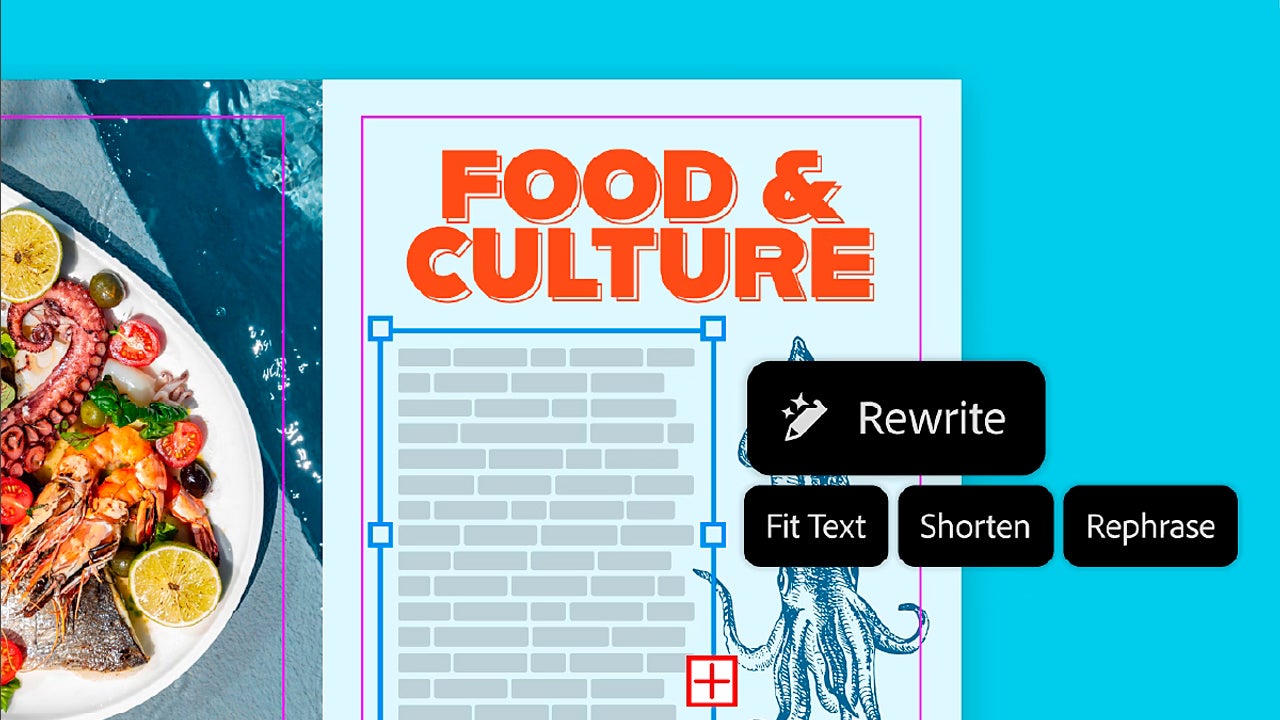
Changing the tone of a text can be useful for certain situations; in some cases, you may need a more professional approach, or perhaps the complete opposite. In the end, you can generate different versions that maintain the essential information but change how it is communicated.

How to use Rewrite in InDesign

To begin, open your project in InDesign and select any text you want to modify. You can also place the cursor over a text frame to select the entire story.

When you select the text, a floating contextual bar will appear. If you don’t see it, go to Window and click on Contextual Task Bar to make it appear. In this floating bar, select Generate Text; by doing so, you will also open the Generate panel.
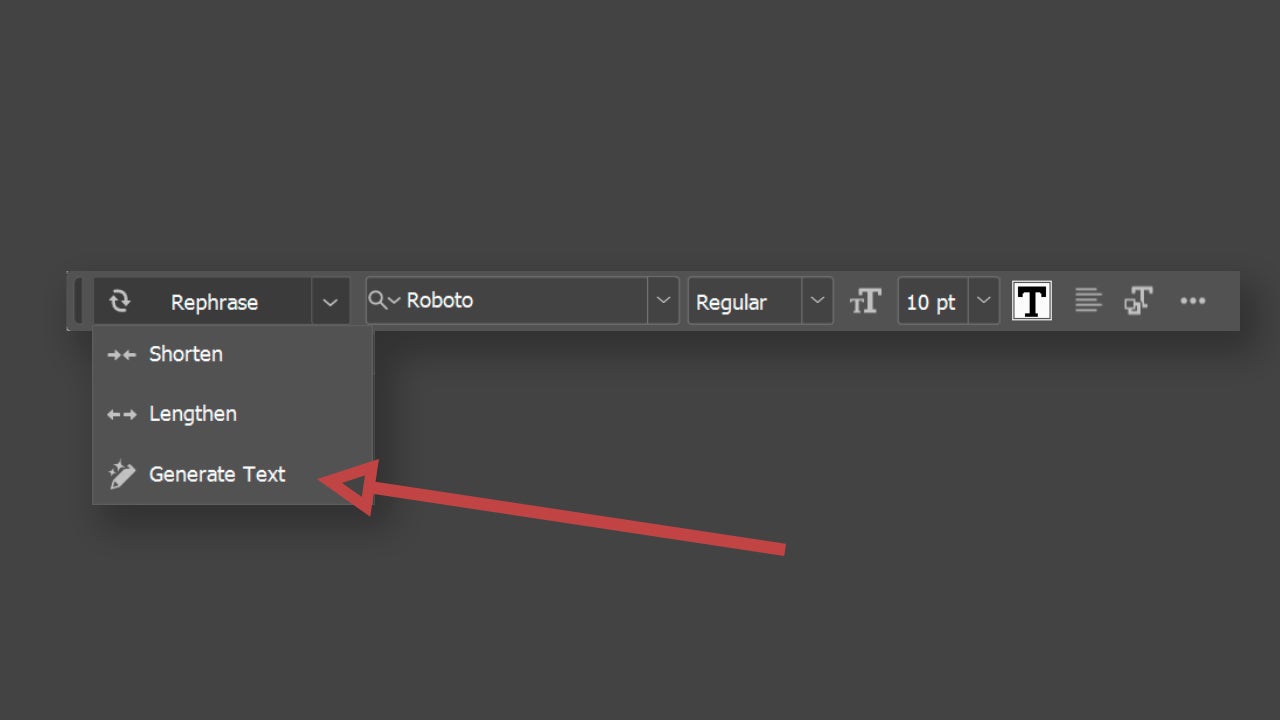
There are other ways to access Generate. To start, you can activate the option by going to a text box, right-clicking, and selecting the Generate Text option. On the other hand, you can make the Generate panel appear by going to Window > Generate. From this panel, you have several options, but we will focus now on Rewrite. Below Rewrite, you will see a text box where you will need to write your prompt. Simply describe there how you want the selected text to be modified and click on Generate.
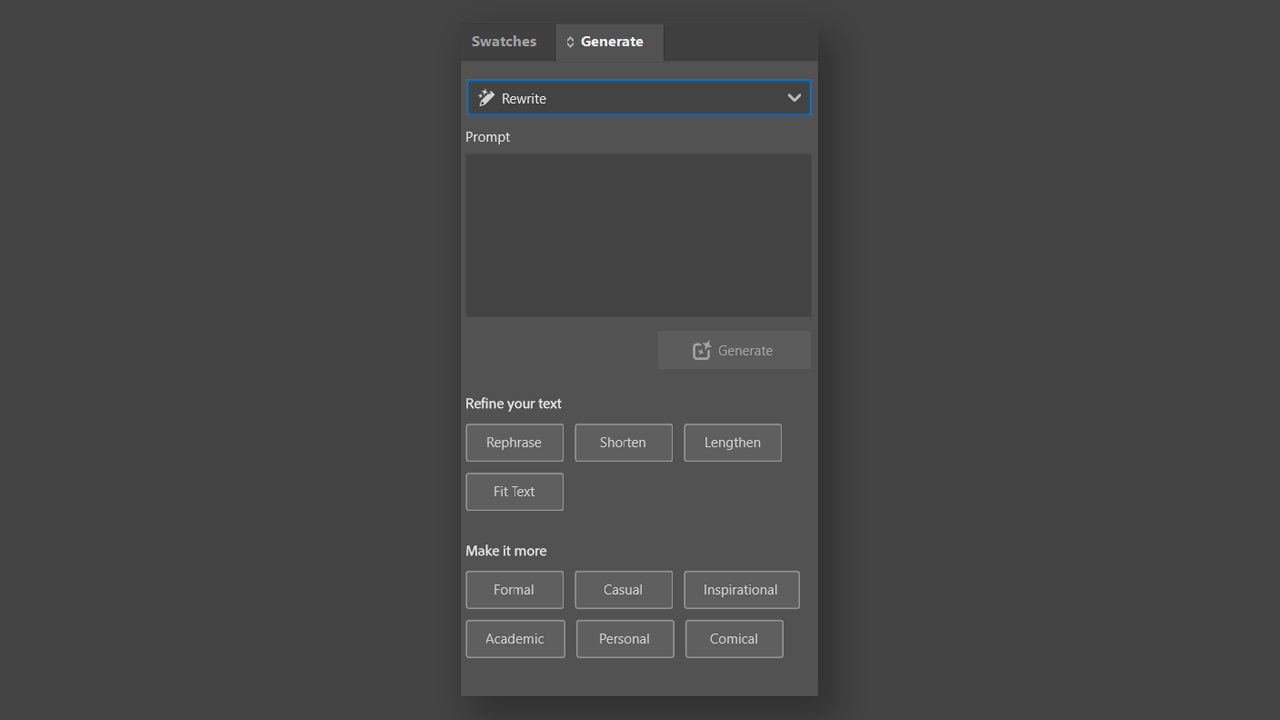
When I finish processing your request, you will see how the text is automatically replaced in your layout while respecting the paragraph style you have applied. As a detail, keep in mind that the language of the generated text will match the language you used to write the prompt.

You can also see other variations of the text in Results (through the Generate panel) in case the one you see doesn’t fully convince you. Choose one of the three alternatives and select Done to finish. Below you will see other symbols that will help you confirm that the result is good (thumbs up), that it is bad (thumbs down), or to try again (retry symbol).
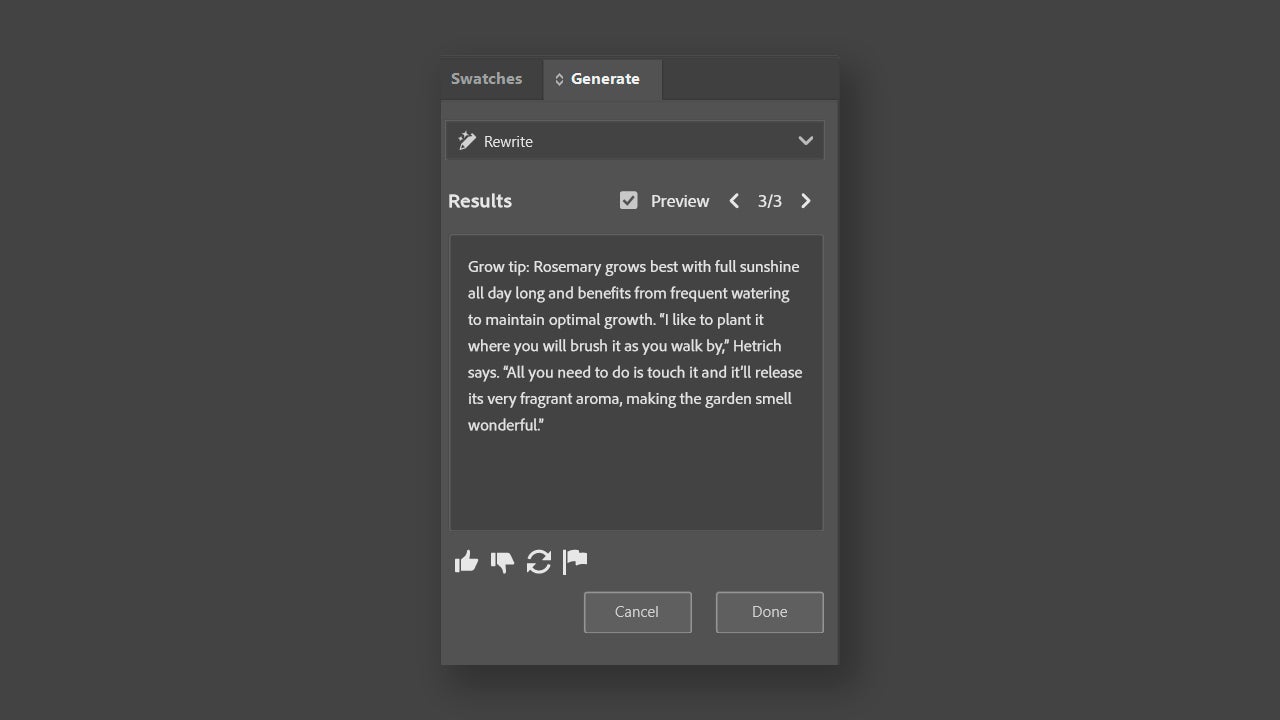
If you want, you can modify the text with a series of predefined shortcuts, such as Rephrase, Shorten, Lengthen, or Fit Text, for example. These “buttons” will help you perform very specific actions in a short amount of time.

If you want to improve the results of this function, you must consider the length of the text to be modified and ensure that it does not exceed 1500 words. On the other hand, do not lose sight of the cost of generations made with AI. Although the Rewrite and related options are free for InDesign users, the Fit Text function does consume a credit per generation.

Images also receive updates

In addition to Rewrite, InDesign also includes a series of improvements in images. Within the Generate panel, there is also the option of Text to Image. Just like in Photoshop, within InDesign we will be able to generate images from a prompt.
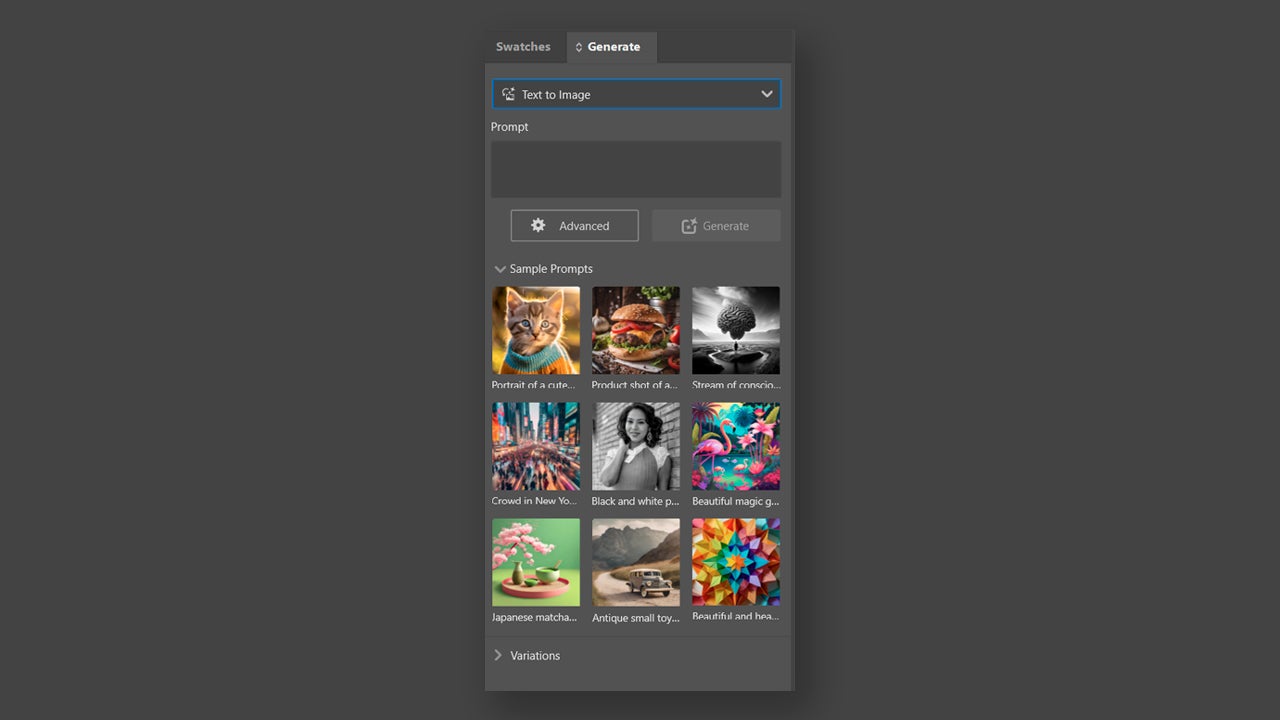
This can help you create images that serve as provisional while you wait for the final ones. Just like lorem ipsum, this way you can visualize how your almost final layout would look. If you click on the Advanced option, you will be able to access a new panel with more options that will help you create more detailed images.
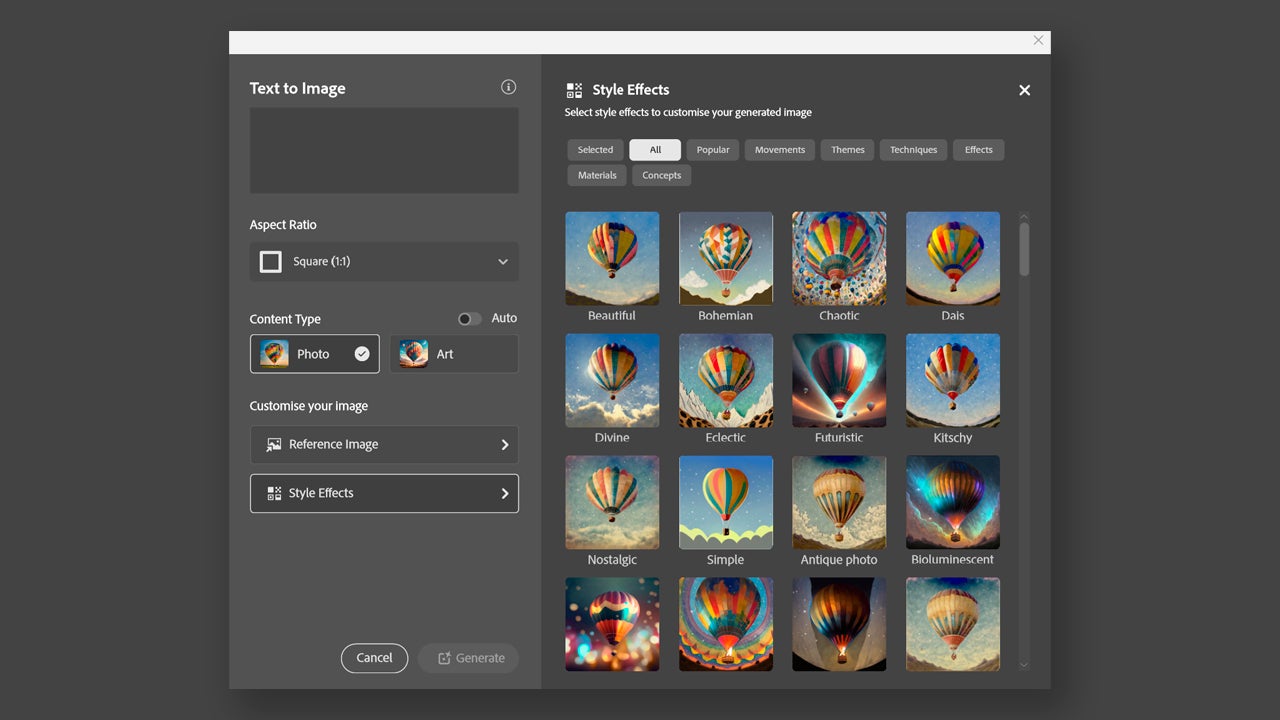
There you can choose artistic styles, the aspect ratio, and even upload a reference image so that the generated output closely resembles the final image.

Adobe InDesign
Adobe InDesign DOWNLOAD

Author: María López

{ "de-DE": "Künstler aus Berufung und Technikliebhaber. Seit ich denken kann, habe ich gerne an allen möglichen Gadgets herumgebastelt.", "en-US": "Artist by vocation and technology lover. I have liked to tinker with all kinds of gadgets for as long as I can remember.", "es-ES": "Artista de vocación y amante de la tecnología. Me ha gustado cacharrear con todo tipo de gadgets desde que tengo uso de razón.", "fr-FR": "Artiste de vocation et amateur de technologie. J'aime bricoler avec toutes sortes de gadgets depuis que j'ai l'usage de la raison.", "it-IT": "", "ja-JP": "", "nl-NL": "", "pl-PL": "", "pt-BR": "", "social": { "email": "", "facebook": "", "twitter": "", "linkedin": "" } } View all posts by María López

Author María LópezPosted on June 16, 2026June 17, 2026Categories News

Post navigation

Previous Previous post: 82% of IT teams already lived through a web-based incident
Next Next post: Intergalactic skips Summer Game Fest: ex-Naughty Dog artist says it’s no red flag

Recent Posts

  • Nintendo Switch 2 hits $499: PS5, Xbox and Steam Deck prices are up too
  • Fortnite reveals Pirate Shop Access odds after backlash: 1 in 137,500
  • Stellar Blade Complete Edition is out on Switch 2: Digital Foundry says it’s better than expected
  • GTA 6 on PS5 could unlock early in New Zealand: play up to 13 hours ahead
  • Clockwork Revolution now targets 2027: the BioShock comparison is real

Archives

  • November 2026
  • October 2026
  • September 2026
  • August 2026
  • July 2026
  • June 2026
  • May 2026
  • April 2026
  • March 2026
  • February 2026
  • January 2026
  • December 2025
  • November 2025
  • October 2025
  • September 2025
  • August 2025
  • July 2025
  • June 2025
  • May 2025
  • April 2025
  • March 2025
  • February 2025
  • January 2025
  • December 2024
  • November 2024
  • October 2024
  • September 2024
  • August 2024
  • July 2024
  • June 2024
  • May 2024
  • April 2024
  • March 2024
  • February 2024
  • January 2024
  • December 2023
  • November 2023
  • October 2023
  • September 2023
  • August 2023
  • July 2023
  • June 2023
  • May 2023
  • April 2023
  • March 2023
  • February 2023
  • January 2023
  • December 2022
  • November 2022
  • October 2022
  • September 2022
  • August 2022
  • July 2022
  • June 2022
  • May 2022
  • April 2022
  • March 2022
  • February 2022
  • January 2022
  • December 2021
  • November 2021
  • October 2021
  • September 2021
  • August 2021
  • July 2021
  • June 2021
  • May 2021
  • April 2021
  • March 2021
  • February 2021
  • January 2021
  • December 2020
  • November 2020
  • October 2020
  • September 2020
  • August 2020
  • July 2020
  • June 2020
  • May 2020
  • April 2020
  • March 2020
  • February 2020
  • January 2020
  • December 2019
  • November 2019
  • October 2019
  • September 2019
  • August 2019
  • July 2019
  • June 2019
  • May 2019
  • April 2019
  • March 2019
  • February 2019
  • January 2019
  • December 2018
  • November 2018
  • October 2018
  • September 2018
  • August 2018
  • July 2018
  • June 2018
  • May 2018
  • April 2018
  • March 2018
  • February 2018
  • January 2018
  • December 2017
  • November 2017
  • October 2017
  • September 2017
  • August 2017
  • July 2017
  • June 2017
  • May 2017
  • April 2017
  • March 2017
  • February 2017
  • January 2017
  • December 2016
  • November 2016
  • October 2016
  • September 2016
  • August 2016
  • July 2016
  • June 2016
  • May 2016
  • April 2016
  • March 2016
  • February 2016
  • January 2016
  • December 2015
  • November 2015
  • October 2015
  • September 2015
  • August 2015
  • July 2015
  • June 2015
  • May 2015
  • April 2015
  • March 2015
  • February 2015
  • January 2015
  • December 2014
  • November 2014
  • October 2014
  • September 2014
  • August 2014
  • July 2014
  • June 2014
  • May 2014
  • April 2014
  • March 2014
  • February 2014
  • January 2014
  • December 2013
  • November 2013
  • October 2013
  • September 2013
  • August 2013
  • July 2013
  • June 2013
  • May 2013
  • April 2013
  • March 2013
  • February 2013
  • January 2013
  • December 2012
  • November 2012
  • October 2012
  • September 2012
  • August 2012
  • July 2012
  • June 2012
  • May 2012
  • April 2012
  • March 2012
  • February 2012
  • January 2012
  • December 2011
  • November 2011
  • October 2011
  • September 2011
  • August 2011
  • July 2011
  • June 2011
  • May 2011
  • April 2011
  • March 2011
  • February 2011
  • January 2011
  • December 2010
  • November 2010
  • October 2010
  • September 2010
  • August 2010
  • July 2010
  • June 2010
  • May 2010
  • April 2010
  • March 2010
  • February 2010
  • January 2010
  • December 2009
  • November 2009
  • October 2009
  • September 2009
  • August 2009
  • July 2009
  • June 2009
  • May 2009
  • April 2009
  • March 2009
  • February 2009
  • January 2009
  • December 2008
  • November 2008
  • October 2008
  • September 2008
  • August 2008
  • July 2008
  • June 2008
  • May 2008
  • April 2008
  • March 2008
  • February 2008
  • January 2008
  • December 2007
  • November 2007
  • October 2007
  • September 2007
  • August 2007
  • July 2007
  • June 2007
  • May 2007
  • April 2007
  • March 2007
  • February 2007
  • January 2007
  • December 2006
  • November 2006
  • September 2006
  • August 2006
  • June 2006
  • May 2006
  • July 2001
  • January 2001
  • November 2000
  • September 2000
  • August 2000
  • July 2000
  • April 2000
  • March 2000

Categories

  • Affiliate post
  • Expert Review
  • Gaming
  • Guides
  • How to
  • Legacy how To
  • News
  • Noticias
  • Software>Security
  • Sponsored
  • Trucos y Consejos
  • Uncategorized
  • Windows software

Meta

  • Log in
  • Entries feed
  • Comments feed
  • WordPress.org
Softonic English Proudly powered by WordPress