Skip to content

Softonic English

Just another Softonic Sites site

AI-based audio workflows in Audition: Revolutionizing sound editing

Having a podcast is in fashion. This trend has made more and more people realize that good sound makes a difference, especially if you want your project to stand out. If you are looking for a powerful and easy-to-use tool to improve your recordings, Adobe Audition might be just what you need. And best of all: it now incorporates artificial intelligence features that do much of the work for you, from enhancing your audio to increasing its quality. What is Adobe Audition? Adobe Audition is, essentially, a professional audio editing software that is part of […]

Having a podcast is trendy. This trend has made more and more people realize that good sound makes a difference, especially if you want your project to stand out. If you are looking for a powerful and easy-to-use tool to improve your recordings, Adobe Audition might be just what you need. And the best part: it now incorporates features with artificial intelligence that do much of the work for you, from enhancing your audio to increasing quality.

Adobe Audition
Adobe Audition DOWNLOAD

What is Adobe Audition?

Adobe Audition is a professional audio editing software that is part of Adobe Creative Cloud. Unlike other, more basic programs, Audition allows for advanced work in editing, mixing, restoring, and mastering sound. Still, thanks to its recent improvements, it is becoming more accessible for those just starting. It is an ideal program for:

  • Edit podcasts.
  • Remove noise from your recordings.
  • Sync audio with video (especially if you also use Adobe Premiere Pro).
  • Mix music tracks or sound effects for audiovisual productions of any level.

The new artificial intelligence features that make your work easier

Adobe has enhanced Audition with AI tools through Adobe Sensei, its artificial intelligence platform. As a result, tasks like “cleaning” audio or adjusting voices can be done more quickly, accurately, and accessibly.

Noise Reduction

As we mentioned before, Adobe Audition allows you to remove background noise (such as hums, fans, or clicks) automatically. You just need to select a segment of the noise, and the AI will detect it and clean the rest of the audio. One of the quickest ways to do this would be with the Noise Reduction effect.

  • Within Waveform Editor, select the range that contains the noise to be removed.
  • Click on Effects and then go to Noise Reduction/ Restoration > Noise Reduction (Process).
  • Within the editing panel, select Capture Noise Print.
  • Below, you can adjust the amount of noise to be removed within Noise Reduction and Reduce by. Finally, select Apply, and your audio will be edited.

This would be one of the simplest methods. Within Audition, you will find many tools to deal with noise differently. To repair dialogues, for example, we can do the following:

  • Add the audio clip to an empty track within a multitrack session.
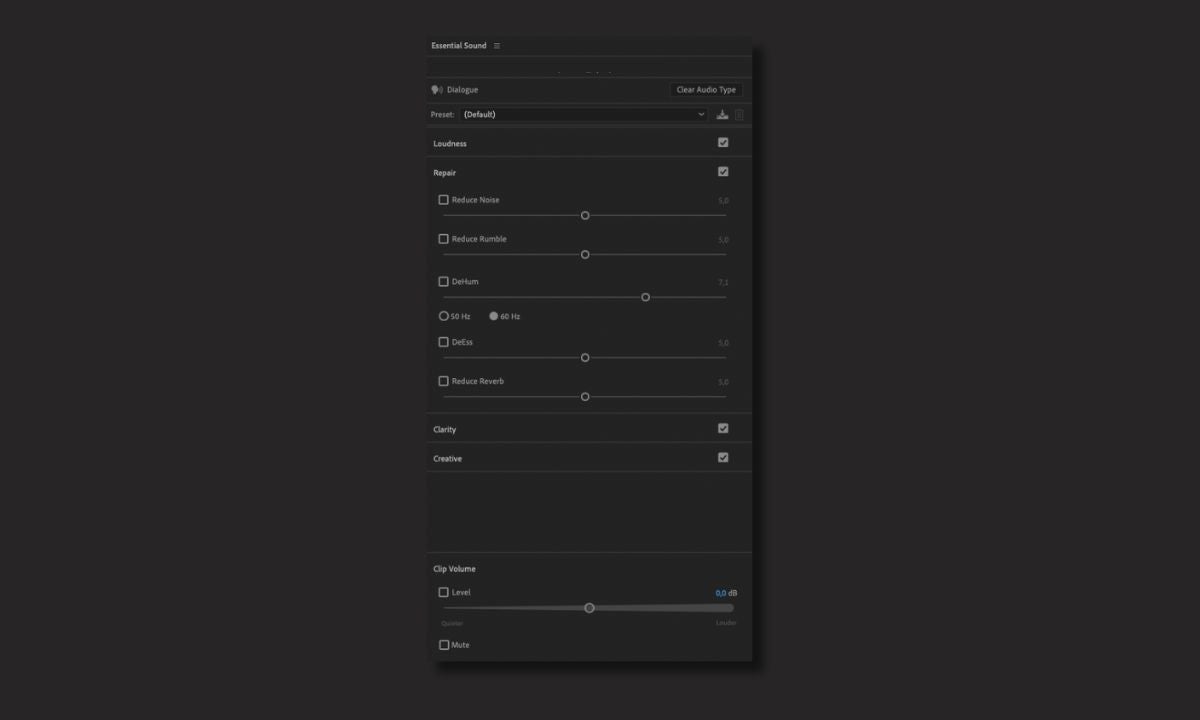
  • Click on the clip again. Within the Essential Sound panel, set the clip as Dialogue.
  • Select the Repair checkbox and click on that section again.
  • You will find several options: Reduce Noise, Reduce Rumble, DeHum, DeEss, and Reduce Reverb. Adjust each of them to achieve the desired result.
Improve your voice with a click

If your recorded conversations don’t have the quality you expected, don’t worry: fixing it is that easy.

  • Just like we did before, add your conversation to a multitrack session.
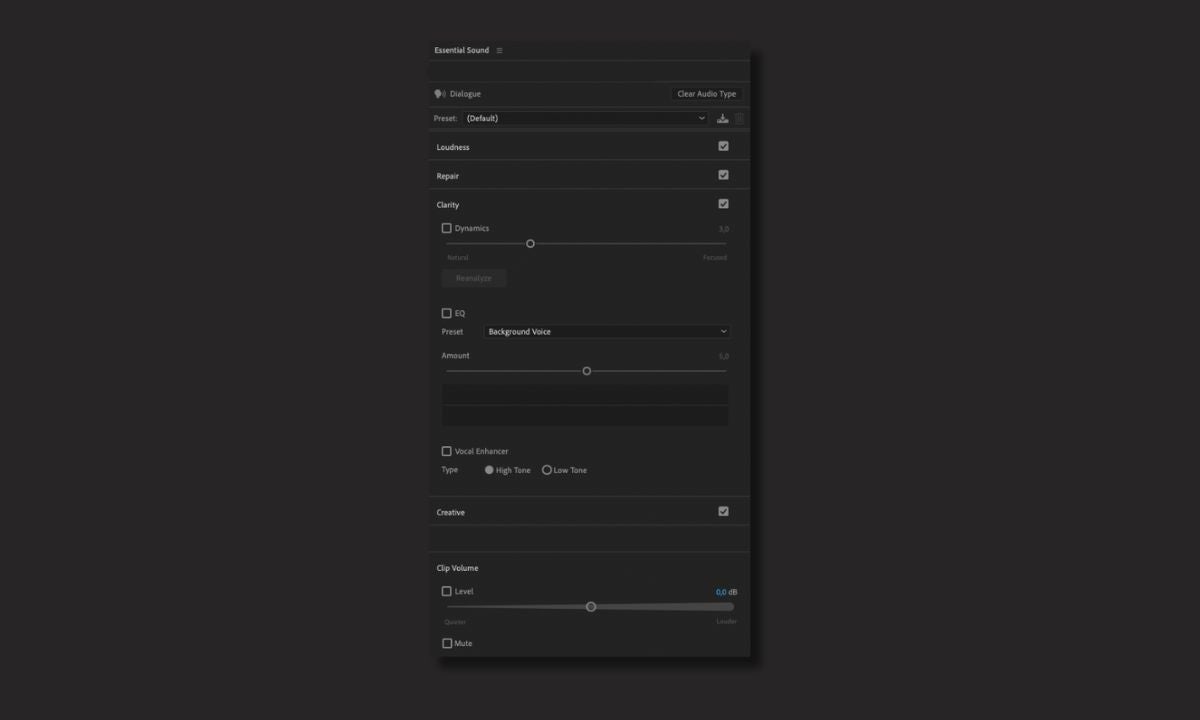
  • Set the conversation as a Dialogue within the Essential Sound panel.
  • Now, head to the Clarity section.
  • Sections like Vocal Enhancer will help you improve your dialogues at the right frequency. Others, like Dynamics, will allow you to reduce or expand the dynamic ranges of your recordings. Experiment with them to adjust to your liking.
Volume leveling with AI

Thanks to the Match Loudness feature, Adobe Audition can automatically match the volume of multiple tracks. This is ideal for podcasts or interviews in which each voice was recorded with a different microphone.

  • From the Window, click on Match Loudness to open the settings panel.
  • Drag the sounds to the panel and click on Scan.
  • Then, select Match Loudness Settings and from Match To, choose one of the standards that appear.
  • Once you are done, select Run.

Check your microphone with AI

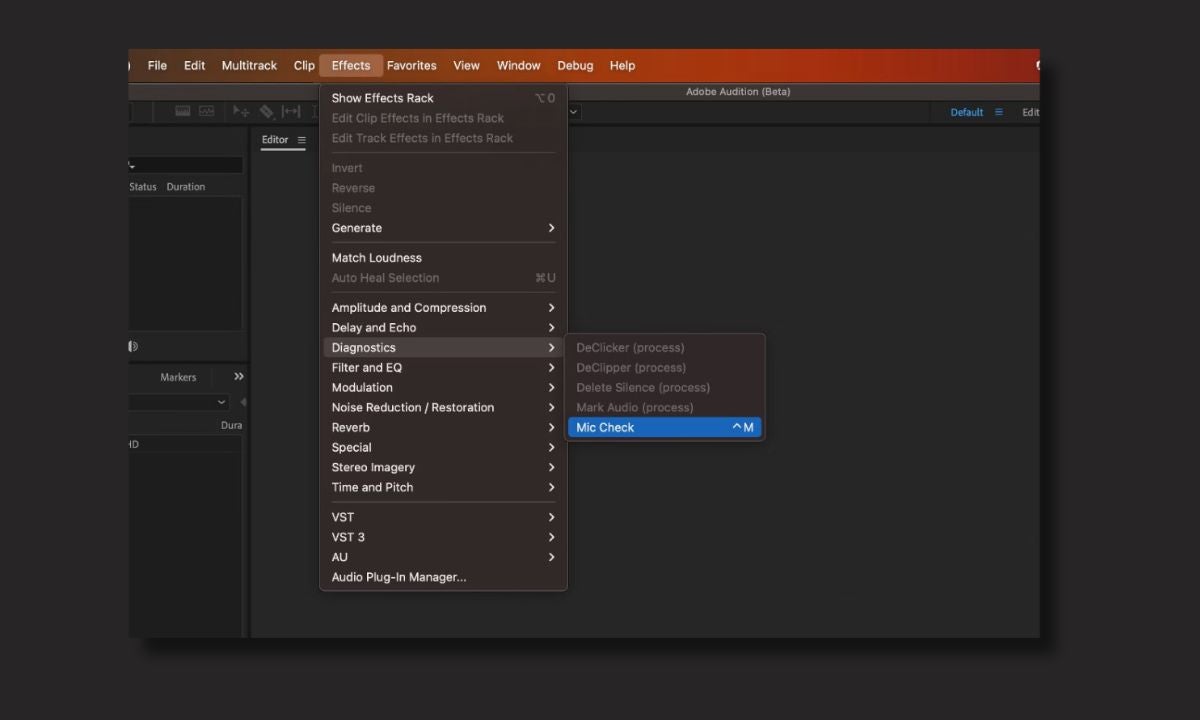
Thanks to Mic Check, the surprises with the microphone are over. With the help of AI, you can test your microphone settings and receive recommendations on what adjustments to make to record in the best possible way.

  • To access the effect, select Effects > Diagnostics > Mic Check.
  • From Mic, choose your device from the dropdown menu.
  • Select Test Mic to start recording a test audio and click on Stop Test for Audition to analyze your recordings.
  • When it’s finished, you will see a list of recommendations generated by Audition to improve the sound.
How do I get started with Adobe Audition?

To get started, you just need to download Adobe Audition from the official Adobe site or through the Creative Cloud app. Don’t forget to check your PC or Mac’s requirements to ensure you can run the program without issues. After that, all that’s left is to try it for yourself: experiment with your own recordings and improve them with Audition.

Adobe Audition
Adobe Audition DOWNLOAD

Author: María López

{ "de-DE": "Künstler aus Berufung und Technikliebhaber. Seit ich denken kann, habe ich gerne an allen möglichen Gadgets herumgebastelt.", "en-US": "Artist by vocation and technology lover. I have liked to tinker with all kinds of gadgets for as long as I can remember.", "es-ES": "Artista de vocación y amante de la tecnología. Me ha gustado cacharrear con todo tipo de gadgets desde que tengo uso de razón.", "fr-FR": "Artiste de vocation et amateur de technologie. J'aime bricoler avec toutes sortes de gadgets depuis que j'ai l'usage de la raison.", "it-IT": "", "ja-JP": "", "nl-NL": "", "pl-PL": "", "pt-BR": "", "social": { "email": "", "facebook": "", "twitter": "", "linkedin": "" } } View all posts by María López

Author María LópezPosted on April 22, 2025July 1, 2025Categories News

Post navigation

Previous Previous post: The hidden challenges of Skyrim keep players hooked a decade later
Next Next post: Nothing presents its new super cheap smartphone under the CMF brand

Recent Posts

  • Pragmata reaches one million copies sold in its first 48 hours
  • Jon Favreau defends himself against criticism of The Mandalorian and Grogu: "I want people to wonder if this is just the television show on the big screen"
  • The Batman: Part II confirms a famous Game of Thrones actor for its cast
  • Torrente Presidente is one of the highest-grossing films in the history of Spain, but it fails outside the country
  • Super Mario Galaxy has made over 740 million dollars and officially becomes the highest-grossing movie of the year

Archives

  • April 2026
  • March 2026
  • February 2026
  • January 2026
  • December 2025
  • November 2025
  • October 2025
  • September 2025
  • August 2025
  • July 2025
  • June 2025
  • May 2025
  • April 2025
  • March 2025
  • February 2025
  • January 2025
  • December 2024
  • November 2024
  • October 2024
  • September 2024
  • August 2024
  • July 2024
  • June 2024
  • May 2024
  • April 2024
  • March 2024
  • February 2024
  • January 2024
  • December 2023
  • November 2023
  • October 2023
  • September 2023
  • August 2023
  • July 2023
  • June 2023
  • May 2023
  • April 2023
  • March 2023
  • February 2023
  • January 2023
  • December 2022
  • November 2022
  • October 2022
  • September 2022
  • August 2022
  • July 2022
  • June 2022
  • May 2022
  • April 2022
  • March 2022
  • February 2022
  • January 2022
  • December 2021
  • November 2021
  • October 2021
  • September 2021
  • August 2021
  • July 2021
  • June 2021
  • May 2021
  • April 2021
  • March 2021
  • February 2021
  • January 2021
  • December 2020
  • November 2020
  • October 2020
  • September 2020
  • August 2020
  • July 2020
  • June 2020
  • May 2020
  • April 2020
  • March 2020
  • February 2020
  • January 2020
  • December 2019
  • November 2019
  • October 2019
  • September 2019
  • August 2019
  • July 2019
  • June 2019
  • May 2019
  • April 2019
  • March 2019
  • February 2019
  • January 2019
  • December 2018
  • November 2018
  • October 2018
  • September 2018
  • August 2018
  • July 2018
  • June 2018
  • May 2018
  • April 2018
  • March 2018
  • February 2018
  • January 2018
  • December 2017
  • November 2017
  • October 2017
  • September 2017
  • August 2017
  • July 2017
  • June 2017
  • May 2017
  • April 2017
  • March 2017
  • February 2017
  • January 2017
  • December 2016
  • November 2016
  • October 2016
  • September 2016
  • August 2016
  • July 2016
  • June 2016
  • May 2016
  • April 2016
  • March 2016
  • February 2016
  • January 2016
  • December 2015
  • November 2015
  • October 2015
  • September 2015
  • August 2015
  • July 2015
  • June 2015
  • May 2015
  • April 2015
  • March 2015
  • February 2015
  • January 2015
  • December 2014
  • November 2014
  • October 2014
  • September 2014
  • August 2014
  • July 2014
  • June 2014
  • May 2014
  • April 2014
  • March 2014
  • February 2014
  • January 2014
  • December 2013
  • November 2013
  • October 2013
  • September 2013
  • August 2013
  • July 2013
  • June 2013
  • May 2013
  • April 2013
  • March 2013
  • February 2013
  • January 2013
  • December 2012
  • November 2012
  • October 2012
  • September 2012
  • August 2012
  • July 2012
  • June 2012
  • May 2012
  • April 2012
  • March 2012
  • February 2012
  • January 2012
  • December 2011
  • November 2011
  • October 2011
  • September 2011
  • August 2011
  • July 2011
  • June 2011
  • May 2011
  • April 2011
  • March 2011
  • February 2011
  • January 2011
  • December 2010
  • November 2010
  • October 2010
  • September 2010
  • August 2010
  • July 2010
  • June 2010
  • May 2010
  • April 2010
  • March 2010
  • February 2010
  • January 2010
  • December 2009
  • November 2009
  • October 2009
  • September 2009
  • August 2009
  • July 2009
  • June 2009
  • May 2009
  • April 2009
  • March 2009
  • February 2009
  • January 2009
  • December 2008
  • November 2008
  • October 2008
  • September 2008
  • August 2008
  • July 2008
  • June 2008
  • May 2008
  • April 2008
  • March 2008
  • February 2008
  • January 2008
  • December 2007
  • November 2007
  • October 2007
  • September 2007
  • August 2007
  • July 2007
  • June 2007
  • May 2007
  • April 2007
  • March 2007
  • February 2007
  • January 2007
  • December 2006
  • November 2006
  • September 2006
  • August 2006
  • June 2006
  • May 2006
  • July 2001
  • January 2001
  • November 2000
  • September 2000
  • August 2000
  • July 2000
  • April 2000
  • March 2000

Categories

  • Affiliate post
  • Expert Review
  • Gaming
  • Guides
  • How to
  • Legacy how To
  • News
  • Noticias
  • Software>Security
  • Sponsored
  • Trucos y Consejos
  • Uncategorized
  • Windows software

Meta

  • Log in
  • Entries feed
  • Comments feed
  • WordPress.org
Softonic English Proudly powered by WordPress