Skip to content

Softonic English

Just another Softonic Sites site

Unlock the Power of Adobe Lightroom: Batch Editing & AI Features Explained

Adobe Lightroom is one of the best photo editing programs (or the best) that you can find today. This old acquaintance of the photography community has been improving year after year, with the inclusion of new features and functionalities that will help you edit faster and better. Just like … Continue reading “”

Adobe Lightroom is one of the best photo editing programs (or the best) you can find today. This old favorite of the photography community has been improving year after year, with the inclusion of new features and functionalities that will help you edit faster and better.

Just like in almost all Adobe programs, AI has become another companion in our creative routine with new editing effects. Besides that, Lightroom makes our work easier thanks to batch editing and the creation of our own presets, as you will see below.

Adobe Lightroom
Adobe Lightroom DOWNLOAD

Edit large batches of photos within Adobe Lightroom

The process known as Batch Editing is the method through which we can edit a large number of photographs without the need to go through them one by one. This is very useful if you have a series of similar images or those that require the same touch-ups.

Una forma muy simple de hacer esto es a través de preajustes. Estos ya incluyen una serie de ediciones (niveles específicos de exposición, saturación, luz, etc.) que puedes aplicar a muchas fotos a la vez sin tener que cambiar nada. Sin embargo, también puedes copiar y pegar ediciones de una foto a otra.

Para hacer esto, sigue estos simples pasos:

  • Once you have an edited photo with the parameters you want in Adobe Lightroom, select it and copy its edit by clicking on Copy Edit Settings. You will find the option at the bottom of Lightroom.
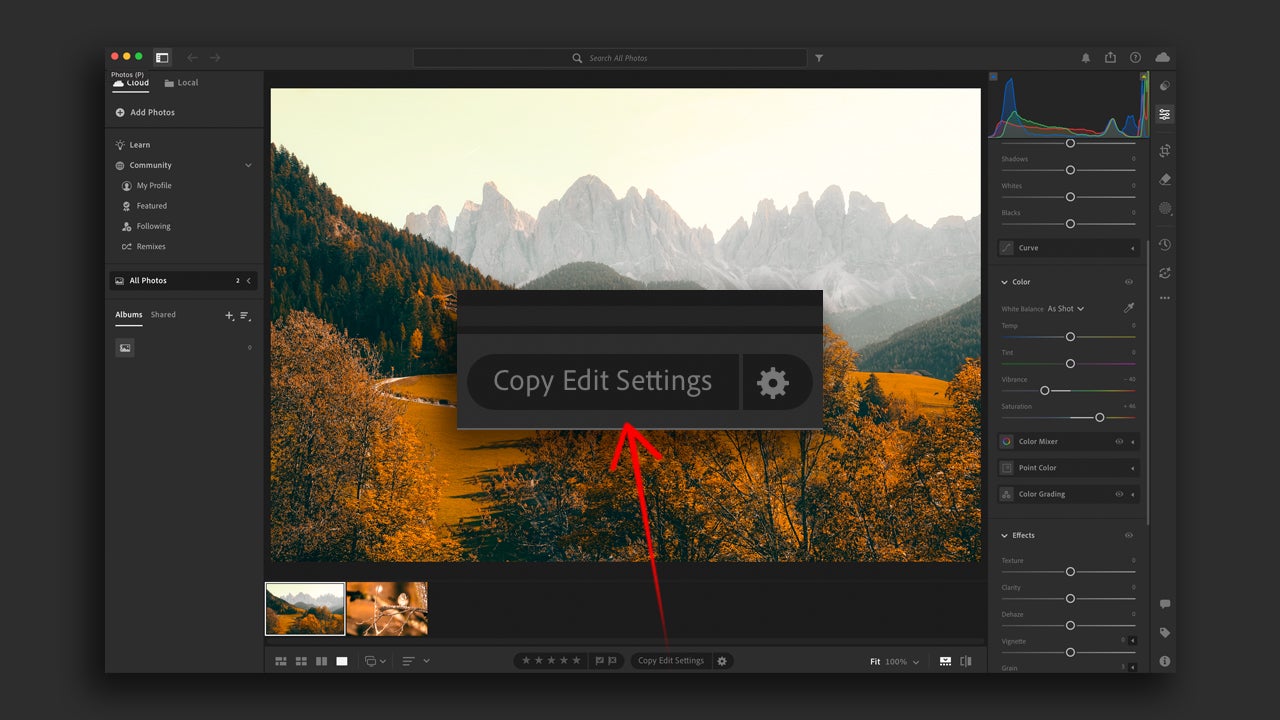
  • Go to another one of your photos, click on it and then select the option Paste Edit Settings.
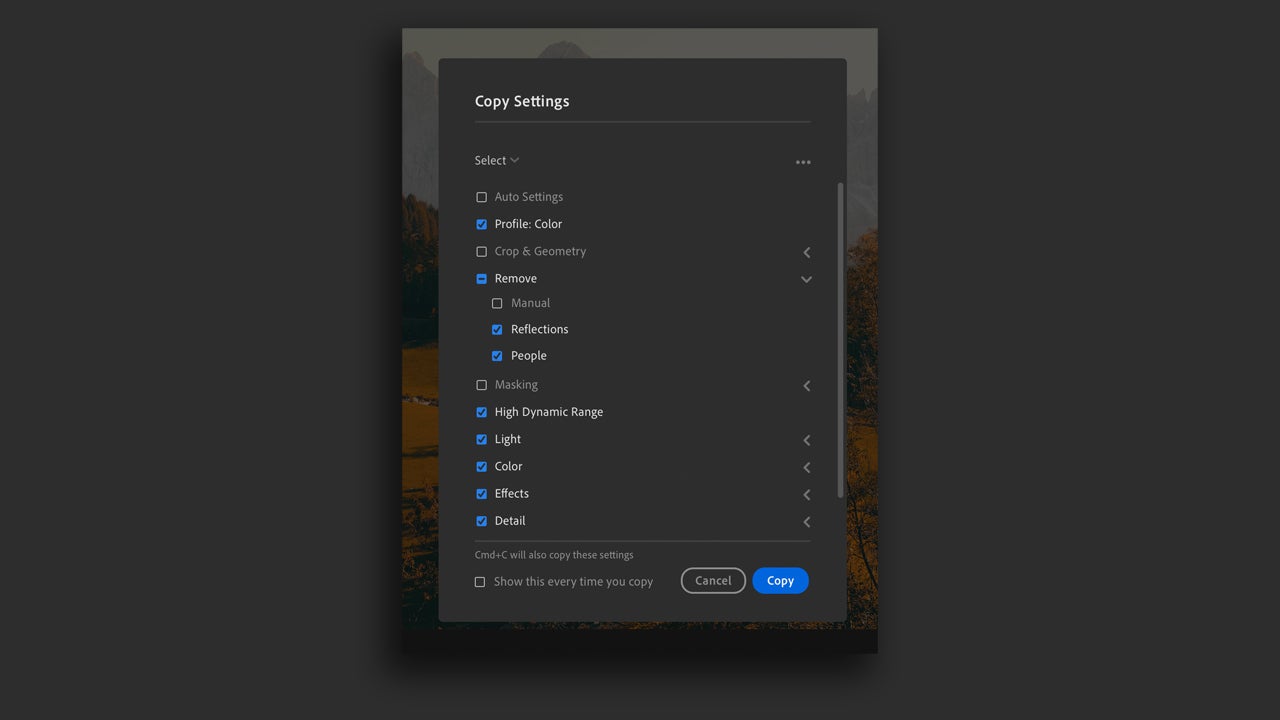
  • If you only want to copy some specific adjustments, use the shortcuts command + Shift + C (macOS) or Ctrl + Shift + C (Windows). A new panel will appear where you can choose the specific edits you want to save for another image.
If you want to apply any type of adjustment to a group of photos as you import them into Lightroom, simply go to Adobe Lightroom > Preferences > Import (macOS) or Edit > Preferences > Import. Then, change the RAW Defaults option to a setting of your choice. Here you can use a preset that you have previously configured or one of the default ones included in Lightroom.

Create your own presets

Previously, we mentioned the fact that you can create your own custom settings. If you don’t know how to do it or where to start, follow these steps:

  • Edit a photograph just the way you like it. Adjust the color, light, contrast, etc.
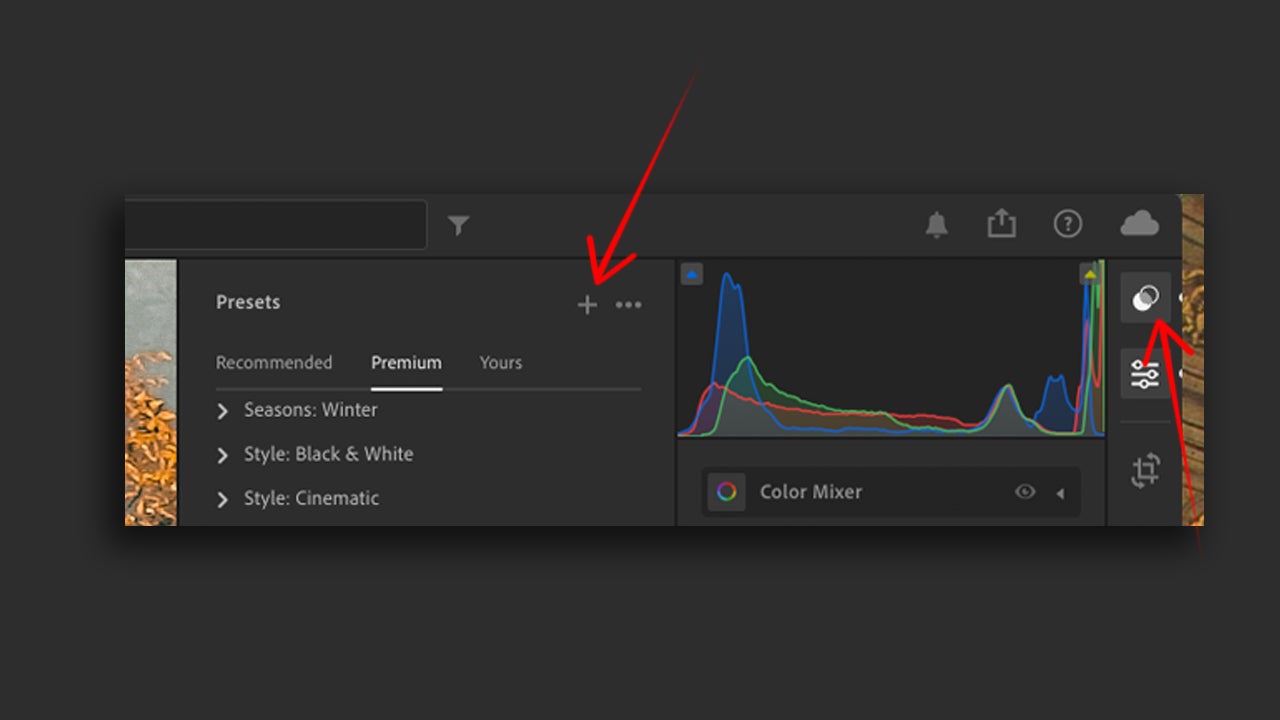
  • When you’re done, go to the panel on the right and click the Presets button. Once inside, select the + button.
  • A new window will pop up where you will need to check the settings you want to include in the new one we are going to create. Above, you will also need to write a name for that setting.
AI Editing Status: Learn How It Works

As we mentioned at the beginning, Adobe Lightroom allows you to edit your photographs with the help of artificial intelligence. Tools like Denoise, Masking, or Generative Remove rely on it and deliver quite spectacular results.

  • Open your photographs in Adobe Lightroom and edit them with one of the AI options that the program already has.
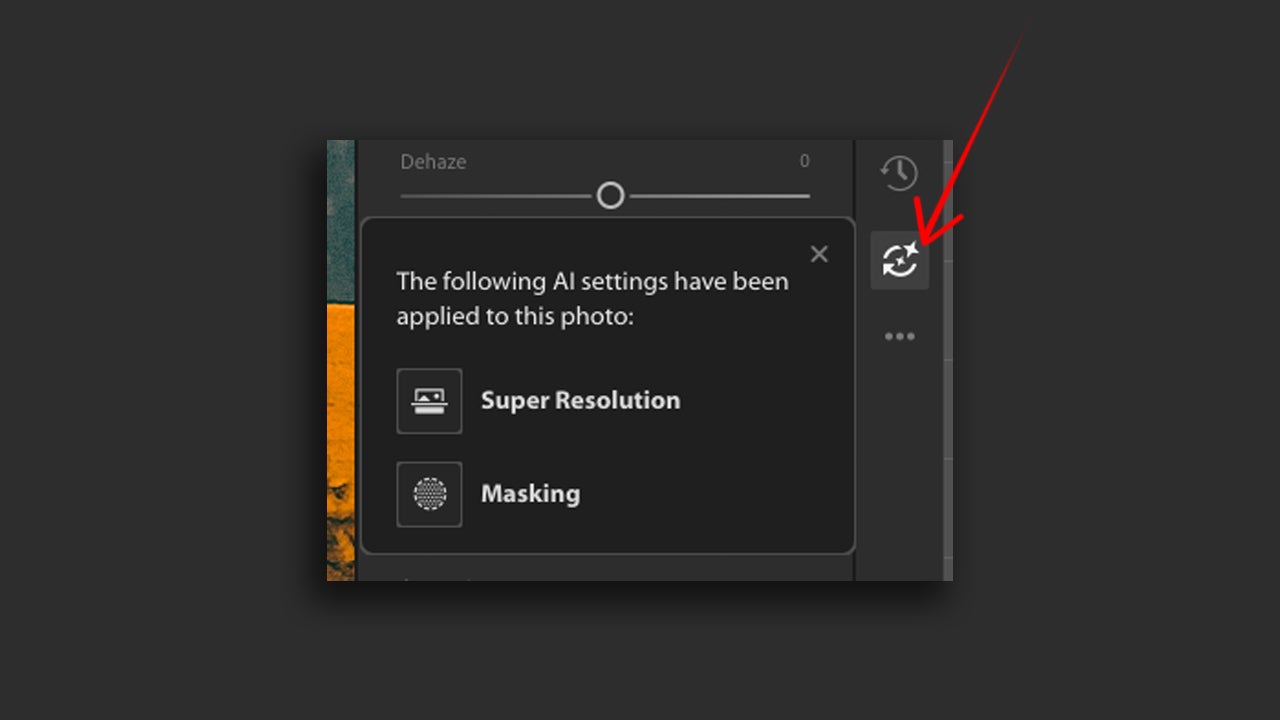
  • By doing so, you will see that AI Edit Status will be activated. The button will be highlighted in yellow to alert you that you should take a look and update some settings for the editing to be effective.
  • If you have made any changes, simply select Update All within AI Edit Status. There you will also be able to see in detail the editing you have done with AI.
Some of the effects that will help you improve the quality of your images the most are Denoise, RAW Details, and Super Resolution. The first will help you reduce noise in your images without losing details along the way. On the other hand, with RAW Details, your photos will have sharper details and improved color reproduction, among other things. Finally, Super Resolution will help your photograph have double the linear resolution. Very useful for “enlarging” images that are cropped or excessively small.

Adobe itself recommends on its website the order you should follow when using effects and edits that involve AI in your images. It would be as follows:

  • HDR
  • Denoise, RAW Details, Super Resolution
  • Reflections Removal
  • Distracting People Removal
  • Generative Expand
  • Generative Remove, Content-Aware Remove, Heal and Clone
  • Lens Blur
  • Lens Profile
  • Crop and Transform
  • Adaptive Profiles
  • Global Adjustments
  • Masking

Adobe Lightroom
Adobe Lightroom DOWNLOAD

Author: María López

{ "de-DE": "Künstler aus Berufung und Technikliebhaber. Seit ich denken kann, habe ich gerne an allen möglichen Gadgets herumgebastelt.", "en-US": "Artist by vocation and technology lover. I have liked to tinker with all kinds of gadgets for as long as I can remember.", "es-ES": "Artista de vocación y amante de la tecnología. Me ha gustado cacharrear con todo tipo de gadgets desde que tengo uso de razón.", "fr-FR": "Artiste de vocation et amateur de technologie. J'aime bricoler avec toutes sortes de gadgets depuis que j'ai l'usage de la raison.", "it-IT": "", "ja-JP": "", "nl-NL": "", "pl-PL": "", "pt-BR": "", "social": { "email": "", "facebook": "", "twitter": "", "linkedin": "" } } View all posts by María López

Author María LópezPosted on July 31, 2025August 1, 2025Categories News

Post navigation

Previous Previous post: Catastrophe at Apple: the creator of one of its best series unexpectedly leaves it
Next Next post: Netflix has already renewed the new series from the creator of 'BoJack Horseman' even before its premiere

Recent Posts

  • Not only 'Backrooms': 5 other Internet phenomena that had movies (even if they weren't very good)
  • Spider-Noir no fue el único superhéroe de cine negro: Marvel tenía todo un universo noir que ya ha sido olvidado
  • Lorcana has a new expansion that focuses on one important thing: your hype for Toy Story 5
  • If you want a Steam Deck, it will now cost you 200 euros more
  • The new James Bond game sells over one and a half million copies in its first 24 hours

Archives

  • May 2026
  • April 2026
  • March 2026
  • February 2026
  • January 2026
  • December 2025
  • November 2025
  • October 2025
  • September 2025
  • August 2025
  • July 2025
  • June 2025
  • May 2025
  • April 2025
  • March 2025
  • February 2025
  • January 2025
  • December 2024
  • November 2024
  • October 2024
  • September 2024
  • August 2024
  • July 2024
  • June 2024
  • May 2024
  • April 2024
  • March 2024
  • February 2024
  • January 2024
  • December 2023
  • November 2023
  • October 2023
  • September 2023
  • August 2023
  • July 2023
  • June 2023
  • May 2023
  • April 2023
  • March 2023
  • February 2023
  • January 2023
  • December 2022
  • November 2022
  • October 2022
  • September 2022
  • August 2022
  • July 2022
  • June 2022
  • May 2022
  • April 2022
  • March 2022
  • February 2022
  • January 2022
  • December 2021
  • November 2021
  • October 2021
  • September 2021
  • August 2021
  • July 2021
  • June 2021
  • May 2021
  • April 2021
  • March 2021
  • February 2021
  • January 2021
  • December 2020
  • November 2020
  • October 2020
  • September 2020
  • August 2020
  • July 2020
  • June 2020
  • May 2020
  • April 2020
  • March 2020
  • February 2020
  • January 2020
  • December 2019
  • November 2019
  • October 2019
  • September 2019
  • August 2019
  • July 2019
  • June 2019
  • May 2019
  • April 2019
  • March 2019
  • February 2019
  • January 2019
  • December 2018
  • November 2018
  • October 2018
  • September 2018
  • August 2018
  • July 2018
  • June 2018
  • May 2018
  • April 2018
  • March 2018
  • February 2018
  • January 2018
  • December 2017
  • November 2017
  • October 2017
  • September 2017
  • August 2017
  • July 2017
  • June 2017
  • May 2017
  • April 2017
  • March 2017
  • February 2017
  • January 2017
  • December 2016
  • November 2016
  • October 2016
  • September 2016
  • August 2016
  • July 2016
  • June 2016
  • May 2016
  • April 2016
  • March 2016
  • February 2016
  • January 2016
  • December 2015
  • November 2015
  • October 2015
  • September 2015
  • August 2015
  • July 2015
  • June 2015
  • May 2015
  • April 2015
  • March 2015
  • February 2015
  • January 2015
  • December 2014
  • November 2014
  • October 2014
  • September 2014
  • August 2014
  • July 2014
  • June 2014
  • May 2014
  • April 2014
  • March 2014
  • February 2014
  • January 2014
  • December 2013
  • November 2013
  • October 2013
  • September 2013
  • August 2013
  • July 2013
  • June 2013
  • May 2013
  • April 2013
  • March 2013
  • February 2013
  • January 2013
  • December 2012
  • November 2012
  • October 2012
  • September 2012
  • August 2012
  • July 2012
  • June 2012
  • May 2012
  • April 2012
  • March 2012
  • February 2012
  • January 2012
  • December 2011
  • November 2011
  • October 2011
  • September 2011
  • August 2011
  • July 2011
  • June 2011
  • May 2011
  • April 2011
  • March 2011
  • February 2011
  • January 2011
  • December 2010
  • November 2010
  • October 2010
  • September 2010
  • August 2010
  • July 2010
  • June 2010
  • May 2010
  • April 2010
  • March 2010
  • February 2010
  • January 2010
  • December 2009
  • November 2009
  • October 2009
  • September 2009
  • August 2009
  • July 2009
  • June 2009
  • May 2009
  • April 2009
  • March 2009
  • February 2009
  • January 2009
  • December 2008
  • November 2008
  • October 2008
  • September 2008
  • August 2008
  • July 2008
  • June 2008
  • May 2008
  • April 2008
  • March 2008
  • February 2008
  • January 2008
  • December 2007
  • November 2007
  • October 2007
  • September 2007
  • August 2007
  • July 2007
  • June 2007
  • May 2007
  • April 2007
  • March 2007
  • February 2007
  • January 2007
  • December 2006
  • November 2006
  • September 2006
  • August 2006
  • June 2006
  • May 2006
  • July 2001
  • January 2001
  • November 2000
  • September 2000
  • August 2000
  • July 2000
  • April 2000
  • March 2000

Categories

  • Affiliate post
  • Expert Review
  • Gaming
  • Guides
  • How to
  • Legacy how To
  • News
  • Noticias
  • Software>Security
  • Sponsored
  • Trucos y Consejos
  • Uncategorized
  • Windows software

Meta

  • Log in
  • Entries feed
  • Comments feed
  • WordPress.org
Softonic English Proudly powered by WordPress