
Skip to content

Softonic English

Just another Softonic Sites site

AI Photoshop for fashion and beauty: fix hair, wrinkles, and fabric distractions without over-retouching

In the beauty industry, models have to look incredible and show off the product they’re trying to sell well. That’s why the most important thing is to make the model shine without it looking too artificial. And that’s where Photoshop comes in handy.

With each update, Photoshop has become an increasingly accessible and easy-to-use program, without sacrificing features along the way. The key to this lies in the integration of AI-powered tools. If you want to know how to use Photoshop for retouching, here’s a simple guide.

Adobe Photoshop
Adobe Photoshop Download

How to use Photoshop’s AI to edit a photo

It’s worth clarifying that in Photoshop there isn’t really a single AI tool that does everything for you. What you’ll find is a series of tools that will help you fix imperfect skin, fill in backgrounds, change the color of any item of clothing, and much more. Depending on the situation, you can use one tool or another (or combine them).

Removing hairs, pimples, or small distractions

In this case, the best thing you can do is use the Remove Tool.

  • To start using it, simply select the tool and adjust the brush size for the area you’re going to erase.
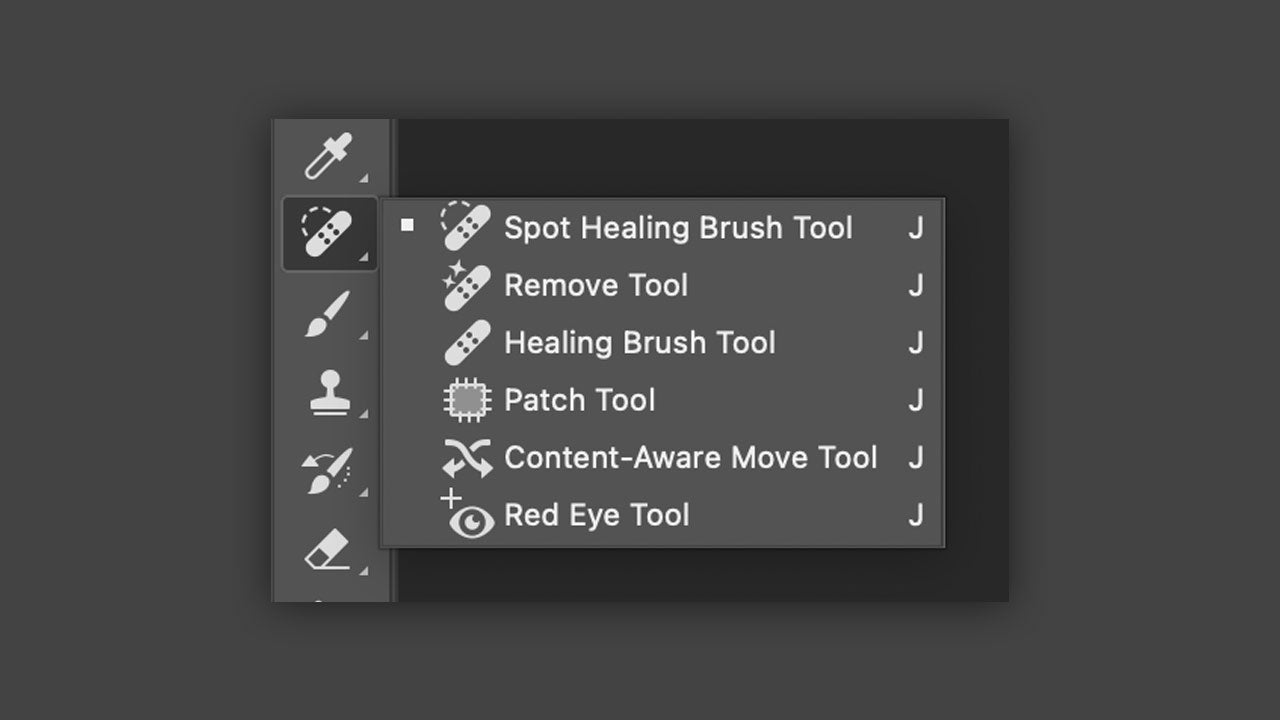
  • Make sure you’re on the correct layer. You can check this in the Layers panel.
  • Lastly, use short strokes, one by one. If you paint over too large an area, you’ll make the surface look too artificial.

Adding elements to the background or rebuilding specific areas

Placing new objects in an image is now much easier than ever thanks to Generative Fill. As well as adding or modifying elements, it can also help you remove larger ones if the Remove Tool doesn’t quite work.

  • To use it, use any selection tool (such as the Lasso Tool or a similar one) to select the area you want to remove or modify, always leaving a small margin.
  • Next you’ll see a small context menu with the Generative Fill option.
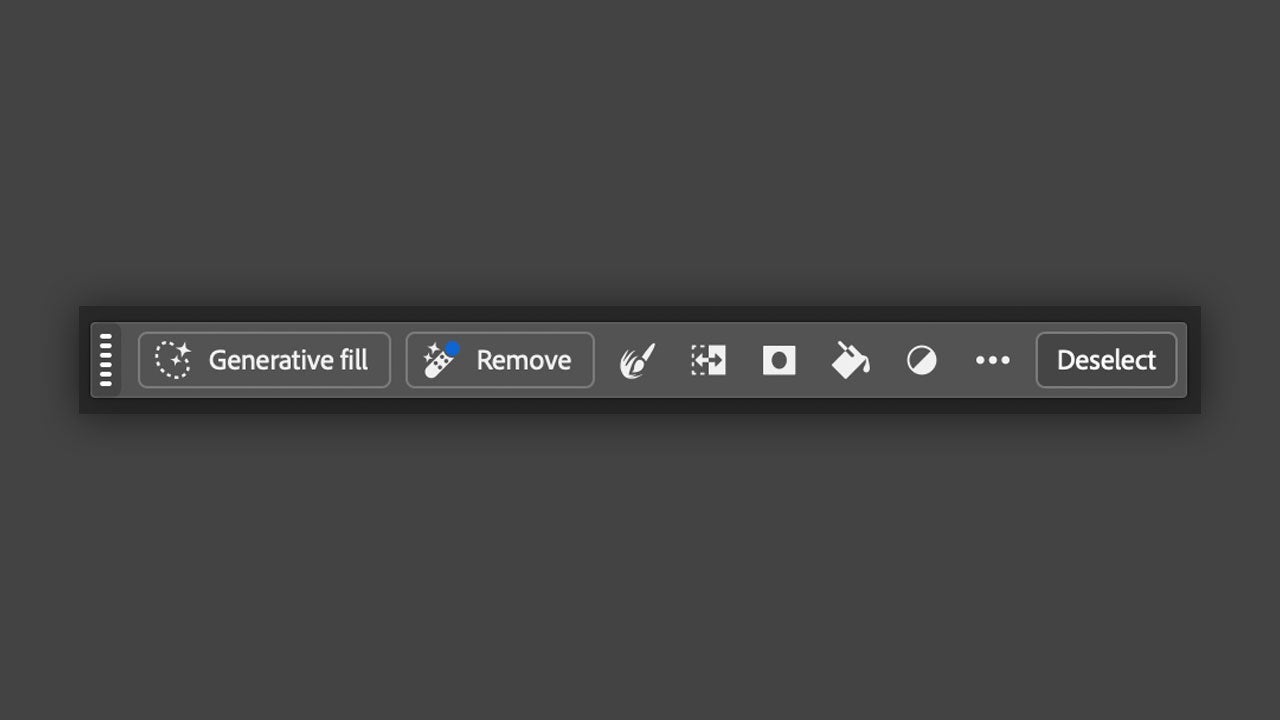
  • Click on Generative Fill and leave the text box empty if you only want an element to disappear. If you want to add an object, you’ll have to briefly describe what you want to generate.
  • You can choose between different generative models for the image if you want. Alongside Firefly, you can also use other third-party models from the Partner tab.

Selecting only the hair, the face, or pieces of clothing

If you want to make an accurate selection without wasting too much time, there are two excellent tools: Select Subject and the Object Selection Tool.

  • To use Select Subject, first choose a selection tool like the Magic Wand, Object Selection Tool, or Quick Selection Tool.
  • Then click on Select Subject. Using the arrow on the right, you can choose whether you want the image processing to run locally (Device) or in the cloud (Cloud).
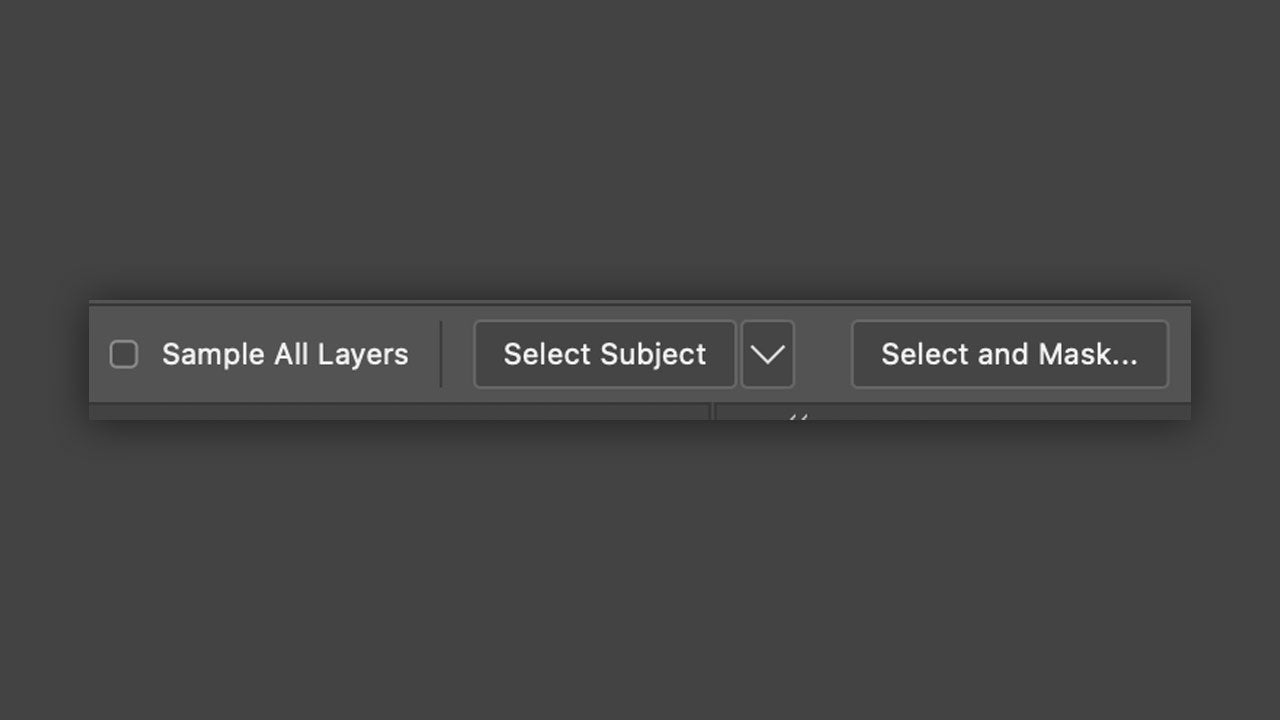
  • The Object Selection Tool goes even further, since all you have to do is hover over the clothing, the hair, or the face for Photoshop to recognize it. If you’re making a hair selection, click on Select and Mask and use the Refine Hair option.

Retouching with masks

Thanks to layer masks, you’ll be able to apply any change you’ve made with AI without affecting the original image and go back to it when needed.

  • To apply a layer mask, click on the rectangle icon with a circle in the middle. You’ll see it at the bottom of the Layers panel.
  • When you do that, you’ll see a new white layer appear just to the right of your image. Select that white layer.
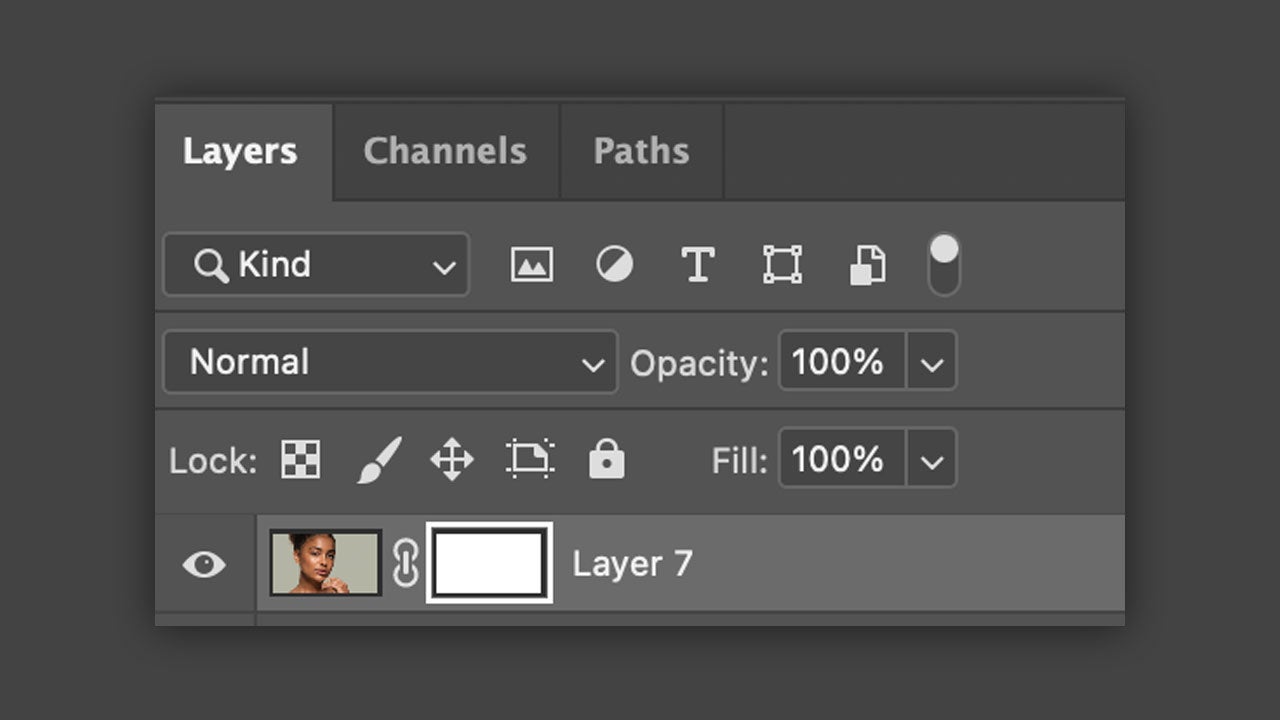
  • Choose a brush and make sure black and white appear in the color swatches. Anything painted black will be hidden, anything white will remain visible. AI tools are a big help, but it’s worth being aware of their limits. In many cases, they may invent details that weren’t there before or create unrealistic edits. In those cases, you can always make additional manual adjustments and use tools like Clone Stamp Tool or Healing Brush Tool.
Adobe Photoshop
Adobe Photoshop Download

Author: María López

{ "de-DE": "Künstler aus Berufung und Technikliebhaber. Seit ich denken kann, habe ich gerne an allen möglichen Gadgets herumgebastelt.", "en-US": "Artist by vocation and technology lover. I have liked to tinker with all kinds of gadgets for as long as I can remember.", "es-ES": "Artista de vocación y amante de la tecnología. Me ha gustado cacharrear con todo tipo de gadgets desde que tengo uso de razón.", "fr-FR": "Artiste de vocation et amateur de technologie. J'aime bricoler avec toutes sortes de gadgets depuis que j'ai l'usage de la raison.", "it-IT": "", "ja-JP": "", "nl-NL": "", "pl-PL": "", "pt-BR": "", "social": { "email": "", "facebook": "", "twitter": "", "linkedin": "" } } View all posts by María López

Author María LópezPosted on September 25, 2026September 25, 2026Categories News

Post navigation

Previous Previous post: Google’s digital wardrobe finally comes to the iPhone: this is how we can try on clothes without touching them
Next Next post: Call of Duty will soon add a new tab so you don’t see certain skins if you don’t want to

Recent Posts

  • Cyberpunk 2077 gets a live-action movie: Paramount teams up with CD Projekt Red
  • HVAC Systems Are Your Home’s Biggest Energy Draw: New Federal Data
  • Superman’s Man of Tomorrow gets a suit upgrade: leaked photos hint at a sharper 2027 look
  • Marvel’s The Amazing Spider-Man #1000 is out now: Mysterio gets a disturbing new look
  • Harry Potter streaming could change: HBO Max and Paramount+ stay separate for now

Archives

  • October 2026
  • September 2026
  • August 2026
  • July 2026
  • June 2026
  • May 2026
  • April 2026
  • March 2026
  • February 2026
  • January 2026
  • December 2025
  • November 2025
  • October 2025
  • September 2025
  • August 2025
  • July 2025
  • June 2025
  • May 2025
  • April 2025
  • March 2025
  • February 2025
  • January 2025
  • December 2024
  • November 2024
  • October 2024
  • September 2024
  • August 2024
  • July 2024
  • June 2024
  • May 2024
  • April 2024
  • March 2024
  • February 2024
  • January 2024
  • December 2023
  • November 2023
  • October 2023
  • September 2023
  • August 2023
  • July 2023
  • June 2023
  • May 2023
  • April 2023
  • March 2023
  • February 2023
  • January 2023
  • December 2022
  • November 2022
  • October 2022
  • September 2022
  • August 2022
  • July 2022
  • June 2022
  • May 2022
  • April 2022
  • March 2022
  • February 2022
  • January 2022
  • December 2021
  • November 2021
  • October 2021
  • September 2021
  • August 2021
  • July 2021
  • June 2021
  • May 2021
  • April 2021
  • March 2021
  • February 2021
  • January 2021
  • December 2020
  • November 2020
  • October 2020
  • September 2020
  • August 2020
  • July 2020
  • June 2020
  • May 2020
  • April 2020
  • March 2020
  • February 2020
  • January 2020
  • December 2019
  • November 2019
  • October 2019
  • September 2019
  • August 2019
  • July 2019
  • June 2019
  • May 2019
  • April 2019
  • March 2019
  • February 2019
  • January 2019
  • December 2018
  • November 2018
  • October 2018
  • September 2018
  • August 2018
  • July 2018
  • June 2018
  • May 2018
  • April 2018
  • March 2018
  • February 2018
  • January 2018
  • December 2017
  • November 2017
  • October 2017
  • September 2017
  • August 2017
  • July 2017
  • June 2017
  • May 2017
  • April 2017
  • March 2017
  • February 2017
  • January 2017
  • December 2016
  • November 2016
  • October 2016
  • September 2016
  • August 2016
  • July 2016
  • June 2016
  • May 2016
  • April 2016
  • March 2016
  • February 2016
  • January 2016
  • December 2015
  • November 2015
  • October 2015
  • September 2015
  • August 2015
  • July 2015
  • June 2015
  • May 2015
  • April 2015
  • March 2015
  • February 2015
  • January 2015
  • December 2014
  • November 2014
  • October 2014
  • September 2014
  • August 2014
  • July 2014
  • June 2014
  • May 2014
  • April 2014
  • March 2014
  • February 2014
  • January 2014
  • December 2013
  • November 2013
  • October 2013
  • September 2013
  • August 2013
  • July 2013
  • June 2013
  • May 2013
  • April 2013
  • March 2013
  • February 2013
  • January 2013
  • December 2012
  • November 2012
  • October 2012
  • September 2012
  • August 2012
  • July 2012
  • June 2012
  • May 2012
  • April 2012
  • March 2012
  • February 2012
  • January 2012
  • December 2011
  • November 2011
  • October 2011
  • September 2011
  • August 2011
  • July 2011
  • June 2011
  • May 2011
  • April 2011
  • March 2011
  • February 2011
  • January 2011
  • December 2010
  • November 2010
  • October 2010
  • September 2010
  • August 2010
  • July 2010
  • June 2010
  • May 2010
  • April 2010
  • March 2010
  • February 2010
  • January 2010
  • December 2009
  • November 2009
  • October 2009
  • September 2009
  • August 2009
  • July 2009
  • June 2009
  • May 2009
  • April 2009
  • March 2009
  • February 2009
  • January 2009
  • December 2008
  • November 2008
  • October 2008
  • September 2008
  • August 2008
  • July 2008
  • June 2008
  • May 2008
  • April 2008
  • March 2008
  • February 2008
  • January 2008
  • December 2007
  • November 2007
  • October 2007
  • September 2007
  • August 2007
  • July 2007
  • June 2007
  • May 2007
  • April 2007
  • March 2007
  • February 2007
  • January 2007
  • December 2006
  • November 2006
  • September 2006
  • August 2006
  • June 2006
  • May 2006
  • July 2001
  • January 2001
  • November 2000
  • September 2000
  • August 2000
  • July 2000
  • April 2000
  • March 2000

Categories

  • Affiliate post
  • Expert Review
  • Gaming
  • Guides
  • How to
  • Legacy how To
  • News
  • Noticias
  • Software>Security
  • Sponsored
  • Trucos y Consejos
  • Uncategorized
  • Windows software

Meta

  • Log in
  • Entries feed
  • Comments feed
  • WordPress.org
Softonic English Proudly powered by WordPress