Google now allows teenagers to use Bard, but there are some security measures in place

The integration of AI into our lives has gained significant momentum since the outset, evident in the proliferation of chatbots following the launch of ChatGPT by OpenAI. This is underscored by Google’s main alternative, Bard, which debuted this year, aiming to rival ChatGPT. And now, there’s fresh news regarding ChatGPT.

ChatGPT DOWNLOAD

Mountain View has announced that, starting today, teenagers from “most countries around the world” will be able to use Bard, their artificial intelligence chatbot, something they couldn’t do until now. Additionally, they have confirmed the implementation of some security measures for these young users.

Young people from the vast majority of countries can now use Google’s Bard

Of course, any teenager meeting Google’s minimum age requirement for having their own account will have access to the said AI chatbot from the tech giant, as the company asserts. Generally, the minimum age for using Google is 13 years old, although there are some exceptions detailed on this page. Another noteworthy point is that these young and new users of Bard will only be able to use it in English, but Google plans to add other languages at some point.

That said, let’s discuss the security measures Google has implemented for teenagers using Bard, aiming to help them understand how this technology works and to prevent exposure to inappropriate content. For instance, the company will share resources, including a video explaining what generative AI is, potential issues that may arise, and their respective solutions.

Apart from what’s been mentioned, when a teenager asks Bard a factual query for the first time, Google will verify Bard’s answers against its own browser search results. Additionally, in light of this announcement, the tech company mentioned they have trained Bard to “recognize areas that are inappropriate for younger users” and have “implemented features and safety barriers to help prevent unsafe content, such as illegal or age-restricted substances, from appearing in its responses to teenagers.”

ChatGPT DOWNLOAD

To wrap up, Google has also added interesting new features to Bard, such as one that will help us solve a math equation by simply typing it or uploading an image of it. The platform will also be able to generate charts from tables, for instance.


The scammers are using Google Forms to try to steal money from users

As discovered by security researchers at Cisco Talos, scammers have now found a way to abuse Google Forms to conduct a new spam and phishing campaign. The cybercriminals sending these malicious messages to users’ emails are also using a fake AI chatbot with the aim of stealing cryptocurrencies from anyone who falls into the trap, likely also transacting through those payment methods.

Google Chrome DOWNLOAD

As is often the case, this procedure is capable of deceiving many users. However, to put everyone’s mind at ease, at the moment this new scam method was brought to light, they hadn’t managed to steal any money from potential victims. Cisco Talos hasn’t hesitated to state that this new tactic pays “extraordinary attention to detail.” Clearly, all of this is conducted through Google Forms, at least it all begins with the mentioned service from Mountain View.

This is the new spam and phishing campaign by cyber scammers

It seems that the first thing scammers do is create a new file in Forms, choosing the option that allows converting that file into a questionnaire. After this, the attackers set up two very key aspects to carry out their attack: one is to publish the grades later, once the manual review is done (which allows the questionnaire to collect email addresses of potential victims) and the “responder’s entry” in responses, enabling attackers to complete the form using the potential victim’s email address.

With all this done, Google Forms can generate a link to the document that criminals can access to complete it. Then, they can click on “release scores,” triggering the service to send a notification to the victim’s email. What’s interesting is that this notification message can be fully customized before sending, showing an exaggerated attention to detail. Regardless of what the message says, this entire process ultimately aims to deceive someone into believing that, a year ago, apparently, they logged into a bitcoin cloud mining service and completely neglected it.

Google Chrome DOWNLOAD

By instilling a bit of fear into potential victims, they manage to coax them into being “helped” by an obviously fake AI chatbot. This chatbot supposedly assists in converting the cryptocurrency in question into fiat currency so they can withdraw the remaining cash (as they claim to have taken a portion of the money deposited in that service). After this “assistance” from the chatbot, it requests a fee for the service, around 64 dollars, which must be paid in bitcoin to an address provided by the bot itself.

Microsoft is improving its Photos app for Windows with new AI-powered tools

Although this has gone somewhat unnoticed in recent days, it seems that Microsoft is testing new improvements for the Windows Photos app, and these are being developed with AI tools. Without a doubt, the use of artificial intelligence no longer surprises us at this point, especially coming from Redmond, who seem increasingly immersed in said technology, whether through their strong investment in OpenAI or the use of AI for Xbox game development, for instance.

Windows 11 DOWNLOAD

Now, as we were saying, Microsoft seems to be testing new AI tools for its Photos app through its Windows Insider program, and this has left us with a rather noteworthy improvement. As discovered by the user previously known as “PhantomOcean3” on Twitter, the new version of this Redmond-based application now allows for the removal and replacement of the background image in photos. However, it’s important to remember that this is still in the testing phase, and nothing is known yet about a full and official release.

Microsoft Photos will allow us to replace or remove the background from our images

It seems that the Microsoft Photos app has a new icon in the top menu—a human figure. When clicked, it opens the image editor, offering three options: to blur the background, remove it entirely, or replace it. Additionally, there’s a new background brush being tested, allowing users to change the background color rather than replacing it altogether. Currently, there’s no official date for when all users can enjoy these new features, but the wait shouldn’t be too long.

The same user previously mentioned has noticed other minor changes in the Redmond-based Photos app. Among them, the zoom and full-screen options for viewing photos seem to have been moved to the bottom right of the screen. There are a few more additional changes in this tool, but as mentioned earlier, they’re not something that will significantly disrupt the experience. However, if you’re interested, you can always check out the thread by “PhantomOcean3.”

Windows 11 DOWNLOAD

With these additions, it seems like Microsoft Photos aims to move beyond being just an app for viewing our photos. While it’s true that this application already has various options and tools, some more basic than others, for editing our images, it’s now when it seems that the folks at Redmond want to put in a bit more effort to expand the capabilities of this Windows app.

Microsoft launches Bing Webmaster Tools on Android

As many of you may know, Microsoft has several tools dedicated to Bing, such as the Bing search engine itself, Bing Chat, their AI-powered chatbot, and their Bing Image Creator AI tool. However, this isn’t the only one worth mentioning; there’s also their Bing Webmaster Tools, which has recently been released for Android devices. It’s now available for download at any time, as announced on the Bing blog.

Microsoft Bing Webmaster Tools DOWNLOAD

This tool allows webmasters themselves to monitor the performance of their websites from anywhere. In other words, Bing Webmaster Tools is used to track traffic, search rankings, and crawling details, regardless of our current location, now that it’s available for download from the Google Play Store. Additionally, with this announcement, they also took the opportunity to share the key features of this Android mobile app.

The Microsoft app is now available for download from the Google Play Store

To begin with, Bing Webmaster Tools allows us to check firsthand, at any time, our website’s performance. This means we can see how many visitors our page receives, search rankings, and crawling details. Furthermore, we can receive notifications about issues that could harm our search results, such as HTML markup or crawling errors. Among its other features are the ability to easily submit sitemaps and individual URLs to Bing, ensuring we stay updated on all our website’s content, and the option to monitor the keywords we use.

Microsoft Bing Webmaster Tools DOWNLOAD

Certainly, Bing Webmaster Tools can be downloaded for free from the previously mentioned Google Play Store, available right away. This announcement comes a few months after the introduction of a very interesting feature in the aforementioned Redmond tool. This feature allowed the app to track traffic from Bing Chat links. It’s worth noting that this new functionality was included in September. However, it’s reported that Microsoft has merged regular search traffic with chat traffic, making it impossible now to differentiate how much traffic comes from the mentioned Microsoft chatbot.

Google makes the decision to withdraw Fitbit from several markets

Google, which recently announced its plans to further expand the accessibility of its AI-powered search engine, has now decided to withdraw Fitbit from several international markets, including countries in Europe, Asia, and Africa, as confirmed by the company itself. Therefore, while existing users of Fitbit smartwatches will still be able to use their devices, those who do not already have one will not be able to purchase them in the affected markets.

fitbit DOWNLOAD

Google acquired Fitbit in 2021, and now, almost 3 years after this acquisition, Google has recently updated its documentation for the devices of the brand. This led to the announcement that Fitbit products will no longer be available in countries such as Croatia, the Czech Republic, Estonia, Hungary, Latvia, Lithuania, Luxembourg, Poland, Portugal, Romania, and Slovakia. In Asia, Hong Kong, Korea, Malaysia, Thailand, and the Philippines are the territories affected by the company’s decision.

Fitbit says goodbye to several countries

Beyond this, TechCentral media was able to talk to people from Google, which confirmed that the Fitbit product line would also be withdrawn from South Africa, indicating that this is because they intend to “align the hardware portfolio with the regional availability of Pixel products“. They have also taken the opportunity to state that Mexico and the rest of Latin America will also be left without these smartwatches.

Likewise, the technology giant wanted to reassure users who already have one of the fitbit devices, indicating that they will continue to provide assistance to these people and their devices through new software versions, security updates, compliance with guarantees and access to customer service. They also stated that they can continue using their premium subscription services, as long as they are paid, of course.

fitbit DOWNLOAD

We will see how long they last supporting customers in the aforementioned countries that lose the presence of the firm in their markets. For now, what we can be sure of is that the inhabitants of all these territories will no longer be able to access new Fitbit products and we will see the drift that the brand takes in the coming months and years. Perhaps Google is considering integrating its technology into the Pixel Watch line, although this is nothing more than mere speculation, both ours and that of other media that have echoed the news.

Google takes its AI-powered search engine to more countries

The expansion of artificial intelligence is almost inevitable, and it is something we are seeing in almost every aspect of the technological world, as demonstrated by the fact that Microsoft is going to offer AI-based tools to Xbox studios for game development, for example. Now, in this case, we come to talk about Google, which has recently taken its AI-powered search engine, Search Generative Experience (SGE), to more than 120 new countries, including Mexico, Brazil, South Korea, Indonesia, Nigeria, and South Africa, among many others.

Google Chrome DOWNLOAD

At first glance, we can highlight that Google’s service has not reached Spain, at least for now. Nevertheless, you can check the complete list of countries on their official website. Additionally, we can mention that this search engine now supports four new languages, including Spanish, Portuguese, Indonesian, and Korean. These languages are added to the ones that already had support, namely English, Hindi, and Japanese.

The AI is expanding in Google’s search engine

However, keep in mind that to use this tool from Mountain View, you still have to participate in Google’s Search Labs program, and once enrolled, these AI functions can only be used through Chrome on the desktop or the Google app on Android and iOS. With all this context in mind, the Product Director of SGE, Hema Budaraju, declined to answer in an interview whether the AI they use for their search engine will eventually reach others. However, she hinted that such an option might be possible in the future.

While all indications point to the experimental testing of this SGE ending before the end of this year, Google seems determined to continue gathering user feedback to optimize the experience. Plans for 2024 have not been detailed yet. Beyond all this, the tech giant has announced some new features that will land in SGE, and these are the following:

  1. In search results, we will see a new option to request tracking, aiming to save time and avoid going into a separate conversation with SGE. This new addition will roll out in the coming weeks in the United States.
  2. When requesting translations, we will be able to see various meanings that may belong to different contexts. This addition will come to English-to-Spanish translations shortly in the United States.
  3. A new addition coming next month to the United States and later to other countries will allow us to request more information about some terms used in subjects like programming and health in search results. This will join a recently announced addition that provides more details on topics like economics, science, or history.
Google Chrome DOWNLOAD

On the other hand, as indicated by The Verge, SGE also has another innovation regarding search results when they are good. They respond to user requests without having to click on the sources. For now, there is no data on how SGE results have changed click-through rates from search results to other sources, although Google has already updated its service to improve the way links are contextualized.

YouTube will soon add a function very similar to something we can already see on TikTok

While it’s true that the function we’re discussing in this post gained popularity through its use on TikTok, for example, it’s also true that it seems perfectly designed for use on YouTube, and that’s what Google seems to think. The world’s most famous video platform will incorporate a new section called “For You” on November 20. This section will be displayed when entering the channels of content creators who choose to activate it, as announced through a post on X (formerly Twitter).

Youtube DOWNLOAD

Yes, this new section is just what you’re thinking. With YouTube’s “For You” section, upon entering the channel of a content creator who chooses to activate this feature, we will see personalized video recommendations based on our viewing history as users. As you can see, this update will be present only on channels and not on the platform’s main page or on our account page.

YouTube will provide video recommendations even on the channels of our favorite content creators

As mentioned earlier, content creators will have the responsibility to choose whether or not to show the “For You” section. However, they will also have the ability to manage and configure it to display recommended content of their choosing on their channel. For instance, they can decide whether to show shorts, live streams, or full-length videos, or choose a mix of everything. They can also choose whether only recent content is recommended. This new feature seems to be an interesting addition for both users and YouTube content creators, as it allows creators to have control over what is recommended on their channel.

The new “For You” section on YouTube will appear as a carousel of videos, with the selected videos based on the creator’s configuration and the user’s viewing history. It’s worth mentioning that this new section has been in testing for several months, as shown in this video on the Creator Insider channel.

Youtube DOWNLOAD

That being said, remember that the new “For You” section on YouTube will be available on the platform on November 20, just over a week from now.

Waze has a new feature that will help us be more cautious on the road

Waze has announced a new feature that, thanks in part to the use of AI, can be more than useful for us to be more cautious while driving and even save our lives. Specifically, as they say in their official blog post, Waze incorporates Google’s accident history, which means that when we pass through a potentially dangerous road, we will receive a notification from the mentioned app.

Waze DOWNLOAD

For those less familiar with this topic, Waze is one of the best GPS navigation apps currently available for driving on the road. Now, with the addition of this new feature, the platform will determine if a road is particularly dangerous thanks to the use of AI. This new function will analyze user reports, relevant data such as whether the road is a highway or a street, and other aspects such as the degree of incline and the condition of the road itself.

With this new feature from Waze, we can drive much more cautiously on the road

In the official post, it is mentioned that this new feature has been in beta since last year, and in fact, it is not even present in the latest beta version of the app. There are also no user reports indicating that this new feature is already available. However, Google, which has owned Waze for about a decade, states that this feature is already available. We assume that it is having a staggered rollout.

Waze DOWNLOAD

Regardless, this new feature will analyze the previously mentioned data, and if any of those factors pose a danger, the app will send a notification to the user indicating how dangerous the stretch of road can be and for how many kilometers that hazardous situation might last. However, it seems that users will not receive notifications about the situations on roads they frequently travel on, as it could be a distraction, according to Waze officials.

Google is pushing AI for ad creation

AI has not stopped revolutionizing the world of technology and other fields since it came into our lives, and it is certainly here to stay. Recently, we learned that Microsoft will offer AI tools to Xbox studios to develop their games, which is a perfect example of the integration we are experiencing of artificial intelligence in almost all areas of technology. Well, now it is Google that has gone a step further with this type of tools.

Google Chrome DOWNLOAD

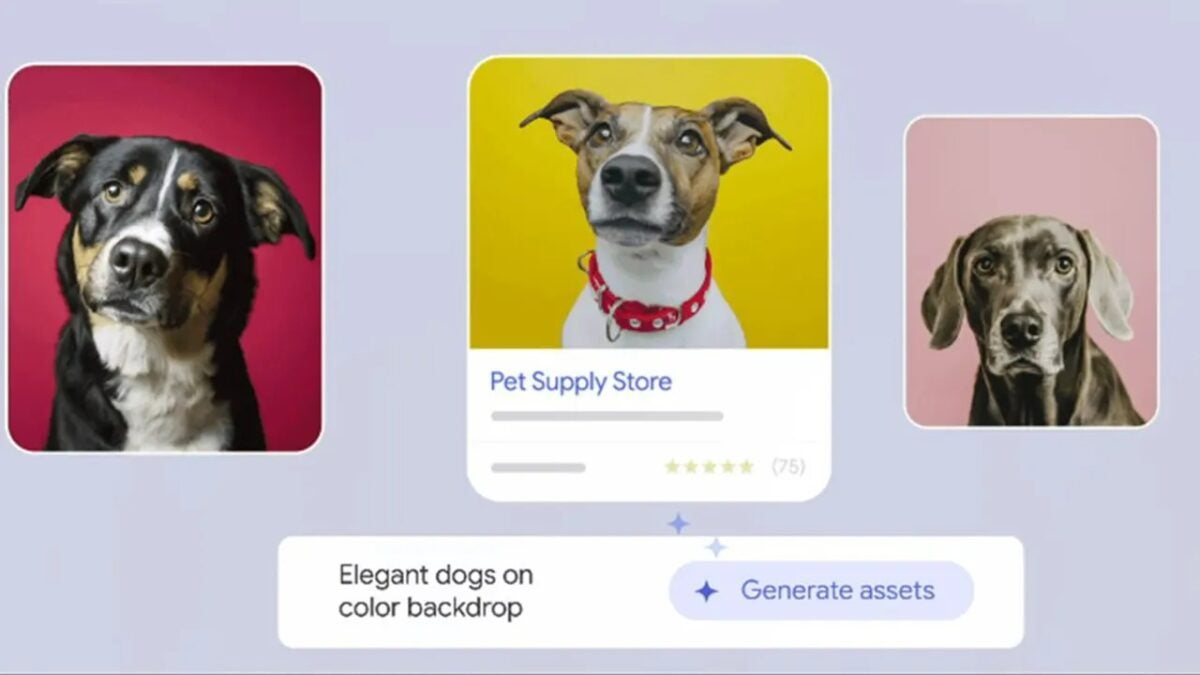
Google is launching new AI features for its Performance Max tool, which will allow advertising agencies or companies without creative staff to create ads in a much more efficient way. This will apparently allow the creators of the Google advertising in question to generate it, writing the headlines and descriptions that come up with the searches, as well as generating the images themselves that are included in their ads.

AI comes to Google advertising

Mountain View also wanted to affirm that those who use this new tool will be able to repeat their indications as much as they want until they find the texts and images they like the most. Likewise, the company also ensures that no two images will be the same in order to avoid problems between the different advertisers that use it. In other words, they guarantee that with these new additions the identity of each brand that is advertised will continue to be recognizable.

Additionally, Google Ads will have an AI image editing function in 2024, which will undoubtedly be a great addition for advertisers, since this way, by editing from the platform itself, they will save time in the creation of ads. Still on the subject of ad images, the editor itself will allow updating the most visual ads that are already available while retaining some of their highlights. It is also capable of generating ad variations.

Google Chrome DOWNLOAD

Additional details point out that, as indicated by Google, those advertisers using Merchant Center Next, a tool that controls the appearance of Google products, will also get AI tools. Those from Mountain View say that all content generated with these new tools will be subject to SynthID, which is a metadata watermark, helping to identify it as AI-created content.

Microsoft is testing a new feature that allows you to enlarge images without switching tabs in Edge Canary

Although it’s true that this feature is not available for all Microsoft Edge users, it will likely become available eventually. However, at the moment, only a few selected users from the Edge Insiders program in the Canary Channel of Microsoft’s browser can test “Enlarge image,” which is the new feature designed to enhance user interaction with images on websites.

Microsoft Edge DOWNLOAD

With this new addition, currently only available to the mentioned users of Microsoft Edge Canary, the in-development version of the Redmond company’s browser; we will be able to view the images in question in a larger window without having to switch tabs or open new windows. Additionally, it appears that this new preview includes the image’s alternative text or a brief description that provides some context about what you are seeing.

Microsoft Edge continues its quest to incorporate innovations that enhance the user experience

As we mentioned, this new feature is not yet available for all users officially, but it’s true that it can be activated by following some very simple steps, as explained in this link. We also outline the steps to activate this new preview of Microsoft Edge:

  1. First, you need to update Microsoft Edge Canary to version 120.0.2198 or newer, which can be done by visiting edge://settings/help.
  2. Then, right-click on the Edge Canary shortcut and select “Properties.”
  3. Go to “Target” and add a space after the path, then enter the following command: –enable-features=msEdgeImageMagnifyUI.
  4. After making these changes, click “Apply” and then “OK” to save them.
  5. Continuing with these steps, go to “Settings,” then “System and Performance,” and disable the “Use hardware acceleration when available” option, if it is enabled.
  6. After completing all these steps, you just need to close the browser and reopen it using the modified shortcut.
  7. To confirm that everything has worked correctly, go to any webpage, right-click on an image, and select “Enlarge image.”
Microsoft Edge DOWNLOAD

Beyond all of this, it’s worth mentioning that the image preview window also allows users to provide feedback through thumbs-up or thumbs-down buttons. This feature will help Microsoft gather valuable information for Edge and its development.