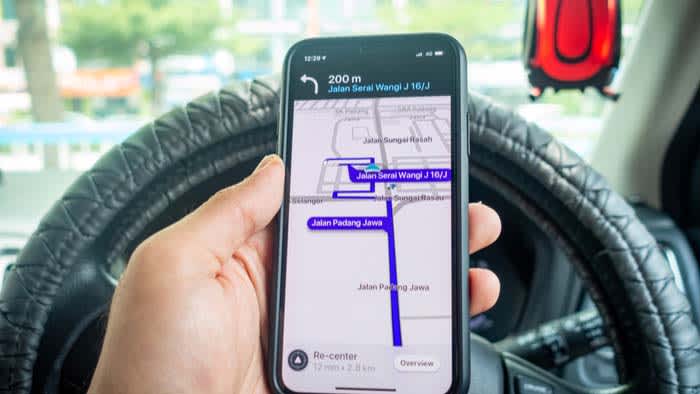
The GPS application Waze will now notify you of speed bumps, speed humps, and sharp curves

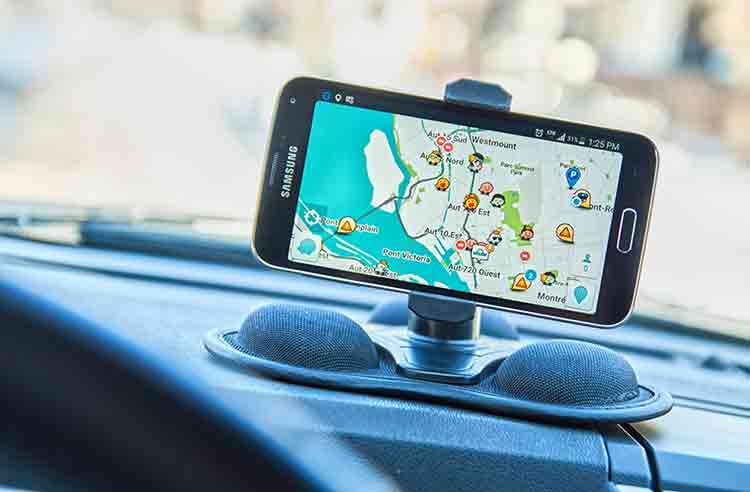
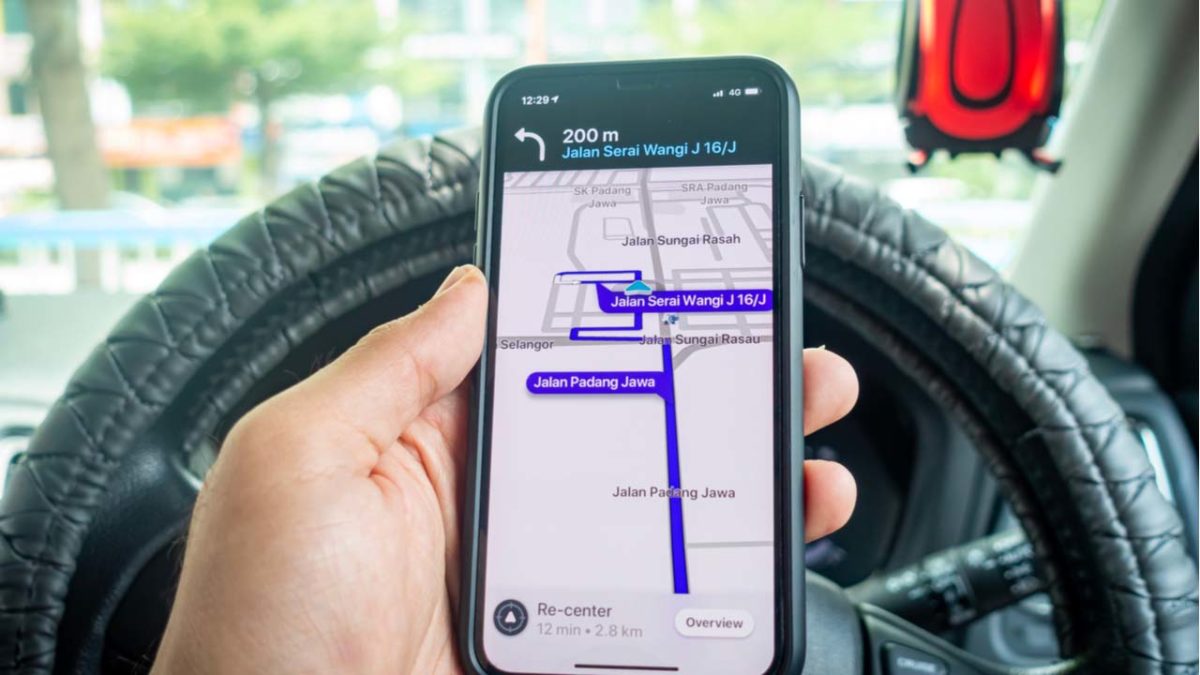
Waze, the GPS application for smartphones, will take a step forward in the functions it offers to users, and with a new update that will add a large number of features, this service will notify users of more obstacles on the road, whether they are speed bumps, humps or tight curves. With this, this service belonging to Google and that competes parallel to Maps, will see its warning system improved.

Waze has been under the Google umbrella for over a decade, and it has remained strong throughout that time. In fact, this major update package certifies that this service is in good health and also plays a useful role as “fake competition” for Google Maps, as although it can steal users, they are actually still within Google’s services.

Waze Download

Waze notices for drivers

According to the explanations from Google on their official blog, there are a total of 6 new features that Waze will receive soon in its service. In this way, this application, which is often used by those who want to avoid obstacles in their routes thanks to its fast redirection system, will enjoy a wide range of additions to continue ensuring their satisfaction.

The 6 highlighted news are as follows:

  • Closed curve warning. Thanks to this, users will be able to slow down if they were not aware of the risk of a curve.
  • New warning for speed bumps and humps. These are obstacles present in many urban environments, and thanks to these new warnings, they will be marked more clearly in the application.
  • Speed limits. Waze will highlight the speed limits of each street you are driving on.
  • Parking search. The application will also improve its service for searching parking in high traffic areas.
  • Emergency vehicles. If an emergency vehicle is near your route, the application will notify you.
  • Extra route information. Waze will provide more information about the route than was previously provided.

Mobile GPS, a valuable tool

Before smartphones flooded society, having a GPS was not as easy as it is now. While before it was necessary to buy expensive systems, or look for modern vehicles that had them integrated into their system, nowadays any user has access to high-quality GPS services thanks to providers like Google, but also to many others, like Apple in the case of iOS systems.
Waze Download

Waze has a new feature that will help us be more cautious on the road

Waze has announced a new feature that, thanks in part to the use of AI, can be more than useful for us to be more cautious while driving and even save our lives. Specifically, as they say in their official blog post, Waze incorporates Google’s accident history, which means that when we pass through a potentially dangerous road, we will receive a notification from the mentioned app.

Waze DOWNLOAD

For those less familiar with this topic, Waze is one of the best GPS navigation apps currently available for driving on the road. Now, with the addition of this new feature, the platform will determine if a road is particularly dangerous thanks to the use of AI. This new function will analyze user reports, relevant data such as whether the road is a highway or a street, and other aspects such as the degree of incline and the condition of the road itself.

With this new feature from Waze, we can drive much more cautiously on the road

In the official post, it is mentioned that this new feature has been in beta since last year, and in fact, it is not even present in the latest beta version of the app. There are also no user reports indicating that this new feature is already available. However, Google, which has owned Waze for about a decade, states that this feature is already available. We assume that it is having a staggered rollout.

Waze DOWNLOAD

Regardless, this new feature will analyze the previously mentioned data, and if any of those factors pose a danger, the app will send a notification to the user indicating how dangerous the stretch of road can be and for how many kilometers that hazardous situation might last. However, it seems that users will not receive notifications about the situations on roads they frequently travel on, as it could be a distraction, according to Waze officials.

Google targets Waze for its app graveyard

The Wall Street Journal recently broke the news that Google Maps and Waze are merging. The move forms part of cost-cutting measures initiated recently by Google’s CEO, Sundar Pichai. Among others, Pichai’s cost-cutting has shut down Project Loon, Google Stadia, the Google Pixel laptop division, and half of Area 120. 

Now, to be clear, the statement that Google’s PR team issued to the Wall Street Journal doesn’t spell out the demise of Waze. In fact, Google took an optimistic position and stated that it ‘remains deeply committed to Waze’s unique brand, its beloved app, and its thriving community of volunteers and users.’ The company also stated furthermore that ‘Google said it planned to maintain Waze as a stand-alone service.’

However, we saw the same kind of abject optimism about the future of Google Stadia, which, as it turned out, was far from secure as the entity is now dead. Google kept circulating news that Google Stadia would not be discontinued. However, two months later, Google Stadia was gone.

Google targets Waze for its app graveyard

We need to keep in mind that this sort of acquire and integrate approach is something that Google often engages in. Google has a healthy track record of buying out competing software and integrating it into its own alternatives. Even though, for the moment, Waze is simply joining Google’s Geo Dvision along with Google Maps, it’s very likely that the two entities will be merged in the near future. 

Waze has long been a superior navigational tool as it not only shows more efficient routes than Google Maps, but also encourages users to engage with one another by reporting incidents on the road. Even after pushing traffic reports to Google Maps, the company has not managed to make the same impact that Waze has.

It makes only logical sense for strong elements of Waze to be ported to Google Maps, and for the Waze name to eventually die. In other Google news, is the Google car on the way?

Santa returns for Christmas at Waze, jingling your driving experience

It’s that time of the year when Santa Clause is coming to Waze ??

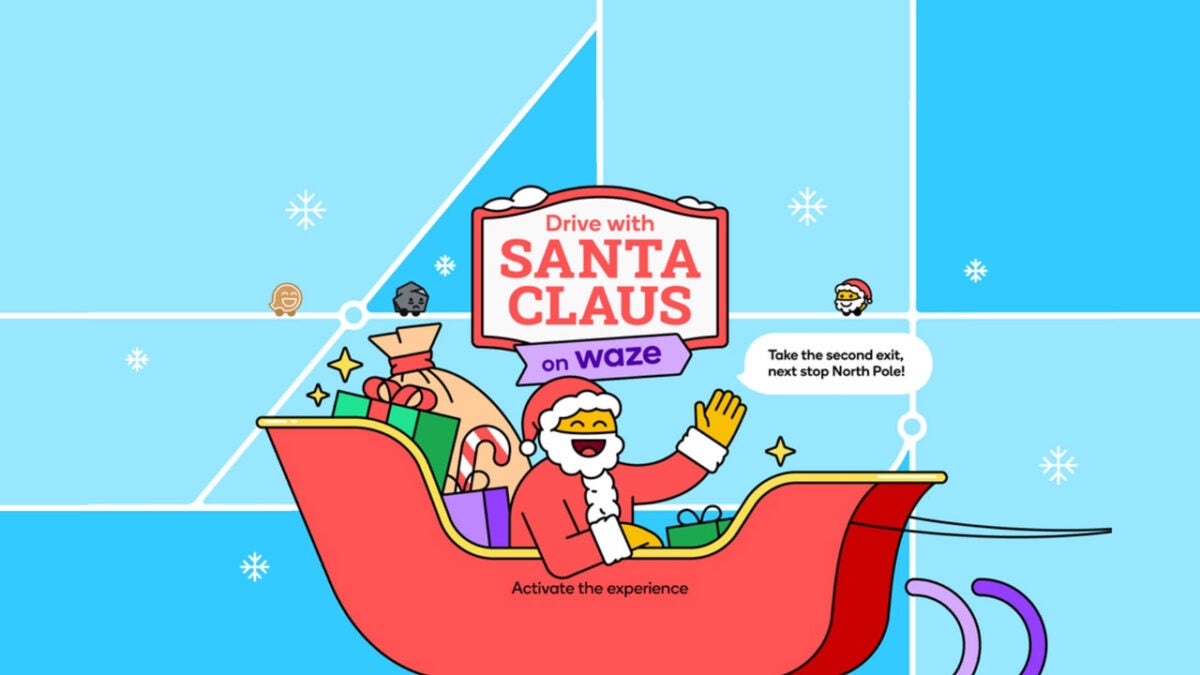
It’s that time of the year when Santa Clause is coming to town ??(choose your favorite lyrics to hum to). As far as driving around is concerned, you can now change your GPS settings on the Waze app. Instead of an arrow, it now features various Santa options on the map, but only if you reside in the United States. Everyone else will have to settle for the standard mode.

Waze - GPS Maps Traffic Alerts Live Navigation APK DOWNLOAD

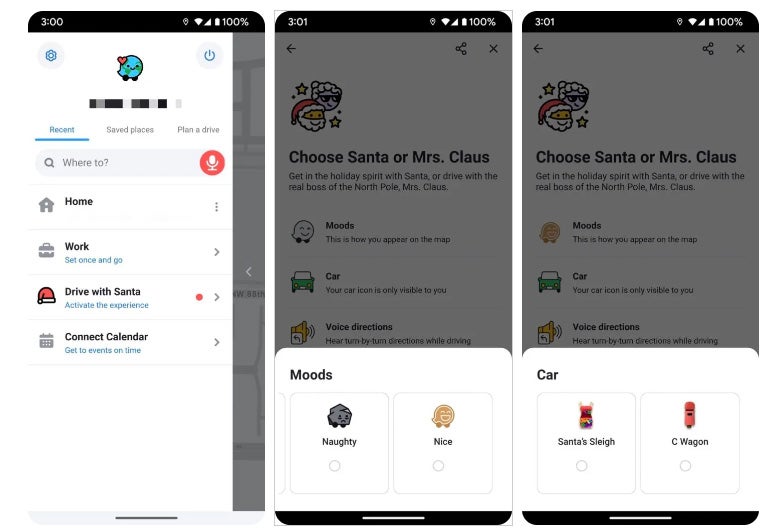
When you head to My Waze on the app and tap on Drive with Santa, you’ll have two options that first appear. You have the choice between Santa and Mrs. Claus. Now, while Santa has experience with different cultures and has voices in various languages, Mrs. Claus isn’t so lucky. If you’re in the US, you’ll only hear her guide you with navigational details in English. She really should get out more. 

The Christmas excitement doesn’t end there. After you choose your character, you can also select a mood. This feature will affect how you and other drivers see you on Waze maps. There’s also a vehicle option, letting you choose between the infamous sleigh or the C-wagon. You can also adjust some of the voice settings for both characters.

Waze brings Santa back onto maps

I usually use Petal maps on my Huawei phone, but I’m seriously tempted to install Waze to see this new feature. It’s a fun way to get into the festive mood, especially when you’re driving around trying to find the best presents for everyone. Also, when you ping your location for friends to see where you are, it looks like Santa is on his way to visit them.

Don’t miss out on the fun! If you see your friends on your map with Santa, you can join them with Mrs. Clause.

Change the voice on Waze to Cookie Monster, Woody, and more

Ride with friends by changing the voice on Waze!

Waze

The default voice on GPS apps like Waze can get grating. If you’re on a long road trip, you might as well listen to a voice that isn’t driving you up a wall.

Well, there’s a way to do it! Soon, you will be guided down the road by Cookie Monster, Buzz Lightyear, Woody, and even DJ Khaled.

How to change the voice on Waze

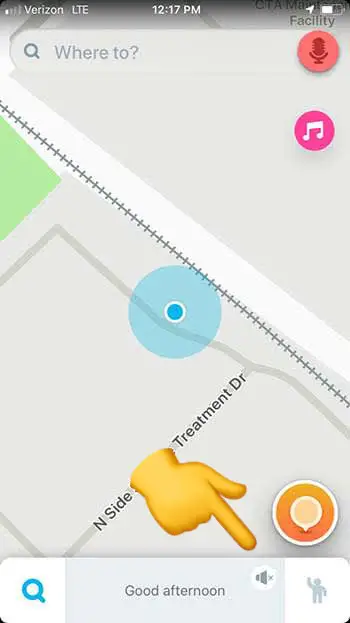
Step 1: Open Waze

Adjust Waze voice

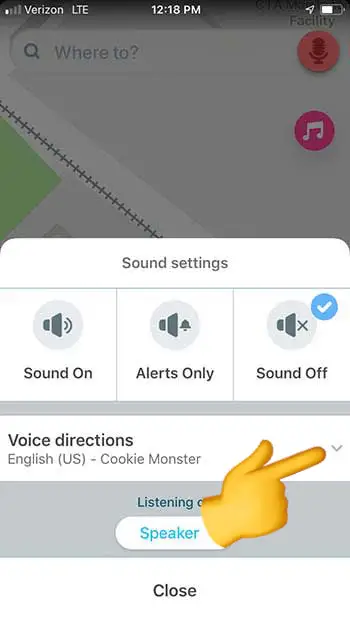
Step 2: Click on the sound settings (the speaker icon)

Waze voice selector

Step 3: Click on the drop-down arrow next to “voice directions”

Waze

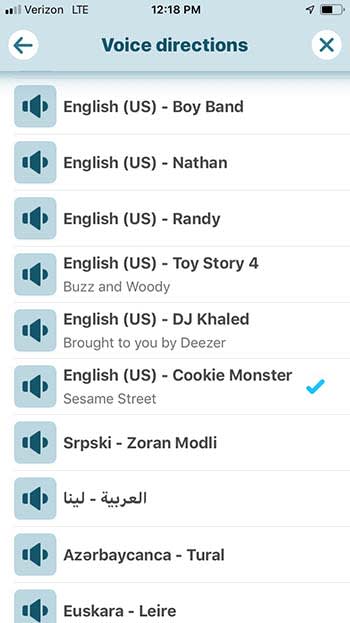
Step 4: Choose the voice you want

You can also choose to hear your directions in a different language in this option. 

Record your own voice

Waze

If you want something done right, you have to do it yourself.

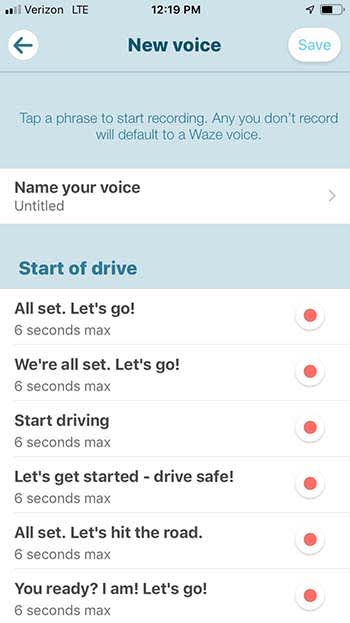
Waze also gives users the option to record their own voice for GPS directions. If you do it, it’s going to take you a bit of time to record every option Waze has available, but you could have some fun with it. Rather than recording what Waze tells you to, you can technically say whatever you want. Obviously, you should say “turn left” when it tells you too, but non-directional options are yours to mess with! You could even record your girlfriend’s voice to have her nag you the whole way to your destination!

Wrapping up

No matter which option you go with, remember to be safe on the road. Also, if you choose Cookie Monster, remember to pack a few cookies just in case he gets hungry.

Have you tried Waze Carpool? It just got better

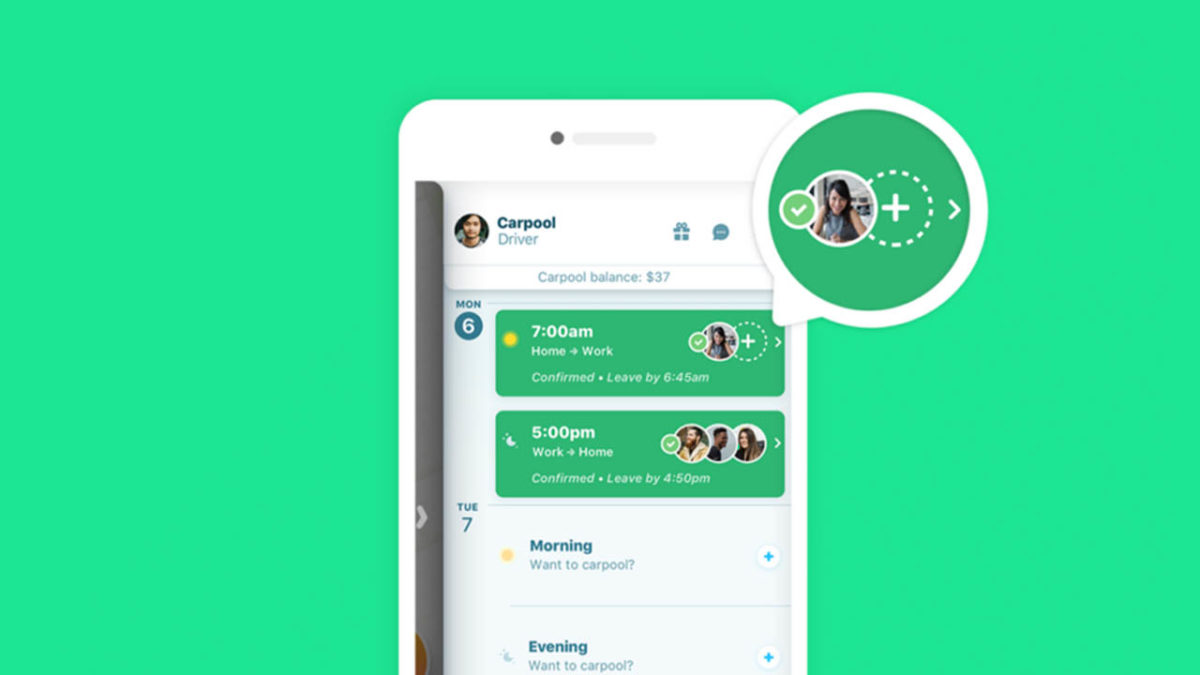
Waze now lets you add up to four other carpool riders to your journey!

Waze carpool feature

With all the new tools that are being added to Waze, it’s about time we got a decent carpooling option!

You may know Waze as that app Google bought a while back. It has since been taking features from to bolster Google Maps. Google is clear that Google Maps is still its flagship navigation program but understands that Waze offers something different enough to Maps to warrant a spot of its own in the Google Play Store.

Waze is a community-based navigation app. The mapping data shows us where we are and where we’re going. Also, Waze asks its users to tell each other what is going on during their journeys and then uses all that data to improve the routing options it offers. It now even tells users about upcoming toll prices. When Google recently added crowd-sourced speed trap alerts to Google Maps, the feature came from Waze, which had had it for years.

With Waze being built upon its community it will probably come as no surprise that the company has been dabbling with carpools for years now. Carpools are like the ultimate form of commuting community as it can help save time, money, and the environment. The Waze Carpool app first hit the scene in Israel back in 2015 and came to the U.S. last year. It is also available in Brazil and Mexico. The app has always been a little limited, however, with potential carpools being limited to two app users. This has now finally been expanded, turning Waze Carpool into a more complete ride-sharing app.

Waze Carpool Download Now
8

Waze now lets you add up to four other carpool riders to your journey

To use the Waze carpooling feature, you need to add your daily routine and schedule to the app. This way you have a number of set routes and rides that the app knows you’re likely to make. Then, each day when you confirm the rides you’ll actually be taking that day, the app will match you up with other users who are looking to make similar journeys.

You’ll be able to see how much extra time they’ll add to your journey and how much money you’ll be able to collect off them for adding them to your carpool. You can find all the details for signing up to Waze Carpool here.

Waze carpool
Source: Waze

The carpooling feature has just been boosted from two riders to four. This means you can now add up to four riders to your pool, potentially boosting the amount of money you can take per journey and even opening up the more express HOV 3+ carpool lanes.

Waze makes it clear in the blog post announcing the bump up to four riders, however, that Waze Carpooling is not supposed to be a moneymaker. It isn’t another Uber or Lyft. All prices added to carpooling journeys are adjusted so that they don’t exceed the price of the gas the journey needs or general wear and tear to the vehicle.

If you’re looking for help with your daily gas money, a bit of company during your daily commute, or just want to do your bit for the environment Waze Carpool could be the app for you.

Waze will now show toll prices

Waze just added one of the most requested features from users!

Waze

Waze drivers rejoice! The Google-owned app will now tell drivers how much tolls will cost on their drives. 

This highly-requested feature if going to be a lifesaver. Now, drivers may elect to not take the toll road if saving 10 minutes isn’t worth $8 in tolls. On the other hand, drivers may elect to take the toll road if they can save serious time by spending a few bucks.

More importantly, drivers will know how much cash/change to bring with them to pay for tolls if they do not have an electronic pass. The new feature will be available in the U.S. and Canada.

Waze will now show drivers three different routes:

  • One with tolls (if applicable)
  • One without tolls
  • A third possible option if the first two don’t work

Not an easy task

In the U.S. alone, there are more than 5,000 toll roads, and their prices can vary based on time of day, type of car, number of people in the car, what direction you’re heading, and how long you’re on the road.

Basically, Waze had its work cut out for it. However, when there’s a will, there’s a Waze.

Waze users and volunteers sent data about tolls in order to accomplish the monumental task. 

Wrapping up

Make sure you check out the new feature! Waze only works well if its users keep it updated and accurate, so your feedback is essential to its functionality!

How to change the voice on Waze

Do you want Buzz and Woody to give you directions on your next road trip? Here’s how!

Waze

If you use GPS apps like Waze, you know how grating the default navigator’s voice can be.

As you get directions, you can’t help but wish you didn’t have to hear the navigator’s annoying voice. Wouldn’t it be nice to hear a more familiar voice rather than the stale, robotic default voice? Well, there’s a way to do it! Soon, you will be guided down the road by Cookie Monster and DJ Khaled.

How to change the voice on Waze

Step 1: Open Waze

Adjust Waze voice

Step 2: Click on the sound settings (the speaker icon)

Waze voice selector

Step 3: Click on the drop-down arrow next to “voice directions”

Waze

Step 4: Choose the voice you want

You can also choose to hear your directions in a different language in this option. 

Record your own voice

Waze

If you want something done right, you have to do it yourself.

Waze also gives users the option to record their own voice for GPS directions. If you do it, it’s going to take you a bit of time to record every option Waze has available, but you could have some fun with it. Rather than recording what Waze tells you to, you can technically say whatever you want. Obviously, you should say “turn left” when it tells you too, but non-directional options are yours to mess with! You could even record your mother’s voice to have her nag you the whole way to your destination!

Wrapping up

No matter which option you go with, remember to be safe on the road. Also, if you choose Cookie Monster, remember to pack a few Oreos just in case he gets hungry.

6 must-have apps to take on vacation

Fill your phone with these 6 apps before your next vacation!

Vacation time is precious. Every minute spent stuck waiting for a cab is one less minute on the beach. Thankfully there are many apps that can save time by helping you navigate and find the hotels and restaurants that will make your vacation a 4-star affair. Here are the best apps for you to use while you’re traveling.

6 must-have apps to download before you travel

Waze is one of the greatest travel apps out there, as it uses other Waze users’ locations and information to determine nearby traffic alerts and even lurking police officers. The GPS accuracy is constantly updated, making it one of the most accurate apps out there.

Google Maps Free Download ►
7
Similar to Waze, Google Maps is one of the most accurate GPS apps out there. While Waze has a large number of features, Google Maps forgoes this in order to create a simple and accurate system. If you want a simple and easy to follow GPS app, then Google Maps can be a good alternative to Waze.

Citymapper Free Download
7
If you plan on using public transportation during your travels then Citymapper is the perfect app to have on hand. It maps out transit routes throughout various cities in order to make it easy for you to navigate subways and other metro-transit routes.

HotelTonight Free Download ►
7
Sometimes, plans go south. Maybe you have a long layover. Maybe your hotel overbooked. Maybe you need a place to crash mid-road trip. HotelTonight hooks you up with a great place to stay for the night when you need it in a hurry.

Yelp is a popular review app that’s perfect for anyone who’s traveling to a new place and looking for somewhere nice to eat. It is incredibly detailed with thousands of reviews for restaurants all over the world.

A little different than the other apps on this list, but still probably the best of its kind thanks to its near worldwide accessibility, Uber is a great app for when you’re in a pinch. If you find yourself in any situation that requires you to take a cab, then Uber can be a good alternative to trying to call a cab company.

Most of these apps are particularly useful for when you’re going on some kind of vacation or doing some personal travel. However, if you’re going on a business trip, out Softonic Solutions community has a few more apps for you to check out. Be sure to share your favorites!