How to become a micro-influencer on Instagram

You don’t need a million followers to make money on Instagram. Here’s how to become a micro-influencer.

microinfluencers

Micro-influencers are on the rise.

If you’re unfamiliar with the concept, the term refers to someone with a few thousand followers (no one can agree on the entry point) up to around 50k.

Brands love these small-scale influencers because, they’re knowledgeable, authentic, and tend to engage with their audience more often than full-fledged celebs.

If you love Instagram and have a good-sized following, you may have an opportunity to make some cash.

However.

Becoming a micro-influencer takes more than a cute Instagram. Between strategizing and content creation, influencing on any scale is an actual job.

Here’s a rundown on what micro-influencing is, and how to get into the game.
 How to become a micro-influencer

What are micro-influencers?

Ok, micro-influencers aren’t exactly on par with the YouTubers and Instagram models with followers in the hundreds of thousands or higher.

Instead, these are individuals in their category with a certain level of expertise in a specific niche.

The ideal micro-influencer is passionate and authentic—someone with a relationship with their followers who is seen as a go-to source for information and recommendations.

First of all, your account needs to be up to par

VSCO examples

Your success as a social media personality—macro, micro, or somewhere in between lies in your photography skills and your activity.

Because just about anybody can take a decent photo these days, you probably should be a great photographer and editor.

There are a million apps out there that can help you do this–from Boomerang’s GIF maker to VSCO, an editing tool that adds a professionalism to your feed.

Instead of thinking in terms of individual shots, your entire feed should represent your personal brand–develop a palette, identify your favorite filters, and keep things on topic.

personal branding microinfluencerThe second part of this is activity, meaning you need to post consistently and engage with other users’ content.

Friendly, thoughtful responses and positivity will help you create connections with others. The old, “do unto others” rule, right?

Engagement is everything

Being a successful micro-influencer doesn’t require you to build an empire millions deep. It’s not always about amassing the largest number of followers possible, even though there are plenty of apps to help you do that. What matters more is who is following you and how interested or engaged they are with what you’re doing.

This year, there’s been something of a shift in the influencer marketing space. See, brands are learning that working with top influencers doesn’t provide the return on investment they were hoping for.

How to calculate your engagement rate

On Instagram, your engagement rate is the total number of engagements (likes, shares, comments) over a specific period divided by the number of total followers x 100%.

The average engagement rate on Instagram is 3%, while Facebook and Twitter are much lower, both hovering somewhere between 0.5% and 1%.

How do you get work?

In the beginning, getting work means doing a ton of pitching. You’ll send thousands of emails and InMails, and direct messages. But before you start blindly emailing brands, do a little nurturing.

Brands monitor digital conversations through a range of alerts and reputation management tools. Platforms like Mention, HootSuite, and countless others let brands know when someone mentions them. Get on their radar by posting about the brands you want to work with, well before you reach out.

You’ll also want to engage with those brands directly. So—try posting comments or positive micro-reviews of products you’ve tried.

Pick potential clients wisely

If you’re new to the space, any business probably sounds like good business. This approach is fine if you’re working behind the scenes as say, a ghostwriter or social media manager.

A micro influencer, on the other hand, is the brand. So, you need to make sure you’re pitching brands that align with your niche.

Ask yourself the following questions:

  • Do you think this brand offers something interesting and marketable?
  • How can influencer marketing help?
  • Does this brand share my values?
  • Which areas to they need help with?

In the long run, compromising your values or faking expertise won’t get you very far.
Reaching out

Create a short cover letter and introduce yourself. This shouldn’t be more than a few short paragraphs and should mention your follower counts, brands you’ve worked with, and why brands should work with you.

Create a media kit

Put together a media kit to use as a promotional tool. A media kit is a PDF document that showcases your experience your social counts, accomplishments and how you can help brands achieve their goals.

Things to include:

  • Bio: who are you, what’s your niche, etc.
  • What can you offer?
  • Handles
  • Follower counts
  • Engagement rates
  • Contact info
  • Past collaborations
  • Branded header, logo, and a professional photo

This example, from Le Fashion Fetish blogger, Anna Shearer, is a nice example; it’s short, contains key details, and gives the viewer a sense of her aesthetic.

Le Fashion Fetish Media Kit Example

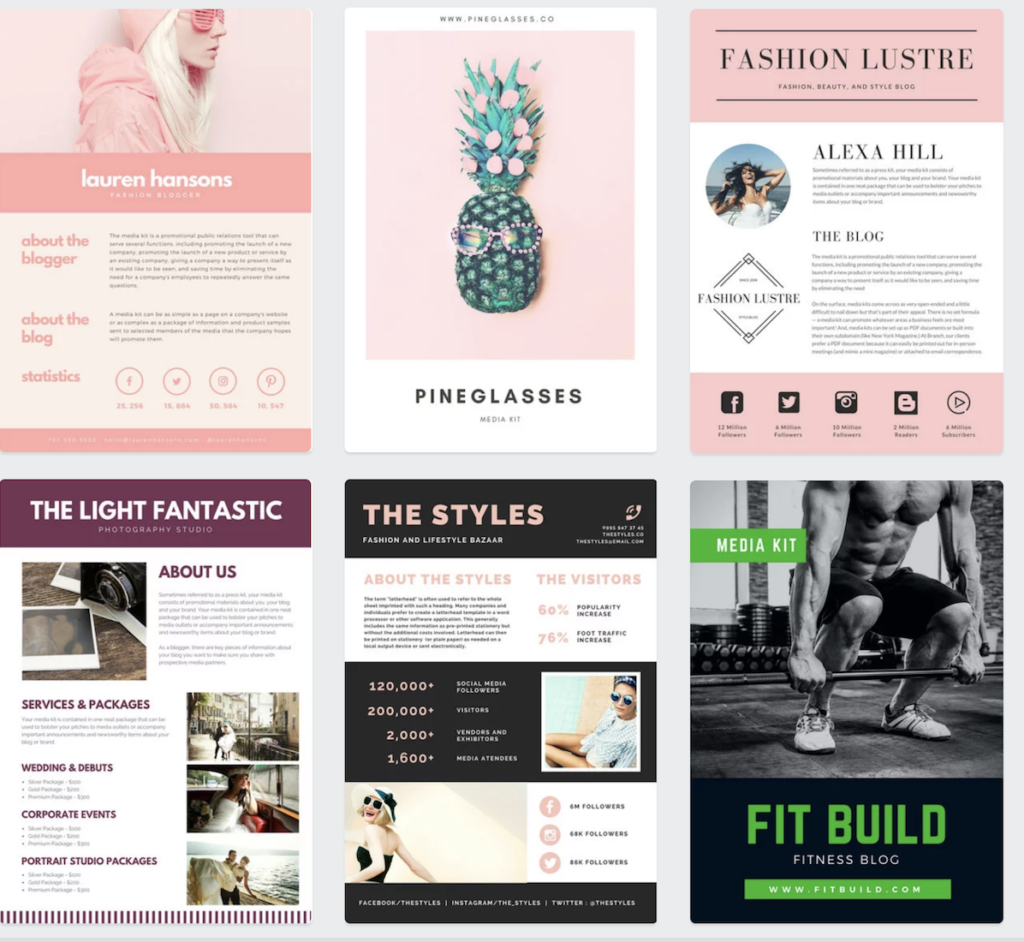
There are also a million sites, like Canva, where you can download customizable templates. The benefit here is that they deal with the design and you make it your own.

10

Some of Canva’s media kits:

Consider working for free at first

If you’re just starting out, you may need to do a few free posts to prove your value.

In the beginning, aspiring influencers should be eager to work with any brand that fits their value set and aesthetic. So, start by fleshing out your portfolio.

You’ll have to work harder to prove yourself, so overdeliver. If you get a brief requesting one post, do an extra or throw in a story.

You want to make sure the brand has a good experience working with you.

Content creation is a ton of work

The hardest part about becoming a professional blogger or social media influencer is, you’ll need to wear a lot of hats.

You’ll end up as the face of your brand, the receptionist, the strategist, the CEO.

You do sales and marketing, you edit your photos, and chances are, you’re figuring out how to do your own books.

Your workload will vary depending on whether you’re a blogger or you’re social-only. Still, in both cases, you’ll be spending a good deal of time creating content.

And those extra hours spent coming up with quippy hashtags and styling selfies will add up.

Final thoughts

Instagram is a great opportunity for hobbyists to turn their passion into a source of income.

That said, the main appeal of micro-influencers is a certain level of expertise, coupled with the high engagement rates of a known face, who isn’t too big to make a genuine connection.

While you’ll need to know your way around filters, copywriting, and understand at least a few basics from business 101, dipping your toes into the world of micro-influencing might not be a bad idea.

And who knows, maybe someday, you can drop the “micro.”

7 best apps to manage your money – from cash to crypto

Building a fortune is easier than you think. Try these 7 apps to help you get there.

Everyone wants to be a money master. Or, at least feel in control of their wallet.

While we can’t always control our salaries or the fact that taxes are taken out of our accounts, there are some useful tools out there that do a great job helping you make the most out of the money you have.

Here’s a roundup of some of the best apps for money. Whether you’re trying to grow a nest egg or just hang onto a few more bucks each month.

Best apps to manage your money

Mint

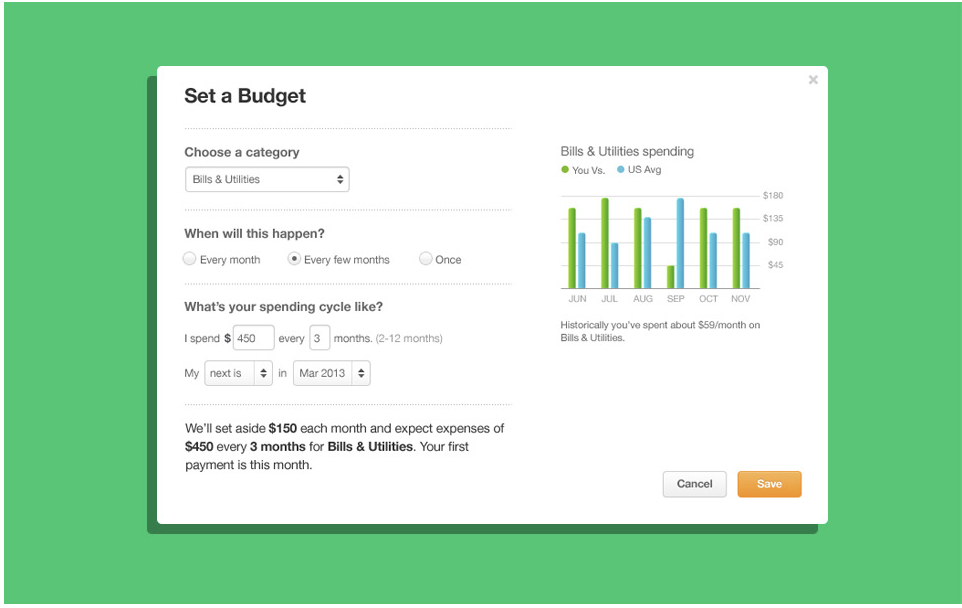
The budgeting app is one of the more popular financial management tools on the web. They’ve managed to amass over 20 million users through their collection of convenient reporting features. Mint syncs with investment accounts, your bank and credit cards, so no manual entry.

Oh, and there’s also a free credit reporting tool, so you can keep tabs on your score and you know, work on raising that number that unlocks so many of life’s great advantages.

What’s more, users can customize spending categories, pay their bills, and divide ATM withdrawals into different categories, so cash transactions don’t need to go undocumented. You can also set budgets and receive alerts when you’re reaching your limit.

The app automatically updates and categorizes transactions, allowing you to get a sense of where your finances stand at any given time.

Mint Set a Budget
Mint Personal Finance Download Free
10

Acorns

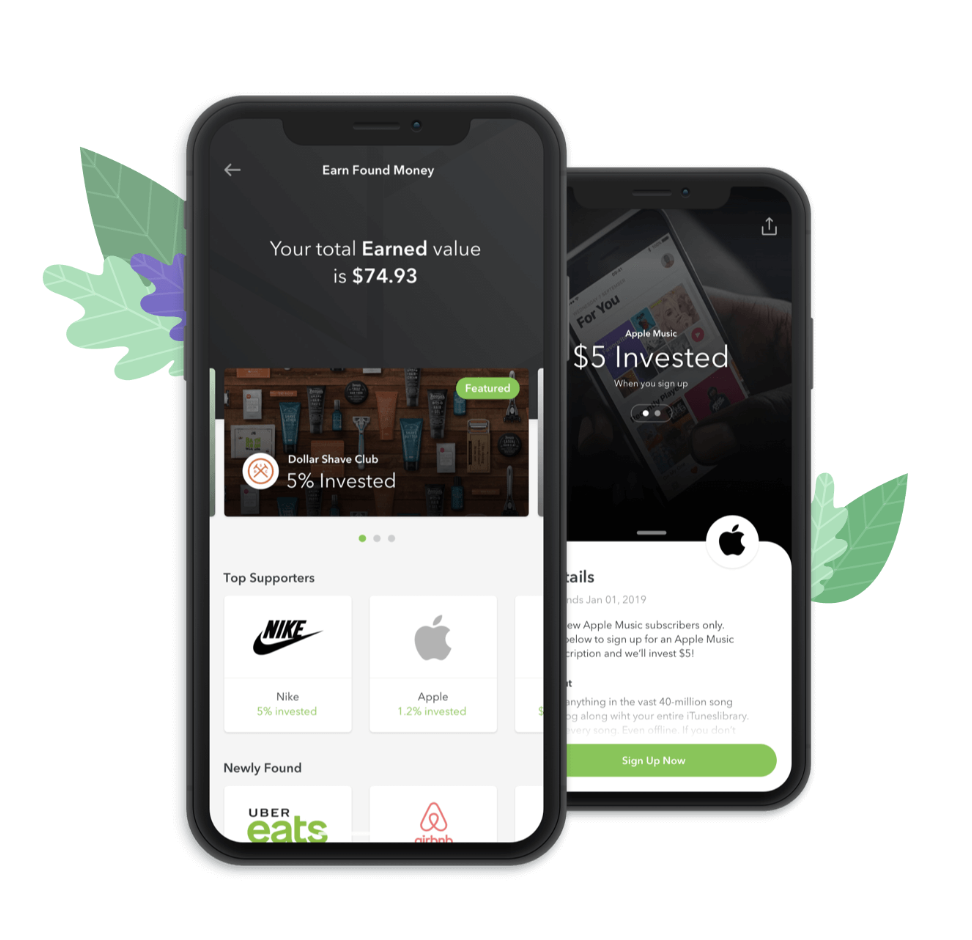
So Acorns isn’t exactly a budgeting tool, but they do make it super easy for users to save money. Acorns is an investment app that allows users to automatically invest their spare change from debit and credit card purchases.

The app isn’t exactly for serious investors, but it may be a good tool for people who want to start investing small amounts or who struggle to save. You can set an automatic monthly payment, so you’ll mindlessly invest $10, $20, or $100 each month without having to do anything.

And, like Bank of America’s keep the change feature, and other spare change tools, Acorns rounds transactions to the nearest dollar and sends that extra few cents here and there to an investment account.

Accounts come with modest fees, too. You’ll pay $1 a month on accounts with balances under $5,000, or 0.25% per year on balances above that $5,000 mark.

Acorns Investment app

Wally

Wally is a free app that’s become a popular money management tool for millennials. One of the key benefits here is that the platform supports just about any foreign currency, making it a great option for people living outside of the U.S.

So, what does Wally do, then? Well, it’s a personal expense tracking platform that allows you to keep tabs on your expenses like you would at work.

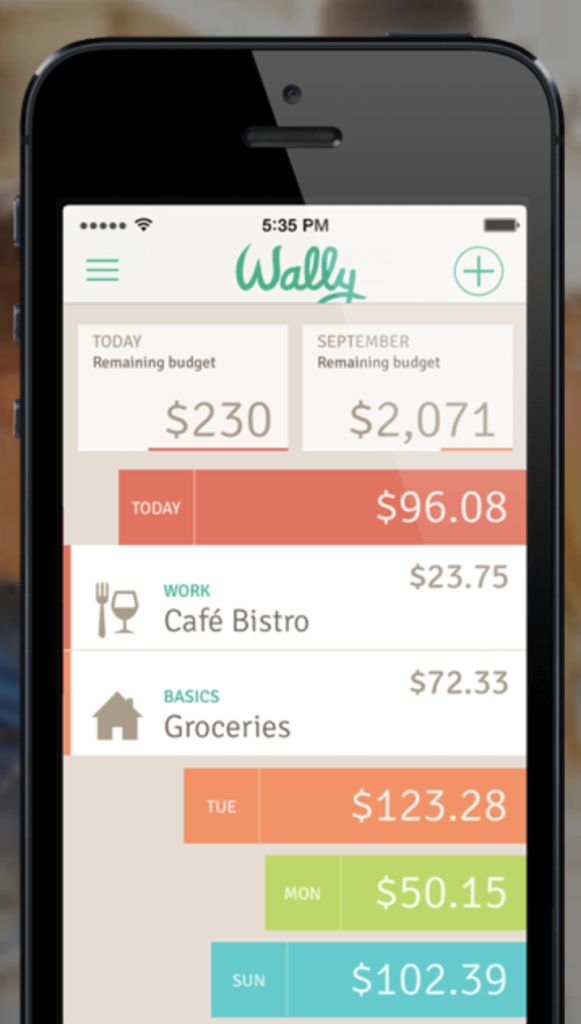
With Wally, you’ll get a clean interface that makes it easy to keep tabs on your spending habits. Instead of logging each purchase manually, Wally allows you to take photos of your receipts and snap some pics on the go.

Basically, this app is best for people who want more visibility into their spending habits, but aren’t going to bother typing every transaction into their Excel spreadsheets at the end of the day.

Wally App
8/10

Coinbase

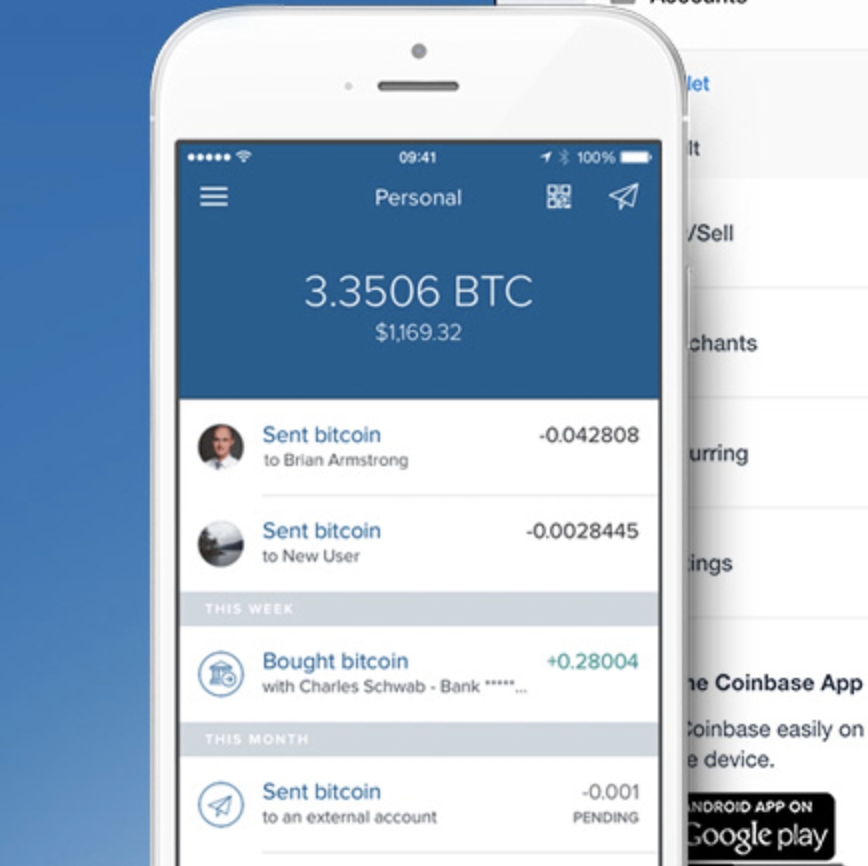
Coinbase is a great option if you’re interested in dabbling in cryptocurrency. This app is ideal for the crypto-beginner; you can trade in Bitcoin, Etherum, Litecoin, and others.

The mobile app is a minimalistic version of the original desktop app. That said, they’ve made it easier to use.

Coinbase fees range from 1.49% to 3.99%, depending on your choice of payment method. Credit card fees tend to be more expensive than other methods, by the way.

Purchase limits are capped at $9,500 a month for first-tier users, but you can increase your limits to $25,000. Sure, you’ll need to provide a few extra details, like your passport or driver’s license, but it’s a minimal chore when you look at the added trading potential.

What makes Coinbase appealing is that it’s more approachable than some of the other crypto-trading platforms. You can set up alerts so you can be tuned into opportunities that meet your buy/sell price. It’s also a smart move if you’re looking for an easy way to send crypto to friends.

Coinbase mobile version
Coinbase - Bitcoin & Ethereum Wallet Download Free
7

YNAB

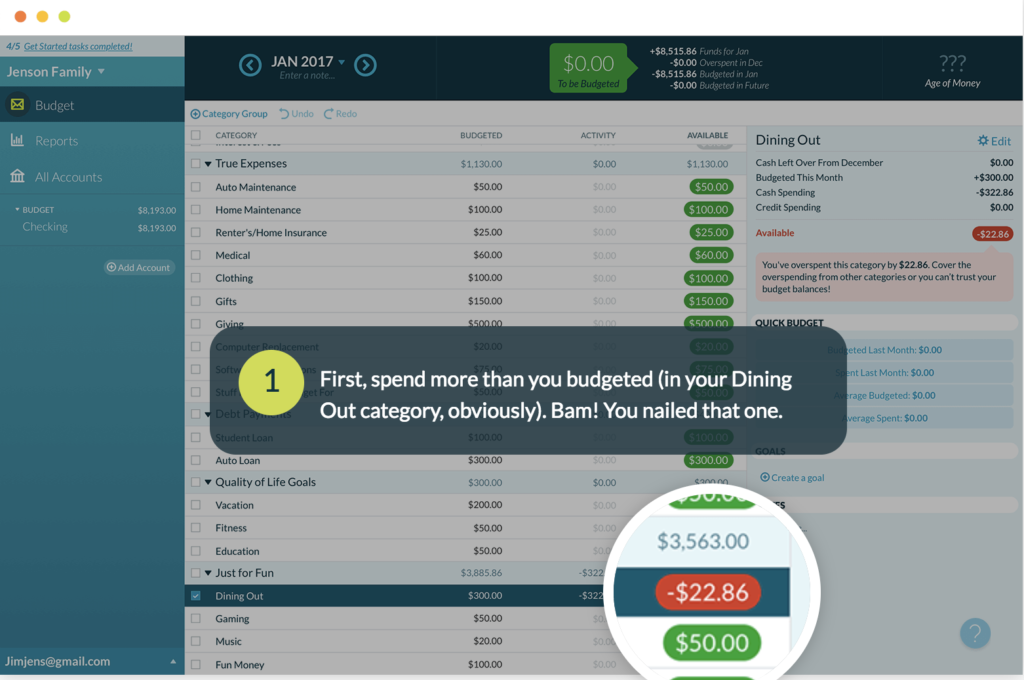
You Need a Budget, or YNAB is a popular choice with a unique approach to budgeting. Instead of relying on the envelope-style budgeting method, you’ll build a budget based on your income.

YNAB Budget Personal Finance Download Now
9

The YNAB method works as follows.

Rule 1: every dollar has a job

As soon as you receive money, you assign each dollar a specific task. This way you can place your rent in one area, savings in another, food, entertainment, etc. all have their own category, so you don’t need to worry about every single purchase. No dollar is unaccounted for, so there’s no such thing as extra money; this forces you to make a decision about all spending, allowing for more intentional choices.

Rule 2: embrace your true expenses

This rule takes account of your true expenses. This is the stuff like holiday gifts, your yearly trip to visit family, your six-month insurance premium. The goal is to make sure that irregular costs won’t send you into a tailspin when they sneak up on you later

Rule 3: roll with the punches

YNAB’s method accounts for the fact that we don’t always follow our budgets as planned. In this case, if you overspend in one category, you’ll just reduce your spending elsewhere.

Rule 4: age your money

Here, the goal is to spend money that’s over 30 days old. While new budgeters might be struggling to stretch their paycheck, the idea is to save at least a month of income so you’re not stressed trying to move money around each month.

The goal here is giving yourself some space to breathe. Old (-ish) money usages means you’re not obsessing over checks clearing or paychecks arriving on time.

YNAB comes in both web and mobile apps and gives you the option to sync your bank accounts automatically or enter each expense manually.

YNAB home screenshot

Pocket Guard

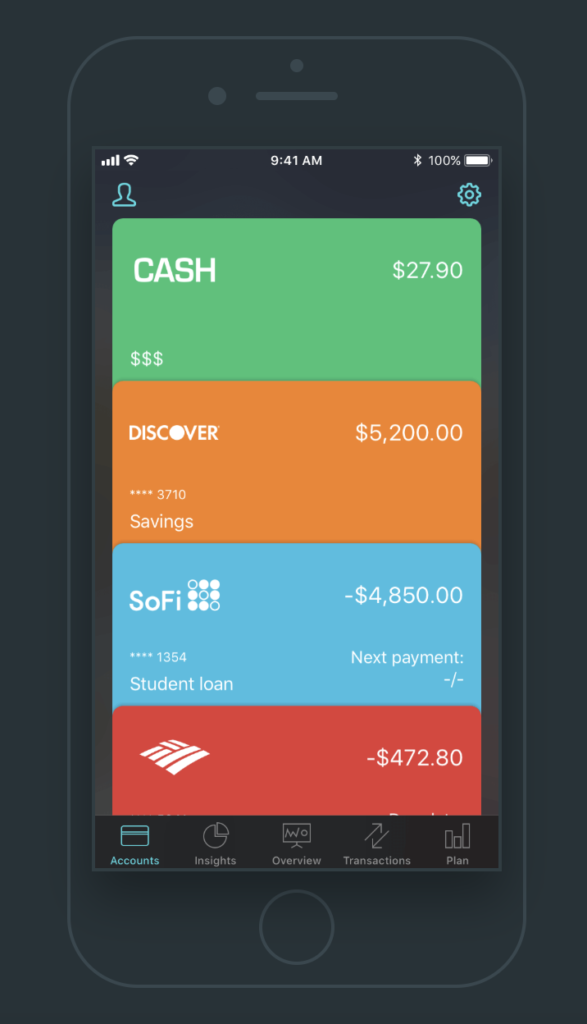
PocketGuard functions as a tool for both tracking your spending and protecting you from going over budget. The app links up with your accounts and compares your budget with your actual accounts and income.

The app is super easy to use and connects to your bank account, so information like monthly income and expenses will populate your account as they come and go. PocketGuard tracks recurring expenses like phone bills, cable, and internet, and even helps you comparison shop for better deals.

Pocketguard app
PocketGuard Download Free
7

Goodbudget

Goodbudget is a good choice for couples who want to share finances with each other without all the hassle. The app allows you to share and sync budgets with your partner or a roommate.

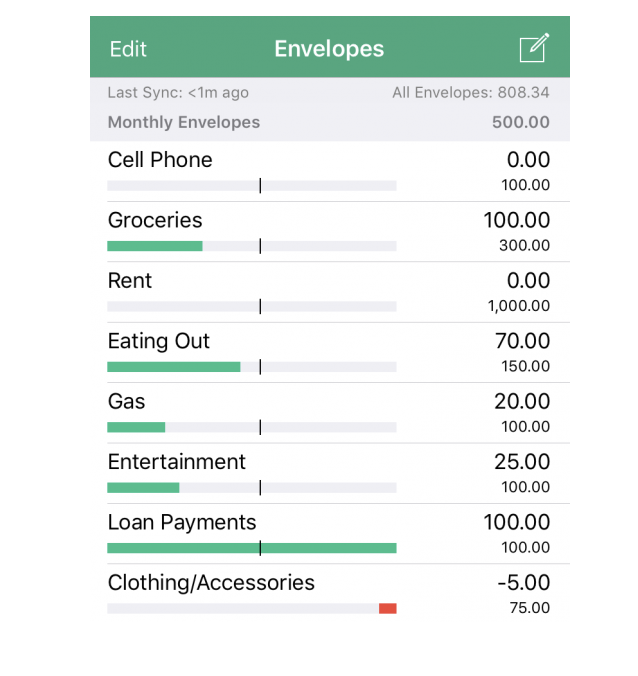
The system is based on the old-fashioned envelope system. And you’ll get an envelope for everything from rent to groceries and entertainment, as well as savings or vacation funds. You’ll start the process by customizing your envelopes and set a budget for each.

Every time you spend or receive money, you’ll log the transaction into your Goodbudget account. It’s a little annoying to enter your info each time, but the budgeting system is solid. There’s definitely a tradeoff here, we’ll leave it at that.

Goodbudget App
Goodbudget Budget Planner Download Free
7

How to deal with passive aggressive emails

Don’t get fired because you got a nasty email. Here’s how to survive this common work issue.

There are certain buzzwords and phrases, that when added to professional emails, sound the interpersonal alarm bells.

“Thanks in advance” takes away your autonomy. “Please advise” comes across abruptly.

Whether someone wants to touch base, check in, or circle back, it’s hard not to feel like your digital space is under attack.

There’s no real cure for dealing with passive aggressiveness altogether, but we’ll say this outright: fighting fire with fire isn’t the best approach.

How to deal with passive aggressive emails

The phrases we hate

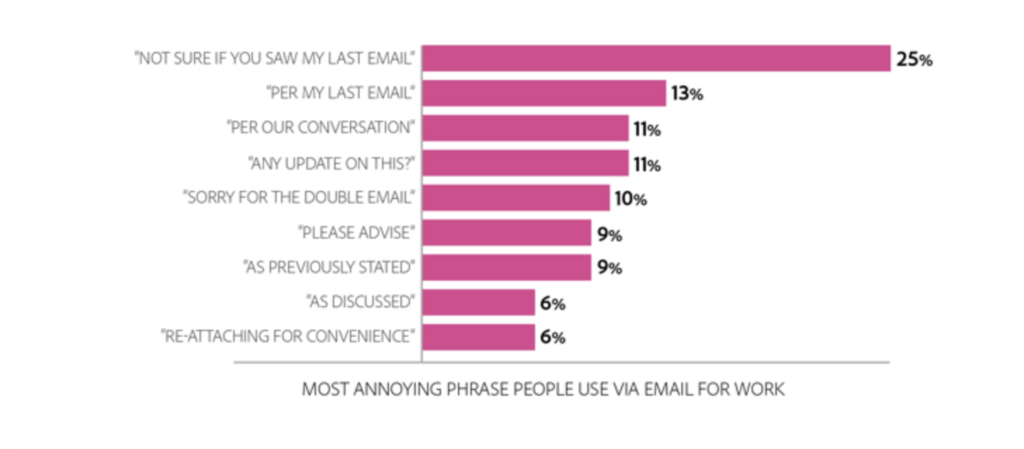
In a recent survey covering the state of work communications, Adobe uncovered the nine most-hated email phrases.

Leading the charge was the nagging lead-in “not sure if you saw my last email,” with 25% of respondents voting in agreement.

Here’s the break down below:

Most hated work email phrases

One of the most loathed phrases is, “any updates?” Which, frankly doesn’t necessarily belie some hidden meaning.

And in the case of “please advise,” it’s a phrase we tend to hate because it’s overly formal.

So, the point is—there’s a lot of room for misinterpretation here.

The first step in combatting potential issues is checking yourself first. Passive aggressive email behavior differs from using a turn of phrase that annoys people.

Things like avoiding conflict in-person and instead, sending an email, or calling out a small mistake and CC-ing the whole team or the boss, or incorrectly labeling messages “urgent” all come to mind.

Or, worse, you’re dealing with a person who lies, takes things out of context, or fails to loop you in re: a project or deadline.

So, how does one deal, if they’ve got an offender on their team? Below, we’ll look at a few ways to keep cool and come out on top.

How do you handle an email bully?

Psychology Today recommends handling a workplace passive-aggressor with the following three steps:

  1. Know what you’re dealing with
  2. Refuse to engage
  3. Acknowledge the anger

We should add that this doesn’t mean you’re ignoring emails. Instead, you’re identifying a problem, keeping your cool, but acknowledging that it’s okay to feel upset, confused, or angry.

A couple of pro tips:

Content, not context

Follow the advice of  Neil Lavender, and again, just don’t engage. In Lavender’s book “Toxic Coworkers,” he says it’s better to follow up with requests based on content instead of trying to analyze contextual clues.

For example, if someone asks for a report, an update, or something else, just send it along.

No, stewing in anger, no spending time writing your best covert insults. Instead, move

Before you respond—write a draft in a secured location

We’ll take this example from motivational speaker Drew Dudley. Basically, if you receive an email that makes you angry, write an unfiltered response in a Word document or your laptop’s notepad, it’s up to you. Just make sure these private feelings never touch any email windows.

Let it all out and save your draft in a folder—Dudley calls his folder “this could have happened.” Then take a minute to listen to some music or go for a walk.

Or, revisit this 2017 Twitter thread:

Then, come back and write your response—the professional, clear-headed version—and get on with the day.

Avoid emotional words like “I feel” or “I think.” Take out any instances where you use the word “you.” It sounds like you’re blaming the sender.

You’ll also want to consider the root of the behavior. Are there certain fears that motivate this person? Is their rudeness grounded in reality—I.e. are you meeting expectations and deadlines, or inadvertently leaving colleagues in a lurch?

Back to saving these drafts, though. Dudley has another good point: looking over those unsent missives later gives you some distance.

These secret docs serve as a reminder of the terrible choices not made—and highlight the fact that maybe, getting “too real” won’t provide long-term satisfaction.

email frustration

Protect your sanity

Passive aggressive people are a fact of life. Whether its the friend who can’t help but stick a jab into every conversation or a housemate who leaves annoying notes around the house—these annoying interactions can suck the joy out of certain moments. But, in these cases, you can shut it down.

At work, making waves, of course, is unseemly. You risk getting called thin-skinned. Emotional. Or accused of misunderstanding. And while we mentioned in the above section that “taking the high road” is the best course of action, there are some exceptions to the rule.

Talk to the offender

But, it may be worth having an in-person conversation about how a colleague’s passive aggressive behavior is coming across.

We’ll first underline this point: do not get defensive or accuse the person of being passive-aggressive.

Instead, be direct, focus on the message your colleague is trying to get across and consider whether you’re contributing to the problem in one way or another.

Boundaries, baby

Control your behavior. If a coworker asks you to do something that you don’t have time for—say no and explain why.

If someone is sending you too many follow up emails, give them a specific time to expect an update. The flip side here, though, is, you’ll actually need to follow up at that time.

Don’t be afraid to speak up

Finally, passive-aggressive behavior should not be tolerated, due to the negative impact on business.

According to a piece in the Harvard Business Review, passive-aggressive emails (well, behavior in general) can stall decision making, risk management, and execution. Employees begin to doubt their judgment—make a wrong move and risk being called out on a group CC. This behavior erodes trust—and undermines collaboration.

Business leaders should aim to set expectations and reinforce them on a regular basis. Employees, too, need to be able to calmly and respectfully speak up.

No one deserves to be bullied and it’s everyone’s responsibility to be vigilant in the name of both basic decency and productivity.

Facebook’s future plans could eliminate all your privacy

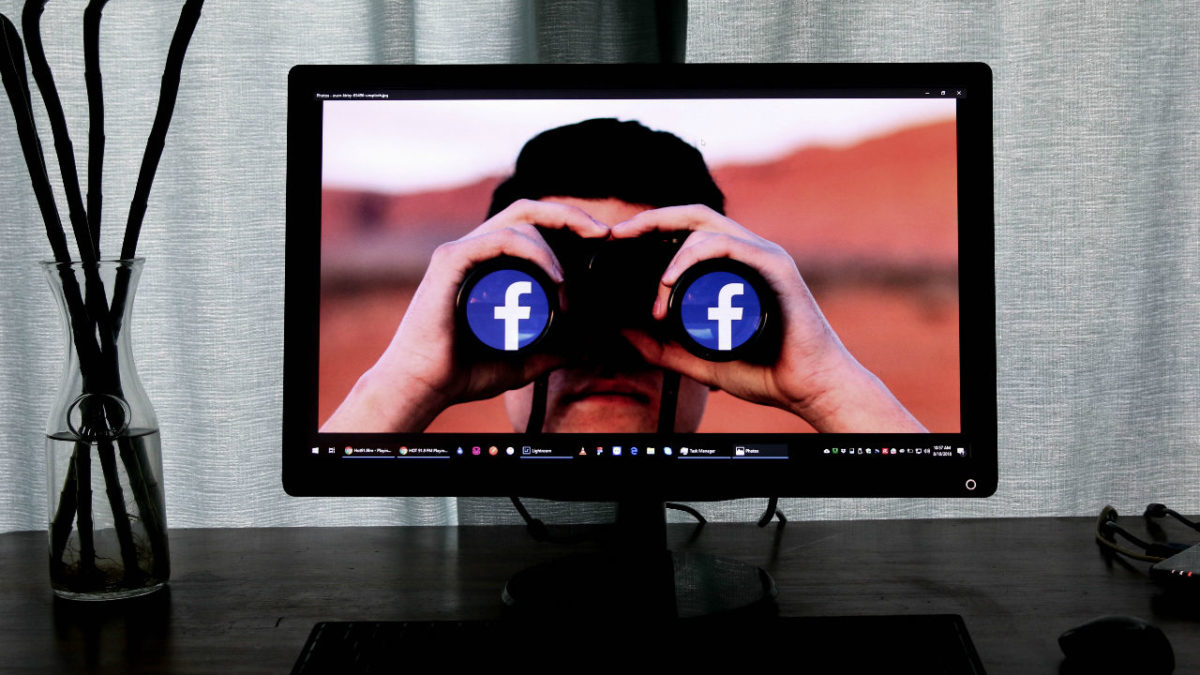
facebook social scoring

Back in 2015, Facebook secured a patent that allowed them to analyze someone’s network in order to let them do something.

Pretty vague, to be sure.

But a bit of language in the patent proved troubling and made national headlines. A provided example of how the patent might work stated that a lender could examine the credit ratings of an individual’s social networks and if the average rating is lower than the average credit rating, they could reject the loan application.

So, digital guilt by association. Or, to put it more ominously, 21st-century redlining. Since the news broke three years ago, there hasn’t been much talk surrounding the issue.

While it could be that Facebook has been sitting on the patent, we were curious, what’s been going on in this arena since then?

Is Facebook still pursuing credit reporting?

Facebook is using another rating system

uninstall facebook

This past August, Facebook confirmed that it now ranks users on a trustworthiness scale, which, of course, has drawn comparisons to China’s social credit system.

According to the Washington Post, Facebook has been developing the scoring system for the past year or so. How it works is, users are assigned a score between zero and one, based on a number of factors. But it’s safe to assume you’ll have a lower score if you share a lot of links to PatriotNewsAndJetFuelCantMeltSteelBeams.org.

Reputation scoring is another piece of the crackdown on fake news. Facebook users have the ability to report posts that they believe are fake, offensive, or otherwise problematic.

However, according to Facebook product manager, Tessa Lyons, people were reporting posts as false or offensive when they didn’t agree with the content.

Now, while the idea of a social scoring system sounds ominous, it’s important to remember a few things. First, the system was designed to identify bad actors on the platform, measuring credibility based on how people use the tool. Second, China’s system is a government-run initiative with mandatory participation. Facebook is a private entity, so no one is required to use the platform.

After all, brands lose traffic, clicks, and views when they opt out and individuals miss out on connections and event invites from their network.

They’ve also been pursuing banking data

Recently, Senators Bob Menendez (D-NJ) and John Kennedy (R-LA) sent a bipartisan letter to Mark Zuckerberg, expressing concern over reports that Facebook had been courting big banks.

The social media giant has been asking for customer financial information from institutions like American Express, Bank of America, and Wells Fargo. Luckily, it seems that they haven’t made any deals just yet.

According to Facebook, the incentive for banks would be a platform to sell financial products — as well as incorporate online banking features into Facebook Messenger.

The senators raised concerns as there’s no definitive proof that this sensitive information would be secured. And in the wake of the Cambridge Analytica scandal, it’s hard to get on board with the concept.

And, they’ve filed for several more ‘creepy’ patents

facebook security

So, Facebook has applied for thousands of patents since going public in 2012. Recently, The New York Times reviewed several hundred of them, finding many of them creepy.

A few highlights:

Among the worst is a patent that uses your front-facing camera to analyze your expressions as you look at content on your screen.

There’s another that allows your phone’s microphone to listen in on you — to, apparently determine which TV shows you watch and whether you mute commercials.

Or, one that monitors your weekly routine, looking at where you sleep, work, and more. Or, weirder yet — a patent that looks at your posts and purchases to determine major life events like births, weddings, and death.

Advertisers, of course, find value in predicting when you and your friends will get married, graduate, and die.

As of yet, none of these technologies are a reality. In fact, Facebook VP Allen Lo says, most of the technology outlined in the patents have not been included in any existing products and likely never will be.

Brands often patent a concept in order to prevent competitors from using a similar technology. However, it’s worth noting that there’s no huge reason for Facebook to spend time and money on new ways to collect data if they don’t intend to use at least some of them.

So what are the issues?

While social media is technically optional, these days it’s not uncommon for employers to ask to see your page ahead of an interview. Online daters often ask for profile details ahead of meeting a stranger on the internet. In short, deleting your profile can have a negative impact on your social and professional lives.

And though we’re unlikely to take a cue from China’s monitoring program, it’s hard not to have a few concerns. Facebook hasn’t exactly been transparent about the reputation-scoring criteria. And new data collection methods stand to have a huge impact on our privacy and potentially our rights. Sure, the primary motivation behind Facebook’s data collection is driving ad sales and raking in cash from brands.

However, when those brands are creditors or banking institutions and even employers, we need to tread carefully.

Facebook fumbles its political ad crackdown

Will upcoming U.S. elections face the same social media meddling we saw in 2016?

Facebook ads update

Facebook rolled out a new algorithm in January 2018. And with the new year, came the promise of a better social network.

The aim was to create a platform that fostered meaningful connections and cracked down on the fake news cycle that has dominated the political landscape since the 2016 election.

After it was revealed that Russian operatives bought ads made to look like they came from American advocacy groups, the social network promised more transparency surrounding who can buy ads.

Now, the process requires uploading an official ID, the last four digits of your social security number, along with a letter from a registered US address.

While this might sound reasonable given the current climate—there are some weird things about the new rules. For example, publishers who create political content must submit this information, too—as do businesses with any political bent, perceived or real.

So, what’s the state of the current FB ads landscape?

Some added transparency

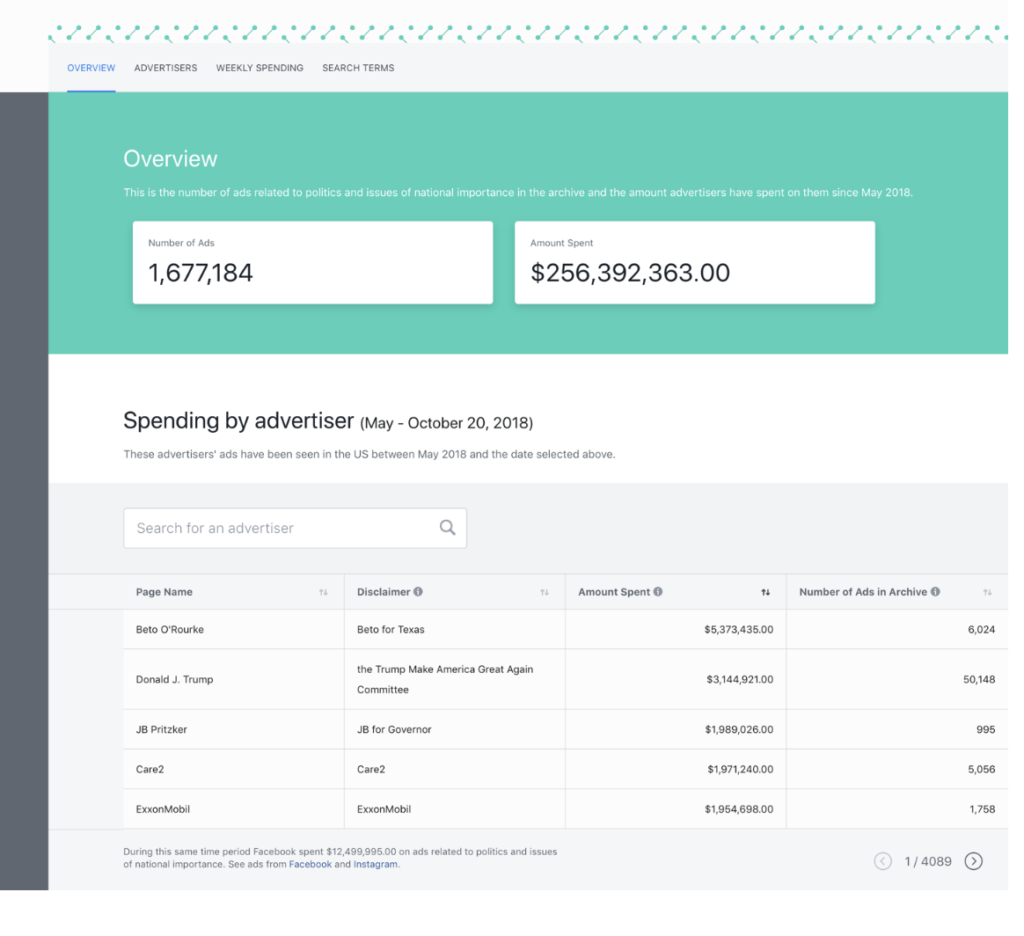
In May, the social network introduced a searchable database called AdArchive, which allows users to view political ads for U.S. elections. This month, they’re doubling down ahead of midterms, with Ad Archive report, a weekly report that discloses political spending.

The latest rollout gives users access to which politicians are spending most on digital sales.

So, far Beto O’Rourke (followed by Trump) is topping the ad spend charts and Democrats are buying three times as many ads as their conservative counterparts.

AdArchive Spending by Campaign

But there have been some notable hiccups

Unfortunately, Facebook isn’t always great at drawing clear lines.

Since the Ad Archive rollout, brands like Walmart, Nike, and Papa John’s were mistakenly added to the archive. And while there’s no penalty associated with that distinction, it’s safe to say, most brands would likely rather avoid mislabeling.

Most of the mislabeling happens when a brand is linked to a political (-ish) cause. Papa John’s and those hate speech instances, for example, or Nike’s Colin Kaepernick ads.

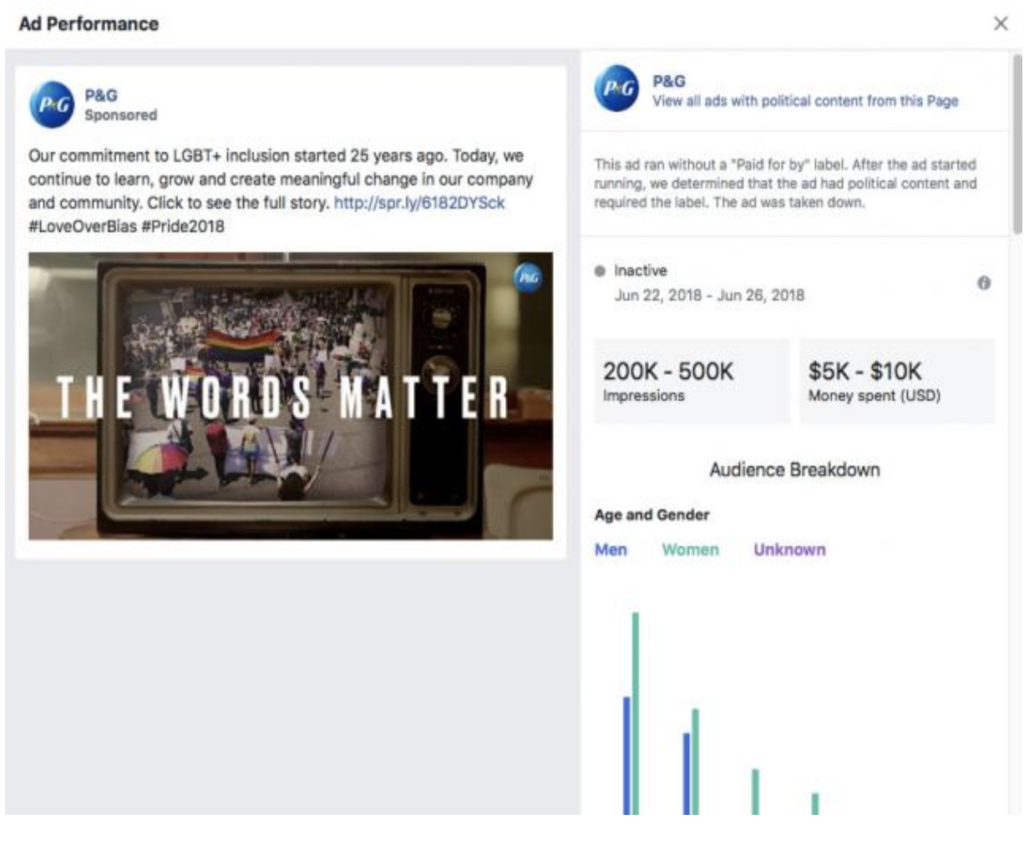
Procter & Gamble ran an ad in support of LGBTQ pride and Facebook canceled it, citing that this was not disclosed as a political ad.

Newsrooms and small businesses are facing issues, too.

Back in April, when Facebook announced their plan to create a public database of political ads, they also announced that news stories covering political topics would be flagged if they were promoted or boosted to increase views.

Which is where things get a bit murky. While we get that there are some serious problems with fake news and irritating posts, it seems a little crazy that a small news team can’t cover the election without first submitting a great deal of information.

Purging perceived spammers

Facebook announced earlier this month that it purged over 800 U.S. publishers and individual accounts for spamming users with political posts.

The idea was to remove accounts generating content through clickbait ad farms, though according to the Washington Post, Facebook removed pages from people who say they were legitimate political groups.

Chris Metcalf of the left-leaning digital publication Reasonable People Unite told the Post he would gladly abide by Facebook’s rules if he knew what they were.

Facebook says these accounts were shut down for having “consistently broken our rules against spam and coordinated inauthentic behavior”.

The social media site keeps citing authentic behavior and the importance of having trust in the connections made through the platform.

As such, they’ve cracked down on anything that looks like politically themed clickbait, whether its authentic or not—and that’s not just paid ads. Those with too much organic activity — likes, shares, comments — are at risk, too.

Facebook’s statement says that they’re just looking out for misuse, meaning political groups need to be ‘upfront about who they are and what they’re up to.’ Facebook says they’re committed to uncovering abuse whether that’s economically or politically motivated.

Metcalf, mentioned this in the Post interview, too, stating he was accused of trying to profit off of content. But isn’t anyone who’s writing news articles, blog posts, or branded content trying to profit from it?

But—wait, you can buy ads under fake names?

Based on the purging and rollout of the database, it seems that Facebook is trying to do some good, promising transparency and trying to eliminate misuse. But, VICE recently ran an article revealing another bug.

In May, Facebook added a mandatory “Paid for by” disclosure for any political or political adjacent ad. VICE found that they were able to place bogus ads “paid for” by Mike Pence, the Islamic State and the Democratic National Committee Chairman, Tom Perez. Interestingly, they reported, an ad paid for under the name “Hillary Clinton” was swiftly denied. VICE even posed as 100 Senators and Facebook approved all their ads.

Final thoughts

To say that Facebook needs to work out a few kinks is an understatement.

It’s everyone’s best interest to understand who is paying for ads–but it seems the company is making things difficult for brands and publishers who bump up against political issues, which could potentially lead to problems down the road.


Black Mirror comes to life with China’s ‘social credit’ scoring system

China’s system for scoring citizens is like something out of science fiction.

black mirror "nosedive"

In the U.S., the U.K., and elsewhere, credit scores help lenders determine whether a person can get a loan or a credit card. And while there are some significant problems with the credit system—we can (generally) take solace in the fact that it only accounts for certain aspects of our finances.

But in China, the government has been busy putting together a social credit system with some serious dystopian implications. The idea of social credit predates social media—and has been around since the 1990s.

The plan for the Construction of a Social Credit System (2014-2020), outlined here, serves to rank trustworthiness based on more than bank records and student loans.

An active pilot program is already in place, and if all goes as planned, social scores will be in full effect by 2020. And, yes, the comparisons to that one social-media themed “Black Mirror” episode are everywhere.

So, why would anyone want this?

China doesn’t have credit. Meaning, there’s no equivalent to things like FICO. Combine that with a lack of trust in the marketplace and the promise of some major advantages like access to better healthcare, discounts, and preferential treatment. Then, perhaps, it’s easier to understand why the Orwellian program has garnered plenty of support.

While this sounds purely terrible on all fronts—there’s a high degree of support for the program. Especially when you look at wealthier, more educated Chinese citizens. (Read: those likely to benefit from the system.)

The outline mentions that the goal is to “strengthen sincerity” in commercial, social, governmental, and judicial constructions – all the ingredients of a peaceful, transparent society.

Supporters see the score as a way to protect citizens from financial fraud, food scandals, and other consumer risk factors. Which, seems fine if you’re scoring businesses or institutions, a la the Better Business Bureau, Glassdoor, or sites like Yelp.

But, people?

What are the perks?

Apparently, the benefits of being ranked at the higher end of the spectrum include some sweet perks—just for being a “good” person.

Think waived deposits on a hotel room, VIP access at the airport, better loan terms, and easier access to employment opportunities.

The problem doesn’t lie in the rewards for good behavior—we all like to be recognized for a job well-done.

Things that improve one’s score include paying your bills on-time, donating to charity, taking care of your family, and buying Chinese goods.

And then, it starts veering into a stranger place; offering points for praising the government on social media and being friends with other high scorers.

It’s easy to get dinged for little things

Offenses like jaywalking or purchasing too much alcohol at the market can cost you. So can spending too much time on video games. Or, using someone else’s train pass, like this woman.

As it stands, punishments depend on region, and cities like Shanghai have their own methods of calculating scores.

Behaviors are tracked in a variety of ways. Citizens link their social profiles, make payments through a connected app, and surveillance cameras track activity using facial recognition software.

Still, authorities have the power to add “bad actors” to blacklists like the Chinese Supreme Court’s ongoing roster of discredited people.

People on the court’s blacklist are banned from leaving the country, making big purchases, and taking the train. According to this Marketplace article, these people are also banned from staying in upscale hotels, purchasing insurance, or even “lavishly” decorating their homes.

As you might imagine, a few wrong moves — like smoking in public or links to the wrong people on social media — can seriously impact your ability to go about your daily life.

Final Thoughts

We’ll have to wait until 2020, at least, to see how this large-scale experiment shakes out. Already, people are being blocked from financial access.

Whether they are penalized for a crime, for protest, or non-payment due to lack of funds, this system stands to undermine a lot more than someone’s ability to rent a VIP suite.

Facebook overstated that whole pivot to video. Is text-based news still endangered?

Do you prefer reading or watching your news?

Facebook Pivot to Video Claims Inflated

No one reads anymore.

By X date, 99% of all online content will be video.

Yeah, yeah.

It’s all video, baby, and text has been on a steady decline for the past several years.

Except, maybe not.

Facebook is now being sued over allegedly misleading advertisers by inflating the number of how many people were watching videos on the social platform.

In 2016, a Wall Street Journal article reported that Facebook had dramatically overblown average viewing time for video ads on its platform for two years—by as much as 900%.

Which, if you look at the number of shakeups within the news and media sector, is actually a really big deal.

What’s really going on with video?

Content marketing sites, business publications, have all documented the rise of video at the expense of written content.

Publishers like MTV, Vice Media, Vocativ made news for their respective “pivots to video,” a term that came to represent mass editorial layoffs in favor of bulking up video content.

These days, there’s no clear consensus on whether this was a good move or not.

According to Morningstar, Out editor-in-chief, Phillip Picardi said it felt like the pivot was something forced on publishers, while Jessica Coen of Mashable stated it’s not a zero-sum game. Vox, on the other hand, laid off several social-video employees, as it wasn’t a viable growth driver.

Who are all these people who don’t read anymore?

The way the whole “pivot to video” has been covered, it feels like we’ve been led to believe that reading is for old people or those who aren’t cool. But, this message that we’ll soon give up on text-based articles always felt fishy.

Like, who wants to deal with autoplay at work or on the train?

In fact, a Reuters Institute published a report in June 2016 stating that the growth of online video news was driven by publishers and technology, not the consumers themselves.

The report found that consumers—both young and old—did like the “drama and immediacy” of video news, but liked the flexibility associated with reading an article.

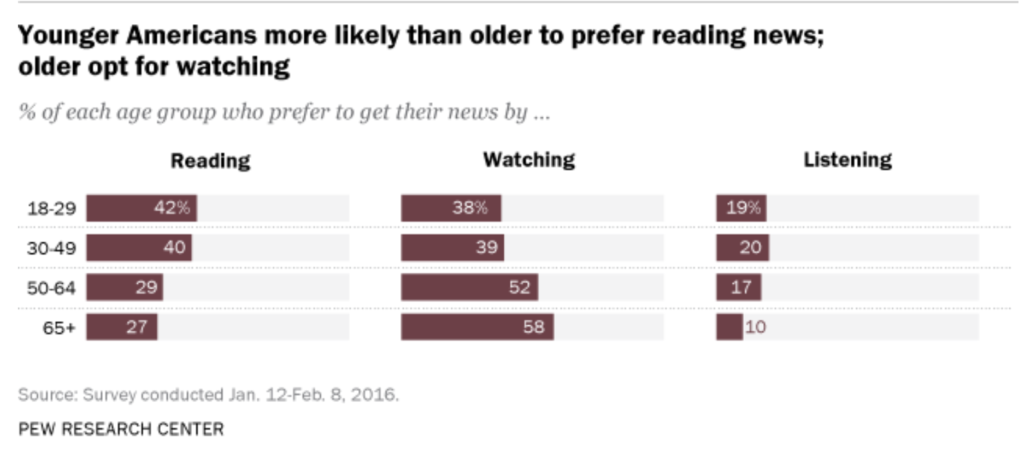
Pew Research Center found the same was true.

In fact, their research revealed that millennials do like reading the news, and prefer keeping up with the latest happenings in text form.  Older people, by contrast, were the ones who prefered watching the news.

Millennials do read the news

Where did the pivot come from?

According to Pew Research, around 45% of adults get their news from Facebook. And, because it’s become this primary source of information, the social giant found that they could boost ad revenue by gating video content behind an ad.

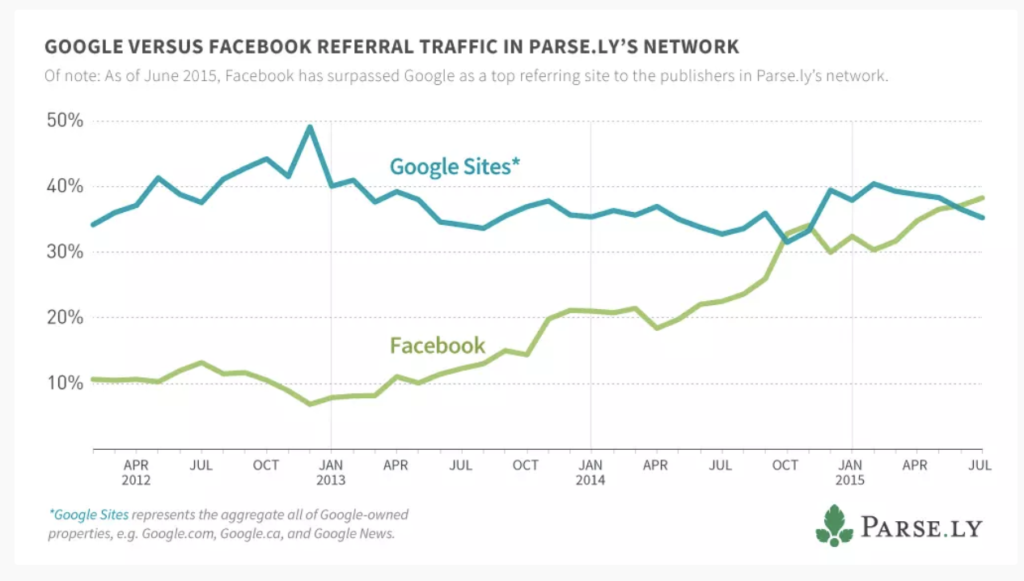
As it stands, Facebook is responsible for 40% of all referral traffic to online publications.

Facebook referral traffic

As such, they’ve used this as an opportunity to sell marketers on this idea that video is dead. Or rather, it’s a way for brands to connect on an emotional level or engage with their audience.

And it makes sense. If you’re an advertiser, it’s better to place your ad in front of a captive audience, rather than have Facebook users ignore a text-based ad inside your feed.

Reading is active. It requires some actual brain power while watching a video does not. The human brain processes visual content at a rate that’s 60,000 times faster than it processes text.

So, it’s easy to understand why brands should place an emphasis on video ads.

On top of that, marketers are getting the message that video is what people really want.

Google any content marketing-related information about video marketing, you’ll see a lot of articles with statements like these: “blogging is dead,” “why you need to add video to your strategy,” etc.

Wrapping up

It always seemed ridiculous to make the assertion that just because one type of content performs well or comes with a certain set of benefits that we can discard the old ones.

The old refrain, “video killed the radio star” doesn’t make sense anymore in the golden age of podcasting. Nor does the idea that we’ll completely replace the written word.

A multi-channel content strategy does make sense for brands and publishers alike. but the fact that dishonesty served as the basis for many of the pivots in the space is troubling.

Social media at work: pros, cons, and is it necessary?

Should you mix social media with your career? A look at the pros and cons.

Social media and its role in our professional lives is complicated. Offices take varying stances on whether they allow it, while others make social participation mandatory for employees.

The benefits of maintaining a professional presence online are clear. Social channels done right can validate your brand and help you land a job or connect with “the right people.”

But shifting norms have come with some new expectations. Do we need to be that active on Facebook and Twitter at work?

We’re honestly not sure.

As it stands, there are plenty of guides across the web from Flex Jobs to Monster to the NYT that stress the importance of keeping up an active online presence.

Some say that opting out can be seen as a red flag for employers, but curating a personal brand when you’re not trying to become an influencer is extra work.

Below, we’ll look at some of the benefits and minefields associated with social media and its role in the office.

Social media and the workplace: a delicate balance

Social employees tend to be more engaged

HBR found that workers who used social media at work tended to be more engaged. Think about it; these are the folks actively making connections during their workday. This group looks at their role in the broader sense; following trends in the industry and working to improve their reputation.

They’re also always on the hunt for the next best thing. That same HBR piece mentioned that social butterflies tended to leave their jobs more often than their less engaged peers.

People without a social presence risk appearing like they don’t care or they don’t know their way around the internet. Through social media channels, employees can bolster their connections in the industry, which is especially useful in sales, marketing, PR, event planning.

More and better connections can be good for the company. Benefits come in the form of increased leads and better recruits, as well as competitive intelligence.

So, great for companies, then? What about regular workers?

Well, on the employee side, research has found that employees who feel comfortable fostering these digital connections are more open to collaborating with others or researching new ideas they might not be familiar with in real life.

What that means is, if you’re a social networker, you might be more productive.

Making meaningful connections on LinkedIn, for example, could help you stay in contact with people who can boost your career, while general usage keeps you abreast of the latest trends in the space.

7

It might make you smarter

No cat videos and fake news aren’t going to magically boost your brain power. But using social media, thoughtfully opens you up to a whole world of new information.

Intelligent digital conversations require research and strong communication skills. Meaning, if you’re talking with industry experts in your LinkedIn group, you’ll likely be looking at credible

While social media might be best known at this point for fake news, just about all of the platforms can help you uncover new content, learn more about other companies and increase your reach.

Job hunting

Finding jobs is one of the more practical applications of social media.

The downside is, when you’re using social media to find a job, there may be some expectation that you’re actually, well, good at it. As such, numbers matter.

You’ll want to take some time to build your network which is understandably daunting. Start by reaching out to people you know—add people from your alma mater, people you’ve worked with in the past and include a personal note along with your invitation.

LinkedIn, of course, is the more obvious job hunting platform, but Twitter might prove useful as well. Twitter has feeds dedicated to advertising jobs, though you’ll need to sift through a fair amount of noise to find opportunities.

Career Builder has put together some simple steps for adding Twitter to your job hunting process.

One of the biggest complaints from hiring managers is that job hunters aren’t prepared when they walk into the interview.

Instagram can be helpful in that arena, as you can quickly learn more about not only what the company does, but what their culture and branding are like.

You can also use the platform to engage with companies you like. Sometimes brands share open positions on their social channels before posting to job boards.

But what about coworker relations?

On the one hand, the idea of combining social media and coworkers is a recipe for disaster.

Do you really want these people intermixing on the same digital playground as your family, your friends from college? The people you weren’t friends with in high school?

Yeah…

But, there are some benefits to braving the social minefield, too. For example, coworkers can use social media to interact with each other, promote each other’s accomplishments, and strengthen bonds.

A recent survey from Microsoft found that incorporating social media into workplace communication strategies would make their jobs easier.

Social can be a way to share ideas and boost communications, especially with remote teams. But, the case for limiting those social interactions to Slack channels, LinkedIn and other work-specific platforms is a strong one.

Stressing about whether you want to accept a Facebook request from Janet in accounting is kind of a bummer. This article from Fast Company recommends simply doing nothing when someone sends you a Facebook request you feel weird about.

Your personal Instagram or Facebook might not contain any damaging information, but some workers don’t want colleagues to access images of their after-hours selves.

Wrapping up

In short, though, the main benefits of using social media seem to be linked to those users who actually want to use the tools. You’ll see some good results if you’re using the internet to learn new information and make meaningful connections.

No matter what industry you’re in, a social media presence can pay off in the form of new contacts and job leads. That said, if you’re not into it, try maintaining a professional-looking LinkedIn page rather than forcing yourself to keep up with Instagram and Facebook.

In the end, getting social can help you succeed in the workplace. Social media, of course, helps you build connections that move your career forward both in and out of your organization.

5 best AI apps you can download right now

Use AI to make your life better. Here are some tools to use today!

Best AI Apps to Download Now

Artificial intelligence is here. And while we’re not quite at the point where we can’t separate humans from the rising robot class, this new wave of technology promises smarter work and new ways to play.

Below, we’ve compiled a list of some of the coolest AI apps you can download right now.

Best AI apps you can download right now

Hound

Hound Assistant

Hound is an artificial intelligence app available on Android and iPhone. It’s kind of like Google Voice Search, as you can search for information by talking through the interface.

Just say, “ok, Hound” and you can ask for directions, restaurant recommendations, and more. You can also use the tool to call an Uber, play music, etc.

While this app is a lot like Siri and Google’s offerings, it offers a few benefits. For one, Hound is made by the people who made the music app, Soundhound. If you want to know what song is playing, it will just let you know, rather than prompting you to buy from the App Store or Google Play.

It’s also better at helping you locate, say a coffee shop with Wi-Fi. Yes, Google does this, but sometimes the suggestions don’t fit the bill.

HOUND Voice Search & Assistant Download free ►
8

Elsa

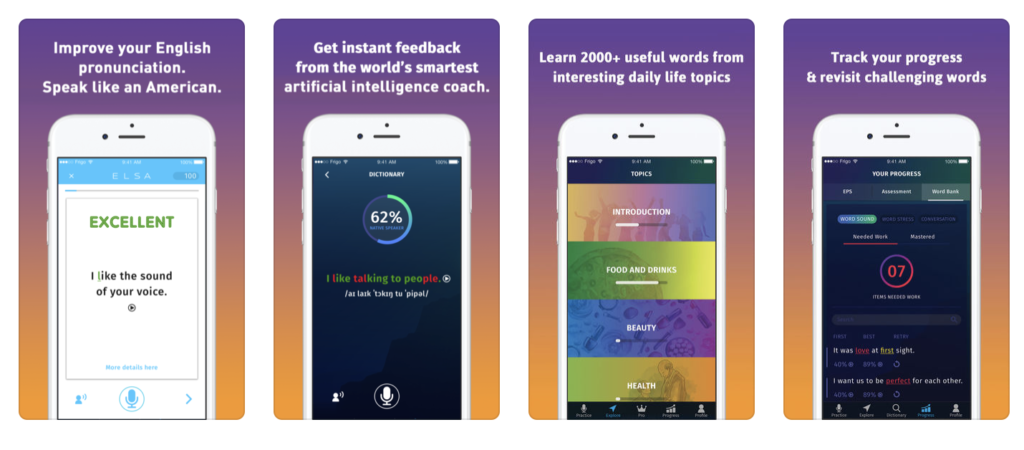
ELSA Language Tutor

Not a native English speaker? The Elsa app is an English Language Speech Assistant—get it?

Anyway, Elsa is the first AI pronunciation app that asks you a few questions about your native language and adjusts the settings accordingly. The smart technology aims to help users with speech challenges specific to their native language—working through lessons like “ending sounds” The app is free, so there’s no excuse not to brush up on your language skills.

Google Allo

Allo Assistant Google

While Google already offers voice search within its apps, Google Allo is a separate digital assistant you can download to your Android or iOS device built to better your chat experience.

But, before you dismiss it, know that it offers more than what you’ll get with Siri and Voice Search. Allo is a smart messaging app that allows you to level up your responses.

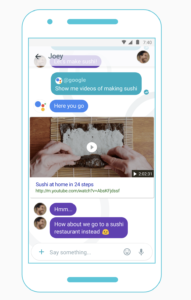
Allo comes with Smart Reply, which suggests texts and emoji by learning your habits— while this feature is already available in Gmail, it makes texting a lot easier. Additionally, the app lets you locate information on Google without leaving the conversation—so if you’re trying to find brunch spots, you can quickly find and share some options without the cut and paste nonsense you’re used to.

Google Allo Download Free ►
8

Kono

Kono Scheduling Assistant

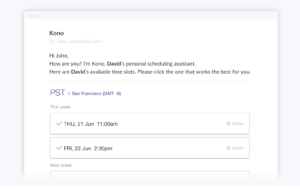
Kono is a scheduling assistant that aims to help the disorganized maintain a facade of professionalism…. Or, rather, it’s an AI tool that helps users update their calendar and interact with other meeting participants.

The benefit of Kono is, the AI understands natural language processing and analyzes responses quickly. You’ll eliminate the irritating back and forth that goes hand-in-hand with trying to find time for a Skype meeting or whatever that works for everyone.

Specify:

  • Your work schedule
  • Time zone
  • Location
  • When you take breaks
  • Conference details
  • Meeting duration
  • Meeting summary
  • Lunch breaks

Now, it’s not perfect—you may get sick of the canned emails filling up your inbox. And, you can only send out one request per email. Still, if you need help organizing your calendar, but don’t yet have the budget for a living, breathing assistant, Kono is definitely worth a try.

Socratic

Socratic Study Assistant

Socratic is an AI app built for students or students of life. If you’re hunkered down with a pile of homework, you can use the app to snap a picture of your homework and Socratic gets to work finding the answers to all of your problems.

Yes, this app is potentially a way to cheat using your smartphone, but the tool actually shows its work, so you can understand how it got from point A to point B.

Socratic supports more than just math, too. Use it for English, history, economics, chemistry, and more. While the program stands to help you navigate through your course load much faster, it’s well-advised to leave it home come exam day.

Socratic - Homework answers download free ►
8

While AI has a long way to go before it becomes the stuff of science fiction, it’s exciting to see that the technology is expanding to different areas that Siri and Alexa haven’t quite covered.

Why you should manage your energy instead of time

Tracking your time may not be the key to productivity. Try this instead.

studying

With demands coming from all directions, managing time in reliable, 24-hour increments seems like the most practical approach to getting things done.

Most of us respond to increasing demands by putting in more time. We get up early and stay late at the office.

And what sounds like the hallmarks of a go-getter is really a recipe for disaster. High turnover. Distraction. Health problems. The list goes on.

Energy, of course, decreases as we spend it, of course. However, we can take some steps to regenerate our capacity to be more productive. Instead of thinking of out potential output in terms of hours and minutes, it might be smarter to look at energy management instead.

Why you should manage your energy instead of time

Energy management, an intro

Energy management as a concept isn’t especially new. But, it’s worth revisiting. These days, the line between work and home is increasingly blurring, leaving us feeling depleted on a regular basis.

Back in 2003, Tony Schwartz founded the Energy Project. The organization set out to find ways to improve productivity in the workplace, using scientific methods to help people feel energized at work.

Schwartz and his team found that we have four types of energy: physical, mental, emotional, and spiritual. And, each of these categories must be addressed in order to keep us feeling 100 percent.

82% of business leaders feel that they’re working at suboptimal energy levels. Which, let’s face it, is likely to trickle down the chain of command. Leaders set the tone for long work days, when instead, at least some efforts need to focus on helping workers recharge.

Here’s a short clip from Schwartz emphasizing the power productivity rituals.

Managing energy means learning more about yourself

Some of us are most productive in the morning, while others knock out tasks later in the day. While not everyone has the luxury to work when their body wants them to, you can choose how to organize your to-do list.

If you’re not sure, keep a diary of how you’re feeling every hour or so for a few days. Factors that can affect this include food, sleep, and stress levels.

A few things to work on:

  • Be comfortable: This goes for your environment as well as your person. Keep your space clean, at a comfortable temperature and well-lit. Wear clothing that feels good—no belts that press into your stomach, itchy shirts, etc.
  • Eat well: Lean proteins, vegetables, fruits, and minimal sugar. Drink lots of water, too.
  • Get enough sleep: Aim for eight hours and avoid staying up too late finishing tasks.

Understanding your patterns also means leaning into those waves of productivity. What we mean by “waves” are those times you’ve felt compelled to clean out your closet or wrote a whole article in one sitting. Sometimes, these waves come without warning, and if that’s the case, try riding it out if nothing is standing in your way.

Those waves also come after you take an action. Let’s explain: crossing a smaller action off of your to-do list gives you that feeling of accomplishment—which helps you muster the energy for the more difficult task at hand.

Make room for rest

Resting isn’t exactly respected in our culture. The idea conjures up spa days. Of treating yourself after a hard day of work. Or, you know, just being lazy.

In fact, many of us consider rest the opposite of work. That the two concepts are at odds with one another. But that’s the wrong way to think about it. Rest is essential to working smart. That downtime allows us to collect our thoughts and reacquaint ourselves with our brains.

The New York Times published an article about the benefits of sleeping for short stretches during the workday. The idea there was, sleeping in 20-60 minute intervals (pre-REM) gives users a chance to tap into their creative side and recharge those internal batteries.

As you may recall, this article came with a whole side helping of backlash. Talk of coddled millennials and the mocking of Silicon Valley’s sleep pods and other perks were buzzing around the web.

But it’s interesting how it’s all about optics. We’re told when we get our first jobs that we need to put in the hours. You know, show up early, but be the last one to leave.

Late risers get a bad rap, for whatever reason, regardless of output, and setting boundaries when it comes to work-life balance isn’t as easy as it sounds. And we get it. Maybe napping at work isn’t an option, but rest doesn’t have to involve a pillow and a blanket.

Here are a couple of ideas that seem perhaps, too basic to mention, but we’ll do it anyway.

Spend some time with a book

ebook

The benefits of reading cannot be overstated. For one, all of our leading innovators read—everybody from Oprah to Stephen King and Bill Gates spends part of the day with a book.

The practice not only keeps your brain sharp, it also reduces stress and bolsters our problem-solving skills. Even better—unlike taking a nap, you can squeeze in some on the job reading without causing a scene.

Give yourself space to think

Or, just literally give yourself some time to think quietly for a period. Making space for your thoughts is not the same as doing nothing. In fact, it’s been shown to boost job performance.

The idea is that a short timeout for reflecting can help you process and learn information. Especially if you’re working in a mentally demanding industry. While we benefit from team-oriented brainstorming and collaboration, solo-thinking sessions can energize us and help us better prepare for meetings or a long list of to-dos.

Finally, just stop multitasking already

You’re failing at it anyway. Few of us can actually handle multitasking.

Instead, learn to prioritize.

Make lists, rank your tasks in order of importance, and check one thing off at a time.

Doing things quickly and reworking them later is a waste of time. In the moment, it might feel like you’re being productive, but in reality, you’re just slowing yourself down.

Unfortunately, there are countless studies that demonstrate over and over that multitasking does not help you get more done.

In fact, each time you stop to check an email or take a peek at your phone, you’re increasing the total amount of time spent on the task. If you need a break, take one.