First look: Facebook Portal video chat devices

Will Facebook’s Portal change video chat forever?

Following up a tumultuous couple of weeks for the company, it seems we finally have some good news coming from Facebook: The introduction of two new camera devices – the Portal and the Portal Plus.

One of the earliest (and arguably remaining) criticisms for Facebook was how it streamlines and trivializes friendships to the point that they are hardly genuine at all. It’s hardly a surprise that of the typically hundreds of Facebook friends per user only a scant handful are actually considered good close friends. ‘Facebook friend purges’ where users remove excess friends are all too common, and the connected world that Facebook strove to achieve begins to feel ironically empty. The Portal aims to change this by simplifying and encouraging actual real-time conversations between people. Yes, we know Facebook already has phone call and video chat options, but what we’re talking about here is something way bigger:

Get ready for a much more tangible connection

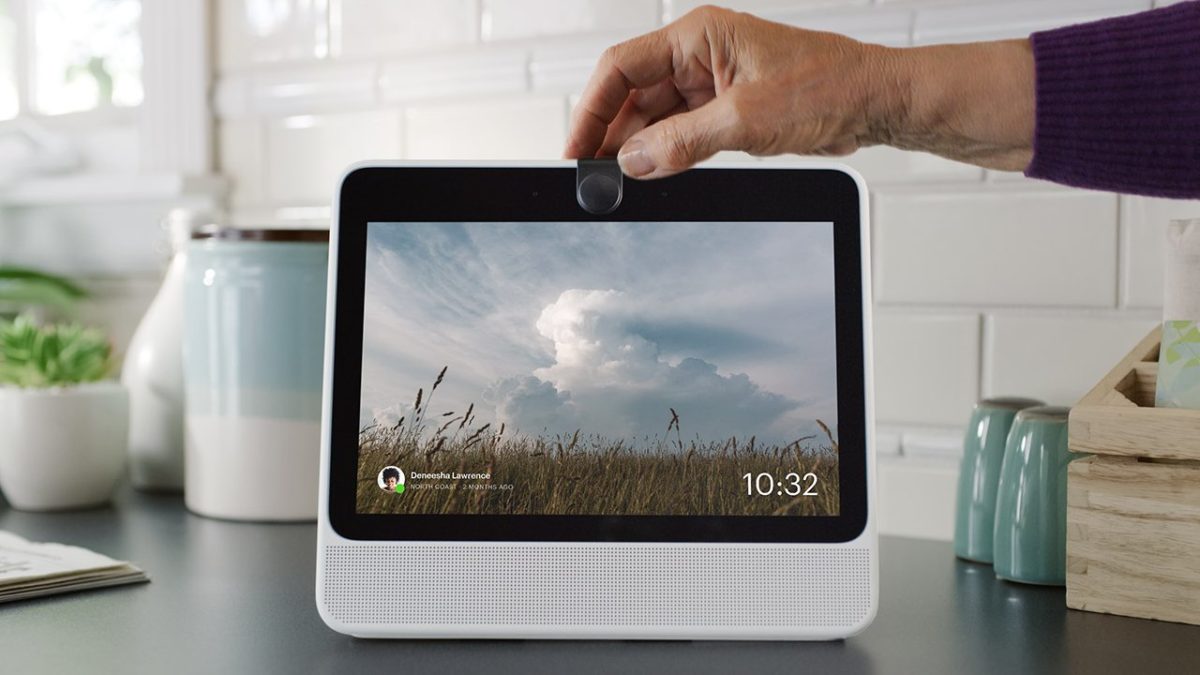
Both the Portal ($199) and the (slightly heftier, more stylish, and more pricey) Portal Plus ($349) are cameras for video chat built with the intent to make it feel as though you’re socializing in the same space as your friends or family from all over the world. The Portal uses Facebook Messenger to easily and instantly reach out to anyone else who also uses the app. Similar to Alexa or Siri you can simply say ‘hey Portal’ to wake it up and ask it to connect you to whoever you’re trying to speak with. Thankfully, this isn’t just limited to other Portal owners either; you can call someone’s phone, tablet, or even computer.

Connect with Facebook on any platform

If this sounds like an Amazon Alexa ripoff, it’s because that’s exactly what the Portal uses. That’s right. If you own a Portal it lives on the same network and is connected to anything else in your house or workspace that uses Alexa. Alexa’s integration means you can ask your Portal to tell you the weather, list off music albums, run your microwave, or dim the lights. Very cool … provided that you trust Amazon and Facebook enough to give them access to your other household appliances and devices.

We’re still iffy on that.

While we’re not sure that we’re prepared for Facebook and Alexa to partner up in running our house, we were pretty excited to hear about Facebook’s collaboration with iHeartRadio, Pandora, and Spotify. This will make the Portal an actually viable option for quickly accessing or sharing music with our friends and that’s pretty exciting.

Listen to Spotify with your friends

Additionally, the Portal can let you request and watch videos like Facebook Watch, YouTube or Food Network, and scroll through any display photos from your Facebook news feed.

How’s the camera, though?

All the bells and whistles aside, the main reason you’d be spending your hard-earned cash on a Portal is likely not for features you can already get through Alexa. The Portal is a vid chat camera first and foremost. How does it do in that department?

We’re pleased to say it does very well indeed. Both the Portal and the Portal Plus sport a 12-megapixel camera capable of capturing high definition videos and crystal-clear details and movements. Both models use the same software and processors, and we found the real difference was how they look on the outside:

Portal vs Portal Plus

While the Portal has a 10-inch screen, the Portal Plus bumps it up to 15 inches, and adds a surprisingly intuitive and useful rotating display. You can also pivot the Portal Plus to switch between portrait and landscape mode, which is really neat depending on what your friend is trying to show you.

Facebook Free Download
8

The best, or at least the most groundbreaking, feature for the Portal has to be its smart camera and innovative ‘Spotlight’ system. Facebook’s goal with the Portal was to eliminate the awkward look and feel of video chatting with someone, and their solution was the Spotlight feature, which essentially makes it look like your chat is being recorded by a professional cameraman. How?

The Portal’s tracking AI is pretty impressive

The Portal has an AI that tracks users as they move around the room, zooming in and out as needed, panning and re-framing to match! You won’t have to oddly sit in the same spot trying to angle your microphone to hear you clearer or fidget with the camera to ensure it’s pointed at what you’re trying to show. The camera follows the subject’s movement, discerns when multiple subjects are present in-frame, and – with Spotlight – can stay trained on a person of your choice.

The Portal and Portal Plus are Facebook’s first plunge into designing, advertising, and distributing an actual hardware product from scratch, and given the misfortune they’ve struck of late, we hope it’s a step in the right direction. If the Portal ends up doing as well as Facebook hopes, we could be seeing a lot of new faces on the social network and be able to connect with them with a lot more ease and sophistication. With a little luck, Facebook is getting closer to achieving the goal it set about to achieve back in 2004: To bring the world closer together.

Both Portal and Portal Plus are available for pre-order right now and will begin to ship this November.
Here are the best new features in the Windows 10 October update

Microsoft brings some amazing features to their OS.

windows

Windows 10 is putting out its bi-yearly update this month and some of the features (especially the last one on our list) are going to be some of the most useful we’ve seen yet. Oftentimes updates to Windows 10 are simply more streamlined ways to use apps and features we already have, but this time expect to see some things that, depending on what kind of smartphone you use, could drastically overhaul the way you attain and transfer files and information.

Here’s what’s new in the Windows 10 October update

Cloud clipboard

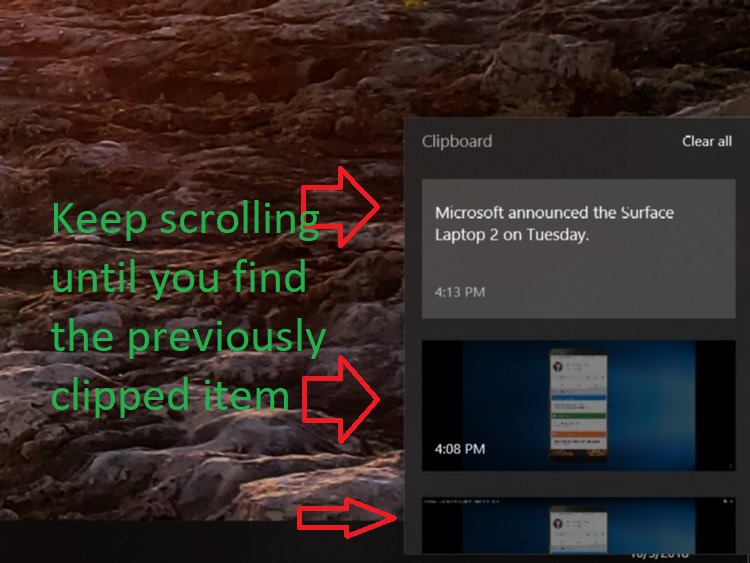
The first announced tweak to catch our eye was the cloud clipboard, which lets you copy multiple text samples or photos to your clipboard via ctrl+x or ctrl+c. Pressing Win+V (which used to do nothing) will now bring up a window where you can see everything you’ve copied. Did you accidentally forget to paste what you last copied? No problem! Just scroll down the clipboard until you find it!

Cloud clipboard means you won't lose saved clips

Anything you copy can now also be synced with any other devices using Windows 10, which means transferring saved URLs or pictures will be as simple as it honestly should have been from the start.

Task Manager now displays power usage

For Windows users looking to max out their computer’s performance while minimizing programs that are taxing for your system, you can now easily check a program’s power usage by simply opening up your Task Manager (ctrl+shift+Esc).

New power usage column shows how much energy tasks are using

There’s a new column on the far right labeled power usage that shows just how much focus your PC is giving to any given program or app.

Better screenshot tools

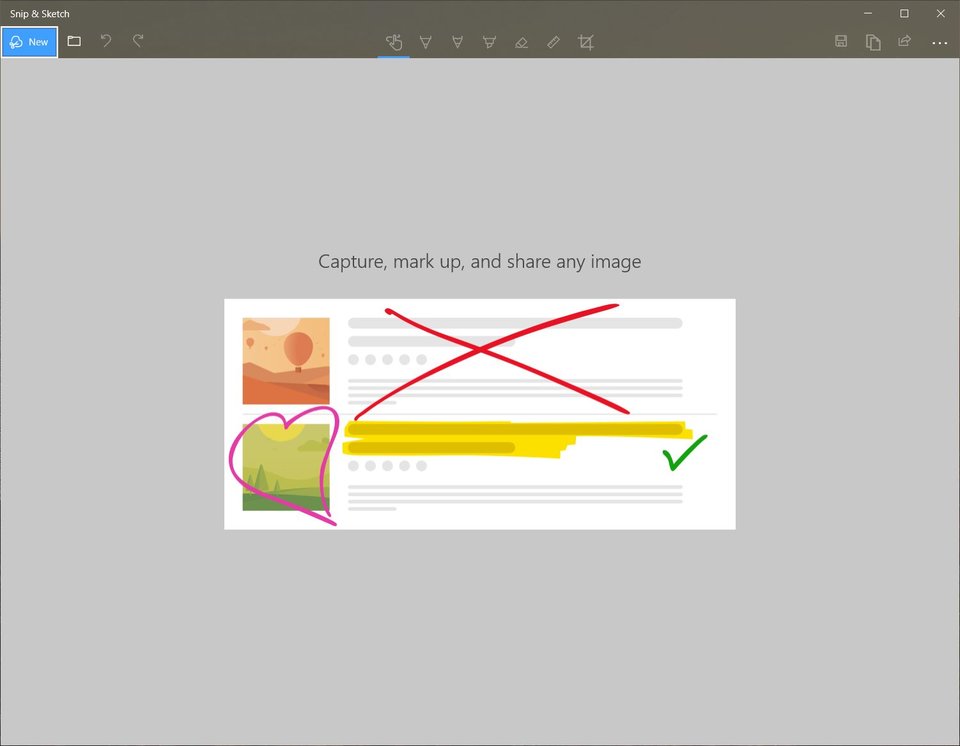
After a plethora of updates for Windows 10, we’re finally getting a revamped screenshot mechanic. Instead of opening up the Snipping Tool all you need do now is press Win+Shift+S to open a screen-cap tool.

New snip tool makes getting screenshots way easier

From this window, you’ll be able to take a full screenshot of your monitor, crop your usual rectangular camera, or even (our favorite) sketch out a free-form screenshot of any shape you like! This new tool is aptly referred to as ‘snip and sketch.’

Windows 10 Download
7

App Mirroring

But all of these new features are just the tip of the iceberg: The biggest implementation is that you can now go back and forth between your smartphone and your PC with your clips, pictures, texts, and several apps. The new ‘your phone’ app allows for Android users to text from their PC as long as they have Microsoft’s mobile companion app. All of these features work for both iOS and Android, but Android gets one additional tool that stands out.

With the new update users can even use the new desktop app to copy/paste and drag and drop both text and pictures from your phone directly to your computer:

Microsoft is appropriately dubbing this feature ‘app mirroring,‘ a phrase we expect to be hearing a lot in the coming months. Mirroring starts with Android photos and texting, but iOS hasn’t been left in the dust: iPhones can transfer web pages, though it has not been verified whether iPhone will be getting any further features from this app. Microsoft is planning for more mirroring support for Android, however, though they have not yet confirmed specific dates.

Can’t wait until next week for the update? You don’t have to. Follow the instructions on Microsoft’s website right here and download it here and now.

Play the Fallout 76 beta on October 23

Here’s all you need to know to play Fallout 76 this month!

If you’re as hyped for Fallout 76 as we are, then news of a beta coming down this month probably got you as giddy as opening a hatch and hopping into a post-nuclear wasteland.

That sounded strange. What we’re saying is that we’re excited.

Welcome to post-apocalyptic paradise!

While the next installment of Fallout isn’t due until November 14, the beta (Break-It Early Test Application) will be available first for Xbox One on Tuesday, October 23. For PC and PS4 users you’ll have to wait another week – snag it on October 30. The bad news is that on any given day where the beta is live it will only be up for 4-8 hours.

This game's gonna look beautiful

“Focusing as many players as we can into these windows is our prime objective,” Bethesda explains in their FAQ. “We’ll fix what we need to fix and do it again and again from the start of B.E.T.A. until a few days before launch.” Don’t worry about missing the window either. “We’ll give you as much heads up as possible,” they ensure, “because we need you to log in during these times and play the game.”

One of the coolest things about this beta (and why we’re so excited to get as soon as it’s available) is that it’s actually the full game. There are no restrictions on progression or on content, which is crazy. “Our current plan is for your progress to carry over once Fallout 76 officially launches on November 14,” they explain. Trophies and Achievements, however, will not carry over; you’ll need to wait on hunting for those until the official November release.

All your unlocked traits will carry over come November

Your progress (i.e. levels, skill cards, atoms) will all be kept, though! So get a head start on the grind before everyone else jumps in!

Early to the grind, early to the top of the heap!

How do you get in the beta?

Since this is the near-full version of the game, the only way to receive access to the beta is to pre-order it before it goes live. You can safely do so right here:

Fallout 76 Download
10

For PC

PC players with a Bethesda account will then automatically have beta access once it goes live. You can boot it up via the Bethesda launcher, which you can get for free right here – just scroll down to the bottom of the page.

For console

Console players who pre-order the game digitally via the Xbox or PlayStation Store will automatically be able to access the beta once it’s live on their respective platforms. All you have to do is search ‘Fallout 76 beta’ once it’s available on your console’s store to download it.

NOTE: You cannot play the beta (or the full game) on Steam. You can only launch it via Bethesda’s own launcher. If you don’t already have it you can download it free here.
Gaze into the irradiated abyss with your friends

As for the pre-order, there are two versions to choose from: The base version of the game, and the Tricentennial Edition. The $200 Collector’s Edition has flown off shelves already and unless Bethesda says otherwise don’t expect more to come in stock!

The Tricentennial Edition comes with extra goodies

The base game is fully accessible (except achievements and trophies) for $59.99. Order the Tricentennial Edition for $79.99 and you’ll get bonus downloadable items, exclusive power armor customization options, and a Tricentennial skin for the pistol, hatchet, and laser rifle. You’ll also get an Uncle Sam-themed outfit as well as posters and a saluting emote.

Still have questions? Check out Bethesda’s own FAQ for the beta right here. Pre-order Fallout 76 now and we’ll see you in West Virginia!

How to create a Windows 10 desktop shortcut to use your photos as a screensaver

Manually trigger a screensaver of your favorite photos. It’s easy!

family photo

Stepping away from the computer for a few minutes? You might have your screensaver set to come on after a set time, but here’s the issue you run into: If you set it to come on after too long (or choose not to use a screensaver), your computer is still sitting on the same screen for a long time. Boring.

Set it to come on too quickly and you’ll have to keep jiggling your mouse to switch it off. Sounds trivial, but trust us – it gets distracting very quickly. So what’s the best option? To be able to manually decide whenever you want to pop on the screensaver. We can show you how to do that with just a simple double click.

Clownfish Aquarium Live Wallpaper Free Download
7

One of our favorite screensavers is Photos. It’s great to set on the family computer, especially if you keep yours in a central spot in the house. It puts a smile on your face to walk past the den or living room and see a slideshow of your family vacation, your pets, or pictures from that party you had on your birthday. The following guide will work for any screensaver type you prefer, but we’ll be using Photos as an example since that’s the one we like best.

The following steps will work on Windows 10, Windows 7, Windows 8, and even Windows Vista. It’s easy. You can do it.

How to create a Windows 10 desktop shortcut to use your photos as a screensaver

1. Open your screensaver window

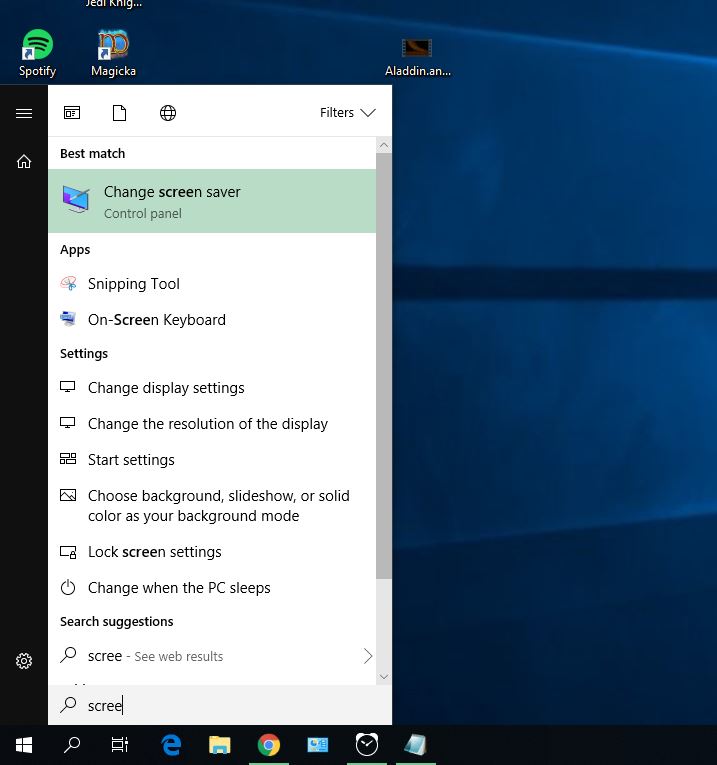
Search for Screensaver

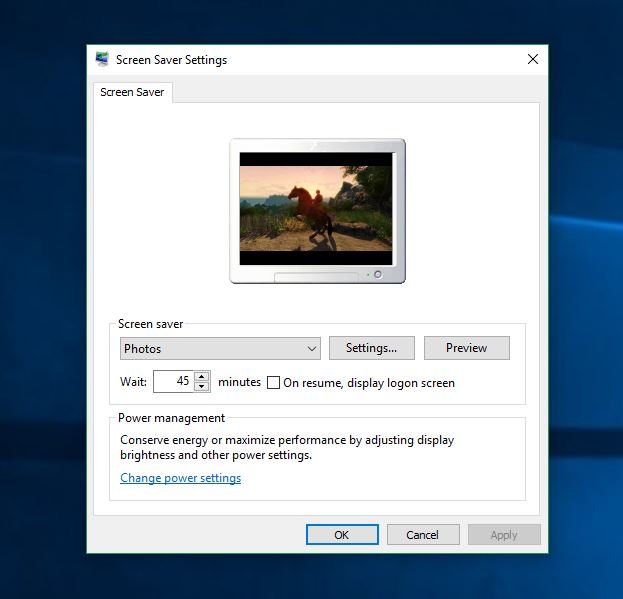
To start off, hit the Win key on your keyboard or click the Windows icon on the bottom left of your screen. Type ‘screensaver’ and the first option to appear should be change screen saver. Click on that.

2. Check and set your screensaver settings

Screensaver window

This will open a new window where you can view and change any of your current screensaver settings. If you don’t have a screensaver set up, we would encourage you to do so. While the need for a screensaver was originally to keep your PC healthier, that’s not really necessary with today’s computers. Still, it’s entertaining and makes for good conversation.

3. Choose your screensaver type

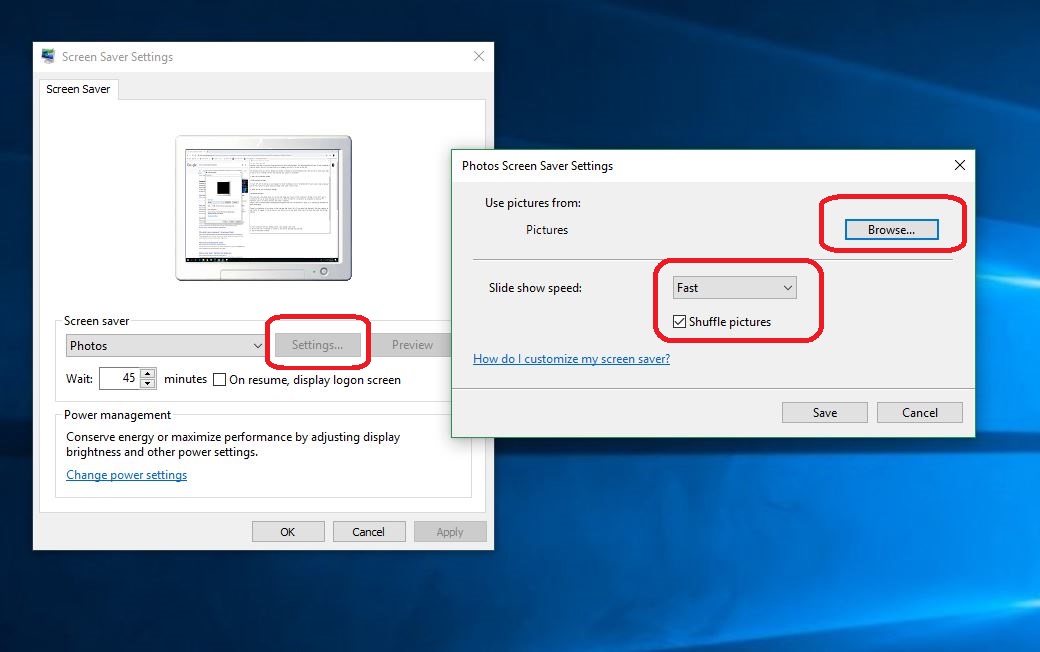
Choose the screensaver of your choice via the drop-down (go Photos! Do it!), and adjust how long you’d like your computer to wait before it engages. If you do choose to use Photos, you can pick which folder they’ll be shown from under the Settings options.

Set your screensaver settings

This is also where you can decide how fast the pictures change and whether you want them on shuffle. Once everything in the Screen Saver Settings is set to your preferences, click Apply.

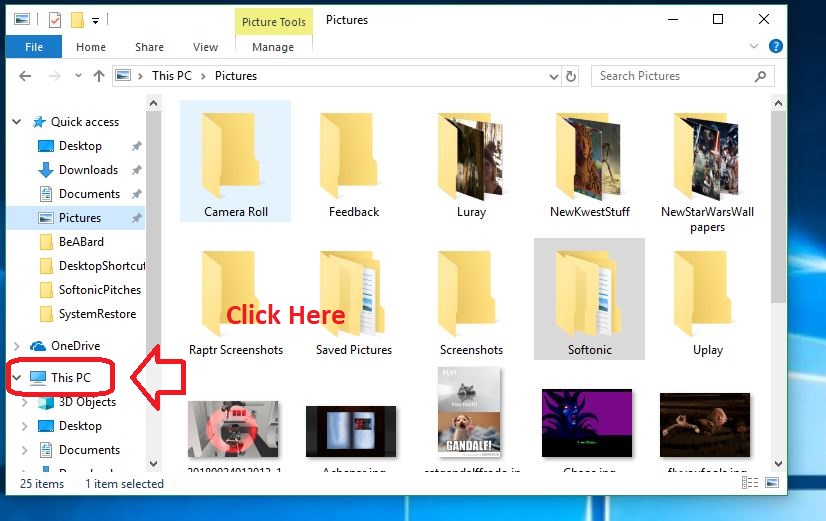
4. Open your File Explorer

You can hit Win+E to get there faster

5. Navigate to This PC

Open This PC

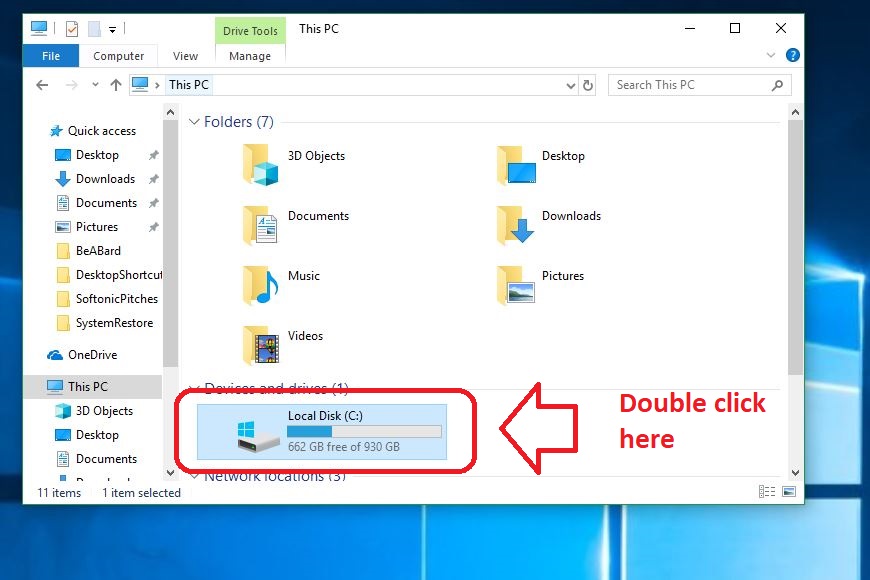
6. Go into your C: Drive

Open your C: Drive

7. Open your Windows folder

Open Windows folder

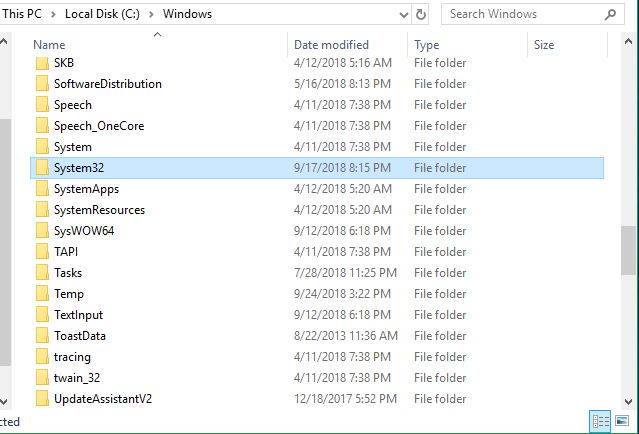
Once in the C: Drive, scroll down to the Windows folder. File Explorer is largely alphabetical, so it should be easy to find. Open it.

8. Open your System32 folder

Find System32 folder

Like the above folder, this sub-folder should be easily found; everything’s still alphabetical.

9. Find your screensaver.scr

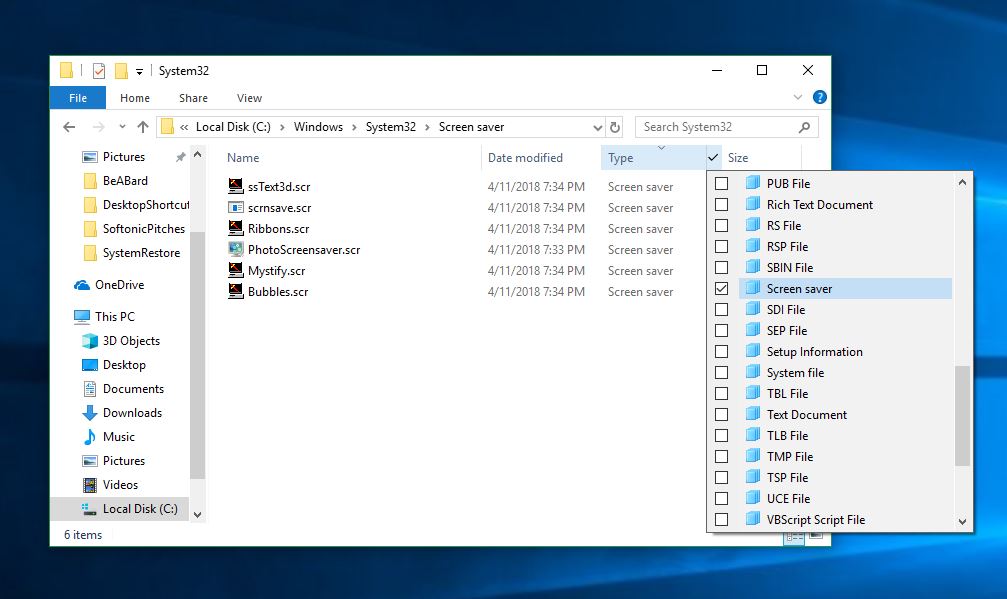
Now comes the important bit: You’ll need to find the .scr file for the screensaver type you chose. You can scroll through, but it’ll take a WHILE. You can either search by Type instead of by name as pictured below …

Find screensaver this way

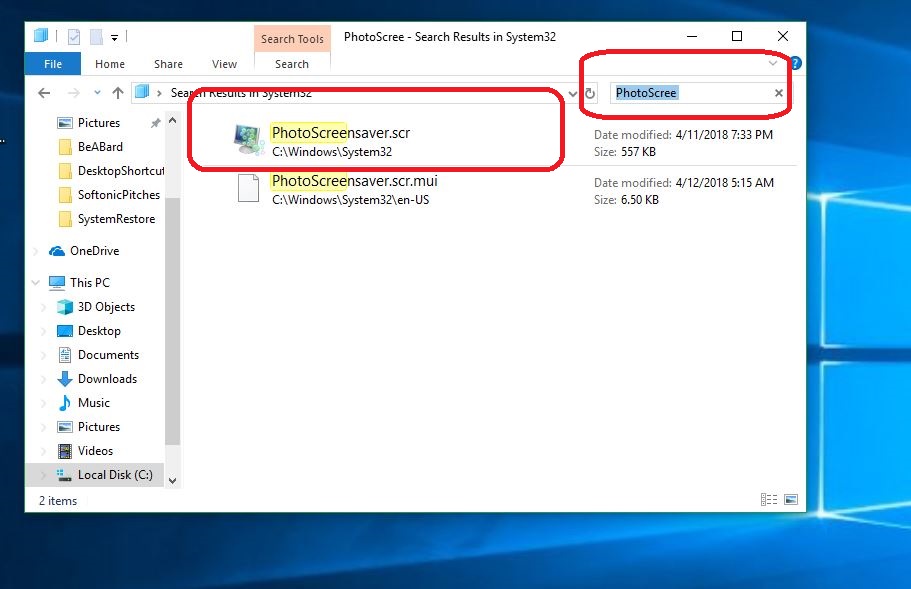
Or you can use our preferred method, which is to simply type ‘PhotoScreensaver’ in the search portal, or type in ‘Ribbons’ or whichever screensaver type you chose.

Find screensaver

10. Send this file to Desktop as a shortcut

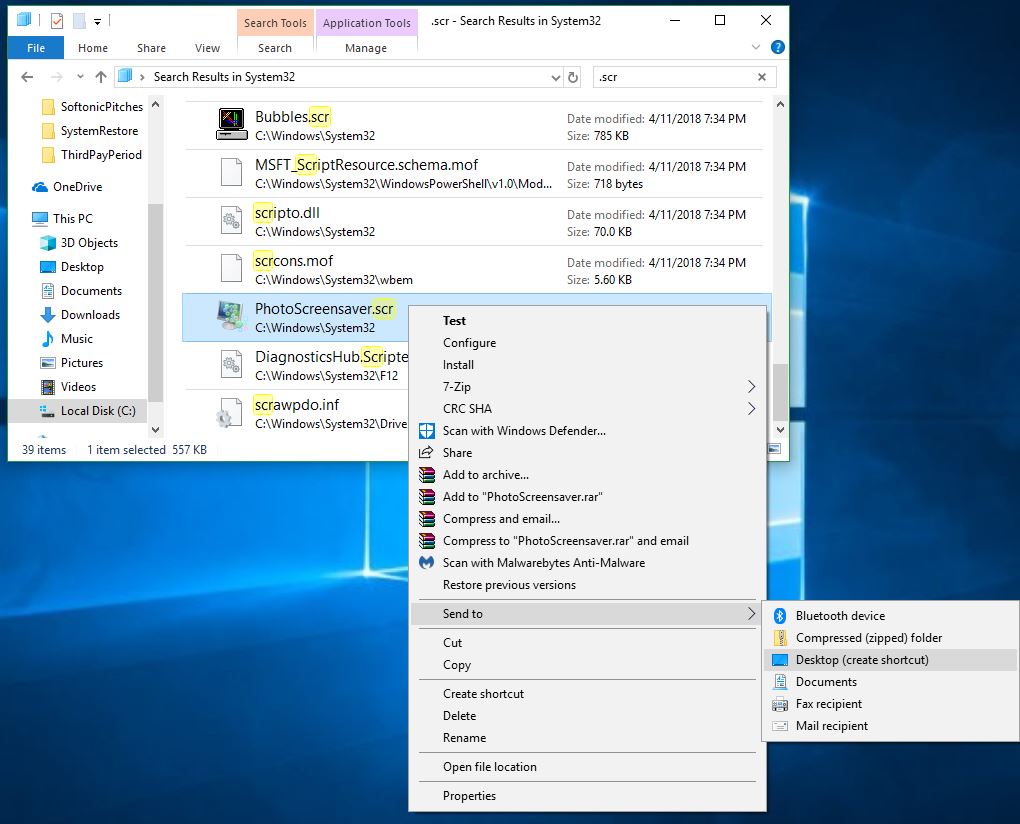
Right-click on the file and you’ll see a drop-down that shows a bunch of neat options. Hover over the one that says Send To and then choose Send to Desktop:

Send to desktop

Congratulations! You now have a quick shortcut that will run your choice of screensaver whenever you like. Let us know in the comments below whether you found our guide helpful, and enjoy your new manually controlled picture montage!

Did we just get leaked features for Google Pixel 3?

Watch this leaked video for what might be an early glimpse at this awesome new phone.

Last week was a big one for Google, but not for the reasons you might think (or the reasons they’d want). Alleged leaks in Ukraine and Russia might have just given us an official look at not only the unboxing of the Google Pixel 3, but some of its key features too.

Supposedly we’ll be receiving a lot more information about the phone come October 9th, but if even half the leaked information from this video uploaded by MySmartPrice turns out to be true we already have a pretty good idea of what we’re in for with the Pixel 3 and Pixel 3 XL:

As expected, the Pixel 3 will feature a ton of your standard apps: calendars, browsers, mail, files, maps, and the like. With two upward swipes, you’ll have access to your full catalog making for quick accessibility. Drop the app on your home screen and you’ll be presented with options for how you’d like to open it. Downward swipe to access and manage your text messages, emails, as well as basic functions like battery power, Bluetooth, and flashlight. As before users can squeeze the sides of the Pixel to launch Google Assistant.

Familiar apps screen

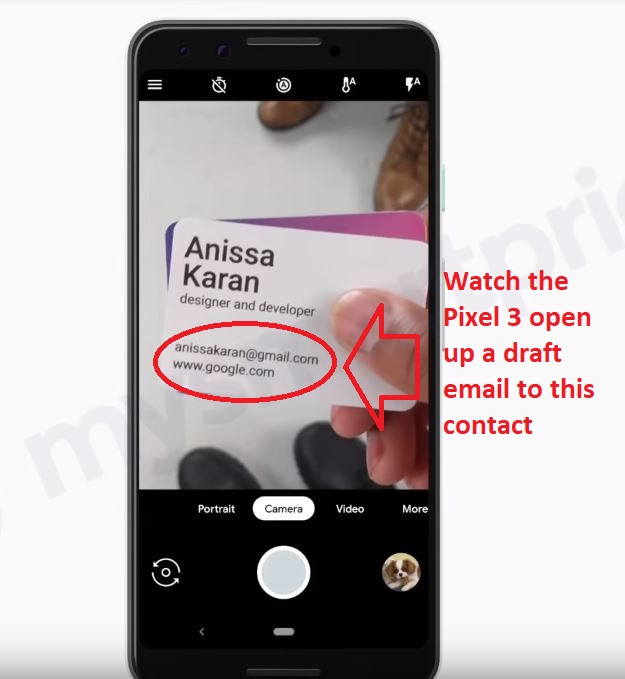
It’s nothing groundbreaking, but further on in the video we start seeing some newer innovations: Take a picture of an email on a business card and it opens up a draft of an email to them. This would be pretty for storing new contacts and just for a more simplified approach to managing business connections. Not bad, Google.

Draft emails based on recognized names

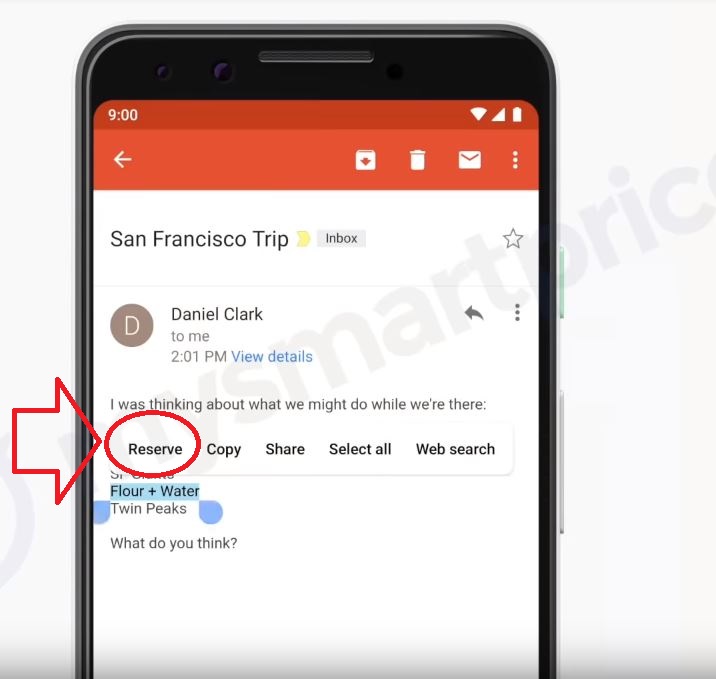
Another neat new feature is the phone’s ability to recognize the name of a restaurant out of context – hold down the name and on option pops up to make a reservation there. You can also long-hold the power button to screenshots, which would have been handy with the Pixel 2.

Reserve restaurants easily

Based on this video, however, it seems we’re seeing very few big improvements or any markedly new ideas. Google does seem to be keeping up with the competition, and is focusing more on streamlining our commonly-used functions. At least that means they’re paying attention to both the consumer and the competition.

Speaking of the competition, the unboxing video shared last week shows it’s got a lot more gadgetry included per order than Apple does with their new iPhone XS:

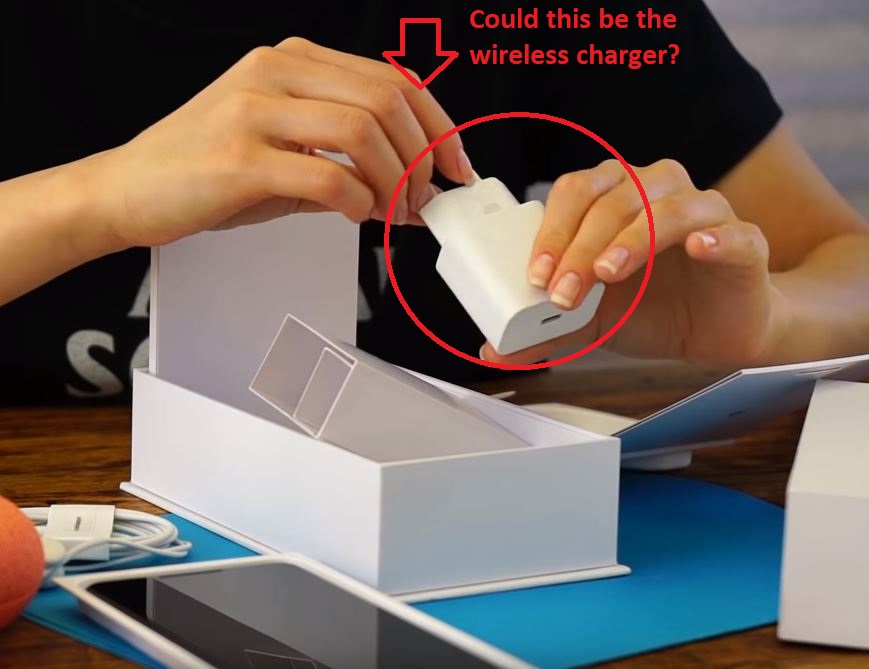
We may be seeing the rumored ‘pixel stand,’ which is the Pixel’s wireless charger. If we are really getting a wireless charger we admit that’d be pretty cool. According to MySmartPrice, the pixel stand will also turn your Pixel 3 into a smart display with fully integrated shortcuts for your music apps, Google Assistant, and notifications.

Wireless charger?

Other rumors include forward-facing speakers, two front-facing cameras, and … a set of earbuds included with every box (was that so hard, Apple??)!

Unboxing of Google Pixel 3

Does all this sound suspicious to you?

It does to us.

Whether what we’re seeing is leaked footage from a planned commercial, a counterfeit phone, or some random accident altogether is still unclear. As such, everything we think we know will likely remain conjecture until next week.

Think this information is legit? Let us know in the comments below. In the meantime, we’ve got our sights set for October 9.

How to make perfect scrambled eggs

Start your morning with the world’s best scrambled eggs!

Scrambled Eggs

Nailing good scrambled eggs is like trying to brew the perfect cup of tea – you’ll likely fail time and time again trying to recreate that one perfect instance where you got it just right, where you happen to let the tea steep just long enough, add just that right amount of cream or sugar to achieve that singular spot-on experience.

You’ll wake up the next morning and enthusiastically try to brew that same cup of tea again, measuring out just the right amount, timing how long you steep, even using the same cup … but somehow it’s not right. The magic just isn’t there. Can anyone relate?

Maybe we’re just projecting …

Scrambled eggs are one of the simplest breakfast foods you can make, and yet – like that cup of tea or a really good steak – getting it just right each time somehow evades us. One of the biggest contributing factors is that since so many people prep their eggs differently it becomes easy to over-complicate the dish, adding too many ingredients, cooking them for overly long, or getting the wrong consistency.

Seriously, though, there are so many different takes on how to cook scrambled eggs:

You can even learn to scramble your eggs “the Gandalf way!”

If there’s a method for making scrambled eggs, we’ve tried it. We love what these guys showed us, and we’ve found a way of our own that we think is just right. Let’s get started!

How to make perfect scrambled eggs

What you’ll need:

2 eggs
butter (preferably stick)
olive oil
thyme
chives
salt
black pepper

ShopRite Free Download
5

First off, it’s two eggs per portion. The fresher the better, and you can tell by checking out the membrane when you crack it. Alton Brown explains here just what that looks like:

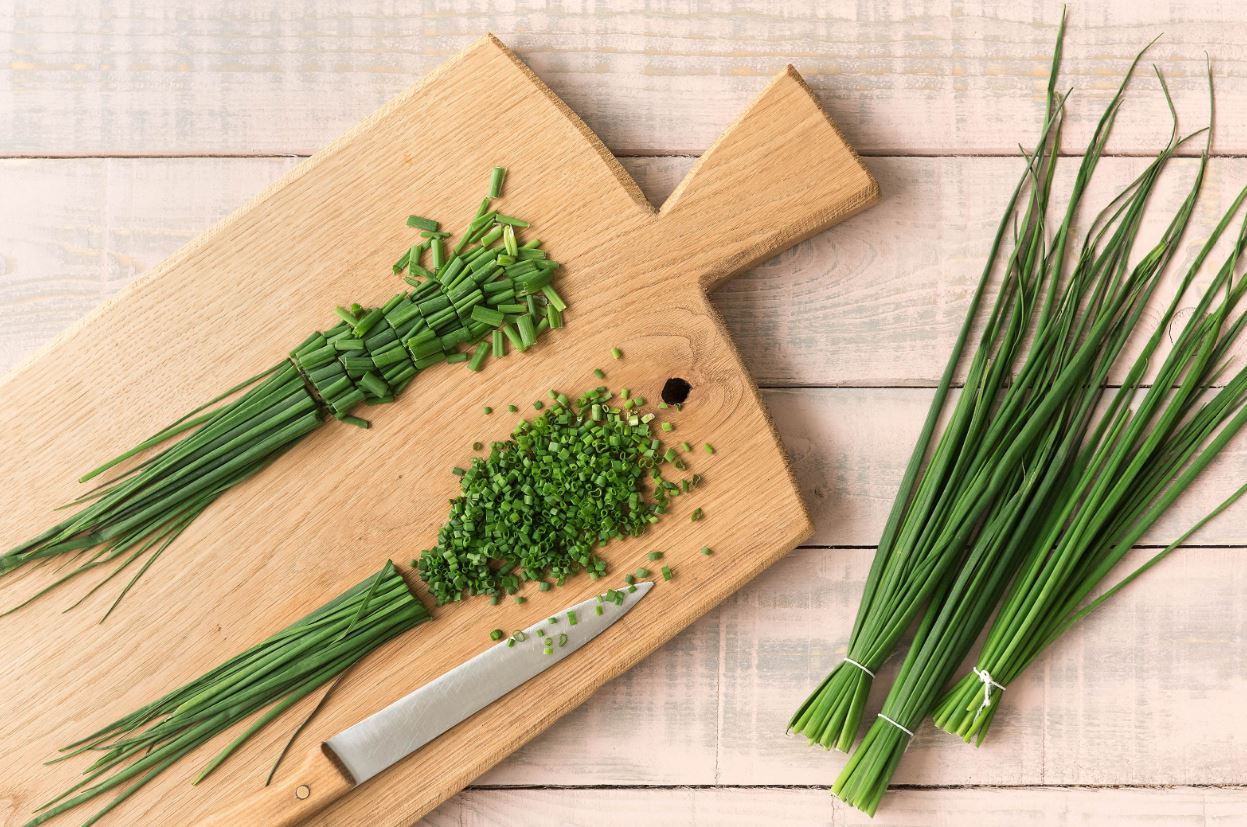
Crack your eggs into a bowl (careful not to get any shell in there!) and it’s time to get your seasonings. All you’ll need is salt, black pepper, and – the often under-utilized – chives. Add just a pinch of the salt, grind in a couple cranks of black pepper, and then add the chives. The chives are going to add a light, delicate onion flavor, and it’s very easy to accidentally add too much, especially when you’re using fresh. Trust us, though, adding just about a teaspoon or less of chives will make a dramatic difference.

FreshChoppedChives

If you’re looking for more ways to use common spices, check out our article here.

Using either a fork or a whisk, vigorously stir the eggs in the bowl until it’s all one uniform golden color.

WhiskedProperly

Next it’s time to get the skillet ready. Be sure to opt for a smaller pan, as it will help with the mixing and folding we’re going to be doing. Surface area is a factor here, and the less of it you have to deal with the better; you’ll get better-developed egg curds and you’ll have more control of the pan and cooking time.

BrowningButter

Put in a half tablespoon of butter, then pour a touch of extra virgin olive oil over it. Dust the pan sparsely with thyme (fresh is better!) and get your spatula on stand-by. Once you turn up the heat, you’ll be done with cooking process in about 2-5 minutes. If you want toast with your eggs (yum), then pop it in the toaster now.

Cook Timer Free Download
9

Go ahead and turn the heat up to high. You can optionally throw in some minced garlic here, but it isn’t necessary. Once the butter and oil combination starts to lightly simmer, pour the mixture right into the bowl with your eggs! Give it a quick stir, then immediately pour that mixture back on the pan. Turn down your heat.

TIP: When you’re raising or lowering the heat, judge it by the size of the flame, not what the dial says.

HighFlameMustLower

Now comes the quick and delicate cooking process. If you want your eggs to have a heartier, more solid consistency just push the egg mixture around the pan, being sure to fold and move them about quickly – eggs cook extremely fast and you don’t want these to get overdone.

If you’re looking for smoother, richer, runnier scrambled eggs (like you’d put on toast), it’ll take slightly longer. Keep your flame very low from start to finish. The moment your egg mixture hits the pan, take the whole thing off the heat. Stir them constantly to keep the curds uniform in shape. Keep the pan off the stove top for a good 20 or 30 seconds, then return them to the heat, still stirring. Repeat this until your eggs achieve the desired consistency, then pour them directly over your toast.

SmoothConsistency

Sprinkle a few more chives (or fresh parsley!) on top there you have it: Perfectly scrambled eggs. You might be surprised we didn’t use milk or cream at any point. It’s because you don’t need either one to get good, creamy eggs. It’s a common misconception. On the contrary, adding a dairy product like milk will actually leech the moisture from your eggs, resulting in making them come out more rubbery and dry. The best scrambled eggs won’t need milk or cream at all.

PerfectScrambledEggs

Agree with our method? Let us know any add-ons or changes you made in the comments below!

How to survive encounters with these 10 animals

Nature can mess you up. Here’s how to make sure you stay on top of the food chain.

Spend a lot of time outdoors and you’re spending a lot of time in the domain of the animals. Unless you are inordinately unlucky, though, you probably won’t be on the receiving end of a hungry lion upon stepping out your front door! Depending on where you live, however, your likelihood of being threatened by some of the animals on this list will likely go up. While arm-wrestling a shark might not happen to you tomorrow, potentially dangerous animals like snakes, bears, or even dogs live in all parts of the world. Learning how to react to these encounters might just save your life.

Here’s our list of 10 dangerous animals you may encounter, and the best ways to ensure your safety:

How to survive encounters with these 10 animals

1. Dogs

don't give eye contact; it's perceived as a challenge

Dogs are Man’s Best Friend, but if you encounter a feral stray with no one around, you could very easily become threatened. Dogs react to movement, as it triggers a chase instinct. This means that you’re more susceptible if running, jogging, or on a bike. Like some of the other animals on this list, dogs are territorial, and if you tread on what they consider to be their property, they may act defensively. First and foremost, do not try to run. It’s almost a guarantee you will lose a race against a dog, and even trying will just trigger their natural instinct to give chase.

show that you're in charge, not him

If you slow your pace, avoid eye contact, and then stand still (preferably with your side facing the dog, as you’ll look thinner and less threatening), you’re no longer as imposing to him. Next, try not to look or act afraid; it’s not that dogs can ‘sense your fear’ as some people think – it’s that if they can get a rise out of you, they’ll be confident enough to keep pushing the attack. If you appear confident and in charge, the dog will reconsider attacking you, considering you too tough to mess with.

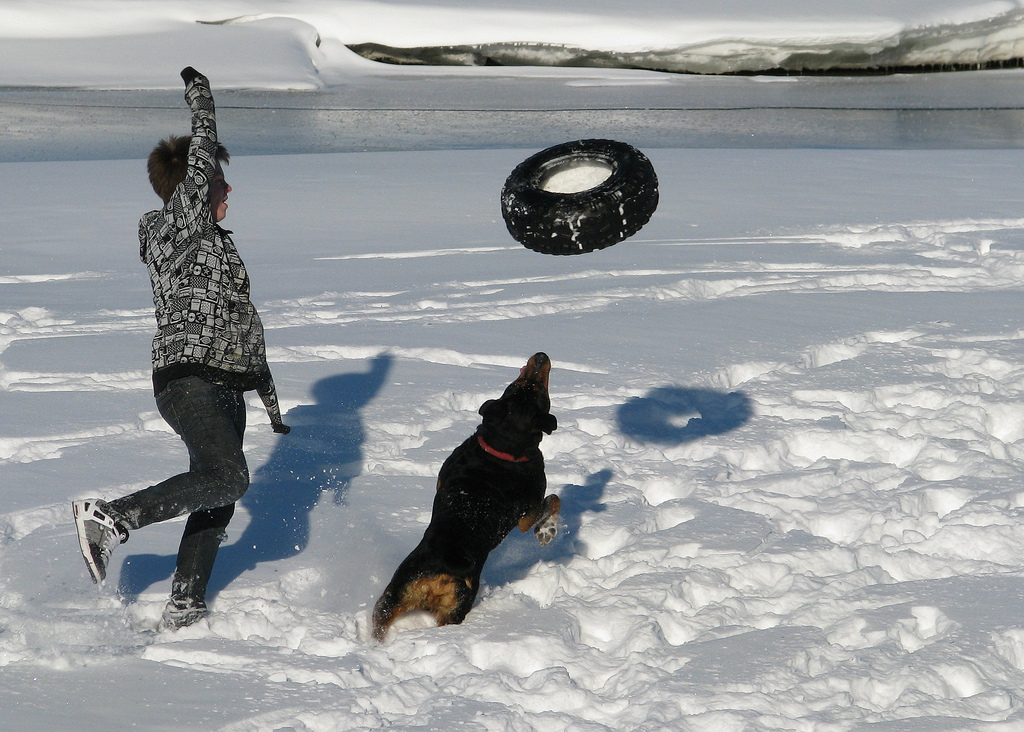
distract the dog if possible

Distracting the dog is also a good bet – throw something away from you that the dog might consider a toy, or even just pretend to pick up and throw something. That way you’re taking the attention away from yourself. If you do get bitten, immediately rinse the bite area with cold water and wrap bandages around the open wound to stop the bleeding. Then see a doctor, even if you don’t think you need to; stray dogs can be rabid, and you may need shots.

2. Jellyfish

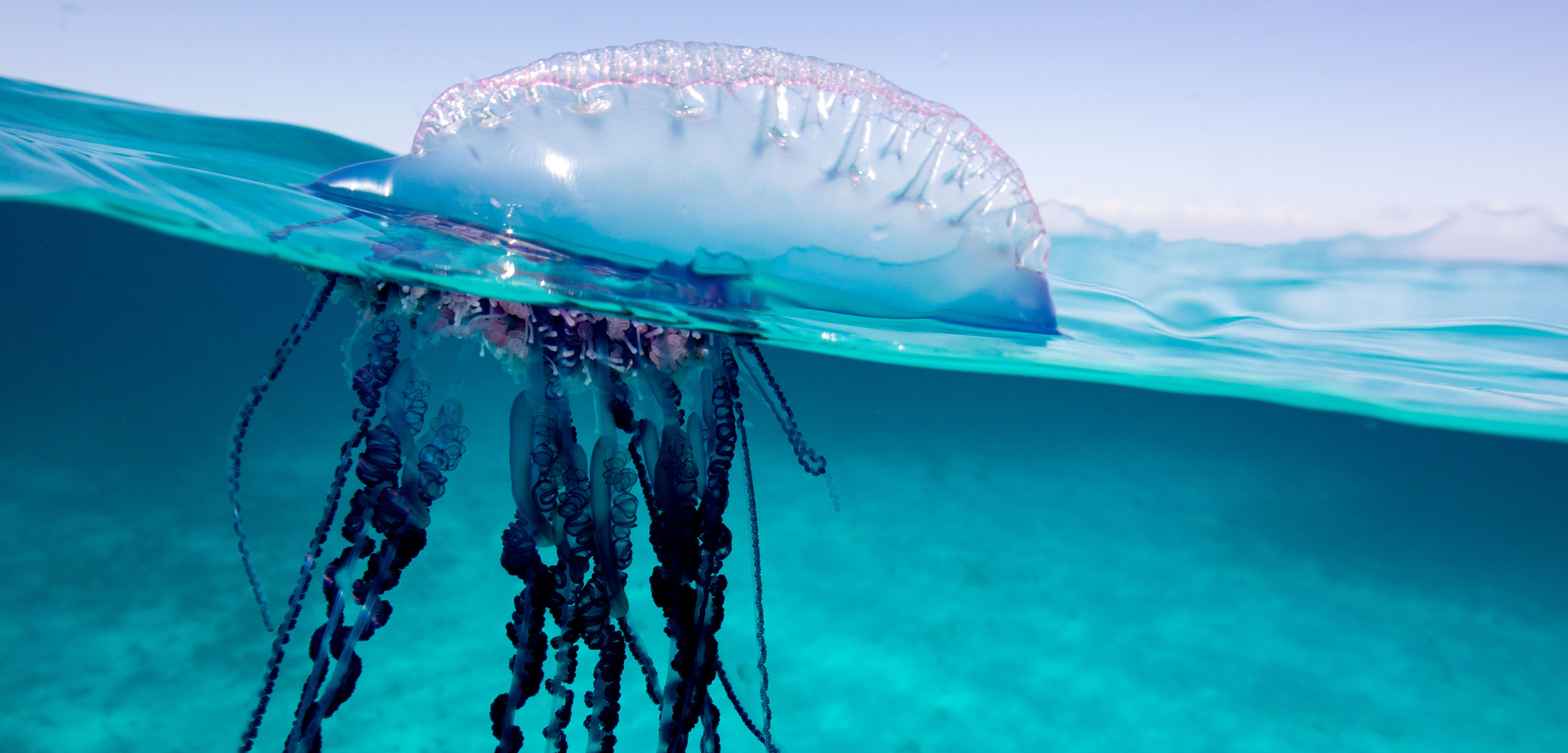
be on the lookout for these nasty guys

If you’re stung by a jellyfish, you’re due for a long period of discomfort. While there’s little way to prevent being stung (other than not venturing into the ocean), it’s a good idea to talk to lifeguards on duty before venturing in the water. They should be able to tell you how frequent jellyfish attacks have been lately. If you are stung, there’s an urban legend claiming that urinating on a burn will lessen the pain. This is not true.

If the water is clear, you've nothing to fear

Rather, salt water is actually the best thing for it. In all likelihood, you’re pretty close to salt water already! Avoid applying fresh water to the burn area, however, as it will actually make the situation worse. Lastly, you need a way to remove the jellyfish parts from your wound. Tweezers are best, but if you don’t have them, opt for a stick or even a seashell.

3. Snakes

Why'd it have to be snakes?

Snakes may be the most dangerous animal on this list since they’re found all around the world and are very easily camouflaged. They are responsible for more than 100,000 deaths a year, but it’s largely because people don’t know how to act around them. The good news is that most snakes are not poisonous and 80% of bite incidents with snakes occur as a result of foolishly trying to catch them. Please don’t be that guy.

can you see the snake?

Stomping your feet will help as the vibrations in the ground will confuse the snake, while slowly stepping away from it. If you’ve been bitten, definitely don’t try to suck the poison out of the wound like they do in the movies; if you’re not a professional, you’ll likely end up ingesting the poison yourself. Instead, immediately call in an emergency. They’ll tell you to wash the bite with running water. Do so and if you know how to apply a tourniquet, do so and by the time you have it on, the ambulance will hopefully already be there.

4. Bees

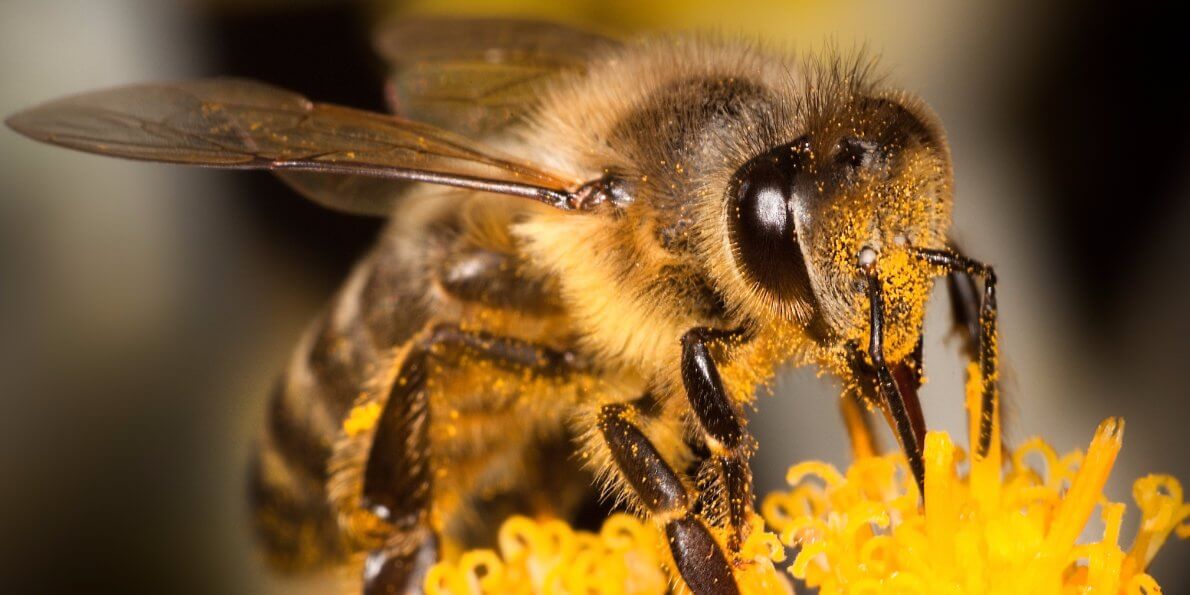
bees are endangered

Bees are dangerous because they can build a hive without you even knowing they did so. Most common in the spring and summer, keep your eye on wood crevices, low-hanging trees, old buildings, or abandoned cars as they are often good nesting grounds for these insects.

keep far away from bee hives

If you do find yourself near a bunch of bees DO NOT ATTACK THEM. Not only will it make them angry, but honeybees are in serious jeopardy of becoming extinct. Rather just run away from them, shake any baggy clothing to make sure they haven’t gotten trapped inside. Bees are also attracted to black, so try and wear white clothing if you’re going on walks through the meadows in spring or summer. And stay off that island from “The Wicker Man.”

5. Bears

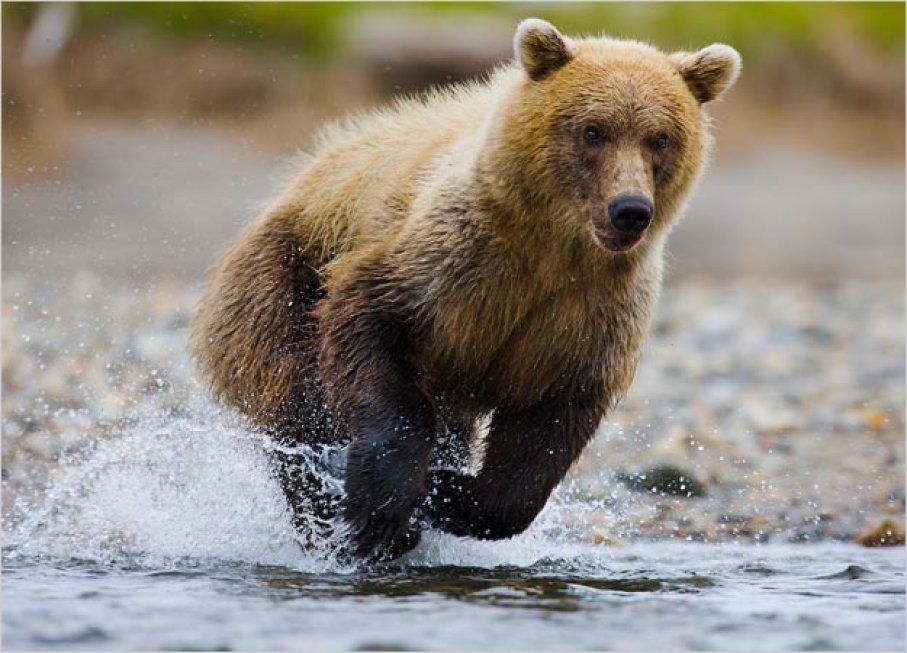
play dead when attacked by a bear

Bear attacks are rare, but if you’re extremely unlucky they may still happen in some wooded areas. If you do encounter a bear, reading body language is vital to your survival. Do not try to run. First of all, you won’t be able to outrun it (bears can run up to 30 miles per hour), and second of all, it will only make you look like prey, similar to with the shark or lion.

If you can't outrun the bear, outrun your friend

It may be counter-intuitive, but your best bet is actually to play dead. Fall to the ground and curl into a ball, using your hands to cover your neck. The bear might try and play with your body for a little – it’ll be scary, but just let it. As long as it thinks you’re dead it won’t do any further harm.

6. Sharks

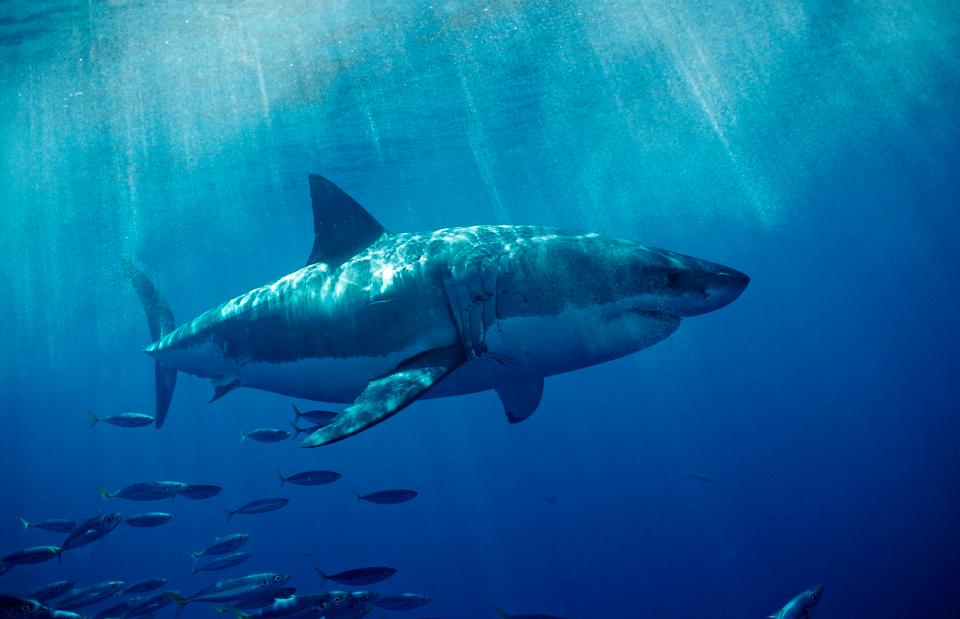
most sharks will not attack

If you watch Shark Week you might already know that out of 150 species of shark only 20 will actually attack humans. The odds are in your favor, as of all the animals on this list, it’s actually least likely that you’ll encounter a shark. If you do and if it’s one of the 20 species that attacks humans, even then they won’t acknowledge you unless they perceive you to be food.

Don't bleed, don't urinate

To avoid seeming like food, do not bleed or urinate in the ocean, and you should remain out of their range of interest. Should you meet a shark face to face, don’t turn and swim away; you’ll just look like prey. Rather stay as motionless as you can, and if you are attacked aim for the shark’s eyes and gills, as they are the most sensitive areas.

7. Crocodiles (or alligators)

Crocodile or alligator?

Alligators boast the strongest jaws of any animal on the planet. As the Crocodile Hunter exploited time and time again, however, that only accounts for when they’re biting down. If you can manage to keep their mouth closed, they won’t be able to get it open in the first place. Obviously, though, we hope it doesn’t come to you wrestling down an alligator!

Crocodiles (and lizards in general) are capable of extremely fast movement over very short distances, but they won’t be able to outrun you at length. They’re also not unable to consistently make sharp turns while pursuing, so running in a zigzag is a good way to keep them far away. If you’re swimming when you notice the crocodile, keep down the noise and movement as much as you can; splashing or shouting will just draw their attention.

8. Elephants

that's a perilous pachyderm!

Elephants are generally friendly, but if a female elephant thinks you’re a danger to her young she can mess you up pretty bad. As with any animal on this list, reading body language is important – if the elephant has her ears pulled back and her trunk curled, she may try to trample you.

put something between you and the elephant

Running from an elephant is difficult given their massive size, so if it comes to it you’ll need to find something to put between the two of you, like a rock, log, or fence. Try and keep it between you and the angry elephant until she loses interest, grows tired, or help arrives.

9. Lions

lions are basically big cats

As with sharks, maintaining eye contact is equally important when dealing with lions. Never turn your back on them. Remember that lions are essentially big cats, so if they perceive that they could get a sneak attack on you they’ll be enticed to try and do it. Like cats, lions also have a heightened fight or flight mechanism.

lionesses are even more dangerous than the males

If you make yourself look big and loud, they’ll be confused and will generally want to avoid dealing with you. Lions (being cats) are also easily frightened by dogs. If you have a more vocal, protective dog with you, the lions won’t come close.

10. Gorillas

gorillas are prideful

While it’s unlikely that you’ll encounter a gorilla, accidents at the zoo could potentially happen. Gorillas are prideful creatures who are highly protective of their territory and their families. The best way to avoid confrontation with a gorilla is to play the obedient passive: Sit down to make yourself seem less large, and avoid eye contact and speak in a whisper to seem less of a challenge.

Play passive with gorillas

If the gorilla is provoked to hostility, however, do the same approach you did for the bear – drop, curl into a ball, and do not fight. Remember that gorillas are prideful and won’t attack someone who’s defenseless and weak.

Hopefully, this list will help you prepare should you find yourself in any of these scenarios. Be careful out there, and if there’s a chance you’ll run into a particular animal we covered, plan accordingly!

Ex-Google CEO predicts the internet will split in two by 2028

Will the internet break apart because of Chinese control?

This month, we received a grave prophecy from Ex-Google CEO Eric Schmidt. Talk of an international internet fragmentation has been whispered and rumored for years, but Schmidt recently came out and said the words we were afraid to hear: “I think the most likely scenario now is not a splintering, but rather a bifurcation into a Chinese-led internet and a non-Chinese internet led by America.”

China might have their own internet soon

If proven correct, this hypothesis would leave a profoundly depressing aftertaste on what is arguably the greatest triumph of the past couple of decades. The internet has been able to accomplish what so much foreign policy and international mediation could not – one big community of shared information, a dialogue between countries that runs not just alongside political machinations, but that resonates equally powerfully between common folk, no matter what country they may live in. To witness a schism that breaks that net into two or more separate entities would be heartbreaking.

What supporting evidence is there?

Schmidt went on to explain that “Chinese Internet is a greater percentage of the GDP of China” than the U.S. internet is to ours. “The scale of the companies that are being built, the services being built, the wealth that is being created is phenomenal.”

According to the IMF number crunch, while Hong Kong’s growth rate did lose some traction in 2016, China remains one of the richest countries in the world. Transsion, for example, is a Chinese smartphone manufacturer that has seized the entire African continent, leaving its American counterparts in the dust. With over 7 million people and money to spend, the competition is real, and the threat of a splintered internet starts to become more believable.

Transsion phone success

“Globalization means that they get to play, too,” Schmidt continued. “I think you’re going to see fantastic leadership in products and services from China. There’s a real danger that along with those products and services comes a different leadership regime from government, with censorship, controls, etc.”

That different leadership plays a bigger role than you might think. As early as 2015, Techcrunch writer Danny Chrichton hinted that “across the world it is becoming abundantly clear that the internet is no longer the independent and self-reliant sphere it once was, immune to the peculiarities of individual countries and their laws.”

Other governments are sinking their hooks into the internet, and it’s no surprise that the result is everyone trying to pull off a piece themselves. Shared control will obviously not work as long as countries around the world continue to uphold vastly different ideologies, cultures, and divergent economies.

Chinese Google

Is there any good news?

A little. So far, the Trump administration’s strategy regarding China has been repeated rounds of tariffs and trade barriers in an attempt to encourage Americans to buy inward and stop investing money in Chinese products. The issue is that the administration has not put nearly enough focus on ensuring that American values around the internet are exported to continents across the globe. Even if Americans stop buying Chinese products, other countries will continue to as long as they are comparable, affordable and easily accessible. All we’re doing is closing our own door.

Trump tariff war on China

So where is this good news? The good news is that the Trump administration is finally preparing to give more attention to the Overseas Private Investment Corporation. That means more commercial lending facilities will be accessible to developing countries. “Maybe that measure will be successful in closing the strategic distance between the two countries,” writes Chrichton. “It would be merged into another agency and given a much more rich budget (as high as $60 billion) to go and compete with Chinese financing around the world.”

Maybe. It would be a start, but whether it will be enough to save a diverging internet is hard to say.

The best burger recipe in the world

Are you ready for the world’s greatest burger recipe? It’s just one mouth-watering click away.

Burgers are the ultimate crowd-pleasing cookout food. Equal parts standard barbecue fare and specialty dish, it’s pretty easy to make a basic hamburger and it’s pretty tough to make one that’s perfect. A big factor we considered in when crafting ours was considering that everyone wants different layers and toppings on theirs – cheese, no cheese, onions, no onions, tomatoes, etc. Everyone’s got an opinion.

Toppings can totally change the flavor, texture, and presentation of a hamburger, and they’re completely subjective. The best way to handle any added accouterments is to just lay out a platter so people can pick and choose exactly what they want to add. Because of this, our article will not be focused on toppings, and will instead be addressing the star of the show: The patty itself. We’ve assembled what we think is the best burger you can ask for in terms of flavor, durability, size, versatility, and juiciness. Trust us, you won’t go back.

The best burgers you’ll ever make

Ingredients

1. 1 pound of 85% lean ground chuck
2. 1 pound of bison meat
3. 2 eggs
4. 1 1/2 cups sharp cheddar cheese
5. 3/4 of a yellow onion
6. 10 strips of bacon
7. 3 tablespoons yellow mustard
8. 1 1/2 tablespoon Worcestershire sauce
9. 1 1/2 teaspoon cracked black pepper
10. Montreal steak seasoning

Obviously, this is not a vegan recipe, nor is it dairy-free. If you’re looking for other options, you can try and recreate these burgers with turkey, and don’t add any cheese or bacon. For vegan-specific burgers, you might just want to look elsewhere!

Mix the meat

chuck is a great start

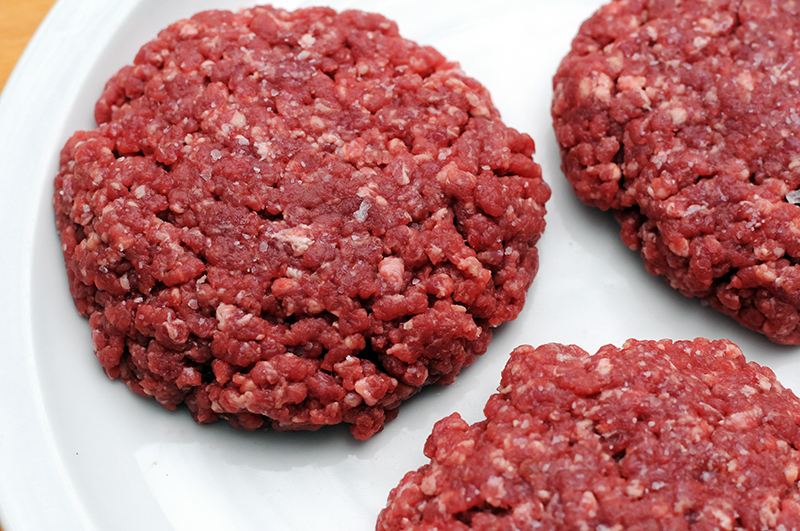
Once you’ve gotten your ingredients out the first thing you’ll want to do is put your meats together: Put both the chuck and the bison meat into the same bowl and immediately start kneading and combining them together with either your hands or (if you’re squeamish) a couple of big forks. The reason we use two kinds of meat is because each brings something different to the burger. Chuck is pretty run-of-the-mill and should generally by your default hamburger meat. It’s inexpensive and serves to add some fullness to our burgers.

If you haven't tried it, you don't know

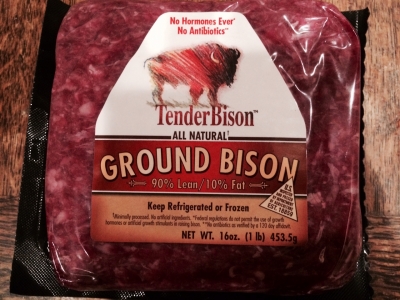
Bison, on the other hand, is more pricey and generally a mightier meat. It’s got a slightly sweeter taste – which will counter some of the aggressive salty-smokiness that we’ll be adding with other ingredients – and has higher levels of vitamins and minerals than chuck as well as double the beta-carotene of other red meats. What’s important for us, however, is that buffalo meat has more strength, substance, and overall grit to it. By cutting our chuck with buffalo meat we’re going to make our patties stronger, juicier, and overall tastier.

For a more in-depth walkthrough of different cuts of burger meat and where each reigns supreme, check out Alton Brown’s walkthrough:

Add the flavor

After your meat is added, start frying up your bacon. For both the bacon and (later on) the burgers we recommend using a cast-iron skillet. It will heat faster which means your meat will cook faster, and it also colors the meat a darker charbroiled color and cooks them through more thoroughly. If you don’t have anything cast-iron, though, don’t worry; a regular cooking pan will do the job just fine.

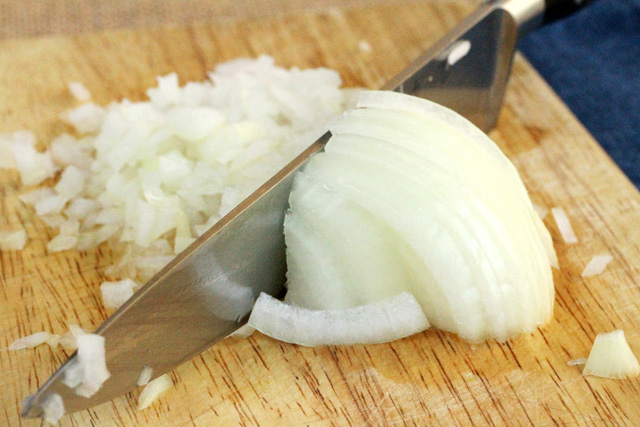
While your bacon is frying, add the cheese to the meat and chop your onion. We chose sharp cheddar for its bite and its tang, but you could use pepper jack for spicy or a Mexican blend if you’re trying to mix things up. You could even use mozzarella or Swiss if you’ve got mushrooms to add, but we digress.

Try not to cry.

If you’re dubious about adding onions, trust us. Besides adding a little contrast and bite to our rich meats, the inherent sweetness of a yellow onion will draw out that sweetness from the buffalo meat. Onions are a great addition, even if they’re not easy on the eyes when cutting!

TIP: When you’re cutting your onions, chewing strong mint or cinnamon gum will reduce tears. Or you could try chopping under a towel or wear goggles if you don’t mind looking like a nerd. Or just spend $20 and get yourself a mandoline. It will help you slice and chop onions in a flash – no tears necessary.

Bacon boost

bacon strips bacon strips bacon strips

Once your bacon is finished (it doesn’t need to be overly crispy; we’re adding it directly into the burger meat!) grab a few pieces after they’ve cooled off a little and start tearing and crumbling it right over the bowl where the meats, cheese, and onions are. If you want the flavor to really permeate, crumble the bacon as finely as you can. Our preference is actually to tear more than crumble, as that gets bigger bits of bacon per burger bite (how’s that for alliteration?) Next up is our seasonings!

Seasonings greetingsMustard adds a lot to the flavor

Mustard is king here since it’s got a little kick to it. Even if you’re not a fan of mustard in general, we definitely think it’s important to add regardless. It’s got some spiciness to it, sure, but it’s not as abrasive as, say, hot sauce or a ton of red pepper flakes. It’s got just enough spice to accentuate the meaty saltiness that you’re looking for in a burger. Still, if you’re hesitant try putting in two tablespoons instead of three.

Next up is Worcestershire sauce, and what more can we say about this? It’s rich, smooth, smokey, and sweet. A dollop of it will really bring out some of the matching sweetness we’ve already got going on.

Worcestershire is key

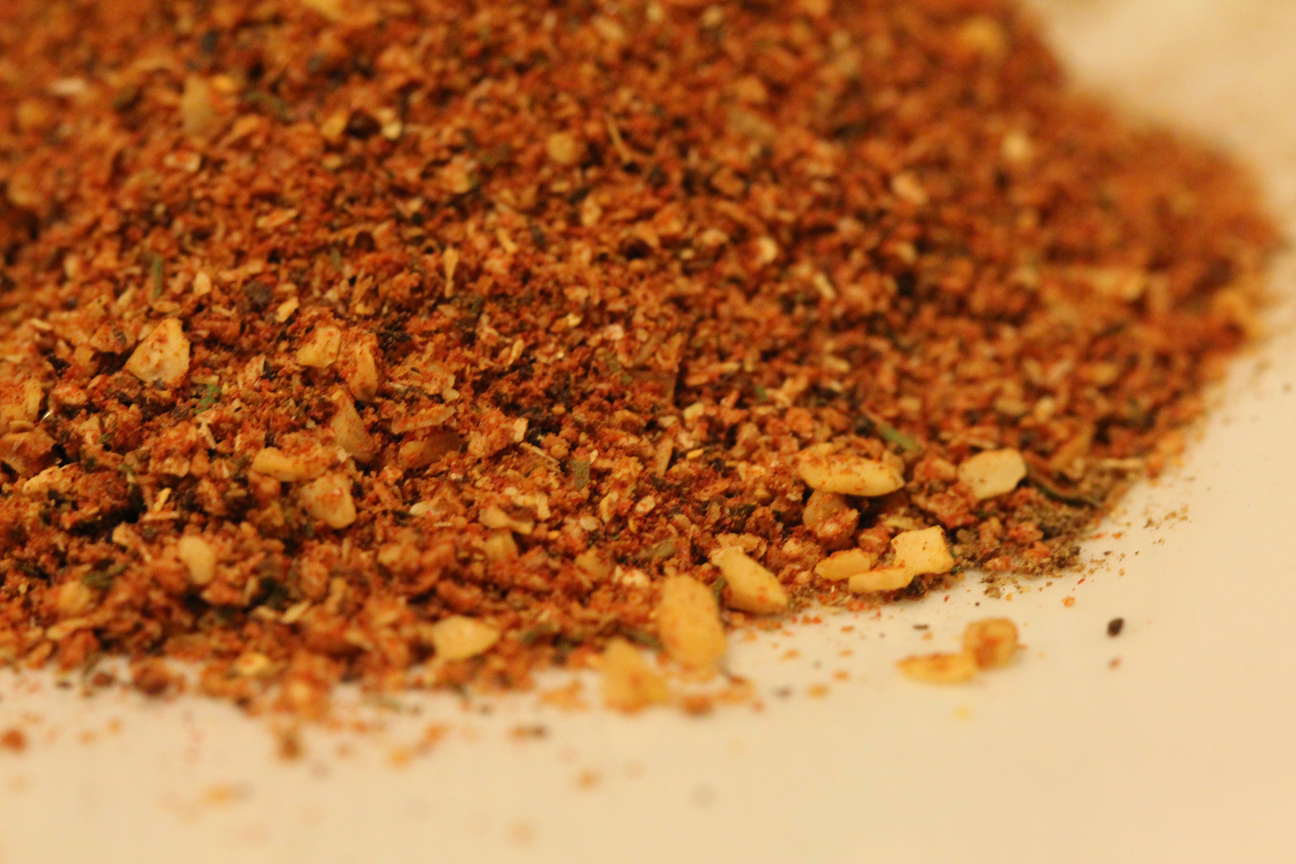
Add black pepper for more smokey spice and be a little more generous with the Montreal steak seasoning. If you’re unfamiliar with this stuff, it’s a combination of pepper, paprika, salt, garlic, onion powder, cayenne, coraiander, and dill seeds.

It’s a powerhouse.

We also found that it’s generally better to avoid adding straight-up salt to this burger since it’s already going to have plenty of that. We like Montreal seasoning because it goes great on grilled meats and includes salt without overdoing it.

Montreal steak seasoning is the secret

The incredible, edible egg

Lastly, crack a couple of eggs in a bowl and add them to the mix. We recommend the separate bowl for the eggs because we’re paranoid about getting shell in there. If you mess up and get shell in the separate bowl, it’s way easier to get it out than fishing it out of your giant bowl of burger ingredients …

But why add eggs in the first place? Eggs are the glue of cooking, and they’re going to help make these patties less crumbly. Don’t add them and your meat will come off the skillet looking more like Sloppy Joe filling. After the eggs are added, blend everything together until it’s one homogenous mixture. The goal is to have every flavor in every bite.

Just add fireCooking outdoors reigns supreme

Grilling is always better done on, you know, a grill, but if weather isn’t permitting, you can grill these just as easily over a stove-top. For outdoors we found it was best to use apple wood chips, and indoors we liked using peanut oil, butter, and sprinkling of rosemary over your cast-iron skillet. Crank on some music and get grillin’!

A better bun

One key factor to take into consideration at this point is what kind of buns you’ve got for these bad boys. If you want a larger burger (our favorite) we’d suggest you use kaiser buns. Shape your patties about the size of your fist, and throw them on the heat to sizzle. If you want smaller, slider-type burgers, roll them into balls about half that size. We’ve had them both ways, and both are great.

Recipe makes great sliders

When you take the burgers off the heat, you’ll likely want to put them on wax paper in order to let the grease drain off before serving. Normally we’d prefer good old paper towels, but since there’s cheese already in the burgers, they’ll wind up sticking to that. Put them on wax paper and you shouldn’t have that problem.

And that’s about it! Serve them and add any toppings you like! Anything goes, but our preference is on a toasted kaiser bun with mayo, ketchup, and a slice of tomato or pickle to cut the rich meatiness. Enjoy your BBQ!

How to make sure your cat uses the litter box

Frustrated with a kitty who won’t use her litter box? Here’s how to fix that.

According to this 2018 survey, cats have risen up in the ranks as the second-most popular pet in the United States (number one being the freshwater fish). High among the list of reasons to own a cat is how easy it is to take care of one. We love dogs to pieces for a ton of reasons, and the reasons are vastly different from why we love cats: They’re known for their low maintenance and proud independence.

Gambit is a happy cat.

While it’s true there aren’t too many issues to worry about once a cat is settled into a new home, litter training is a pretty big one. Most of the time, a kitten will learn to use the litter box from her mother, but there are instances where this either is not the case, or where certain living conditions or habits change that might result in your cat no longer using their box.

Cats communicate with humans whether we can understand them or not, be it a head bump, a blink of the eyes, a swish of the tail, or a long stare. Refusing to use the litter box is the same thing, it’s just especially unpleasant. When a cat does this, the first thing to remember is that it is not malicious – it was not done to anger you or to “get revenge” from something you did.

We think that way. Cats don’t.

When a cat doesn’t use the litter box it’s almost certainly because they are trying to tell you something. Keep that in mind as we rattle off our five solutions (in no particular order).

How to make sure your cat uses the litter box

1. Try a different litter brand

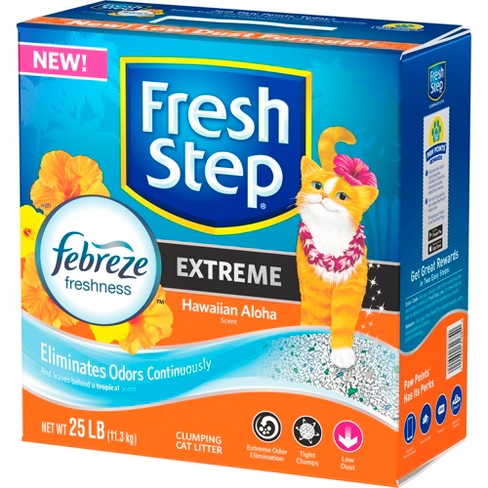
FreshStepIsOneBrand

This step should be your immediate go-to if you have a new kitten, or if you’ve purchased and are using a litter with which your cat is unfamiliar. There’s a reason there are so many brands of litter: you’re not just looking for one that suits you, but one that suits your cat. There are some cats who won’t care about the difference should you switch brands, but there are some who will. It’s a matter of texture, scent, and mostly familiarity. If it doesn’t smell or feel right, they may not use it.

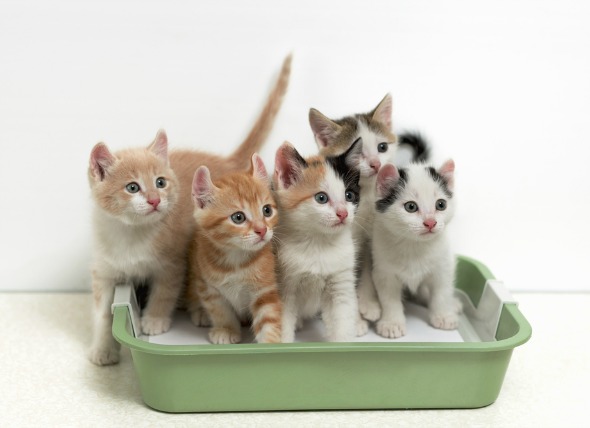
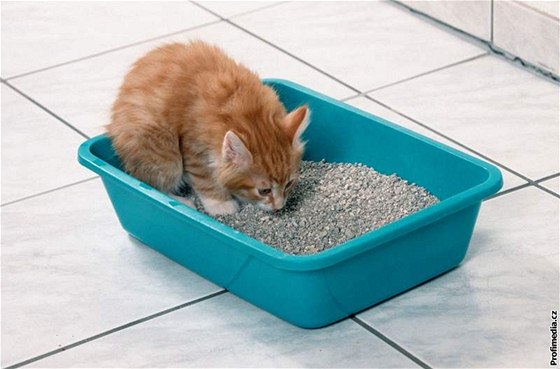
CatLitterBox

Odds are, if you’ve been using the same litter since you first got the cat, this doesn’t need to change. While cats are often fascinated by new objects and places (unless they’re too scary!), with rudimentary facets of their lives like food, sleep, or people, a cat prefers consistency and repetition. Bottom line: if you change litter brands and your cat stops using her litter box, it’s likely because she doesn’t like the new litter.

2. Make sure she knows this is HER litter box

MoreThanOneBoxPerCat

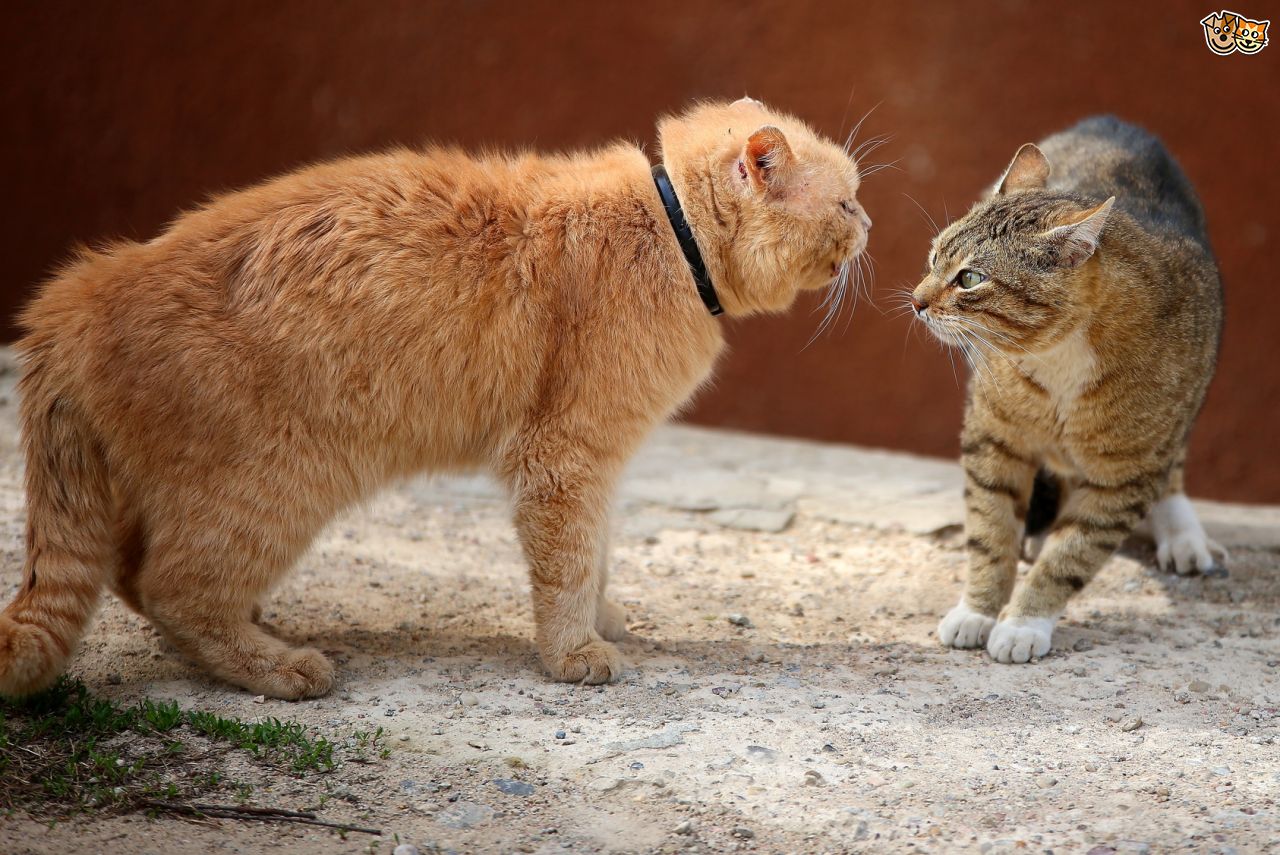
This is probably the most important point on our list. Just like you need to keep your litter brand and box recognizable, your cat needs to feel a sense of familiarity and ownership in a variety of ways. If you have more than one cat living under one roof, this becomes even more crucial. Laws of the jungle dictate there has to be an alpha in the pack, a Top Cat of the bunch. If you observe your cats regularly it should be pretty apparent who that cat is (hint: It’s probably the one that’s bigger or older).

TheresAlwaysATopCat

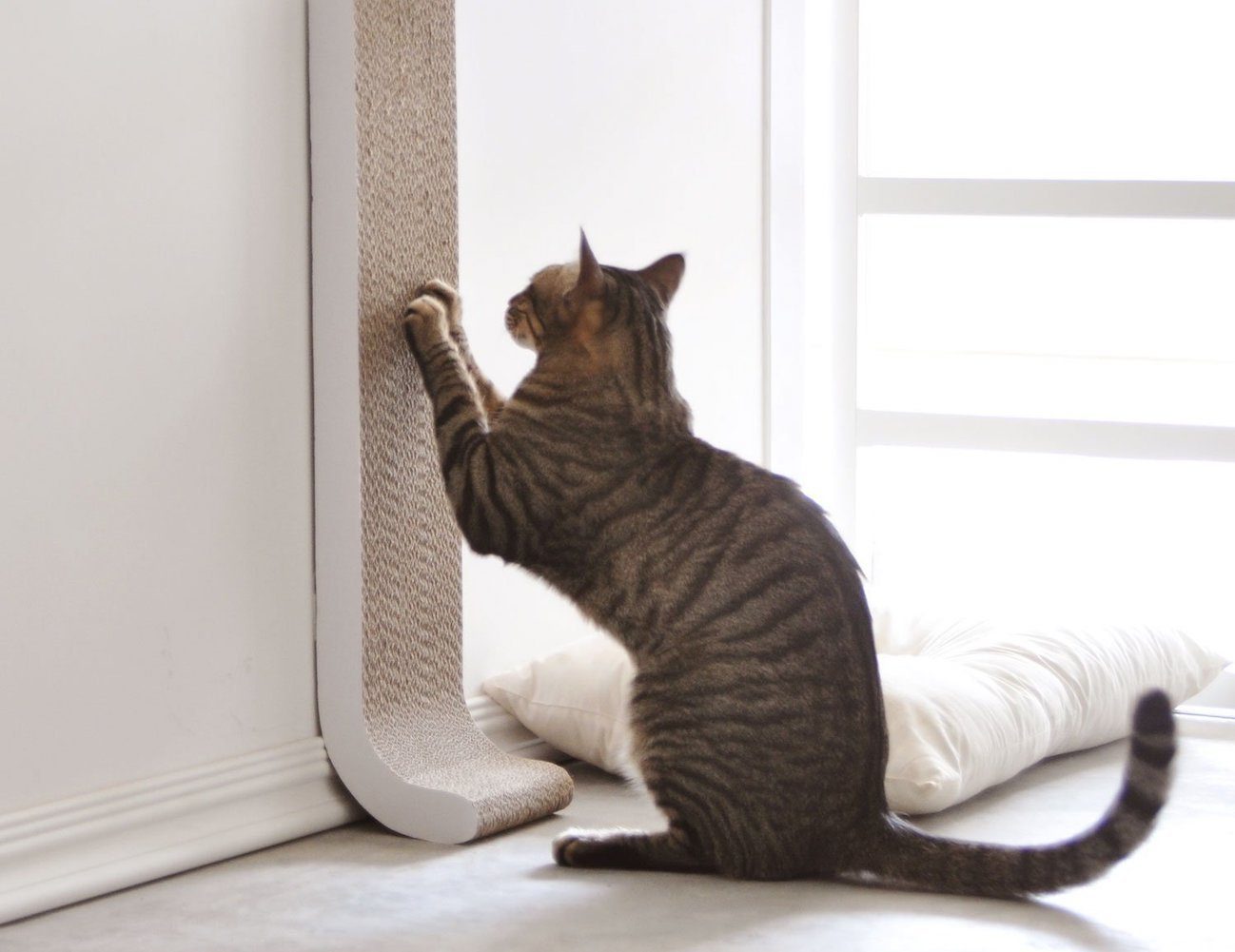
When cats rub against objects or people it’s to mark territory. Every cat should own at least one scratching post for this exact reason. If you’ve ever wondered why your cat insists on tearing up your couch, for example, it’s because it likely carries foreign scents from outdoors, other guests, shoes, or bags. By scratching it, your cat is replacing the foreign scent with one that she’s familiar with.

MarkingTerritoryByScratching

You may not witness it firsthand, but if your dominant cat has claimed all the litter boxes (by urinating or spraying), your other cat won’t feel she has any other place to go! Clean both your litter boxes and keep them (and maybe even your cats) separated until each cat has used a different box.

3. Use the cat’s own scent

One of the best ways to encourage your cat to use the litter box is to make sure it smells specifically like her. The next time your cat urinates where she’s not supposed to, clean it up and deposit the soiled paper in her litter box. This way, you’re showing her that “this is where that belongs” and are more importantly making the box smell like her. Ideally, next time she has to urinate she’ll walk past the box, recognize her scent, and “re-use” it.

TwoCatsCanBeFriends

This method is especially likely to make a difference if, again, you have more than one cat. While it encourages your cat to use the box since it smells like her, it’s also deterring your Top Cat from claiming it; it’s already been claimed by someone else. In essence, you’re using the cats’ own scents to segregate who uses which box. It’ll make for a far less stressful environment for each of them.

4. Put the box where accidents happen

If your cat stops using the litter box in favor of another spot, odds are they will continue to use that same spot whenever they refuse to use the litter box. Logic took them their once; it’ll take them there again. Besides, like our last point explained, if a place smells like them, they’ll be more prone to re-use it. Your cat is telling you that “this is the place where I’m gonna go.”

DontBeShyAboutMovingBoxes

If that’s the place she chooses to pee, then that’s where the box needs to move! Clean the box, make sure it smells like her, then move it to where she had her last accident. The triple-whammy should be enough to send the message: You’re putting the box “where she asked.” If you really don’t want the litter box to be in the spot she chose, then try slowly inching it back to where it was originally. If it’s done steadily enough, she should be okay with it.

5. Deter accident-prone areas.

Never try to punish a cat. It won’t work and it’s just mean. Furthermore, a cat won’t learn in the same way that a dog or a child might. Squirt a cat for misbehaving and she’ll just think you’re being awful for no reason. Instead, she’ll need to be taught in a different way:

If your cat frequents places she shouldn’t – maybe not even to pee – the best way to prevent them from doing so is to make the area undesirable to them, and not conducive to exploring. Try lining your countertops or “accident areas” with sticky double-sided tape, noisy aluminum foil, or even by spraying it with strong citrus scents like Lysol. Instead of thinking “this human sucks for squirting me with water,” your cat will think “this counter sucks because it’s sticky, noisy, and smells bad.”

LoveYourCat

Lastly, reward your cat when she behaves well. That doesn’t just mean slipping her a treat – even just positive reinforcement like petting, brushing, or praising her. It will go further than you think, and will help to solidify the positive relationship you have with your fuzzy friend. More gets conveyed than you might think, as cats are experts at reading body language and tone of voice. If you come across as angry and short-tempered, that’s how she’s going to see you. If you come across as assuaging and nurturing, then she’ll be less stressed which means fewer accidents and a happier home.