
Mobile World Congress 2015 Day 3: Firefox OS and AVG Zen

Default player


brightcove.createExperiences();

For our third and final day at Mobile World Congress 2015 in Barcelona, we took a look at Firefox OS running on a high-end device, then sat down with Tony Anscombe from AVG to see the next evolution of AVG Zen, the family security management app.

We also took a look at some of the hardware and wearables being shown on the floor, like the luxury Huawei Watch which will compete with LG’s Watch Urbane and the upcoming Apple Watch. We also had a go with Nokia’s prototype virtual reality glasses that used its HERE maps data to show us around Chicago.

The internet of things has been impossible to avoid at MWC15, so you can expect more and more household objects to be connected to other devices and the internet.

Check back soon for extended interviews with AVG and a longer look at Firefox OS.

Related Stories

Mobile World Congress 2015: Day Two

Oovoo and Flinch are bringing emotions to messaging

Our first day at Mobile World Congress 2015

Follow Jonathan on Twitter: @jonathanriggall

Oovoo and Flinch are bringing emotions to messaging

At Mobile World Congress 2015 in Barcelona, we have seen messaging company Oovoo showcasing a particularly cool pixelated wall with face tracking software. As well as being a neat gimmick, this technology is being worked into Oovoo’s apps.

Face tracking pug

The face tracking technology is made to recognize your expressions. A proof of concept display mapped my expressions onto a virtual character – in my case a pug – which mimicked me. Oovoo’s Chris Wire explained that this technology is not being rolled into the Oovoo app yet, but is already a big part of a social app released at the end of last year: Flinch.

Flinch is a free game that you play against strangers or friends and the idea is simple: don’t smile! Once connected to another player, you will see them through their device camera, and whoever smiles first loses. According to Oovoo, despite it’s quiet launch, Flinch has started to become popular in the all important 13-20 age group. The app is totally free, and you can get playing right away.

This emotional face tracking, says Oovoo, could help with predictive text – or even responses. The app could read your face as happy or sad as you write, and add the appropriate smiley, for example. There is plenty of scope for mistakes with this kind of thing, but it’s undeniably funny.

What Oovoo have shown is that WhatsApp is very much behind in terms of bringing fun new communication features to its users, although this has yet to harm its huge user base.

Flinch is currently iOS only, but an Android app may be released in the future.

Download Oovoo for iOS and Android.

Related Stories

6 must have apps for Mobile World Congress 2015

What to expect at Mobile World Congress 2015

The best travel and transport apps of 2014

Follow Jonathan on Twitter: @jonathanriggall

App of the Week: Dubsmash

This week’s App of the Week is a messaging app with a twist. Dubsmash has one idea – send your friends videos of you lip-syncing to well known and funny quotes and soundbites. It’s available for iOS and Android.

We found it to be a bit buggy, but the results can be amusing anyway. It works by giving you a huge library of categories to browse, so you can find a clip that suits your mood. Then you video yourself lip synching over the clip, and send it to your friends. It might be a novelty messaging app, but it could be fun while it lasts. Check out more in our video below.

Default player


brightcove.createExperiences();

Download Dubsmash for iOS or Android

Twitter adds new video and group chat features

Last year Twitter announced that new features would be coming to the service, and it made good on that promise today, bringing new group chat and video functions to its service.

The new video feature means you can capture and edit, and share video from within the app. Twitter videos are non-looping, unlike six second Vines, and can last up to 30 seconds. Twitter owns Vine, but claims the new video feature is designed to sit alongside that app, not replace it. This feature is rolling out today, according to Twitter, and you should be able to use it soon. iOS users will be able to add video from their camera roll right away, whereas Android users will have to wait for a further update to do the same.

Group Chats are also coming to Direct Messages (DMs). Twitter’s direct message feature has felt underused for a long time, but the company finally looks to be making it more like a competitor to traditional messaging apps like WhatsApp or Facebook Messenger. Now you can create group chats within DMs, so you can have private conversations within Twitter. Group members do not have to follow each other, and you receive a notification if you are added to a group.

These new features come hot on the heels of ‘While you were away‘, which was added to give users highlights of what had happened on Twitter since the last time they checked.

Like most online services, new features and changes often provoke a lot of complaints. ‘While you were away’ was criticized for getting in the way of people’s normal feeds. Twitter would obviously like people to discuss tweets and topics within its service, as much as possible, but group chats could make it feel cluttered, as anyone who has been in a few WhatsApp groups will testify.

Source: Twitter

Related Stories

Twitter’s app graph checks what you have installed on your device

Facebook at Work: should the social network quit while it’s ahead?

Regin – the software that’s been spying on users since 2008

Follow Jonathan on Twitter: @jonathanriggall
App of the Week: Crossy Road

Softonic’s App of the Week highlights some of the coolest, most unique, and biggest app releases for Android, iOS, Windows, and Mac. This week, we’ve got a fun and addictive game for iOs and Android, Crossy Road.

Remember Frogger? Crossy Road takes that simple road-crossing formula, swaps out the frog for a chicken, and makes the whole thing into an ‘endless runner’ type game. This means you’re guiding a chicken across endless roads, rivers, and railway tracks. But these are full of things that will send your chicken on a journey to meet its maker, so you’ll need quick reflexes.

Crossy Road has a great 8-bit isometric style, tight controls and, while it’s difficult, when you die it never feels unfair. Find out more in our video below.

Default player


brightcove.createExperiences();

Download Crossy Road for iOS and Android.

Check out some of our past App of the Week features:

App of the Week: Modern Combat 5

App of the Week: NBA 2K15

App of the Week: FIFA 15 Ultimate Team

Rumor: WhatsApp to launch web version

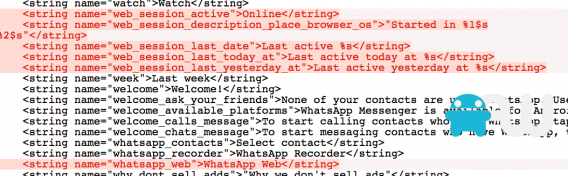
One of the most requested apps we know of is “WhatsApp for desktop“. But the app, which is tied to your phone number, has only been available for mobile devices so far. Now, references to a WhatsApp Web have been discovered in an Android version of the app.

Dutch website AndroidWorld looked at the code of the current Android beta APK in search of evidence of a web version of WhatsApp, after Telegram founder Pavel Durov claimed that WhatsApp tried to poach his web developer.

From what we can see, it looks likely that WhatsApp is developing a web app so that you can access the service through your browser. This would also mean that you could finally use WhatsApp from your tablet, as well as your desktop computer. Telegram has a web app, which you can use by signing in with your phone number, and then a special code sent to your device. It would seem likely that a WhatsApp web app would work in the same way.

As well as this rumored web app, Facebook-owned WhatsApp is supposed to be getting video calls sometime in early 2015. The hugely popular app has fallen behind its competition recently in terms of features, with Telegram, LINE and Viber notably offering users more features without the yearly subscription charge.

Source: AndroidWorld, Cult of Android

Related Stories

Twitter’s app graph checks what you have installed on your device

Facebook at Work: should the social network quit while it’s ahead?

Regin – the software that’s been spying on users since 2008

Follow Jonathan on Twitter: @jonathanriggall

New ‘Just Cause 3’ screenshots

Avalanche Studios has released three new screenshots of next year’s Just Cause 3. The game is the next in the series of much loved, chaotic, sandbox action games.

Scheduled for a May 2015 release, Just Cause 3 will be set on a Mediterranean island, and of course, features the game’s signature parachute and grapple hook. These are used to speed up travel – you shoot the grapple hook and let it propel you into the air, then use the parachute to glide through the air – while the hook also doubles as a very creative weapon. Avalanche say, unsurprisingly, that Just Cause 3 has ‘vastly improved parachute and grapple mechanics.’

Game Informer has an exclusive on the game, and fans will be delighted to hear that early rumors that Just Cause 3 would be free-to-play are unfounded. JC 3 will likely get some expansion DLC (downloadable content), but will not feature micro-transactions.

Just Cause 3 will be available on PC, Xbox One and PlayStation 4.

Source: IGN

Related Stories

Best free Android games

App of the Week: Call of Duty Advanced Warfare

Google’s most popular apps and games of 2014

Follow Jonathan on Twitter: @jonathanriggall

1997’s Tomb Raider II out now on iOS

Square Enix has just released Tomb Raider II for iOS, meaning you can now play Lara Croft’s second adventure on your iPhone, iPad or iPod Touch, as long as you have iOS 7.0 or above.

Originally released in 1997, Tomb Raider II didn’t change much from the original adventure puzzle game, giving players improved graphics and bigger levels to explore. In 2014, the graphics aren’t going to impress anyone, but it’s still a big adventure to play through, and will appeal to anyone nostalgic about the series.

Like many console ports, you’ll have to cope with touchscreen controls which are less than ideal, unless you have an external controller. Square Enix does not mention external controller support, but we can assume it does, as last year’s Tomb Raider iOS port did.

Download Tomb Raider II for iOS

Download Tomb Raider for iOS

Related Stories

Tomb Raider reboot released for Mac

The top 10 games of 2013 – so far!

Tomb Raider: the first 10 minutes

Follow Jonathan on Twitter: @jonathanriggall

FL Studio finally coming to Mac OS X in 2015

FL Studio, formerly known as Fruity Loops, is finally coming to Mac OS X next year. FL Studio is a DAW (digital audio workstation), basically a recording studio for your computer.

Originally released for Windows in 1998, Fruity Loops became very popular with music producers, credited for being the choice app for makers of early dubstep in the UK. However, FL Studio has never made it across to Mac OS X, despite Apple computers being the choice for many creative people. According to developer Image-Line software, FL Studio was developed in Delphi, a programming language that lacked a Mac OS X compiler until very recently.

Explaining how laborious bringing FL Studio to Mac is, the Support Team writes that users should be patient, as it may take quite a long time to be released. Until then, you can use the Windows version of FL Studio via Parallels on OS X, or dual booting your Mac with Windows. Alternatively, there are other DAW apps like Ableton and Reason.

Source: Resident Advisor

Related Stories

Apple plans to lower Beats Music subscriptions to $5 to take on Spotify

New iTunes design upsets some users

How to add your own MP3s to Spotify

Follow Jonathan on Twitter: @jonathanriggall

Check out our top apps of 2014, starting today

It’s that time of year again: we’re publishing our top apps of the year, starting today. See below for the complete list of apps, as they get published.

We start with the best apps for Health and Fitness, like RunKeeper and Apple Health. Later this month you’ll be able to read about the top messaging, productivity, entertainment, travel, and photo apps, as well as the best PC and mobile games.

1) The best apps for health and fitness

2) The best apps for messaging and social networks

3) The best apps for productivity and organization

4) The best apps for entertainment and lifestyle

5) The best apps for travel and transport

6) The best apps for photo and video

7) The best games for computers

8) The best games for smartphones

You can find out in depth how we went about choosing our top apps of 2014 here.

Related Stories

Norton Antivirus is the best security suite of 2013

Help, it’s Christmas! 11 Apps to survive the holidays

20 apps to make you an Instagram pro

Follow Jonathan on Twitter: @jonathanriggall