Is Firefox finally coming to iOS?

Great news for iPhone users – Mozilla has (unofficially) said it’s going to bring Firefox to iOS. It’s quite a surprising move, as the organization has said for a long time that it wouldn’t do so because it didn’t want to develop using Apple’s own Javascript and rendering engines, necessary for browsers on iOS.

In the past, Mozilla has said that it would not develop for iOS unless it could use its own web engine, but this has allowed Google Chrome and Opera to get a foothold in the big iOS market, while discouraging Firefox’s use on other platforms. Firefox Sync, which allows you to easily use your bookmarks and history wherever you want, is basically useless if you can’t use it on your mobile.

The news came from an internal Mozilla event in Portland, reported by Mozilla Release Manager Lukas Blakk on Twitter. He said, “we need to be where our users are so we’re going to get Firefox on iOS,” with the hashtag ‘mozlandia‘ (the meeting is in the home of comedy series Portlandia). There has been no official announcement so far, but it could be that Mozilla’s new CEO has prompted a change in attitude towards iOS.

We’ll update as soon as we know anything about possible release dates or any other information.

If you use iOS and have never tried an alternative browser, there are a number of good alternatives:

Opera Mini

Chrome

UC Browser

Dolphin Browser

Source: TechCrunch

Related Stories

Download the Firefox 34 update, featuring a new search bar and built-in video chat

You haven’t installed a toolbar – Firefox has a new search interface

Firefox removing Google as its default search

Follow Jonathan on Twitter: @jonathanriggall

Santa Trackers – Google and Microsoft go head to head

Google has launched its 2014 Santa Tracker, which has been running since 2007. For the last two years, Google has not had its traditional help from the North American Aeropsace Defense Command (Norad), which took its Santa Tracking services to Bing in 2012.

This means that you have two ways to track Father Christmas around the globe: Norad’s Bing Maps powered tool, and Google’s very own Santa Tracker. Both feature a countdown to the start of Santa’s journey around the globe, but until then, both sites have plenty to explore.

Google’s Santa Tracker works like an Advent Calendar, with a new link to click every day. December 1st gave you a free Android Santa Tracker app. Visit the site to see what more it has in store. Over at ‘NORAD Tracks Santa’, there’s a new game to play every day, plus Christmas songs and a lot more, including video and reading material. If we’re being forced to make a decision, Google’s Santa Tracker is the nicer site, but there’s no reason not to use both.

Related Stories

Oh no, it’s Christmas! How to avoid Santa Claus in video games

Help, it’s Christmas! 11 Apps to survive the holidays

Track Santa’s progress with NORAD and Google

Follow Jonathan on Twitter: @jonathanriggall

The Crew out today- watch the launch trailer now

Ubisoft’s massively multiplayer online racer The Crew is out today, and there’s a brand new trailer to celebrate. Watch it below.

The Crew sees you racing around the United States in seriously customized automobiles, evading the cops and taking out the competition. There’s off-road and city racing, and it looks like an impressive arcade racing game.

Default player


brightcove.createExperiences();

Ubisoft didn’t send review copies early, claiming that multiplayer is so important to The Crew, that it’s unfair to judge the game until it’s being played by lots of people. There may be something to that argument, as there have been plenty of examples of games that were well reviewed before release, only for players to discover multiplayer mode couldn’t stand the stress of huge numbers of players or the game was plagued with bugs.

Nevertheless, that means we’ll have to wait to find out what critics think of The Crew. We’re hoping it turns out well, as alongside Project Cars, there could be two good options for PC racing fans, the latter providing a simulator experience. The Crew, on the ther hand, will give the arcade thrills.

Buy The Crew for Windows

Related Stories

This trailer for The Crew shows everything you need to know

Check out the Minimum, Recommended and Optimum PC requirements for The Crew

Watch The Crew – Customization trailer

Follow Jonathan on Twitter: @jonathanriggall
Ignite – carriers could start installing apps on Android phones without your permission

Your phone carrier could soon be able to remotely install apps on your Android device, without your permission. A company called Digital Turbine has a technology called Ignite, that will give carriers the ability to install apps on devices, bypassing app stores.

Most carriers add some apps or customization to Android, but it’s often not popular with users, as you can’t easily uninstall them. With Ignite, your carrier will be able to push new bloatware onto your device after you’ve bought it: ‘post-loading’.

Digital Turbine claims Ignite can help carriers get more advertising revenue, and while that’s probably good news for carriers, consumers are less likely to be happy about more advertising being pushed to their phones.

Being able to push apps to users will allow companies to get new apps to a big audience, without that audience having chosen to download them. Not all Android devices will be affected by Ignite – only those with a ‘carrier specific’ version of the operating system. ‘Clean’ installs of Android, like those found on the Nexus devices, or anyone who rooted and reinstalled Android, cannot be affected by Ignite. Digital Turbine says Verizon and T-Mobile are already customers, but so far there is no evidence that those carriers have used Ignite.

Source: Forbes (via The Next Web)

Related Stories

App of the Week: Clean Master for PC

Twitter’s app graph checks what you have installed on your device

Best podcast apps for iOS and Android

Follow Jonathan on Twitter: @jonathanriggall

Rumor: Microsoft to unveil more Windows 10 features in January

Microsoft is rumored to be holding an event in January 2015 to present the consumer features of Windows 10. So far, we’ve heard more about its business and professional applications.

This could also see the release of a ‘Windows 10 Consumer Preview‘, a fuller featured version of the Windows 10 Technical Preview that you can already test.

Microsoft’s first Windows 10 announcement was a relatively low key, short affair. This next event could be much bigger, going into much more detail about Windows 10 and its new features, including its new touch interface ‘Continuum’. The exact date of the event should be announced before the end of this year.

If you want to check out Windows 10 early, you can download and install the Windows 10 Technical Preview. Be warned that it will only operate until April 15 2015, and it’s not recommendable to install it on your primary computer, as it may have bugs and be less reliable than earlier versions of Windows.

Download Windows 10 Technical Preview

Source: The Verge

Related Stories

Microsoft: all Windows Phone 8 Lumia devices will get Windows 10

Critical Windows bug was hidden for 19 years

Windows 10 Technical Preview updated with new gesture controls and more

Follow Jonathan on Twitter: @jonathanriggall

Game of Thrones Episode 1: Iron from Ice released next week

Telltale Games has announced that its next release, Game of Thrones: Iron From Ice will be released next week.

December 2nd sees the game out on PC/Mac and PlayStation 4 (North America), while Xbox One/360 and PS 4 (Europe) get it on December 3rd. Game of Thrones: Iron From Ice comes to iOS on December 4th, but there is no mention of an Android release yet.

Telltale’s Game of Thrones: Iron From Ice is an adventure game, similar to those the company is famed for. From updating classic franchises like Monkey Island, to its highly acclaimed Walking Dead series, Telltale has almost single-handedly given a new life to the point-and-click adventure that had all but died since the rise of 3D graphics.

Game of Thrones: Iron From Ice sees you play as characters relating to House Forrester, which has not appeared in the popular HBO series. However, you will interact with characters you know from the show, as screenshots of Tyrion have shown. Telltale has shown that it doesn’t shy away from drama and tough choices in its games, so we expect it to be every bit as challenging as the original stories.

Related Stories

Here’s your first look at Game of Thrones Episode 1, ‘Iron From Ice’

Telltale Games announces details of its Game of Thrones series

Learn Dothraki from Game of Thrones with this new app

Follow Jonathan on Twitter: @jonathanriggall

Watch Star Wars: The Force Awakens via iTunes Trailers this Black Friday

Tomorrow sees the launch of the Star Wars: The Force Awakens trailer in theaters, but it will also be shown on iTunes Movie Trailers, which you can view on the web or via the official iTunes Trailers app.

The trailer will clock in at 88 seconds, showcasing some of what director J.J. Abrams is making. Originally, it was announced that the trailer would only be shown in 30 theaters across the US, so fans will be happy to be able to watch it online.

The iTunes Movie Trailers app is only available within the US, but international users can direct their browsers to Apple Trailers to watch it. While we know that the trailer for Star Wars: The Force Awakens will be released on Black Friday, so far no time has been announced.

US users can download the iTunes Movie Trailer app here.

Related Stories

Angry Birds Star Wars II out today

EA and DICE resurrect Star Wars: Battlefront

Star Wars Pinball out now for iOS

Follow Jonathan on Twitter: @jonathanriggall

Twitter’s app graph checks what you have installed on your device

Twitter has a tracking feature called ‘app graph‘ that collects a list of all the apps you have on your mobile device, in order to ‘build a more personal Twitter experience for you’. Basically, this means giving you better targeted advertising.

You may not notice this new feature, but you can choose to deactivate it in settings. Read more below.

App Graph is designed so that Twitter can tailor its experience to you, including “improved who to follow suggestions, adding tweets, accounts, or other content to your timeline that we think you’ll be interested in, and more relevant promoted content.”

App Graph doesn’t collect any data on what you do with your apps, just which apps you have. However, if you find that to intrusive, you can turn it off by going into Settings. Tap the Me tab, then the gear icon, then Settings. Choose the account you want to change, then under Privacy you can toggle ‘Tailor Twitter based on my apps.’

We have reached out to Twitter to ask whether ‘adding.. accounts’ means you may automatically follow some accounts due to app graph.

Download Twitter for iOS and Android.

Source: Twitter

Related Stories

Telegram for iOS and Android gets new privacy features

Telegram creator accuses WhatsApp of copying features

WhatsApp double blue check marks may be optional soon

Follow Jonathan on Twitter: @jonathanriggall

Download the new CCleaner 5 now

If you want to clean up your Windows PC, there is a good chance you’ve tried CCleaner at one point. We’ve always rated this free app very highly, and now, there’s a brand new version with a brand new interface.

Happily, the basics of CCleaner are unchanged. You can use it to clean up temporary files taking up space on your hard drive, clean up your registry, or use it as a startup manager, among other things. The new flat interface means CCleaner now looks the part on a Windows 8 (or 10!) PC.

As well as a new interface, CCleaner 5 also manages your Google Chrome plugins and extensions. The app has always been able to do things like cleaning history and caches, but now it extends to managing what you have installed on Chrome too.

CCleaner is still one of the best cleaning and optimizing tools for Windows. Download it here.

Related Stories

The top 7 download managers

The gamer’s kit: improve the performance of your PC

Goat Simulator 1.1 update out in June, brings more goats

Follow Jonathan on Twitter: @jonathanriggall

You haven’t installed a toolbar – Firefox has a new search interface

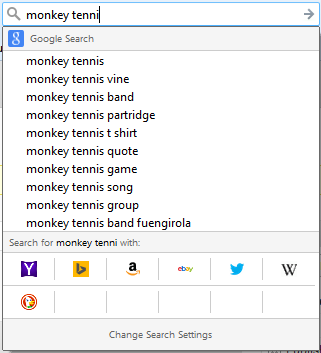
If you have Firefox auto-updates switched on, you may have noticed a change in the search box. Instead of the usual drop down results, you’ll get a new box with suggested results and alternative search engines.

Seeing it for the first time immediately after installing a new Firefox Add-on, I assumed I’d managed to install some kind of toolbar by accident that had hijacked the search box, but this is just the newly designed search results for Firefox.

You can toggle suggested results on or off, and below that you’ll see a list of alternative search engines. You can also add sites to go directly to your search term on that site (like Wikipedia). It’s not the most attractive interface, but it is functional, and will be more useful in the coming months. As we reported, Firefox is changing its default search engines in some regions next year – US Firefox users will find themselves with Yahoo Search, and this new search interface makes changing that more obvious.

Download Firefox for Windows and Mac

Related Stories

(Updated) Firefox removing Google as its default search

Mozilla bringing DuckDuckGo to Firefox 34

Firefox 33 for desktop improves performance and restore feature, Android version coming soon

Follow Jonathan on Twitter: @jonathanriggall