Skype 10th Anniversary: a history

Skype is a great communication app for making video calls. It is available for nearly any device with internet access, reaching more than 300 million users per month.

In the last few years Skype has made headlines for two reasons: its acquisition by Microsoft for 8.5 billion dollars and Skype’s replacement of Messenger. Today marks the service’s tenth birthday!

Skype’s beginning

Skype’s origins date back 10 years to Estonia, developed by the creators of Kazaa, the well-known P2P downloader. The same Peer to Peer technology is utilized for voice calls, and even the origin of the name of the program: Skype is short for “Sky Peer to Peer”.

Founders

The founders of Skype: Janus Friis (Danish) and Niklas Zennström (Swedish)

The first beta of Skype was an application able to make voice calls from PC to PC and little else. The original logo was purple.

Skype 0.9 Beta introduced the concept of paying to use Skype to make calls to landlines, while trying to find the right color to fit the program. Successive versions varied their main color to finally settle on the blue by which Skype is known today.
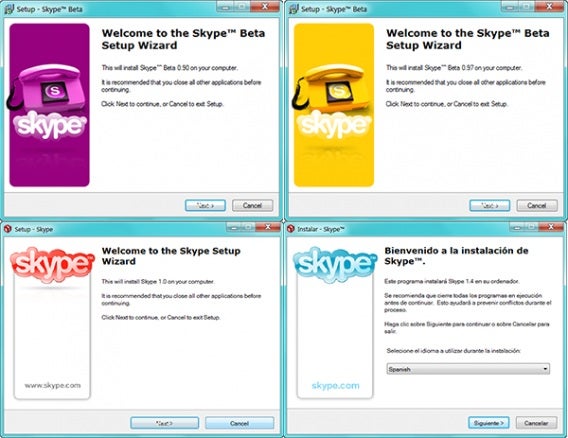
Skype Installation Window Beta 0.90, 0.97, 1.0 and 1.4, with different colors

Then came video

Version 2.0 was released for the first time in beta version in late 2005. It aimed to revolutionize internet calls again, first introducing video calling and a new design incorporating a more simplified interface.

This version was already very similar to Skype as we know it today.
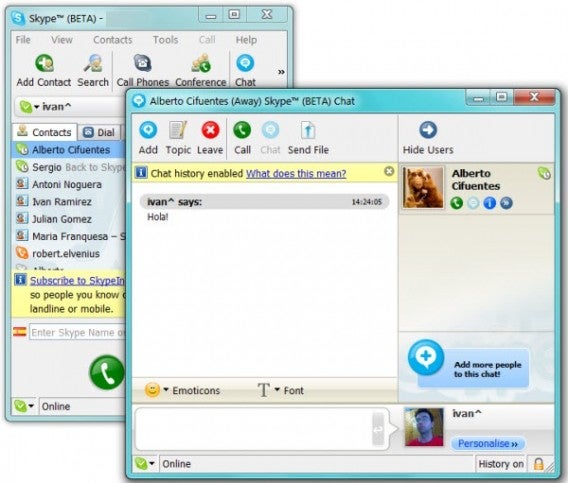
It enabled voice and video calls, instant messages with animated emoticons, sharing files, group conversations, SMS, chat logs, and custom avatars.

Purchase by eBay

In September 2005, eBay bought Skype for $2.5 billion. The founders of Skype then concentrated on a streaming video service called Joost, which unfortunately wasn’t very successful.

During the following years, Skype continued to be updated, but the company didn’t flourish financially. eBay absorbed billions in losses for the company, and subsequently stated that they had overrated Skype.

Skype becomes more social

Skype version 3.1 and successive apps became more social. It was no longer a matter of calling your family, but also of connecting with new people through the network.

Skypecasts were first introduced in May 2006. It was a service which could create voice conversations with up to one hundred participants. It worked like a chat room with a host who could control who could talk.

The service would stay active until September 2008, when Skype decided to close it permanently for not maintaining the expected minimum quality standard.

Other social functions were Skype Find and a directory of users. Skype Find, later simply called business directory, was maintained by the community of Skype users. You could find a local restaurant phone number and call from Skype. This was active until Skype 5.2.
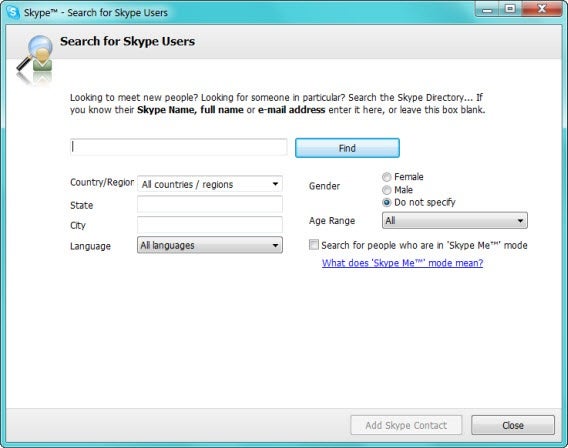
Back in those days the user directories allowed you to search for much more than you could today: you could search for users by age, region, sex and language.
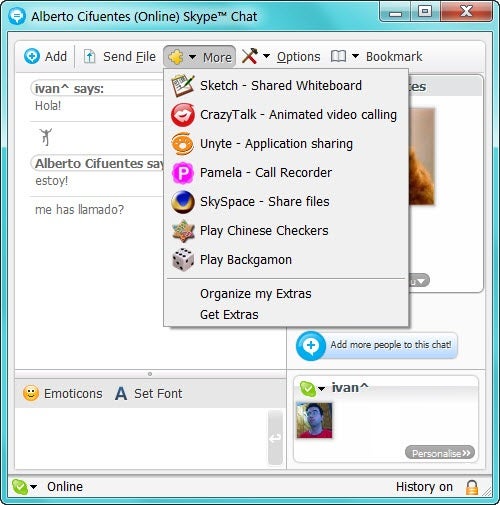
Version 3.0 of Skype had pretty much everything we know about Skype, including extras: small plug-ins that added features and games.

Focus on video calls

In early 2008, the tension between eBay and Skype’s respective management teams resulted constant managerial changes and culminated with the departure of the company’s two founders.

Josh Silverman took over in February and put the main focus of the company on video calls. The result: many of the features of previous versions were discontinued (Skypecast, Skype Find) while version 4.0 of Skype allowed video calls in 720p HD.
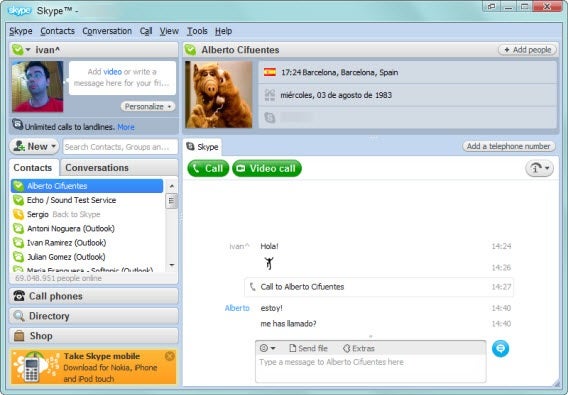
Main window of Skype 4.0, very similar to the current versions of the program

In 2009, Skype 4.1 also included the possibility of screen sharing and joined up with Boingo to offer wireless internet access through their access points (with a surcharge). It would later to be renamed to Skype and Skype Wi-Fi Access.
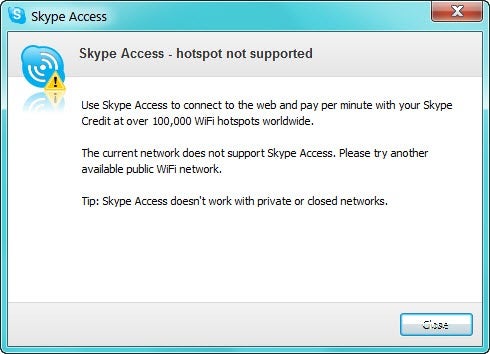
Skype Access in Skype 4.1 for Windows

Expansion to all devices

In 2010 the versions of Skype for Windows, Mac and Linux were already very mature: it was time to jump to other platforms.

First it was Android, and then iPhone and iPad. Early versions allowed only voice calls (in some cases, only Wi-Fi and not 3G). It was not until December 2010 that video calls came to iPhone and June 2011 to Android.

Video call on Android tablet

This expansion did not end there: Skype is one of the applications that has spread to many platforms: it’s available on PC, Mac, Linux, smart TVs, Skype phones and consoles.

Microsoft buys Skype

In May 2011, Microsoft bought Skype for $8.5 billion. By then, the stable version of Skype for Windows was 5.3, with Facebook integration and group video calls.
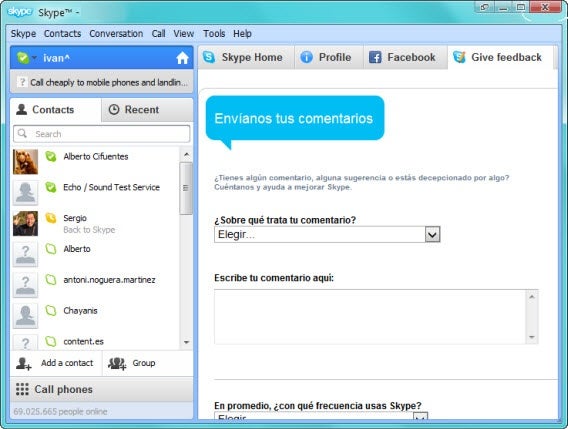
How it looked when Microsoft bought Skype (Skype 5.3)

The group calls and other functions were included within a monthly subscription package called Skype Premium. With a payment of about $4.99 per month, you could access to shared screen video calls and group calls, unlimited calls to a country, and an ad-free interface.

Skype replaces Messenger

The news came in November 2012: Messenger would disappear and the main Microsoft messaging system would be Skype.

Since then, Skype has evolved, slowly, to cover the gap and replace the once-famous Messenger. The first change was obvious: allow login through a Microsoft account. The second: the inclusion of Bing Bar in the installer.
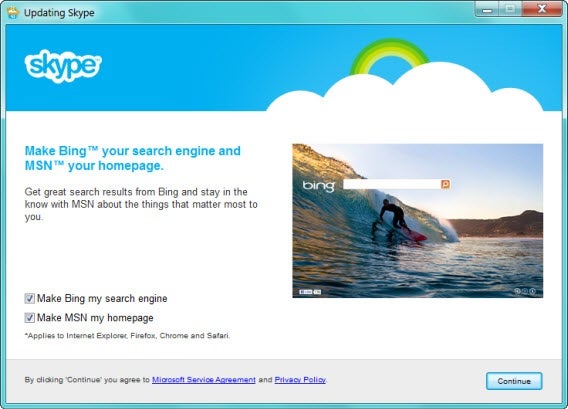
Bing Bar Skype installer

Skype has slowly adapted some Microsoft’s overall style. The first thing: a flat interface and the disappearance of icon highlights bring it in line with the rest of Windows 8.

The most current version of Skype today is 6.6 and although you can’t completely replace Messenger, with some patience it proves to be an efficient messenger with multipurpose network support (Skype, Facebook and Messenger).

Happy Birthday, Skype!

Final Fantasy XIV: Returning to Eorzea after playing the original

The original release of Final Fantasy XIV in 2010 was met with harsh criticism from both players and press. Square Enix themselves conceded that the MMO was a failure and the producer formally made an apology for the state of the game. Over the next three years version 1.0 of Final Fantasy XIV was retooled with new gameplay mechanics, updated graphics engine, improved servers, and a fleshed out story. In the end the game was released as version 2.0, Final Fantasy XIV: A Realm Reborn.

Default player


brightcove.createExperiences();

I played Final Fantasy XI for several years, and eagerly picked up Final Fantasy XIV when it first launched. While I didn’t despise the game like so many others, it was rather lukewarm and I only played for about five months. Due to my subscription of 1.0, there was no need to purchase 2.0 as it automatically rolled into my account. I was also granted early access to the game three days before the official launch. I’ve chronicled my impressions as a returning player coming into a very different world.

Warrior of Light

A Realm Reborn (2.0) takes place five years after the end of the original Final Fantasy XIV (1.0). Story-wise, the world was under siege from the primal Bahamut and the empire of Garlean. In a last ditch effort to save the heroes from utter destruction, they were transported five years into the future, though with their memories fragmented. New 2.0 players take the role of novice adventures who will hear stories of the “Warriors of Light” that fought five years ago. 1.0 players are instead the actual Warriors of Light, who have certain small advantages and slightly altered stories.

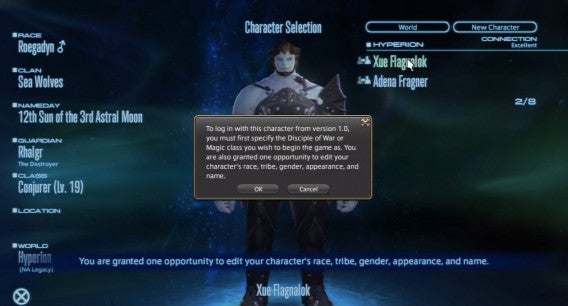
legacy character from 1.0

As a Warrior of Light I retained my class levels, abilities, gear, money, mount, and ability to change classes. I however didn’t keep access to various quests, transportation (airship), retainers, or other companions. Despite my higher level I found myself at the same story progression as any other player. I started 2.0 in the higher level 20’s as a Pugilist and soon found myself blitzing through quests without much thought of difficulty or goals. The focus was to get my airship pass as soon as possible and travel to other cities. This required going through a large amount of quests designed from levels 1 through 15.

golem story mission

Eventually I decided to drop my Pugilist gauntlets and take up lower level classes such as Lancer and Archer. If I was going to be doing lower level content, it made sense to be lower level and gain appropriate rewards. Even if you are higher level, 2.0 makes full use of ‘level syncing’ to reduce your current level and bring it closer to one applicable to the story or dungeon you’re undergoing. This meant that I was typically on my toes, even if I went in with higher levels and overpowered gear. What also made things nice was that most quest rewards let you opt out of getting lower level gear in exchange for more money (gil).

Duty Finder and roles

One of the biggest improvements is the implementation of the Duty Finder, Final Fantasy XIV version of a Dungeon Finder. Not only does it include finding full dungeons, but shorter “Guildhest” group quests, hunts, and eventually will allow PvP. The first few of these objectives are available at level 10, but as mentioned before you can enter at higher levels and by synced down. One thing to keep in mind that each class can only queue as a single role, even if they have been gearing themselves as something else. Marauders and Gladiators are assigned tanks; Conjurer as healer; and Lancer, Archer, Pugilist, Arcanist, and Thaumaturge as damagers (DPS or Damage per second). Basic dungeons require one tank, one healer, and two damagers.

legacy character from 1.0

As you can imagine this can mean long wait times for damage dealers, while tanks and healers get first dibs. My classes above 10 and ready to use Duty Finder were Pugilist, Lancer, Archer, and Conjurer; three DPS, a healer, and no tanks. Though you only actually need these roles to queue, you can still run around as other classes in the meantime and actively switch classes during a dungeon or guildhest. In some cases many players were switching to melee DPS (Lancer, Pugilist) to tank simpler encounters.

turtle battle

Roles expand slightly at level 30, where each class can upgrade to a job once achieving level 15 with a designated secondary class. For example a 30 Pugilist/15 Lancer can become a Monk, which is a more specialized and less customizable Pugilist. Most of the classes advance to only a single job, which shares its original role. The exception is Arcanist (DPS), which has two jobs in the form of Summoner (DPS) and Scholar (Healer). In the end players will have to wait until level 30 to see more healer options.

abilities

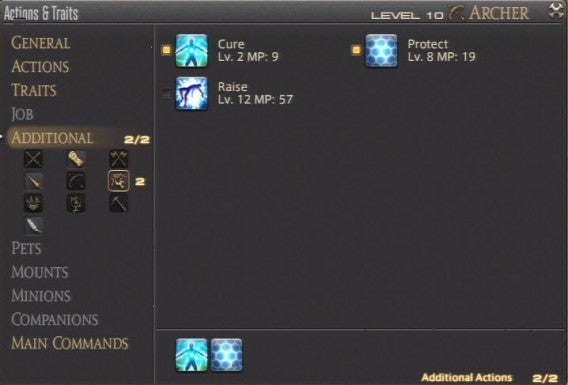
Most classes can already heal and defend themselves by assigning additional abilities from other classes. For example my levels of Conjurer allowed me to assign magic such as Cure, Protect, and Raise to my DPS classes. Though the amount of healing was much lower and couldn’t be used as area of effect, it was still very useful in a pinch. Most jobs lack the option of adding in a variety of cross-class abilities, and are restricted to only a select few. The question for players is if it’s better to have the specialized strength of jobs, or the diversity of classes. It’s speculated that classes will be better for soloing, while jobs will shine in groups.

Fate and Levequests

It seems that with so many classes that you’ll be spending a lot of time grinding. Besides the Duty Finder, there are many activities to relieve the monotony of leveling. The first is Fate, timed world quests that sprout out around and allow anyone to take part in. This isn’t really new to MMOs, as games such as Guild Wars 2 and Warhammer Online: Age of Reckoning implemented them all the time. Fates are very common and quick allowing easy experience and gil without much hassle.

fate battle

Levequests return in A Realm Reborn. Levequests are short quests designed to be completed solo and can include fights in the field, gathering materials, or crafting in town. An improvement to Levequests is that you can hold up to 100 at once, and are rewarded an extra allowance every few hours. One drawback is that you will fail a Levequest if you happen to disconnect or are transported to an instance, such as using Duty Finder. This can make it risky to initiate a leve when you are queued for something else.

levequest

Additionally, the item rewards and assignments are typically geared towards the guilds that are located in the nearby cities. For example in the city of Ul’dah and the surrounding region you’ll likely be given gear for Gladiators, Pugilists, and Thaumaturge; crafting and gathering is typically for Weavers, Alchemists, Goldsmiths, and Miners. This isn’t much of a problem for 2.0 players who might already be those classes. However, as a returning 1.0 user most of those proved worthless and motivated me to continue my hasty pursuit of an airship pass, and guilds in other cities.

World problems

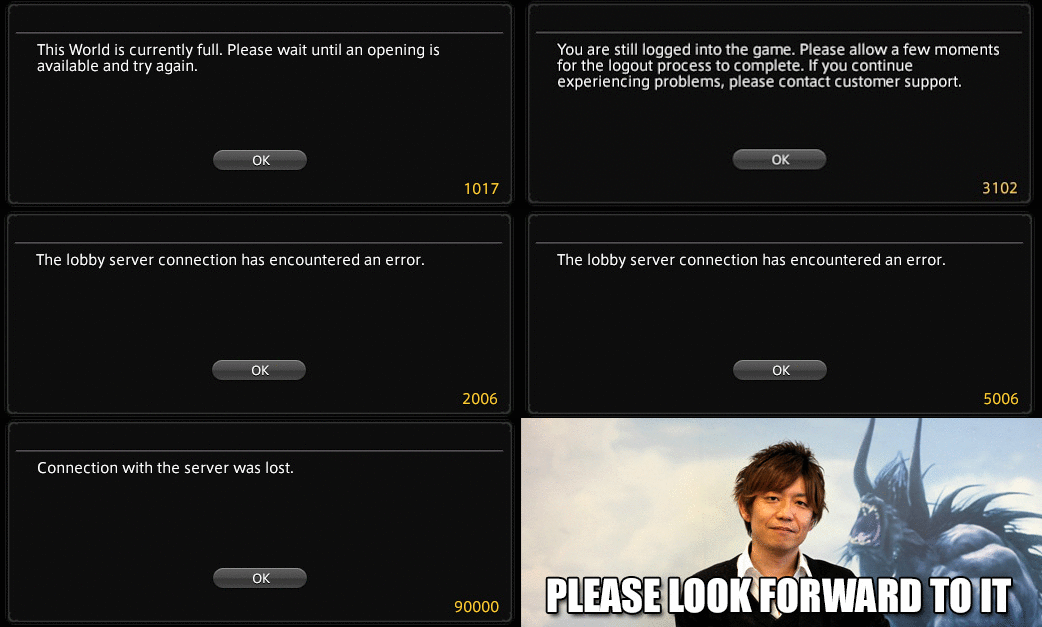
The biggest issues during early access were the technical server problems. Even though it was planned to gain a three day head start to older players and those that pre-ordered, it became difficult to even play. During the second day of early access, August 25th, Square Enix decided to limit the amount of players allowed on the NA/EU servers and disable the player queue. Instead of being placed in a waiting list, unfortunate players were given a “1017 error” telling them to log in when space was free. This led many to spam the login screen and attempt to brute force their way in. I was guilty of this and spent more than two hours trying to get in.

servers down

Even once inside the game there were still plenty of server errors, including crashes, time outs, and a broken Duty Finder. Many players were cautious, often staying in the same zone to avoid being disconnected and having to repeat the login fiasco again. Others went completely AFK, taking up player space with no form of auto kick to remove the idle. The problem was eventually resolved in the early morning of August 26th, allowing many players to easily get into the NA/EU servers. The JP servers never suffered these problems.

Ready for launch?

Final Fantasy XIV: A Realm Reborn officially releases on August 27th and the question remains is if Square Enix is ready. The amount of early access players represent only a fraction of the populace, and things could get worse once the floodgates open. It’s good that they’ve managed to work out some kinks now, even if felt like early access players were in a beta stress test.

A Realm Reborn is incredibly fun, compelling, and a great reboot to the lackluster original. Returning players will have certain advantages with gear and levels, but the playing field is rather balanced for with those that are coming in for the first time. If I spent hours just trying to get into the game, there is something alluring or addictive that many others will feel as they explore the new Eorzea. I’ll continue playing Final Fantasy XIV to explore all the nooks that I’ve yet to discover in the short amount of time so far.

Are you enjoying Final Fantasy XIV?

What happens when Games for Windows Live dies?

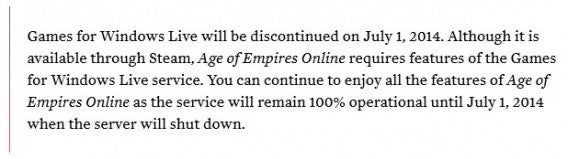
Microsoft subtly revealed that Game for Windows Live will shut down in 2014, which could affect the multiplayer, downloadable content, and saves of many titles. Some games, such as Age of Empires Online, depend on the service to function, while others games are less intertwined. While the shutdown is over a year away, it’s good to highlight what the change means and some ways to alleviate the problems.

GFWL shutdown

Publisher responsibility

Iron Brigade

There are currently over 70 games that use Games for Windows Live (GFWL), with 15 of them published by Microsoft Studios. Among their popular titles include Fable III, Gears of War, and Halo 2. All these games have some type of cooperative or multiplayer aspect, which seems important to preserve after the end of GFWL. Microsoft is expected to roll out patches to either retain GFWL’s functions, and possibly roll them into a new service (perhaps integrating it directly into Xbox Live or the larger Microsoft account).

Fable III pc

One thing to keep in mind is that Microsoft doesn’t necessarily have to oversee the preservation of third party games that require GFWL. Capcom has 10 games that use the service, many of which have online and cross-platform capability. Sega and Codemasters also have at least 5 titles that use GFWL for multiplayer and match making. It’s the responsibility of these publishers to amend their dependence on GFWL and patch their games. Questions remain as to when they will do this, and if the updates will simulate everything GFWL offered.

Multiplayer

Online cooperative and competitive modes are among the biggest features of many GFWL games. For some games, it includes both match-making and the actual multiplayer sessions themselves, while others use more direct P2P methods to find other players.

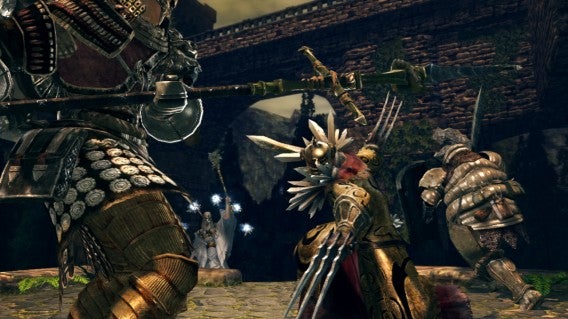
Dark Souls arena

Among the most popular titles that could be harmed by the demise of GFWL include Rockstar’s Grand Theft Auto IV, Namco Bandai’s Dark Souls, THQ’s Warhammmer 40,000: Dawn of War II, and Capcom’s Street Fighter IV.

Downloadable content

GFWL not only takes care of the full retail game, but also any downloadable content or expansions to the titles. Among the biggest of these are the 5 DLC scenarios for Fallout 3, starting with Operation: Anchorage and concluding with Mothership Zeta.

Mothership Zeta PC

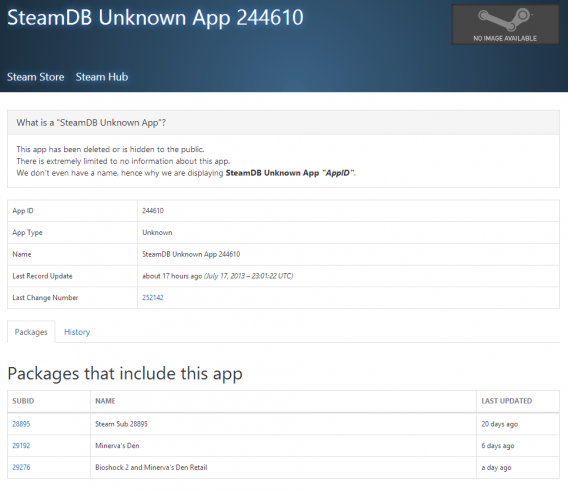
Bioshock 2’s downloadable single player campaign Minerva’s Den is also intertwined with GFWL, and will require patching from 2K Games to be accessible once the service shuts off. Evidence through Steam’s registry shows that 2K Games is taking steps to make Minerva’s Den playable over Valve’s online service.

Accessing saves and other game aspects

Accessing saved data for many titles requires logging in to your Games for Windows Live account, even if you plan on playing in single player. Some titles, such as Batman Arkham City, instead save to the cloud and allow saving and loading from anywhere even if GFWL isn’t working.

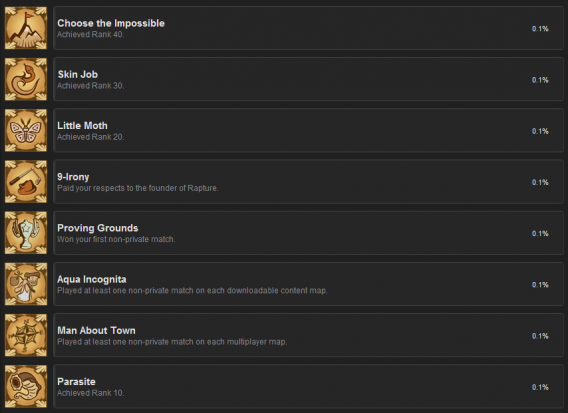
GFWL can also oversee other aspects of the game such as voice chat, friend list organization, leaderboards, and achievements. Many game achievements will need to be completed before the GFWL shutdown in order to boost your Gamerscore across your Microsoft accounts.

Steam relief

Some of the issues related to the inevitable GFWL shut down are already being taken care of thanks to patches and Steam implementation. Batman Arkham Asylum, Batman Arkham City, and Bioshock 2 have already received Steam Achievements, which include ones identical to those found in GFWL.

steam achivements

This is a great start, as Steam is an established and more stable online platform than Game for Windows Live ever was. Among the easiest ways publishers can alleviate the shutdown is to transfer over to the Steamworks API. This tool will allow games fully integrate with the Steam client, and provides access to networking, player authentication, matchmaking, and voice chat. Steamworks also provides the Steam community with friends groups and, as mentioned above, easy roll over of achievement lists. As a final bonus it also can use Steam Cloud to help manage saves and has anti-cheating capabilities.

Bioshock 2 Reg

Overall, Steamworks sounds like a great way to preserve the functionality of many games. Many of the GFWL titles are already available over steam. The biggest question is if and when publishers will adapt, if they opt into some other system, or if they’ll simply let their games decay. Microsoft seems content with Age of Empires Online dying completely when GFWL ends, but what of the rest?

How do you feel about the end of Games for Windows Live?

How to import videos into Instagram

You’ve probably been playing around with Instagram video uploading for the past two months, and maybe you’re content, but perhaps you’re looking to do more with it.

One of the biggest user requests with the emergence of Instagram video was the ability to import videos that had already been shot with your  camera. Instagram developers had initially wanted users to shoot clips exclusively within the app. Thanks to user requests, however, we now have the ability to import and crop video clips already on our device. In this article, we’ll show you how to use this new feature.

Note: we tested this out on a Samsung Galaxy Nexus. Your device may have a slightly different interface.

Accessing your imports

access imports

To access your videos, you have to enter video mode. First, select the camera icon to access capture mode. Once in camera mode, tap the video camera icon to switch to video mode. While in video mode, select the gallery on the right.

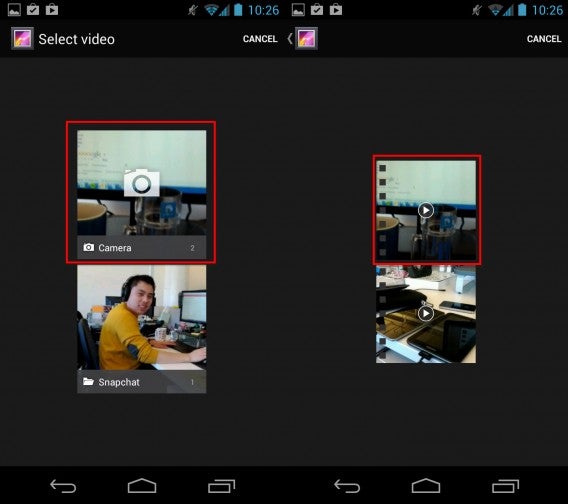
select video

Select the source folder you wish to browse, which will most likely be your camera roll (you can also select other folders). Now you can select the video you wish to use.

Cropping and trim

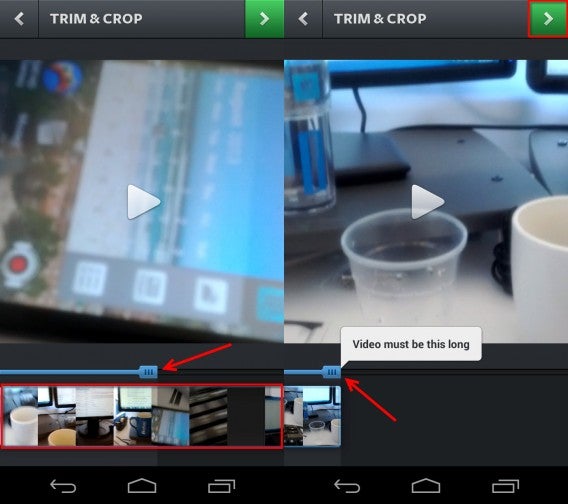
You’ll need to select which part of your clip will be in the video. Instagram videos have a maximum length of 15 seconds, so longer videos will have to be cropped. The blue bar on the top will determine the total length of your video; drag it left to make your video shorter, or right to bring it closer to the maximum. You can add portions of the video by dragging the blue bar left or right.

Underneath the bar is a small preview of the final video. Swipe left to see more of the beginning, and right to see footage closer to the end. If you reach the end of the bar, you will get a “Video must be this long” message.

cropping and trim

You can always preview your video by hitting the play button in the center of the screen. When you’re fine with your selection, hit the green arrow icon at the top.

Filters and upload

filter and upload

You can add a filter to change the look of your video, as well as selecting a cover frame. When you’re happy with the look of your video, press the green button to share it. Like photo-sharing with Instagram, you can add a caption, hashtag, and share your video on connected social networks.

Bringing stored video content to Instagram is really that simple. The big question is whether or not users and businesses will use this feature to upload original videos, or if we’ll start to see more re-purposed videos like games footage, film clips, or even commercials, further demonstrating Instagram’s potential as a promotional tool.

What will you import and upload with Instagram videos?

How to add contacts in LINE for your mobile device

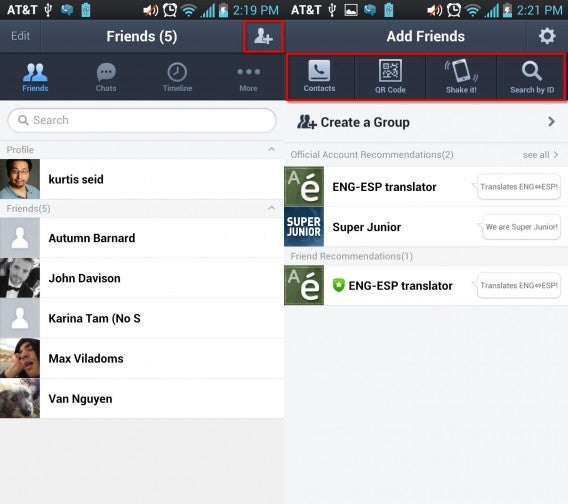
Previously we explained how to get LINE set up and working. But what good is a call and chat app if you have no one to talk with? While a few of your contacts may have been added via the auto add friends option, there might be many more that are absent. There are several options you can use to add contacts by hitting the Add friends icon on your friends list, and we’ll show you how they each work.

Note that we tested this on an LG Nitro HD running Android Ice Cream Sandwich: while your experience will be similar, there may also be some minor differences.

adding options

SMS text request

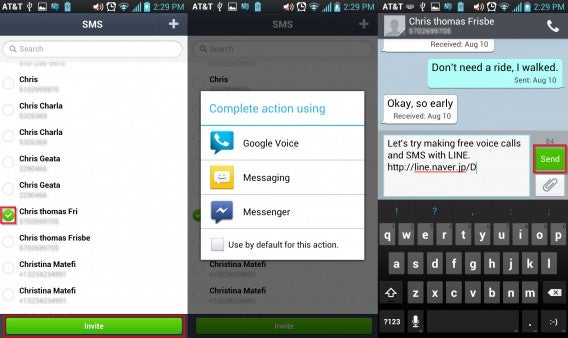
The Contacts option allows you to request friends via SMS text messaging or email. For the former a list will be generated based on the phone numbers in your device’s contact list, which you can also search through; you can also add in new contacts to this list with the plus sign icon near the top. Select the friend you wish to invite and press the Invite button.

sms request

From here you can choose your messaging method, such as your device’s built in messenger, Google Voice, or even Facebook Messenger. Your message will include a link for your friend to join LINE. When they do so, and if they enabled auto add friends, they should appear on your friends list.

Email request

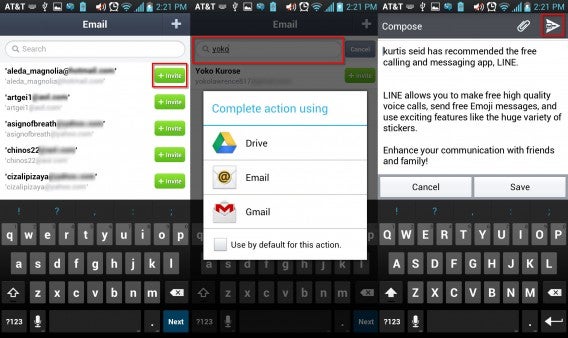
email request

The other Contacts option is through email. Once again a list will appear where you can invite people, add in new contacts to the list, or search through your contacts. Once again you can select which service you send your email through, such as Gmail or Outlook. The email you send will not only include a link to join LINE, but will attach your unique QR code (which we will discuss below).

QR scan

You can also add friends based on QR codes, which each user has. As mentioned before email requests will attach the QR code automatically. You can also check your QR code by selecting the My QR code option.

qr code

You’ll switch over to the camera when you select QR Code on the add friends menu. You can use your camera to directly scan QR codes, which will automatically register when in range of your QR. You can also enter your gallery and select QR codes that are already on your device.

Shake it!

If your friend is nearby both of you can enter the Shake it! mode to scan each other. Both will need to select the add option once the scanning is complete.

shake it

Keep in mind that Shake it! will search for anyone close by and using this option. If you see a complete stranger on your list that means they are also currently using Shake it! Don’t fret, as both of you will need to add each other for them to appear on your true friends list.

User IDs

adding your user ID

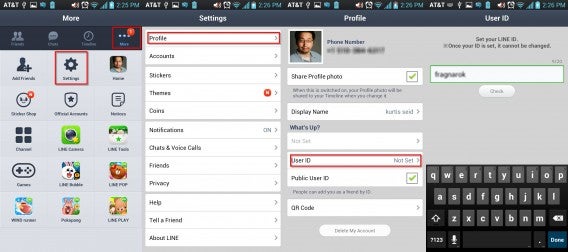
The last option to add friends is through User IDs. By default people do not have IDs, and you will need to set one up. Select the More option, followed by Settings. In this menu select Profile and then User ID. You can select a user ID with a maximum of 20 characters, but note that you cannot change your ID once selected.

user id

Once you know a friend’s User ID you can place it in the dialogue box under Search by ID. When your friend is found, hit the Add button.

Creating Groups

create group

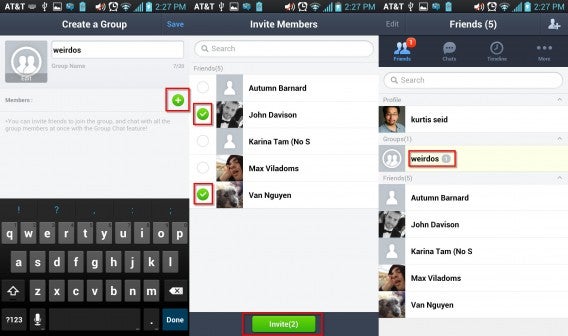
Once you have a number of friends you may want to sort them into easier to find groups. The Create a Group option is great for this. You select a group name and add in a picture for the group. Next select the green icon to add in members. Select the friends you wish to be in the group and hit invite. The group will appear on your friends list between your profile and your friends.

So now you’ve populated your friends list with all sorts of people you know. In our next series of posts we’ll show you just how you can interact with them, as well as block those unwanted contacts.

Are you enjoying LINE over WhatsApp, Viber, and other chat apps?

What changes are in iOS 7 Beta 5?

Shortly after concluding WWDC 2013 two months ago Apple released a beta of iOS 7 for developers. This beta was recently updated to iOS 7 beta 5, which features a good amount of small changes. We’ve tried out the update and are pleased with the ways Apple is taking the OS.

Better color coordination

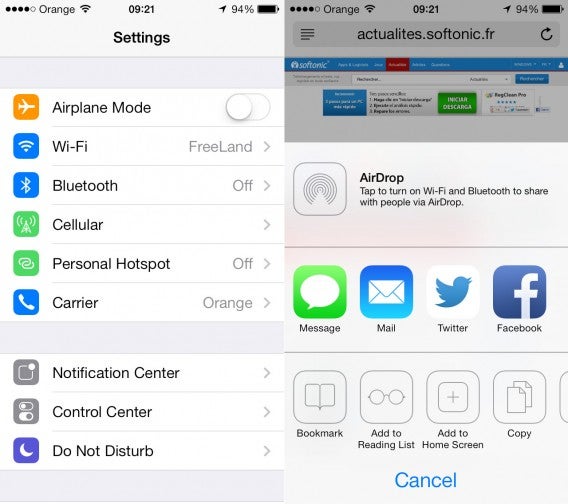
iOS 7 beta 5 has improvements to the look of the Settings App, mostly in the form of new colors. Icons in the settings app are no more colorful and easier to see for Wi-Fi, Bluetooth, Do Not Disturb, and others. The Twitter icon on AirDrop has also been change from a white bird on a blue background, to the more familiar blue bird.

new icons copy

The install screen also has changed to match with your device’s model. For example If you have a white iPhone, the screen will have a white screen with black icon, while a black iPhone will have a black background with white icon.

Interface changes

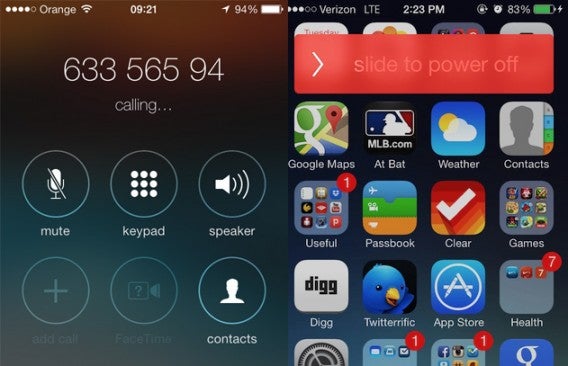
The iOS is of course focused on a great phone interface. All of the icons while taking a call are much larger and have circles to help highlight them and match the look of the keypad.

dialpad and poweroff

When you power off your device a new power off slider will appear at the top. As you swipe from left to right the color will change from a dark red to a much lighter off-pink.

IMG_1264

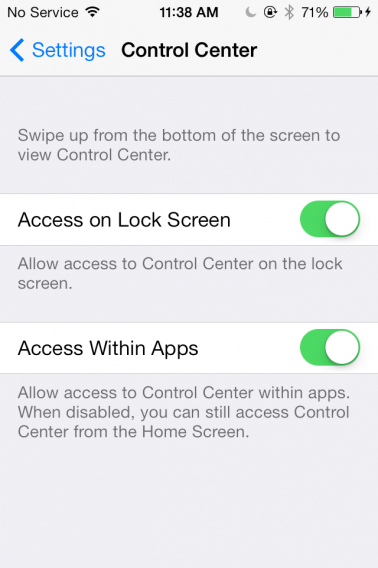
The Control Center settings now have Access controls, allowing you to toggle if the menu is access able from the Lock Screen or within apps. Turning off access is a great way to prevent accidentally activating the feature, especially when playing games with a lot of swiping.

Taking care of mail

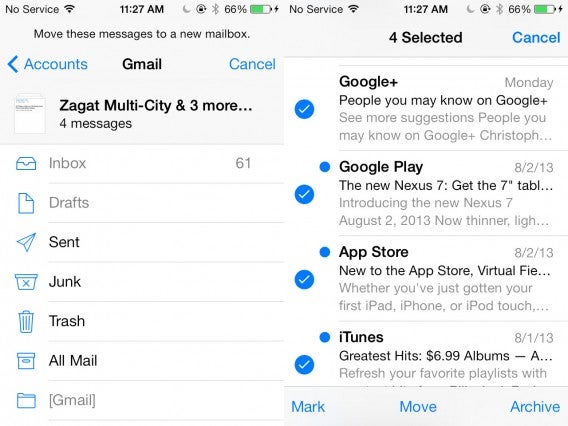
mail changes

A small change to the mail app interface includes the direct removal of the delete button right on the inbox. Instead you must hit the edit button, allowing you to mark your email list and then move them to either trash or archive. Although this extra step might seem annoying, it’s a great means of stopping accidental email deletion.

A touch of trust

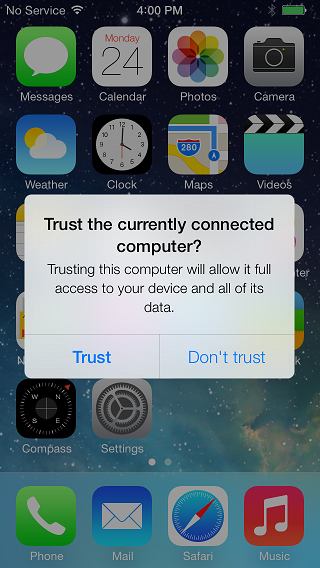
To help with security, a new warning and check has been added when connecting your device to a new computer via a charger. The first time you attach your iOS device to a computer a verification will appear, asking you would like to allow full access to your device and all of the stored data.

ios-7-message

This can also occur when you connect to other devices (such as game consoles) or power sources, which may indicate possible security risks or hidden computers within your power source.

Panoramic problem

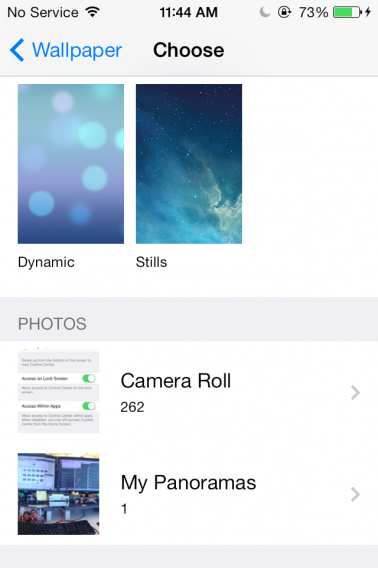
A minor removal includes the disabling of the panoramic wallpapers which previously moved according to your device’s gyroscoping, rotating a full 240 degrees. You can still select panoramic pictures as wallpapers, they simply won’t animate. It’s understandable for this to be missing in the beta as it’s not a necessary function for developers . Hopefully it will be reinstated when iOS 7 is released for consumer use.

IMG_1265

iOS 7 beta 5’s changes are helpful and prevent accidental access of unwanted functions. While the update isn’t huge, it does provide a taste of where Apple is focusing and how the iOS will ultimately shape into. We like what we’ve seen and look forward to future updates.

How to register LINE for your mobile device

While you might be happy with mobile chat apps such as WhatsApp and Viber, but another contender has steadily advanced towards the top of the heap. That app is LINE, which has over 200 million users worldwide across Android, iOS, Windows Phone, BlackBerry, and even some Nokia devices. Two things make LINE stand out over WhatsApp: its  Windows and Mac desktop versions, as well as its huge amount of Emoji stickers and emoticons. If this sounds impressive, or you’re just searching for a new way to chat and make calls, we’ll guide you through the process of using LINE.

In this first installment of the series we’ll show you how to quickly register LINE and get it ready on your mobile device. Note that we tested this on an LG Nitro HD running Android Ice Cream Sandwich, while your experience will be similar, there may also be some minor differences.

Register your device

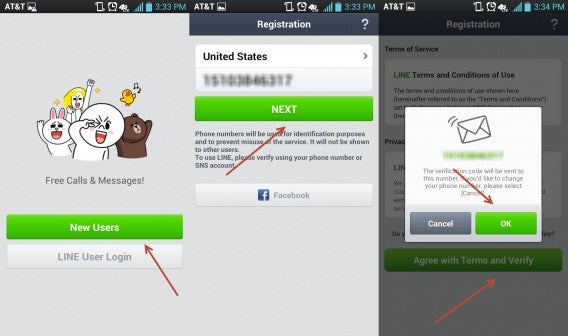
When you first open LINE you’ll have the select to become a “New User” or “LINE User Login”. Since you’re using this guide select the former option. In the next screen select your country and phone number you wish to use with your account (most likely the same as the device you are currently using). If everything looks correct select “NEXT”.

register1

The terms of use page will first appear, followed quickly by a number confirmation overlay. select “OK” on the overlay to return back to the terms of use. Select “Agree with Terms and Verify” to move on. Momentarily a SMS text message will be sent to your number that will almost instantly and automatically register your account. If this automation does not occur manually place in the code window that appears and you will be taken to the next step.

Auto friends

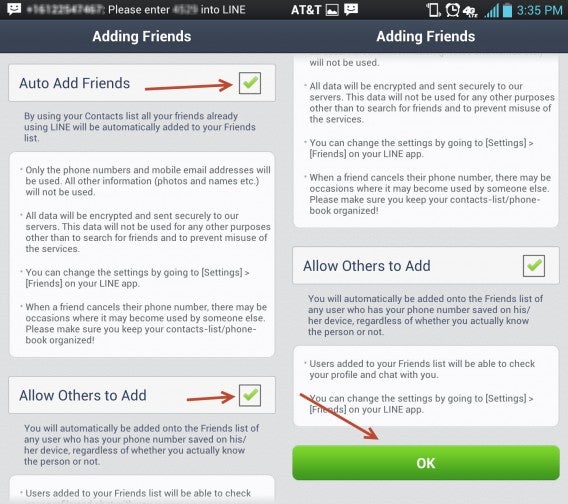
You can select to automatically add friends that join LINE based on their mobile numbers and email addresses stored in your contacts; this data is also be safely encrypted. You can also toggle if others can do the same to you.

add friends

Both of these options can be selected or deselected by hitting the corresponding check boxes on the right. These options can also be disabled later within LINE’s friends settings. Once you’re happy with the selection select “OK” (you may have to scroll down on some devices).

User name and photo

You can’t just go full on anonymous. Tap on the top dialog box and insert a display name with a maximum of 20 characters.

name and photo

Next, tap the photo icon on the left to add in your profile image. Either choose an image on your device or take a new one. If the image is too big, you will be given the option to crop and frame a specific section. Once you’re happy with your user name and photo, hit “Register”.

Email Registration

email register

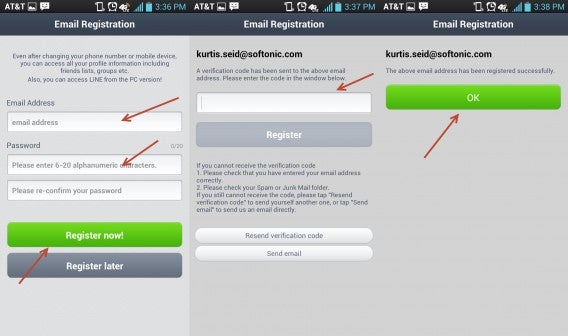
This section is completely optional, but doing it now is a good idea and can save you time later. Enter the email address you wish to use in the first dialog box. Now make a password with a maximum of 20 characters. When everything looks right tap “Register now!”.

line email

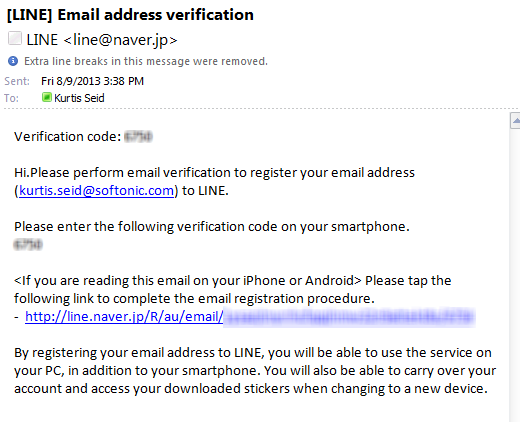
Check your email client and find the message sent by LINE. Copy over this code to the mobile LINE app and enter it into the box, followed by hitting “Register”. Once your email address is confirmed hit “OK” to finish the registration.

Ready to use

let it load

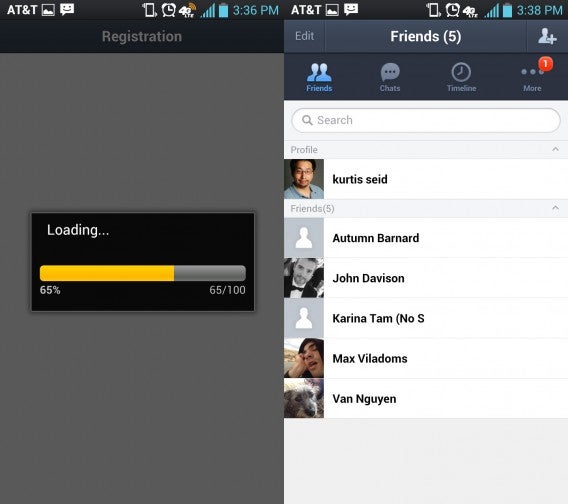
LINE will then load. The speed of this depends on your device, but should generally be short. You can now start chatting with friends and populating your contact list. We’ll show you just how to do these and more in our next how to use LINE series.

Interview: American McGee’s Alice: Otherlands

Even though Alice: Madness Returns wasn’t a commercial success, the series still has a dedicated fanbase. Over 3,000 supporters have backed a Kickstarter to fund a new animated film that will continue Alice’s story, and if successful, could result in a third game. Alice: Otherlands is the name of the project that will take the series heroine into the minds of important figures from 1875’s London. We were able to interview series creator American McGee to find out what he and his company Spicy Horse has in store for the series.

The series and its future

Softonic: It has been stated that Otherlands will conclude the Alice trilogy, but will there be room for potential spin-offs and side stories? If so, would they be as games or films?

American McGee: The plan right now is to get Otherlands made as a series of animations and as a game. The success of the animations will help secure a future for the Otherlands game. Beyond that, I really don’t know yet. It’s going to depend on how the story resolves and audience demand. Personally, I wouldn’t mind if Otherlands (animation and game) marked the final chapter of Alice’s adventures. That feels right to me.

ST: Will viewers of Otherlands need to have played Alice or Alice: Madness Returns to fully understand the story? Will there be extra references they could miss?

AM: Because these animations take place inside the minds of other characters (not in Alice’s mind) you won’t need an understanding of Alice or Madness Returns in order to enjoy them. When we eventually make a game based on this concept, then some understanding of Alice’s journey and goals will be helpful in enjoying the story and action presented there.


American went into further detail on the Kickstarter site

“Alice’s story in the first game is one of overcoming psychological trauma brought upon by the death of her family. Emotions created by that event (rage, guilt, sadness, etc) take form in Wonderland, personified through characters like the Mad Hatter and Queen of Hearts. If Alice loses in the battle against these emotions she’ll not only lose her sanity, but be lobotomized and remain locked within the asylum for the rest of her life. She knows there’s a greater mystery to be solved, but the immediate problem is escape from her mental and physical imprisonment.

At the end of the first game we see Alice is victorious. She frees herself from her mental and physical constraints, is set loose in London…”

Alice in light land

“The narrative contained within the three games links together – the first story being one of Alice overcoming the psychological barriers that stop her from realizing her true potential. In the second game the threat is physical, though Alice uses her “Wonderland powers” to unravel the mystery of her parents’ death and defeat the real-world bad guy. At the end of the second game we see Alice emerge onto the streets of London filled with a power that transcends the physical and psychological – she’s now master of both domains. She’s also aware of an insidious evil lurking in every corner of Victorian London, of a threat greater than the asylum or the man who killed her family.”

The ownership game

ST: Electronic Arts published the first two games, do they have complete ownership of the Alice license? Could they have say on what goes into Otherlands, or will it be completely up to you and Spicy Horse?

AM: EA own the game rights. The film rights are owned by independent film producers in Hollywood [Collision Entertainment]. We’re running [the Kickstarter] so that I can purchase the film rights. That will give me freedom to create animations, feature films and merchandise (toys, posters, books, etc) related to those. If another game gets made I expect we’ll have as much creative freedom as we did with Alice and Madness Returns. Making sure I have creative freedom is part of the negotiation process.

Alice visits Otherlands

ST: Will we see the return of both cast and characters? Would Susie Brann reprise her role as Alice, and maybe even Anni Long as The Queen of Hearts?

AM: That is very likely. Susie Brann, Roger Jackson and the other voice actors are a critical part of the Alice productions. I’m working today to secure their involvement with the Otherlands.

Alice and her attire

ST: Does Alice make use of her arsenal of weapons and powers? There is of course the vorpal blade, but what about also the parasol, pepper grinder and others. What about Hysteria?

AM: we might have a chance to see Alice fighting against the mental demons contained within the Otherlands (minds of others). The animations will vary in terms of content and story. Some might be visual explorations and nothing more. Others could contain mini narratives and the kind of action you’re asking about here. Of course for the Otherlands game (when we finally make it) we’ll see Alice using her full arsenal of weapons and skills.

Possible minds Alice will visit

“The third installment of the story would find Alice leveraging her super hero-like power to invade the minds of others, hence “Otherlands.” 1875 in London is a time filled with a rich array of characters, each a potential vehicle for Alice’s new adventures – Jules Verne, Jack the Ripper, Darwin, Queen Victoria and a plethora of French artists.”

ST: You’ve listed out a number possible Otherlands Alice could visit. What are the top minds that you’d most want to see come to life?

AM: I’ve very interested in seeing the minds of Van Gogh, Verne, and Edison. The list of potential minds is growing daily – because there are so many great options, I think we’ll need to have a dialog with our backers to decide which ones we explore first. With Kickstarter the question is not which minds I want to explore – but which minds our backers want to explore.

The Alice Otherlands campaign has proven successful, achieving 111% of its $200,000 goal ($222,377 pledged). This has proven better than Spicy Horse’s previous Kickstarters, Akaneiro: Demon Hunters which earned 102% of its goal, and Ozombie which was canceled three weeks before its scheduled funding deadline. American McGee and Spicy Horse do have challenges ahead of them, as they are a game studio and not an animation house. Still, the success of the Otherlands animation could lead the way to new Alice games. It’s a question if Electronic Arts will see the merit of publishing another title.

Free strategy and simulator games for Android and iOS

When it comes to strategy and simulation games, Android and iOS devices have some real hidden gems. Some simulations allow you to sail the seas, manage an airline, or simply live vicariously through strange creatures. It’s even better when you don’t have to pay for them! Read on and we’ll show you six free games for your iOS and Android devices.

Pocket Planes

9aacba64-365d-42be-80c6-a0fbdb271341Would you like to be the owner of a business empire? You might enjoy Pocket Planes, a game in which you manage your own airline company.

Of course, Rome was not built in a day. You’ll start with a modest company and grow slowly to hobnob with the greats. Eventually you’ll control absolutely everything, from things as superficial as crew uniforms to important issues as scheduling flight routes.

Download Planes Pocket for Android

Download Pocket Planes for iPhone

Bridge Constructor

Suspension bridges might not sound like the most fun subject in the world, but things change when they’re turned into a game. Bridge Constructor is humorous proof of this.

In this game, you have to build bridges on different cliffs. Combine materials and structures to make your constructions strong or you may fall prey to nasty accidents. Of course, unlike real life, if a bridge doesn’t work out, you can simply make a new one.

Download Bridge Constructor for Android

Download Bridge Constructor for iPhone

The Sims Free Play

The Sims Free PlayThe most popular version of The Sims is on PC, but no platform has escaped the charm of the virtual beings, including iOS and Android.

Both mobile versions of The Sims are more limited than their PC counterpart, but they still have more options than you might expect: you can have up to 20 Sims in a game, care for pets, visit neighbors, and build houses. If you’re a Sims addict, you’ll want to download these versions.

Download The Sims Free Play for Android

Download The Sims Free Play for iPhone

Playmobil Pirates

Playmobil PiratesDo you fear you’re a little old to play with Playmobil? Don’t be ashamed, if you don’t want to be seen playing with dolls, you’ve always got game simulations.

With Playmobil Pirates you can experience adventures with a high strategic component within a complete Playmobil world. Its low difficulty level may not be perfect for the hardcore player, but if aren’t too interested in challenge, you could enjoy the game a lot.

Download Playmobil Pirates for Android

Download Playmobil Pirates for iPhone

Towers N ‘Trolls

Towers N TrollsTower defense is a classic genre that has had iterations throughout different systems, including even iOS and Android. For these devices, we found Towers N ‘Trolls to be among the best free games.

Don’t be deceived by its Shrek-style graphics, Towers N ‘Trolls is a tremendously challenging and addictive game, and the very best of its kind in the app stores.

Download Towers N ‘Trolls HD for Android

Download Towers N ‘Trolls HD for iPhone

Clash of Clans

Clash of ClansThis sixth title only meets 50% of our remit, as it is only available on iPhone/iPad, but there could be an Android version in the future. Clash of Clans has become a blockbuster, a game that has been winning over iOS users since its inception.


In Clash of Clans, you are the head of a barbarian tribe that must deal with foreign enemies. Fun graphics, intense gameplay, and multiplayer modes make it one of those titles you’ll lose hours and hours over. We’d love an Android version soon!

Download Clash of Clans for iPhone

What other mobile simulation and strategy games do you play?

How to use login verification on Twitter mobile apps

Twitter introduced two-step verification in May 2013 after a hacking incident the previous February. The original verification used a SMS-based system that sent a text message with an access code. With this new method, you no longer need a phone number or texts. This also lets people access two-step verification if they don’t use one of the supported mobile carriers.

We’ll show you how to set up and access this improved security feature.

Note: if you have SMS verification enabled, you must revoke its permission in the web app for the app-based verification to work correctly.

Setup Login Verification in the mobile app

TWITTER_STEP1

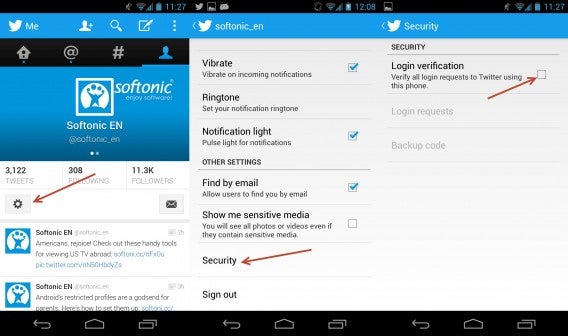
In the iOS app, select the “Me” tab, tap on the gear icon to open options, select “Settings,” and tap on “Security.” Android users will need to select your account name in “Settings” and scroll down to see the “Security” option.

Hit the check box on the right to turn on Login Verification.

Using Login Verification

login requests

Head to Twitter.com and log in with your account and password. Now when you attempt to sign in, a verification request will be sent to your phone.

Return to your device and select “Login requests.” Here you can revoke or allow any web login requests.

The backup code

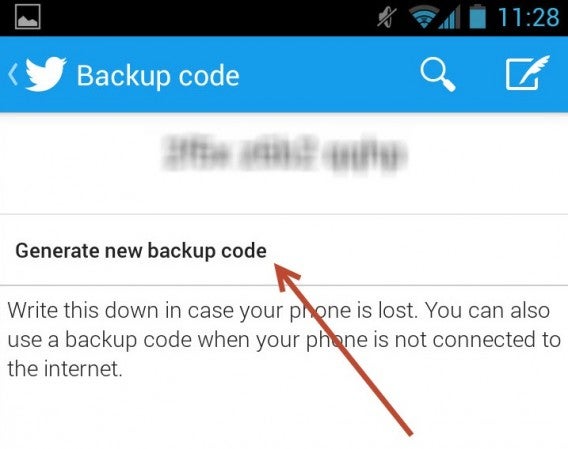
If you somehow lose your phone or don’t have access to it at the moment, the Twitter app will generate a random code that you can use to get into Twitter.com. Unlike you might expect, this code isn’t temporary, so you might want to write it down just in case.

Request on Twitter web app

Select “backup code” and enter your code. Twitter will remind that you will need to return to your phone to change the backup code.

change your backup code

Is it really secure?

The backup code doesn’t expire with one use, this means two-step verification isn’t nearly as secure as you’d expect. If your phone is stolen or someone learns your backup code they can still get into your Twitter account.

disable

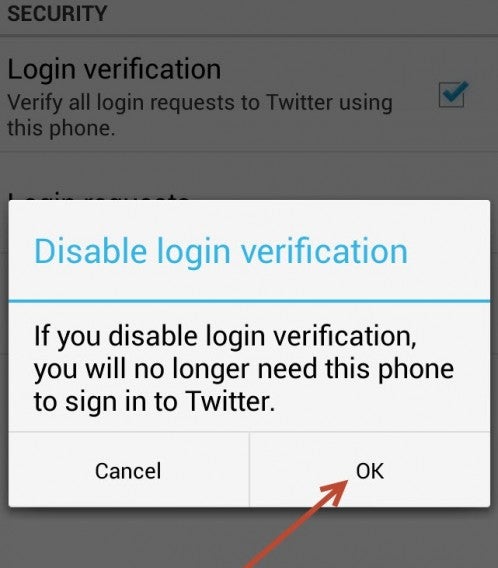
Until Twitter updates this function it may be better to stick with SMS text Login Verification. If you’re not interested in the new app-based verification, you can disable it by toggling off the check box.