How to Monitor Your Child’s Online Activity

Technology surrounds us in today’s world. This offers many online benefits for children and adults, but it can also become a problem. Besides offering lightning access to education, entertainment, and social networking, it can also lead to unwanted content. 

And because we’re so immersed in technology nowadays, it’s difficult for many to manage their screen time. This article will explore such sides of our interconnected world and how you can monitor online activity, including screen time, to help you navigate the digital landscape safely.

Why Online Monitoring Is Important

Even though there are different points of view regarding the ethics of monitoring someone else, any parent knows that their children should be safe. That’s because the Internet is full of questionable content, but that’s not all. Healthy content can be so engaging anyone can lose track of time.

Here are some crucial considerations on why you should do it:

Harmful Content

  • Harmful Content

There’s a lot of inappropriate content for children and people of various belief systems. This includes violence, explicit content, cyberbullying, and questionable social practices. 

  • Screen Time

Excessive screen time is problematic for anyone. It can lead to health issues such as eye strain and bad posture, among others. It can also reduce sleeping time and physical activity. 

  • Habit Building

Everyone needs a bit of discipline, and building habits on how to safely browse the Internet and consume content will put children and adults in a better position to manage their activities.

Norton 360 Deluxe BUY NOW
  • Prevent Danger

There are a lot of unsavory elements lurking around, including child predators, scammers, and others trying to exploit unsuspecting victims.

Online

How Norton 360 Premium Can Help

Norton is at the forefront when it comes to online security. The company requires no presentation, and its current accolades include Best of the Year 2021 by Pcmag.com and Best Protection & Best Performance by AV-Test for the same year. 

Still, some people might not know or understand what its Norton 360 premium offering can do for them, more specifically, in its Deluxe tier.

Opting for Norton 360 premium will improve your online security. It’ll do so in a myriad of ways, including stopping account takeovers and blocking hackers. But let’s go into detail about parental controls and online monitoring, which is the topic of this article.

Because Norton takes the safety of your children seriously, they’ve developed a comprehensive package of features. Let’s take a look.

  • Time Supervision

This tool lets you understand how your children spend using their online devices, including PC and Android. It lets you allot a number of hours, and users can request time extensions. There are even graphs to visualize this information in different periods.

  • Video Supervision

No, this isn’t a Big-Brother-like scheme. This feature lets you check a list of videos your kids watch on their devices. It shows thumbnails, video descriptions, and titles and enables you to watch a small fragment of the video.

  • Mobile App Supervision

You can also check which devices were downloaded and installed on Android devices. You can also check which ones were uninstalled and browse them by usage. This way, you can also gauge what interests your child the most.

  • Web Supervision

With this feature, you can check what websites were visited by category, such as general, entertainment, shopping, etc. You can also block unwanted websites and check if there was an attempted access to such sites. 

  • Search Supervision

If you toggle this feature, you can check what your children are looking for in different search engines such as Google, Ask, Bing, Yahoo, and YouTube. There’s also a way to activate safe browsing filters for all these engines with a single click.

  • Location Supervision

There’s a tool that maps the location of Android and iOS devices to check where your children have been. There’s a 30-day history; you can filter the activity by time and date. 

  • School Time

This is a boon for homeschoolers but suitable for all. Because remote learning requires the Internet, setting online limits is challenging. This feature lets you manage school time by blocking activities during certain hours and checking whether educational websites were visited.

As you can see, this solution has everything you need to keep your children safe, and it allows both monitoring and prevention. However, it’s just a tiny part of what Norton 360 Premium can do for you. Be sure to check the full features to understand how it can help against malware and boost your privacy, among many other things.

Online

Safety Starts at Home

Even though Norton 360 Premium offers a comprehensive package that can help you keep your children safe, teaching your children about online safety and maintaining healthy communication is essential.

The first thing is you should be a role model regarding technology use. Show your child how to use devices responsibly, and don’t just talk the talk; walk the walk as well. Use your devices, keeping healthy screen time limits into account. Avoid using your phone constantly, especially during family time.

People change, and that’s even more pronounced with children. Be sure that you regularly check their needs and make the necessary adjustments. Negotiate so the outcome is positive for both parties. 

Norton 360 Deluxe BUY NOW

In the end, monitoring screen time and activity is vital to being a parent today. But it requires a marriage of technology and communication abilities. Norton 360 Premium Deluxe will give you an impressive array of tools to help your children stay safe, but no lesson will be learned without guidance and support.

Remember that the key is balance. This means allowing them to enjoy technology while protecting their well-being, not outright banning everything. Only then you’ll allow your kids to develop skills and awareness to thrive in today’s world.
Elevate Your Presentation Game with Plus AI

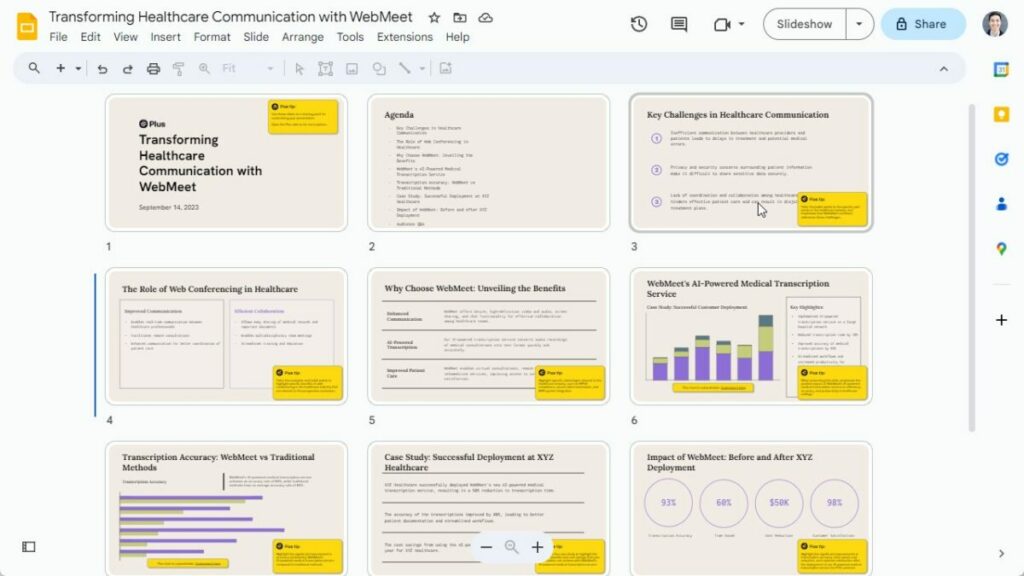
In the dynamic world of business, effective communication is the backbone of success. Presentations, specifically, act as powerful tools, bridging the gap between ideas and their realization. They’re the mediums through which visions are shared, strategies are proposed, and data is visualized. But with such a pivotal role comes the pressure to get them just right.

The Common Challenge: Crafting Quality Slides

Crafting a presentation isn’t just about throwing together a bunch of slides. It’s an art that demands time, creativity, and attention to detail. The endeavor often becomes tedious, especially when trying to achieve a professional look, maintain brand consistency, or convey complex ideas succinctly. 

For many, this process can feel overwhelming, especially when staring at a blank presentation. This leads to last-minute scrambles and presentations that don’t quite hit the mark.

Introducing Plus AI: The Modern Solution

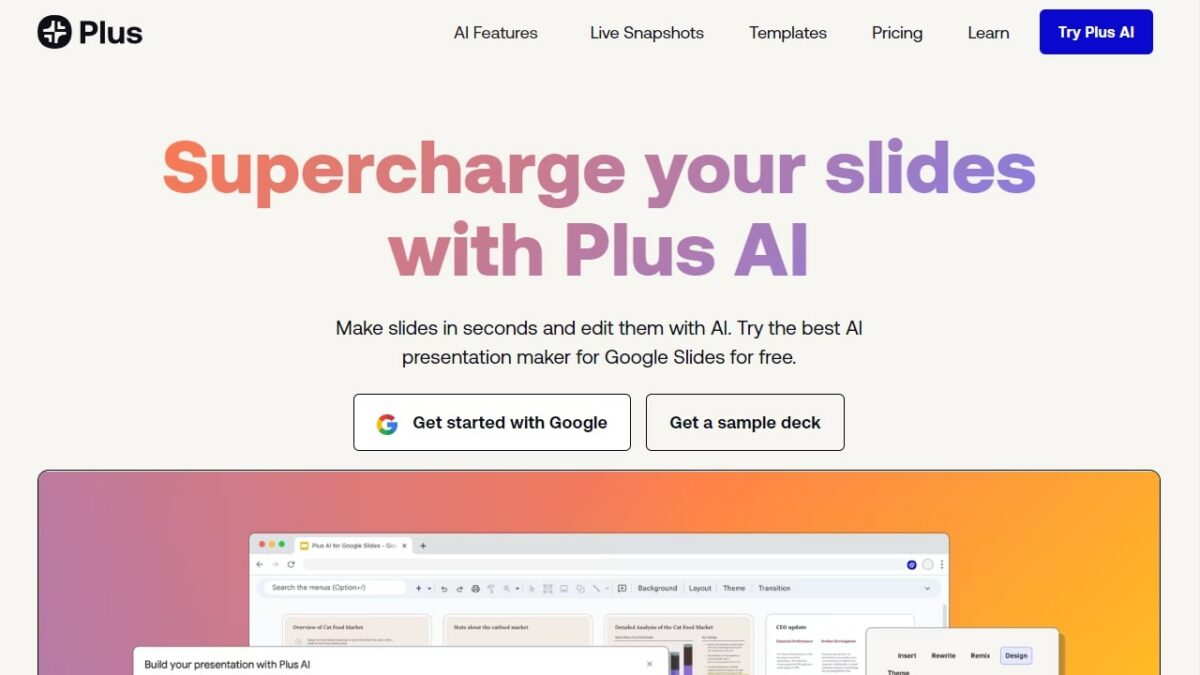
Amidst these challenges, Plus AI aims to make your life easier through their Google Slides AI. It’s not just another tool but an AI copilot designed for the modern communicator. Plus AI ensures that you’re not bogged down by the intricacies of slide design or the nuances of content alignment. It promises to make your work faster and better at the same time.

Effortless Professionalism with a Click

With Plus AI, gone are the days of laboring over slide formats and worrying about the perfect layout. With its intuitive interface, users can produce top-notch, professional-grade presentations with ease. The power of AI means that even the most novice users can create presentations that rival those made by design experts. Whether it’s reformatting your content to your brand’s color scheme or transforming mundane slides into engaging layouts, Plus AI has got you covered.

Advantages of Making Presentations with Plus AI

Google Slides AI:

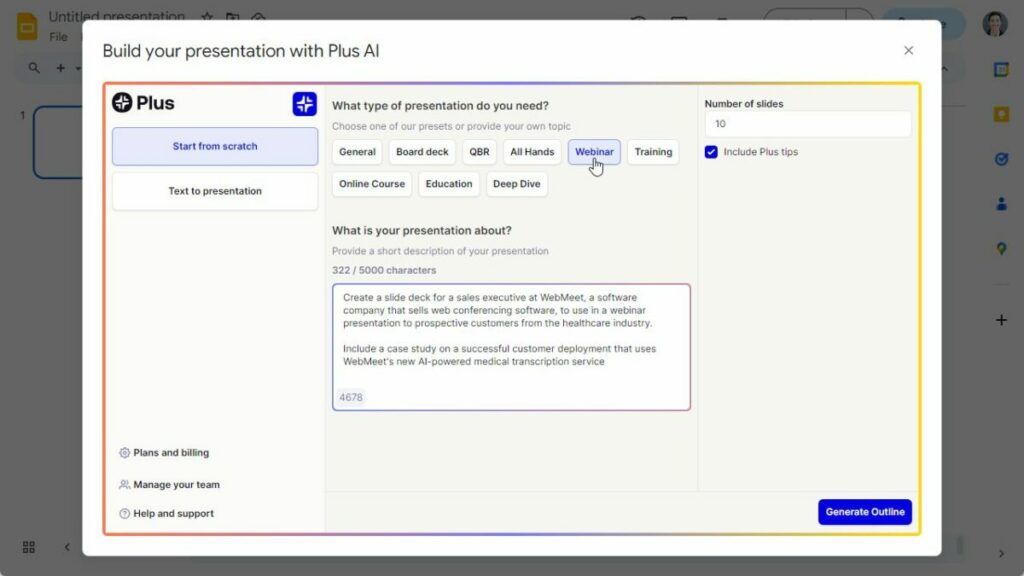
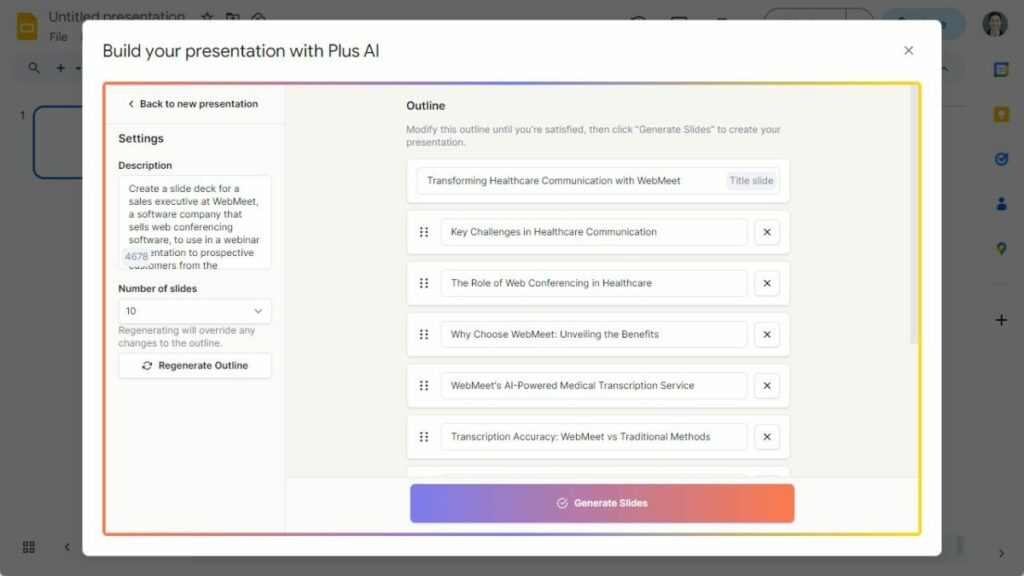
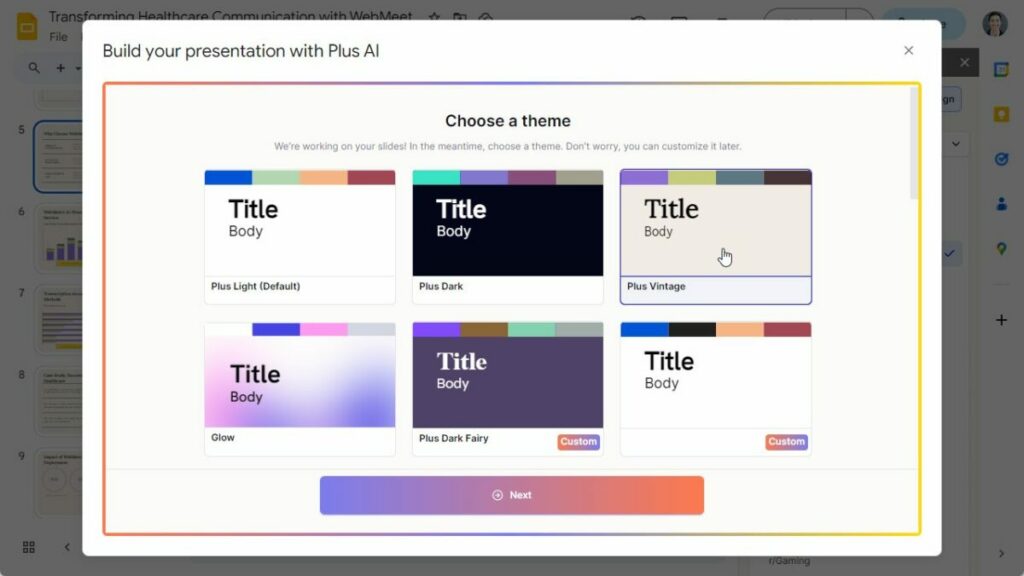
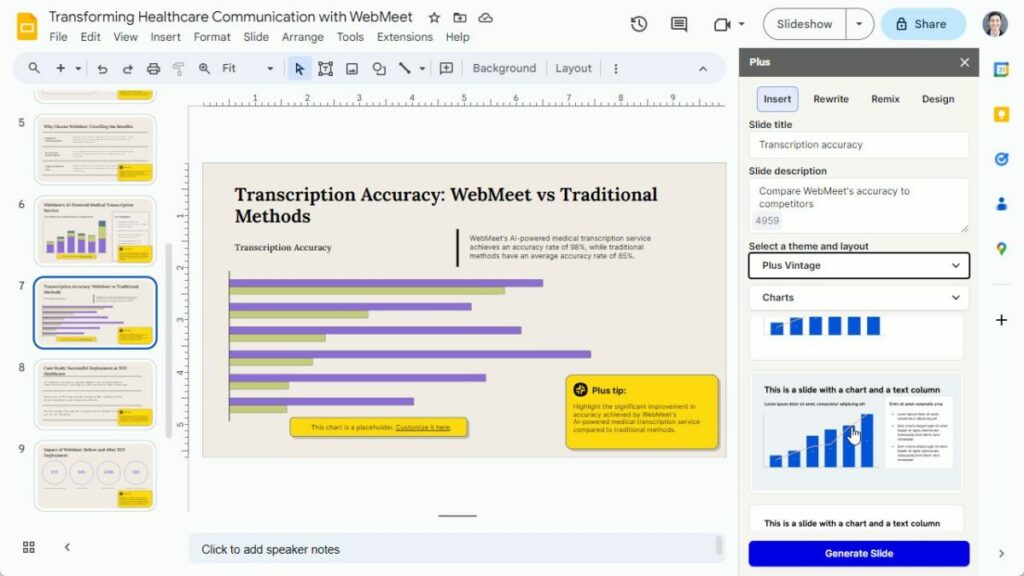
Plus AI is the best way to use AI in Google Slides presentations to design, create, and edit your presentations. Using Plus AI is as easy as opening an add-on and asking Plus AI to create an outline, generate a presentation, edit single slides, or even design a new presentation theme. Just give Plus AI a short prompt or a source document, and watch as it crafts your vision into a captivating presentation.

Efficiency Redefined:

No more delving into time-intensive practices of building presentations from the ground up, sifting through design ideas, or structuring content meticulously. With Plus AI, you’re introduced to an era of creating tailored presentations in a fraction of the time. Think of Plus AI as your personal business assistant to help improve your presentation workflows.

Unparalleled Quality:

Plus AI is more than just an AI slide maker—it’s an AI copilot that will help you improve all of your presentations. Leveraging state-of-the-art AI and an extensive slide library, it goes above and beyond to ensure that every slide, graphic, and piece of content is of the highest caliber. Your presentations won’t just be good; they’ll be memorable, making a lasting impression on your audience.

Achieve Professional Aesthetics Effortlessly:

Remember the long hours spent fine-tuning presentations, aiming for that polished, professional finish? Those days are behind you. With Plus AI, achieving a sleek and professional look is as easy as a single click. The system’s theming capabilities also allow you to customize presentations with your own colors, fonts, and logos.

Diverse Exporting Capabilities:

Plus AI understands the varied preferences of its users. Whether you’re an aficionado of Google Slides or have a penchant for PowerPoint, it’s equipped to cater to your needs. Once your presentation masterpiece is ready within Google Slides, you can either share it with a standard Google Slides link or seamlessly export it as a PowerPoint file. It’s adaptability at its finest.

Getting Started with Plus AI:

Step 1: Integration Made Simple

Start using AI in Google Slides by installing the Plus Google Slides AI add-on. This seamless integration ensures that you can dive right into creating your presentation without the hurdle of learning a new tool.

Step 2: Start the AI Presentation Process

Say goodbye to the daunting sight of empty slides. With Plus AI, all you need to do is provide a brief idea or theme of the presentation you envision. The AI takes over from there, populating your deck with relevant content, graphics, and designs.

Step 3: Add the Finishing Touch

The power of AI doesn’t mean you lose control. In fact, it’s quite the opposite. Plus AI offers AI-assisted editing tools, enabling you to make tailored changes. Whether it’s adding new slides, tweaking existing designs, or refining content for clarity and correctness, Plus AI ensures you’re in the driver’s seat.

Standout Features to Explore:

  • Insert: Want to incorporate specific slides like a timeline, a metrics slide, or next steps? Plus AI streamlines this process, making slide addition a breeze.
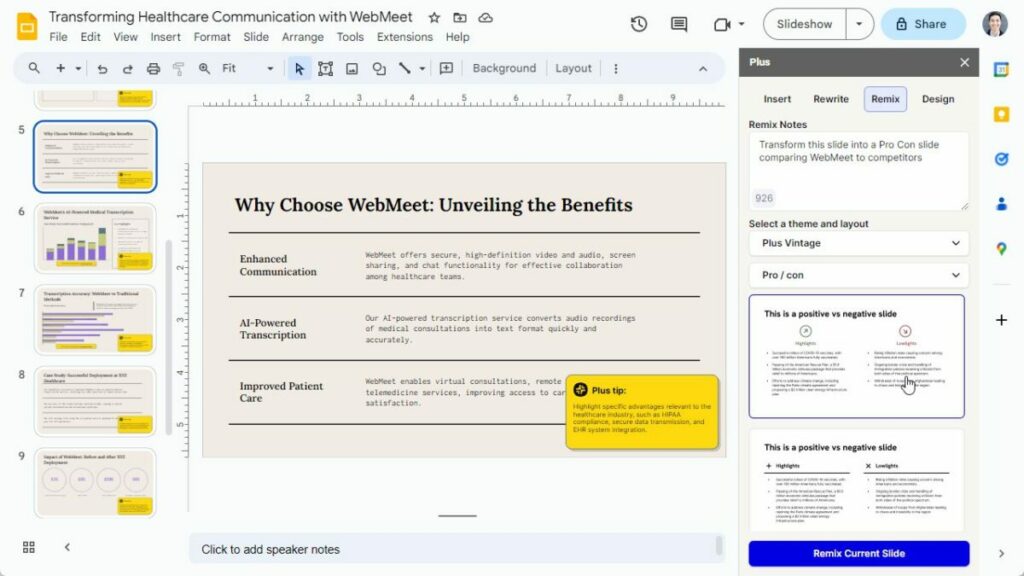
  • Remix: Repurpose content or transform mundane text into vibrant slides. Whether you’re converting a block of text or revamping an existing slide, the Remix feature ensures your content is always presented in the most engaging manner.
  • Rewrite: Enhance the quality of your content with the Rewrite feature. Whether you’re aiming to adjust the tone, provide a succinct summary, translate slides from one language to another, or simply correcting grammar, Plus AI has got you covered.
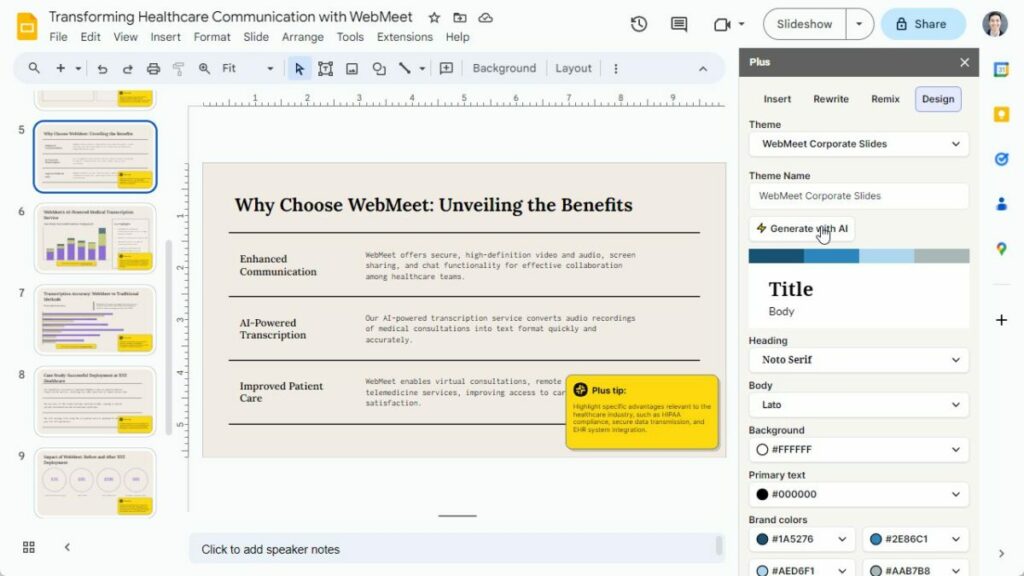
  • Design: Let Plus AI automatically generate a new presentation theme for you using AI.

Branding and Customization:

A presentation isn’t just about content; it’s also a reflection of your brand’s identity. Plus AI recognizes this and provides extensive customization options. Create new themes with your brand’s logos, adjust fonts to align with your brand’s typography, play around with colors to maintain brand consistency, or if you’re unsure, let the AI recommend the best aesthetics for you. With Plus AI, your presentations don’t just convey information; they tell your brand’s story.

Advancing Corporate Communication: Plus AI for the Enterprise

In today’s fast-paced corporate world, effective communication is not just a luxury; it’s a necessity. Companies, regardless of their size, require sophisticated tools that streamline the workflow and enhance the quality of interactions both internally and externally. Plus AI stands out as the top choice for AI presentations for enterprises, offering tailored AI-powered solutions that transcend the boundaries of traditional presentation-making.

An Ecosystem Beyond Presentations:

While Plus AI excels at crafting compelling presentations, its capabilities aren’t confined to this arena. The platform is equally adept at automating reporting across various tools, ensuring that teams can access and interpret data without hiccups. This holistic approach positions Plus AI as an invaluable asset in the arsenal of any forward-thinking enterprise.

Exclusive Features for the Enterprise:

  • One-Click On-brand Presentations: Brand consistency is paramount in the corporate world. Plus AI’s intelligent algorithms ensure that with just a click, presentations not only look aesthetically pleasing but also resonate with the brand’s identity.
  • Custom Presentation Templates: Upload your existing slide templates into Plus, and let Plus AI automatically generate sales presentations, proposal decks, and more.
  • Custom AI Model Training: Every enterprise is unique, and so are its needs. Plus AI allows businesses to train custom AI models on their existing content, ensuring the AI models and outputs are aligned with the company’s specific requirements and style.
  • Versatile Integration Options: In the diverse data landscape of modern businesses, the ability to build integrations is a game-changer. Plus AI allows customers to pull data from analytics tools and CRMs to create automated reports and presentations.
  • Compatibility: Plus AI extends beyond Google Slides, seamlessly integrating with tools like PowerPoint, in order for you to meet your customers wherever they are.

Prioritizing Security:

In the era of data breaches and cyber threats, the safety of proprietary information is a top concern for enterprises. Plus AI doesn’t take this lightly. Committing to the highest standards of data security, the platform is proud to be SOC 2 Type II Certified, ensuring that enterprises can trust it with their data and content, without reservations.

Transforming Presentations with Plus AI

As the landscape of corporate communication evolves, Plus AI emerges as the quintessential tool for those seeking to enhance their storytelling skills. With its blend of intuitive design, robust capabilities, and adaptability for both individual and business requirements, Plus AI is more than just a tool—it’s a game-changer. Dive into the Plus AI experience, and prepare to redefine the art of AI productivity.

Why Avast Free Is the Best Antivirus Choice

Avast Free may be the answer to protect your PC and other devices from viruses and malware. Check it out here!

A lot has been said about antiviruses since their appearance in 1971 when the first virus, called Creeper, infected PDP-10 mainframe computers. Because the desktop computer world has two main types, the tech-savvy and casual users, antivirus software is something that tends to “take care of itself.” And Avast Free certainly is one of the best on offer.

Avast Free Antivirus Download

Those new to computers or casual users rely on built-in software or vendor recommendations. In contrast, more involved “PC-master-race” kind of users usually adhere to their favorites.

Still, in the ever-evolving landscape of the Internet nowadays, it’s extremely important for all to know exactly what each offer brings. In this article, we’ll delve into Avast and antiviruses in general so you’re better informed when deciding what to use.

The Case for Antivirus Software

It’s unthinkable in today’s times to go online without proper protection. All kinds of dangers lurk around, with shady websites, phishing attempts, dangerous links on emails, and more. 

What’s worse, hackers, scammers, and other cyber criminals are engaged in an arms race against software providers. This means you need to be at the vanguard when protecting your devices. New ways of gaining access to your personal information appear literally every day.

Categorizing software like Avast Free as “antiviruses” is a misnomer since it does much more than detect and eliminate viruses. In truth, any worthy protection platform today should include antivirus tools as just a part of the offering.

Because of the many ways you can get hacked or scammed today, a good package comprises viruses and general malware. Avast Free not only helps in detecting and blocking viruses but also other kinds of malware, such as ransomware.

It does so in real-time, which is extremely important. It catches malware on the fly before it accesses your system. Other options allow you to run “offline” scans, but by then malware could have performed all kinds of actions on your data and personal information.

Windows Defender Who?

Many people try their luck by relying on software available for free with their OSs, such as Windows Defender. It seems, after all, a competent choice, and it’s included in your Windows copy, so why bother picking anything else? As it turns out, there are many reasons. 

First of all, Windows Defender is not a bad option at all. It includes real-time protection from malware in general, and it targets apps, cloud storage, email, and web browsers, including downloads.

You can quarantine or delete infected files and send reports. It has cloud protection as well. Pretty nice, isn’t it? The problem resides in efficacy and features.

Windows Defender consistently scores less than others when detecting malware, which lets some nasties slip into your system and remain undetected. Additionally, many bells and whistles of other antivirus software aren’t available, such as VPN, optimization tools, parental controls, etc.
One feature that Avast Free has and Windows Defender lacks is the ability to protect your photos from being encrypted by hackers. And this is just an example.

So, if you thought you were safe with Windows Defender, think again! 

ET Wi-Fi Home

If only an unauthorized, friendly alien would be the one messing around with your Wi-Fi network without you noticing it! In truth, it’s much more likely that strange events surrounding your connectivity are due to a considerably less cute intruder.

If the Internet wasn’t dangerous enough, you must also look out for unauthorized access to your Wi-Fi network. This happens for several reasons, and the technical details would take several volumes.

In short, people with the right tools can access your Wi-Fi networks; if they do, they can gain complete control of your devices. They can even redirect web traffic to their devices first, injecting malware that goes unnoticed.

Threats are abundant, but luckily, Avast Free offers a feature where you can actively scan your Wi-Fi network to look for security weaknesses. It can also help you find intruders. 

Why Avast Free?

Avast Free has a lot going on and is a no-brainer regarding antivirus and malware protection. First, it’s free, so you won’t make any financial investments to stay protected.

Second, it’s lightweight. While other solutions take up many of your system resources, Avast feels like a breeze. You won’t even notice the impact on performance. 

Because the team behind it has more than 30 years of experience and more than 435 million people use it daily, you can rest assured it’s a top-notch choice to protect your devices and important information.

The software is designed to allow them to catch well-known threats efficiently, much like other solutions, but also new and emerging threats. This is extremely important because you don’t want to be “patient zero,” so to speak.

And, if you ever feel you need more, you can switch to paid plans with more features.

Do You Need More than Avast Free?

Make no mistake: Avast Free is an incredible platform powerful enough to protect you in your online activities. With this solution, you’ll be safe from current and emerging threats and unwanted intruders.

While this is what most people need, you might want additional protection. If you do, you’ll be happy to know higher Avast tiers do include such features. For instance, you can get protection from fake sites that take your credit card information.

You can also update outdated computer apps automatically (which, incidentally, are a major security concern), prevent people from hacking your webcam, and much more. 

As you can see, all this collateral protection is perfect for many, but the key word here is “additional.” The free version protects you with some of the most powerful anti-malware techniques available.

Avast Free Antivirus Download

Summing up, if you aren’t already one of the 400+ million users of Avast Free, don’t waste any more time and get it. Try it out. There’s nothing to lose by trying and a lot to win.

Inviting AI into the Classroom

We live in exciting times for educators and students alike. The advent of AI being implemented in different fields has resulted in almost daily innovations.

Filmora is one such example. Recently launching version 12.5, this update further enhances the video editing software’s AI capabilities with features like audio visualization, and unique text animations. These new tools in addition to Filmora’s already formidable suite of effects and features positions Filmora as a leader in AI video editing.

Filmora Pro DOWNLOAD

Still, some are wary of AI tools and are concerned with the many ethical questions arising from this new technology. Let’s dive into some of these considerations and look at how Filmora addresses them.

AI and Ethics

If you’re an educator, you might be worried about the implications of using AI tools in the classroom. After all, children tend to follow the adults in their lives. If a teacher is using AI to enhance their presentations to make them more engaging their students might think that anything goes when it comes to using AI.

However, a proper discussion should include the pros and cons of AI usage, both inside and outside the classroom. As with any tool, positive results are possible when used responsibly. With AI itcan decrease workload, and speed up productivity of tedious work allowingmore time for other activities.

It can also be a creativity enhancer. Especially when editing videos. Many students might have no idea what’s possible with video due to a lack of technical skills.

However, AI can help students deliver stunning results and polished content, which can allow them to better demonstrate advanced ideas and concepts.

Many who are against AI have a very black and white view of it : AI is often seen as a one-stop shop for everything either enabling incredible creativity and bringing any user’s imagination to life or as a dangerous technology full of intellectual property abuses and in serious need of guardrails . Those who hold a critical view of AI tend to ignore AI’s role as an equalizer. For instance, mature students who are going back to school.

For them, creating PowerPoint presentations can be a difficult and cumbersome task. However, with tools like Filmora, they can create visually impressive presentations and simply concentrate on the content.

What Filmora Can Do


Even though its AI capabilities are impressive, reducing Filmora to an AI-assisted solution would be unfair. It’s, in fact, a powerful suite of tools that allows creators to perform complex edits quickly.

An example of this is adding text. With Filmora, you can straightforwardly add text while customizing font, color, effects, and animations. It’s on par with any other professional video editing solution, but it’s done with just a couple of clicks.

This is just the beginning, efficiency is baked into Filmora at every step of the editing process. For instance, the Quick Split Mode lets you easily cut the clips on your timeline. You can also create adjustment layers to apply the same effect to multiple clips. And let’s not forget that you can match the footage with music thanks to the Auto Beat Sync feature.

Another impressive feature is the Avatar Presentation. Instead of using your real-life image for presentations, you can use an animated avatar that mimics your facial expressions and moves in real time. It’s fun and innovative, which will keep your audience engaged.

Filmora Pro DOWNLOAD

Regarding AI-enhanced tools, one of the highlights is AI Copywriting. Working together with ChatGPT, it helps you to generate video scripts by simply writing a video description. It can also create catchy titles,, descriptions, and more.

There are also asset packs ideally suited for both educators and content creators. The Class Pass aims to improve the creativity in class with 27 assets to choose from. The Trend Pass is suited for content creators with 35 assets to unleash their creativity.

The central concept with Filmora is easing the learning curve for video editors and content creators by offering intuitive, one-click tools.. If AI makes the job easier, then AI is incorporated. If a tool is better off in the hands of the user without any AI input, then it’s streamlined so anyone can use it to get pro-level results.

As you can see, it’s a powerful suite that works just as well in education and for content creators. If you find yourself in the last group, there is some exciting news.

Filmora Young Creator Program

Filmora understands that talent needs to be fostered, which is why the team behind it developed the Young Creator program. To participate, you just have to show the world who you are and what inspires you as a Gen Z.

To do so, you can take advantage of Filmora’s many features and create a video.. It’s a great way to get acquainted with the program and use it to monetize your work.

It works like this: Filmora will share weekly themes and ideas that you can use to produce videos. Users visit the contest page and download the specific effect packs. After creating the video,share it on social media with the hashtag #shareTheSpotlight and the tag @Filmora_editor for a chance to earn $250.

In a Nutshell

Filmora is a next-gen solution for your media creation and editing needs. It’s a comprehensive suite of tools that uses the latest technologies and trends to empower you to create stunning content.

In today’s fast-paced world, staying ahead with the latest software is essential, and this is where Filmora truly shines. By using up-to-date software, you not only ensure that your content remains current but also guarantee that you’re harnessing the most advanced technology available. This not only keeps you in line with the latest trends but also enhances your overall experience.

Last but not least, it uses AI in a responsible way that works by enhancing your work, not replacing it.

Filmora Pro DOWNLOAD

VEGAS Pro 365+: The Future-Proof Subscription for Every Video Editor

Learn how you can use VEGAS Pro 365+ for professional video editing with the features that set it apart!

In the ever-evolving world of digital content creation, the tools we use play a pivotal role in shaping our final product. Enter VEGAS Pro 365+, a game-changer in video editing software. With its innovative SmartScription model, it’s more than another software subscription. It’s a commitment to the future of video editing.

Vegas Pro Download

Features That Set VEGAS Pro 365+ Apart

Beyond its revolutionary subscription model, it boasts a suite of features for the modern content creator:

  • AI-Powered Compositing: Let the software handle the heavy lifting. With AI-driven tools, users can seamlessly integrate titles, objects, and effects, eliminating the need for manual masking.
  • Automated Masking: No more hours spent on tedious tasks. The Smart Mask feature tracks moving objects frame-by-frame, ensuring precision and time savings.
  • Perfect Color Grading: Set the mood right. With advanced color grading tools, every video will look professional, vibrant, and true to your vision.
  • 3D Content Integration: Merge live-action footage with 3D elements. It creates a seamless blend of reality and computer-generated imagery.

Exclusive VEGAS Pro 365+ Subscription Benefits

Subscribers to VEGAS Pro 365+ are in for a treat. The subscription offers:

  • Cloud storage ensures your projects are safe and accessible from anywhere.
  • Access to premium stock content, elevating the quality of your videos.
  • Regular free upgrades, so you’re always equipped with the latest tools and features.
  • Text-to-Speech and Speech-to-Text for convenience and efficiency.

Software subscriptions have often been viewed with a hint of caution. The recurring costs, the looming end dates, and the potential loss of access have made many creators wary. VEGAS Pro 365+ is here to change that perception.

Addressing the Subscription “Trap” Concern

For many, the word “subscription” brings with it a sense of impermanence and the threat of losing access to vital projects. The fear of being trapped in a cycle of renewals, only to lose everything once you opt out, is real. But they understand this concern and offer a refreshing solution.

With VEGAS Pro 365+, your projects are yours forever. Even if you decide to end your subscription after the two-year mark, you will still have complete access to all your projects. There’s no interference, no locked features—only uninterrupted access to your work. It’s a promise of trust and reliability, ensuring that your creative journey is never hindered.

Vegas Pro Download

Three Compelling Reasons to Choose VEGAS Pro 365+

  1. Perpetual License Post Subscription: Users are entitled to a perpetual license after committing to a two-year subscription. It ensures that even if you decide to end your subscription, your access to the software remains uninterrupted until the end of the two-year period. It’s more than a subscription; it’s a lifetime partnership.
  2. Significant Cost Savings: Users can save up to 40% compared to purchasing a lifetime license and one upgrade. It’s not only about cost savings; it’s about getting premium value for a fraction of the price.
  3. Exclusive Subscription Features: Enjoy many exclusive features in the standard 1-year plan and the SmartScription 365+ plan. From advanced AI tools to premium stock content, VEGAS Pro 365+ ensures subscribers get the best.

Addressing the Elephant in the Room: Cost

At first glance, the SmartScription model might seem pricier than a once-off purchase. But, the value proposition becomes clear when you factor in the continuous upgrades, exclusive subscription benefits, and the perpetual license after two years. 

It’s an investment in the future, a commitment to continuous innovation, and a nod to the evolving needs of the modern content creator.

Comparison: VEGAS Pro 365+ vs. Other VEGAS Products

Discovering the perfect fit for your editing needs is crucial. Let’s delve into how VEGAS Pro 365+ compares to other VEGAS products:

License Options for VEGAS Pro 21:

  • Edit: Basic features of VEGAS Pro.
  • Suite: Includes everything in Edit, plus SOUND FORGE Audio Studio, ACID Music Studio, Mocha VEGAS, and Boris FX Primatte Studio.
  • Post: Contains everything in Edit, with additions like SOUND FORGE Pro, ACID Pro, VEGAS Effects & Image, Mocha VEGAS, and Boris FX Primatte Studio.

VEGAS Pro 365+ Subscription Benefits:

  • Edit 365 Subscription: Offers 20GB cloud storage, free upgrades, limited HD stock footage, and features like Text-2-Speech and Quick Upload.
  • Suite 365 Subscription: Provides 50GB cloud storage, unlimited HD stock footage, and all features of Edit 365.
  • Post 365 Subscription: Comes with 100GB cloud storage, unlimited 4K stock footage, and all features of Suite 365.

Software Inclusions:

  • Features like AI Z-Depth, AI Smart Mask for videos, Adjustment events, and more are standard across all versions.
  • Exclusive tools like SOUND FORGE Audio Studio, ACID Music Studio, and Mocha VEGAS vary based on the version.

A User-Centric Approach

It’s so much more than software; it’s a partner in your creative journey. With its user-centric approach, the software ensures that every feature, every tool, and every update are tailored to enhance the user experience. It’s not only about editing videos; it’s about creating masterpieces.

Explore VEGAS Pro 365+ Now!

In a world where technology is ever-evolving, it’s crucial to have tools that evolve with it. VEGAS Pro 365+ isn’t only a tool; it’s a commitment to the future of video editing. With its innovative subscription model, a suite of advanced features, and a user-centric approach, it’s set to redefine how we perceive video editing software.

For content creators looking for a reliable, future-proof, and feature-rich video editing solution, it’s the answer.

Vegas Pro Download

Understanding the Growing Threat of Cybercrime in 2023

Make sure you understand how much cybercrime is evolving and how you can use Norton to defend against it!

We’ve come a long way since computer viruses first appeared in 1971. Back then, viruses were simply self-replicating software, emulating their physical counterparts. The first one, Creeper, was a “white hat” sort of hacking attempt, meaning it was innocuous, at least compared to today’s cyber threats.  Now, we call it a cybercrime.

As a security test, Creeper uninstalled itself from its previous host whenever a new hard drive was infected. Then it displayed the message “I’M THE CREEPER. CATCH ME IF YOU CAN!”. If only things were so simple and innocent nowadays!

With current technological advancements, viruses and other malware are more widespread than ever. It makes these menaces an unstoppable force. Thankfully, we have solutions like Norton 360 Antivirus to help us. What cybercrime encompasses and how you can protect yourself are some of the topics we’ll explore in this article. 

A Crash Course on Cybercrime

To understand what an unauthorized party can do against you and your data, it’s sometimes helpful to analyze it from the opposite angle. And, as you’ll soon realize, they can do a lot. So much so that the term “cybercrime” was coined. And within this umbrella term, there are others. 

For instance, malware encompasses all kinds of software-related threats, while social engineering deals with how to hack you via cons and scams like pretending to be someone you know to steal information, which is commonly known as “phishing.” Norton 360 deluxe is your best ally to avoid cyberthreats on 2023 like stealing your personal data, phishing and other threats.

Perhaps one of the most famous types of viruses is trojans, a term which, again, is an umbrella. You have exploits, rootkits, droppers, DDoS, and much more. They all work differently, but the goal is the same: infect the computer to steal data.

Norton 360 Deluxe BUY NOW

There’s much more than delivering malware to an unsuspecting target or scamming them via social engineering. Other vulnerabilities cybercriminals take advantage of include weak passwords, connecting to unsafe networks, and being careless with personal data.

Ingenuity abounds in cybercrime. There’s a common attack known as “man-in-the-middle.” In this scheme, someone can redirect you to your desired website by acting as an intermediary. This way, the attacker is privy to all information circulating from and to your device. It can include usernames, passwords, credit card data, and much more.

What’s worse is the scale of some attacks. In our interconnected world, millions of devices can be hacked at the same time, revealing the personal details of many. These details are often shared in hacking forums and the deep web in what is known as “data breaches,” which we’ll discuss later on. 

This is just the beginning. Because cybersecurity is akin to an arms race, every new solution to prevent these situations is met with yet another criminal development trying to circumvent it. Thus, it’s imperative to be up-to-date with the best cybersecurity tools at your disposal.

cybercrime

Some Notorious Examples

As of 2023, the worst data breach in history was the Cam4 data breach of March 2020. This is an adult streaming website where 11 billion records were exposed. This included full names, email addresses, and payment logs, but that’s not all.

Because the email content was stored in Gmail, Hotmail, and other popular providers, a lot of media, such as pictures and videos, were also exposed. And, because of the website’s nature, cybercriminals used “sextortion” tactics to demand ransoms. Norton 360 Antivirus is specifically designed to avoid Data breaches and ensure you browse provide your personal data safely

If you think that this only happens to unsuspecting, gullible people, think again. Major organizations and governments with on-site security teams are also under menace. For instance, in July 2023, the parliament of New Zealand was hacked by a Russian group.

That’s not an isolated incident. In the same month, a South Korean institution was the target of a phishing attack, resulting in 175 million wons lost. The Ministry of Justice in Trinidad and Tobago was hit with a DDoS attack, interrupting court operations throughout the country. 

Norton 360 Deluxe BUY NOW

As you can see, successful hacking attempts abound and discriminate against no one. In our era, having proper protection is paramount, as is being constantly updated when new threats emerge. Some situations are unavoidable because they are beyond a user’s control, such as a data leak from a website. Others fall under the user’s responsibility, such as keeping your devices safe.

Where Is It Headed?

In our ever-changing online landscape, predicting how cyberattacks will evolve is difficult. Paradigm-breaking technologies such as VR (Virtual Reality) will undoubtedly offer new and creative ways for these nefarious actors to develop innovative ways to break havoc.

Still, the ultimate goal of attacks is the same: allow maximum damage with the least possible consequences for the perpetrator. That means that future viruses, for example, will keep aiming to become as undetectable as possible. 

It’s worrying that with the rise of AI, such as ChatGPT, hackers can now develop malware without even knowing how to code. Thus, there may be more viruses, trojans, rootkits, spyware, and others than ever before.

Another important consideration is that, according to the World Economic Forum, 93% of cyber leaders and 86% of business leaders believe there might be a catastrophic cyber event between 2023-2025. Whereas thinking something doesn’t make it automatically true, the fact that top people in the business believe so makes you take it as a done deal.

The rise in remote working also brings in new dangers. Nowadays, organizations must be on the lookout for threats within their employees’ devices. Even if an employee uses a relatively secure company device, it can still be connected to vulnerable networks.

The good news is that competent security companies have world-class tools on board, like Norton anti-virus and other solutions. They take advantage of new technologies such as AI and Machine Learning to develop efficient solutions in record time. It takes some effort from the user’s side, too. Tools must be updated and have a proven track of being reliable.

Norton 360 Deluxe BUY NOW

VEGAS Pro 21: The Ultimate Video Production Platform

Learn how VEGAS Pro can help you with video editing and more!

Anyone into video production is, at the very least, familiar with VEGAS. This long-standing software has been available forever and has become a staple. Reasons for this are plenty, but the core is the same: user experience.

In this article, we’ll delve into VEGAS Pro 21 to check its features and whether this iteration has what it takes to continue with its legacy.

iOS 17 Download

User-Friendliness at Its Finest

It goes without saying that anyone needing software such as VEGAS is, at the very least, someone inclined to work with video professionally. After all, if you want to edit a short clip to post on TikTok or send it to your friends, you can use simple editors that even let you use some effects.

Conversely, there’s a lot of competition in professional video production software. There is a lot of professional software around with great features. The problem here happens when the developers confound the word “professional” with cumbersome, unintuitive, needing a course to understand it, and others.

VEGAS has been user-friendly forever, and it’s one of its significant strengths, no matter the version. You can add effects easily, cut and edit video in a way even a child could understand, and create transitions with a simple drag and drop.

Everything, including automation, compositing, cinematic titling, and coloring, is as simple as it gets. And make no mistake: results will be professional-grade.

Some of the VEGAS Pro 21 Highlights

So, what’s the deal with VEGAS Pro 21? First, you need to know there are three tiers: Edit, Suite, and Post. We’ll look at the Edit tier since it’s the essential one and its most salient features.

AI-Powered compositing

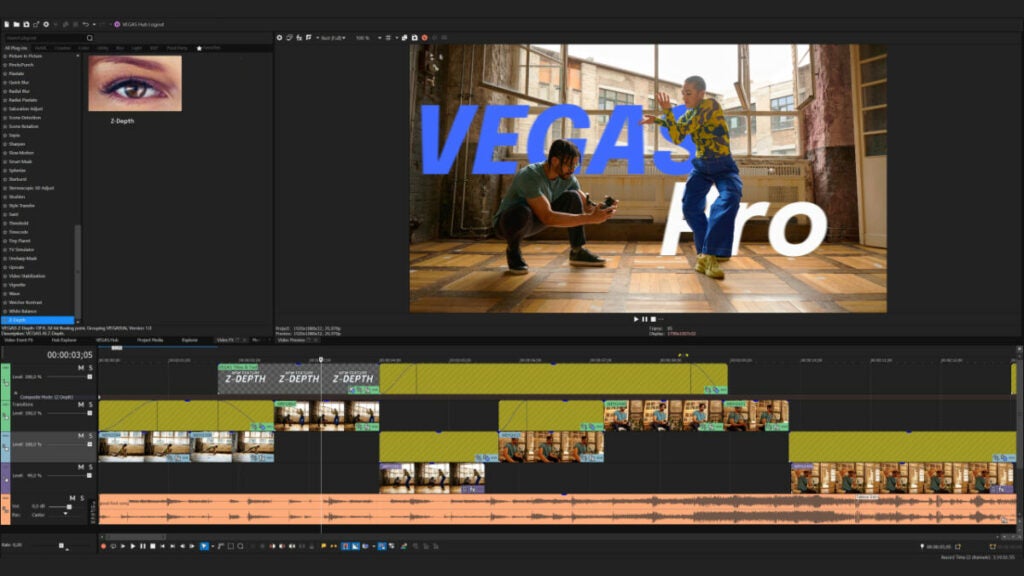
This is better summarized in a single phrase: no more manual masking. Thanks to Z-Depth, you can add objects, titles, and effects anywhere between the foreground and background with little effort.

Cloud-Based Text to Speech

VEGAS Pro’s Text to Speech feature, now powered by cloud computing, offers a wider range of languages, accents, tones, and voices to all subscribers, eliminating the need for a full update to access new additions.

Automated masking

Yes, there’s automated masking, too. Gone are the hours of painstakingly masking subjects. It tracks moving objects incredibly well, thanks to frame-by-frame analysis.

Restoration tools

A suite of tools is designed to reduce noise levels, video stabilization, and eliminate flicker from lights. If you have old 4:3 footage, you can also fill the black bars on the sides.

3D models

While others charge you separately for this, VEGAS Pro 21 allows you to use 3D models with dynamic lighting and shadows. It’s incredible for sci-fi projects but also when props are lacking.

Effects galore

With VEGAS Pro 21, you don’t need to purchase extra effects for your projects. It has more than 390 built-in, all of them excellent. It includes complex stuff such as mesh warps and lens flares.

Your First Day Using VEGAS Pro

Let’s say you’ve never used professional video editing software before. What does it look like if you purchase VEGAS Pro to edit your first video? While there are endless workflow settings and your needs can vary, it’s almost as simple as working with a phone video editor.

You choose your project settings, import the assets, and then simply drag and drop footage to the timeline in the lower part of the screen. Select different tools, such as cutting and moving, to position them in the right place.

Need to superimpose footage? Simply drag another file and drop it a little higher (or lower) than the first one, and it automatically creates another track. You can quickly work with chroma keys as well.

Want effects or fine-tune colors? Simply browse the FX section and, again, drag and drop it either to the entire track or a specific part of the footage. You can watch the results on the upper right or an external monitor.

Transitions are also a breeze. You can choose your favorite one and drop it in the timeline. Conversely, you can move the handles as you do in other video editing software. Flexibility is a major asset in VEGAS Pro 21.

When you’re done, render the video. You’ll need to choose the format and other settings. That’s it!

More VEGAS Advanced Elements

Even though VEGAS Pro 21 Edit is a highly competent piece of software, you might want additional possibilities if you’re into filmmaking or more advanced projects. This is when the Suite and Post tiers come into play.

With VEGAS Pro Suite, you’ll get additional software such as the also-beloved Sound Forge. This audio editor has been used for mastering since the 90s and is as powerful as ever. It also brings ACID for music composing.

Then there’s Mocha VEGAS for stabilization, Boris FX Primatte Studio for chroma-keying, and more.

 And if you get the Post suite, you’ll have a complete video workstation for even the most demanding projects. It includes motion tracking technology, meaning you’ll never again have to automate effects for moving objects, a soul-draining task manually. There’s also 3D compositing, a powerful image editor, and more.

There’s also a subscription model, where you can enjoy any of the three tiers for a monthly fee, and it includes cloud features and VEGAS Content, a massive library of stock footage.

In a Nutshell

VEGAS Pro 21 is a complete video workstation that allows newcomers and professionals to leave aside the cumbersome and archaic ways of others to concentrate on what’s important: working in a straightforward manner at a professional level.

The Edit package is extremely generous, offering features others lack, making it far more robust than other entry-level software. And, for most, this will be all they need to edit professional-looking videos and films.

You can explore the Suite and Post tiers for additional features if you need more. How do you know you need them? Trust me, when the time comes, you’ll know it.

Summing up, there’s video editing, and then there’s VEGAS Pro video editing. I know which one I’d choose. What about you?

Unlock a Year of Premium Features for Just $1 with CCleaner Professional!

There’s a great offer regarding CCleaner Pro. Read this article to find out all about this incredible suite for your PC, with features not found elsewhere.

CCleaner needs no introduction, as it has been around since 2005 and is the most popular PC cleaner worldwide. As the years have progressed, so has the program’s features and offerings, meeting rising needs for computer optimization and privacy. The best part is that you’re able to enjoy all of these Pro features for a year for just $1 .

CCleaner Professional One Year of Premium Features for $1

In this article we’ll check out the many features CCleaner Professional has to offer to the modern user . We’ll take a deep look at how useful these features really are, the user-friendliness of CCleaner Professional, and much more.

A Quick Glance at CCleaner Features

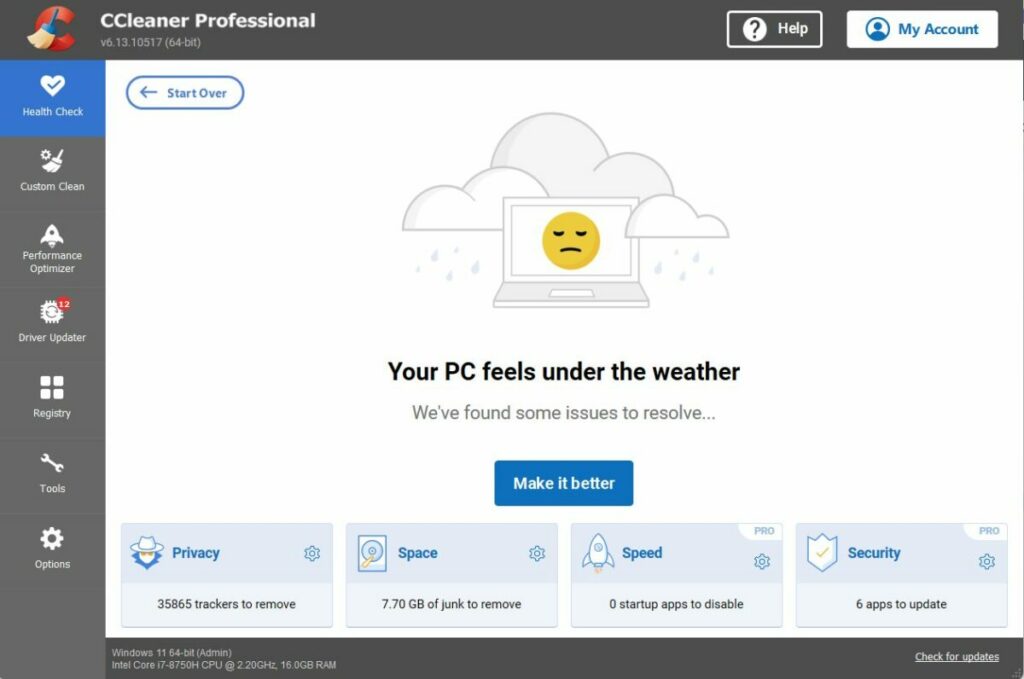
PC Health Check

The free version of CCleaner is a robust application capable of many things. Since all of the features from the free version are also included in the Pro version, let’s take a quick look at the features exclusive to CCleaner Professional.

This utility checks various aspects of your PC, such as privacy, speed, space, and more. When the analysis is complete, you can simply let CCleaner do its job by improving everything automatically for you. Speed checks and updating software are features exclusive to the Pro version.

Driver Updater

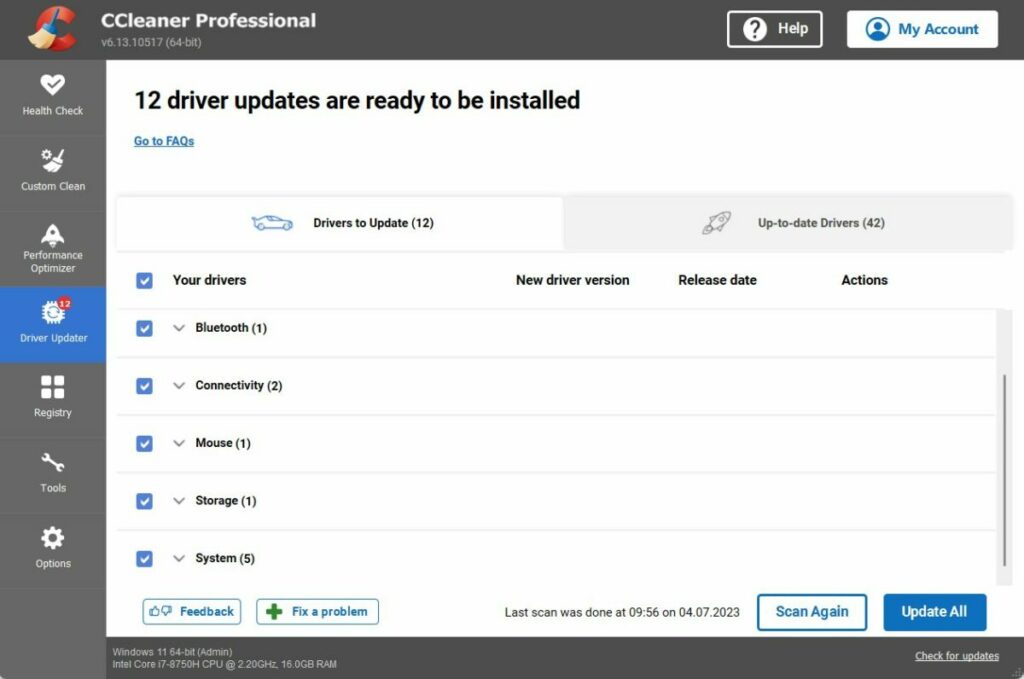
Exclusive to CCleaner Professional, this is a hub for checking all kinds of drivers in your PC and whether they need updating. You can customize it, too. You can, for instance, skip driver versions that you know are problematic.

CCleaner Professional One Year of Premium Features for $1

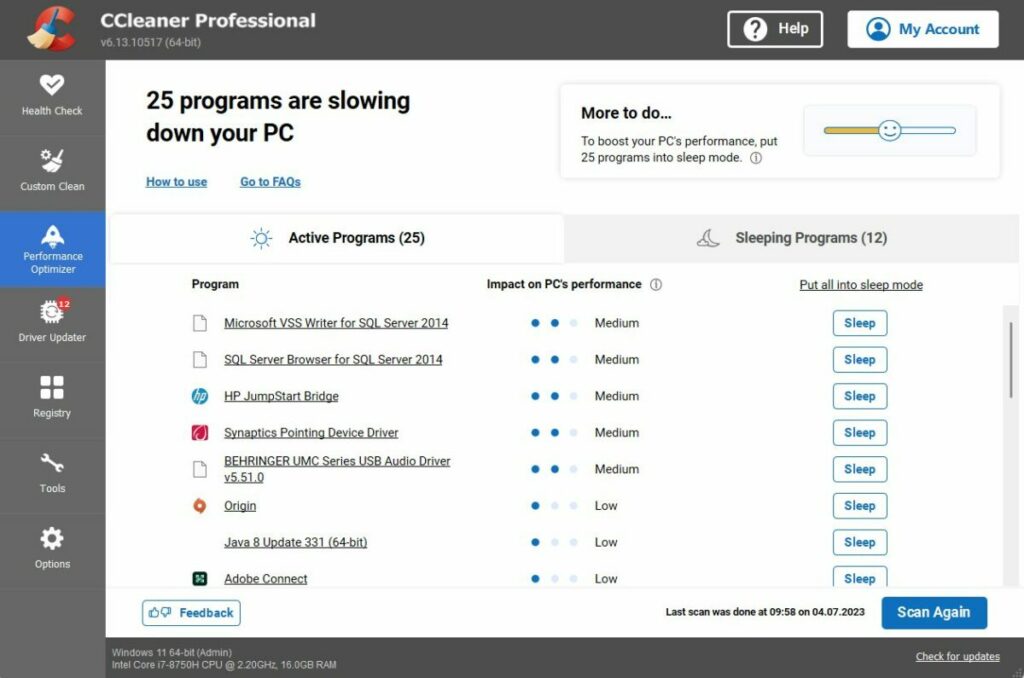
Performance Optimizer

As the name implies, this nifty feature improves performance in various ways. CCleaner Pro claims it can offer up to 30% more battery life on your laptop and up to 34% more speed overall. 

Software Updater

If you’re using old software, you might be at risk. CCleaner Professional checks for outdated software and updates it automatically.

Real-time Monitoring

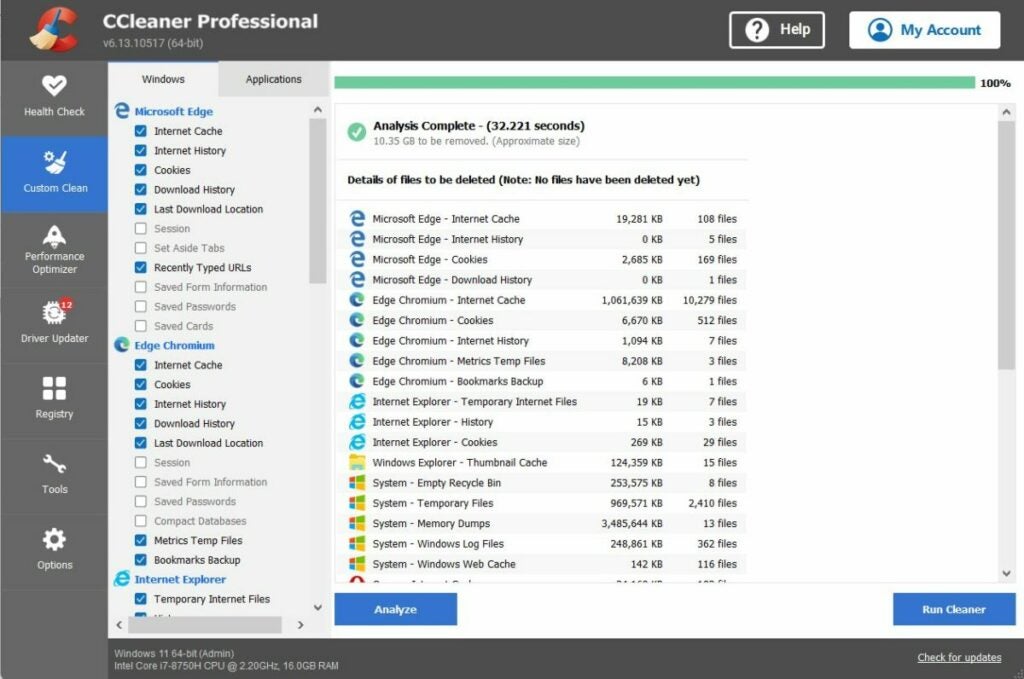
Some of the real-time monitoring features that CCleaner Professional has are a junk file protector and automatic browser cleaning. It tells you whenever you have large junk files, you can delete them, and it also cleans your internet history when closing your browser.

Deep cleaning

With the Pro version, you get top-of-the-line cleaning systems that others can’t offer, not even the free version of CCleaner.

Some Use-Case Scenarios

While it’s easy to share performance details in writing, sometimes actions speak louder than words. Let’s look at some situations where CCleaner Professional can be (and is) extremely useful.

Startup issues solved the easy way

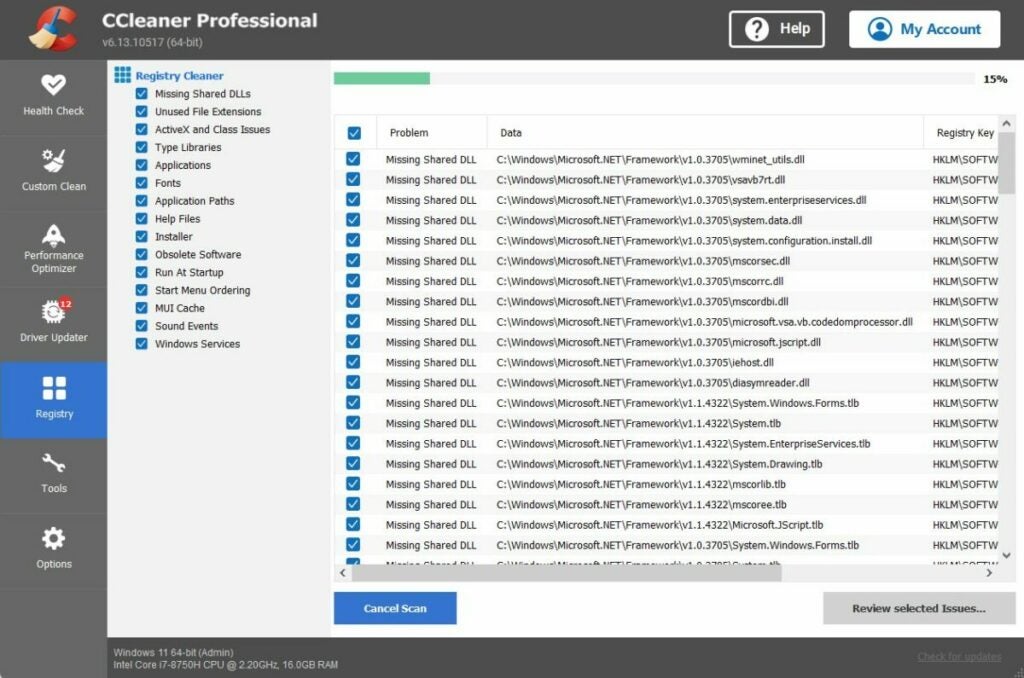
Windows starts to clog after installing software. This is especially true for services that need some real-time monitoring or background processing. It can make your computer unbearably slow, and solving it requires dabbling in MSCONFIG and other Windows features that can be complicated for regular users.

With the Pro version, you don’t need to worry about that. Not only that, but it analyzes the impact of each app when starting up so that you can prioritize. That feature alone is difficult to find elsewhere.

Intelligent sleep mode for software

This is an impressive feature only found in the Pro version. The performance optimizer analyzes your PC, finding software that might slow it down. It then explains how each program impacts your computer’s performance. That’s fine, but nothing to write home about. 

However, the most interesting aspect is how CCleaner Professional offers a solution. You can put those active programs to sleep, but it can automatically wake them up when required. This means no more messing around with the Task Manager. You can also wake them up yourself.

CCleaner Professional One Year of Premium Features for $1

Honey, have you updated your Intel(R) Management Engine Interface #1?

If you’re a dedicated PC user, you probably keep your computer up-to-date regarding drivers. However, this means little more than GPU drivers and other Windows Update recommendations.

With CCleaner Professional, more obscure updates are easily displayed (like the one in this heading), including the current version, the new version, and the release date. But more importantly, it lets you easily skip versions with a single button. That means no more Windows Update messing things up.

But Mine Is Better!

There are a lot of system utilities available nowadays. Some of them are, in fact, pretty solid choices, so why bother trying something else? Personally, I used CCleaner as my de-facto Registry Cleaner for a long time without paying a lot of attention to the extra features, so I understand where you’re coming from.

However, after carefully analyzing the Pro version, I can confidently say it makes both regular and power users’ lives easier. This is due to several factors, so let’s take a look:

  • All-In-One

Even though the free version of CCleaner is a competent package, the Pro features make it a compelling choice for your everyday system monitoring and cleaning. Most offerings don’t even come close to the range of utilities found here.

  • Ideal for Newcomers

It strikes a good balance of offering powerful tools while being friendly enough. If you don’t know much about PC and software, you can stick to the automatic tools and the real-time protection.

  • Custom-tailor it as needed

Suppose automatic processes aren’t your thing; no worries. This is a fully-customizable suite of tools, and you can personalize it almost to your heart’s content. You can set cleaning schedules or manually perform almost every action.

Some Useful CCleaner Tips

Hopefully, you now have at least a rough idea of what CCleaner Professional is capable of. That said, there are a couple of tips that can help you get started.

  • Set a cleaning schedule

One of the nicest features is to set cleaning schedules. This is great for busy users or those who tend to procrastinate regarding cleanups (I’m in that group). The best part is that you can let CCleaner either manage it or send a reminder.

  • Do some driver research

Take advantage of CCleaner Professional’s ability to skip drivers and browse online for potential issues. It can prevent an incredible number of headaches, so don’t underestimate its power!

  • Fine-tune the Smart Cleaning feature

If you enable Smart Cleaning, customize when CCleaner shows you popups. Depending on your usage, the threshold can be too high or too low.

To sum up, CCleaner Professional is very well worth the $1 for a year, and the many features offered will keep your PC in top shape around the clock.

CCleaner Professional One Year of Premium Features for $1

Level Up Your Gaming Videos This Summer with Filmora Editor

Summer is the season for gaming, but why waste precious gaming hours on tedious video editing? Say goodbye to endless editing sessions and hello to the ultimate tool for summer gaming fun: Filmora Video Editor. With its smart features, seamless editing capabilities, and user-friendly interface, Filmora empowers you to transform your gaming footage into visually stunning masterpieces in record time.

The Tool You’ve Been Waiting For

Filmora is a game-changer for content creators, emerging entrepreneurs, seasoned professionals, and students. Filmora has all the fundamental tools you need to create outstanding gaming videos regardless of your skill level. Its intuitive user interface and advanced editing capabilities cater to beginners and pros alike, ensuring a smooth editing experience for everyone.

Unleash Your Creativity with Powerful Features

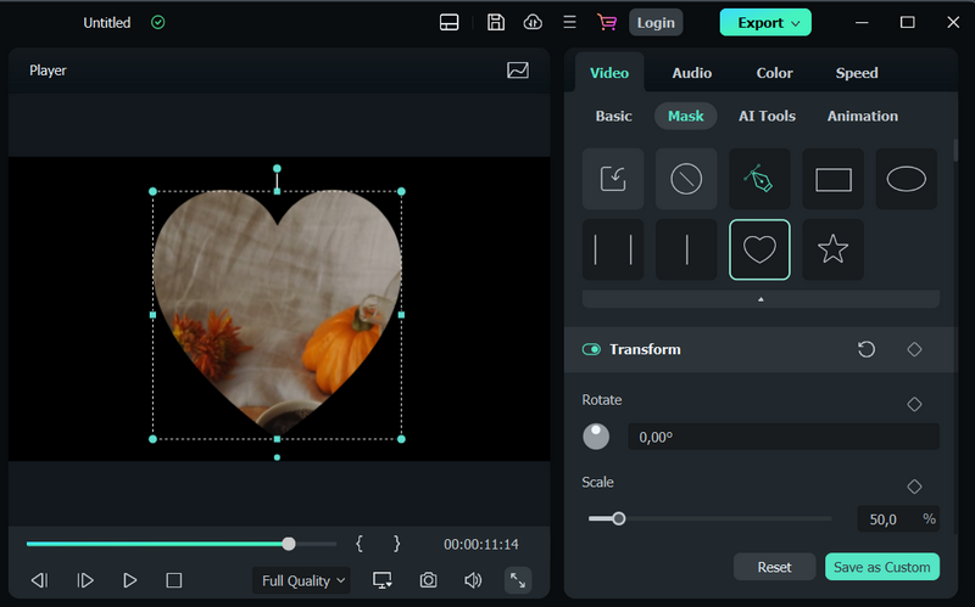
Stand out from the crowd with Filmora’s Draw Mask tool and Enhanced Keyframes feature. The Draw Mask tool allows you to effortlessly isolate shapes in your editing by drawing complex shapes with straight lines or curves. Whether highlighting a powerful gaming moment or focusing on a specific object, this tool gives you precise control over your edits. Meanwhile, the Enhanced Keyframes feature offers impressively smooth transitions, enabling you to animate split-screen clips, play with colors, and add captivating text overlays.

Save Time and Effort with AI-Powered Tools

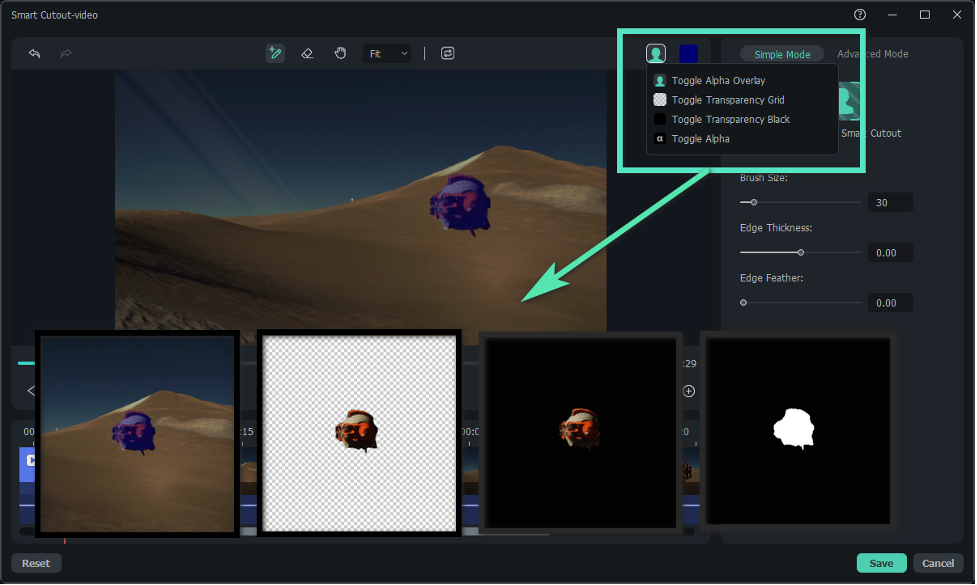
It’s game over for time-consuming green screen editing and laborious manual adjustments with Filmora’s Adjustment Layer and AI Smart Cutout. The Adjustment Layer enables you to apply the same effect instantly to multiple clips, ensuring consistency throughout your video. Meanwhile, the AI Smart Cutout intelligently selects and isolates a person or object from your footage, sparing you the painstaking task of manual editing. These features save you time and elevate the quality of your videos effortlessly.

Perfect Your Audio with AI Wizardry

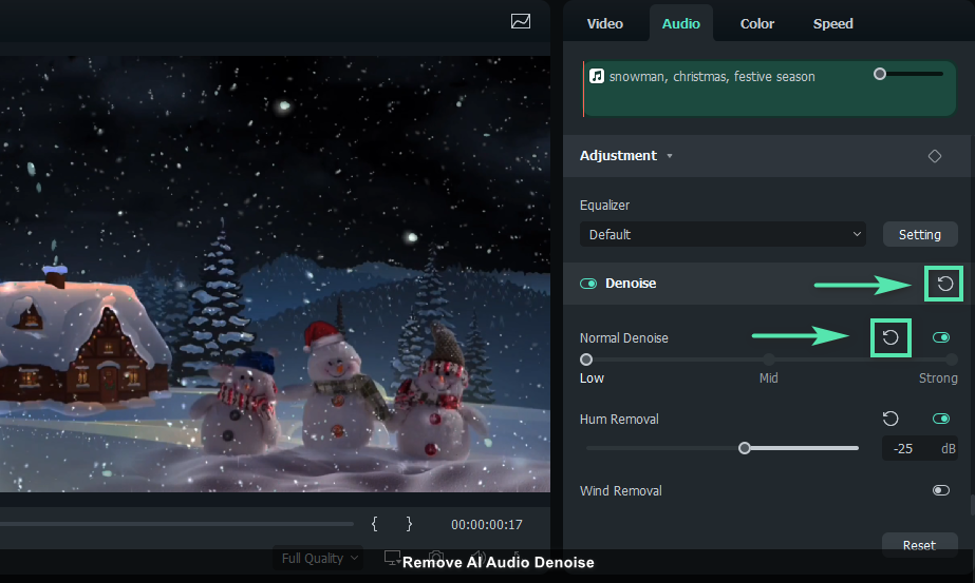
Audio editing can be a challenge, but not with Filmora. With the AI Audio Stretch tool, you can easily match the duration of any audio clip to your video, eliminating the need for manual adjustments. The AI Audio Denoise feature also detects and reduces background noise, such as talking, humming, static, or wind, resulting in clear and crisp audio for your gaming videos. These AI-powered tools take your game to the next level by ensuring your audio is as polished as your visuals.

Stand Out with Color Correction

When creating a reaction video indoors, lighting conditions and camera settings may vary, leading to differences in color tones and overall appearance compared to the original game screen recording. Luckily, Filmora’s Color Correction tool comes to the rescue. Adjust colors, correct imbalances, fine-tune contrast, and balance lighting effortlessly to create a natural and captivating visual experience. Whether you want to emulate the style of your favorite artist or create a unique aesthetic, Filmora makes color correction a breeze.

Unlock a World of Possibilities with Green Screen and AI Features

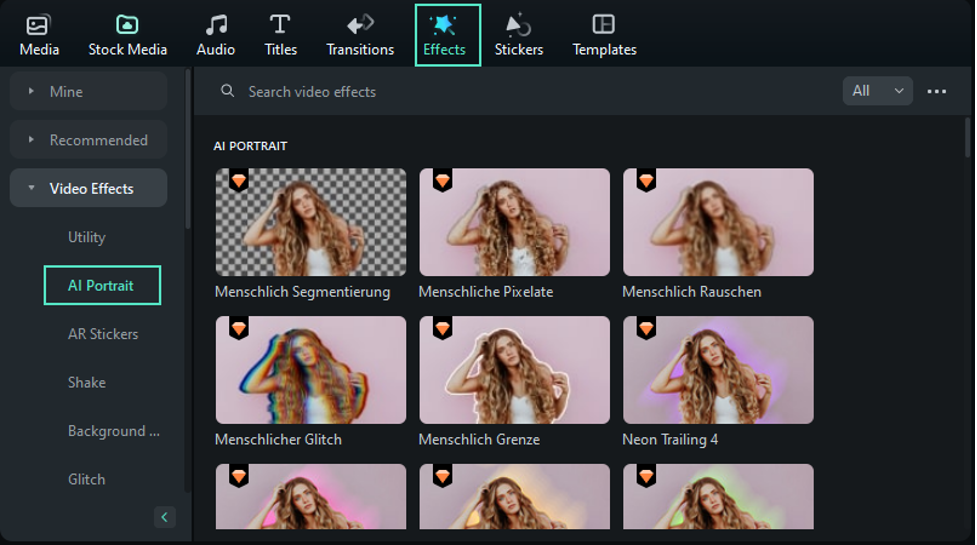
Filmora’s Green Screen and AI Portrait features are nothing short of game-changing. With the Green Screen tool, adding dynamic backgrounds to your videos becomes a breeze, immersing your viewers in a seamless gaming experience. Additionally, AI Audio Visualizer add a touch of professionalism to your creations, giving your gaming videos that extra oomph they deserve.

Make the Most Out of Your Summer with Filmora

Filmora is the ultimate tool for all your video editing needs this summer. Whether crafting gaming videos for a large audience or capturing casual content for friends and family, Filmora’s features will help you deliver high-quality and visually captivating content. Let Filmora help you turn your ordinary gaming videos into extraordinary creations this summer. Experience the power of effortless editing with Filmora today and level up more than just your game!

Mylio Photos: The Most Advanced and Private Photo Gallery Ever

See how Mylio Photos can enhance and help you manage your photography. Read more here!

Photo galleries are a given nowadays on most devices. There are simple apps that allow you to view your images and share them with friends and family, and others with more advanced features. These include face recognition abilities thanks to AI, location, camera settings, and much more. Sadly, those nifty features come at a cost: your information is in the cloud, with all the privacy concerns it might raise. That’s where Mylio comes in.

Mylio Photos takes a whole set of powerful ideas when it comes to organizing, sharing, accessing, editing, and categorizing your photos that even surpass other popular galleries, and does so without any need to upload them to the cloud. This way, you know your privacy is respected while you get state-of-the-art technology for all your photo gallery needs.

Mylio Photos DOWNLOAD

Best of all, the app is completely free. But if you’re in need of even more features, you can get Mylio Photos+ with premium benefits. It costs $9.99/month or $99/year. But what can Mylio Photos do? Let’s check the most critical aspects of this app.

Powerful AI Recognition Features

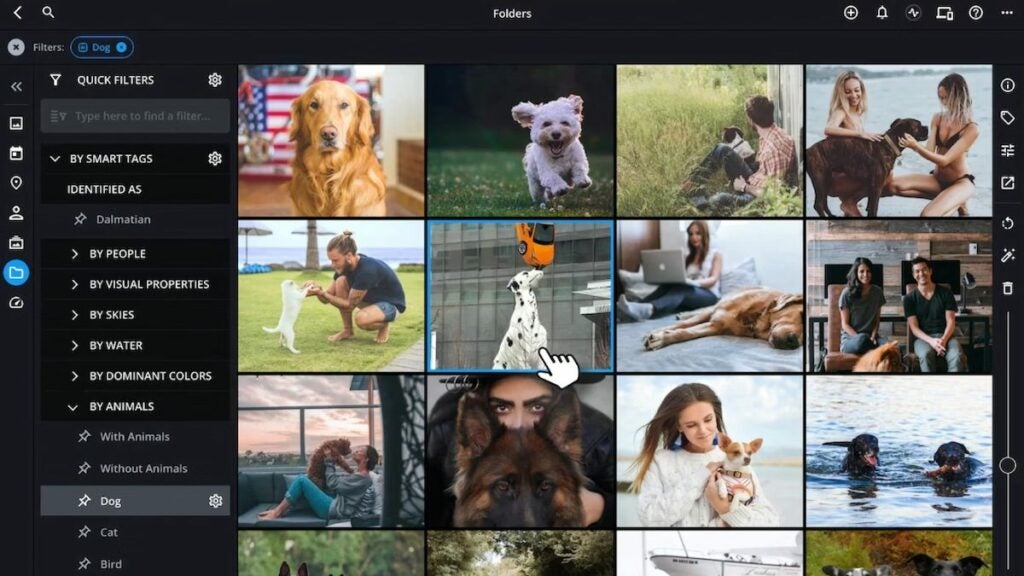
Mylio Photos is no stranger to powerful organizing features, and one of the highlights is its AI capabilities. Its AI is capable of categorizing pictures by recognizing objects or features. This means, for instance, that it can automatically label all pictures containing food, horses, and many other types of objects.

Another interesting feature is facial recognition. Again, thanks to its powerful AI, it can recognize faces to categorize photos for easy browsing. It allows you to put names on faces, so you can later type “John” to find all photos where John shows up.

Privacy Comes First

When using AI and powerful gallery capabilities, you might wonder what happens with your information. As you probably know, most offerings process your data on the cloud, meaning you have no control over the servers in which it happens.

The critical difference between Mylio Photos and other offerings is that everything runs locally on your device. Your pictures are safely stored and there are no external servers involved in the processing of images.

It also has a feature called SafeShare that allows you to remove all personal information from your pictures when you share it with other platforms.

Browse Easily with Mylio Photos

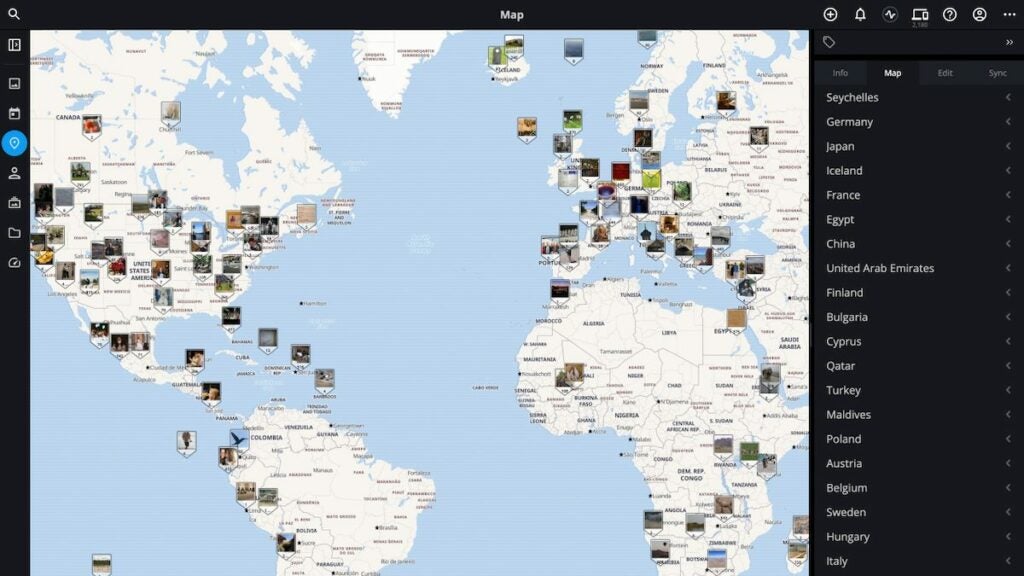
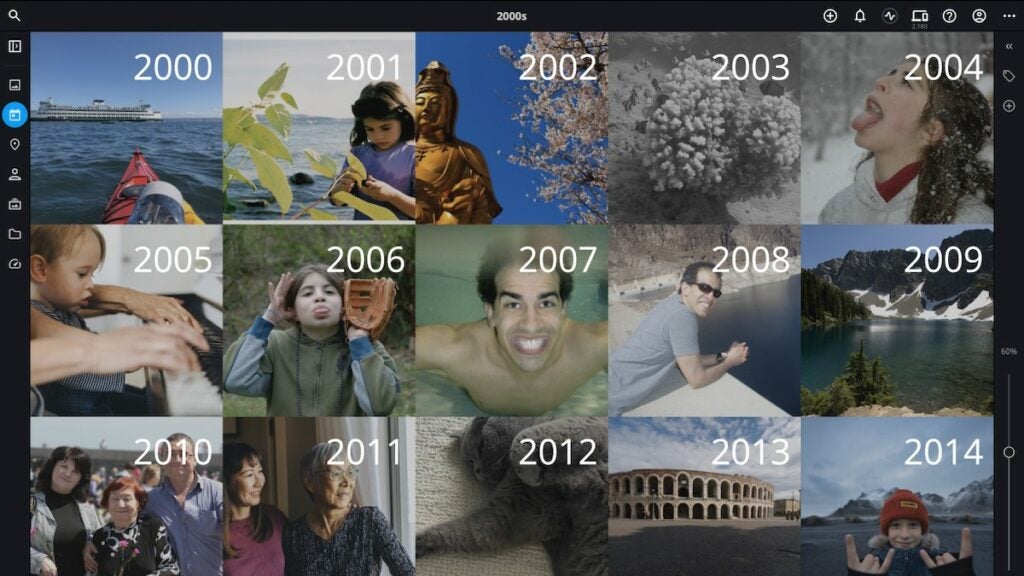
This app is not just about AI. There are many ways to organize photos, such as date, folder, person, camera, and other settings. Some of these categories offer additional features, with one of the most interesting being location. 

When you explore images, a handy feature allows you to check the map where each photo was taken, and you can even search the web for information. It’s very convenient because you don’t need a separate browser to perform such actions.

Mylio Photos Helps to Save the Best Moments

If you use a smartphone for taking pictures, chances are you take many photos of the same situation to pick the best one. If you do so, you know how tiresome the whole process is. Worst of all, many don’t take the time to delete the extra features.

Mylio Photos can analyze pictures automatically to choose the best ones and eliminate bad and similar pictures. This is a lifesaver when you’re in need of freeing up space.

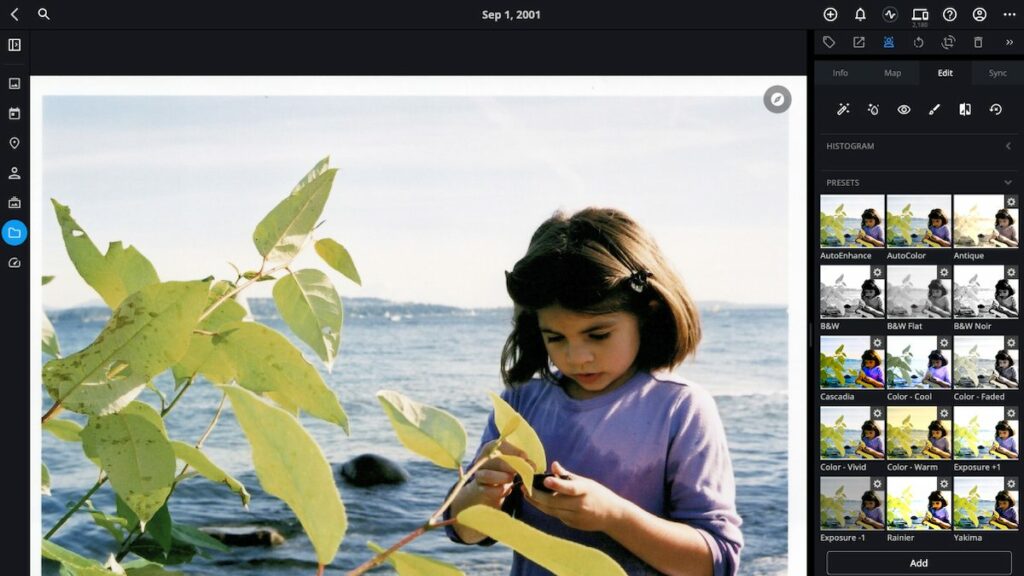
Edit Images with Professional Quality

No photo gallery worth it comes without a decent set of image-enhancing tools. Mylio Photos is no exception, and it offers many ways to polish your images. You can change the exposure, color balance, and contrast, among others.

The best part is that you can choose from a set of automatic enhancements that allow you to create the perfect photo with a single click.

Working Outside of Mylio Photos

A very important feature is that you’re not a hostage of Mylio Photos while using it. You can easily share your library with other apps and even websites via the Share and Open With menus. 

There’s also a clipboard feature that lets you copy and paste images to other devices for further editing or any other needs.

Mylio Photos+ Features

Mylio Photos offers amazing value, especially when you consider it’s a free app and runs locally. However, upgrading to Mylio Photos+ allows for some important upgrades, including:

  • Allowing access to your pictures from any device by designating a hard drive as a Vault.
  • Allowing cloud synchronization with Google, OneDrive, and others while encrypting your images.
  • Reducing your image data size with the SpaceSaver technology, which allows you to store up to 15x more images.
  • Deleting duplicate files easily with the Photo DeDupe tool.
  • Synchronizing images between devices on-demand

Advanced Photo Gallery Done Right

As you can see, Mylio Photos is an incredible package that can make your life considerably easier whenever dealing with pictures on any device. It has a complete suite of powerful tools and AI capabilities without compromising your privacy.

If you’re in need of additional features, you should consider Mylio Photos+. It offers all the connectivity needs you might have and does so, again, with top privacy features and interesting enhancements such as the SpaceSaver tech. Give it a try today!

Mylio Photos DOWNLOAD