Tom Hanks releases typewriter iPad app for hipsters with writer’s block

Typewriter lover and actor Tom Hanks has released an iPad app that simulates typing on a type writer. The app, called Hanx Writer is free, and is great for basic writing.

The best feature of Hanx Writer is the noise it makes. The sounds of the typewriter hammer falling on paper and the ding it makes at the end of each line are authentic. Even the backspace sound is satisfying.
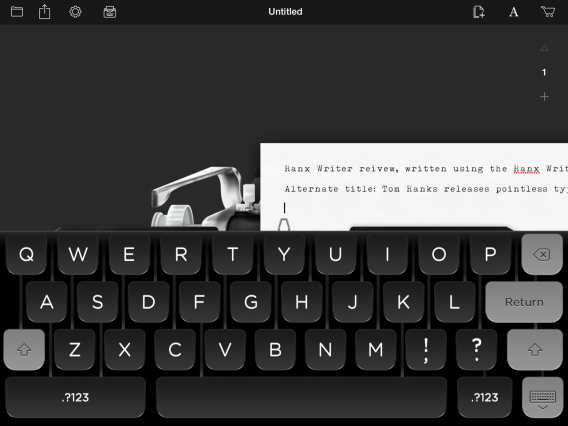
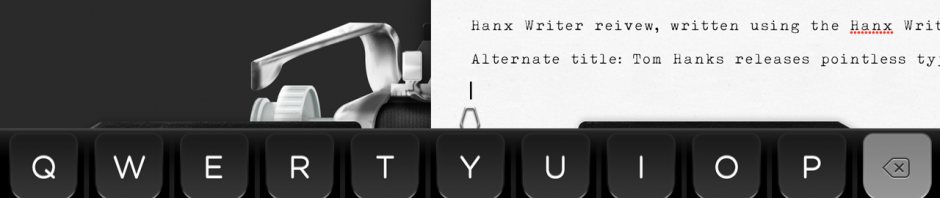
Hanx Writer virtual keyboard

Beyond the sound, Hanx Writer just can’t capture the feel of typing on a typewriter. One of the joys of typing on a typewriter or a mechanical keyboard is feeling the resistance of the keys. You just can’t get that with a digital screen. Things get a bit better if you use a Bluetooth keyboard like I am.

The app supports exporting your compositions to various app including email, Google Drive, Evernote and Dropbox. Unfortunately, it can only export as PDF. You can print out your writing so it looks like you actually typed it out on a type writer.

Hanx Writer additional type writers to buy

Hanx Writer includes in-app purchases for different typewriters and background colors. Each typewriter also sounds different. There are only two additional typewriters to buy at the writing of this article. Each type writer costs $2.99. You can get both for $4.99 as a bundle.

Hanx Writer may be a bit of a gimmick but if the sounds of a typewriter spark your creativity, it may be worth a download.

Pro tip: use the Coffitivity app (Android | iOS | Mac) to listen to the sounds of a coffee shop while you write. Coffitivity is available as an app or you can use their website.

Source: Hanx Writer (iTunes)

Related Stories

The Expendabros is the best movie game ever

Google Hangouts gets Facebook ‘Chat Heads’ in leaked experiment

The Walking Dead Pinball arrives August 26

Twitter will get video ads like Facebook

Facebook fixes iOS app bug to reduce crashes by 50%

Follow Lewis on Twitter: @lewisleong

Pro Evolution Soccer 2015 demo September 17 with November 11 release

Konami announced that Pro Evolution Soccer 2015 will be released November 11, 2014 for all major consoles and PC in the US. The EU release is scheduled for November 13.

Ahead of the November release, PES 2015 will have a downloadable demo for PlayStation 3, PlayStation 4, Xbox 360, and Xbox One on September 17. Currently there isn’t any word about a demo for PC.

If you’re wondering if there’s a difference between the PC version compared to consoles, Adam Bhatti, PES EU Brand Manager, said via Twitter “PC users: same modes and gameplay as PS4/Xbox One. Better visuals than PS3/Xbox 360. A hybrid really.”

This is the first year that PES and FIFA will be going head-to-head again so it should be interesting to see which game captures the interest of soccer fans.

Source: Polygon | MCV

Related Stories

Gamescom 2014 – Battlefield Hardline single player campaign revealed

Metal Gear Solid 5: The Phantom Pain and Ground Zeroes are coming to Steam

The Expendabros is the best movie game ever

FIFA 15 trailer shows improvements to agility

Follow me on Twitter: @chrislikesrobot

http://features.en.softonic.com/the-expendabros-is-the-best-movie-game-ever

Adobe releases critical patches for Flash Player, Acrobat and Reader

Adobe has patched critical flaws in a few of its products that could allow hackers to “take control of affected systems.” If you’re on Windows and use Adobe Flash Player, Acrobat or Reader, you’ll want to update your software immediately.

Although these fixes are marked as critical, Adobe says the exploits have only been used in “limited, isolated attacks.”

If you are using Google Chrome, your browser should have been updated automatically to include the latest secure version of Flash Player. To check if Chrome has an update, click the Menu button and then About Chrome. You’ll be prompted to restart the browser if an update is found and installed. Firefox, IE, and Safari users will want to download the latest Flash version below.

Adobe has a history of security flaws with these products so you may want to switch to other programs. If you’re looking for a free PDF reader, check out Foxit Reader. Browsers like Firefox and Chrome come with a built-in PDF viewer already so you don’t even need another program. Macs come with a free PDF viewer called Preview and are not affected by these vulnerabilities.

Download Adobe Flash Player: Mac | Windows

Download Adobe Acrobat: Mac | Windows

Download Adobe Acrobat Reader: Windows

Source: Adobe | Via: The Hacker News

Related Stories

Report: iOS has the best mobile security

Why Facebook Messenger permissions aren’t unique or dangerous

How to protect your online identity and why you should care

App of the Week: DU Speed Booster

Google to give preference to more secure websites in search results

Follow Lewis on Twitter: @lewisleong
Google Hangouts gets Facebook ‘Chat Heads’ in leaked experiment

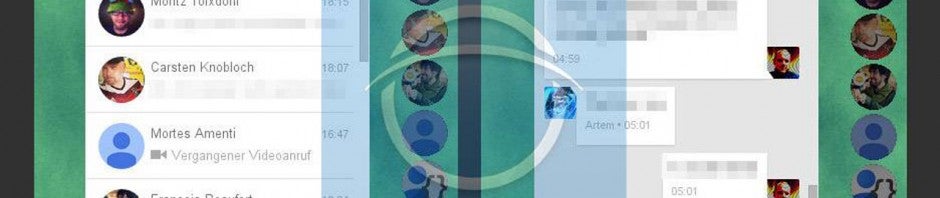
Google is experimenting with floating chat bubbles for its Hangouts (Android | Chrome| iOS) messaging service in a leaked experiment. Screenshots show floating bubbles which expand a chat with a contact when clicked on. This feature resembles the Chat Heads feature found in Facebook Messenger for Android and iPad.

The leaked screenshot above shows a line of floating circles to the side of the screen. The green hangouts circle at the bottom lets you expand your contacts list with a search bar at the top. Once a contact is selected, a chat window expands to the left.

If this feature is anything like Chat Heads it’ll allow users to chat anywhere from their computer. The circles will float above all other windows for easy access. They can be dragged and moved if blocking something on the screen. While the screenshots only show a desktop version, it’d be nice to see a similar feature on Android.

Don’t expect to see this feature any time soon as the feature requires experimental developer tools only found in Google Chrome’s developer channel.

Source: Caschys Blog | Via: Android Police

Related Stories

Why Facebook Messenger permissions aren’t unique or dangerous

Simple communication app Yo gets new features

Group screen sharing now free for Skype on Windows and Mac

Skype to discontinue support for Windows Phone 7

Skype no longer works on Mac OS X Leopard or earlier versions (update)

Follow Lewis on Twitter: @lewisleong

Gamescom 2014 – FIFA 15 demo out next month before September 26th release

EA Sports has announced that FIFA 15 will be out on September 26th, and it will be preceded by a demo in the same month. The company also launched a new trailer showcasing new goalkeeper animations in this year’s game.

According to EA, the latest generation of goalkeepers has been completely remodeled, with around 50 new animations, better artificial intelligence, and more realistic models. The trailer is one of a series the company is publishing to show off FIFA 15’s improvements in realism, each one focusing on one area of gameplay.

Default player


brightcove.createExperiences();

During EA’s conference, we saw how players react emotionally during gameplay, looking annoyed and frustrated at poor passes, and happy when things go right. There are more than 600 emotional responses possible during a match, which should make them look and feel more like the real thing. FIFA 15 also features pitch weathering and degradation, and players will get splattered with mud when it’s wet.

Watch this space to find out when the FIFA 15 demo is available to download for PC.

Related Stories

FIFA 15 trailer shows improvements to agility

E3 2014: FIFA 15 Ultimate Team’s new features

FIFA 15 lead producer Sebastián Enrique talks gameplay, control and response

Follow me on Twitter: @jonathanriggall

Histropedia lets you build cool visual timelines of historical events

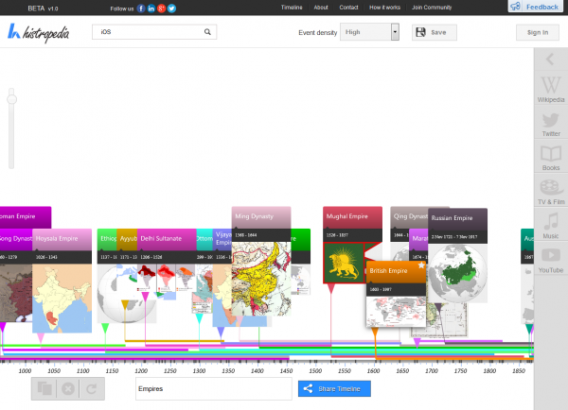
Histropedia is a new tool for creating visual timelines of historical events. It was shown in public for the first time at the Wikimania conference in London this weekend. Taking data from Wikipedia, it will allow you to automatically make timelines based on almost whatever you want.

The site is still in beta, but already very easy to use, and flexible. You can browse featured timelines about empires, famous artists, or Apple computers, to name a few. Alternatively, you can create your own timelines by searching for events and adding them.

Histropedia adds related content to the events on the timeline, from YouTube videos and Wikipedia articles, to books and music. The quality varies, however, depending on what the subject is. Wikipedia is generally good, but book results taken from Amazon clearly need more work in places.

According to Histropedia’s creators, they are only about halfway through its development, meaning we can expect lots of improvements. It currently works with Wikipedia in English, but will work in all languages eventually. It should be complete within four to six months.

Try creating your own historical timelines on Histropedia.

Source: The Guardian

Related Stories

Comparison: Health & fitness apps for your smartphone

What can I do with my tablet: entertain the kids

Among the Sleep puts you in the mind of a two-year-old

Follow me on Twitter: @jonathanriggall

Angry Birds Stella release date announced

Rovio’s upcoming Angry Birds game, Angry Birds Stella, has got a brand new trailer and official release date – September 4th 2014. Check out the trailer below.

Announced back in June, Angry Birds Stella will be released on mobile – most likely iOS and Android to begin with – and will be accompanied by a cartoon series beginning in November. The game looks like yet another spin on the Angry birds formula. Rovio are promising new powers for the birds, and ‘exciting gameplay features’ to make it challenging even for experienced players.


brightcove.createExperiences();

Angry Birds Stella follows the adventures of Stella and her girlfriends battling Gale, a bird who has turned to the dark side and joined the Piggies. This is the first Angry Birds game with all-female characters, but it looks pretty stereotyped so far, with ‘cute and cuddly’ characters and plenty of traditionally girly colors. Will this capture the attention of female gamers?

Follow Jonathan on Twitter @jonathanriggall

RELATED STORIES

XBMC media software is now Kodi Entertainment Center

Popular media management software XBMC has been renamed as Kodi Entertainment Center. The open source software, used to control your music, TV and movies, changed names to avoid legal issues.

XBMC originally stood for Xbox Media Center, since it was created by a group of developers to run on the original Xbox. In 2008, developers changed the name to XBMC to avoid legal trouble. Still, some users were confused by the fact that XBMC was not a Microsoft product.

Getting rid of the “Xbox” part of the name makes sense as the software hasn’t run on any Xbox console except for the original.

While the app now has a new name, the interface and features will remain the same.

XBMC won’t get a rebranded until the next update, version 14. For now, you can still download XBMC is available for Android, iOS (Jailbroken), Mac, Windows and more.

Also check out Plex (Android | iOS | Mac | Windows | Windows Phone), a fork of the XBMC project, if you want a simple cross-platform media streaming app.

Source: XBMC

Related Stories

iTunes 11.3 expands Extras content to Mac and Apple TV

Movies purchased from Google Play now show up in YouTube

The 7 most important announcements from Google I/O 2014

Follow Lewis on Twitter: @lewisleong
Google Now Launcher available for all Android 4.1 and above devices

The Google Now Launcher has been released for devices running Android 4.1 (Jelly Bean) or higher. The launcher was originally released last year for Android 4.4 (KitKat), then for all Nexus and Google Play devices in February.

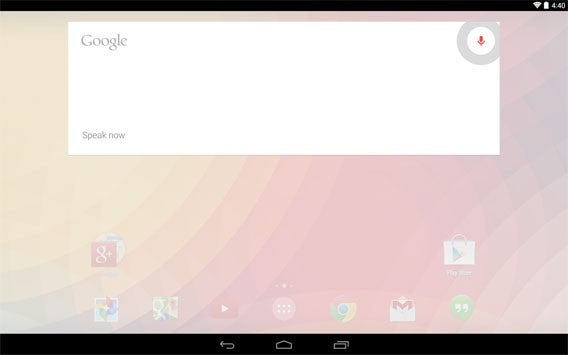
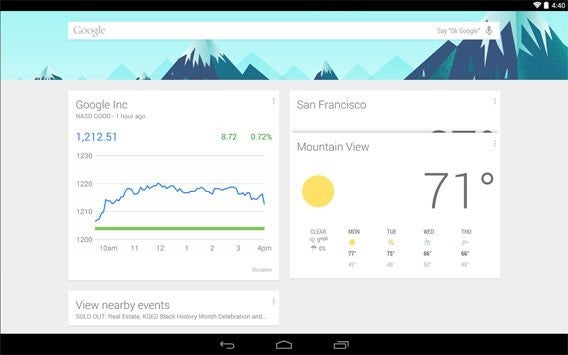
The Google Now Launcher gives you a new home screen, that Google describes as ‘clean, simple and customizable.’ Swiping the home screen brings up your Google Now cards, and you can search either by tapping the search or saying ‘OK Google’ to activate voice commands.

With voice input activated, you can search or tell your phone to send a text message, play a song, or other similar functions. Being a Google product, the launcher gives you easy access to services like Gmail, YouTube or Maps, so it’s great if you’re a big user of Google. The new launcher also features a new wallpaper picker, and translucent status and navigation bars so that your wallpaper is always visible.

Download Google Now Launcher for Android.

Related Stories

Follow Jonathan on Twitter: @jonathanriggall

Sacred 3’s new screens before August 5th release

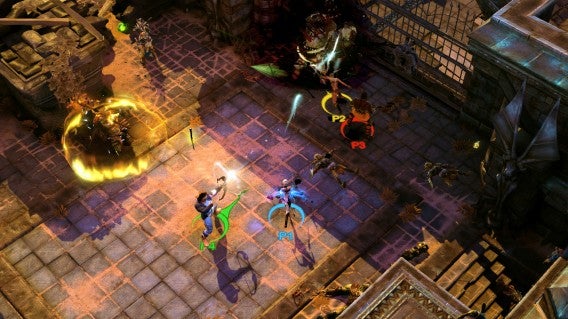
Sacred 3 will launch on August 5th, but before the game is available on Tuesday Deep Silver released five screens for the hack-and-slash game.

If you’re a fan of arcade hack-and-slash games, Sacred 3 will be a title to keep your eye on.

Sacred 3

Sacred 3

Sacred 3

Sacred 3

Sacred 3

Sacred 3 will be available on PC, PlayStation 3, and Xbox 360.

Related Stories

Call of Duty: Advanced Warfare trailer warns of PMC Atlas

FIFA 15 trailer shows improvements to agility

Homefront: The Revolution in development at Deep Silver Dambuster Studios

PlayStation Now PS4 open beta on July 31

EA Access is a subscription to EA games on Xbox One

Follow me on Twitter: @chrislikesrobot