What is HANGOUTS / GOOGLE CHAT and how it works

Google Hangouts is an easy way to stay in touch with all the people synced to your account. It’s a free social service that lets you communicate by sending text messages, pictures, videos, and emojis. You can send messages to people whether they’re online or not and host free group video calls for up to 10 people at a time. 

Hangouts is a simpler free version of Google Chat and Google Meet designed for individuals rather than businesses. You have to pay a monthly fee to use Google Chat and Google Meet, but Google Hangouts is free. 

What’s Google Hangouts used for?

Hangouts is a social and communication service you can access on any of your devices as an app. You can also use it on your computer using the Chrome extension. Hangouts is part of Google’s suite of online apps that include Signal and WhatsApp. Google Hangouts is an all-in-one communication tool that you can use at home or when you’re out on various devices. If you have an account on any other Google service like YouTube or Gmail, you’re set to use Hangouts.
What is HANGOUTS  GOOGLE CHAT and how it works 2

How Google Hangouts works

When you open a new message, Google Hangouts shows you a list of everyone online and therefore available for a call or chat. The Google Duo icon also allows live feeds from the user’s camera. Chats are an easy way to communicate with friends.

If you want to chat with a friend, all you have to do is type their email address or name in the search bar and send them an invitation. You can add people to your chat by clicking on the plus icon at the top of the chatbox. To send a photo to everyone in your group, click the image icon. 

To make a video call, click the video call button, and a window will pop up. You can use in-call messaging to share notes, photos, and links. 

This app will sync your chats and update your messages to all your devices. 

Useful features 

You can send messages to people even when they’re offline. You can tap on their name, write something in the text box, and hit ‘Send’ without worrying if they’re busy with other things. You can snooze your notifications. This prevents distractions while you’re busy.

You can also make phone calls using Google Voice, send text messages or check your voicemail. Google has added a new feature to let users see the history of your conversations. Called Hangout History, it saves all your conversations on Google Drive for easy access.
What is HANGOUTS  GOOGLE CHAT and how it works 2

Using the Chrome extension 

The Hangouts Chrome Extension on browsers like Firefox or Safari gives you access to everything available in an instant messenger. This includes screen sharing, voice chat, and video calls. 

If you want to install Hangouts on your computer, you’ll have to download the Hangouts Chrome extension. If you click on ‘Add to Chrome’, the extension will open automatically.

The history of Google Hangouts

Google Hangouts was launched in 2013 to replace Google+ Messenger and Google Talk and combine all its calling and messaging services. Google Hangouts now competes with other popular apps like WhatsApp and Facebook.

Is Google Hangouts safe?

Google Hangouts is safe to use. Messages sent and received and calls are encrypted, so your privacy is protected. To protect your own safety, only answer messages and calls from people you trust.
What is HANGOUTS  GOOGLE CHAT and how it works 2

The best and worst of Google Hangouts

Pros

  • The interface is easy to use
  • You can sync chats and contacts across many devices
  • You can integrate Google Voice
  • Excellent default security settings 


Cons

  • Connections are sometimes unclear
  • Video quality can vary

Summary

Google Hangouts is perfect for people who want an easy way to chat with family and friends. It’s easy to understand and use. It has everything you might need for communication without lots of extras that would make it too complicated. 

Google Hangouts is completely free. All you need to use the app on any of your devices is a Google account. Just remember that it’s designed for personal use. There’s a monthly charge for other business-orientated communication apps like Google Chat and Google Meet.


Google Hangouts is officially on the way out

The Google Hangouts shutdown will begin October 2019.

google hangouts to be shutdown

Google Hangouts is Google’s most popular messaging app. On mobile, Hangouts has seen over 1 billion downloads on Android and for desktop, it has enjoyed its privileged position as the main chat facility for Gmail’s 1.5 billion users. It has been around for over 13 years when it started its life as Google Talk. Google has now released details of how it will shut down Google Hangouts and move users to its new app: Hangouts Chat.

Hangouts Chat Download now
6

The Google Hangouts shutdown will begin October 2019

In a blog post announcing the Hangouts shutdown, Google described how it will be enterprise Gsuite customers who will be the first to see the app go. The post mentions a piece from 2017 in which Google talked about the next generation of Hangouts focusing on team communication and it seems that the new timetable shows how this move will be implemented.

According to the recent blog post from Google, these are the key dates to be aware of in the lead up to Hangouts retirement:

“…timeline of changes

  • April 16, 2019 – Several changes that may require administrator action.
  • Between April and September 2019 – Features from classic Hangouts will come to Chat.
  • October 2019 – Start retiring classic Hangouts for G Suite customers.”

G Suite users will start to lose access to Hangouts in October with regular consumers being switched off sometime in 2020.

For those who like Hangouts, the good news is that from April, Google will begin work on migrating some of the key Hangouts features to Hangouts Chat. With Hangouts being Google’s most popular messaging app ever, it would be an own goal for the search giant to not include most, if not all, of the features Hangouts users have enjoyed in this migration.

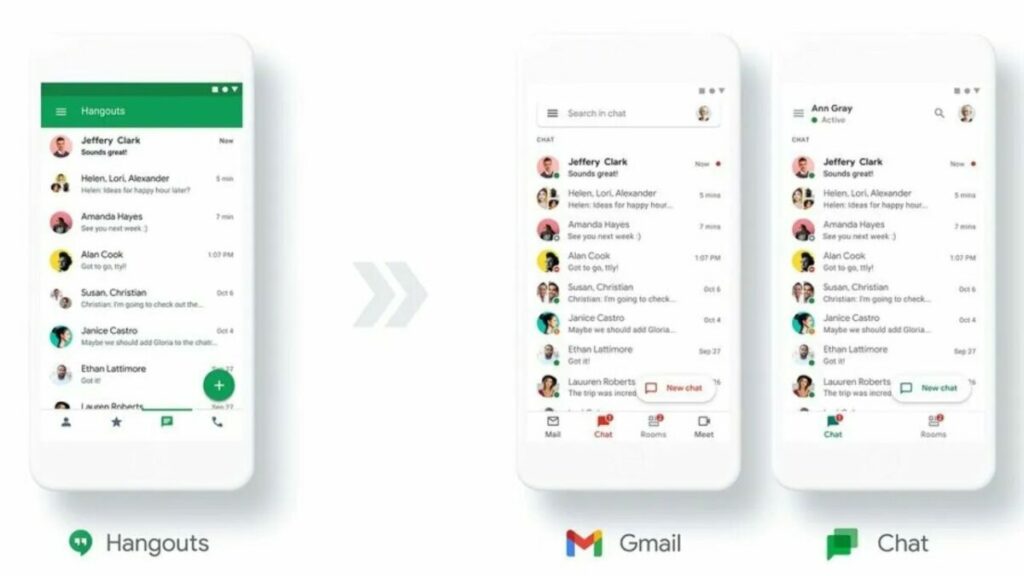
The key thing to understand here is that essentially Hangouts is now three apps, but that the two newest apps mark different key features from the original Hangouts app. Hangouts Chat is the Slack-like app that will deal with messaging, while Hangouts Meet is a video-conferencing app. To avoid confusion around this issue, Google is now calling the original Hangouts app Hangouts Classic. Google HQ is now committed to taking the best of Hangout Classic’s features and moving them across to the two newer Hangout apps before decommissioning it.

The funny thing about all this is that Google is doing it to simplify its messaging app output. Google is currently carrying out plans that will remove Hangouts and Google Allo from its roster. Once they’re gone, that’ll leave Google with five messaging apps available, which is the same number of apps it had before it introduced Hangouts Chat and Hangouts Meet.

This new direction doesn’t appear to make too much sense and hinges on the successful migration of users from Hangouts Classic to Hangouts Chat and Hangouts Meet. Maybe all will become clear further down the line, but it is clear that the next few months will be crucial for Google’s messaging strategy.

Hangouts gets Facebook-like Chat Heads on Windows and Chrome OS

Google’s multi-platform messaging app Hangouts received a major redesign today. Windows and Chrome OS users now get Facebook-like “Chat Heads” that can be dragged around the screen. It’s much easier to read and minimize messages than with the old chat windows.

This offers more flexibility than the old Hangouts extension for desktop. You’ll still need to download a Chrome extension but the app can run without Chrome being launched. This means you can use the Hangouts app in conjunction with other browsers like Firefox. Links received in Hangouts will open in your default browser.

The updated Hangouts app also supports voice calling from your desktop. It even integrates Google Voice so you can receive your text messages and transcribed voicemails in their own chat windows.

If you’re already using Hangouts, you’ll be prompted to update over the next few weeks. Or you can just download it now at the link below.

Download Hangouts for Windows and Chrome OS

Download Hangouts for Android and iOS

Related Stories

Ads not coming to WhatsApp in the ‘near term’

Snapchat will get ads soon

HTC to bring Zoe photo and video app to iOS later this year

Rumor: Google Play experimenting with app trials

Follow me on Twitter: @lewisleong

Google Hangouts gets Facebook ‘Chat Heads’ in leaked experiment

Google is experimenting with floating chat bubbles for its Hangouts (Android | Chrome| iOS) messaging service in a leaked experiment. Screenshots show floating bubbles which expand a chat with a contact when clicked on. This feature resembles the Chat Heads feature found in Facebook Messenger for Android and iPad.

The leaked screenshot above shows a line of floating circles to the side of the screen. The green hangouts circle at the bottom lets you expand your contacts list with a search bar at the top. Once a contact is selected, a chat window expands to the left.

If this feature is anything like Chat Heads it’ll allow users to chat anywhere from their computer. The circles will float above all other windows for easy access. They can be dragged and moved if blocking something on the screen. While the screenshots only show a desktop version, it’d be nice to see a similar feature on Android.

Don’t expect to see this feature any time soon as the feature requires experimental developer tools only found in Google Chrome’s developer channel.

Source: Caschys Blog | Via: Android Police

Related Stories

Why Facebook Messenger permissions aren’t unique or dangerous

Simple communication app Yo gets new features

Group screen sharing now free for Skype on Windows and Mac

Skype to discontinue support for Windows Phone 7

Skype no longer works on Mac OS X Leopard or earlier versions (update)

Follow Lewis on Twitter: @lewisleong

Google Hangouts doesn’t require a plugin in Chrome

Google is making using Hangouts even easier by building it into its Chrome browser. I reported this feature would be coming, but it has finally arrived in the experimental versions of Chrome.

If you’re running Chrome Canary or other developer build of Chrome, you can get this feature today. The rest of us will have to wait a few weeks until Google fixes all the bugs.

Users of other browsers like Firefox, Opera, and Internet Explorer will still need to install the plugin for Hangouts to work.

Source: Victoria Kirst (Google+)

Follow Lewis on Twitter @lewisleong

RELATED STORIES

9 surprising features in Google Hangouts

In the world of VoIP calls and free video, a war started ages ago between Skype (owned by Microsoft), mobile chat applications like Viber or LINE, and Hangouts, the offering from the giant of Mountain View, Google.

If I could only keep one of these, I’d opt for Google Hangouts. Beyond the simple fact that Hangouts works fantastically, even during video conferences with 10 people, it’s the other little bonuses of Hangouts which make it a must-have.

Here are 9 of the best features of Google Hangouts that you may have missed, but which could forever change the way you use the service.

1. Register your call or conference on YouTube

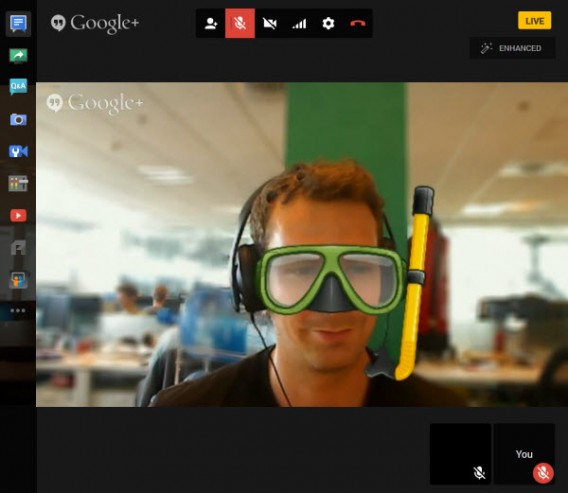
The first little-known, but very handy feature: Hangouts live, which lets you record your calls as YouTube videos.

Hangouts on Air live

As its name suggests, videoconferencing is broadcast live on YouTube, but by paying attention to the privacy settings, you can significantly restrict access to your video conference.

Once the call and the live broadcast have ended, the video is automatically saved in your YouTube account. To see it again, go to the Video Manager section in YouTube.

2. A mini control room in real-time

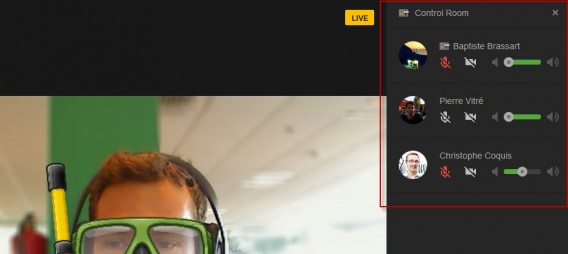
The Hangouts live feature offers another significant advantage: it allows you to access a control room from the options menu.

Governed Hangouts live

Using this control room, you can turn each videoconference participant’s microphone or webcam on or off.

The tool has already been adopted en masse by YouTubers and other podcasters all over the world because it severely reduces post-production work.

3. Manage your Circles to launch calls quickly

As part of the Google ecosystem, Hangouts is closely linked to the Google + social network. This means that to use this VoIP service effectively, you need well organized Google + circles, which will significantly save you time.

Circles Hangouts

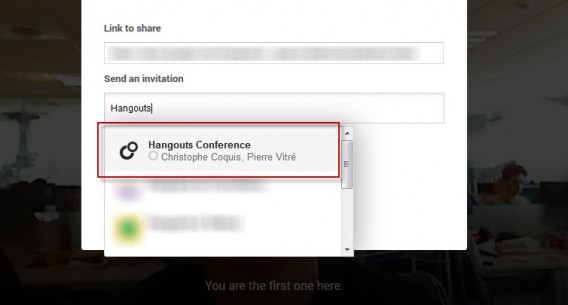
If you often have videoconferences with a group of friends or colleagues, consider creating a circle so that you can start the conversation quickly and without having to add the participants one by one.

4. Schedule your Hangout times

Hangouts NotificationsYou can plan a video call in advance with Google Hangouts. More than a video conference, this is like creating an upcoming Google + event and inviting all the participants in advance.

Hangouts details

When creating the Hangouts call, you’ll  find your Google + Circle of friends and can add a description in the Details field. Then, the Google+ notifications system takes over to keep you informed of developments related to the event.

5. Applications and Games for Hangouts

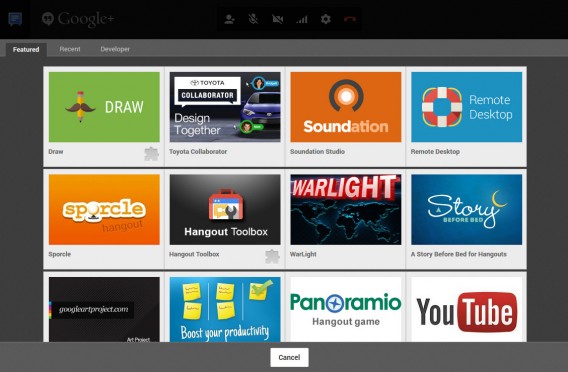
As well as the YouTube videos module and collaborative working via Google Docs, which I’ll discuss below, Google Hangouts includes a dozen other third party applications, all of them free.

Apps Google Hangouts

To use them, simply download the module corresponding to the service. The icons are then added to the control center on the left of the screen, and can be viewed by all participants in the video call.

Sound design with Soundation, short stories with A story before bed, or even a visual quiz with Panoramio are all add-ons that offer something to liven up your Hangouts conversations.

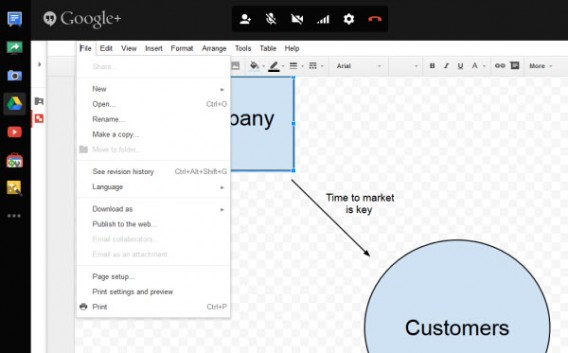
6. Collaborative working via Hangouts and Google Docs

Google Hangouts Drive

If screen sharing has become a standard function over time for all video conferencing services, the same can’t be said of collaborative working. Google Docs scores points where services like Skype can’t even compete.

Several people – up to 10 – can edit a document during a call. To do this, you need to download the module, and then create a new document or open an existing one. Once completed, the document can be saved locally, or in your Google Drive.

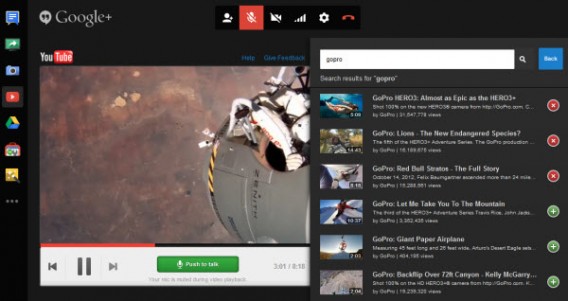
7. Watch YouTube videos with others

YouTube Hangouts is another app that’s definitely worth checking out. It can broadcast a video in a window in the center of the call, making the video visible to all participants.

YouTube Hangouts

Google has paid close attention to detail with this function, even muting the microphone of your contacts as soon as the video starts to play. To watch a clip or the latest trailer, search for the video from the search engine and then add it to the playlist module.

In the mood for a Podcast? Prepare your playlist of videos in advance, publish your show on YouTube with Hangouts live, and avoid all those tedious post-production tasks.

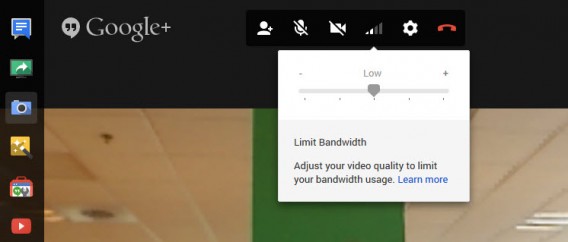
8. Change the bandwidth

Once the call starts, you may struggle to get online access because the bandwidth given to videoconferencing might be too big. To correct this annoying side-effect, click the internet connection symbol between the cogwheel settings icon and the webcam disabling icon.

Limit bandwidth Hangouts

By reducing the amount of bandwidth given to video calling, picture quality is reduced, but it will let you continue surfing the web, playing online games, and downloading things while on the call. Note that although the video quality drops, you shouldn’t notice any lag between audio and video.

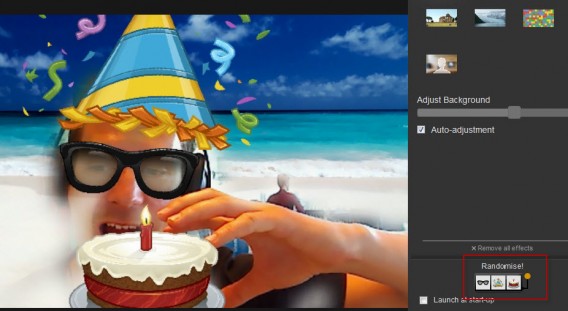
9. Shuffle button for Hangouts effects

You may or may not remember the famous MSN winks, but Google Hangouts has its own handful of animations that are just as funny as they are kitsch. The feature is called Google Effects and is installed by default.

Randomize effects Hangouts

What you perhaps didn’t know is that Google lets you randomly modify effects. The button is hidden at the bottom right of the window, and fortunately, there’s nothing too ridiculous to share online.

Clearly, Google Hangouts has a few more things that some of the other VOIP services have to offer, and if you’re tired of plain old Skype, make sure to give Hangouts a spin.

If you’re still into Skype, check out our tutorial on using Skype group chats.

Follow me on Twitter @bbrassart

How to deactivate Hangouts for Android in 15 seconds [Video]

Google Hangouts now receives SMS messages in the Android apps, a feature which irritates many users because of the fact that text messages and Hangout chats don’t sync in one conversation, even if they’re from the same contact. Luckily, there is a way of getting around this feature without deleting the app, and it’s as simple as disabling integration with SMS. Check out the video below for a quick tutorial on how to prevent Google Hangouts from receiving text messages.

Warning: Nexus smartphone users will have to install an alternative SMS app like Contacts+, Hello SMS or Go SMS Pro. Other phone models are normally equipped with a default alternative SMS app.

Default player


brightcove.createExperiences();


Now, you can peacefully receive texts and have chats via Hangouts without having to work through the confusion of multiple conversations with one person in the same app.

If you want even more tips for your Android device, check out how to detect malicious Android apps eating your battery life.

Improved status and mood indicators come to Google Hangouts in Gmail

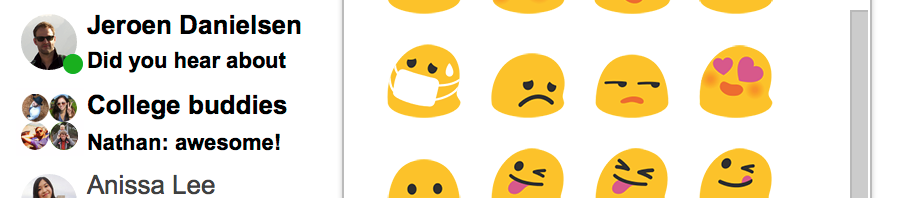
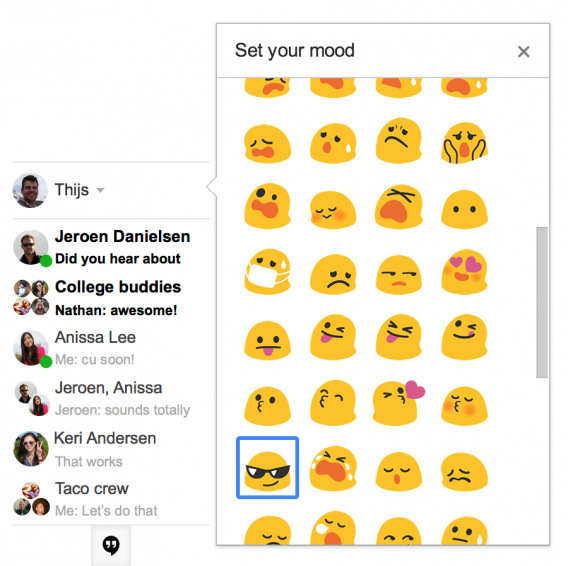
One of the biggest criticisms about Google Hangouts was the removal of the status indicator. While today’s update for Gmail doesn’t bring back the status feature, it does make it easier to see which friends are available to chat. Previously, friends who were able to chat were underlined with a thin green line. With today’s update, the line is replaced by a more obvious green bubble. Gmail Hangouts set mood Moods are new to Gmail, allowing you to set one of eighty emojis as your status. This is a fun way to let your friends know what type of mood you’re in, similar to Skype. Unfortunately there’s no way to set text as your mood. The update is rolling out today to all Gmail users. If you’re not using Hangouts in Gmail yet, you can enable it by clicking on your profile picture above your chat list and then try the new Hangouts.

Major Hangouts for iOS update brings stickers, video messaging

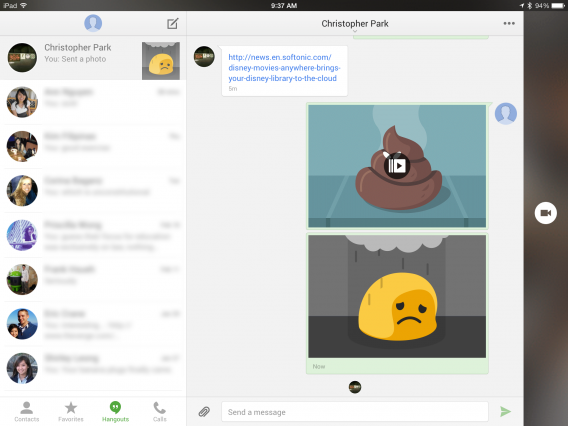
Google Hangouts for iOS received a major update this morning, bringing animated stickers and Vine-like video messaging. The previous version of Hangouts for iOS lacked many features of its Android counterpart but has now surpassed it. There’s no word from Google about when Android users can expect to see these new features.

Stickers are big business for messaging apps like LINE so it’s nice to see them in Hangouts. Unfortunately, the selection is mediocre and doesn’t feature original artwork.

Short video messages are also a nice addition, letting users send up to 10 seconds of video. Videos won’t play unless you tap on them but the thumbnails show an animated gif of the video.

The update also brings location sharing, which has been in the Android version but was missing in iOS. This means you can send an exact location to your friends.

Google Hangouts for iPad

Hangouts of for iOS also gets a redesign with new chat bubbles and an iPad optimized interface. iPad users will have a two column design with your chats listed on the right and your current chat on the left. There’s also a dedicated video chat button that runs along the right side of the screen.

The mobile messaging battle is heating up. With Facebook’s pending purchase of WhatsApp, messaging apps are all trying to find unique ways to draw more users. These new features in iOS should increase interest in Hangouts but Google is still competing in a crowded space.

Download Hangouts for iOS

Source: Google Hangouts (iTunes)

RELATED STORIES

Hangouts for Android update fixes group messaging

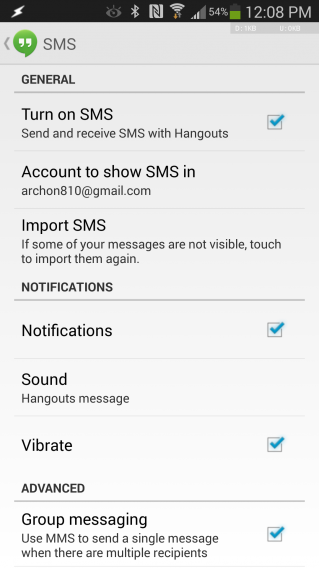
A minor update to Google Hangouts for Android is rolling out now, bringing fixes for group messaging. Version 2.0.2 updates how the app handles group messaging by allowing users to toggle the use of MMS. Previous versions of Hangouts only allowed sending of group messages via MMS, which cost some users money if their plan doesn’t include unlimited MMS. In this latest version, users can uncheck the option to use MMS to send a single message to multiple people.

Google Hangouts 2.0.2 update options via Android Police

Hangouts for Android also gets a new feature to Import SMS, allowing users to import messages that aren’t visible. This feature allows Hangouts to try and import them again.

The update is rolling out now to Google Play and weighs in at 13.4MB.

Download Google Hangouts for Android

RELATED STORIES

Source: Android Police