Skip to content

Softonic English

Just another Softonic Sites site

Comparison between manual slide creation and AI-assisted presentation generation

Creating a presentation from scratch is not easy Making it beautiful and attention-grabbing for the viewer is a very complex task The blank canvas is quite intimidating, especially if you have no experience in design Fortunately, nowadays there are many programs that allow us to compensate for all those “artistic” shortcomings, such as Adobe Express In addition to being quite easy to use, Adobe Express can save you a lot of work time thanks to generative AI If you want to know how, stay with us a little longer: you will learn to get a lot […]

Creating a presentation from scratch is not easy.  Making it beautiful and eye-catching for the viewer is a very complex task. The blank canvas is quite intimidating, especially if you have no experience in designing. Fortunately, nowadays there are many programs that allow us to compensate for all those “artistic” shortcomings, such as Adobe Express.

In addition to being quite easy to use, Adobe Express can save you a lot of work time thanks to generative AI. If you want to know how, stay with us a little longer: you will learn to make the most of the tools in Adobe Express.

Adobe Creative Cloud
Adobe Creative Cloud DOWNLOAD

Easily shape your ideas with AI

We’re not going to deceive you: designing slides the old-fashioned way has many advantages over AI generation. Besides being more personal and close, the simple act of creating them boosts our creativity and makes us more resourceful in general. But what happens when you have to create a presentation on a topic that barely interests you? What if your mind can’t come up with more? And what if you have little time to prepare it? That’s where AI can play an important role.

The important thing is not to think of AI as a robotic substitute that comes to take your job and create a gray, soulless world. This technology can serve as support to create better and faster, without losing your personal and human touch.

In the case of Adobe Express, its tools can help us complete tasks in a matter of minutes. Tasks that, not long ago, could have easily taken us several hours.

How to create a presentation with Adobe Express in just minutes

Now you find yourself here: you have little time and need to prepare a professional-looking presentation. You have a rough idea in your head of what structure it should have, but you haven’t developed it much. Don’t panic, there is a solution.

First, we go to the Adobe Express website. Once inside, the first thing we will see is a series of pre-established quick actions and the generation box. Before doing anything, we will first create the presentation file.

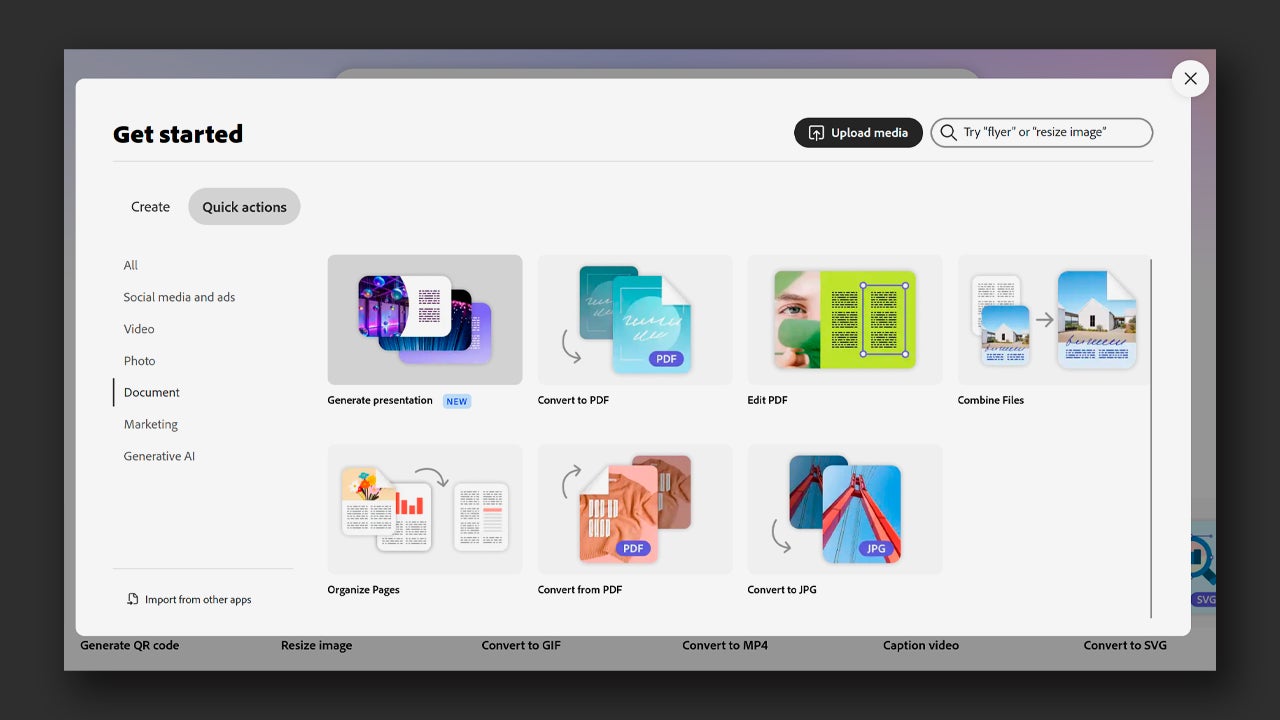
The truth is that there are many ways to start, depending on what your goal is. Today, we will focus on one of the most interesting features of Adobe Express, the creation of presentations by AI. To do this, click on the + button you will see in the right column, which will take you to the Get Started. panel.

From there, click on Quick Actions and then on Document. There you will see an option called Generate presentation. Click on it to start creating your presentation.
Next, a new page will open with a text box in the center. This is where you will need to describe how you want your presentation to be. Additionally, you will also need to add any relevant files to include in the slides (images, graphs, etc.). As you write, Adobe will make suggestions to help you complete your prompt (if you want).
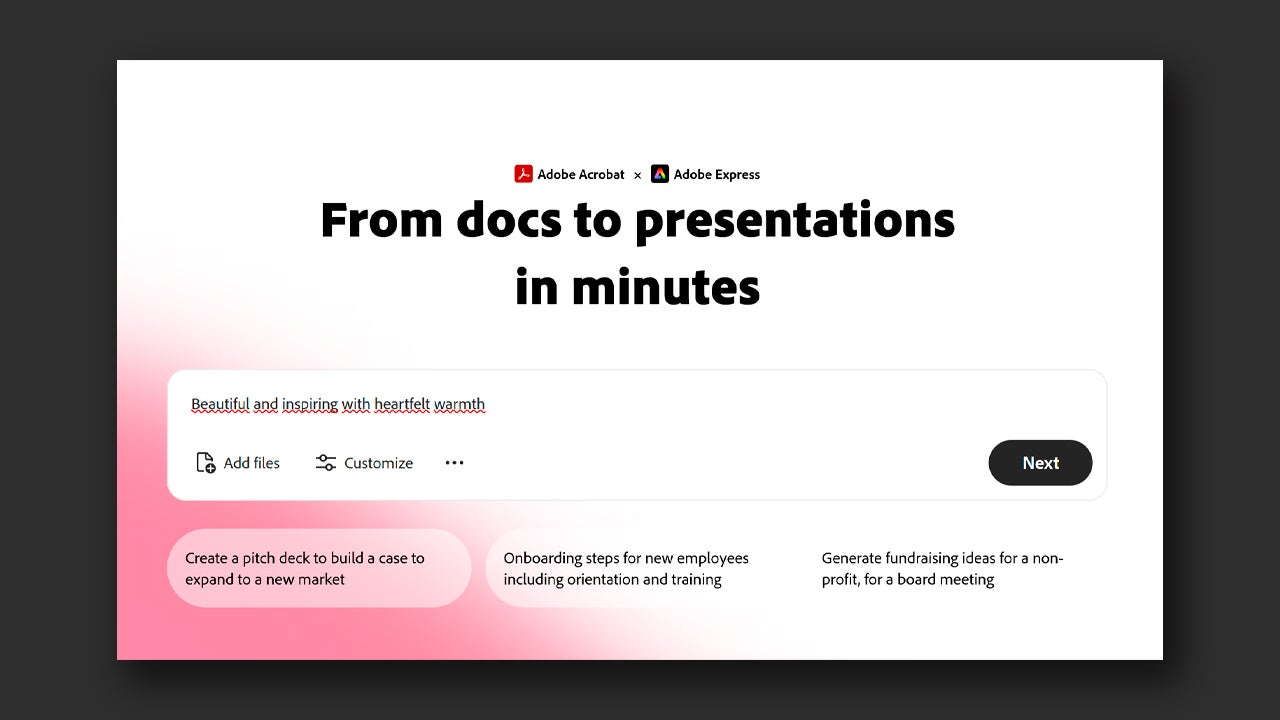
From the Customize button, you can choose the length of the presentation, specify the audience it is aimed at, and determine the level of detail. Once you have finished writing and configuring your presentation, click on Next.

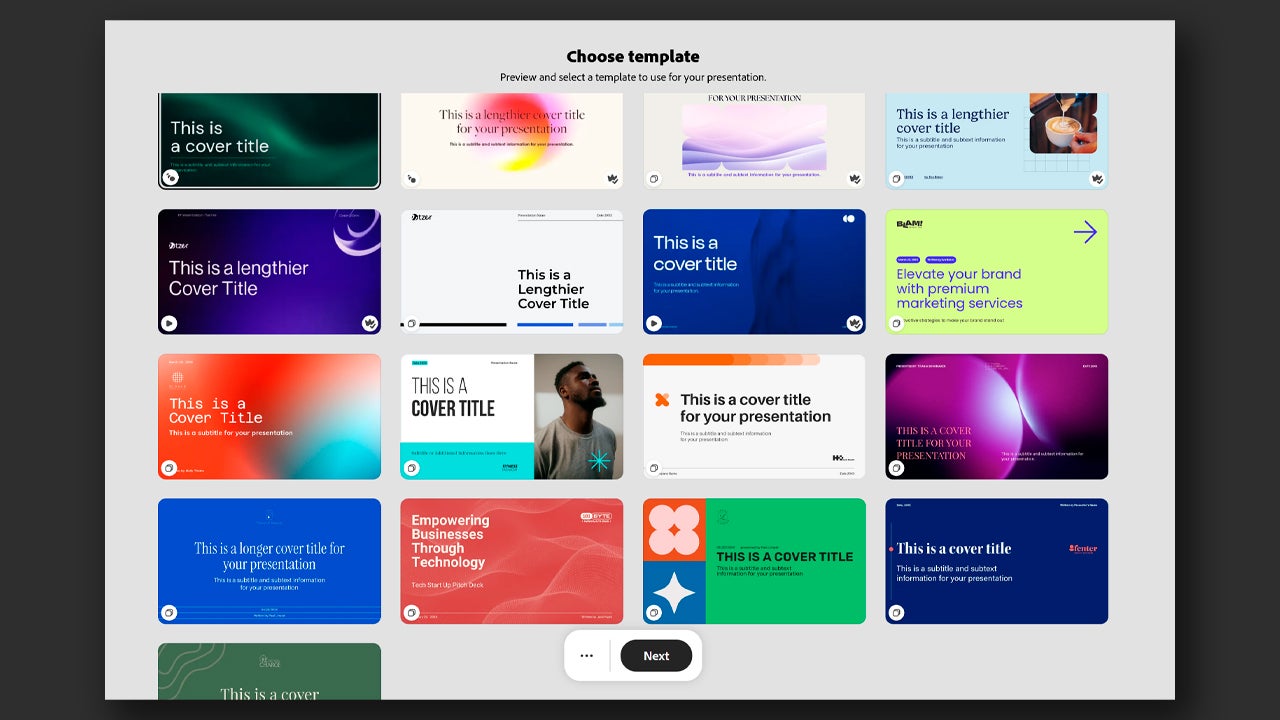
By clicking on Next, you will go to another page with several visual templates to choose from according to your taste. You can select any of the available ones or simply click Next to continue.
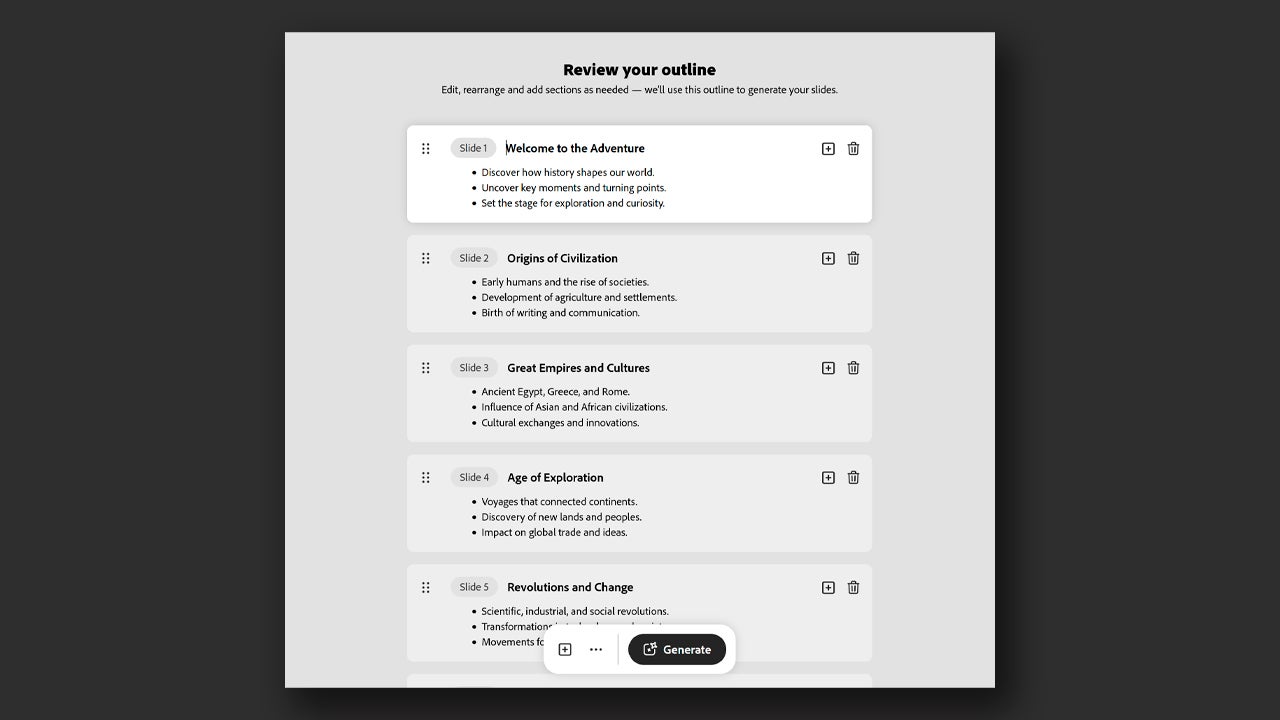
By continuing, you will see what the information and order of the slides generated by Adobe would be. From here you can add (plus symbol) or delete (trash can symbol) slides at your convenience. Check that the texts are correct, that the order is right, and when you finish, click on Generate.
Now, you will have to wait a few moments for Adobe Express to generate the content. It is important that you do not close the page at any time while it is loading. Soon you will see how your presentation turned out.
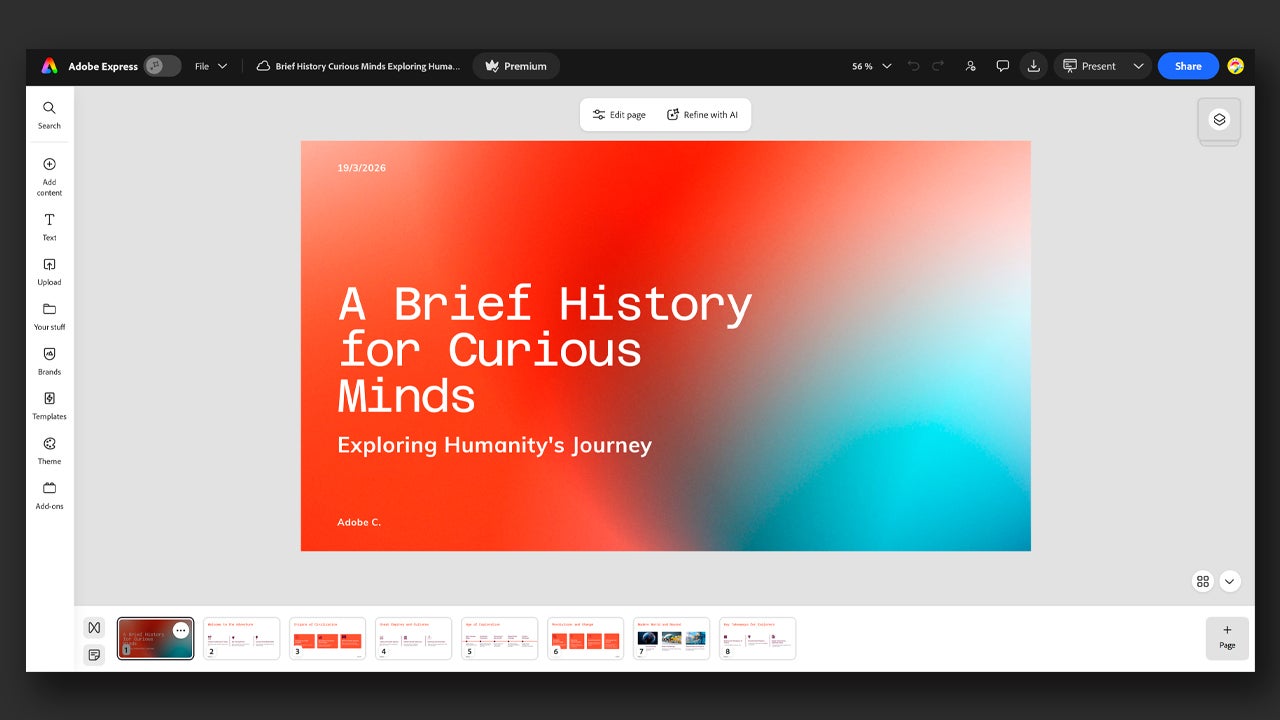
From here you can add more slides, edit the texts, or even change the template. If you have uploaded your brand or company visual materials, you can access them from the Brands button.

Make generative AI your assistant

As you can see, creating a presentation with Adobe Express can greatly help you speed up your work. With Express, you can start from a framework supervised by you from the beginning. It’s not about having a machine replace you, but about working better by using this technology as support.

How to Access Adobe Express

If you want to know how to access Adobe Express, it’s very easy. First of all, you need to have a registered Adobe account. Creating one is free and you can do it from the official Adobe page. Additionally, Adobe Express is completely free and includes a large number of editing tools, fonts, and resources.

However, Express has a monthly paid subscription plan, Adobe Express Premium, for those users who need more templates and paid resources. You can access it for free using Adobe’s own 30-day free trial. This gives you the opportunity to access 250 generative credits and hundreds of more exclusive visual resources.

If you use generative AI a lot, Adobe offers another additional plan, Adobe Firefly Pro, which includes Adobe Express Premium with over 4000 generative AI credits. Through this link you can check the subscription options and current prices. Make sure the website is set to your region so that the prices for your country appear.

Adobe Creative Cloud
Adobe Creative Cloud DOWNLOAD

Author: María López

{ "de-DE": "Künstler aus Berufung und Technikliebhaber. Seit ich denken kann, habe ich gerne an allen möglichen Gadgets herumgebastelt.", "en-US": "Artist by vocation and technology lover. I have liked to tinker with all kinds of gadgets for as long as I can remember.", "es-ES": "Artista de vocación y amante de la tecnología. Me ha gustado cacharrear con todo tipo de gadgets desde que tengo uso de razón.", "fr-FR": "Artiste de vocation et amateur de technologie. J'aime bricoler avec toutes sortes de gadgets depuis que j'ai l'usage de la raison.", "it-IT": "", "ja-JP": "", "nl-NL": "", "pl-PL": "", "pt-BR": "", "social": { "email": "", "facebook": "", "twitter": "", "linkedin": "" } } View all posts by María López

Author María LópezPosted on March 24, 2026August 14, 2026Categories News

Post navigation

Previous Previous post: The new trailer for The Mandalorian and Grogu reveals the return of a beloved character from The Clone Wars
Next Next post: This Korean movie has just become the highest-grossing film in the country's history

Recent Posts

  • Beyond Good & Evil 2 and 4 more games still stuck after 10 years
  • Star Wars: Galactic Racer is out now: its roguelite progression started as a homemade board game
  • The Lincoln Lawyer gets a final season 5: Netflix’s franchise will go on
  • Marvel’s Midnight Spider-Man is here: a brutal new rule for Peter Parker
  • A Knight of the Seven Kingdoms already looks like HBO’s best Game of Thrones follow-up

Archives

  • October 2026
  • September 2026
  • August 2026
  • July 2026
  • June 2026
  • May 2026
  • April 2026
  • March 2026
  • February 2026
  • January 2026
  • December 2025
  • November 2025
  • October 2025
  • September 2025
  • August 2025
  • July 2025
  • June 2025
  • May 2025
  • April 2025
  • March 2025
  • February 2025
  • January 2025
  • December 2024
  • November 2024
  • October 2024
  • September 2024
  • August 2024
  • July 2024
  • June 2024
  • May 2024
  • April 2024
  • March 2024
  • February 2024
  • January 2024
  • December 2023
  • November 2023
  • October 2023
  • September 2023
  • August 2023
  • July 2023
  • June 2023
  • May 2023
  • April 2023
  • March 2023
  • February 2023
  • January 2023
  • December 2022
  • November 2022
  • October 2022
  • September 2022
  • August 2022
  • July 2022
  • June 2022
  • May 2022
  • April 2022
  • March 2022
  • February 2022
  • January 2022
  • December 2021
  • November 2021
  • October 2021
  • September 2021
  • August 2021
  • July 2021
  • June 2021
  • May 2021
  • April 2021
  • March 2021
  • February 2021
  • January 2021
  • December 2020
  • November 2020
  • October 2020
  • September 2020
  • August 2020
  • July 2020
  • June 2020
  • May 2020
  • April 2020
  • March 2020
  • February 2020
  • January 2020
  • December 2019
  • November 2019
  • October 2019
  • September 2019
  • August 2019
  • July 2019
  • June 2019
  • May 2019
  • April 2019
  • March 2019
  • February 2019
  • January 2019
  • December 2018
  • November 2018
  • October 2018
  • September 2018
  • August 2018
  • July 2018
  • June 2018
  • May 2018
  • April 2018
  • March 2018
  • February 2018
  • January 2018
  • December 2017
  • November 2017
  • October 2017
  • September 2017
  • August 2017
  • July 2017
  • June 2017
  • May 2017
  • April 2017
  • March 2017
  • February 2017
  • January 2017
  • December 2016
  • November 2016
  • October 2016
  • September 2016
  • August 2016
  • July 2016
  • June 2016
  • May 2016
  • April 2016
  • March 2016
  • February 2016
  • January 2016
  • December 2015
  • November 2015
  • October 2015
  • September 2015
  • August 2015
  • July 2015
  • June 2015
  • May 2015
  • April 2015
  • March 2015
  • February 2015
  • January 2015
  • December 2014
  • November 2014
  • October 2014
  • September 2014
  • August 2014
  • July 2014
  • June 2014
  • May 2014
  • April 2014
  • March 2014
  • February 2014
  • January 2014
  • December 2013
  • November 2013
  • October 2013
  • September 2013
  • August 2013
  • July 2013
  • June 2013
  • May 2013
  • April 2013
  • March 2013
  • February 2013
  • January 2013
  • December 2012
  • November 2012
  • October 2012
  • September 2012
  • August 2012
  • July 2012
  • June 2012
  • May 2012
  • April 2012
  • March 2012
  • February 2012
  • January 2012
  • December 2011
  • November 2011
  • October 2011
  • September 2011
  • August 2011
  • July 2011
  • June 2011
  • May 2011
  • April 2011
  • March 2011
  • February 2011
  • January 2011
  • December 2010
  • November 2010
  • October 2010
  • September 2010
  • August 2010
  • July 2010
  • June 2010
  • May 2010
  • April 2010
  • March 2010
  • February 2010
  • January 2010
  • December 2009
  • November 2009
  • October 2009
  • September 2009
  • August 2009
  • July 2009
  • June 2009
  • May 2009
  • April 2009
  • March 2009
  • February 2009
  • January 2009
  • December 2008
  • November 2008
  • October 2008
  • September 2008
  • August 2008
  • July 2008
  • June 2008
  • May 2008
  • April 2008
  • March 2008
  • February 2008
  • January 2008
  • December 2007
  • November 2007
  • October 2007
  • September 2007
  • August 2007
  • July 2007
  • June 2007
  • May 2007
  • April 2007
  • March 2007
  • February 2007
  • January 2007
  • December 2006
  • November 2006
  • September 2006
  • August 2006
  • June 2006
  • May 2006
  • July 2001
  • January 2001
  • November 2000
  • September 2000
  • August 2000
  • July 2000
  • April 2000
  • March 2000

Categories

  • Affiliate post
  • Expert Review
  • Gaming
  • Guides
  • How to
  • Legacy how To
  • News
  • Noticias
  • Software>Security
  • Sponsored
  • Trucos y Consejos
  • Uncategorized
  • Windows software

Meta

  • Log in
  • Entries feed
  • Comments feed
  • WordPress.org
Softonic English Proudly powered by WordPress