
Skip to content

Softonic English

Just another Softonic Sites site

Do you want graphics for your reports? Adobe has the best tool for you

It is likely that, on many occasions, the thought of using Adobe Illustrator to create graphics or charts has crossed your mind. However, many dismiss it almost instantly due to the fear that it might be complicated or difficult to learn. Nothing could be further from the truth. Adobe Illustrator is an excellent program for creating graphics. The possibilities it offers, whether in shapes, styles, or colors, allow us to bring to life what we have in mind with great ease. If you want to learn how to use Illustrator’s graphic tools, stay and learn with these simple steps. […]

It is likely that, on many occasions, you have considered using Adobe Illustrator to create graphics or tables. However, many dismiss it almost immediately because they fear it might be complicated or difficult to learn. Nothing could be further from the truth.

Adobe Illustrator is an excellent program for creating graphics. The range of possibilities it offers, whether in shapes, styles, or colors, allows us to bring our ideas to life with great ease. If you want to know how to use Illustrator’s graphic tools, stay and learn with these simple steps.

Adobe Illustrator
Adobe Illustrator Download

How to Create a Chart from Scratch

In Adobe Illustrator, we have a fantastic feature dedicated exclusively to graph creation. The icon you will see by default in the toolbar is the Column Graph Tool, but if you right-click, you will see the rest of its options. If you can’t find the icon, press the J key.

  • To start, select one of the chart options that appear. If you want to create a column chart, you should choose Column Graph Tool.
  • Now, it’s time to define the dimension that the chart will occupy in its entirety. Click on your canvas and drag the mouse to create a square of the size you prefer.
    • If you need it to have specific dimensions, click on the canvas and enter the measurements manually. Don’t worry too much; you can change the chart size at any point.
  • At this point, we will need to enter the data that the chart will represent. In the first row, place the attribute. The following rows will be used to enter the numerical data. Below is an example of how you could place them and where each data would go.
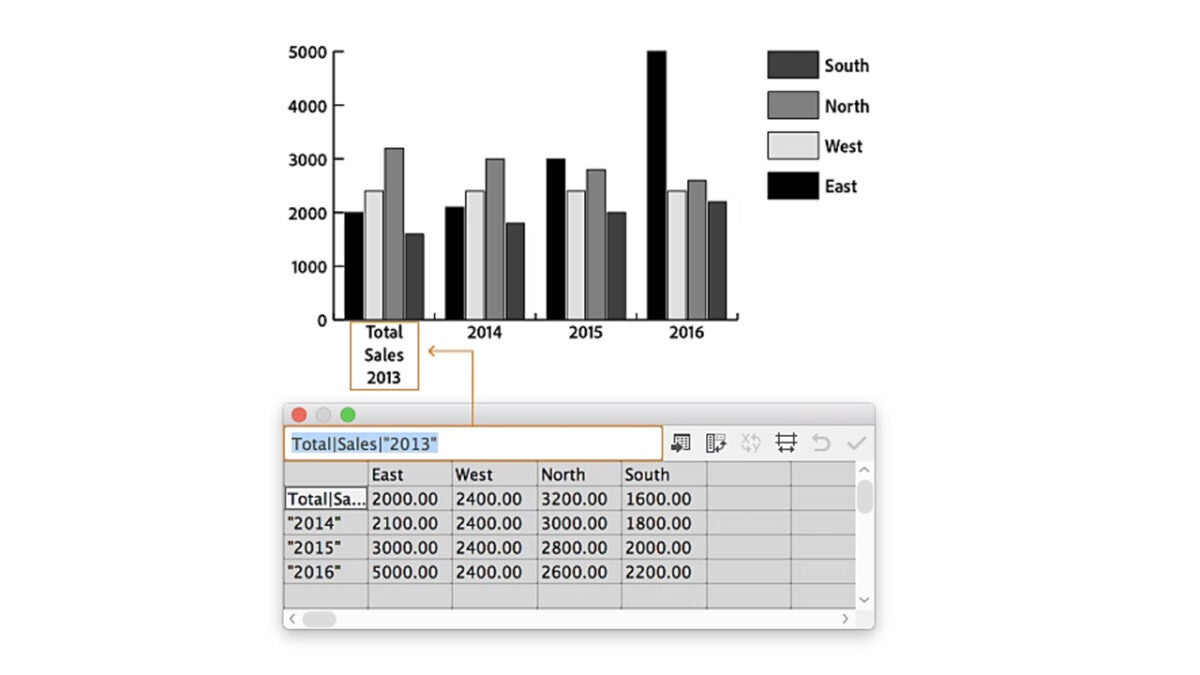
  • If you have the information saved in an Excel file, Illustrator will allow you to import the file so you don’t have to enter it manually.
  • To adjust the width of the columns, click on the Cell Style button and enter any value between 0 and 20 within Column width (the width).

Although we have focused here on bar charts, the procedure is quite similar to other styles, such as column, line, or radar charts, among others. By following these steps, you will be able to create your chart on the first try and without major complications. Now, it’s time to make it look nice.

Customize Your Chart to the Millimeter

One of the great advantages of Adobe Illustrator is that it allows us to customize our designs to the smallest detail, and graphics are no exception. Likewise, we will start with something simpler, such as editing colors.

  • Select your chart with the Selection tool (A).
  • Go to Object and then select Ungroup. This will allow you to edit the individual parts that make up the chart. Be careful because once you do this, you will no longer be able to edit its data. Accept the pop-up text and select Yes to proceed.
  • Once you have ungrouped the chart, you can alter its colors (and shapes too) as you wish. Select them and change them to your liking.

You can modify the size of the chart and adjust it to the space you need. To do this, you simply have to do the following:

  • Select the graphic with the Selection tool (A).
  • Now, follow the path and go to Object > Transform > Scale. You can also double-click on the Scale tool.
  • In the contextual box that appears, enter the size you want your graphic to be.

By default, you will see that the chart legends appear on the right, but you can also change this:

  • As before, select the chart with the Selection tool (A).
  • Follow the path Object > Graph > Type.
  • Here, click on Add Legend Across Top and press OK to finish.

Do you want to give your table a distinctive touch and add shadows? Try doing this:

  • Re-select the chart with the Selection tool (A).
  • Again, follow the path Object > Graph > Type.
  • In the Graph Type box, click on Add Drop Shadow and select OK to finish.
Adobe Illustrator
Adobe Illustrator Download

Combine Different Chart Styles in One

If you have thought about mixing various styles of representation in a single graphic, you can make it a reality in Illustrator. To combine any type of graphic with another, follow these steps:

  • Choose the Group Selection tool. It is located under the Direct Selection icon (key A) when you right-click.
  • Now, select which data from the chart you want to change to a different style. Double-click to select both the chart and its corresponding legend.
  • Follow the path Object > Graph > Type and choose which style you want to change to. Configure it to your liking so that it looks exactly as you want.

Author: María López

{ "de-DE": "Künstler aus Berufung und Technikliebhaber. Seit ich denken kann, habe ich gerne an allen möglichen Gadgets herumgebastelt.", "en-US": "Artist by vocation and technology lover. I have liked to tinker with all kinds of gadgets for as long as I can remember.", "es-ES": "Artista de vocación y amante de la tecnología. Me ha gustado cacharrear con todo tipo de gadgets desde que tengo uso de razón.", "fr-FR": "Artiste de vocation et amateur de technologie. J'aime bricoler avec toutes sortes de gadgets depuis que j'ai l'usage de la raison.", "it-IT": "", "ja-JP": "", "nl-NL": "", "pl-PL": "", "pt-BR": "", "social": { "email": "", "facebook": "", "twitter": "", "linkedin": "" } } View all posts by María López

Author María LópezPosted on October 16, 2024July 1, 2025Categories Affiliate post, News

Post navigation

Previous Previous post: Payday 3 was a monumental failure, but its developers still believe they can save it
Next Next post: Create Hollywood-Level Videos with Adobe Premiere Pro’s Latest Feature

Recent Posts

  • The third season of Euphoria has not been liked by almost anyone, and there are good reasons for it
  • The third season of Euphoria has not been liked by almost anyone, and there are good reasons for it
  • Not only 'Backrooms': 5 other Internet phenomena that had movies (even if they weren't very good)
  • Spider-Noir no fue el único superhéroe de cine negro: Marvel tenía todo un universo noir que ya ha sido olvidado
  • Lorcana has a new expansion that focuses on one important thing: your hype for Toy Story 5

Archives

  • May 2026
  • April 2026
  • March 2026
  • February 2026
  • January 2026
  • December 2025
  • November 2025
  • October 2025
  • September 2025
  • August 2025
  • July 2025
  • June 2025
  • May 2025
  • April 2025
  • March 2025
  • February 2025
  • January 2025
  • December 2024
  • November 2024
  • October 2024
  • September 2024
  • August 2024
  • July 2024
  • June 2024
  • May 2024
  • April 2024
  • March 2024
  • February 2024
  • January 2024
  • December 2023
  • November 2023
  • October 2023
  • September 2023
  • August 2023
  • July 2023
  • June 2023
  • May 2023
  • April 2023
  • March 2023
  • February 2023
  • January 2023
  • December 2022
  • November 2022
  • October 2022
  • September 2022
  • August 2022
  • July 2022
  • June 2022
  • May 2022
  • April 2022
  • March 2022
  • February 2022
  • January 2022
  • December 2021
  • November 2021
  • October 2021
  • September 2021
  • August 2021
  • July 2021
  • June 2021
  • May 2021
  • April 2021
  • March 2021
  • February 2021
  • January 2021
  • December 2020
  • November 2020
  • October 2020
  • September 2020
  • August 2020
  • July 2020
  • June 2020
  • May 2020
  • April 2020
  • March 2020
  • February 2020
  • January 2020
  • December 2019
  • November 2019
  • October 2019
  • September 2019
  • August 2019
  • July 2019
  • June 2019
  • May 2019
  • April 2019
  • March 2019
  • February 2019
  • January 2019
  • December 2018
  • November 2018
  • October 2018
  • September 2018
  • August 2018
  • July 2018
  • June 2018
  • May 2018
  • April 2018
  • March 2018
  • February 2018
  • January 2018
  • December 2017
  • November 2017
  • October 2017
  • September 2017
  • August 2017
  • July 2017
  • June 2017
  • May 2017
  • April 2017
  • March 2017
  • February 2017
  • January 2017
  • December 2016
  • November 2016
  • October 2016
  • September 2016
  • August 2016
  • July 2016
  • June 2016
  • May 2016
  • April 2016
  • March 2016
  • February 2016
  • January 2016
  • December 2015
  • November 2015
  • October 2015
  • September 2015
  • August 2015
  • July 2015
  • June 2015
  • May 2015
  • April 2015
  • March 2015
  • February 2015
  • January 2015
  • December 2014
  • November 2014
  • October 2014
  • September 2014
  • August 2014
  • July 2014
  • June 2014
  • May 2014
  • April 2014
  • March 2014
  • February 2014
  • January 2014
  • December 2013
  • November 2013
  • October 2013
  • September 2013
  • August 2013
  • July 2013
  • June 2013
  • May 2013
  • April 2013
  • March 2013
  • February 2013
  • January 2013
  • December 2012
  • November 2012
  • October 2012
  • September 2012
  • August 2012
  • July 2012
  • June 2012
  • May 2012
  • April 2012
  • March 2012
  • February 2012
  • January 2012
  • December 2011
  • November 2011
  • October 2011
  • September 2011
  • August 2011
  • July 2011
  • June 2011
  • May 2011
  • April 2011
  • March 2011
  • February 2011
  • January 2011
  • December 2010
  • November 2010
  • October 2010
  • September 2010
  • August 2010
  • July 2010
  • June 2010
  • May 2010
  • April 2010
  • March 2010
  • February 2010
  • January 2010
  • December 2009
  • November 2009
  • October 2009
  • September 2009
  • August 2009
  • July 2009
  • June 2009
  • May 2009
  • April 2009
  • March 2009
  • February 2009
  • January 2009
  • December 2008
  • November 2008
  • October 2008
  • September 2008
  • August 2008
  • July 2008
  • June 2008
  • May 2008
  • April 2008
  • March 2008
  • February 2008
  • January 2008
  • December 2007
  • November 2007
  • October 2007
  • September 2007
  • August 2007
  • July 2007
  • June 2007
  • May 2007
  • April 2007
  • March 2007
  • February 2007
  • January 2007
  • December 2006
  • November 2006
  • September 2006
  • August 2006
  • June 2006
  • May 2006
  • July 2001
  • January 2001
  • November 2000
  • September 2000
  • August 2000
  • July 2000
  • April 2000
  • March 2000

Categories

  • Affiliate post
  • Expert Review
  • Gaming
  • Guides
  • How to
  • Legacy how To
  • News
  • Noticias
  • Software>Security
  • Sponsored
  • Trucos y Consejos
  • Uncategorized
  • Windows software

Meta

  • Log in
  • Entries feed
  • Comments feed
  • WordPress.org
Softonic English Proudly powered by WordPress