Skip to content

Softonic English

Just another Softonic Sites site

Create Hollywood-Level Videos with Adobe Premiere Pro’s Latest Feature

Have you ever started editing a video and realized that the colors don’t look the way you wanted? Although many might not believe it, making a video look good goes beyond the recording quality itself: colors are important and help us convey ideas or feelings. In Adobe Premiere Pro, the color management tools have become even more efficient and accessible for everyone. Thanks to this, you don’t need to be an expert in color calibration to achieve professional results. Below, we show you how you can tackle […]

Have you ever started editing a video and realized that the colors don’t look the way you wanted? Although many may not believe it, making a video look good goes beyond the recording quality itself: colors are important and help us convey ideas or feelings.

In Adobe Premiere Pro, the color management tools have become even more efficient and accessible for everyone. Thanks to this, you won’t need to be an expert in color calibration to achieve professional results. Below, we show you how you can easily tackle color management in your projects.

Adobe Premiere Pro
Adobe Premiere Pro Download

Why should I enable color management?

Many know that color management is one of the most common headaches among those who do it professionally. Over time, Adobe has been refining its interface and improving its tools to make this task easier for editors, regardless of their level.

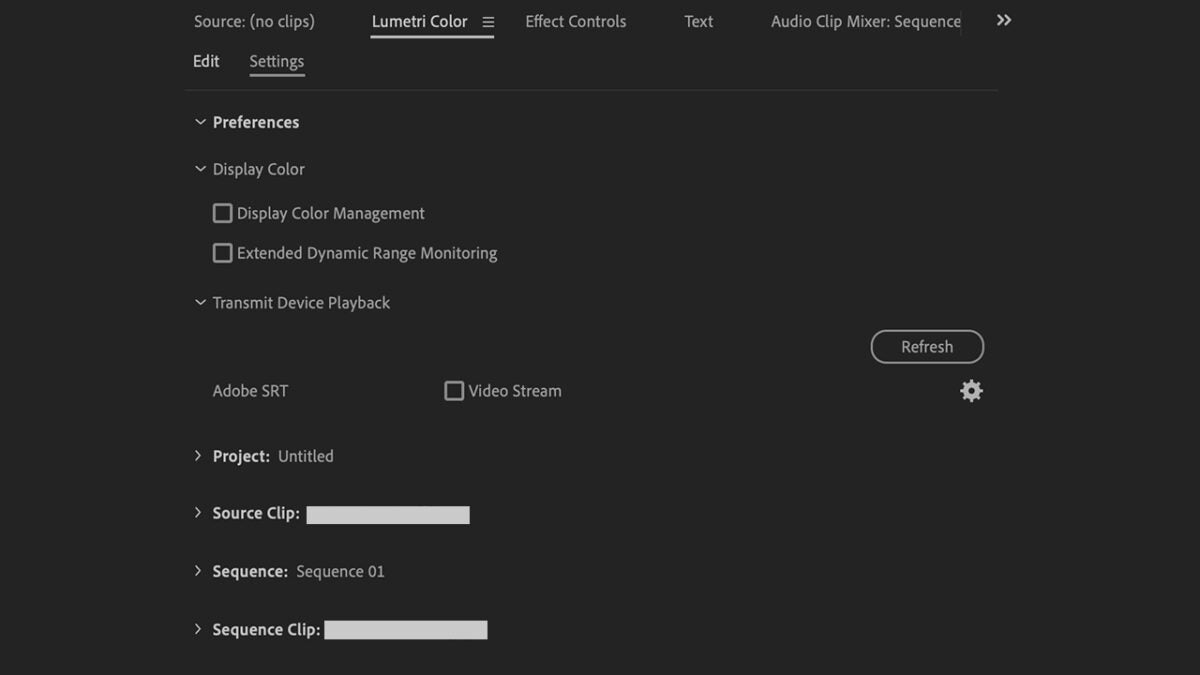
Before we start playing our clips, we need to set up color management. To access the preferences, we will first go to Window > Lumetri Color. Within the Lumetri Color panel, check the Display Color Management option to display accurate color values on any screen you are using.
It is important to emphasize that the vast majority of monitors we have at home are calibrated with the sRGB color profile. However, televisions, for example, are based on Rec. 709, a standard for high-definition television.

Although sRGB is the most used color profile on the Internet, it can cause problems because many videos are in Rec. 709. By enabling color management, videos in Rec. 709 can be better displayed on an sRGB monitor.

Organize Your Workspace and Focus on Color

Just like with Photoshop or Illustrator, Premiere Pro allows you to change the layout of the panels to suit your needs. To optimize our work with color, we will go to Window > Workspace > Color. By doing so, the Lumetri Color panel will open on the right and the Lumetri Scopes panel on the left.
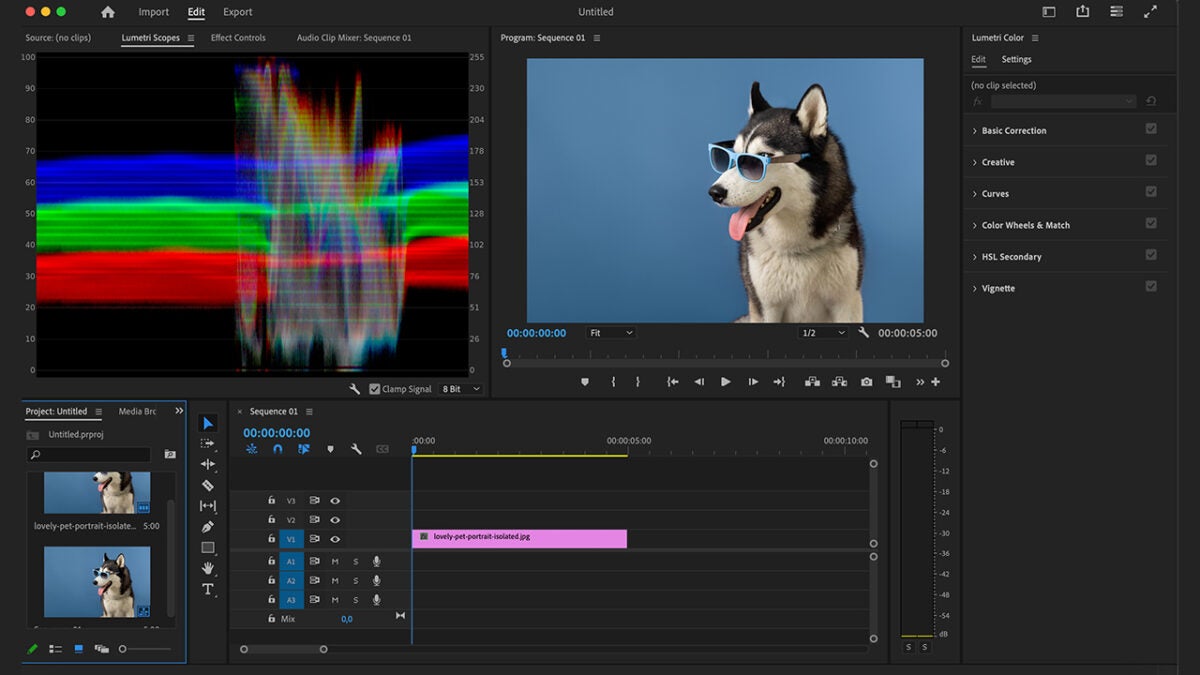
Lumetri Color: This is how basic color correction works

Knowing how to handle the Lumetri Color panel will be essential for you to change the tones of your project with great precision. As we mentioned before, you will see it located on the right after changing the workspace.

The first thing we will see in the Lumetri Color panel is the Basic Correction section. From here you can make changes to the brightness or color in a general way, something that in most cases will help you quickly correct your clips. Simply slide the controls until you get the result you want.
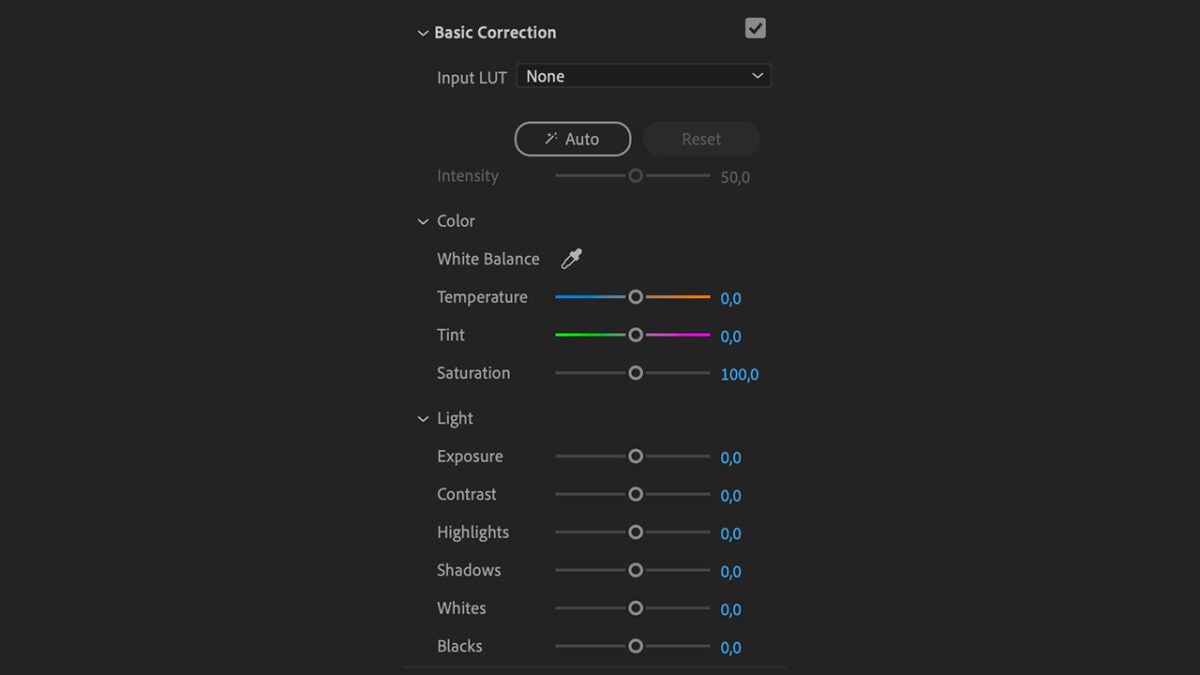
Here, you will also see the Input LUT. The word LUT is the acronym for Look Up Table and is an algorithm that transforms the color parameters of the clip to different ones. In the case of Input LUT, these changes are applied to the source material. Further down, you will see other panels like Creative or Curves, which will allow you to fine-tune the color of your project.

Color Correction Effects

Adobe provides us with a wide selection of effects and color controls to modify our clips in real-time.

Just like with video effects, color effects are applied in the same way. You will find them under the video effects> color correction section. Besides Lumetri Color, you will find this series of adjustments:
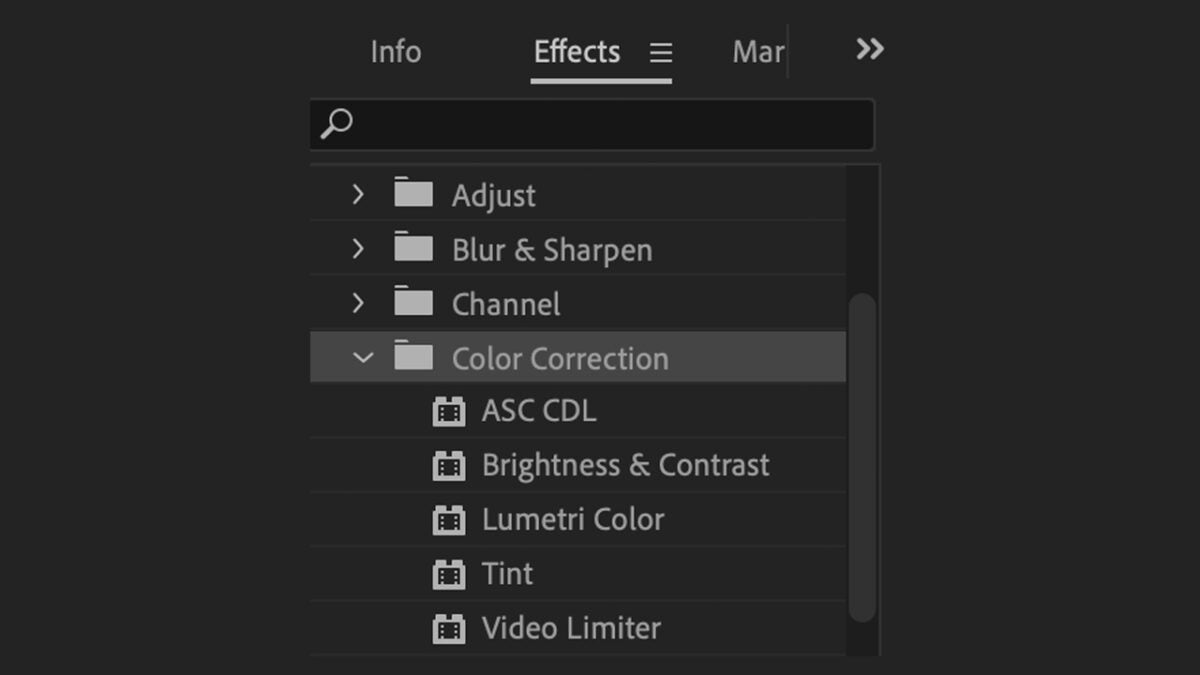
ASC CDL

The ASC CDL (American Society of Cinematographers Color Decision List) is a standard used in post-production to consistently adjust color across different programs and equipment. It is very useful for teams or individuals editing together, as the color changes you make to a clip will appear the same for everyone. This way, the group will work under the same basic guide of brightness and contrast.

Brightness & Contrast

As you can infer from the name, the Brightness & Contrast adjustment is used to adjust the brightness and contrast. Drag it to any clip located on the timeline to change these parameters.

Tint

The Tint effect replaces the original colors of a video with the two colors of your choice. However, doing so will not change the brightness and contrast. With this effect, you could, for example, alter the shadows of a clip and replace them with a different color.

Video Limiter

Applying the Video Limiter effect will ensure that the brightness and color values remain within acceptable limits for playback on different platforms. Your final video will meet technical standards and will not cause color errors on other screens.

Adobe Premiere Pro
Adobe Premiere Pro Download

Author: María López

{ "de-DE": "Künstler aus Berufung und Technikliebhaber. Seit ich denken kann, habe ich gerne an allen möglichen Gadgets herumgebastelt.", "en-US": "Artist by vocation and technology lover. I have liked to tinker with all kinds of gadgets for as long as I can remember.", "es-ES": "Artista de vocación y amante de la tecnología. Me ha gustado cacharrear con todo tipo de gadgets desde que tengo uso de razón.", "fr-FR": "Artiste de vocation et amateur de technologie. J'aime bricoler avec toutes sortes de gadgets depuis que j'ai l'usage de la raison.", "it-IT": "", "ja-JP": "", "nl-NL": "", "pl-PL": "", "pt-BR": "", "social": { "email": "", "facebook": "", "twitter": "", "linkedin": "" } } View all posts by María López

Author María LópezPosted on October 16, 2024July 1, 2025Categories News

Post navigation

Previous Previous post: Do you want graphics for your reports? Adobe has the best tool for you
Next Next post: Apple Intelligence will change our home forever: these are the company’s plans

Recent Posts

  • The third season of Euphoria has not been liked by almost anyone, and there are good reasons for it
  • The third season of Euphoria has not been liked by almost anyone, and there are good reasons for it
  • Not only 'Backrooms': 5 other Internet phenomena that had movies (even if they weren't very good)
  • Spider-Noir no fue el único superhéroe de cine negro: Marvel tenía todo un universo noir que ya ha sido olvidado
  • Lorcana has a new expansion that focuses on one important thing: your hype for Toy Story 5

Archives

  • May 2026
  • April 2026
  • March 2026
  • February 2026
  • January 2026
  • December 2025
  • November 2025
  • October 2025
  • September 2025
  • August 2025
  • July 2025
  • June 2025
  • May 2025
  • April 2025
  • March 2025
  • February 2025
  • January 2025
  • December 2024
  • November 2024
  • October 2024
  • September 2024
  • August 2024
  • July 2024
  • June 2024
  • May 2024
  • April 2024
  • March 2024
  • February 2024
  • January 2024
  • December 2023
  • November 2023
  • October 2023
  • September 2023
  • August 2023
  • July 2023
  • June 2023
  • May 2023
  • April 2023
  • March 2023
  • February 2023
  • January 2023
  • December 2022
  • November 2022
  • October 2022
  • September 2022
  • August 2022
  • July 2022
  • June 2022
  • May 2022
  • April 2022
  • March 2022
  • February 2022
  • January 2022
  • December 2021
  • November 2021
  • October 2021
  • September 2021
  • August 2021
  • July 2021
  • June 2021
  • May 2021
  • April 2021
  • March 2021
  • February 2021
  • January 2021
  • December 2020
  • November 2020
  • October 2020
  • September 2020
  • August 2020
  • July 2020
  • June 2020
  • May 2020
  • April 2020
  • March 2020
  • February 2020
  • January 2020
  • December 2019
  • November 2019
  • October 2019
  • September 2019
  • August 2019
  • July 2019
  • June 2019
  • May 2019
  • April 2019
  • March 2019
  • February 2019
  • January 2019
  • December 2018
  • November 2018
  • October 2018
  • September 2018
  • August 2018
  • July 2018
  • June 2018
  • May 2018
  • April 2018
  • March 2018
  • February 2018
  • January 2018
  • December 2017
  • November 2017
  • October 2017
  • September 2017
  • August 2017
  • July 2017
  • June 2017
  • May 2017
  • April 2017
  • March 2017
  • February 2017
  • January 2017
  • December 2016
  • November 2016
  • October 2016
  • September 2016
  • August 2016
  • July 2016
  • June 2016
  • May 2016
  • April 2016
  • March 2016
  • February 2016
  • January 2016
  • December 2015
  • November 2015
  • October 2015
  • September 2015
  • August 2015
  • July 2015
  • June 2015
  • May 2015
  • April 2015
  • March 2015
  • February 2015
  • January 2015
  • December 2014
  • November 2014
  • October 2014
  • September 2014
  • August 2014
  • July 2014
  • June 2014
  • May 2014
  • April 2014
  • March 2014
  • February 2014
  • January 2014
  • December 2013
  • November 2013
  • October 2013
  • September 2013
  • August 2013
  • July 2013
  • June 2013
  • May 2013
  • April 2013
  • March 2013
  • February 2013
  • January 2013
  • December 2012
  • November 2012
  • October 2012
  • September 2012
  • August 2012
  • July 2012
  • June 2012
  • May 2012
  • April 2012
  • March 2012
  • February 2012
  • January 2012
  • December 2011
  • November 2011
  • October 2011
  • September 2011
  • August 2011
  • July 2011
  • June 2011
  • May 2011
  • April 2011
  • March 2011
  • February 2011
  • January 2011
  • December 2010
  • November 2010
  • October 2010
  • September 2010
  • August 2010
  • July 2010
  • June 2010
  • May 2010
  • April 2010
  • March 2010
  • February 2010
  • January 2010
  • December 2009
  • November 2009
  • October 2009
  • September 2009
  • August 2009
  • July 2009
  • June 2009
  • May 2009
  • April 2009
  • March 2009
  • February 2009
  • January 2009
  • December 2008
  • November 2008
  • October 2008
  • September 2008
  • August 2008
  • July 2008
  • June 2008
  • May 2008
  • April 2008
  • March 2008
  • February 2008
  • January 2008
  • December 2007
  • November 2007
  • October 2007
  • September 2007
  • August 2007
  • July 2007
  • June 2007
  • May 2007
  • April 2007
  • March 2007
  • February 2007
  • January 2007
  • December 2006
  • November 2006
  • September 2006
  • August 2006
  • June 2006
  • May 2006
  • July 2001
  • January 2001
  • November 2000
  • September 2000
  • August 2000
  • July 2000
  • April 2000
  • March 2000

Categories

  • Affiliate post
  • Expert Review
  • Gaming
  • Guides
  • How to
  • Legacy how To
  • News
  • Noticias
  • Software>Security
  • Sponsored
  • Trucos y Consejos
  • Uncategorized
  • Windows software

Meta

  • Log in
  • Entries feed
  • Comments feed
  • WordPress.org
Softonic English Proudly powered by WordPress