Skip to content

Softonic English

Just another Softonic Sites site

Explanation of generative credits: how to track and make the most of AI usage

Over the past few years, Adobe has been perfecting more and more the tools powered by generative AI within its programs, such as Photoshop or Illustrator. However, the use of this technology comes with a cost that many users may not be aware of. This is why we have generative credits. Don’t worry if you haven’t heard of them or don’t quite know what they are for: below, we will explain in detail everything you need to know about generative credits. What are generative credits? Although many may not be aware, using generative AI has a […]

Over the past few years, Adobe has been perfecting more and more the tools powered by generative AI within its programs, such as Photoshop or Illustrator. However, the use of this technology has a cost that many users may not be aware of.

That is why we have generative credits. Don’t worry if you haven’t heard of them or don’t quite know what they are for: below, we will explain in detail everything you need to know about generative credits.

Adobe Creative Cloud
Adobe Creative Cloud DOWNLOAD

What are generative credits?

Although many may not be aware, using generative AI has a cost that is much higher than you might think. Generating images, text, and more involves a significant process behind it, which entails the use of very expensive hardware, a lot of energy, server usage, storage, and a long etcetera that would warrant another article altogether.

In Adobe, generative credits are the currency of the platform we have to generate images, graphics, texts, or apply effects.

They are available in almost all Adobe programs, such as Photoshop, Illustrator, Premiere Pro, In Design, Adobe Express, etc.

Where can I check my credit number?

Any Adobe user can see the number of credits they have in the following way:

  • First, you will need to go to the Adobe website and log in with your user account.
  • Once you do this, it will take you to the Home of Adobe. Once here, go to the top right corner and click on your user image; it is a round icon located all the way to the right.
  • This will open a small window with options, and the Generative AI section will also be displayed. Here you will see the number of credits included in your plan and those you have already consumed in the month.
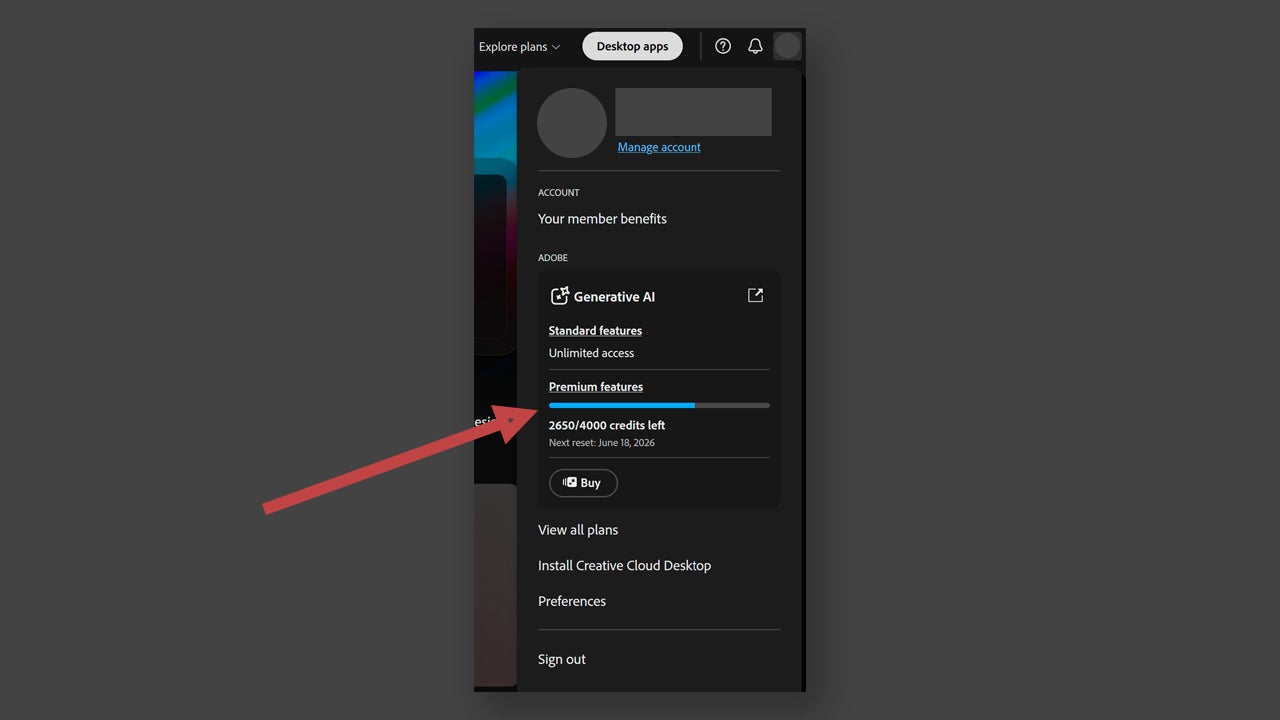
You can also check it within Adobe programs, as long as they are updated to the latest versions. To do this, you just need to do the same as we described earlier: access the icon of your profile within the program.

Tips for Saving Generative Credits

Within our plan, we have a series of included credits that should not be wasted aimlessly. Credits are consumed when using features powered by Firefly or by other third-party models (Google, ChatGPT, etc). Using Generative Fill within Photoshop, for example, consumes one credit per generation.

Adobe divides the generative AI functions into standard and premium. Within the standard category, there are actions like Generative Fill, Generative Expand, Text to Image, and similar features, all within Photoshop. In Illustrator, for example, they would be Text to Vector Graphic or Generative Recolor. Standard functions generally consume one credit, except for some that consume a bit more.

On the other hand, the premium features encompass more complex and advanced actions, such as those that can create video for example. Features that use third-party models like Google or OpenAI are also considered premium. If you use them, they will cost you many more credits than the standard ones, although the number will depend on what you do.

As you can see, every action has a price and if you want to save the most, you should use your head a little:

  • Prioritize manual adjustments before resorting to AI. We know it’s the easiest option, but it’s worth taking a moment to see if there are things we can do ourselves.
  • Plan what you want to do before acting. Think carefully about your prompt, review it, and ensure it has all the necessary information, this way you will save yourself from doing extra tests.
  • Take advantage of stock resources. There are thousands of resources, both video and photo, that are free and available to you.
  • Don’t experiment in vain. Exploring new ideas is fine, but it’s not necessary to make dozens of generations if you don’t have a clear purpose.

How much do generative credits cost?

Have you been excited using AI features and run out of credits? It’s a more common scenario than you think. If your counter is at zero, you can always buy credits through an additional subscription to your Creative Cloud.

Here are several options, depending on whether you are a private individual, student, teacher, or a company. Prices range from $9.99 (€11.17) to $199.99 (€223.68), and you can purchase from 2,000 to 50,000 monthly credits.
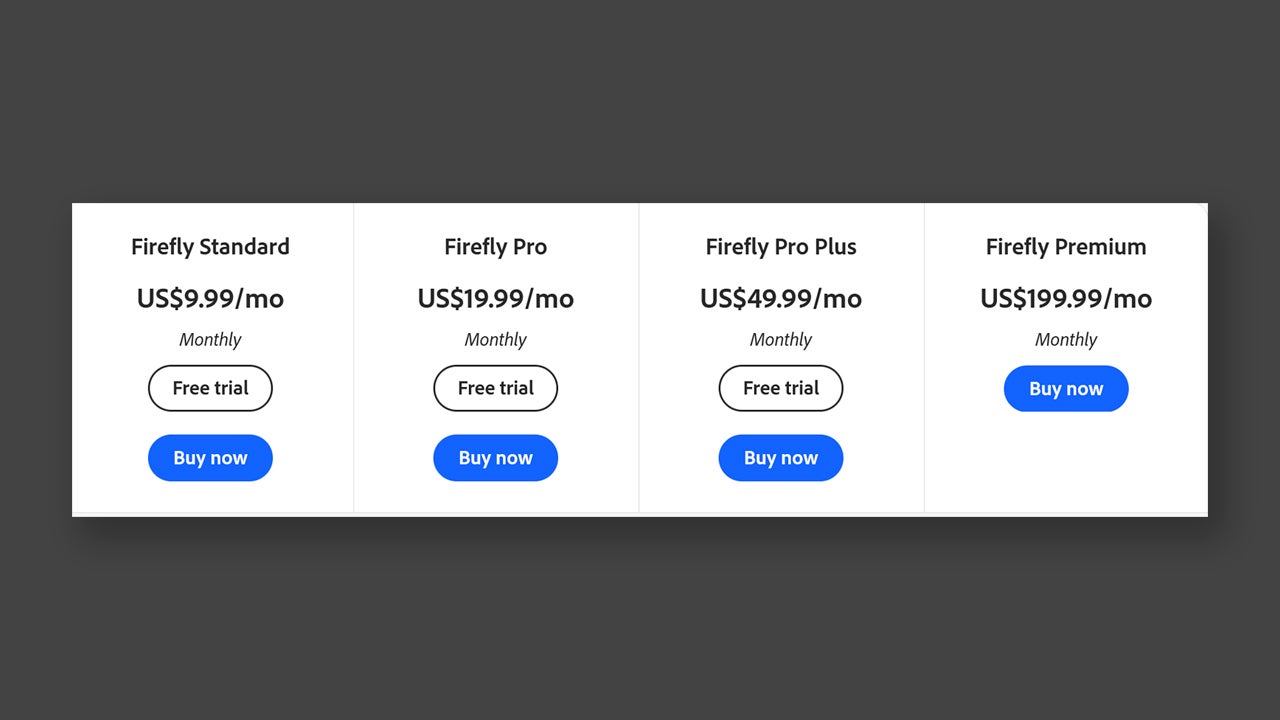
From this link you can check each plan, price, and what is included in each of them. Almost all plans also have a free trial period of 7 days, where you can see if the number of credits is sufficient for you or not.

Adobe Creative Cloud
Adobe Creative Cloud DOWNLOAD

Author: María López

{ "de-DE": "Künstler aus Berufung und Technikliebhaber. Seit ich denken kann, habe ich gerne an allen möglichen Gadgets herumgebastelt.", "en-US": "Artist by vocation and technology lover. I have liked to tinker with all kinds of gadgets for as long as I can remember.", "es-ES": "Artista de vocación y amante de la tecnología. Me ha gustado cacharrear con todo tipo de gadgets desde que tengo uso de razón.", "fr-FR": "Artiste de vocation et amateur de technologie. J'aime bricoler avec toutes sortes de gadgets depuis que j'ai l'usage de la raison.", "it-IT": "", "ja-JP": "", "nl-NL": "", "pl-PL": "", "pt-BR": "", "social": { "email": "", "facebook": "", "twitter": "", "linkedin": "" } } View all posts by María López

Author María LópezPosted on June 18, 2026June 18, 2026Categories News

Post navigation

Previous Previous post: Genshin Impact Luna VIII arrives July 1: Sandrone, new skins, and a moon area
Next Next post: GTA 5 is now free to upgrade on PS5, Xbox Series X/S and PC

Recent Posts

  • How to use reference images, video, and voice in Adobe Firefly to generate more consistent concept scenes
  • The Legend of Zelda rumor: $519.99 listing is merch, not a new game
  • The X-Files is officially headed to Hulu: Ryan Coogler’s reboot gets a series order
  • Parasite Eve could be Square Enix’s next RPG revival: survival horror is booming again
  • Razer just released Pokémon gaming headsets: Sylveon, Charizard and Lucario

Archives

  • October 2026
  • September 2026
  • August 2026
  • July 2026
  • June 2026
  • May 2026
  • April 2026
  • March 2026
  • February 2026
  • January 2026
  • December 2025
  • November 2025
  • October 2025
  • September 2025
  • August 2025
  • July 2025
  • June 2025
  • May 2025
  • April 2025
  • March 2025
  • February 2025
  • January 2025
  • December 2024
  • November 2024
  • October 2024
  • September 2024
  • August 2024
  • July 2024
  • June 2024
  • May 2024
  • April 2024
  • March 2024
  • February 2024
  • January 2024
  • December 2023
  • November 2023
  • October 2023
  • September 2023
  • August 2023
  • July 2023
  • June 2023
  • May 2023
  • April 2023
  • March 2023
  • February 2023
  • January 2023
  • December 2022
  • November 2022
  • October 2022
  • September 2022
  • August 2022
  • July 2022
  • June 2022
  • May 2022
  • April 2022
  • March 2022
  • February 2022
  • January 2022
  • December 2021
  • November 2021
  • October 2021
  • September 2021
  • August 2021
  • July 2021
  • June 2021
  • May 2021
  • April 2021
  • March 2021
  • February 2021
  • January 2021
  • December 2020
  • November 2020
  • October 2020
  • September 2020
  • August 2020
  • July 2020
  • June 2020
  • May 2020
  • April 2020
  • March 2020
  • February 2020
  • January 2020
  • December 2019
  • November 2019
  • October 2019
  • September 2019
  • August 2019
  • July 2019
  • June 2019
  • May 2019
  • April 2019
  • March 2019
  • February 2019
  • January 2019
  • December 2018
  • November 2018
  • October 2018
  • September 2018
  • August 2018
  • July 2018
  • June 2018
  • May 2018
  • April 2018
  • March 2018
  • February 2018
  • January 2018
  • December 2017
  • November 2017
  • October 2017
  • September 2017
  • August 2017
  • July 2017
  • June 2017
  • May 2017
  • April 2017
  • March 2017
  • February 2017
  • January 2017
  • December 2016
  • November 2016
  • October 2016
  • September 2016
  • August 2016
  • July 2016
  • June 2016
  • May 2016
  • April 2016
  • March 2016
  • February 2016
  • January 2016
  • December 2015
  • November 2015
  • October 2015
  • September 2015
  • August 2015
  • July 2015
  • June 2015
  • May 2015
  • April 2015
  • March 2015
  • February 2015
  • January 2015
  • December 2014
  • November 2014
  • October 2014
  • September 2014
  • August 2014
  • July 2014
  • June 2014
  • May 2014
  • April 2014
  • March 2014
  • February 2014
  • January 2014
  • December 2013
  • November 2013
  • October 2013
  • September 2013
  • August 2013
  • July 2013
  • June 2013
  • May 2013
  • April 2013
  • March 2013
  • February 2013
  • January 2013
  • December 2012
  • November 2012
  • October 2012
  • September 2012
  • August 2012
  • July 2012
  • June 2012
  • May 2012
  • April 2012
  • March 2012
  • February 2012
  • January 2012
  • December 2011
  • November 2011
  • October 2011
  • September 2011
  • August 2011
  • July 2011
  • June 2011
  • May 2011
  • April 2011
  • March 2011
  • February 2011
  • January 2011
  • December 2010
  • November 2010
  • October 2010
  • September 2010
  • August 2010
  • July 2010
  • June 2010
  • May 2010
  • April 2010
  • March 2010
  • February 2010
  • January 2010
  • December 2009
  • November 2009
  • October 2009
  • September 2009
  • August 2009
  • July 2009
  • June 2009
  • May 2009
  • April 2009
  • March 2009
  • February 2009
  • January 2009
  • December 2008
  • November 2008
  • October 2008
  • September 2008
  • August 2008
  • July 2008
  • June 2008
  • May 2008
  • April 2008
  • March 2008
  • February 2008
  • January 2008
  • December 2007
  • November 2007
  • October 2007
  • September 2007
  • August 2007
  • July 2007
  • June 2007
  • May 2007
  • April 2007
  • March 2007
  • February 2007
  • January 2007
  • December 2006
  • November 2006
  • September 2006
  • August 2006
  • June 2006
  • May 2006
  • July 2001
  • January 2001
  • November 2000
  • September 2000
  • August 2000
  • July 2000
  • April 2000
  • March 2000

Categories

  • Affiliate post
  • Expert Review
  • Gaming
  • Guides
  • How to
  • Legacy how To
  • News
  • Noticias
  • Software>Security
  • Sponsored
  • Trucos y Consejos
  • Uncategorized
  • Windows software

Meta

  • Log in
  • Entries feed
  • Comments feed
  • WordPress.org
Softonic English Proudly powered by WordPress