
On September 12th, Apple unveiled the new iPhone 15, Apple Watch Series 9, and Apple Watch Ultra 2 to the world. Cupertino’s smartwatch kicked off the Keynote and showcased some very interesting innovations. Among them, we had the debut of the new S9 SiP chip and the “Double Tap” gesture, which changes how we interact with the Apple Watch.
However, those familiar with tinkering with Apple gadgets may already know that you can do something very similar to the double tap without needing to purchase the Series 9. If you have an Apple Watch and want to know how to activate this gesture, keep reading below.

How do I activate double tap?
Apple explains that thanks to the S9 SiP chip and the high speed of its Neural Engine, the Apple Watch Series 9 can recognize the new “double tap” gesture in a fairly intuitive way. However, you can also perform gestures with your Apple Watch. To do this, you first need to meet these conditions:
- You must have an Apple Watch Series 4 or later.
- The Apple Watch should be updated to the latest available version of watchOS.
Once you have these conditions met, you can get started. The magic of gestures is made possible through the use of Assistive Touch, a functionality available on iPhone, iPad, and Apple Watch that helps us interact with our devices through gestures and actions.
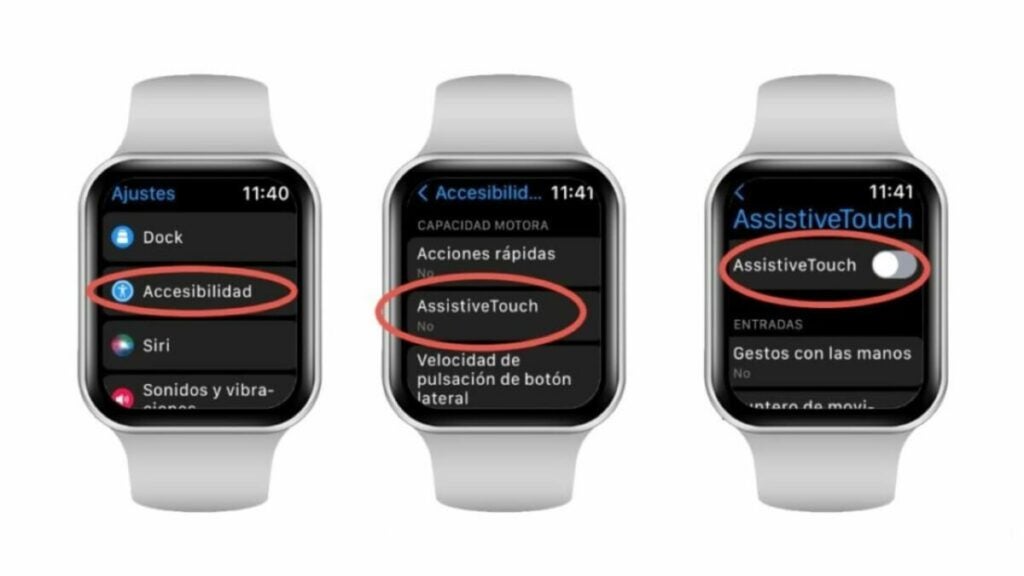
To activate Assistive Touch on your Apple Watch, follow these steps:
- Select “Settings” from the Apple Watch. You’ll recognize it instantly by its gray gear icon.
- Tap on the “Accessibility” section and then select “Assistive Touch.”
- Once you have activated Assistive Touch, you can customize the gesture you want to use through “Hand Gestures.” The Apple Watch allows you to use pinch, double pinch, fist close, and double fist close gestures to perform actions.
Indeed, our Apple Watch hides many interesting features that are not immediately apparent. Try out these gestures and incorporate them into your routine.
