Hotmail bids a final farewell on Twitter

Hotmail was recently rebranded as Outlook.com, and now the famous email service has said a last goodbye on Twitter.

In 1995 a project called HoTMaiL started life, and would go on to be the world’s most popular email service. Bought my Microsoft two years after launch for 400 million dollars and rebranded MSN Hotmail, it gained massive popularity through its integration with MSN Messenger (Windows Live Messenger).

When Microsoft bought Skype, it soon decided to retire both Windows Live Messenger and Hotmail, which upset many users. The move to Outlook.com isn’t quite as tough as that to Skype, as Outlook.com maintains all the features of Hotmail. Nevertheless, it’s sad to see the end of such old services (by internet standards).

Here’s Hotmail’s final tweet:

Goodbye Hotmail!

Read more about the move to Outlook.com.

Hands on preview: Hotmail.com turns into Outlook.com

outlook metro iconMicrosoft unveiled a dramatic overhaul of its Hotmail email service. The Hotmail name is dead and will instead be replaced by Outlook. Current Hotmail.com users will have the ability for their @hotmail.com email address to be automatically migrated to a @outlook.com address. While this sudden change may be jarring to some users, it is actually a solid and necessary change to Microsoft’s email service.

The biggest change users will notice right off the bat is the complete Metro style overhaul of the web interface. The entire website (for the most part) works just like you would expect a Windows 8 Metro app to work. With tight SkyDrive integration, integrated messaging, and video calling, Microsoft is aiming squarely at Gmail.

Let’s take a deeper look and get our hands dirty with the new Outlook.com. Continue reading “Hands on preview: Hotmail.com turns into Outlook.com”

How To: Import Hotmail into Gmail

Now you’ve got an even better reason to ditch Hotmail (or “Windows Live Mail” as it’s now known). As the Google Operating System blog reports, in May Gmail rolled-out a handy new feature for new users that enabled them to import mail from other online e-mail accounts such as Hotmail, Yahoo!, AOL and many other webmail or POP3 accounts. The good news is now it’s available to everyone 🙂

Previously, the only way to import Hotmail into Gmail was via third party applications such as Izzymail which could be both time consuming to setup and compromise your security somewhat.

Here is how to do it:

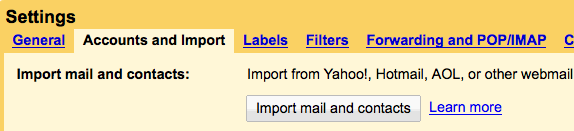
Log into your Gmail account. Click on “Settings” in the top right corner of the screen. Then click on the “Accounts and Import” tab:

screen-capture.png

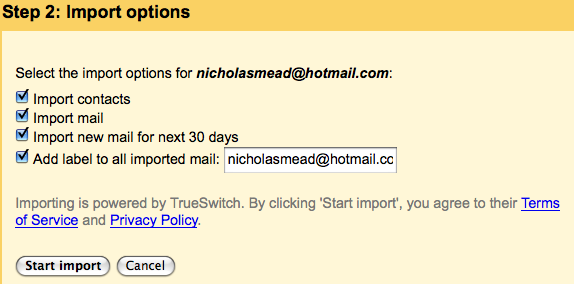
Click on “Import mail and contacts” and then enter the e-mail address and password of the account you want to import mail from. Then select exactly what you want to import:

screen-capture-3.png

Click “Start Import” and you’re done! A hell of a lot easier than using a third party app.

Note that the import process can’t be stopped once it’s started even if you log out of Gmail. You can see the status of the import process by clicking on the “Accounts and Import” tab again at any time. Messages may also take up to 48 hours before they finally appear in your inbox. Once it’s complete, you’ll see a confirmation e-mail in your inbox. Note that this service is not yet available for Google Apps for Your Domain as it’s aimed primarily as non-business customers.

Switch from Hotmail to Gmail with IzyMail

IzyMailWhen I tell people that I still use Hotmail I’m usually met with laughter, disgust or I’m ostracised completely. It’s not that I like Hotmail (now known as Windows Live Mail but since my address ends with the domain “hotmail.com” and everyone knew it as Hotmail before one of Microsoft’s many ridiculous rebranding exercises, that’s what I’m going to call it in this post) it’s just that I’ve used it for so long, I just don’t know how to say goodbye. I’ve had a Gmail account since it was launched but I only use it for work related things and my Hotmail has just been for social use. However, the latest incarnation of Hotmail disturbed me so much, that I’ve had enough and I’m moving wholesale to Gmail.

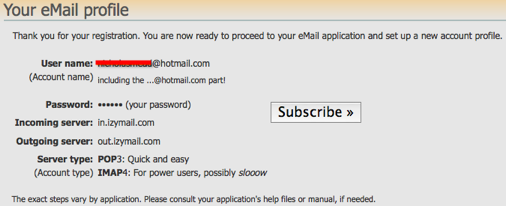
There are various ways of doing this but most are quite long winded involving manually transferring contacts and mails. The reason for this is that Hotmail does not support POP3 mail forwarding. IzyMail however allows you to forward everything by a proxy POP3do everything in just a few simple steps. IzyMail enables you to access webmail from major providers such as AOL, Yahoo, MSN, Hotmail, Windows Live, Fastmail or Gmail with any eMail application – it even works with mobile devices. Switching from Hotmail to Gmail requires 3 simple steps:

1. Create an IzyMail registration at the IzyMail Control Panel.

izymail.png


2. Define a Gmail import profile

izymail-2.png

3. Confirm ownership of your Gmail address by clicking on the link in the IzyMail confirmation message you receive.

That’s it – you’re done! Note that this only means that your mail will be forwarded to your Gmail account. All of your folders and archived mail will remain in your Hotmail account. You’ll also have to remember to log into your Hotmail at least once a month to keep it activated.

Use Outlook to access Windows Live Hotmail

OutlookIf there’s one thing I’ve just about had enough of it’s Windows Live Hotmail. I stated my case in no uncertain terms a while back and although I still haven’t abandoned it, I have found a way of avoiding it’s bloated, unintuitive, RAM sapping, vomit inducing interface. The solution? Use Outlook to access it instead using Microsoft Outlook Connector.
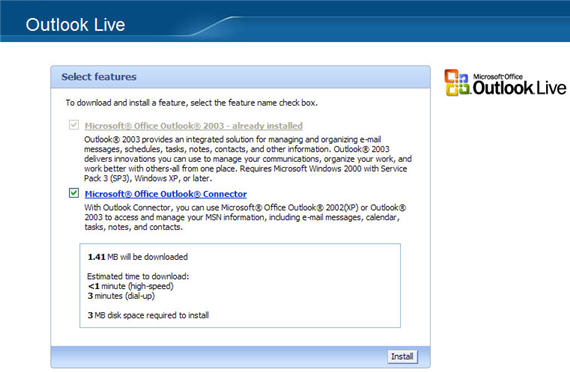
Microsoft Outlook Connector allows you to access any Windows Live Hotmail (and Office Live Mail) account from the far more civilized Microsoft Outlook. With Outlook Connector, you can use Outlook 2003 or Outlook 2007 to access and manage your e-mail messages and contacts for free which is great although rather annoyingly (and typically Microsoft), management of calendar, tasks and notes requires a subscription fee. If you do pay for this, you can synchronize multiple calendars between different Microsoft applications such as Microsoft Outlook and Windows Live Calendar.

microsoft-office-outlook-connecter-screenshot

This little application also means you benefit from Outlook’s spam filter which you can apply to Windows Live Hotmail’s incoming mail so no more mails from fake political exiles requesting you to send your account details so they can deposit a million dollars in your account (I get these constantly and am starting to think that being a political exile must be extremely lucrative). If you’re an Outlook user, you’ll never go back to using Windows Live Hotmail’s own interface after trying this.

How to forward Hotmail to other e-mail accounts

Hotmail logoIf like me you’re getting increasingly tired of Hotmail, you’ll probably be thinking of migrating or moving to another account. However, one thing that stops me is the worry that so many people have my Hotmail address, that I’ll end up missing a lot of e-mails. One excellent solution I’ve found is GetMail for Hotmail which is an email forwarding program that aims to address the lack of a POP3 server for Hotmail. This means that you can automatically setup Hotmail to forward your e-mails to other addresses. If you use GetMail For Hotmail with other third party POP3 tools such as FreePOPS or YPOPS you can also forward from AOL, Yahoo and many other webmail email accounts.

This makes it particularly useful for mass migrating all your e-mail to Gmail but also to continue forwarding e-mail received in your old accounts. For those that wish to forward to other POP accounts, the developers have created a list of SMTP servers as well. GetMail for Hotmail can even forward e-mail to your Blackberry, it’s SSL compatible and can be set to run as a an automatic Windows service. I’ve found that it can be prone to occasionally crashes and sometimes misses mail, but it’s definitely better than nothing.

Windows Live Hotmail to launch today

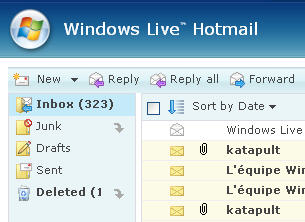
wlh1.jpgWindows Live Hotmail, the new version of Microsoft’s webmail service, is set to launch globally in 36 languages this Monday. The revamped service will offer a number of new features to recapture users that have fled to other webmail services like Yahoo! or Gmail.

Considered by Microsoft as the biggest update of Hotmail since 1996, this new release will aim to be “safer, more powerful and productive” and easier to access, whether via the net or a mobile device. The new webmail will now offer 2 Gb of storage, allows users to import and export contacts to other webmail services, and handle right-clicks and drag and drop. Just like Gmail with Google Chat, Live Hotmail will incorporate Windows Messenger and all the Live services like OneCare or Spaces from the drop down menu on the left. Outlook Connector is one of the most eagerly awaited features of the new version, as it should allow users to “view and manage their Windows Live Hotmail account from Outlook for free, with full contact, e-mail and e-mail folder synchronization.”

Microsoft also claims to have tightened security in its webmail service by providing a “safety bar” indicating the authenticity of new messages. The spam filter will also automatically delete or block junk mail: its reliability will be tested in the coming months.

Live beta testers will be familiar with the new sleeker, although slightly disappointing new interface, the new color themes and toggling between the “classic” Hotmail look and a new interface more similar to Outlook.

If you already have a Hotmail account you can update it to the new version by clicking the green “Join Windows Live Hotmail” button in your account. Microsoft will be encouraging its 280 million Hotmail users to make the switch in the coming months, but will it effectively win back users from Yahoo! or Gmail? As Techcrunch do well to point out, it’s surprising that Microsoft hasn’t integrated their latest jewel, Silverlight, with the new Live Hotmail. Instead of giving users the chance to fully customize and build on their webmail, it seems Microsoft has decided instead to give an updated, but watered down, version of Hotmail.