How to use Hotspot Shield for Windows

Hotspot Shield is an amazing app to protect data, access websites banned in your country, and explore the web anonymously. It’s free on Windows and Mac, allowing a secure and encrypted connection that blocks out hackers and others watching your online activity. We’ll explain how to configure Hotspot Shield on Windows, enabling a fast and hidden connection.

Installing Hotspot Shield

Download Hotspot Shield and start the installation by double-clicking the executable file. The language will default to English, but you can change it if desired.
bing ad

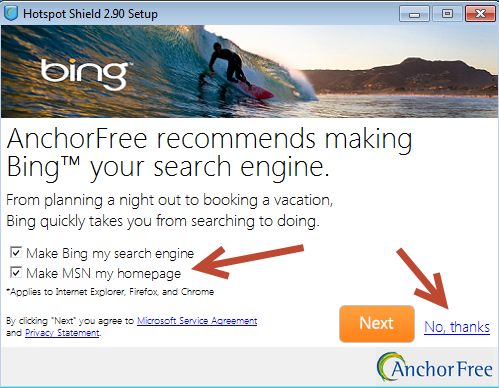
There will be prompts to change your homepage or make other changes to your web browser. If you do not want these uncheck the boxes and hit “No, thanks”.
installing uncheck

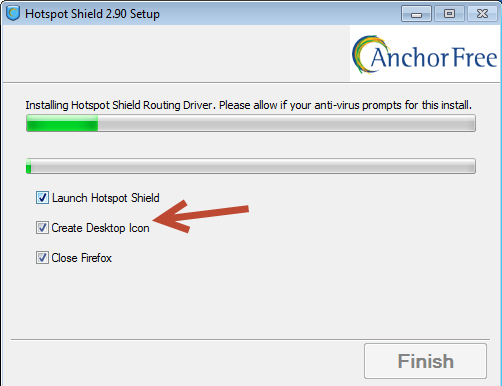
Installation depends on your computer, but will likely take a few minutes. We recommend unchecking all of the boxes before the installation completes, namely if you are using FireFox at the time. This way you can control what is closed.
disconnected

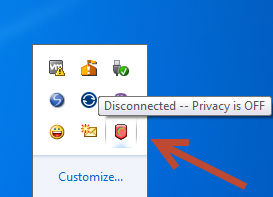
After installation, run Hotspot Shield from the Start menu. You will see the shield icon with a red crescent, near the system time and other icons. If you have your icons hidden, you may need to click on the arrow to expand the menu. Proceed by clicking the Hotspot Shield icon.

Set options
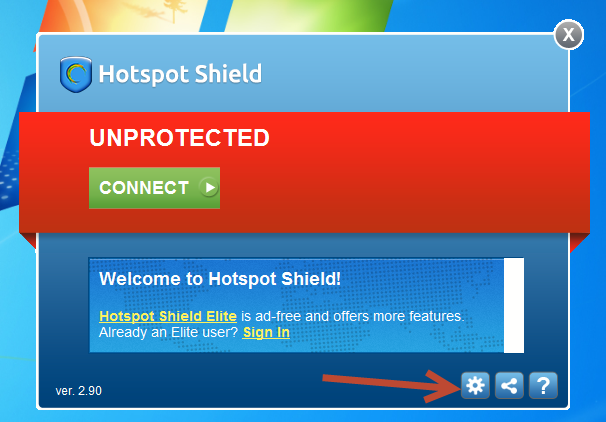
unprotected_gear

By default Hotspot Shield will be off. Clicking “Connect” will start an encrypted connection, but we’ll hold off on that for now. Note that the free version of Hotspot Shield has ads and lacks all of the features. You can upgrade to the Elite version to have even more control, but the free version is still very powerful.
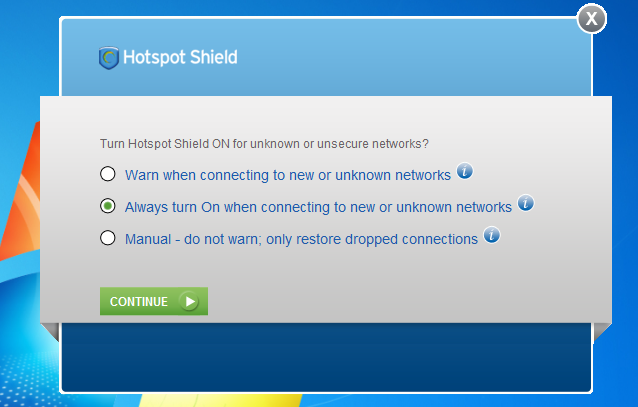
always on

For now it’s a good idea to adjust Hotspot Shield’s settings to your liking. Press the gear icon and you will enter the “Network Detection” tab within the options. The middle option “Always On” is the most secure and reliable option, which gets our recommendation.
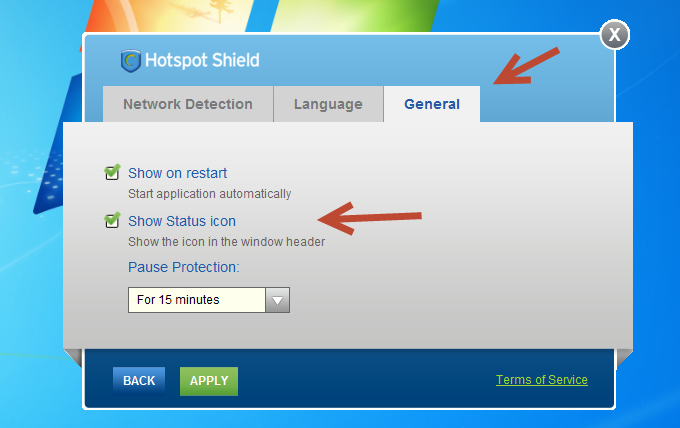
general options

Switch over to the “General” tab and you can adjust if Hotspot Shield shows on restart, includes a status icon, and the length of pauses in protection. We recommend leaving the default settings. If you do make any changes hit “Apply” to return to the front of the app.

Enable protection

Now that all of your options are set, it’s time to start protection. Press the green button marked “Connect” to set a VPN connection.
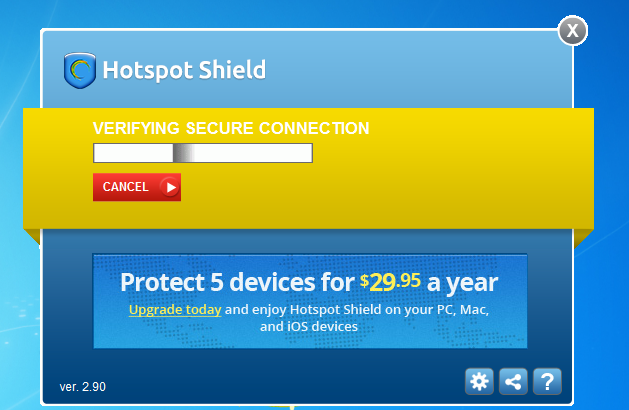
securing connection

The connection will likely take a few minutes. The center of the app will change from green to yellow as this process takes place. If you ever wish to cancel the connection you can hit the red “Cancel” button.

Select country VPN

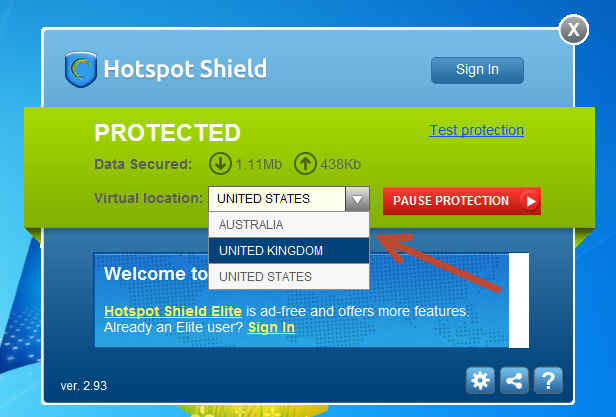
You’re nearly done, but for added security you can change your IP address and country, setting you in either the United States, United Kingdom, or Australia.
select country

Hit the drop down menu and select the country that you want your connect to identify as. This can allow you to access websites that your home country has banned. Let the process complete and you will have a new location and IP address.
uk location

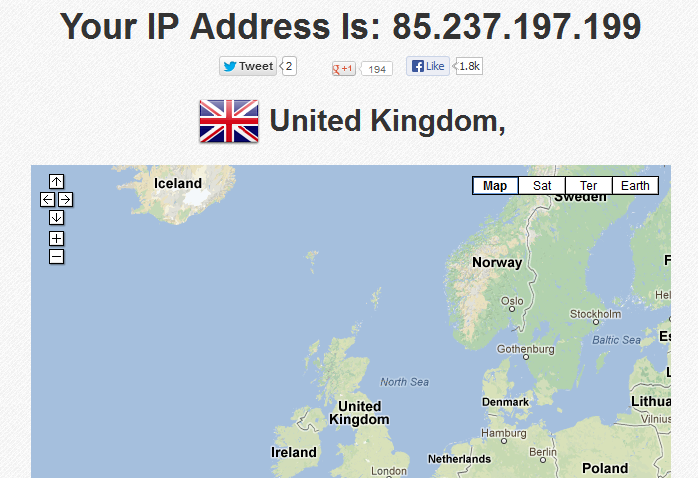
If you want to check if this change worked, head over to findipinfo. In our case, we are now recognized as being located in the United Kingdom. While it won’t allow us access everywhere, we can now check out sites and content that might not be available in the United States, such as foreign sporting events.

Win an iPad with Hotspot Shield in our Facebook contest!

We hope you’ve been hanging out on our Facebook page this weekend, because if you haven’t, you’ll have missed the fact that we’re giving away a shiny new 32GB iPad!

That’s right – the winner of our latest competition will be sent a beautiful new iPad, complete with a subscription to Hotspot Shield. If you didn’t know already, Hotspot Shield is a powerful VPN service that lets you surf the web privately, access blocked websites, load pages faster and use less mobile data.

Even if you don’t manage to bag the big prize, we’re also giving away 5 one-year Hotspot Shield licenses.

We’re really making this easy for you – just head over to Facebook, become a fan of the Softonic Facebook page and tell us where is the most random place you’ve ever hooked up to a wifi point! You’ve got until May 10, so what are you waiting for? Go win your iPad!

New iOS version of HotSpot Shield released, adds iPad support

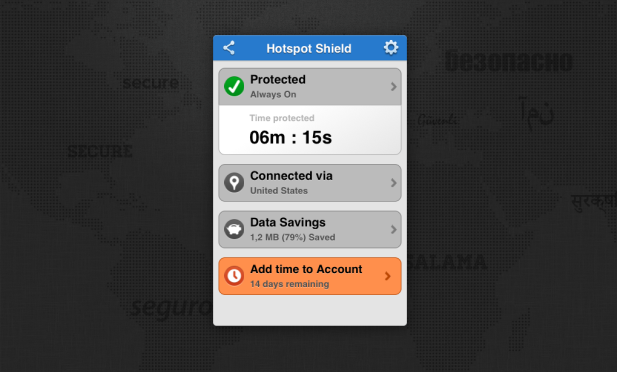
HotSpot Shield VPN for iOS received a major update today, optimizing the app for iPad and adding useful new features. The popular VPN (virtual private network) application allows you to browse the internet securely, save data and access web sites and apps that are blocked outside of certain countries, such as Netflix, Hulu or Pandora.

Once enabled, HotSpot Shield VPN lets you protect your identity when using the internet on your iOS device by encrypting all traffic, allowing you to communicate privately. HotSpot Shield compresses all the data sent through the connection so your connection devours less data – the developer claims savings can be up to 50%.

What’s new in HotSpot Shield VPN 2.0

The new version of HotSpot Shield boasts a tablet-friendly user interface for iPad users, which makes it very easy to set up and start using the VPN client.

HotSpot Shield VPN 2.0 now allows you to choose the country of the IP location, between USA, UK and Japan. This means that no matter where you are you can browse content normally restricted to users in that country.

Other changes in the new version of HotSpot Shield for iOS include iCloud support, improved malware protection and the ability to check your data savings and protection status more easily.

If you’re a student it’s well worth considering installing HotSpot Shield on your iOS device. The developer, AnchorFree, is offering a free annual subscription of the service to students in the US and UK. In conjunction with this, it’s offering scholarship awards for colleges and universities as part of a scheme called the ‘College Privacy Challenge’.

Win a Hotspot Shield subscription for a year

We have 50 one-year subscriptions for the excellent VPN software Hotspot Shield Elite to give away. This is the ad-free version, which works on Windows and Mac.
For the chance to win, simply leave a comment below before November 29 2012, remembering to use a functioning email address. We will pick 50 winners at random, and notify them by Novermber 30th 2012.

Hotspot Shield is the most popular VPN download on Softonic, and with good reason. It’s a really easy way to access websites that are blocked in your region, and to do so safely and privately.

Hotspot Shield Elite creates a Virtual Private Network (a secure connection, usually abbreviated to VPN), that protects yuot IP address, allowing anonymous browsing. All you have to do is log in with a personal code to start

Continue reading “Win a Hotspot Shield subscription for a year”

Giveaway: Hotspot Shield Elite

This competition is now closed, but we have a second giveaway here, until November 29th 2012.

Hotspot Shield is one of our favorite apps for hiding your location from websites, creating a virtual private network so you appear to be browsing from the US wherever you are in the world.

We have 10 codes to give away for Hotspot Shield Elite, which has no ads and includes malware protection and a much faster connection.

  • To win a Hotspot Shield Elite code, simply leave a comment below before April 9th at 12pm PDT (Pacific Daylight Time), and we’ll do a random draw to select the winners. Winners will be notified on Tuesday 10th April.
  • When you comment, make sure you enter your email address properly. This is how we will contact you if you are a winner – we will not share your email address with anyone.
  • Here are the full terms and conditions.

If you’ve never used Hotspot Shield Elite, check out Nick’s review for the full low-down.

4 Alternatives to Hotspot Shield

It can be really frustrating when you want to watch a video on YouTube, only to receive a notice saying that viewing is region-restricted for your country. The same goes for accessing other websites available only to certain countries.

Luckily, there are tools like Hotspot Shield which create a Virtual Private Network (VPN) and allows access to geo-restricted websites.

If you’re interested in viewing content from countries other than the US, or are just looking for a comparable alternative to Hotspot Shield, there are a ton of great tools that’ll let you view the content you want, no matter where you are.

Cyberghost VPN

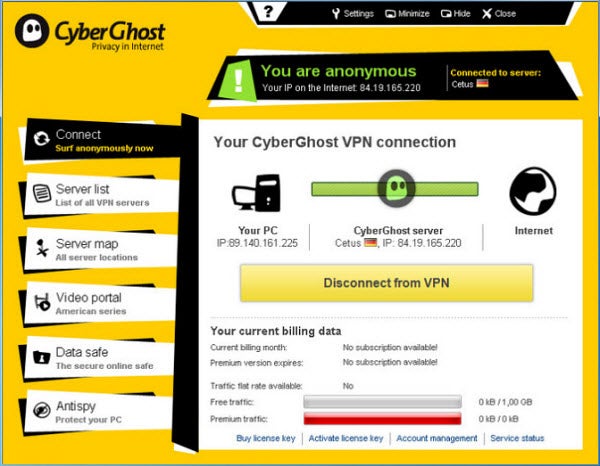
Cyberghost VPN is a nice alternative that lets you access region-restricted online services, as well as browse anonymously online. There is a free VPN package available for download on the developer’s website that includes up to 1 GB of traffic per month, as well as access to free servers. There are also other monthly paid plans if you want less wait time and more server availability.

UltraSurf

UltraSurf is well-known as a tool to browse the web anonymously, but it can also help you view sites that are otherwise restricted based on your location. Simple to install and use, UltraSurf  is a tool for Internet Explorer that works automatically on startup. You can also use it on Firefox, thanks to the handy UltraSurf Firefox Tool.

TunnelBear

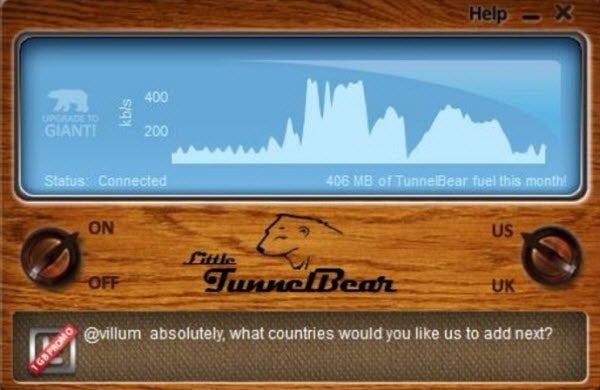
Much like Hotspot Shield, TunnelBear enables users to view region-restricted web content securely. By creating an encrypted connection between your computer and a server in the country you want to connect to, TunnelBear essentially lets you experience online content as if you were viewing it from another country. TunnelBear is available in three pricing plans, one of which is free and gives you up to 500MB of free data per month via the developer’s website.

ExPat Shield

ExPat Shield is essentially Hotspot Shield for users who want access to UK-specific content from outside of the United Kingdom. It does this by connecting your IP address to a UK IP. Installation of ExPat Shield can be a bit arduous, but the surfing speed is pretty impressive. In addition to offering simple VPN connectivity, ExPat Shield also has an anonymous browsing option.

If you’re looking for a few more options for streaming video content, there are even more browesr add-ons and tools you can use.

Watch blocked video sites with Hotspot Shield

Hotspot ShieldI find it really annoying when broadcasters prevent you from watching videos outside your own country. I understand the licensing issues involved but that doesn’t make it any easier to swallow when you want to listen or watch a broadcast from outside your own country.

The way broadcasters block you is by detecting your IP address. If it’s from outside of the country of broadcast, you’ll either receive a standard copyright blurb or simply receive nothing at all. While trying to watch the US Tennis Open on CBS I discovered Hotspot Shield which is a highly useful utility that can help you get round this problem. Officially, it’s designed to protect you while you are surfing in order to prevent personal info being stolen or simply allow you to surf anonymously. It does this by routing your IP through various public and anonymous proxies. In effect, it sets-up a VPN between you and your internet gateway which masks your genuine IP address thus allowing you access to blocked websites.

It won’t work in all cases though and there are a few problems. Once you’ve installed it, Hotspot Shield opens up a new browser window with an address bar which you use to surf to the website of your choice. This works fine if the video you want to watch is embedded in the site itself. However, if it’s a Java applet popup, it often doesn’t work because there’s no easy way to surf to them directly. In addition, it can be painfully slow. Because your internet traffic is being routed through other proxies, it can make accessing sites very slow which isn’t much use when you’re streaming video or audio that requires a high bandwidth. Still, it can help you access that radio commentary or sports broadcast that you desperately want to see when no other options are available.

Legal terms for Hotspot Shield Elite Giveaway

1. Object

With the purpose of promoting Windows/Mac application Hotspot Shield Elite , Softonic International, S.L (hereinafter, “Softonic”), a Spanish Company, with corporate address in Barcelona, c/ Rosselló i Pòrcel, 12 and Spanish Tax Identification Number B-63920920 plans to develop an international campaign to be carried out between 21st November 2012 and 29th November 2012 and which will allow the users to win a license for Hotspot Shield Elite according with what is set forth herein.

2. Scope of the promotion

The scope of the promotion includes the following sites and countries:

http://en.softonic.com/ (Worldwide)

http://onsoftware.en.softonic.com/ (Worldwide)

3. Length of the promotion

The promotion shall start on 21/11/2012 at 12pm PDT (Pacific Daylight Time) and shall end on 29/11/2012 at 12pm PDT (Pacific Daylight Time). After this period, a randomized system shall choose 50 entrants who shall win one full version of Hotspot Shield Elite each.

The prizes shall be given to the winners 30th November 2012

4. Spreading of the promotion

The campaign shall be spread via a blog post, with support from Twitter and Facebook linking to the blog post

Such spreading shall take place between 21st November 2012 and 29th November 2012. Moreover, it shall detail the following information: Information regarding the prize, how to participate in the promotion, Start and termination date, Free promotion.

5. Procedure

In order to participate, each contestant shall leave a comment on the blog post.
[we will contact winners using the email address they leave in our commenting system]

6. Prize

Fifty codes for a one year subscription to Hotspot Shield Elite, with fifty winners of one code each.