New update to Marvel Snap

We’ve got a brand new patch for Second Dinner’s Marvel Snap. Even though this patch doesn’t really institute any massive changes as previous updates have, it still brings us some cool new additions. 

Marvel Snap DOWNLOAD

The biggest change in the latest patch is that the devs have added titles. If you’ve reached Collector’s Reserves within the collection track, you’ll now be able to unlock brand-new titles. These titles will display on your profile during matchmaking; like previously, though, these are cosmetic changes and won’t really impact gameplay very much. Another thing is that you don’t seem to be able to choose titles; the game instead bestows random titles upon your profile. 

The devs have also instituted a few changes in terms of card balances, specifically for Dagger and Wolfsbane. Both of these cards will now be able to consider unrevealed cards while calculating individual power gains. In Dagger’s case, she has officially become even more powerful and useful within the movement archetype. Essentially, Dagger can now gain two additional Power points for every enemy card within a new lane that she moves to. 

New update to Marvel Snap

We’ve also got a few general updates such as Avatars now featuring character logos on the Avatar Selection Menu. There is also a bunch of new location sounds for The Nexus, The Peak, Sewer System, NIdavellir, Muir Island, Attilan, and Tinkerer’s Workshop. 

In other news, you may want to check out our comparison of God of War: Ragnarok and real Norse mythology.

Marvel Snap strategies: how to increase your collection power

Fans of the Marvel universe can continue enjoying their favorite characters with the Marvel Snap card game on mobile and PC. This card game that Nuverse develops gives players a chance to collect all their favorite heroes and villains while also battling it out against real opponents in quick 1v1 matches. But many of you might wonder how to increase your collection power.

Marvel Snap DOWNLOAD

In this article, we’ll look at how to get more cards in Marvel Snap and why you need collection power to do this. Then we’ll guide you step-by-step as we look at how to increase your collection power.

How to get more cards?

Like any card game such as Magic: The Gathering Arena or Yu-Gi-Oh!Master Duel, the main focus of the game is collecting cards. With more than 150 different cards available and multiple ways to upgrade them – collecting all of them can keep players entertained for a long time.

However, in order to get new cards, you need to upgrade cards and improve your collection power or collection level (CL), as it’s also referred to. After each round, you battle against an opponent you will receive Boosters for a specific card in your deck. You then use these Boosters along with Credits to upgrade your cards which will increase your collection power. As your collection level increases, you will unlock new cards – so upgrading your existing cards is vital! 

How to increase your Marvel Snap collection power?

The only way to collect new cards is by increasing your collection power. This is part of what makes Marvel Snap so intriguing and exciting. You don’t have to spend real money to build a good deck as long as you have a solid collection power-building strategy in place. Besides, a lot of cards can only be unlocked through achieving certain collection levels – so no amount of money will give you a full collection. Let’s look at how to increase your collection level in Marvel Snap.

  1. Launch Marvel Snap

    Marvel Snap strategies

    Launch the Marvel Snap app on your computer or mobile device by clicking on the app icon in your app drawer or on your desktop.

  2. Go into your collection

    Marvel Snap strategies

    After winning a battle, you’ll receive booster points towards a card in your deck. From the main screen, tap on the ‘Collection’ button found at the bottom of your screen to the left of the ‘Home’ button.

    In your collection, you’ll see all the cards in your collection, including those not currently in your deck, as a deck is limited to 12 cards.

  3. Click on a shining card

    Marvel Snap strategies

    Any cards that can be upgraded will be clearly visible with a shining sparkle around them. Tap on this card to open it up and see the costs of upgrading the card (credits and booster points).

    Tip: If you want to rank up quickly, make sure to level up your common cards first and change them out once they become uncommon. Following this strategy will leave you with a powerful and well-rounded deck. It will also raise your collection power quickly as these upgrades require fewer booster points than upgrading an uncommon card.

  4. Click on the blue square to upgrade it

    Marvel Snap strategies

    Click on the blue square in the bottom right of the screen to upgrade the card. A new screen will appear featuring the currently selected card in all its glory. Confirm that you want to upgrade it by tapping on the button.

    Tip: Remember that upgrading cards require boosters as well as credits, which are limited. This means you can only unlock a certain amount of cards per day, and then you have to wait for new daily challenges to refresh so that you can earn more credits. Even if you decide to spend money on purchasing more credits – there is also a daily cap for that to ensure fairness and steady progression through the game.

  5. Check your collection level

    Marvel Snap strategies

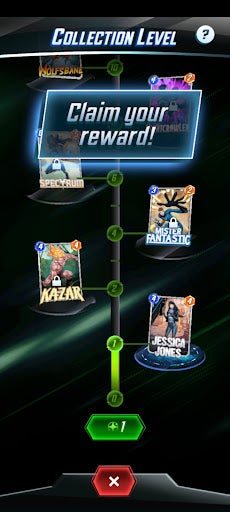
    Once you’ve upgraded a card, you’ll be taken to a new screen showing your collection level and the increase your upgrade caused. On this screen, you’ll also be able to see which card you’ll be getting next and how far you are from getting it.


Battle, upgrade, get new cards, repeat

Marvel Snap is an exciting card game that gives players a chance to collect their favorite superheroes or villains and upgrade them to create the most powerful deck and beat any opponent before you. If you need some more tips, take a look at this thread.