SwiftKey gesture keyboard will debut with iOS 8

SwiftKey, the popular Android predictive and gesture controlled keyboard, is finally coming to iOS. The keyboard will launch September 17th, the same day iOS 8 comes out. The keyboard will support both iPhones, iPod touches and iPads.

SwiftKey offers several key advantages over the stock iOS keyboard. While Apple’s keyboard offers predictions, it’s not nearly as powerful as SwiftKey. SwiftKey integrates with your social accounts, email and websites to analyze how you type. It also offers up suggestions for trending words so you don’t have to constantly correct your keyboard.

Default player


brightcove.createExperiences();

Users will also be able to use gestures to type out messages with one hand. Slide your finger over the letters and SwiftKey is smart enough to predict what you’re trying to type.

SwiftKey is also connected to the cloud, allowing you to sync all your settings across multiple devices, even between Android and iOS.

SwiftKey will be free with in-app purchases for customizations. You can download different themes in their keyboard store, which usually cost about a dollar each. There are theme packs that give a slight discount as well.

Source: SwiftKey

Related Stories

iOS 8 arrives Sept 17, iTunes already updated to support it

How to get free apps from the App Store

WhatsApp bug is resetting some users’ privacy settings

Here are the coolest things Apple Watch can do

Follow me on Twitter: @lewisleong

Swiftkey fixes lag in latest update

Popular Android keyboard replacement Swiftkey received a major update today. If you’ve noticed some lag using the keyboard, that’s all fixed now.

Both traditional typing and Swiftkey’s Flow gesture typing have been sped up. I’ve been using the keyboard for years now, and there’s always been a slight (but still annoying) lag when typing quickly. That lag has been eliminated in this latest update. Flow now offers better prediction and finger tracking too.

The update also brings bug fixes for random crashes, disappearing backgrounds for certain themes, and more.

If you haven’t tried Swiftkey yet, you can get it for free at the download link below. Themes are 33% off for a limited time.

Download

Swiftkey for Android

Source: Google Play

Related Stories

Software Clinic: “Is someone stealing my Wifi connection?”

Facebook removing Messenger feature from main app this week

Scan documents with CamScanner

Instagram apps are vulnerable to account hijacking

How to speed up your Android: 5 tricks that really work

Follow Lewis on Twitter: @lewisleong

SwiftKey Note may bring the gesture keyboard to iOS

Popular Android keyboard, SwiftKey, could be coming to iOS in the form of the SwiftKey Note app. The @evleaks team has released an image of the supposed app on Twitter today, which shows a simplistic note taking app with what looks like the stock iOS 7 keyboard with text predictions.

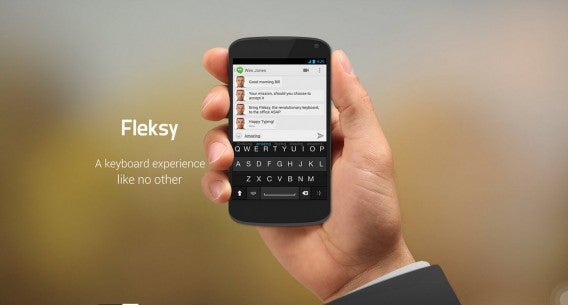
Apple doesn’t permit the use of third-party keyboards like Android does, so SwiftKey will have to be contained within its own note taking app. iOS does have Flesky, which offers a way for developers to integrate its keyboard into other apps, but it doesn’t actually replace the iOS keyboard across the entire operating system.

Flesky keyboard

SwiftKey Note can still be a powerful productivity tool for those who are tired of Apple’s keyboard. Gestures can make typing quicker and easier for long messages and SwiftKey Note can be truly useful if it can export text to a bunch of different apps.

This is all speculation at this point as @evleaks hasn’t said anything about the functionality of the app. SwiftKey already has a specialized note taking app called SwiftKey Healthcare for clinicians to quickly type out information into a tablet so SwiftKey Note for iOS doesn’t seem too farfetched.

Source: @evleaks (Twitter)

Via: The Verge

RELATED STORIES

SwiftKey update features custom keyboards

SwiftKey, the third-party keyboard for Android, received a major update today. The company has consolidated all of its apps into one app, getting rid of its tablet specific keyboard altogether. The update also features custom keyboards, allowing users to move the keyboard around, change its size, and more. Previously, these features were only available in the SwiftKey beta but is now available to all SwiftKey users.

SwiftKey custom keyboards updated

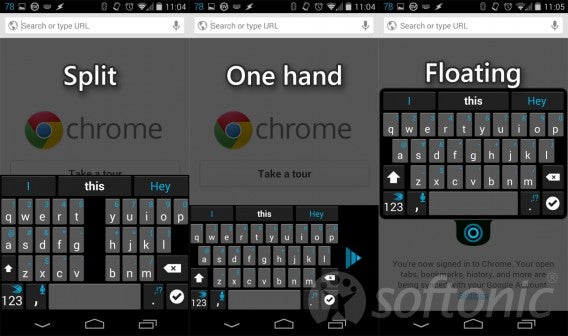
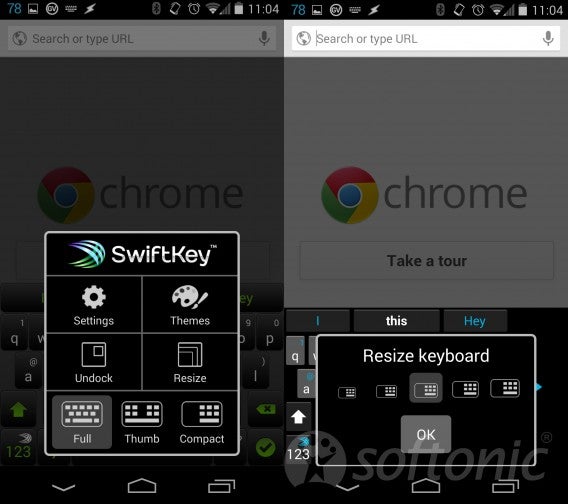
Custom keyboards can be accessed by holding down the SwiftKey/numbers button when the keyboard is pulled up. You’ll see options for setting, themes, undocking, resizing, and other keyboard layouts. “Full” offers a traditional keyboard layout, “Thumb” splits the keyboard into two parts for large screen devices like tablets, and “Compact” shrinks and moves the keyboard to the side for easy one-handed typing.

SwiftKey custom keyboard settings

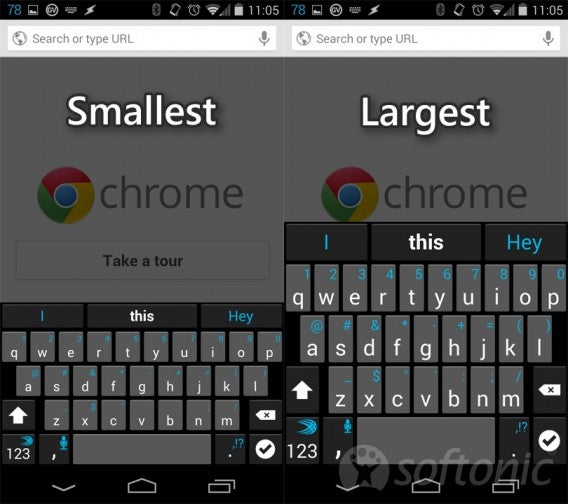
Each of the three keyboard layouts can also be resized. Those who have trouble with accuracy can make their keyboard larger to avoid typos while power users can shrink the keyboard to view more content. Users can even undock the keyboard and drag it around the screen.

While this is limited use on a phone, it will appeal to tablet users since they can split the keyboard and drag each section of the keyboard to a different part of the screen. This makes landscape typing easy.

SwiftKey custom keyboard size comparison updated

SwiftKey Cloud is still here, helping you sync your customization between your Android devices. Flow gesture typing also works very well with the new layouts, especially with one-handed typing.

You can download the latest version of SwiftKey for Android here.

RELATED STORIES

Source: SwiftKey

SwiftKey Cloud now available, syncs your settings across devices

SwiftKey Cloud is finally out of beta and is rolling out to Android users now. Those who purchased SwiftKey will receive SwiftKey Cloud as a free update. For those who haven’t purchased SwiftKey yet, the company is celebrating the roll out of SwiftKey Cloud by putting the app on sale for 50% off.

If you have multiple Android devices with SwiftKey installed, your life is about to get a whole lot easier. With SwiftKey Cloud, your personalization options like custom dictionaries, languages, and settings will be synced across your devices so you have the same keyboard experience no matter what device you’re using. It takes a while to train SwiftKey to recognize how you type so retraining a new SwiftKey install can be a bit of a pain.

swiftkey cloud sign in

SwiftKey also integrates with your Gmail, Facebook, Twitter, and more to analyze the words you use. Additionally, the keyboard features trending words it finds on Twitter so you won’t have to fix autocorrects constantly.

To download the latest version of SwiftKey, hit up the download link below.

Download SwiftKey

SwiftKey Cloud syncs and backs up your keyboard settings

SwiftKey, one of the most popular keyboards on Android, has introduced SwiftKey Cloud for syncing and backing up your keyboard settings. Additionally, the keyboard will support trending phrases so you won’t need to train the keyboard for a specific trending phrase.

While this announcement seems minor, it’s actually handy if you have multiple Android devices or if you’re moving to a new device. Previously, all of your custom phrases and settings wouldn’t be carried over to a new device so you’ll have to retrain SwiftKey. With SwiftKey Cloud, all of your devices will get the most updated information immediately.

Trending Phrases is the most interesting addition as it analyzes Twitter for “localized trending topics.” At launch, Trending Phrases will support US, UK, and 11 other languages. SwiftKey promises support for more languages in the future.

Last but not least, SwiftKey makes connecting the keyboard to your accounts easier than ever. You can hook SwiftKey up to your Gmail, Facebook, Twitter, and now Yahoo! Mail as well.

To try out SwiftKey Cloud, you’ll have to download the beta at the source link below.

Source: SwiftKey Beta

Mobile app of the week: SwiftKey Keyboard 4

The latest version of SwiftKey Keyboard, released today, is the fastest Android virtual keyboard that we’ve tried.

The new version’s SwiftKey Flow technology makes this keyboard replacement even smarter than ever. The gesture-based input system means you just need to drag your finger across the position of the letters on the keyboard in order to make words – you literally don’t have to lift a finger.

Continue reading “Mobile app of the week: SwiftKey Keyboard 4”

Swiftkey Flow added to updated Android keyboard app

One of the best keyboards for Android, Swiftkey, has been updated to version 4. This major update adds a feature called Swiftkey Flow, similar to Swype, which lets you write by swiping your finger around the keyboard.

Swiftkey was already a contender for the best Android keyboard app, and this new version makes its predictive text powers even greater. It predicts as you type, and even predicts the following word.

Swiftkey supports 54 languages, checks where you may have missed spaces in text, and has a range of color schemes to pick from.

Check out Swiftkey for Android: there’s a free trial version, the full paid app and a tablet version.