
How Twitch streamers earn money

Many of us have considered becoming a Twitch partner, but can we realistically make money?

Tweeeetch

Whether you’re casually interested in Twitch or looking to become the very best streamer in history, one question often looms: How do they make money?

Sure, we’ve already talked about what it’s like being a YouTube content creator, but what’s it like being a Twitch partner? Can you really support yourself? Let’s find out!

How Twitch streamers earn money

Through Twitch
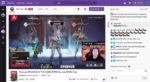
A streamer

There are a number of methods on Twitch for monetization.

Direct Donations

Donations are a streamer’s best friend! Money goes straight from the giver to the streamer, avoiding Twitch entirely. It’s an easy and meaningful “thank you” from users who love a channel.

Understandably, since Twitch earns nothing, they require streamers to set up donation links for themselves. Take, for example, the Apex Legends streamer Viss. On their channel, you can find a number of links directly below the stream, as seen below:
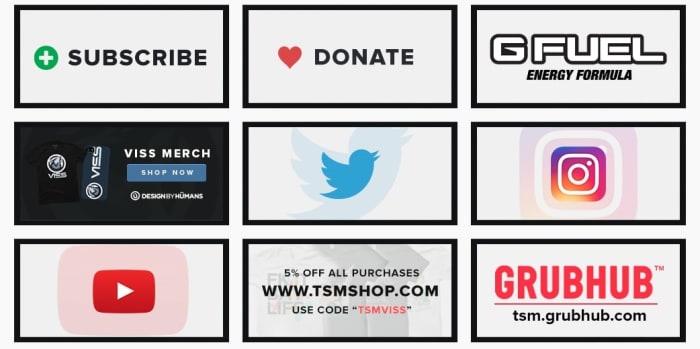
Donations
Very clean and clear link menu, it has our approval!

All streamers that set up donations will have something like this button on their site. You may have to search, but it’ll be there!

If you are a streamer looking to set up direct donations on your site, you have the option to give your donors a choice of emoji that plays over the stream. We suggest using this to let the donors know they’re appreciated!

Twitch Affiliates and Partners

Before we go on, we need to discuss two terms: affiliates and partners. Essentially, these are two levels of Twitch streamer that each unlock new aspects of monetization.

To become an affiliate, you must reach 50 followers and meet a few criteria for monthly streaming (ex: 500 minutes on 7 unique days, etc.). Once that’s accomplished, you can apply to be an affiliate.

And why would you? Because subscriptions and bit donations start right here, along with the ability to earn from the advertisements played on your channel.

Twitch

Partners are a step above affiliates, and the requirements for partnership are set down in the aptly named Path to Partner. Basically, have 75 viewers on average, and a meet a much higher number of average streams. Twitch describes the ideal Partner as someone who they can partner with to exemplify a good streamer to others on the site.

This final tier has many more benefits: promotions on the Twitch website, channel-specific benefits to subscribers, potentially paid appearances at conventions, and more. We’ll talk about a few of these further down.

Subscriptions
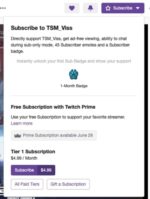
Subscribe

Twitch subscriptions can be confusing for anyone traveling from YouTube, where “subscribe” simply means to follow a channel.

Here, subscriptions work more like a regular streaming service (think Hulu or Netflix). Users pay monthly fees for the ability to watch without ads, and half the subscription cost goes to the streamer.

With a subscription, viewers can also attain user badges and special emoji to enter in the live chat. Also, they may be invited to subscriber-only chatrooms.

Once again, these features become available at the affiliate level. Meanwhile, partners can begin to create their own badges and emoji for greater personalization.

Bits!
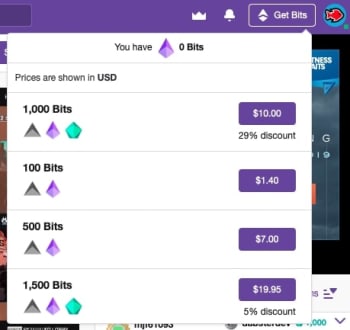
Biiiiiits!Bits are another form of “direct donation.” However, these are officially created by Twitch themselves and are only available to affiliates and above.

They work something like in-game currency: you buy bits, which are then used to purchase emotes that play over a streamer’s video. When this happens, you have a chance of being personally thanked by the recipient!

Once again, to create unique bit emotes and “cheermotes,” you must gain the level of Partner.

Outside of Twitch (Somewhat…)

There are many monetization options that aren’t connected to Twitch. These can actually be some of the best sources of income, but won’t be available to smaller streamers for quite a while.

Sponsors

NinjaMany streamers use their channel to set up personal connections to products. Sometimes this takes the form of advertisements on their channel, which admittedly will be run through Twitch. Oftentimes, streamers can be paid for simply putting something in a video.

Think product placement in your favorite movies!

Take the above photo of Ninja for example. In most of his streams, the camera has been set so viewers are able to see his monitor, refrigerator, keyboard, and gaming computer. We guarantee each and every one of those things are created by sponsors who pay Ninja to subtly represent their product.

Appearances

Yep.

While Twitch Partners may receive offers to show up for Twitch events to represent the company, there are many different businesses that will pay to have streaming legends appear for their product.

At E3 2019, the creators of Philips Hue, a company that uses light shows to enhance gaming experiences, invited Apex, a member of the FaZe Fortnite clan, to join their booth for media interviews.

So, is Twitch Prime Related?
Prime Benefits

With all this talk of Twitch, users familiar with the website may be questioning: does Prime affect monetization?

The answer is: kinda.

In addition to video game specific benefits like free loot boxes, every Twitch Prime member gets one free monthly subscription, which at this time would normally cost $5.

So, remember how we said Twitch streamers get about half of the subscription cost? In this situation, they still get paid half the month’s subscription, even though the actual viewer didn’t put money down.

Conclusion

Between direct donations, the affiliate and partner programs, subscriptions, bits, sponsors, appearances, and Twitch Prime, monetization can seem a bit daunting at first, when combined with everything else this streaming platform offers. We hope this guide gives you a better idea of how everything works.

How to Get Started Selling Membership Subscriptions to a Premium Community Website

Kajabi makes earning money online easy with its intuitive model!

Community

Community is a vital part of any membership site. It’s what brings in the revenue and enables you to create a reputation as an authority in your niche.

Most people would be happy with selling a one-off product to customers, closing the deal, and starting over by marketing to new customers. However, if you already have a community website with members and would like to generate recurring revenue, you might consider setting up a subscription-based membership site.

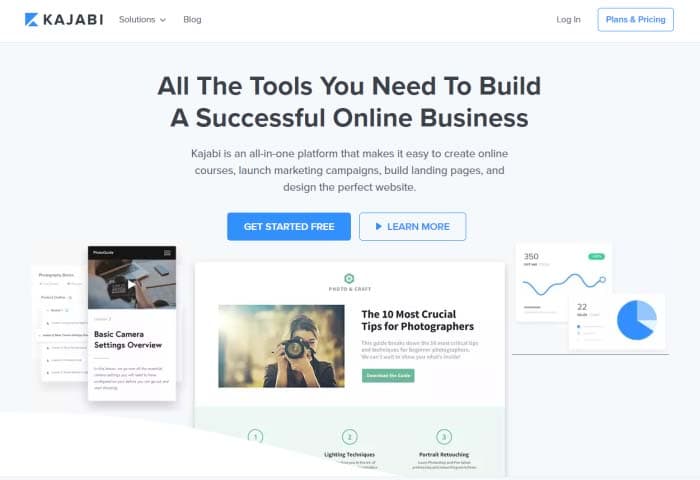
In this story, we’ll walk you through a step-by-step guide to show you exactly how you can sell monthly membership subscriptions to a premium community website using Kajabi.

Let’s get started!

Why you should sell membership subscriptions (and how to do it right)

As the leader of an online community, you might consider selling membership subscriptions to your premium community website. By doing so, you’ll be able to offer products and services for the entire community and keep them engaged long-term.

In other words, by selling membership subscriptions, you’ll make the most of your marketing efforts and turn your existing online community into a source of long-term steady income.

Here are some of the key benefits of using the membership subscription billing model instead of a per-product model:

  • Generate recurring revenue: By offering membership subscriptions to your online community members, you’re able to create recurring revenue streams for your business. Members can pay you a small monthly fees to access exclusive content, forums, and more.
  • Maximize profit per member: By charging monthly subscription fees, you’re able to make more money off each customer in the long-term as compared to only charging a one-time lump sum.
  • Steady cash flow: With a membership subscription model, you don’t have to worry about your sources of income drying out in case you can’t make a successful sale. Instead, you can set up your online payment system to bill your clients at the start of every month.
  • Sustainable business model: The membership-based pricing model is more reliable than the per-product model. With this model, you can easily upsell a variety of products and services to existing customers. Plus, the more quality content you create, the more attractive your membership site will be to potential customers.

Before you take the plunge, you need to make sure your membership offering will come off as an attractive and rewarding option for community members.

Here are some ways you can make this possible:

1. Creating vibrant forums

Enabling your community members to actively participate in discussions and communicate with one another will help you improve your membership site’s user engagement. With a forum, members will be able to leave comments on posts, give feedback, and start discussions with others.

Platforms like Kajabi come with built-in features that community members can benefit from having. It lets you create an unlimited number of groups and sub-forums within your membership site where members can connect with one another. In addition to this, you’re also able to send email notifications and set up private messaging.

2. Access to live video

Kajabi makes it easy for users to host live video broadcasts and webinars. This is a great way to connect with your site’s members and generate user engagement. You can use this as a platform to discuss certain topics, answer questions, or simply offer training.

3. One-on-ones with the community leader

As a membership site owner, you can use Kajabi to offer all kinds of premium resources to paying members. For example, you could offer private live coaching calls. Often, the community leader’s personal brand is the major draw to a community, so enticing potential members with regular one-on-one time can be a powerful sales tool.

How to sell membership subscriptions using Kajabi

Kajabi enables community leaders to set up and manage membership websites. In addition, it also makes it easy to get started with creating offers and selling membership subscriptions.

Kajabi tools

Here, we’ll show you how you can set everything up and get started with a step in the right direction.

Step 1: Create Your membership website

The first thing you need to do is to create a membership site. All you have to do is choose a theme, customize it to fit your requirements, and upload your membership content.

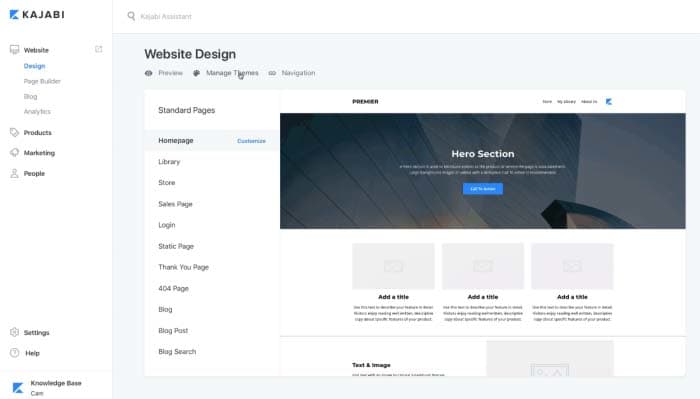
From the Kajabi dashboard, navigate to “Design” under the “Website” section. From there, click “Manage Themes.”

Web Design

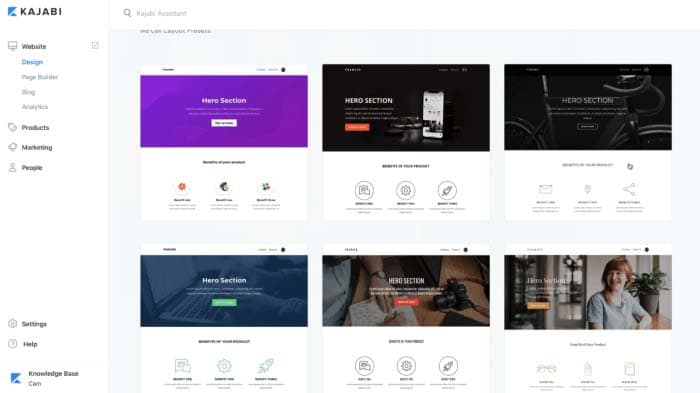
Find a theme you like and click the “Install Theme” button to proceed.

Theme

After you’ve selected a theme for your membership site, you can start adding sections to it using the platform’s intuitive drag-and-drop feature. You can create a simple homepage with a hero section, call to action buttons, and your offers to get started.

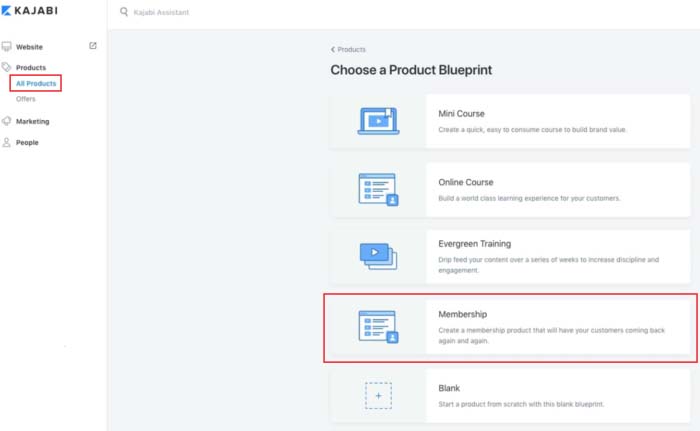
Next, go to the “Products” section to add the content and resources you wish to offer community members. You can either start from scratch or choose a “Product Blueprint to get started. These templates can easily be customized to fit your specific needs.

Product Blueprint

Here are some of the main content types you can offer through your membership site:

  • Video content such as training materials, tutorials, and lectures
  • Text copy, audio, and image content for your membership site content
  • Downloadable files and resources such as worksheets, checklists, and guides

Once all of that’s done, simply set the visibility of your membership site to published, and click the “Save” button to proceed. By now, you’ve created a membership site and added some products to it.

Step 2: Set up membership levels as offers

Once you’ve added your main products to your membership, you can create offers. This is how you’ll be monetizing your subscriptions. With Kajabi, an offer typically consists of a single product (or multiple products) that members can subscribe to receive – more on this later.

Head over to the “Offers” section from the Kajabi dashboard and create your membership levels. After saving your initial offer, you can easily set its price and modify your pricing table. You can set the offer price by clicking on the “Edit Price” button from the same screen.

Membership site owners typically sell offers on a recurring subscription basis. This way, customers get access to fresh content every month in exchange for a small fee. In other words, instead of selling a product (like an online course) for, say, $150, you can create an offer for $10 per month. This offer can even drip-feed the online course content to members over a period of time.

Kajabi gives you access to two of the most commonly used payment gateways – PayPal and Stripe. On top of this, you’ll also be able to offer numerous other checkout options to your members. For instance, you can choose to bundle up different products to maximize the order value, or create more offers as membership levels.

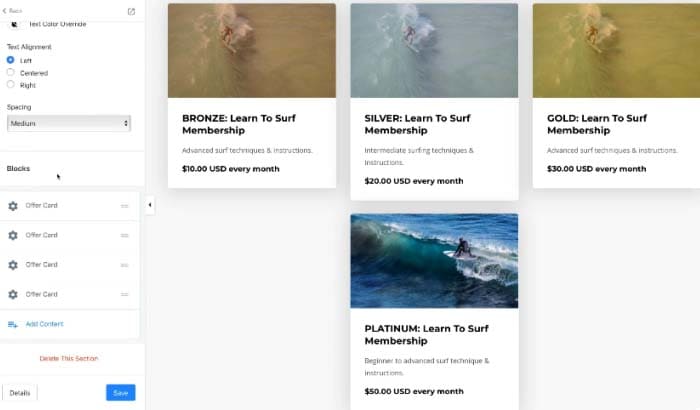
You can name your membership offers based on how much value members will receive from purchasing them. For example, you could call the low-tier option the “Bronze” offer, whereas the mid-tier option and high-tier offer could be “Silver” offer andGold” offer respectively.

Different Levels

You can post the membership levels to your site’s offers section, store page, on the homepage, or publish it on a separate landing page.

Step 3: Add different products to each membership level

Now that you’re done setting up membership levels as offers, you can start adding products to each level.

To do this, you need to create content such as videos, audio, and text copy and add it to the corresponding membership level as a “Product.”

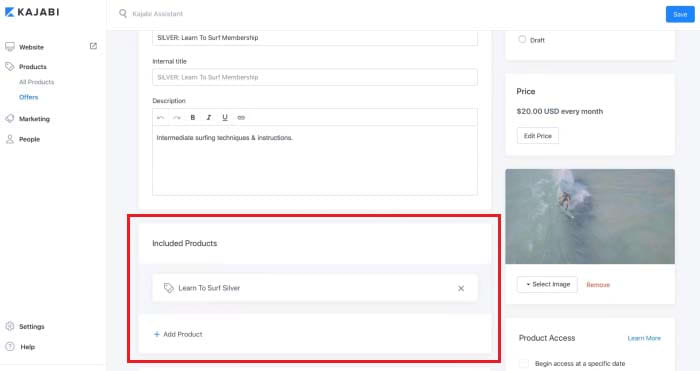
Click on the membership level you’d like to add a product to and select the product(s) you’d like to include in your offer from the drop-down list under the “Included Products” section.

Included Products

Here’s an example of what your final membership model might look like:

  • Bronze Membership Offer ($10 per month): Training material and downloadable resources
  • Silver Membership Offer ($30 per month): Everything included in the Bronze Membership Offer, invite to live webinar, and access to private forums
  • Gold Membership Offer ($40 per month): Everything included in the Silver Membership Offer, and one 30-minute one-on-one coaching session per month

Step 4: Automate email marketing

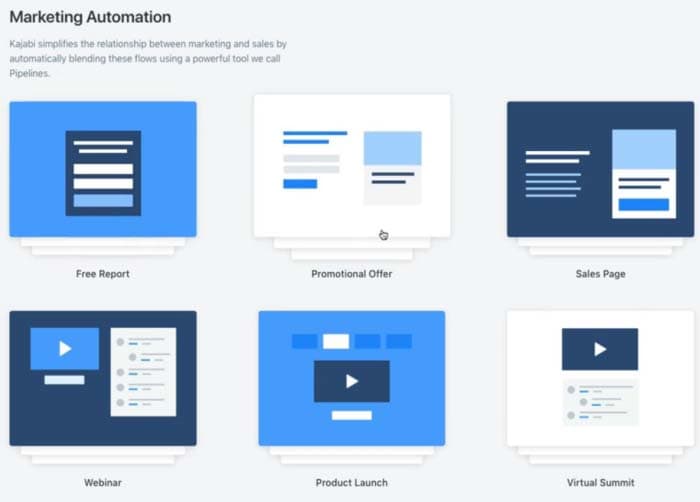
Now that you’re done creating your membership levels and offers, you can use Kajabi’s built-in marketing automation tools (called “Pipelines”) to market your membership subscriptions.

Head over to the “Email Campaigns” section to set up a pipeline and get started. You can either build your own pipeline template or pick one of Kajabi’s pre-made templates.

Marketing Automation

Here’s a look at some of the things you get with Pipelines:

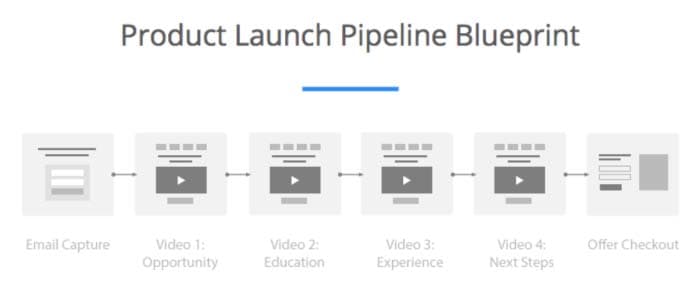
Product Launch

Capture user email addresses by starting a Product Launch Pipeline. This way you’ll be able to send targeted content material (like PDFs and videos), which will help you generate interest in future products and get your existing customers to sign up for pre-purchase offers.

The Free Report Pipeline lets you offer a downloadable report to prospective customers and gather email subscriptions. This allows you to promote other products by upselling them in “thank you” emails.

Start a Promotional Offer Pipeline to gather email subscriptions with a lead magnet and send them to a sales page. You can also send subscribers your site’s weekly newsletters.

Conclusion

By creating a membership site, you’ll be able to sell membership subscriptions to a premium community website and eliminate the need to find new customers.

Kajabi makes it easy for community leaders to set up a subscription-based membership site, manage community forums, and run automated marketing campaigns, all from one platform.

Disclosure:
Softonic is always looking for products we think our readers will value. When you buy through links on our site, we may earn an affiliate commission.