The Best 5 (Free) VPNs You Should Use in 2019

Which free VPNs are the best answer for your privacy needs? Let’s find out!

Our team is always looking for things we think our readers will value. If we make a content partnership like the one featured in this article, then we may receive compensation for publishing.

In January 2019, it was reported that as much as 1,769,185,063 records were leaked across multiple data breaches globally. Wouldn’t it be nice to know that you’re protected? Luckily, a VPN can help!

A VPN provides an encrypted connection between your computer and your Internet Service Provider (ISP) by serving as a proxy. The VPN service can also make it difficult for hackers to intercept your internet activity and steal your data.

In addition, a VPN can help you access geo-restricted content as well as blocked websites. For instance, the kind of content that you’ll find on Netflix when you access it from the U.S. is different from the content that you’ll find when accessed from some places in Asia or Africa.

You should check with Netflix’s terms of use before you try this though.

However, many people often have a hard time knowing which one to choose out of the many free VPN services available. In this review, we will provide insights on top 5 free VPNs we think you should try in 2019 in the order of their value propositions.

The Best 5 (Free) VPNs You Should Use in 2019

1. UrbanVPN
Urban VPN

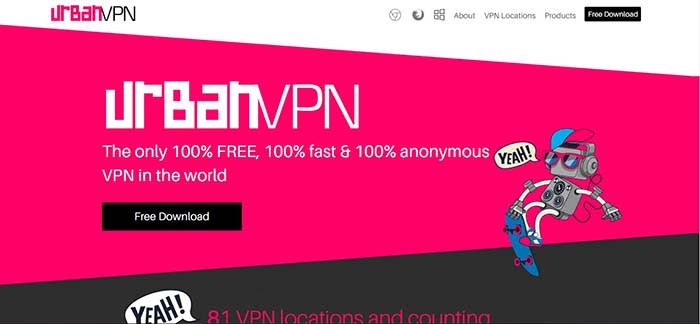
Urban VPN brands itself as the only 100% free, 100% fast, and 100% anonymous VPN service in the world. Founded by Urban Cyber Security in 2018, the Urban VPN team is made up of more than 30 experts with backgrounds that run across cybersecurity, ethical hacking, and network systems.

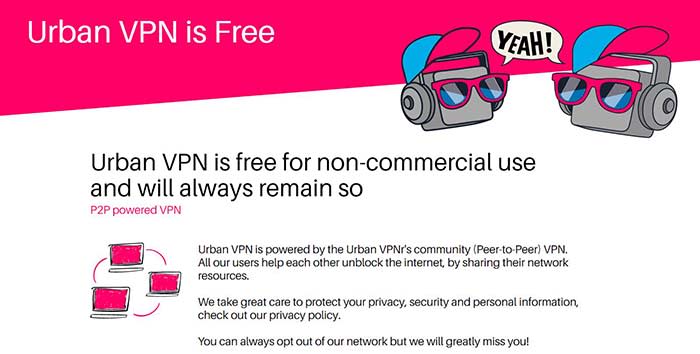
Many people tend to be skeptical about free VPN services because you may never know what you are unwittingly losing in exchange for the free service. Urban VPN, however, can provide a sustainably free VPN service by setting up its service as a P2P powered VPN in which all users help to unblock the internet by sharing their network resources.
Urban VPN

Despite being a P2P VPN server, Urban VPN protects its users’ identity and data with encryption and DNS/IPv6 leak protection technology. The best part is that Urban VPN doesn’t have a cap on accessible data bandwidth, unlike some other VPNs that can only allow you to browse the web without support for streaming or torrenting.

Many VPN services tend to sacrifice speed on the altar of anonymous encryption. However, Urban VPN is optimized to deliver a fast connection through a large network of fast VPN servers in 81 locations. It is also compatible with Windows, Mac, iOS, and Android operating systems.

Cons: The fact that Urban VPN is based in the U.S. suggests that it might keep user logs. However, the company is upfront about the data logging in its privacy policy.

2. Windscribe

Windscribe offers both free and premium VPN services but its free service seems to be the most generous among other competitors with freemium models. Windscribe provides users with a free VPN service that covers 10 GB of data every month and users can get an extra five GB if they tweet about the service. In addition, to the VPN service, Windscribe also has an inbuilt ad and malware blocker called R.O.B.E.R.T for blocking trackers, malware, clickbait, and specific content types.
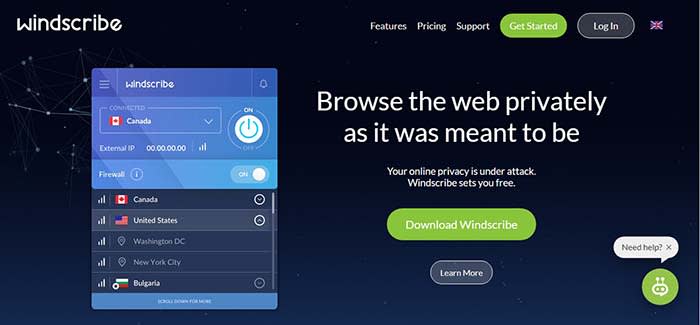
Windscribe

Windscribe’s VPN service is available on Windows, MacOS, Linux iOS, and Android. It also has browser extensions for use on Chrome, Opera, and Firefox. We also love the fact that you can set up Windshield on your router and some other devices such as Amazon FireTV and Kodi. Windscribe can also be used on whatever software or devices that can run OpenVPN or IKEv2 protocols

Cons: The 10 GB data cap doesn’t provide much room to stream content. Users of the free version are restricted to only 10 servers out of 50 servers. The VPN also stores some user information while in use.

3. Hide.me

Hide.me offers a decent free VPN service that is not particularly impressive or dismissible. Hide.me also has a freemium model – free users get strong encryption, zero-user logs, and ad-free browsing. Hide.me has a strong 256-bit AES encryption and it goes beyond encrypting your internet traffic data to also providing encryption on your personal files, passwords, and financial information. It features an in-built kill switch that ends your session if you suddenly lose the VPN connection. This way your computer doesn’t automatically reconnect to the internet without the VPN.
Hide.METhe service is available on virtually all operating systems including Linux, Windows. MacOS, iOS, and Android. Hide.me can be used in-browser with Chrome, Firefox, and on hardware such as Amazon FireTV and routers. It is strong enough to support five simultaneous connections, however, the usage is capped at two GB of data per month.

Cons: The biggest con is the low cap on data use. It will serve the purpose for light browsing, but you won’t be able to do much on YouTube. Furthermore, there’s obviously no Netflix for you. In addition, free users can only access five servers and only one of those servers is in Europe.

4. Proton VPN
ProtonVPN

ProtonVPN provides free and paid users a strong encryption service that will obscure your browsing activity and protect your personal data. ProtonVPN has a proven policy of not keeping user logs and it is compliant with Swiss privacy laws. It also offers unlimited browsing, but it doesn’t support streaming or torrenting.

One key differentiating factor with ProtonVPN is the quality of its customer service. ProtonVPN has a team committed to customer support. ProtonVPN is founded by the team that delivered ProtonMail, the world’s largest encrypted email network.

Cons: Free users can only access server networks in three countries. It doesn’t have a data cap but it seems to suffer from slow connection speeds that can be frustrating. The lack of streaming and torrenting support also makes it unusable to access entertainment content.

5. TunnelBear
Tunnelbear

TunnelBear offers a VPN service with a user-friendly UI/UX and it delivers decent connection speeds to servers in about 22 countries. It delivers a reliable encryption service with AES 256-bit encryption that works on macOS, Windows, iOS, Android, Chrome, and Firefox. Tunnelbear doesn’t keep user data logs and it is committed to independent audits as proof that your data and identity will always be kept private.

TunnelBear has been operational since 2011 after being founded by Ryan Dochuk and Daniel Kaldor. The fact that it is still alive suggests that the team is doing something right.

Tunnel also offers an incredible VPN footprint with more than 350 VPN servers spread out in 22 countries. However, it only provides free users with 500 MB of data per month and it seems that the free plan is designed to be a teaser that encourages you to sign up for one of its Pro plans.

Cons: There’s not much anyone can do with 500 MB of data every month. In addition, TunnelBear doesn’t support streaming and services such as Netflix are also unavailable.

Conclusion

VPNs have become an important element of the modern internet experience because of the security and privacy that they provide. A Gallup study conducted in November 2018 revealed that Americans are more worried about cybercrimes than violent crimes. For instance, 71% of Americans polled were worried that their personal or financial information might be hacked and 67% of the people polled were worried about identity theft. In contrast, only 24% of respondents were worried about being a victim of terrorist attacks.

Safe VPN

In this review, we have established that you can put security and privacy fears to rest by using a free VPN Service.

In our opinion, Urban VPN clearly stands heads and shoulder above the other free VPN services profiled in this review. The fact that it doesn’t have a Pro version eliminates the need to place restrictions on the quality of the free service. Hence it is not surprising that urban VPN doesn’t have bandwidth data caps.

In addition, it doesn’t slow down your network or ruin your browsing experience with ads. Instead, it has an extensive spread with 81 server locations across North America, South America, Asia, Middle East, Europe, Africa, and Oceania.

How to Get Started Selling Membership Subscriptions to a Premium Community Website

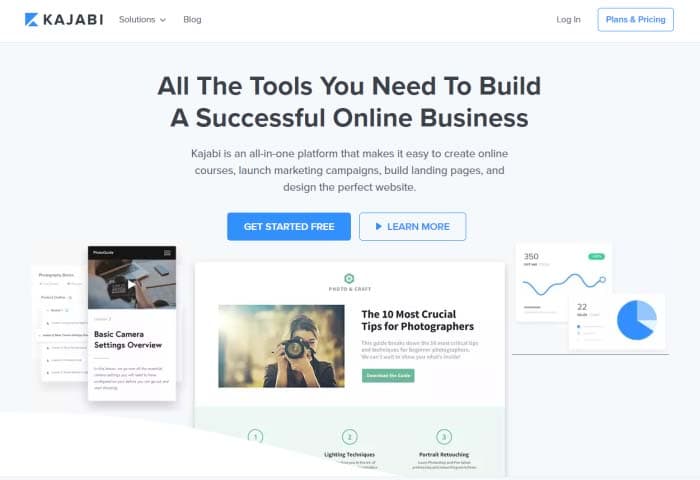
Kajabi makes earning money online easy with its intuitive model!

Community

Community is a vital part of any membership site. It’s what brings in the revenue and enables you to create a reputation as an authority in your niche.

Most people would be happy with selling a one-off product to customers, closing the deal, and starting over by marketing to new customers. However, if you already have a community website with members and would like to generate recurring revenue, you might consider setting up a subscription-based membership site.

In this story, we’ll walk you through a step-by-step guide to show you exactly how you can sell monthly membership subscriptions to a premium community website using Kajabi.

Let’s get started!

Why you should sell membership subscriptions (and how to do it right)

As the leader of an online community, you might consider selling membership subscriptions to your premium community website. By doing so, you’ll be able to offer products and services for the entire community and keep them engaged long-term.

In other words, by selling membership subscriptions, you’ll make the most of your marketing efforts and turn your existing online community into a source of long-term steady income.

Here are some of the key benefits of using the membership subscription billing model instead of a per-product model:

  • Generate recurring revenue: By offering membership subscriptions to your online community members, you’re able to create recurring revenue streams for your business. Members can pay you a small monthly fees to access exclusive content, forums, and more.
  • Maximize profit per member: By charging monthly subscription fees, you’re able to make more money off each customer in the long-term as compared to only charging a one-time lump sum.
  • Steady cash flow: With a membership subscription model, you don’t have to worry about your sources of income drying out in case you can’t make a successful sale. Instead, you can set up your online payment system to bill your clients at the start of every month.
  • Sustainable business model: The membership-based pricing model is more reliable than the per-product model. With this model, you can easily upsell a variety of products and services to existing customers. Plus, the more quality content you create, the more attractive your membership site will be to potential customers.

Before you take the plunge, you need to make sure your membership offering will come off as an attractive and rewarding option for community members.

Here are some ways you can make this possible:

1. Creating vibrant forums

Enabling your community members to actively participate in discussions and communicate with one another will help you improve your membership site’s user engagement. With a forum, members will be able to leave comments on posts, give feedback, and start discussions with others.

Platforms like Kajabi come with built-in features that community members can benefit from having. It lets you create an unlimited number of groups and sub-forums within your membership site where members can connect with one another. In addition to this, you’re also able to send email notifications and set up private messaging.

2. Access to live video

Kajabi makes it easy for users to host live video broadcasts and webinars. This is a great way to connect with your site’s members and generate user engagement. You can use this as a platform to discuss certain topics, answer questions, or simply offer training.

3. One-on-ones with the community leader

As a membership site owner, you can use Kajabi to offer all kinds of premium resources to paying members. For example, you could offer private live coaching calls. Often, the community leader’s personal brand is the major draw to a community, so enticing potential members with regular one-on-one time can be a powerful sales tool.

How to sell membership subscriptions using Kajabi

Kajabi enables community leaders to set up and manage membership websites. In addition, it also makes it easy to get started with creating offers and selling membership subscriptions.

Kajabi tools

Here, we’ll show you how you can set everything up and get started with a step in the right direction.

Step 1: Create Your membership website

The first thing you need to do is to create a membership site. All you have to do is choose a theme, customize it to fit your requirements, and upload your membership content.

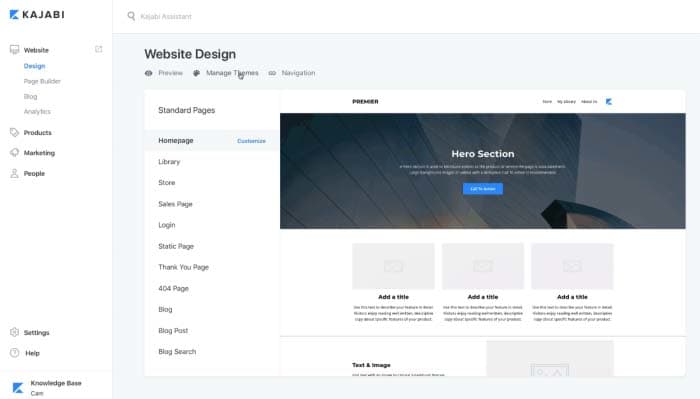
From the Kajabi dashboard, navigate to “Design” under the “Website” section. From there, click “Manage Themes.”

Web Design

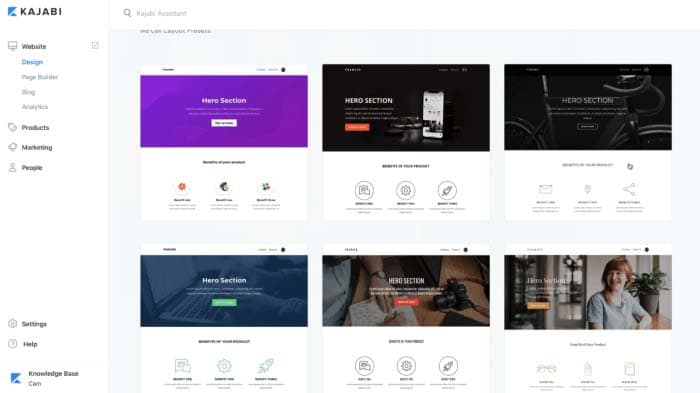
Find a theme you like and click the “Install Theme” button to proceed.

Theme

After you’ve selected a theme for your membership site, you can start adding sections to it using the platform’s intuitive drag-and-drop feature. You can create a simple homepage with a hero section, call to action buttons, and your offers to get started.

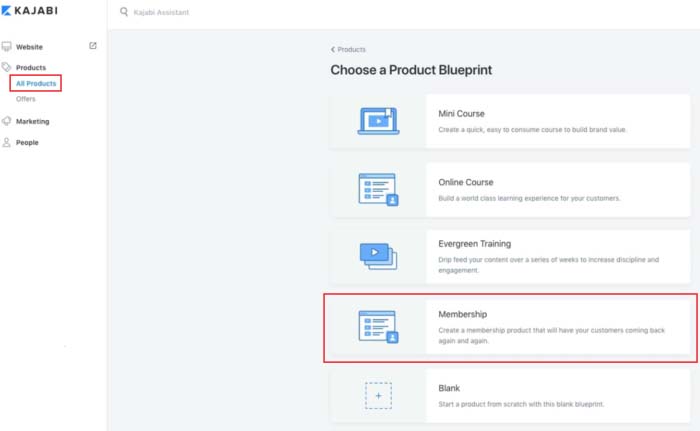
Next, go to the “Products” section to add the content and resources you wish to offer community members. You can either start from scratch or choose a “Product Blueprint to get started. These templates can easily be customized to fit your specific needs.

Product Blueprint

Here are some of the main content types you can offer through your membership site:

  • Video content such as training materials, tutorials, and lectures
  • Text copy, audio, and image content for your membership site content
  • Downloadable files and resources such as worksheets, checklists, and guides

Once all of that’s done, simply set the visibility of your membership site to published, and click the “Save” button to proceed. By now, you’ve created a membership site and added some products to it.

Step 2: Set up membership levels as offers

Once you’ve added your main products to your membership, you can create offers. This is how you’ll be monetizing your subscriptions. With Kajabi, an offer typically consists of a single product (or multiple products) that members can subscribe to receive – more on this later.

Head over to the “Offers” section from the Kajabi dashboard and create your membership levels. After saving your initial offer, you can easily set its price and modify your pricing table. You can set the offer price by clicking on the “Edit Price” button from the same screen.

Membership site owners typically sell offers on a recurring subscription basis. This way, customers get access to fresh content every month in exchange for a small fee. In other words, instead of selling a product (like an online course) for, say, $150, you can create an offer for $10 per month. This offer can even drip-feed the online course content to members over a period of time.

Kajabi gives you access to two of the most commonly used payment gateways – PayPal and Stripe. On top of this, you’ll also be able to offer numerous other checkout options to your members. For instance, you can choose to bundle up different products to maximize the order value, or create more offers as membership levels.

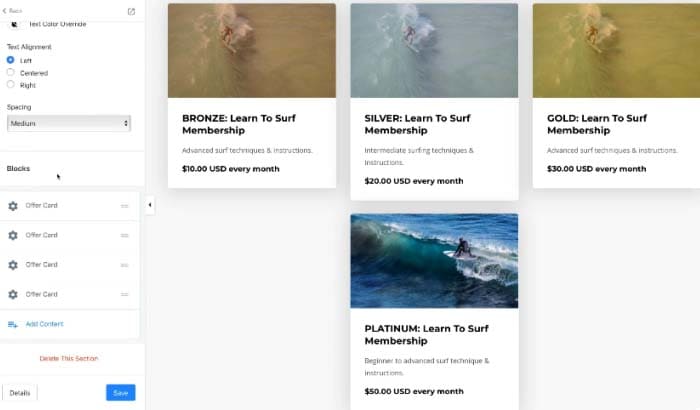
You can name your membership offers based on how much value members will receive from purchasing them. For example, you could call the low-tier option the “Bronze” offer, whereas the mid-tier option and high-tier offer could be “Silver” offer andGold” offer respectively.

Different Levels

You can post the membership levels to your site’s offers section, store page, on the homepage, or publish it on a separate landing page.

Step 3: Add different products to each membership level

Now that you’re done setting up membership levels as offers, you can start adding products to each level.

To do this, you need to create content such as videos, audio, and text copy and add it to the corresponding membership level as a “Product.”

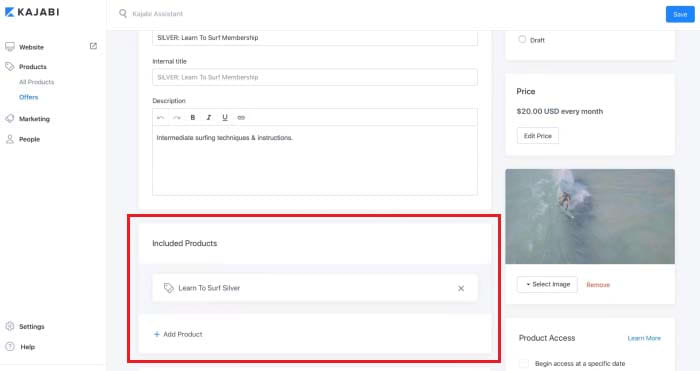
Click on the membership level you’d like to add a product to and select the product(s) you’d like to include in your offer from the drop-down list under the “Included Products” section.

Included Products

Here’s an example of what your final membership model might look like:

  • Bronze Membership Offer ($10 per month): Training material and downloadable resources
  • Silver Membership Offer ($30 per month): Everything included in the Bronze Membership Offer, invite to live webinar, and access to private forums
  • Gold Membership Offer ($40 per month): Everything included in the Silver Membership Offer, and one 30-minute one-on-one coaching session per month

Step 4: Automate email marketing

Now that you’re done creating your membership levels and offers, you can use Kajabi’s built-in marketing automation tools (called “Pipelines”) to market your membership subscriptions.

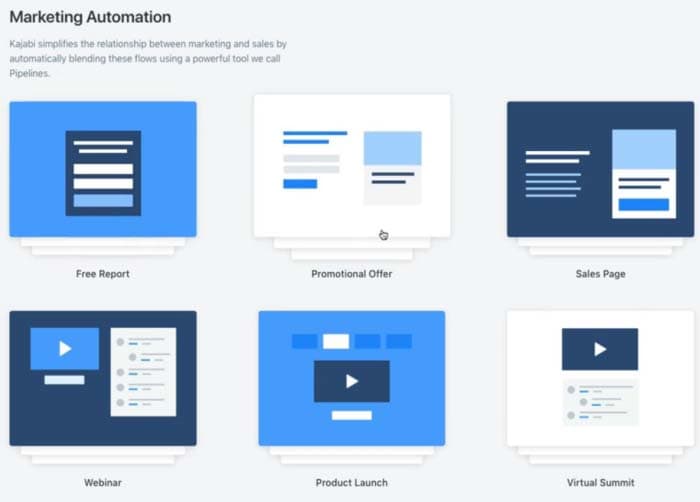
Head over to the “Email Campaigns” section to set up a pipeline and get started. You can either build your own pipeline template or pick one of Kajabi’s pre-made templates.

Marketing Automation

Here’s a look at some of the things you get with Pipelines:

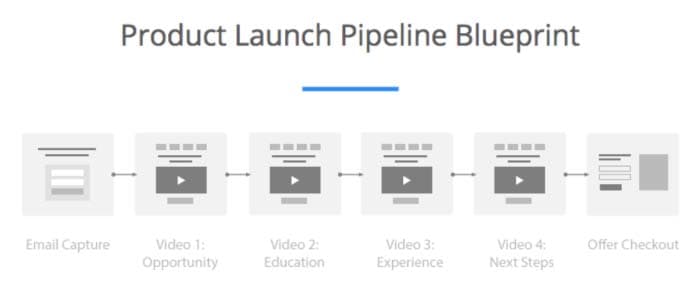
Product Launch

Capture user email addresses by starting a Product Launch Pipeline. This way you’ll be able to send targeted content material (like PDFs and videos), which will help you generate interest in future products and get your existing customers to sign up for pre-purchase offers.

The Free Report Pipeline lets you offer a downloadable report to prospective customers and gather email subscriptions. This allows you to promote other products by upselling them in “thank you” emails.

Start a Promotional Offer Pipeline to gather email subscriptions with a lead magnet and send them to a sales page. You can also send subscribers your site’s weekly newsletters.

Conclusion

By creating a membership site, you’ll be able to sell membership subscriptions to a premium community website and eliminate the need to find new customers.

Kajabi makes it easy for community leaders to set up a subscription-based membership site, manage community forums, and run automated marketing campaigns, all from one platform.

Disclosure:
Softonic is always looking for products we think our readers will value. When you buy through links on our site, we may earn an affiliate commission.