Sick of robocalls? Here’s how to stop them cold.

Chances are, you’ve seen an increase in calls from local numbers coming through your phone. These calls that appear to be from your hometown are scammers, attempting to trick you into picking up and sharing personal information.
The practice, known as neighbor-spoofing involves spoofing caller ID to match the first six digits of your phone number. The aim here is to make the recipient believe someone they know — a friend, neighbor, or local business — is trying to reach them.
While the practice has become commonplace, mobile service providers and the government have yet to find a way to get rid of the problem.
That said, there are some solid methods for reducing the number of “scam likely” calls blowing up your phone.
How to stop robocalls
Why has this become such a big problem?
The reason for the uptick in unwanted calls is, basically anyone can become a robocaller. No longer reserved for more sophisticated, established criminal operations, the technology now gives DIY scammers access to a cheap, scalable “business model.”
In 2017, the FCC passed a Call Blocking Order, which sought to improve phone providers’ ability to block spoofed calls, yet the problem seems to be getting worse.
The FCC and CTIA, a mobile industry trade group have been looking for a better solution to the problem, but existing blocking methods come with the risk of blocking legitimate calls, or false positives.
Weirdly, spoofing itself isn’t always illegal

The FCC rules prohibit anyone from transmitting false information with the intent to defraud or obtain sensitive information from the person on the other line.
If you answer the phone, it’s usually fairly obvious whether it’s a legitimate call. The Truth in Caller ID Act says that anyone illegally spoofing can be fined up to $10,000 per violation. But, you’ll need to be able to identify whether something is a scam to report it.
There are some legitimate reasons for spoofing. One example we found on the FCC site is a doctor calling a patient from their cell phone, but the patient sees a number that matches the main office.
Blocking spam calls on your iPhone
For the occasional unwanted call, you can block calls one by one. Do this by opening the contact details after the call and selecting the little “i” then scroll down and hit “Block this caller.”
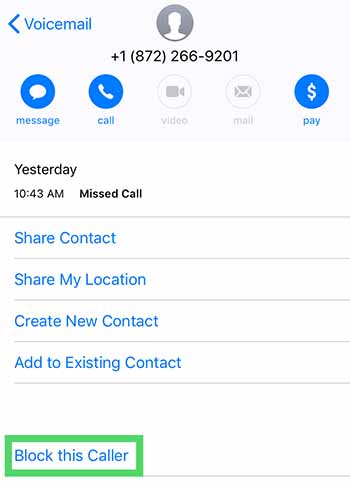
It’s a bit inefficient, especially given that robocallers change numbers constantly. This might be a waste of time. One workaround is turning your phone on “do not disturb” mode, then selecting who you want to receive calls from.
Per Apple, here are the steps for eliminating robocalls from third-party calling apps.
- Go to Settings > Phone
- Hit Call Blocking & Identification
- Then, go to Allow These Apps to Block Calls and Provide Caller ID
- Change setting to on or off and reorder the apps according to priority.
Blocking spam calls on Android
On Android, the process is similar to iOS. Instead, you’ll tap on the caller’s name, hold the number, then tap block/report spam.
The DND workaround on Android can be performed by installing an app like Calls Blacklist, which allows you to limit calls only to those in your contact list. In some instances, this could be annoying—like if you’re waiting for a call from someone new. Still, it’s a decent option for limiting irrelevant spammy calls during the workday.
Protect your voicemail
Some voicemail services will grant you access from another phone if you enter a passcode. This set up could present an opportunity for hackers to spoof your phone number and use it to access your voicemail or use to defraud others.
Report fraud
Reporting spam calls can feel like a waste of time, a drop in the bucket. Try to think of this as a civil service. It’s kind of like calling your senator. When enough people reach out, the government is more likely to take action.
Direct your complaint to the FTC, the FCC, the Do Not Call Registry, or the Better Business Bureau.
Download an app
While you can turn on call blocking settings on your phone, it’s often not enough. The issue is, blocking is typically limited to a single number on individual devices. So, if you’re looking to wipe out scammers and their rotating numbers, your best bet is looking for an app that takes care of business.
We recently published an article that highlights a few of the best apps for blocking spam calls. Check it out if you’re tired of blocking calls one by one.
3 best apps for blocking spam phone calls
Read Now ►