These robocall blocking apps are selling your data

Several robocall blocking apps are selling your data as soon as you hit the download button

robocall

If there is one thing that every person regardless of race, religion, or political stance can get behind, it’s that we all hate robocalls.

This hatred has gotten so apparent that even the FCC has taken action to stop them. However, many of us have still taken matters into our own hands by downloading apps to block robocalls.

Unfortunately, according to an article from TechCrunch, some of these apps are compromising our privacy as soon as we download them. The robocall apps Hiya, TrapCall, and Truecaller all were selling user data to third-party analytics companies. 

How serious is this?

Apps stealing your data is nothing new, but that doesn’t mean that it’s not an issue. Hiya and Truecaller were selling information about your phone such as the model and software, which is in direct violation of Apple’s App Store guidelines. 

Although these three apps were the ones called out most in the TechCrunch article, they are not the only offenders. Many robocall blocking apps immediately send some data to Facebook as soon as you hit the download button.

Robocall blocking apps are nice, but you are still running a risk no matter which one you download. Basically, if it sounds too good to be true, it probably is.

I have one of those apps! What should I do?

Fear not! There are plenty of robocall blocking apps that you can download that won’t sell your data. Again, you just have to ask yourself if it is worth the risk.

RoboKiller - Block Spam Calls & Identify Callers Download Now ►
8

If you’re done with these apps altogether and want to make sure you are protected, there are some things you can do. First, you should uninstall the app in question. Once it is uninstalled, use an app like PhoneClean to make sure all traces of it are gone.

PhoneClean Download now ►
7

The next thing you should do is run a virus scan. Even if the app is gone, there is always a chance that something is happening in the background to send data to third-parties.

Avast Free Antivirus Download now ►
8

Once you’re done running a virus scan, restart your phone. If the scan found something, restarting your device can make sure that everything malicious caught by the virus scan is gone.

Wrapping up

Look, we all hate robocalls. If we get one more fake call telling us about a car warranty we don’t have, then we might just throw our phone out the window. However, this doesn’t mean that we should pursue a method of blocking robocalls that can potentially do more harm than good.

As stated before, the FCC is working on a way to block robocalls for good. It is probably in your best interest to wait until that plan is unveiled before you go seeking your own solutions.
Phone companies could block robocalls, but there’s a catch

The FCC is making phone companies give us an option to block robocalls, but it might not be free.

Robocall

Nothing can spoil the moment quite as much as a robocall. Whether they interrupt you at work or bother you on date night, they’re a real nuisance.

Fortunately, the FCC is making the effort to combat robocalls. However, you might have to pay to make it happen.

According to a press release from the FCC, robocalls account for about 60% of their yearly complaints. In 2016 alone, there were about 2.4 billion robocalls per month. That number has risen to about 5 billion per month in 2019, according to research from YouMail. 

The FCC’s plan

FCC Chairman Ajit Pai announced in a video that he is making blocking robocalls one of his top priorities. In order to meet that goal, the FCC has ruled that phone companies must offer a default option to block robocalls.

Phone companies currently have the technologies to help block robocalls, but you have to call them and ask yourself.

The FCC is also looking to have phone companies improve caller ID . The FCC has a new policy for phone companies called “safe harbor.” Essentially, this means that if phone companies don’t block calls that don’t have proper caller ID verification, they can face legal trouble.

Pai said that he is optimistic that the changes will be implemented by the end of the year.

It could cost you

According to FCC commissioner Jessica Rosenworcel, phone companies will have the ability to charge customers for blocking robocalls.

“There is nothing in our decision today that prevents carriers from
charging consumers for this blocking technology to stop robocalls,” Rosenworcel said in a statement.

Although Rosenworcel is strongly pushing for this to be free across all phone companies, there is still a chance that it will be.

However, Pai said in a statement that he does expect phone companies will offer the service for free. 

Basically, handling robocalls costs phone companies money. Blocking them in the first place does not.

He also said that “based on public input” the FCC will determine if a rule to make blocking free would be appropriate.

Protecting elderly people

The FCC is currently pushing phone companies to offer a service that will allow users to block calls that do not come from a list they provide to the phone company. 

According to Pai, the feature would be an optimal tool to help prevent elderly people from being scammed by robocallers, as they are often the target. Again, phone companies could potentially charge customers for this service.

Another option with iOS

Apple revealed at the WWDC that the new iOS 13 will automatically send robocalls to voicemail. Using Siri technology, your phone will look at your contacts, Mail, and Messages apps when a number calls you. If your phone doesn’t recognize the contact from one of those spots, the call will go to voicemail. Users will be able to access this feature in their settings under “Silence Unknown Callers.”

Wrapping up

If phone companies do not charge us for blocking these robocalls, this is a giant leap forward. If they do charge us, that would be an unfortunate development.

We’re optimistic, but we still think you should play it safe and download a free app to block robocalls.

How to stop robocalls from blowing up your phone

Sick of robocalls? Here’s how to stop them cold.

spam phone calls robocalls

Chances are, you’ve seen an increase in calls from local numbers coming through your phone. These calls that appear to be from your hometown are scammers, attempting to trick you into picking up and sharing personal information.

The practice, known as neighbor-spoofing involves spoofing caller ID to match the first six digits of your phone number. The aim here is to make the recipient believe someone they know — a friend, neighbor, or local business — is trying to reach them.

While the practice has become commonplace, mobile service providers and the government have yet to find a way to get rid of the problem.

That said, there are some solid methods for reducing the number of “scam likely” calls blowing up your phone.

How to stop robocalls

Why has this become such a big problem?

The reason for the uptick in unwanted calls is, basically anyone can become a robocaller. No longer reserved for more sophisticated, established criminal operations, the technology now gives DIY scammers access to a cheap, scalable “business model.”

In 2017, the FCC passed a Call Blocking Order, which sought to improve phone providers’ ability to block spoofed calls, yet the problem seems to be getting worse.

The FCC and CTIA, a mobile industry trade group have been looking for a better solution to the problem, but existing blocking methods come with the risk of blocking legitimate calls, or false positives.

Weirdly, spoofing itself isn’t always illegal

phone spam

The FCC rules prohibit anyone from transmitting false information with the intent to defraud or obtain sensitive information from the person on the other line.

If you answer the phone, it’s usually fairly obvious whether it’s a legitimate call. The Truth in Caller ID Act says that anyone illegally spoofing can be fined up to $10,000 per violation. But, you’ll need to be able to identify whether something is a scam to report it.

There are some legitimate reasons for spoofing. One example we found on the FCC site is a doctor calling a patient from their cell phone, but the patient sees a number that matches the main office.

Blocking spam calls on your iPhone

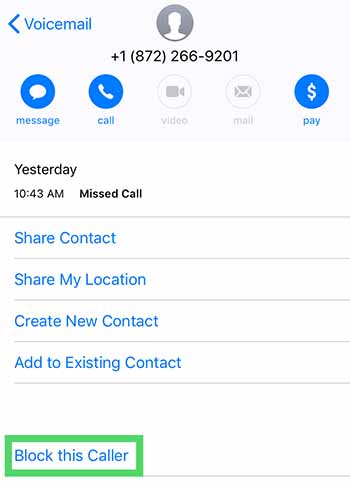
For the occasional unwanted call, you can block calls one by one. Do this by opening the contact details after the call and selecting the little “i” then scroll down and hit “Block this caller.”

block caller iphone

It’s a bit inefficient, especially given that robocallers change numbers constantly. This might be a waste of time.  One workaround is turning your phone on “do not disturb” mode, then selecting who you want to receive calls from.

Per Apple, here are the steps for eliminating robocalls from third-party calling apps.

  • Go to Settings > Phone
  • Hit Call Blocking & Identification
  • Then, go to Allow These Apps to Block Calls and Provide Caller ID
  • Change setting to on or off and reorder the apps according to priority.

Blocking spam calls on Android

On Android, the process is similar to iOS. Instead, you’ll tap on the caller’s name, hold the number, then tap block/report spam.

The DND workaround on Android can be performed by installing an app like Calls Blacklist, which allows you to limit calls only to those in your contact list. In some instances, this could be annoying—like if you’re waiting for a call from someone new. Still, it’s a decent option for limiting irrelevant spammy calls during the workday.

Calls Blacklist - Call Blocker Download Free ►
9

Protect your voicemail

Some voicemail services will grant you access from another phone if you enter a passcode. This set up could present an opportunity for hackers to spoof your phone number and use it to access your voicemail or use to defraud others.

Report fraud

Reporting spam calls can feel like a waste of time, a drop in the bucket. Try to think of this as a civil service. It’s kind of like calling your senator.  When enough people reach out, the government is more likely to take action.

Direct your complaint to the FTC, the FCC, the Do Not Call Registry, or the Better Business Bureau.

Download an app

While you can turn on call blocking settings on your phone, it’s often not enough. The issue is, blocking is typically limited to a single number on individual devices. So, if you’re looking to wipe out scammers and their rotating numbers, your best bet is looking for an app that takes care of business.

We recently published an article that highlights a few of the best apps for blocking spam calls. Check it out if you’re tired of blocking calls one by one.