
This will surely sound familiar. A new AI tool starts showing up everywhere you browse. It promises to summarize documents, generate video, write code, or automate repetitive work. Perfect! It’s just what you needed! You search for it, land on a polished website, click Download, and install the app. Nothing about that feels like a scam. And that’s precisely why this tactic is so effective.

As interest in AI software grows, cybercriminals are using that demand as cover for a familiar attack: convincing people to install malware themselves. The lure may look like a productivity app, coding assistant, browser extension, plugin, or a “free” version of a paid service. This lure leads to a normal and innocent-looking download that, instead of helping you in your day-to-day tasks, will install an information stealer, remote access trojan (RAT), backdoor, or other malware.
For that reason, checking where downloaded software comes from is now more important than ever. Avast One Free Antivirus can add an extra layer of protection by helping block malicious websites and downloads, scanning files for threats, and monitoring applications for suspicious behavior. But sometimes, spotting the warning signs before you make a mistake is your best line of defense.
In today’s article we’ll tell you everything you need to know about fake AI tools and what to watch for in 2026.
Why Fake AI Tools Are Easy to Trust
AI software moves fast. New services appear constantly, well-known products add artificial intelligence features, and an unfamiliar company can become widely discussed almost overnight. That makes it harder to rely on name recognition alone.
Attackers know this and they use it as an exploit, taking advantage of your uncertainty with convincing product pages, screenshots, FAQs, installation guides, and even fake support information. And that’s not all, they can also promote those sites through ads, social media, search results, or posts recommending a useful new tool. This way, even if you check online, you might reach fake reviews or product information that adds artificial legitimacy, which probably confuses you even more.
This is already happening. In 2025, Mandiant documented a campaign using fake AI video-generator websites to distribute information stealers and backdoors. Victims were directed there through malicious social media ads, where they were tricked into installing malware to steal login credentials, browser cookies, credit card data, and other information.
The trap works because, when other sites back up the idea that the software is safe, it feels completely ordinary. Also, it differs from our preconceived idea of scam. There might not be a request to send money or enter a password into a suspicious form. You may simply think you found the app you wanted. Other sites tell you it’s safe. So as a result, you click download thinking it’ll be ok.
What Can a Fake AI Download Do?
There is no single answer, because it largely depends on the malware behind it.
An information stealer may look for browser data, saved credentials, session cookies, cryptocurrency wallet information, or personal files. Other malware can create a backdoor into the device, potentially giving an attacker continued access to your computer, tablet or phone after the fake tool has been installed.
One important detail that you might not know is that a traditional installer is not always required for your device to be infected. In February 2026, Google Threat Intelligence Group reported how attackers were abusing publicly shared AI chats to host realistic-looking setup or troubleshooting instructions. Those instructions tried to persuade users to paste malicious commands into a terminal, which would ultimately install information-stealing malware.
The scary part of all this is that these may not look like a threat at all. In fact, they have been designed to give you a fake sense of legitimacy. A familiar interface, polished documentation, or content hosted on a legitimate platform does not make the instructions themselves safe.
AI Is Improving the Disguise, Not Creating Magic Malware
When we think about AI-powered cybercrime, we normally imagine a tsunami of unstoppable new malware. However, this is not how it works. In fact, most of the time the malware involved and techniques used have origins from before the generative AI boom became part of our everyday lives.
For most attacks, AI improves what surrounds the malware but doesn’t create it from scratch. It might help criminals polish copy, translate instructions, create convincing documentation or support conversations, and produce new versions of a lure quickly. It simply gives a makeover to the usual suspects.
The UK National Cyber Security Centre assesses that AI will increase the volume and impact of cyber intrusions mainly by enhancing existing tactics, techniques, and procedures rather than creating entirely new threat vectors.
In other words, the malicious software itself may be familiar. What is changing is how convincing the path to that malware can become.
How Avast One Free Antivirus Can Help
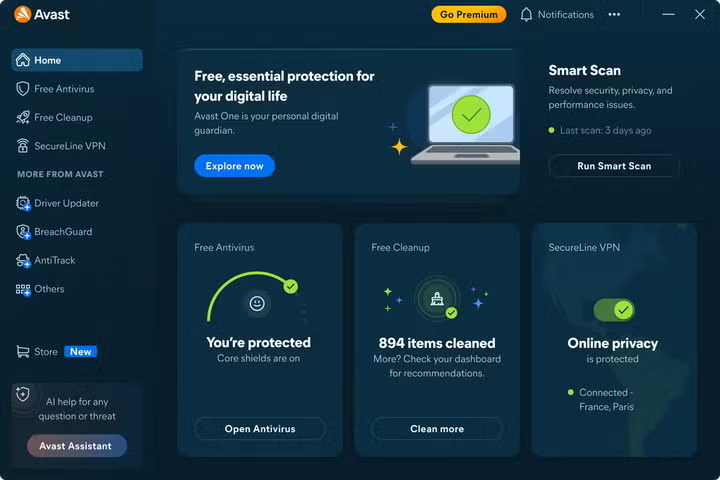
The safest route to dodge these online threats is to avoid malicious files altogether. However, that’s not always easy. Fake AI sites try to make dangerous downloads feel like a routine process, so protection at more than one stage matters. Here’s where Avast One Free Antivirus can help thanks to features like:
- Web Guard: A fake AI service may look polished enough to pass a quick visual check. Web Guard helps detect and block URLs and websites that may be scams, including phishing links and unsafe downloads. That adds a layer of protection which might help stop a suspicious installer from reaching your device.
- File Shield: If a file is downloaded, File Shield scans files and programs on a Windows device in real time before they are opened, run, modified, or saved. If malware is detected, Avast can help to prevent the file from infecting the device.
- Behavior Shield: Not every malicious program is obvious from its filename or appearance. Behavior Shield monitors processes in real time for suspicious activity that may indicate malicious code, including threats that may not yet be covered by existing virus definitions.
- Quarantine: Quarantine provides an isolated space for potentially dangerous files where they cannot run or access the operating system and data. This helps contain the threat rather than leaving the suspicious file active on the device.
These do not make every download safe or replace your own good judgment, but they provide a safety net that can assist you in staying away from trouble. They can provide extra checks when a fake site, installer, or app looks convincing enough to get past your first impression.
How to Download AI Tools More Safely
Here are some useful tips to stay safe from malicious downloads. First of all, always visit the official source. If you discover a tool through an ad on social media, post, video, or search result, do not assume the link is genuine. Once you know the name of the app, go to your search engine of choice and then find the company’s official website. If you’re on a mobile device, then make sure to use a verified app store listing and check not just the reviews, but also the publisher of the software.
Be wary of “free” premium tools. We know that free is attractive but it can also be dangerous. A cracked, unlocked, unlimited, or free version of a normally paid service already raises many red flags. For that reason, always check whether that offer actually exists on the developer’s official site. If not, it might be a scam.
Check the developer, not just the logo. Names, icons, screenshots, and branding can all be copied and, in fact, imitation is the easiest way to throw users off. Compare the publisher or developer with their official website. For browser extensions, check what permissions are being requested too. If it asks you for full access to your files or device, you should start suspecting something’s not right.
Another good tip is to always question unusual setup instructions. Be cautious if setup asks you to disable antivirus protection, ignore browser warnings, paste an unfamiliar command into Terminal or Command Prompt, or weaken a security setting. If you’re still in doubt, verify these steps through official documentation or check in official boards and documentation for more information.
Last, but not least, do not give a tool more access than it needs. An AI app asking for files, browser history, cloud storage, email, or other sensitive data should have a clear reason for needing it. You should review the Data Safety section in the trusted app stores you use, particularly the privacy information and all permissions an app requires. Do not automatically approve every permission just because you want to install an app.
Make Verification Part of the Download
Fake AI software is dangerous precisely because it can look useful, timely, and completely ordinary.
As AI assistants, extensions, plugins, and creative tools become everyday software, clicking Install can feel routine. But before clicking, you should make a habit of running verification checks as well. Check the website, confirm the developer, question unrealistic offers, and stop when a setup asks you to bypass normal security.
Avast One Free Antivirus can provide you with an extra layer of safety by helping block dangerous websites and downloads, scanning files for malware, watching apps for suspicious behavior, and isolating detected threats in Quarantine. Combined with careful downloading, that can make it harder for a convincing fake AI tool to turn one click into a compromised device.
AI can help attackers build a better-looking storefront. You still decide whether to open the door.
