Skip to content

Softonic English

Just another Softonic Sites site

The new 3D Tools in Adobe Illustrator are revolutionary

Until very recently, incorporating 3D objects into your illustrations required at least switching between applications or dealing with very complex programs. But now, with the new 3D functionalities of Adobe Illustrator, the process is not only possible but also much more accessible. From Illustrator, you can turn flat designs into 3D objects and even manipulate perspectives and materials. If you want to know how you can incorporate 3D into your designs, stay with us a little longer. This is how you can transform your designs with 3D effects Transforming your drawings into three-dimensional objects is a process we can do from Illustrator, without […]

Until very recently, incorporating 3D objects into your illustrations required at least switching between applications or dealing with very complex programs. But now, with the new 3D features of Adobe Illustrator, the process is not only possible but also much more accessible.

From Illustrator, you can convert flat designs into 3D objects and even manipulate perspectives and materials. If you want to know how you can incorporate 3D into your designs, stay with us a little longer.

Adobe Illustrator
Adobe Illustrator Download

This is how you can transform your designs with 3D effects

Transforming your drawings into three-dimensional objects is a process we can do from Illustrator, without the need to combine it with other programs. Here, our starting point will be a vector drawing. If yours is flat, you will need to convert it to vectors. You can do it in the following ways:

  • By hand: Import your drawing into Illustrator from File> Place. Now, use the Pen (P) tool to draw over your sketch and create the vectors. If you want to make curved strokes, hold down the left mouse button and move it over the canvas.
  • Image Trace: To make this option appear, select your drawing with Selection (V) and click on the Image Trace option you will see in the top bar, as shown in the image. If you don’t see this bar, go to Windows and click on Control.
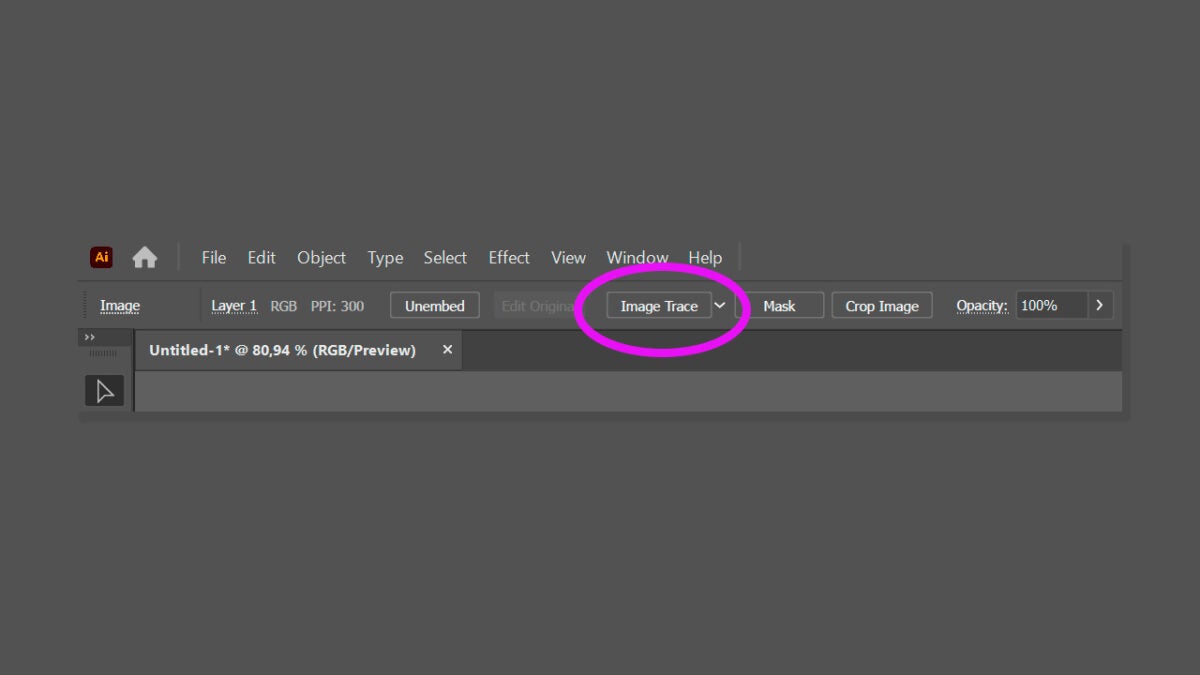
These are just some of the ways we propose for vectorizing images. The vast number of options and tools that Illustrator offers will allow you to reach the same goal in different ways.

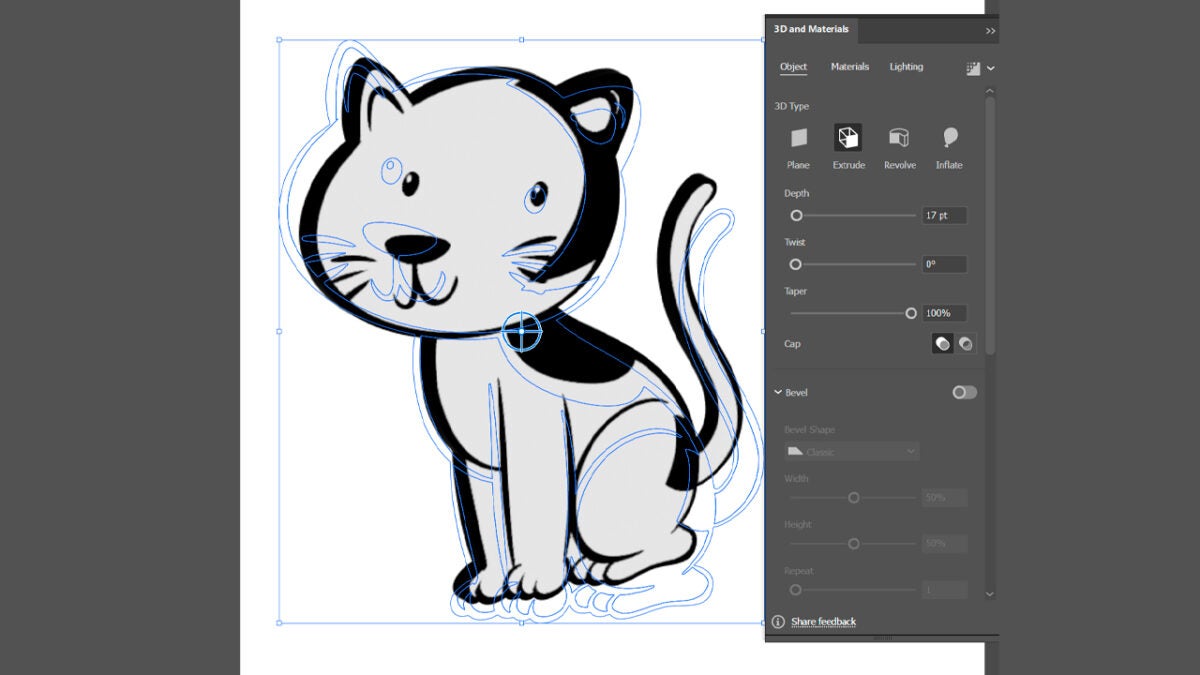
To start applying 3D effects to our vectors, we need to access the 3D and Materials panel, which you will find in Windows > 3D and Materials. From here you can make use of options like Extrude and Rotation, Lighting, Shadows and much more. Once again, remember that effects cannot be applied to flat objects.

  • Select your vector design with the Selection (V) tool.
  • From the 3D and Materials panel, choose the effect you want to apply. In our case, we have chosen Extrude.
  • Adjust the Depth, Twist, and Taper fields according to your preferences. You can also rotate the object and change its perspective with the Rotation and Perspective options.
Now that our design has depth, we can add materials. In the Materials section, you will find many belonging to Adobe Substance 3D, although you can also add your own materials by clicking on the “+” icon. After applying a material, experiment with lights and shadows from Lighting:

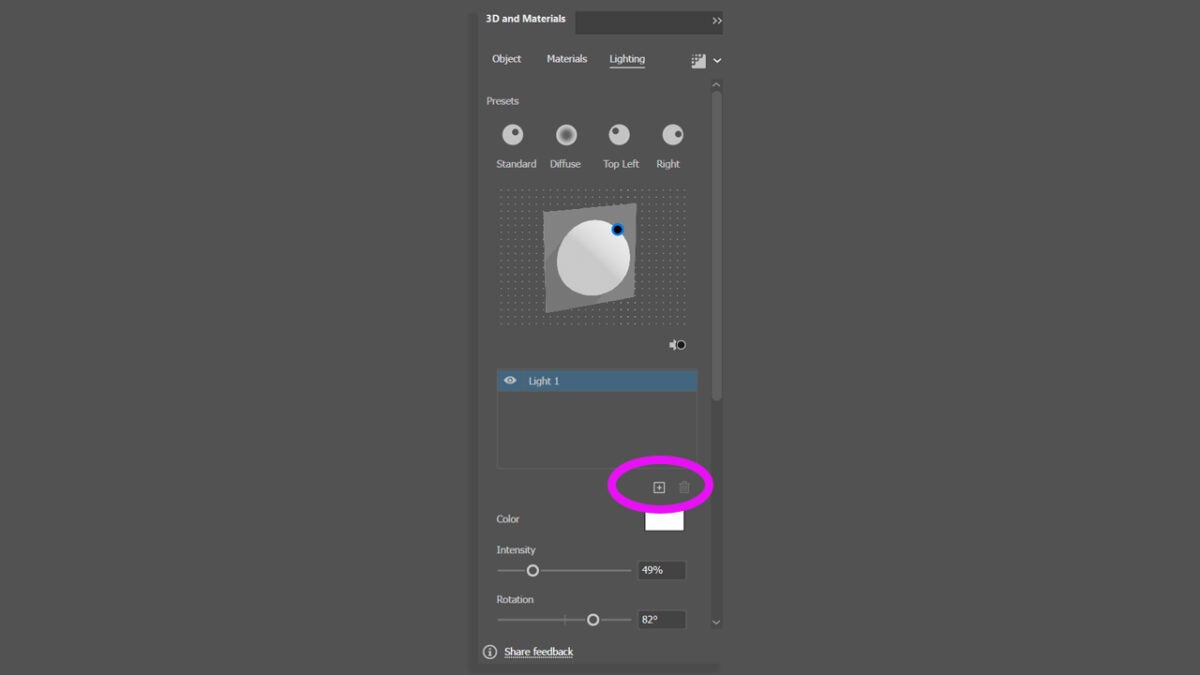
  • Single light: Choose one of the default settings like Standard, Diffuse, Top Left or Right. To adjust its position, play with the Rotation and Height sliders.
  • Multiple lights: Illustrator allows you to add up to 10 lights in total. To add a new one, select the “+” button.
Create 3D objects within Illustrator

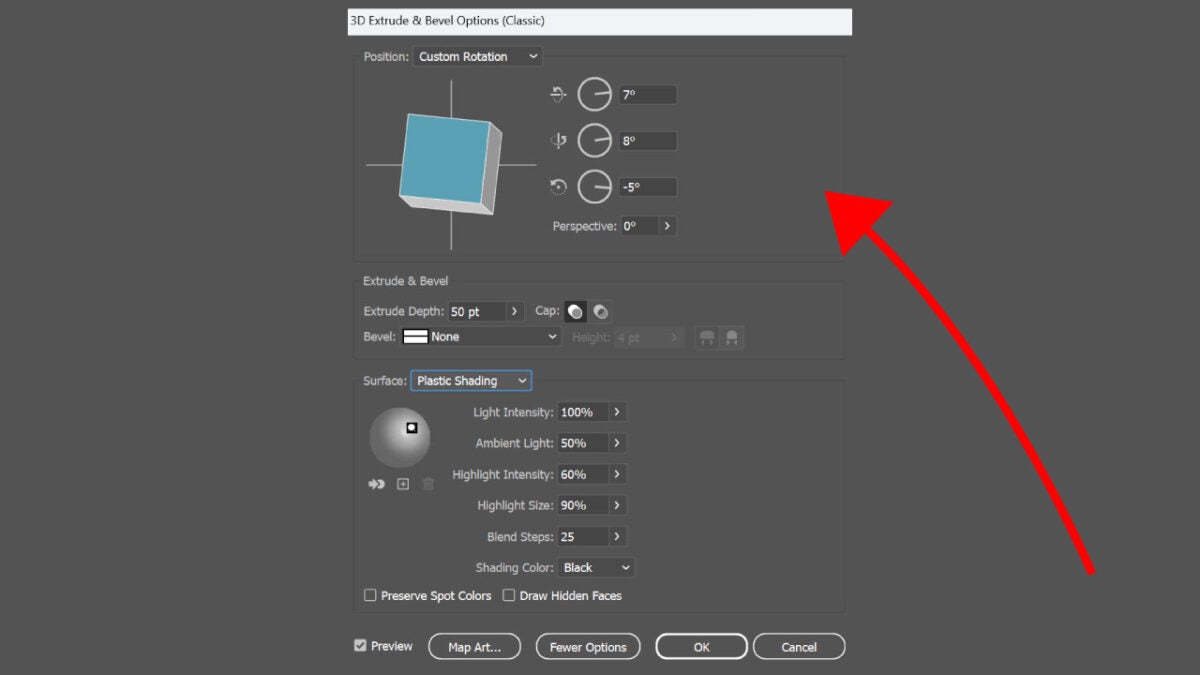
Illustrator allows us to create 3D objects from flat illustrations. One of the ways we can do this is through extrusion. To start, select the flat shape you want to transform. Select Effect, 3D Materials, then 3D (Classic) and then, Extrude & Bevel.

Adobe Illustrator
Adobe Illustrator Download

Then, click on More Options so you can see the number of options available to you. You will see that you can adjust some options such as the position, surface, or lights of the 3D object. Once you have achieved the desired result, click on Ok.
Author: María López

{ "de-DE": "Künstler aus Berufung und Technikliebhaber. Seit ich denken kann, habe ich gerne an allen möglichen Gadgets herumgebastelt.", "en-US": "Artist by vocation and technology lover. I have liked to tinker with all kinds of gadgets for as long as I can remember.", "es-ES": "Artista de vocación y amante de la tecnología. Me ha gustado cacharrear con todo tipo de gadgets desde que tengo uso de razón.", "fr-FR": "Artiste de vocation et amateur de technologie. J'aime bricoler avec toutes sortes de gadgets depuis que j'ai l'usage de la raison.", "it-IT": "", "ja-JP": "", "nl-NL": "", "pl-PL": "", "pt-BR": "", "social": { "email": "", "facebook": "", "twitter": "", "linkedin": "" } } View all posts by María López

Author María LópezPosted on November 29, 2024July 1, 2025Categories News

Post navigation

Previous Previous post: Inside YouTube’s 2024 Spotlight: Top Creators, Surprising Stats, and Record-Breaking Videos
Next Next post: Capture the Magic: Create Your Perfect Family Album with Adobe InDesign This Holiday Season!

Recent Posts

  • Nintendo Switch 2 now shows the AI problem facing PlayStation and Xbox
  • Nintendo posts Q2 results: profit falls 16%, forecast unchanged
  • TSMC’s 1nm fab is now linked to Tainan’s Shalun Science Park
  • Godzilla Minus Zero is not streaming yet: it won’t arrive before its November 2026 debut
  • Binance faces new reports of a $6.3 billion hack: vibe coding is blamed

Archives

  • November 2026
  • October 2026
  • September 2026
  • August 2026
  • July 2026
  • June 2026
  • May 2026
  • April 2026
  • March 2026
  • February 2026
  • January 2026
  • December 2025
  • November 2025
  • October 2025
  • September 2025
  • August 2025
  • July 2025
  • June 2025
  • May 2025
  • April 2025
  • March 2025
  • February 2025
  • January 2025
  • December 2024
  • November 2024
  • October 2024
  • September 2024
  • August 2024
  • July 2024
  • June 2024
  • May 2024
  • April 2024
  • March 2024
  • February 2024
  • January 2024
  • December 2023
  • November 2023
  • October 2023
  • September 2023
  • August 2023
  • July 2023
  • June 2023
  • May 2023
  • April 2023
  • March 2023
  • February 2023
  • January 2023
  • December 2022
  • November 2022
  • October 2022
  • September 2022
  • August 2022
  • July 2022
  • June 2022
  • May 2022
  • April 2022
  • March 2022
  • February 2022
  • January 2022
  • December 2021
  • November 2021
  • October 2021
  • September 2021
  • August 2021
  • July 2021
  • June 2021
  • May 2021
  • April 2021
  • March 2021
  • February 2021
  • January 2021
  • December 2020
  • November 2020
  • October 2020
  • September 2020
  • August 2020
  • July 2020
  • June 2020
  • May 2020
  • April 2020
  • March 2020
  • February 2020
  • January 2020
  • December 2019
  • November 2019
  • October 2019
  • September 2019
  • August 2019
  • July 2019
  • June 2019
  • May 2019
  • April 2019
  • March 2019
  • February 2019
  • January 2019
  • December 2018
  • November 2018
  • October 2018
  • September 2018
  • August 2018
  • July 2018
  • June 2018
  • May 2018
  • April 2018
  • March 2018
  • February 2018
  • January 2018
  • December 2017
  • November 2017
  • October 2017
  • September 2017
  • August 2017
  • July 2017
  • June 2017
  • May 2017
  • April 2017
  • March 2017
  • February 2017
  • January 2017
  • December 2016
  • November 2016
  • October 2016
  • September 2016
  • August 2016
  • July 2016
  • June 2016
  • May 2016
  • April 2016
  • March 2016
  • February 2016
  • January 2016
  • December 2015
  • November 2015
  • October 2015
  • September 2015
  • August 2015
  • July 2015
  • June 2015
  • May 2015
  • April 2015
  • March 2015
  • February 2015
  • January 2015
  • December 2014
  • November 2014
  • October 2014
  • September 2014
  • August 2014
  • July 2014
  • June 2014
  • May 2014
  • April 2014
  • March 2014
  • February 2014
  • January 2014
  • December 2013
  • November 2013
  • October 2013
  • September 2013
  • August 2013
  • July 2013
  • June 2013
  • May 2013
  • April 2013
  • March 2013
  • February 2013
  • January 2013
  • December 2012
  • November 2012
  • October 2012
  • September 2012
  • August 2012
  • July 2012
  • June 2012
  • May 2012
  • April 2012
  • March 2012
  • February 2012
  • January 2012
  • December 2011
  • November 2011
  • October 2011
  • September 2011
  • August 2011
  • July 2011
  • June 2011
  • May 2011
  • April 2011
  • March 2011
  • February 2011
  • January 2011
  • December 2010
  • November 2010
  • October 2010
  • September 2010
  • August 2010
  • July 2010
  • June 2010
  • May 2010
  • April 2010
  • March 2010
  • February 2010
  • January 2010
  • December 2009
  • November 2009
  • October 2009
  • September 2009
  • August 2009
  • July 2009
  • June 2009
  • May 2009
  • April 2009
  • March 2009
  • February 2009
  • January 2009
  • December 2008
  • November 2008
  • October 2008
  • September 2008
  • August 2008
  • July 2008
  • June 2008
  • May 2008
  • April 2008
  • March 2008
  • February 2008
  • January 2008
  • December 2007
  • November 2007
  • October 2007
  • September 2007
  • August 2007
  • July 2007
  • June 2007
  • May 2007
  • April 2007
  • March 2007
  • February 2007
  • January 2007
  • December 2006
  • November 2006
  • September 2006
  • August 2006
  • June 2006
  • May 2006
  • July 2001
  • January 2001
  • November 2000
  • September 2000
  • August 2000
  • July 2000
  • April 2000
  • March 2000

Categories

  • Affiliate post
  • Expert Review
  • Gaming
  • Guides
  • How to
  • Legacy how To
  • News
  • Noticias
  • Software>Security
  • Sponsored
  • Trucos y Consejos
  • Uncategorized
  • Windows software

Meta

  • Log in
  • Entries feed
  • Comments feed
  • WordPress.org
Softonic English Proudly powered by WordPress