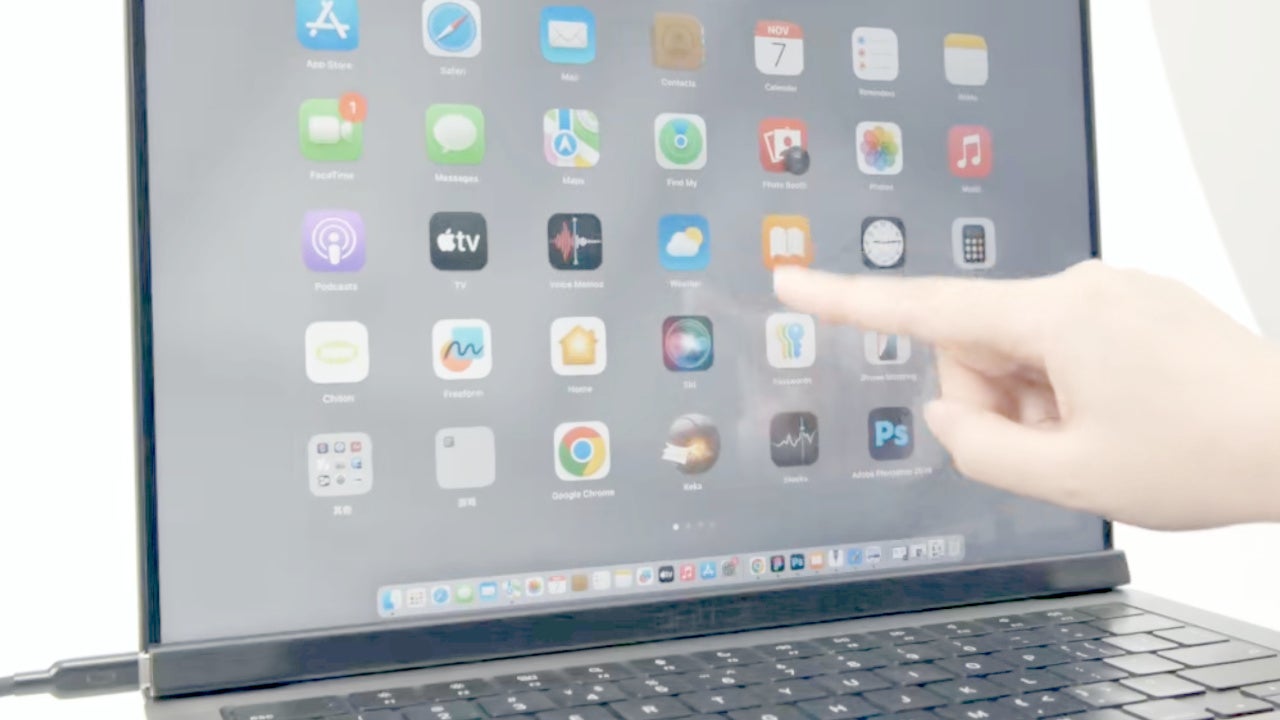
For years, the idea of a touchscreen MacBook has surfaced and faded in the rumour mill. Apple has always argued that touching a laptop screen directly is neither the most comfortable nor the most ergonomic option, and that the iPad is the platform to consider for this kind of mixed interaction. In recent months, however, some reports point to a change of direction, and while we wait for Apple to unveil its own touchscreen Mac—if it ever happens—CES 2026 brings us a solution that, just by plugging it into a Mac, turns it into a touchscreen one.
Magic Screen: Turn any MacBook into a touchscreen device
Intricuit’s Magic Screen is presented as an accessory that magnetically attaches to the MacBook’s display, using the same magnets that detect the lid closing to trigger sleep mode. After connecting it with a single USB-C cable, the device uses its tempered-glass layer to turn the screen into a full touchscreen panel, compatible with all the gestures we already use on iPhone and iPad—taps, scrolling, pinch-to-zoom, and much more.
The idea goes beyond simply touching the screen, too. We can use the stylus, with pressure sensitivity and hover support, to write, draw, or interact more comfortably with design apps.
According to Intricuit, the Magic Screen’s built-in battery gives us up to 100 hours of use per charge, so we can work for several weeks without having to think about plugging it into power. On top of that, the accessory comes with its own Folio Case which, besides protecting it, also works as a stand to reduce vibrations when touching the screen. And, as if that weren’t enough, we can use the Magic Screen as a standalone drawing tablet once we remove it from the MacBook.
A temporary solution until Apple’s touchscreen MacBook arrives
Apple appears to be preparing its own MacBook Pro with an OLED display and touch capabilities. Rumours suggest the first model could arrive between late 2026 and early 2027. According to several analysts, the shift responds to the way we’ve been using the iPad, combining keyboard use with touch interaction.
In the meantime, Magic Screen lets us start enjoying a MacBook we can touch right now—draw on it, and use our fingers to manipulate objects on the screen. If we use design and illustration apps, or even real-time video editing tools, this accessory opens up a very interesting world of possibilities. Just one more of the many new things we’re seeing at CES 2026.
