Hasta la Vista, XP!

After a couple of setbacks, Microsoft’s new operating system, Vista, should be available, if we’re lucky, in January. Testers of the latest Release Candidate have been giving back promising feedback, especially with regard to stability and speed. But what if you can’t wait a couple more months for it?

We’ve selected a few programs that you can mix and match to create your very own hybrid Vista. Freshen up the appearance of your desktop with the Vista Customization Pack or the Vista Transformation Pack. If you’re not ready to go for a full makeover give the Vista touch to your icons via Software Icons Vista 2.0. A cool feature of Microsoft’s new operating system will be the Vista Sidebar, which provides you with all sorts of handy tools, more commonly known as widgets. A relatively unknown, yet clever application is the Windows Vista Upgrade Advisor, a quick way of scanning your PC to verify that it is compatible with Vista.

Of course, the keenest of you out there will be looking for the real deal. The closest you’ll get to it is Windows Vista Beta 2, yet you’ll have to be prepared to suffer the occasional bug or crash that comes with a development version. Whether you choose to go for a cosmetic change or the full Beta tryout, it’s a good idea to get acquainted, for free, to the operating system that Microsoft will ambitiously launch in a few months.
MP3Producer converts your audio files

If you like to listen to your music anywhere and on anything, be it an iPod, a phone or a PC, you’re going to need to change your tracks to different formats. MP3Producer works in the same way as most converters, in that you select your audio files from a CD or from a folder and then select the new format and bitrate. MP3Producer converts your files fairly quickly and can handle more than one track simultaneously.

MP3Producer’s interface is divided into two windows, making it easily understandable. The left side is composed of four tabs: Track List, ID3 Tag, Filename and MP3 Settings. Depending on the tab you have selected MP3Producer will provide explanations on the right side to help you go through the conversion process. The application also offers more flexibility than other audio converters by allowing you to select a segment of a track to be modified.

Continue reading “MP3Producer converts your audio files”

Jazz up your smartphone’s camera

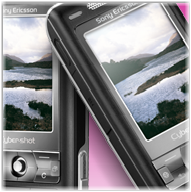
cybershot1.pngGiven that phones have had cameras built-in for a number of years now, it can be pretty disappointing that when you first fire your camera up, it’ll more likely than not be lacking in anything beyond the most basic features. That’s where programs like Camera Magica come in. Camera Magica is capable of using bigger zoom, higher contrast and larger image sizes as well as being able to create new types of images such as seamless panoramas and ‘joke’ pictures.

While opening up the possibilities of your phone’s camera, programs like this are actually using some pretty clever technology. When creating panoramas, Camera Magica automatically detects the edge of the last image you took and looks for it as you slowly move the camera. When lined up, it takes the next shot, making it easy for the program to blend the edges of your images for that seamless effect!

PhotoFusion, from Scalado, has similar features. Along with its panorama tools (which use transparent overlays to help the user line up image edges), PhotoFusion allows you to create ‘Photo Strips’ (one image made up of nine others, in grid format), and warped images. Its developer, Scalado is recognised as being at the forefront of phone camera software development so we can expect more to come from them in the future.

Separating these two programs on anything other than price is pointless: they’re both well designed, fun programs which will help you get the most out of your smart camera phone. Camera Magica is true Freeware and is thus our favourite but PhotoFusion certainly deserves a test run for its novel approach to user-interface and attractive output.

As Sony Ericsson’s latest offering (the CyberShot Phone) makes clear, portable telephony and photography are now inextricably linked. What may have seemed like a fad has become a major feature – one which is improved and enhanced by programs like CameraMagica and PhotoFusion.

AOL goes fishing for new users

Forget the search data spill, which gave away the browsing habits of nearly 65,000 users in August. AOL is trying to woo users by offering its online services for free. This means you get access to AOL video, a free email account, more than 200 internet radio stations and use of AOL’s security tools. Those of you that already use AOL Explorer, AOL Media Player, or Triton and trust the AOL platform will be glad to see the company making some effort.

Jeffrey Bewkes, chief operating officer of Time Warner, is optimistic and believes that going free has also brought new types of people to AOL. He revealed that “40 percent of new users were not former subscribers” but still hoped that old users who had gone off to other internet providers would be encouraged to “come back and reclaim old email addresses”. After what happened in August, I doubt ex-customers will confidently flock back to AOL though.

Adobe Acrobat to include online conferencing

PDF fans are in for a treat this November with the release of Acrobat 8, which promises to introduce new web conferencing facilities. Adobe‘s ubiquitous documentation app has been pumped up to include the new Adobe Connect software service, which allows users to set up personal online meeting rooms via a customizable web address.

The software is designed to bring users closer together, enabling them to collaborate on documents with just a single click. Presumably Adobe will take no responsibility for any messy bust-ups that will inevitably occur as a result. Acrobat 8 Standard is expected to set you back an estimated $299, or $99 as an upgrade for registered users.

Browse in Peace

It seems you can’t go anywhere on the internet without being followed – just ask Gary Glitter. Whether it’s marketing companies tracking your surfing habits or spyware saving and transmitting your personal details, most current browsers leave behind a trail of footprints leading back to your PC. That’s why programming collective Hacktivismo have released Torpark – a new browser that uses its own network of net routers to allow users to surf without leaving a trace.

Even more impressive, Torpack can be stored on any USB pendrive or external storage device meaning you can surf in peace from any PC, anytime. The browser works by encrypting traffic between a computer and the Tor routers owned by the Electronic Frontier Foundation. It also regularly changes the user’s IP address to leave a “smokescreen” for any potential intruders. The makers admit however that data exchanged between websites that do not use encryption to secure login sessions and the Tor network remain vulnerable. They proudly claim however that unlike other similar applications such as Anonymizer and SecretSurfer, Torpark is 100% clean and free of spyware/adware.

Firefox users have been able to access the Tor network via a plugin for sometime now but this is the first time the browser has been available for download. The new package also features a special tab that allows users to switch between anonymous and normal surfing. The two major drawbacks are that in exchange for anonymity, surfing is somewhat slower and some sites act badly thinking you are constantly logging-in and out again like some kind of paranoid lunatic. That said, if you’ve been particularly plagued by credit card fraud or security issues, this could be the answer you’ve been looking for.

Web 2.0 winners and losers

The viral growth of Web 2.0 sites and apps has seen some incredible innovation as mobs of freshly graduated geeks dive head first in to new technologies and languages in the quest to attract the masses as well as the millions that will make them the next Bill Gates. While the cream of the crop has been hitting the headlines, there have been many ideas that are so far outside the box that they can’t even see it anymore! That’s the premise for a recent Wired News Rant and Rave based on a poll taken of Web 2.0 winners and losers.

Of course Flickr comes in as a clear winner with its friendly design, buzzing community and open API. Not far behind is another Yahoo! owned venture – del.icio.us, which really defines what social bookmarking is all about. The number of downloadable plug-ins and add-ons for these winners is testament to their success, something that can’t be said for the “Web 2.0 Losers”, most notably myspace.com. Blasted for its “clunky interface and intrusive advertising”, Myspace somehow became popular while going against just about every convention of Web 2.0. As for wacky ideas, how about fo.rtuito.us, the social network that didn’t bother joining people of common interests but went down the random path with disastrous results. Sticking two complete strangers together for four days to see if they hit it off was more of a Big Brother approach and as with the TV show, it wasn’t a pretty sight.

For me though, a whopping great omission was made by not including the phenomenal last.fm – a site that unites music lovers (and there are a few of them) in the search for audio enlightenment by way of their own personalised and perfect music stream. Finally the clear proof that Web 2.0 has not been a waste of time.

From iTunes to iCan’t play my music

This past week it was nearly impossible to miss the announcement of Apple’s array of new iPod products. Along with all the reworked, shiny gadgets came the latest version of its slick media management software, iTunes. Over the course of the last six versions, iTunes has been progressively gaining hefty features to match the meteoric rise of the iPod. Music, photos, podcasts, album art, song lyrics, TV shows and now finally movies have all ambushed camp iTunes, and it seems that in version 7, feature creep has finally breached its walls.

After the initial elation died down, several reports surfaced about slow performance, iPods not being recognized and horror of horrors – at least for a music player – a “scratchy” sound during music playback! Granted that these problems are usually amplified by a vocal few and that most issues will be fixed in the inevitable patch, it does however raise the question of “When do you stop adding new features so as to maintain the original simplicity of a program?”

To be certain, this is a careful dance between the status quo and selling more iPods but when basic features such sound quality start to take a dive, perhaps it’s time to take a break.

Become Google Earth-conscious

The latest Beta version of Google’s digital imagery app, available for PC and Mac, offers notable improvements, among which exciting support for HDTV, to record your “Earth fly-overs”, in case that’s how you get your kicks. Car owners, you won’t fumble for the next page of driving directions just as you come across an intersection anymore. In this new version of Google Earth you can print out your directions in a turn by turn layout. But the real improvement comes in the form of various overlays to add to the Google Earth experience. Whether you’re environmentally-conscious or a real traveler you’ll take a real liking to these.

Thanks to the United Nations Environmental Program (UNEP), and in a real effort of raising public awareness, “extreme environmental degradation” zones around the globe have been mapped out. I checked out a digital imagery comparison of Mexico City from 1973 to 1999. It’s impressive to see how much the city has sprawled out. The Discovery Networks World Tour is great for getting information on your future travel destinations. I watched videos on the Amalfi Coast in Italy and jotted down a few places that I might check out. National Park Service information is particularly useful if you decide to go trekking, say in Yosemite National Park and want to find out what trails you can take. The Jane Goodall Institute overlay will probably attract wildlife lovers. It picks out chimpanzee preserves around the world. If you’re just curious in general, the National Geographic overlay should satisfy your curiosity with hundreds of locations and landmarks pinpointed on the globe. But my favorite function is the Turn Here overlay because you can view short videos of cool spots in many cities. Anybody can submit a video to Google Earth thus sharing what’s cool with the rest of the world.

e-Donkey blinkered, RIAA are thrilled

What a pity it is to see the RIAA (those who would have you pay by the minute for listening to your own music) get their way every now and again, as was the case recently when they got one up on eDonkey’s creators MetaMachine. Before even reaching the court, the case was settled for $30 million in exchange for not being sued for what would more than likely be many times that figure.

This is a case of the fat cats using their weight to wipe out not only the misdoers but those who have been using the software fairly at the same time. MetaMachine have agreed to stop distributing the software, even though it is not illegal to download. On top, their web page has been liquidized and now contains a message that will have the executives at the RIAA grinning from ear to ear.