Vista compatible iTunes in the pipeline

itunes.jpgOne of the biggest victims of Vista’s ongoing incompatibility problems has been iTunes. Apple have announced that a new compatible version will be available ‘within the next few weeks’ but in the meantime, have issued advice to help minimise problems. Apple concede that iTunes 7.0.2 may work for many users using Vista but recommends that they wait until
the new version is released. So far, a number of issues have been reported by Vista users that the release will rectify.

One of the most annoying has been that users who purchased music from the iTunes store have found that when upgrading to Vista from Windows 2000 or XP, they suddenly find the music won’t play. iPod users have been particularly hard hit. According to Apple, those that have the ”Enable Disk Use’ turned off may be unable to manage their device properly using Vista. What’s worse, using Vista’s ‘Safely Remove Hardware’ option can actually corrupt your iPod. It is strongly recommend that users select ‘Eject iPod’ from the ‘Controls’ menu in iTunes to avoid running the risk of this.

To prepare for the new release, Apple has also issued a series of recommendations for those upgrading to Vista to minimise any such problems. These include Deauthorizing all iTunes accounts, Enabling disk use on all iPods, and uninstalling the old version of iTunes. Finally, once users have installed the new version, users should select ‘Authorize computer’ from the ‘Store’ section in iTunes.

A new alternative to Skype

king-logos.pngWe all know that Skype provides a great way to make calls across the world for next to nothing, and it’s merits as a communications tool are clear to see. I’ve always been a big fan of the app but am becoming increasingly wary of the amount of bandwidth it hogs, even when it’s just running in the background. It’s still a slick program but it’s starting to become a little too swamped with features for those who literally just want to make calls and don’t need access to chatrooms, file transfer and the like.

Step in Gizmo Call, a new Web 2.0 program that offers a very simple way to call anywhere in the world for free. Amazingly it’s as easy as typing a phone number onto the Gizmo Call home page and hitting ‘Call’. You can even create a ‘Call Me’ link and insert it into a web page or send it via email so others can ring you for nothing.

As for the drawbacks, you need to download a plug-in in order to use the service and, more importantly, you’re limited to a maximum free call length of ten minutes per day, after which you’ll almost certainly be reaching for that ‘S’ icon again. Nevertheless, Gizmo Call represents an interesting new model in the Internet telecoms sphere and once the service has been refined a little we can expect to see clones springing up everywhere.

Easy CD and DVD recording

deepburner.jpgSoftware applications are being constantly improved with every new version. Bugs are fixed, designs are polished, new functionalities are added. But sometimes they become too bloated, often losing sight of what they were created for in the first place. So for instance, whenever I need to record a CD or DVD, I no longer turn to Nero but use DeepBurner instead.

This neat program allows you to record CD or DVD in a very simple way: every time you launch it you see a project selection window where you can choose what to do (create a data disk, create an audio CD or burn an ISO image) and you’re then guided through a few easy steps in a wizard-like process.
Continue reading “Easy CD and DVD recording”

Pando – big file transfers made easy

PandoIf you’ve ever had to publish, send or receive particularly large files, you’ll know that it can throw up all kinds of problems – crashed servers, blocked inboxes and transfers that suddenly just hang-up. Pando aims to take the pain out of this process and according to the developers, 3 million people agree that it does exactly that.

Pando is based on a P2P network that enables you to send files of up to 1GB in size by e-mail or by publishing it to the web. It supports all multimedia file types including video, audio and photos meaning it’s great for people who deal with audiovisual files regularly.

For most users, the major benefit will be with e-mail attachments and the good news is, there’s no need to change your existing e-mail client. Pando works by creating a torrent-like link file which you can then send in the body of your e-mail for the recipient to click on. There’s no need to be online when the recipient downloads the file and there’s no compression, FTP or dodgy web uploading applets to deal with. The reason you don’t need to be online is because Pando sends files to its “super-node” servers, which means that there’s always at least one “seeder” online at any given time. This seed is guaranteed for 14 days so even if you log off, your recipient can still view it. Obviously, the more people that share it too, the faster the download. Continue reading “Pando – big file transfers made easy”

Mozilla’s monkey business

seamonkey.pngMozilla have built their reputation mainly on the back of the excellent Firefox browser which has finally challenged the dominance of Internet Explorer. However, they also offer a whole host of other products, one of the most ambitious being SeaMonkey.
SeaMonkey is Mozilla’s successor to Mozilla Suite – an all-in-one suite comprising browser, e-mail client, chat, calendar and much more. SeaMonkey has been the codename for the Mozilla Suite for some time although it was originally invented by Netscape as a codename for Netscape 6 (which was, incidentally, originally known by the less politically correct name of ‘ButtMonkey’).

Since security is a major issue with a suite where you invest so much personal information, the latest release has plugged various holes that left it vulnerable to attack. This means more visible security indicators in the browser and enhanced phishing detection for e-mail. Other changes include inline spell checking in the browser, an updated version of ChatZilla, and a significantly improved startup script on Linux.

One of the things most users praise in SeaMonkey is the e-mail client. The blind copy tool, as well as its intelligent organisation functions and address access, are much better implemented than equivalents in Outlook or Thunderbird. Those who like Firefox will also love the SeaMonkey browser, which features more advanced tabbing functions and customisable security functions. Many users also report that it performs quicker than Firefox even when the latter has been optimised for speed. Not only this but the whole suite takes up half the amount of disk space compared to running Firefox and Thunderbird simultaneously. However, with no automatic update manager, upgrading the suite is a pain in the neck, meaning you have to uninstall the whole thing, including any special profiles you’ve set up.

Its arguable too that the days of all-in-one suites such as SeaMonkey have had their day. With e-mail clients such as Gmail offering tons of storage space, organisers such as Google Calendar and hundreds of chat clients to choose from, who needs a suite?
However, if Mozilla were to join forces with Google on a project like this, you never know – the monkey might finally have its banana and eat it.

Cheer up a picture with Photoshop

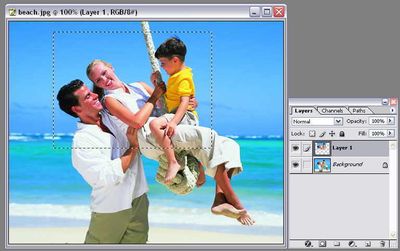
You may have a nice photo that would look much better if you could just add some kind of special touch. Well, let insideTonic lend you a hand: even if you’re not the artistic type, you can still obtain really eye-catching results by following this simple, easy-to-use Photoshop trick.

First of all, open your image and select the area you’d like to emphasize using the Marquee tool. Then copy it to a new layer by pressing Ctrl+J.

photoshop-trick-1.jpg

Continue reading “Cheer up a picture with Photoshop”

BBC to launch on-demand videos

3pmediabbclogo.JPGThe BBC Trust today approved the BBC’s on-demand project, with a final consultation to be held May 2, 2007. The service will allow users to view or download popular programs like Doctor Who, 7 days after their original broadcast. The BBC then plans on releasing its iPlayer application, which will let users play a program 30 days after it has been downloaded or 7 days after it has been watched. The original plan was to let users keep downloaded programs 13 weeks on their hard drives but had to be brought down to 30 days because of Ofcom’s (the UK communications industry regulator) worry that the iPlayer would have a “negative effect” on competitors. But users will still be able to use the “series stacking” feature to keep watched series more than 7 days.

In a sense, the BBC breaks off from the traditional model seen in the majority of broadcast companies. According to WebTVWire, the reason is that the British network is only interested in ratings and doesn’t have to worry about advertising. Other stations are tied to a model where advertising space can be sold at extremely lucrative prices. Joost, the new P2P TV project, should prove traditional channels wrong by embedding advertising into their on-demand service.

It’s interesting to see how the BBC justifies cutting down storage time for episodes. Chris Woolard, head of finance, economics and strategy at the Trust says that “if (users) don’t look at (content) within 48 hours, they don’t look at it at all”. Kind of an easy way of justifying putting more control on content. While the on-demand service is an exciting way of broadcasting episodes it’s clear that management is making sure they keep a tight grip on it.

Revenge of the botnets

botnets.jpgWithout wishing to be the bearer of bad news, your computer now has a one in four chance of being under the influence of a botnet. According to Google Vice President Vint Cerf, approximately 600 million computers are now connected to the Internet and around 150 million of them could be unwilling participants in a botnet – an application which can be used to deliver spam, launch denial of service attacks and read usernames and passwords.
Reporting from the World Economic Forum in Switzerland, the BBC’s Tim Weber claims that botnets could eventually overwhelm the Internet and cause it to disintegrate. While there is no hard evidence to predict that this doomsday scenario will occur, security experts are warning that new Net technologies such as VOIP are leaving machines even more vulnerable to attack. According to managed security firm Network Box, the last few months has seen an increase in the number of worm variants designed to aid botnets.

Simon Heron, Technical Director of Network Box, told us: “These worms will continue to be produced, as botnets are one of the attack vectors being used to target individuals and companies. It would seem that VoIP is an ideal target for hackers in 2007. It’s a new protocol and as it’s quite complicated, it has not been integrated well into firewalls.”

Admittedly, it’s difficult to know whether IT security firms are playing on the fear factor in order to shift more solutions, but it’s fair to say that it would be foolish to ignore these warnings about the dangers of botnets. In practical terms, the installation of an antivirus suite such as AVG Antivirus, plus a decent firewall like Outpost, is a good start. However, because of the differing guises in which a botnet can mask itself (denial of service, spamming, phishing etc.) there is currently no quick fix to guarantee that you’re botnet free. There’s been a certain amount of research into ways of tracking and tackling botnets but clearly this is something that the security software industry needs to address. A cynic might argue though that while a threat remains, users are actually being cowed into buying yet another piece of security software.

When user security turns into Vista paranoia

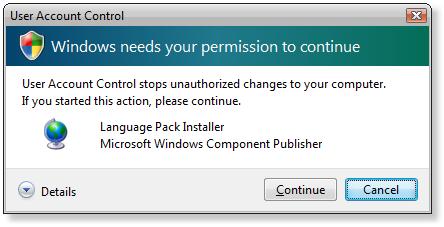
After having installed your brand-new OS you’re supposed to open your mouth in an amazed “Wow!” (not to be mistaken for WoW) but many Vista newcomers have found themselves grimacing in confusion instead. The reason for this unpredicted reaction can be found in one of the features included in Microsoft’s new product: the so called User Account Control.

vista-user-account-control.JPG

User Account Control is a security feature especially designed to prevent certain kinds of programs from abusing your Windows user account by installing adware or spyware apps without your consent. The problem is that this laudable intention turns out to be a real pain for the average user, who is constantly being asked for permission to perform even the most innocent task, such as launching your web browser.

Luckily you can disable it in a very easy way: go to Control Panel and click on User Accounts And Family Safety. Then select User Accounts and click on Turn User Account Control On Or Off. Just uncheck the box, click OK and restart your computer when prompted.

Microsoft obviously recommends not to deactivate this security option but it’s the only thing you can do if you want to stop seeing those annoying windows – as long as you can take responsibility for what you have running on your PC.