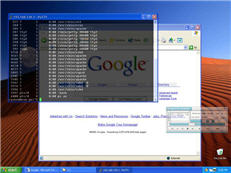
 One of the most hyped features of Vista is its new transparent windows, courtesy of the Aero graphics engine. This is a useful option if you’ve got lots of windows open on a crowded screen and more to the point, it looks good. However, if like many others you’re still not convinced Vista is worth upgrading to, you can still have this classy little feature courtesy of Vitrite.
Vitrite is a tiny app that allows you to manually adjust the level of transparency for almost any visible window. When executed, Vitrite minimizes to the system tray in the lower right corner of the screen. If you wish to make a window transparent, you simply click on the window and press ‘Ctrl Shift’ plus any number on your keyboard depending how transparent you want to make it with one being the most transparent setting. So no more flicking between tabs or scrolling through your toolbar to see what you’ve got open – you can see everything at a glance. Obviously, be careful that you don’t pile too many windows on top of each other or else everything will start to look incomprehensible.
Note as well that Vitrite also offers the option to toggle the ‘always on top’ feature. Again, just press ‘Ctrl Shift’ with the ‘+’ key to make the active window float on top of the other windows. So there you have it – one of Vista’s most attractive features for nothing!
 Anybody who’s watched AVI movies has had to use a codec, yet few people really understand what they are or how they work. To make things clear, codecs encode (and decode) your media file so that your media player can read it. AfreeCodecVT will avoid all the hassle by helping you choose the right codec according to the media file you have and will provide all sorts of information on all the codecs that exist out there.
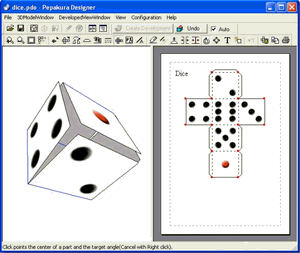 It seems that nowadays we’re all somehow obliged to enjoy geek hobbies, such as playing videogames, surfing the net or retouching digital pictures. What happened to all those good old hobbies people used to have? Not so long ago, children traded football cards while their parents collected stamps, cooked new cake recipes for dessert or knitted warm sweaters for all the family.
 Anyone out there who uses a Windows Mobile device (Pocket PC or Smartphone) will be familiar with Microsoft’s ActiveSync software. Ugly, irritating and very user-unfriendly, ActiveSync has been
  If you’ve installed any Excel plugins such as
 While we still maintain that
  First of all, let us remind you that both programs are at very different levels of development. While eMule is known to be one of the most popular P2P applications, it is still only at version 0.47c. Limewire is now 4.12 and offers a PRO (but not free) version with advanced features. However there are loads of moded versions of eMule, like
  Portable video is fast becoming the most popular secondary use for Pocket PCs, so making sure you have the right media player is now a priority for many PPC device owners. The Core Pocket Media Player is an open-source video and audio player compatible with all the most popular codecs and multimedia file types.