
Speedball 2: Brutal Deluxe

s.pngTo some, speedball is a dangerous mix of illicit substances but to others it’s an excellent futuristic sports title developed by the Bitmap Brothers in 1991. Mix the rules of football, handball and rugby, add two teams of psycho-cyborg gladiators locked in a metal arena with a metal ball and you get speedball. The game consists of passing the ball around to reach the other team’s net and score more goals than them in a limited amount of time. However, unlike the sports we play nowadays in speedball you can joyfully mangle your opponents to get the ball back.

Speedball 2: Brutal Deluxe is the second release in the series. Teams now have 9 players instead of 6 and you can hit targets on the walls to get bonuses. There’s also a number of power ups and other options strewn across the gaming field. The reason we’ve decided to cover this classic is that Kotaku announced today that Frogster Interactive would be releasing a sequel in the summer of 2007. The gaming blog is worried that it will turn out to be a bad “Unreal Tournament Mod”, however with Bitmap Brother Mike Montgomery on the team we can hope for the original spirit of Speedball to carry on.

What about improvements? Will the game environment move on from 2D to 3D? Any chances of multiplayer or online gaming? What about the tournament modes? Will new challenges be introduced? We’ll just have to wait till this summer to see.
Broadband problems uncovered

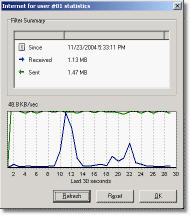
Bandwidth ManagerBandwidth speeds (or lack thereof) are often a mystery. Your provider says one thing but reality is often another. Sometimes problems will be due to the large number of people logged on at once, other times it’s your provider cramming too many people through one data line. However, if you’re suffering from some severely fluctuating bandwidth speeds that are really getting you down, it might be worth using a few bandwidth analyser tools to get to the bottom of it.
One analyser worth checking out is Softperfect Bandwidth Manager. This program aims to spot major bottlenecks where a network of computers are connected to the same server or router. The software monitors your network traffic and can even limit bandwidth according to parameters you specify. This can be really useful for small businesses that have lots of people connected at once but are experiencing bandwidth issues. It can also be useful for those people who perhaps share an internet connection with others at home. There’s nothing worse than someone hogging all the bandwidth with P2P apps whilst it takes you ages just to check your e-mail. With this tool, you can limit bandwidth according to the user, meaning it’s spread more evenly.

If the above intimidates you, then Actual Bandwidth does pretty much the same thing but in a more user friendly interface. The program presents information in easy to read graphs, numeric displays, and system tray icons that update in real-time. The developers also claim it works with just about any internet connection including good old dial-up.

If you need something that goes into a bit more detail about your TCP/IP stats though, then you’ll be better of trying EMSA Bandwidth Monitor. This program allows you to view extended Net adapter interface settings, such as MAC address, speed and analyse data per interface or as a whole. It can also be set to automatically start when it detects an internet connection so it runs in the background while you get on with more important things than swearing down the phone at your ISP!

Cut and splice your favourite clips

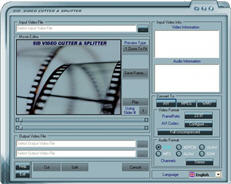
cutspliceWith so much downloadable audio visual material on the internet, people are getting more creative with their content. Just look at the millions of submissions to You Tube by wannabe directors and home movie aficionados. If you’re not ready to take on heavy duty editing programs such as Adobe Premiere, there are a few cut and splice programs out there to help you.

One such example is Video Cutter and Splicer which can split the movie file into two parts at a certain scene and save them as two movies which could help you get your clips under YouTube’s 10 minute limit. You can even save your favourite frames from movies as an image to make a nice thumbnail preview. This program allows you to cut and splice video in AVI, MPEG, WMV, ASF, QT, and MOV format but note that it can only output your masterpieces in AVI, MPEG and WMV format.

For something a little more versatile, you can try Quick Video Converter. As its name suggests, its main job is as a converter but it also cut part of a file, merge two or more files into one and even rip parts of a DVD/SVCD/VCD to video files. It also supports a huge amount of formats, including 3GP and MP4.

If you’re looking for an altogether more powerful solution though, take a look at Video Workshop. Video Workshop is a digital video converter/editor for home video processing and for people who are just getting started with video editing. It also performs conversions but allows you to be much more creative including ripping audio from a film to mp3, mixing soundtracks and adding your own voice overs. A great program for those that want to assemble all their favourite clips in one place and merge them into their own film or mish-mash.

Organize your MP3s with mp3Tag

logo4.gifMost of us who own an MP3 player or play digital music on a computer will admit that it’s possible to get a little precious over your audio collection. There’s something very satisfying about having a hoard of music with the correct track and album names for each song. Not only does it look a lot cleaner in your player, but it makes it a darn sight easier to organize your collection and manage playlists. Ensuring that all the tags in your audio files are correct can be a daunting task, but there’s plenty of software around that will make a much quicker job of it.

mp3Tag is one of the better tag editors around, allowing you to edit the metadata (the information about a track’s name, size, album name, artwork, etc.) with a good degree of autonomy. The app lets you rename files based on this tag information, replace characters or words from tags and filenames, import/export tag information, and create playlists. It carries out its duties and does the job very well too. For instance, the program has a much cleaner interface than many of its rivals and is smaller to boot, making it very quick and responsive.

If you find that you have a lot of different audio formats on your machine that you want to keep in check, then mp3Tag is perfect. It supports virtually every major audio file type, so you can edit tags for Ogg, Musepack and AAC/MP4, besides from regular old MP3s. The program isn’t just a tagger, as it also includes cutting and joining functions that perform pretty well.

Perhaps the biggest boon though is the inclusion of a link-up with the online FreeDB database to import tags from the appropriate album, spelling a swift end to those MP3 albums you get with track names like ‘track01’, ‘track02’, ‘track03’, etc.) While the data returned from the FreeDB is sometimes erroneous, it’s generally pretty good (though probably not quite as quick as the import tool in Tag&Rename).

It’s fair to say that mp3Tag is one of the clear leaders in its field, and considering it’s a freeware app, it’s well worth downloading if you want to clean-up your music collection. Tag editing is very quick and once you’ve given your audio the mp3Tag treatment, you should find it so much easier to organize your tracks.

Block those popups

popup blockerNowadays, both Firefox and Internet Explorer have pretty good inbuilt popup blockers that catch most of those annoying ads. However, there are always some sites that seem to squeeze them through, especially annoying things like Java applets which tend to be slow to load. With this in mind, we bring you a selection of the most popular pop-up blockers at Softonic to help you stop those bad boys.

First up is the none-too-subtely named Smart Popup Blocker which comes with a number of customisable features that cover all angles of popup defence. A sound notifies you when popups have been blocked which is useful because sometimes I find that Firefox blocks Windows that I actually want to see. Once you’ve received the popup alert, you can choose whether to accept or block it permanently. There’s also a handy feature to clean the cookies in your system so that those annoying advertisers can’t track your activity. However, if you use a third-party cleaner, this won’t be of much use.

An alternative is CleanMyPC Popup Blocker which actually ‘learns’ which pop ups you’ll probably need and which you won’t. So for example, if it detects you’re on a secure banking site, it will usually allow popups regarding your logins but block those trying to sell you extra services. Note, however, that this program only works with Internet Explorer.

Finally, not to leave out Firefox users, Adblock Plugin is specifically designed to complement the second most popular browser by blocking unwanted dodgy advertisements on websites. Adblock allows the user to specify filters which remove unwanted content based on the source-address. Every time a webpage loads, Adblock will intercept and disable the elements matching your filters. However, this is only really useful if there is a specific site you are trying to block – unless the source address is in the filter, pop-ups will get through.

Quintura goes online

quintura_logo.gifWhen we first took a look at Quintura Search a few months back, we touted the program as a potential revolutionary in the Internet search world. Since then, we’ve seen a rise in tag-based ‘cloud’ searching technology (including, incidentally, our very own Softonic hot search facility), where popular searches appear in a larger font and spawn related keywords, taking you down a particular avenue of enquiry.

While we were impressed by Quintura’s desktop search, the application never really captured the public’s imagination on a major scale. In an effort to have another stab at the likes of Google and Yahoo!, the developer has decided to jump aboard the Web 2.0 bandwagon by launching an online version of its app.

The new version certainly represents a step forward for Quintura, and the visual interface is a lot clearer than in the previous release. We miss the way you can reduce the scope of the search using a scroll bar, although this option is still available through a settings dialog. Although some searches still take you down some strange and random routes, the engine seems to have improved thanks to the integration of Yahoo XML.

The application provides a unique way of searching the web, giving you the flexibility to manipulate and change results before displaying them in a variety. Admittedly, it will tough for Quintura to lure users away from traditional engines but by putting the service online it broadens the scope for accessing the service.

Top 10 image editors

glassbuttonfeathers.gifIn this era where every waking moment of your life seems to be captured on a digital camera, it’s a good idea to sort yourself out with a graphics editor in order to ensure that your images are in immaculate condition. There are plenty of software tools around that allow you to tweak your pictures to make them clearer, sharper and generally more lifelike than the original shot.
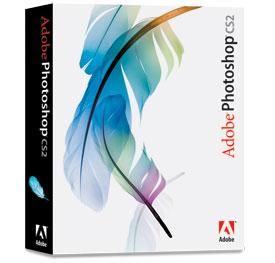
Aside from functioning as merely a photo optimisation tool, many graphics app are designed to get your creative juices flowing, allowing you to produce digital works of art without you needing to be an expert. Adobe’s Photoshop has been the leader of the pack for some time, but the program has now spawned a series of worthy clones that you can pick up much cheaper, or even for free. Here we round up Softonic’s top ten graphic editing packages to help you make your photographs all the more memorable.

1. Adobe Photoshop CS2 – Professional desktop imaging
2. ArcSoft PhotoImpression – Blends powerful photo editing with project templates
3. Adobe Photoshop Elements – Perfect, transform, organize, and share your photos like a pro
4. Ulead PhotoImpact – Complete digital imaging package
5. The GIMP – Create and alter photos and graphics manually or via scripting
6. CorelDRAW Graphics Suite – One of the most complete graphic editing tools
7. Paint Shop Pro X – Complete graphics editor for all levels of ability
8. Photobie – Image editor that supports layer and has a range of filters
9. Saint Paint Studio – Complete paint package for creating and editing images or animations
10. PixBuilder Studio – Graphics editor with many functions and tools

How to remotely control another PC

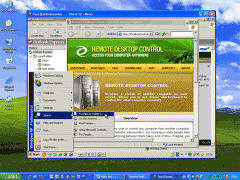
0_remotedesktop_search.jpgHave you ever been in the position where you’ve needed to access a PC from a different location? Maybe you urgently need a file from your PC, or a friend needs your technical help or maybe your stuck behind a firewall that will only let you access certain sites. Thankfully, there are a few programs out there that can help you establish a connection with another PC and allow you to do everything from reinstalling programs to simply just snoop around their desktop.
UltraVNC is one of the most popular applications for this task. Its fast, free and easy to use allowing you full access to a remote PC. One of the best things about VNC is that the other user does not need to install any other software to allow you access. Using Java, the desktop of the person you are connected to is displayed in a separate window on your screen. Be warned though that although its easy to use once up and running, you may need to consult the instructions to get the connection settings right. There’s a useful forum where the most common problems are reported and discussed.

Another option is Remote Desktop Control. This program is somewhat less popular because it doesn’t come with all the advanced features of UltraVNC but it is a little more user- friendly. One good feature is that more than one administrator can connect to the same computer which can be particulary useful when trying to solve tricky technical issues. Note however that the trial is limited to 30 days.

Finally, a slightly different take on the genre is AstroShare which attempts to be an all in one remote-control, video conferencing solution. Its aimed more at those who conduct regular business meetings and need to interchangeably use different computers. It also features file transfer options, voice conversations, instant messaging, and even a chalk-board to outline strategies. However, it’s not for the faint hearted since trying to control all of these features in one program can become cumbersome.

Adobe Photoshop goes online

adobe.jpgIf you think web apps are just a simple, stripped-down version of real desktop programs, you’d better change your mind – and soon! After Google’s first steps on the online software world with tools like Google Docs and Google Spreadsheets, here comes another bigwig: Adobe Photoshop.

According to Bruce Chizen, the company’s CEO, Adobe is planning to launch an ad-supported online version of the popular photo editing software within six months.

The announcement takes place only a few weeks after Adobe signed a deal with Photobucket to provide its users with an online photo and video mixing tool, known as Adobe Remix.

In Chizen’s words:

That is new (for Adobe). It’s something we are sensitive to because we are watching folks like Google do it in different categories, and we want to make sure that we are there before they are, in areas of our franchises.

This is clearly a giant’s step in webware. It seems that big companies are taking web apps more and more seriously, in anticipation of what may happen in the next few years. The so-called Web 2.0 is putting users on the spotlight and challenging coders to go one step ahead in the creation of software.

The Internet is not just a source of information anymore. It’s a living being, a breathing creature in constant development where websites have turned into user-fed communities and interactive tools. If you can create documents, edit photos or mix video online, what will be next? We’re eager to see!

Joost invitations up for grabs!

joost1.pngAs promised last week, insideTonic now has a couple of Joost invitations to distribute among you, the readers. For those who haven’t heard about it yet, Joost is one of a handful of applications which are looking to bring streaming TV to your PC/Mac. Developed by the guys behind such huge projects as Kazaa and Skype, Joost makes use of peer-to-peer networking and advanced video compression to provide multiple stations and shows in a cool, modern design. Joost is already one of the programs of the year.

All we ask in return is one simple thing: give us one reason why you’re the person who deserves an invite! The best two answers (as judged by our expert panel) will receive an invitation within a few days. As we receive more invitations, we’ll send more out… so keep those comments coming! Please note, you’ll need to provide a valid email address with your comment so that we can send you an invite if you win.