 Sending media files to your friends over the Internet can be a real pain, either because you have tons of them or because they’re just too heavy. This is where Swapper comes in really handy, allowing you to share music, photos and videos through a P2P network that works like e-mail. Fast, easy and secure, Swapper is the perfect solution for your media sharing needs!
Month: May 2007
Digg is dead. Long live Pligg
 Since the dawn of the web, millions of sites have been striving for the one thing that’s traditionally proved the hardest to find on the internet – consumer loyalty. Well, it seems that Digg has now finally cracked it and the social networking site’s phenomenal popularity has started paying dividends. The reward for its ability to harvest a huge, loyal customer base? The wrath of the Digital Rights industry and a potential lawsuit of $2.68 million.
OK, so this might not seem like much of an incentive, but the Digg story represents an intriguing example of the almost fanatical loyalty users develop for many social news sites and feed aggregators. It’s an almost idyllic business model whereby you basically get your users to generate all the content themselves and then watch as they feast off of each other in an endless frenzy of clicks.
Building a social networking site in the vein of Digg, Twitter or Yahoo! Answers is easier than you might think, thanks to a new wave of cool content management software programs designed expressly for this purpose. The latest, and final, beta release of Pligg is just about the best we’ve come across.
The open source app allows you to create flexible, personalized sites pretty quickly even if you have zero knowledge of web development languages. The slick control panel makes it very simple to administer sites once they’re up, too. Although it’s an easy out-of-the-box solution for beginners, Pligg is great for more experienced developers too because the code is open and available to be pushed further to produce highly customized projects.
There are still a few bugs and issues that need to be ironed out before it gets its full release, but Pligg could be the ideal platform for you to ‘go social’ and turn the content generation process over to your users. Just be careful not to end up in a situation where the lunatics (no offence to Digg users, of course) are allowed to take over the asylum.
Download of the Day: SoundBase
 Your ever-growing music collection can get really messy if you don’t take the appropriate measures in time. It’s a good idea is to use an audio file organizer such as SoundBase. This manager enables you to keep your music collection in perfect order with almost no effort. It supports the most common audio formats and also features a tag editor and an embedded audio player.
Yahoo! launches web messenger
 Microsoft was the first to launch a web version of its popular Messenger client. Then, Google integrated GTalk! client into Gmail. Today, following this trend of desktop applications going online, Yahoo! launches its own service of web instant messaging.
Yahoo! Web Messenger has been fully developed in Flash 9, so you’ll need to have the Flash plugin installed. It will include all the standard basic features, as well as support for avatars and emoticons. Users will also be able to add Live Messenger contacts, as a result of the deal signed last year between Microsoft and Yahoo! to allow interoperability between their respective messaging networks. According to Yahoo!, VOIP functionalities will be added at some point in the near future.
As for now, you may as well watch the video preview that Yahoo! prepared to learn about this new online web messenger, and of course, sign in and try it out if you already have a Yahoo! ID.
Easy ways to enhance Windows Explorer
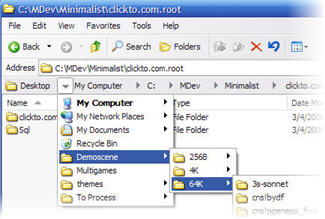 There are many free ways you can spice up Windows without splashing out on a new operating system. One of the easiest is to customize Windows Explorer and it’s “shell” which is basically everything that allow you to browse and manipulate the contents of your hard drive: windows, menus, etc…
One cool little add-on is Visual Task Tips – a lightweight shell enhancement that provides thumbnail preview images for each task in the Windows Taskbar. This is actually a new feature in Windows Vista but Visual Task Tips allows you to have it in previous operating systems for free. It’s a discreet program that comes in handy when you have several applications open.
Another popular tool is Explorer Breadcrumbs which enhances navigation of folders in Windows XP. Rather than navigating step-by-step through your folder hierarchy, it allows you to view your folders quickly and go directly to any location with a single click. It contains a contextual series of buttons that enable you to quickly see and navigate through the entire folder hierarchy without leaving the current window.
Another great XP extension is TaskSwithXP, an advanced task management utility that picks up where the standard Windows Alt+Tab switcher leaves off. It provides the same functionality but adds visual styles to the dialog and also enhances it by displaying a thumbnail preview of the application that will be switched to.
A similar add-on, but aimed specifically at Vista users, is Switcher. This application enhances Vista’s 3D Aero animation system by emulating MacOS Exposé. It displays a snapshots of all your open windows, both active and minimized, allowing you to easily find the application you’re looking for.
Finally, with so much Flash video on the net, its useful to have a way of previewing all your saved audiovisual files. SWF Live Preview allows you to preview Macromedia Flash files using Windows Explorer. SWF Live preview also enables you to scan directories and subdirectories for Flash files, create and preview thumbnails including information such as Flash version, number of frames, and whether it is compressed or not etc.
Download of the Day: YamiPod
 This free alternative to iTunes doesn’t include access to the iStore, but enables you to manage the contents of your iPod and synchronize it with your computer in an easy, convenient way. You’ll be able to copy songs from and to your PC, import and export playlists, find duplicate tracks and retrieve your iPod’s information, amongst other nice features.
Top 10 mathematics programs
 For many, it’s getting towards that fateful time of year again where exams are looming. If you’re a student and are busy swotting (or at least, you’re supposed to be) for your maths finals then take a trip to Softonic’s Mathematics section, where you could find the program that makes the difference between getting an A or a B.
There’s a multitude of helpful software on here, from simple chart plotters, such as the delightful Graph, to heavyweight apps that provide tools to solve complex equations. The number one application in this category Derive, is actually one of the most heavily-downloaded programs on Softonic. It helps you to get around tricky numerical and symbolic problems with the minimum of fuss, and is useful for a wide range of mathematical disciplines, including arithmetic, algebra, trigonometry, and calculus.
1. Derive – Powerful system for doing symbolic and numeric mathematics
2. Graph – Draw mathematical graphs in a coordinate system
3. Deadline – Solve equations and plot graphs
4. Geometry Calculator – Calculate and convert various geometrical values
5. MathWriter – Write mathematical, scientific and engineering equations
6. Basic Facts Worksheet Factory – Sharpen your times-tables skills
7. Math Practice – Demonstrate your great mathskills with this free software
8. Equation Grapher – Draw and analyse mathematical functions
9. Math Calculator – Calculate expression, derivative, root, extremum, and integral
10. 3DField – Convert your data into contour maps and surface plots
Zattoo brings live TV to your PC
 The imminent arrival of Joost is making all the headlines but the disadvantage of the long awaited TV app is that it doesn’t stream live broadcasts. That’s why the makers of Zattoo have decided to launch a new service dedicated to live TV programming which hopes to challenge Joost.
Zattoo is a European project which already has around 300,000 subscribers and will soon become available across the continent. It broadcasts many public service channels in real time including BBC Prime and World, France 2-5, ZDF and Rai Uno. Other channels include Euronews, CNN and Bloomberg.
The first roll-out was in Switzerland where the service has ‘zattooed’ more than 10% of the Swiss broadband population. Most recently, Zattoo has launched in Denmark where viewers can watch DR1, DR2, TV2, NRK1, NRK2, SVT1, SVT2, ARD, ZDF, and TV Polonia. In the UK, testing is still in private Beta mode which you can sign-up to here. The makers eventually want to break into the North American market.
Initial reports of beta testers is that image quality is excellent bring similar if not better than Joost. Although many of these channels are available on apps such as TVU player, this would be the first time that all public channels are brought under one app with reliable quality streaming. It’s an exciting project and I’ll certainly be keeping an eye on the latest Zattoo releases on the developer blog.
PowerDVD: Quality as standard
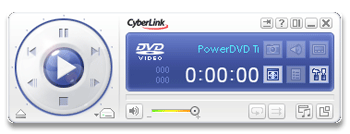 Far from being just office workhorses, computers are also thought of as complete entertainment systems that you can use to chat with friends, play videogames or watch movies. Regarding this last option, there’s a wide range of DVD players out there, but we’ll focus our attention on one of them: Power DVD.
The program’s installation process is very quick. It includes Google Toolbar as an add-on but you can decline its installation if you’re not interested. Once launched, you gain access to its main interface which, to be honest, is not especially nice: a close-up of a girl wearing weird sunglasses is not the kind of thing you expect to see on the screen when opening a DVD player. It would look much better with some abstract design or just the program logo instead. Anyway, configuration settings allow you to customize this interface with skins but there are no skins included. At least you can change the color scheme by clicking on the display.
SnagIt vs HyperSnap-DX
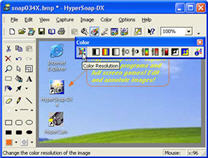 Although many image editors offer screenshot capture facilities, if you’re regularly taking grabs of your desktop, applications or web pages, then it’s probably worth investing in a stand-alone capturing tool. There are dozens of them around, and believe it or not, there are considerable differences between most of these programs.
We’re called upon to nab screenshots on a regular basis, and the two most popular apps in the Softonic offices are SnagIt and HyperSnap-DX, both of which have their own merits. Both programs can be picked up and used very easily and include a variety of different methods for capturing screenshots, including time delays, full-scrolling web page screenshots, and the ability to define an area of the screen to shoot.
HyperSnap includes an amazing voice capture mode, allowing you to perform program functions just by speaking into your PC’s microphone. Although you’ll need a decent mic and must speak slowly and clearly, it’s a great addition and perfect for people who have difficulty using a keyboard or mouse.