 There are different ways you can show off your digital pictures: HTML galleries, Flash slideshows, video presentations and so on. But wouldn’t it be nice if you could create a comic with them? This is precisely what you can do with Comic Life: select your best shots, add a few witty speech bubbles, drop some sound-effect clipart and you’re done. The program requires no designing knowledge and produces amazing results. Easy and fun, one of the most popular apps on the Mac comes to Windows at last!
Month: May 2007
Omni Group interview: part 1
 The Omni Group is one of the most popular software developers for Mac with applications like Omniweb, Omnioutliner or Omnigraffle recognized as functional and original productivity tools. The company is expected to release a private beta of its next product Omnifocus, a Getting Things Done application to simplify your workflow that has geeks all around wetting their pants. We recently posed a few questions to Ken Case, founder of Omni Group, to know a bit more about Omnifocus and Omni Group in general.
The Omni team seems like a fun bunch of creative and talented people. What is a typical work day at Omni?
A typical work day at Omni… Hmm. (Can any day at Omni really be called typical?) Some early risers show up before 9am, but most of the office shows up between 10am and 11am. The snack room is just outside my office, so at this point I hardly notice the constant sound of the espresso machine running during those hours.
We have a few 11am meetings during the week, but most people only attend one or two of those meetings. (Two of those meetings are focused on one product or another; each product team meets every other week.) These meetings are typically pretty short (maybe 15 minutes), but when we have a lot to think about (like what features should go into a release) they can run for quite a while.
Ubuntu goes mobile
 It’s this year’s third mobile Linux announcement, but it could be the most significant. A new version of Ubuntu Linux is to be developed for mobile phones and other portable devices. Known as the ‘Ubuntu Mobile and Embedded’ project, the distribution will be first released in October 2007. According to Ubuntu:
…It is clear that new types of device – small, handheld, graphical tablets which are Internet-enabled are going to change the way we communicate and collaborate. These devices place new demands on open source software and require innovative graphical interfaces, improved power management and better responsiveness.
The Ubuntu announcement follows news from Access and Palm that both are currently developing new, Linux-based mobile operating systems. These join the mobile open-source market already being supported by large firms like Nokia. Interestingly, it also follows hot on the heels of news about Dell releasing Ubuntu-powered desktop PCs and the availability of a distribution designed for installation on the Sony PlayStation 3. Despite the ongoing dominance of closed-source, Windows operating systems, fans of free software have lots to be happy about…. and even more to look forward to!
Protect yourself against file corruption
 There’s enough corruption in the world without worrying whether your precious files are going to suffer the worst. There a few things more annoying than an important file that suddenly won’t open or suddenly decides to delete half of your data. This can be caused by damaged hard drives or simply malware which damages the integrity of your files.
The most simple solution is regular backups but if you want to be really sure, there is one program out there which can go one step further. ICE ECC was created to deal with the recovery of corrupt files, mainly from potentially unstable CD-R and DVD-R disks.
ICE ECC works by ‘inoculating’ files against corruption by creating recovery/backup files of the data in an ‘.ecc’ file. When you want to verify whether the file has been modified or if the data in it has been corrupted, you select the .ecc file and click ‘Verify’. ICE ECC will then do a full analysis of the file and let you know if it has been corrupted, in which case the program will automatically recover it for you. A nice, reliable backup tool.
Ten useful tricks for Windows Vista
 After the Vista fever outbreak in January it seems that everything is back to normal again. There have been many articles written about Vista’s qualities and weaknesses, and many opinions expressed on what Microsoft has got right and where they have failed. In any case, during the last few months, we’ve had plenty of time to test Windows Vista and check all the new features for ourselves. So if you’re planning to switch to Vista soon, take a look at this list with the top ten Vista tricks we’ve prepared for you.
- When launching Vista for the first time, you’ll be surprised to see there’s no menu bar displayed on windows. To enable it, just press and then release the Alt key.
- There are some Vista features you may not like, for example, the constant disk indexing. You can turn this (and other functions) on or off in Control Panel. Click on Programs and then, under the Programs and Features title, find the option called Turn Windows features on or off.
- Talking about disabling features, you probably want to get rid of that User Account Control warning that appears every time you try to start a program. To do so, open the Control Panel, enter “User Account Control” in the search field on the top right corner and you’ll see the option to turn it off among the results. Continue reading “Ten useful tricks for Windows Vista”
Download of the Day: TwitBin
 Are you a twitterholic? If so, then this Firefox extension is for you. TwitBin enables you to send messages to Twitter from your Firefox browser without having to visit the Twitter webpage. The extension displays a sidebar window where you can see other people’s messages and also send yours whenever you feel like it. Just logon to your account and start twittering right away!
Windows Live Hotmail to launch today
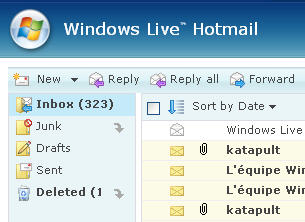 Windows Live Hotmail, the new version of Microsoft’s webmail service, is set to launch globally in 36 languages this Monday. The revamped service will offer a number of new features to recapture users that have fled to other webmail services like Yahoo! or Gmail.
Considered by Microsoft as the biggest update of Hotmail since 1996, this new release will aim to be “safer, more powerful and productive” and easier to access, whether via the net or a mobile device. The new webmail will now offer 2 Gb of storage, allows users to import and export contacts to other webmail services, and handle right-clicks and drag and drop. Just like Gmail with Google Chat, Live Hotmail will incorporate Windows Messenger and all the Live services like OneCare or Spaces from the drop down menu on the left. Outlook Connector is one of the most eagerly awaited features of the new version, as it should allow users to “view and manage their Windows Live Hotmail account from Outlook for free, with full contact, e-mail and e-mail folder synchronization.”
Microsoft also claims to have tightened security in its webmail service by providing a “safety bar” indicating the authenticity of new messages. The spam filter will also automatically delete or block junk mail: its reliability will be tested in the coming months.
Live beta testers will be familiar with the new sleeker, although slightly disappointing new interface, the new color themes and toggling between the “classic” Hotmail look and a new interface more similar to Outlook.
If you already have a Hotmail account you can update it to the new version by clicking the green “Join Windows Live Hotmail” button in your account. Microsoft will be encouraging its 280 million Hotmail users to make the switch in the coming months, but will it effectively win back users from Yahoo! or Gmail? As Techcrunch do well to point out, it’s surprising that Microsoft hasn’t integrated their latest jewel, Silverlight, with the new Live Hotmail. Instead of giving users the chance to fully customize and build on their webmail, it seems Microsoft has decided instead to give an updated, but watered down, version of Hotmail.
Download MP3s legally with iMesh
 Given the number of once-mighty file sharing clients and networks that have been forced to shut down following action by the RIAA, the developers of iMesh have decided to go legit. Well, sort of. It seems the remit of the P2P client is now to distribute content that is “100% legal,” deliver a thriving online music community, and offer users premium music downloads.
On the surface, the client and service looks highly polished. Complete with a colourful, GUI drawing more than a little inspiration from iTunes, it’s easy to find your way around. If you’ve never slapped your eyes on a P2P client before then you’ll almost certainly be impressed by the speed ease in which you can search for music and video, manage playlists and enjoy your downloads through a slick media player. You’ll also likely be impressed by the fact that you can join a community of users in making friends, exchanging messages and sharing media libraries. There’s also an online music download centre where you can pay to download tracks from some of your favourite artists.
MobyExplorer 3.0 new features
 It passed under our radar at the time, but Bermin Software released version 3.0 of their excellent file and FTP manager, MobyExplorer last month. Already a firm favourite with many webmasters (you can totally edit HTML and PHP files on your phone), the program has added some long-awaited features which look likely to cement its position as the number one FTP tool for J2ME phones.
NetSetMan it if you’re on the move
 If you constantly use your laptop or PC between several different internet connections, then you’re probably tired of having to constantly configure them. Entering proxies, static IP addresses and other LAN configuration data can be really annoying if you have to switch quickly or regularly. NetSetMan takes the pain out of this by allowing you to rapidly change between pre-configured network settings.
The free version of this program (for non-commercial use only) allows you to create 6 profiles – more than enough for most users – including IP address settings, Subnet Masks, Default Gateways and DNS servers. These settings are then saved as tabs which you can flick between and activate according to the connection you are using. Other settings you can configure are the Computer Name, WINS Server, Default Printer and Run Scripts.